Info Security Memo
  • Blog
  • Sitemap
    • Categories
  • Contact
  • About
  • Resources
  • Tools
  • 51sec.org

Build Confidence

Focusing on Information Security 

Info Security Notes

Azure File Shares Integrating With Local AD DS & Configure Access Through Public or Private Connections (VPN)

3/31/2022

0 Comments

 
Azure File Shares Integrating With Local AD DS & Configure Access Through Public or Private Connections (VPN)

It is a common use case to integrate your on-prem AD DS with your Azure Storage File Shares. This post summarize the necessary steps to simplify the procedures from Microsoft documentation in the following:

 Follow the steps below to set up Azure Files for AD DS Authentication:

  1. Part one: enable AD DS authentication on your storage account

  2. Part two: assign access permissions for a share to the Azure AD identity (a user, group, or service principal) that is in sync with the target AD identity

  3. Part three: configure Windows ACLs over SMB for directories and files

  4. Part four: mount an Azure file share to a VM joined to your AD DS

  5. Update the password of your storage account identity in AD DS

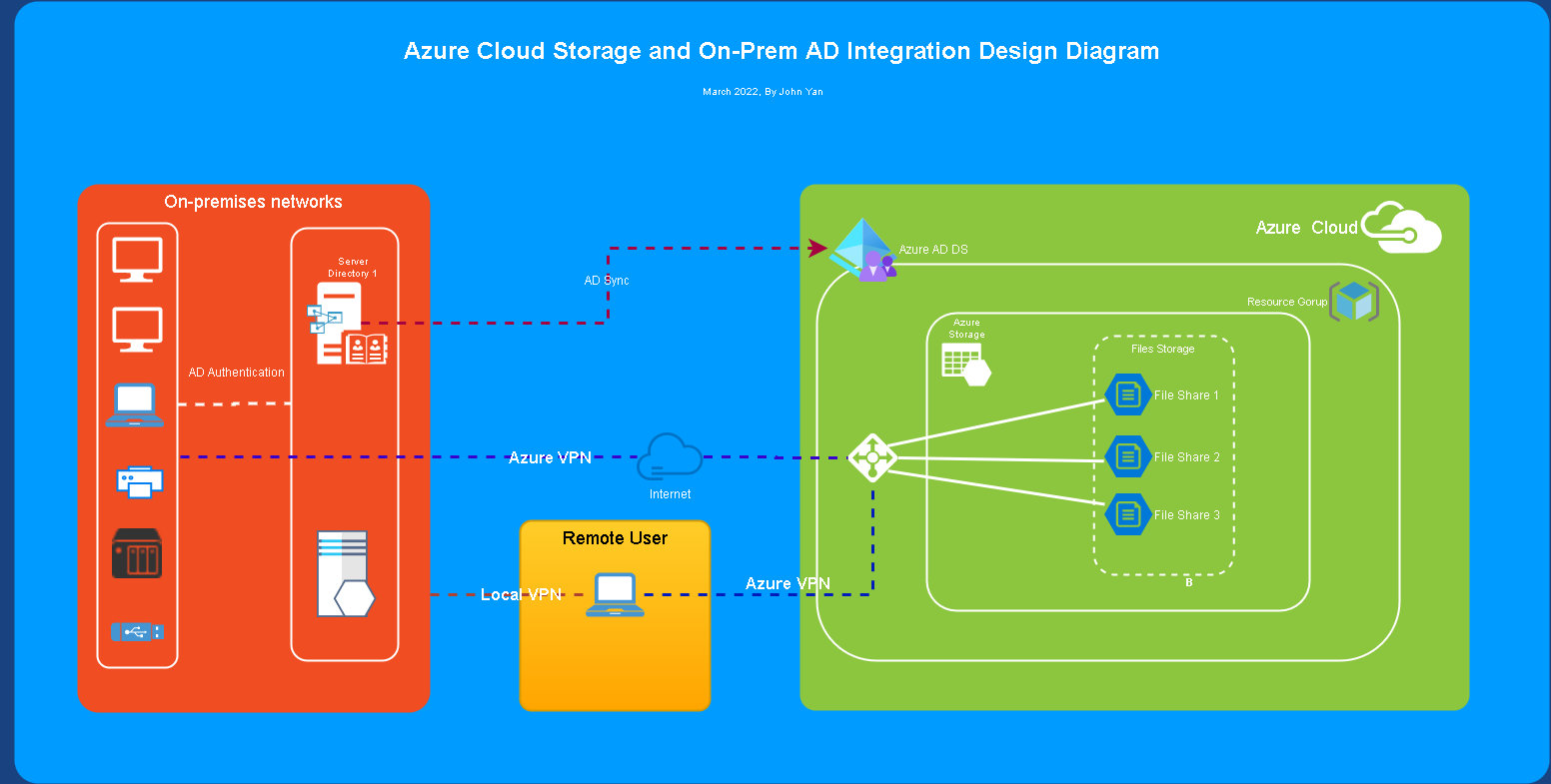
The following diagram illustrates the end-to-end workflow for enabling Azure AD authentication over SMB for Azure file shares.
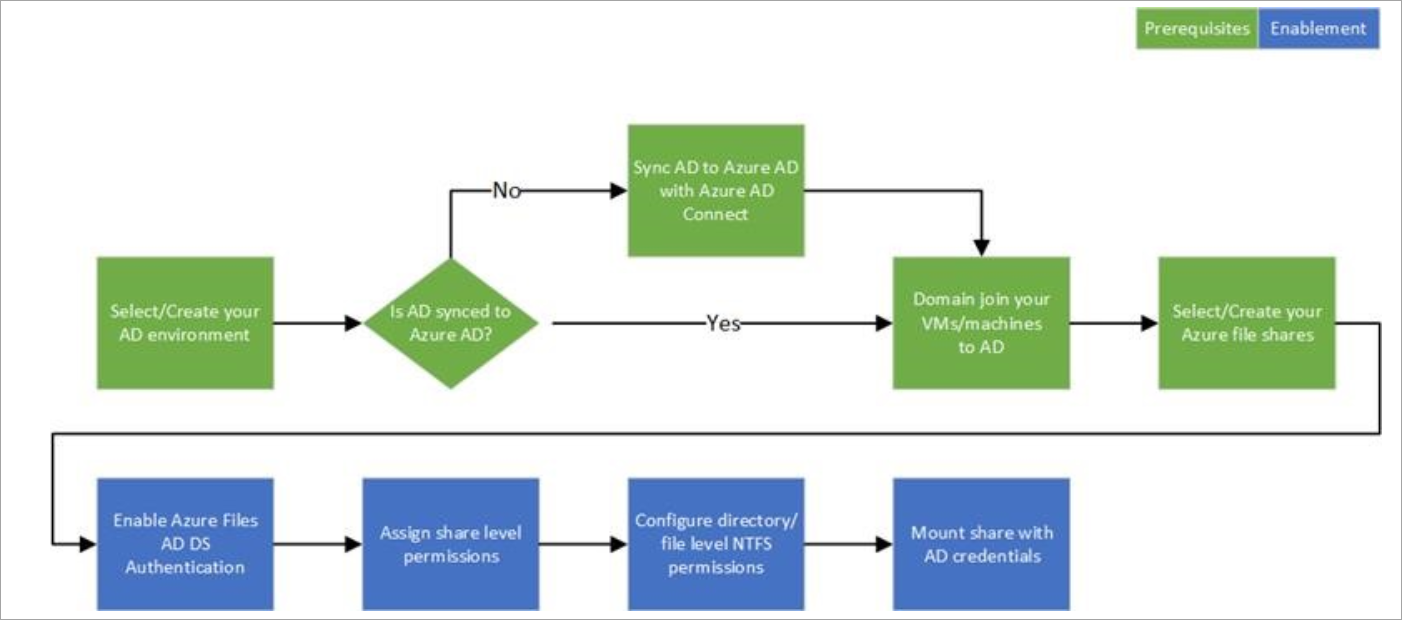
Files AD workflow diagram


My Lab Diagram


Pre-requisites

1 AD DS environment is ready and sync it to Azure AD with Azure AD Connect.

2 Azure storage account and file share created.

3 Network connection is ready for your client machine, which means it can reach out to your Local AD DC and reach out to your Azure File Share (port 445). If not, you might need two VPNs, one vpn to local AD DC, and one vpn to Azure File Share (Private End Point)


Quick Steps

1 Download and unzip the AzFilesHybrid module (GA module: v0.2.0+) 

For example, unzip it to c:\temp\azure folder

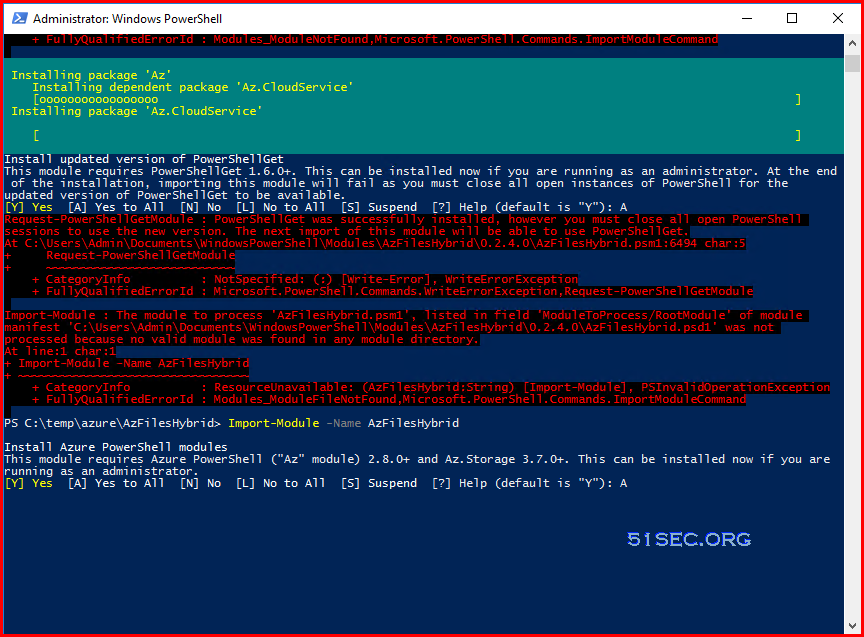
2 Install and execute the module. It will take a while to done during installing packages: 

.\CopyToPSPath.ps1
Import-Module -Name AzFilesHybrid

3 Connect to Azure Account

Connect-AzAccount

4 Run Join-AzStorageAccount Powershell command 

Join-AzStorageAccount `

>>         -ResourceGroupName rg-FileShare-Test-EastUs-1 `

>>         -StorageAccountName netsecfs `

>>         -DomainAccountType ComputerAccount `

>>         -OrganizationalUnitDistinguishedName "OU=StorageAccounts,DC=51sec,DC=corp"


PS C:\Windows\system32> cd C:\temp\jy\
PS C:\temp\jy> cd .\AzFilesHybrid\
PS C:\temp\jy\AzFilesHybrid> Import-Module -Name AzFilesHybrid
Security warning
Run only scripts that you trust. While scripts from the internet can be useful, this script can potentially harm your
computer. If you trust this script, use the Unblock-File cmdlet to allow the script to run without this warning
message. Do you want to run C:\Users\jon\Documents\WindowsPowerShell\Modules\AzFilesHybrid\0.2.4.0\AzFilesHybrid.psm1?
[D] Do not run  [R] Run once  [S] Suspend  [?] Help (default is "D"): R
Install Azure PowerShell modules
This module requires Azure PowerShell ("Az" module) 2.8.0+ and Az.Storage 3.7.0+. This can be installed now if you are
running as an administrator.
[Y] Yes  [A] Yes to All  [N] No  [L] No to All  [S] Suspend  [?] Help (default is "Y"): A
PS C:\temp\jy\AzFilesHybrid>
PS C:\temp\jy\AzFilesHybrid> Connect-AzAccount
Account                SubscriptionName TenantId                             Environment
-------                ---------------- --------                             -----------
[email protected] Pay-As-You-Go    00771de-ce1-4f6-bc3-b9fecde7b AzureCloud


PS C:\temp\jy\AzFilesHybrid> Join-AzStorageAccount `
>>         -ResourceGroupName rg-FileShare-Test-EastUs-1 `
>>         -StorageAccountName netsecfs `
>>         -DomainAccountType ComputerAccount `
>>         -OrganizationalUnitDistinguishedName "OU=StorageAccounts,DC=corp,DC=51sec,DC=org"

StorageAccountName ResourceGroupName          PrimaryLocation SkuName        Kind      AccessTier CreationTime
------------------ -----------------          --------------- -------        ----      ---------- ------------
netsecfileshares      rg-fileshare-test-eastus-1 eastus          Standard_RAGRS StorageV2 Hot        3/26/2022 11:20:55 PM

PS C:\temp\jy\AzFilesHybrid>
PS C:\temp\jy\AzFilesHybrid> Debug-AzStorageAccountAuth -StorageAccountName netsecfileshares -ResourceGroupName rg-FileShar
e-Test-EastUs-1 -Verbose
VERBOSE: CheckPort445Connectivity - START
VERBOSE: Found storage Account 'netsecfileshares' in Resource Group 'rg-FileShare-Test-EastUs-1'
VERBOSE: Executing 'Test-NetConnection -ComputerName netsecfileshares.file.core.windows.net -Port 445'
VERBOSE: CheckPort445Connectivity - SUCCESS
VERBOSE: CheckDomainJoined - START
VERBOSE: Perform operation 'Enumerate CimInstances' with following parameters, ''namespaceName' =
root\cimv2,'className' = win32_computersystem'.
VERBOSE: Operation 'Enumerate CimInstances' complete.
VERBOSE: Session is running in a domain-joined environment.
VERBOSE: CheckDomainJoined - SUCCESS
VERBOSE: CheckADObject - START
VERBOSE: Perform operation 'Enumerate CimInstances' with following parameters, ''namespaceName' =
root\cimv2,'className' = win32_computersystem'.
VERBOSE: Operation 'Enumerate CimInstances' complete.
VERBOSE: Session is running in a domain-joined environment.
VERBOSE: Found storage Account 'netsecfileshares' in Resource Group 'rg-FileShare-Test-EastUs-1'
VERBOSE: Looking for an object with SID 'S-1-5-21-2488401269-1895120637-1421044794-10609' in domain
'corp.netsec.com' for storage account 'netsecfileshares'
VERBOSE: Found AD object: CN=netsecfileshares,OU=StorageAccountsOU,DC=corp,DC=netseccoustics,DC=com of class computer.
VERBOSE: Found storage Account 'netsecfileshares' in Resource Group 'rg-FileShare-Test-EastUs-1'
VERBOSE: Generated service principal name of cifs/netsecfileshares.file.core.windows.net
VERBOSE: CheckADObject - SUCCESS
VERBOSE: CheckGetKerberosTicket - START
VERBOSE: Found storage Account 'netsecfileshares' in Resource Group 'rg-FileShare-Test-EastUs-1'
VERBOSE: Generated service principal name of cifs/netsecfileshares.file.core.windows.net
VERBOSE: Running command 'klist.exe get cifs/netsecfileshares.file.core.windows.net'
VERBOSE:
VERBOSE: Current LogonId is 0:0xb90872
VERBOSE: A ticket to cifs/netsecfileshares.file.core.windows.net has been retrieved successfully.
VERBOSE:
VERBOSE: Cached Tickets: (2)
VERBOSE:
VERBOSE: #0> Client: jon @ CORP.netsec.com
VERBOSE:  Server: krbtgt/CORP.netsec.com @ CORP.netsec.com
VERBOSE:  KerbTicket Encryption Type: AES-256-CTS-HMAC-SHA1-96
VERBOSE:  Ticket Flags 0x40e10000 -> forwardable renewable initial pre_authent name_canonicalize
VERBOSE:  Start Time: 3/26/2022 19:25:37 (local)
VERBOSE:  End Time:   3/27/2022 5:25:37 (local)
VERBOSE:  Renew Time: 4/2/2022 19:25:37 (local)
VERBOSE:  Session Key Type: AES-256-CTS-HMAC-SHA1-96
VERBOSE:  Cache Flags: 0x1 -> PRIMARY
VERBOSE:  Kdc Called: netsecDC04
VERBOSE:
VERBOSE: #1> Client: jon @ CORP.netsec.com
VERBOSE:  Server: cifs/netsecfileshares.file.core.windows.net @ CORP.netsec.com
VERBOSE:  KerbTicket Encryption Type: RSADSI RC4-HMAC(NT)
VERBOSE:  Ticket Flags 0x40a10000 -> forwardable renewable pre_authent name_canonicalize
VERBOSE:  Start Time: 3/26/2022 19:25:37 (local)
VERBOSE:  End Time:   3/27/2022 5:25:37 (local)
VERBOSE:  Renew Time: 4/2/2022 19:25:37 (local)
VERBOSE:  Session Key Type: RSADSI RC4-HMAC(NT)
VERBOSE:  Cache Flags: 0
VERBOSE:  Kdc Called: netsecDC04
VERBOSE: Azure Files Kerberos Ticket Health Check Summary:
VERBOSE: 1 Kerberos service tickets to Azure storage accounts were detected.
VERBOSE: Ticket #1 : Healthy
VERBOSE:
Client                     : jon @ CORP.netsec.com
Server                     : cifs/netsecfileshares.file.core.windows.net @ CORP.netsec.com
KerbTicket Encryption Type : RSADSI RC4-HMAC(NT)
Ticket Flags               : 0x40a10000 -> forwardable renewable pre_authent name_canonicalize
Start Time                 : 3/26/2022 19:25:37 (local)
End Time                   : 3/27/2022 5:25:37 (local)
Renew Time                 : 4/2/2022 19:25:37 (local)
Session Key Type           : RSADSI RC4-HMAC(NT)
Azure Files Health Status  : Healthy


Client                     : jon @ CORP.netsec.com
Server                     : cifs/netsecfileshares.file.core.windows.net @ CORP.netsec.com
KerbTicket Encryption Type : RSADSI RC4-HMAC(NT)
Ticket Flags               : 0x40a10000 -> forwardable renewable pre_authent name_canonicalize
Start Time                 : 3/26/2022 19:25:37 (local)
End Time                   : 3/27/2022 5:25:37 (local)
Renew Time                 : 4/2/2022 19:25:37 (local)
Session Key Type           : RSADSI RC4-HMAC(NT)
Azure Files Health Status  : Healthy
VERBOSE: CheckGetKerberosTicket - SUCCESS
VERBOSE: CheckADObjectPasswordIsCorrect - START
VERBOSE: Perform operation 'Enumerate CimInstances' with following parameters, ''namespaceName' =
root\cimv2,'className' = win32_computersystem'.
VERBOSE: Operation 'Enumerate CimInstances' complete.
VERBOSE: Session is running in a domain-joined environment.
VERBOSE: Found storage Account 'netsecfileshares' in Resource Group 'rg-FileShare-Test-EastUs-1'
VERBOSE: Perform operation 'Enumerate CimInstances' with following parameters, ''namespaceName' =
root\cimv2,'className' = win32_computersystem'.
VERBOSE: Operation 'Enumerate CimInstances' complete.
VERBOSE: Session is running in a domain-joined environment.
VERBOSE: Looking for an object with SID 'S-1-5-21-2488401269-1895120637-1421044794-10609' in domain
'corp.netsec.com' for storage account 'netsecfileshares'
VERBOSE: Found AD object: CN=netsecfileshares,OU=StorageAccountsOU,DC=corp,DC=netseccoustics,DC=com of class computer.
VERBOSE: Found that kerb1 matches password for netsecfileshares in AD.
ResourceGroupName  : rg-FileShare-Test-EastUs-1
StorageAccountName : netsecfileshares
KerbKeyName        :
KeyMatches         : False
ResourceGroupName  : rg-FileShare-Test-EastUs-1
StorageAccountName : netsecfileshares
KerbKeyName        : kerb1
KeyMatches         : True
ResourceGroupName  : rg-FileShare-Test-EastUs-1
StorageAccountName : netsecfileshares
KerbKeyName        : kerb2
KeyMatches         : False
VERBOSE: CheckADObjectPasswordIsCorrect - SUCCESS
VERBOSE: CheckSidHasAadUser - START
VERBOSE: Look up user jon in domain corp.netsec.com
VERBOSE: User  in domain  has SID = S-1-5-21-2488401269-1895120637-1421044794-9150
Install AzureAD PowerShell module
This cmdlet requires the Azure AD PowerShell module. This can be automatically installed now if you are running in an
elevated sessions.
[Y] Yes  [A] Yes to All  [N] No  [L] No to All  [S] Suspend  [?] Help (default is "Y"): A
VERBOSE: Removing the imported "Find-Command" function.
VERBOSE: Removing the imported "Find-DscResource" function.
VERBOSE: Removing the imported "Find-Module" function.
VERBOSE: Removing the imported "Find-RoleCapability" function.
VERBOSE: Removing the imported "Find-Script" function.
VERBOSE: Removing the imported "Get-CredsFromCredentialProvider" function.
VERBOSE: Removing the imported "Get-InstalledModule" function.
VERBOSE: Removing the imported "Get-InstalledScript" function.
VERBOSE: Removing the imported "Get-PSRepository" function.
VERBOSE: Removing the imported "Install-Module" function.
VERBOSE: Removing the imported "Install-Script" function.
VERBOSE: Removing the imported "New-ScriptFileInfo" function.
VERBOSE: Removing the imported "Publish-Module" function.
VERBOSE: Removing the imported "Publish-Script" function.
VERBOSE: Removing the imported "Register-PSRepository" function.
VERBOSE: Removing the imported "Save-Module" function.
VERBOSE: Removing the imported "Save-Script" function.
VERBOSE: Removing the imported "Set-PSRepository" function.
VERBOSE: Removing the imported "Test-ScriptFileInfo" function.
VERBOSE: Removing the imported "Uninstall-Module" function.
VERBOSE: Removing the imported "Uninstall-Script" function.
VERBOSE: Removing the imported "Unregister-PSRepository" function.
VERBOSE: Removing the imported "Update-Module" function.
VERBOSE: Removing the imported "Update-ModuleManifest" function.
VERBOSE: Removing the imported "Update-Script" function.
VERBOSE: Removing the imported "Update-ScriptFileInfo" function.
VERBOSE: Removing the imported "PSGetPath" variable.
VERBOSE: Removing the imported "fimo" alias.
VERBOSE: Removing the imported "inmo" alias.
VERBOSE: Removing the imported "pumo" alias.
VERBOSE: Removing the imported "upmo" alias.
VERBOSE: Loading module from path 'C:\Program Files\WindowsPowerShell\Modules\AzureAD\2.0.2.140\AzureAD.psd1'.
VERBOSE: Loading 'FormatsToProcess' from path 'C:\Program
Files\WindowsPowerShell\Modules\AzureAD\2.0.2.140\AzureAD.Format.ps1xml'.
VERBOSE: Populating RepositorySourceLocation property for module AzureAD.
VERBOSE: Loading module from path 'C:\Program
Files\WindowsPowerShell\Modules\AzureAD\2.0.2.140\Microsoft.Open.AzureAD16.Graph.PowerShell.dll'.
VERBOSE: Exporting cmdlet 'Add-AzureADApplicationOwner'.
VERBOSE: Exporting cmdlet 'Get-AzureADApplication'.
VERBOSE: Exporting cmdlet 'Get-AzureADApplicationExtensionProperty'.
VERBOSE: Exporting cmdlet 'Get-AzureADApplicationOwner'.
VERBOSE: Exporting cmdlet 'Get-AzureADApplicationServiceEndpoint'.
VERBOSE: Exporting cmdlet 'Get-AzureADDeletedApplication'.
VERBOSE: Exporting cmdlet 'Remove-AzureADDeletedApplication'.
VERBOSE: Exporting cmdlet 'New-AzureADApplication'.
VERBOSE: Exporting cmdlet 'New-AzureADApplicationExtensionProperty'.
VERBOSE: Exporting cmdlet 'Remove-AzureADApplication'.
VERBOSE: Exporting cmdlet 'Remove-AzureADApplicationExtensionProperty'.
VERBOSE: Exporting cmdlet 'Remove-AzureADApplicationOwner'.
VERBOSE: Exporting cmdlet 'Restore-AzureADDeletedApplication'.
VERBOSE: Exporting cmdlet 'Set-AzureADApplication'.
VERBOSE: Exporting cmdlet 'Get-AzureADContact'.
VERBOSE: Exporting cmdlet 'Get-AzureADContactDirectReport'.
VERBOSE: Exporting cmdlet 'Get-AzureADContactManager'.
VERBOSE: Exporting cmdlet 'Get-AzureADContactMembership'.
VERBOSE: Exporting cmdlet 'Remove-AzureADContact'.
VERBOSE: Exporting cmdlet 'Remove-AzureADContactManager'.
VERBOSE: Exporting cmdlet 'Select-AzureADGroupIdsContactIsMemberOf'.
VERBOSE: Exporting cmdlet 'Get-AzureADContract'.
VERBOSE: Exporting cmdlet 'Add-AzureADDeviceRegisteredOwner'.
VERBOSE: Exporting cmdlet 'Add-AzureADDeviceRegisteredUser'.
VERBOSE: Exporting cmdlet 'Remove-AzureADDeviceRegisteredOwner'.
VERBOSE: Exporting cmdlet 'Get-AzureADDevice'.
VERBOSE: Exporting cmdlet 'Get-AzureADDeviceRegisteredOwner'.
VERBOSE: Exporting cmdlet 'Get-AzureADDeviceRegisteredUser'.
VERBOSE: Exporting cmdlet 'New-AzureADDevice'.
VERBOSE: Exporting cmdlet 'Remove-AzureADDevice'.
VERBOSE: Exporting cmdlet 'Remove-AzureADDeviceRegisteredUser'.
VERBOSE: Exporting cmdlet 'Set-AzureADDevice'.
VERBOSE: Exporting cmdlet 'Get-AzureADDeviceConfiguration'.
VERBOSE: Exporting cmdlet 'Get-AzureADObjectByObjectId'.
VERBOSE: Exporting cmdlet 'Enable-AzureADDirectoryRole'.
VERBOSE: Exporting cmdlet 'Add-AzureADDirectoryRoleMember'.
VERBOSE: Exporting cmdlet 'Get-AzureADDirectoryRoleMember'.
VERBOSE: Exporting cmdlet 'Get-AzureADDirectoryRole'.
VERBOSE: Exporting cmdlet 'Remove-AzureADDirectoryRoleMember'.
VERBOSE: Exporting cmdlet 'Get-AzureADDirectoryRoleTemplate'.
VERBOSE: Exporting cmdlet 'Confirm-AzureADDomain'.
VERBOSE: Exporting cmdlet 'Get-CrossCloudVerificationCode'.
VERBOSE: Exporting cmdlet 'Get-AzureADDomain'.
VERBOSE: Exporting cmdlet 'Get-AzureADDomainNameReference'.
VERBOSE: Exporting cmdlet 'Get-AzureADDomainServiceConfigurationRecord'.
VERBOSE: Exporting cmdlet 'Get-AzureADDomainVerificationDnsRecord'.
VERBOSE: Exporting cmdlet 'New-AzureADDomain'.
VERBOSE: Exporting cmdlet 'Remove-AzureADDomain'.
VERBOSE: Exporting cmdlet 'Set-AzureADDomain'.
VERBOSE: Exporting cmdlet 'Get-AzureADExtensionProperty'.
VERBOSE: Exporting cmdlet 'Add-AzureADGroupMember'.
VERBOSE: Exporting cmdlet 'Add-AzureADGroupOwner'.
VERBOSE: Exporting cmdlet 'Get-AzureADGroup'.
VERBOSE: Exporting cmdlet 'Get-AzureADGroupAppRoleAssignment'.
VERBOSE: Exporting cmdlet 'Get-AzureADGroupMember'.
VERBOSE: Exporting cmdlet 'Get-AzureADGroupOwner'.
VERBOSE: Exporting cmdlet 'New-AzureADGroup'.
VERBOSE: Exporting cmdlet 'New-AzureADGroupAppRoleAssignment'.
VERBOSE: Exporting cmdlet 'Remove-AzureADGroup'.
VERBOSE: Exporting cmdlet 'Remove-AzureADGroupAppRoleAssignment'.
VERBOSE: Exporting cmdlet 'Remove-AzureADGroupMember'.
VERBOSE: Exporting cmdlet 'Remove-AzureADGroupOwner'.
VERBOSE: Exporting cmdlet 'Select-AzureADGroupIdsGroupIsMemberOf'.
VERBOSE: Exporting cmdlet 'Set-AzureADGroup'.
VERBOSE: Exporting cmdlet 'Get-AzureADOAuth2PermissionGrant'.
VERBOSE: Exporting cmdlet 'Remove-AzureADOAuth2PermissionGrant'.
VERBOSE: Exporting cmdlet 'Add-AzureADServicePrincipalOwner'.
VERBOSE: Exporting cmdlet 'Get-AzureADServicePrincipal'.
VERBOSE: Exporting cmdlet 'Get-AzureADServiceAppRoleAssignedTo'.
VERBOSE: Exporting cmdlet 'Get-AzureADServiceAppRoleAssignment'.
VERBOSE: Exporting cmdlet 'Get-AzureADServicePrincipalCreatedObject'.
VERBOSE: Exporting cmdlet 'Get-AzureADServicePrincipalMembership'.
VERBOSE: Exporting cmdlet 'Get-AzureADServicePrincipalOAuth2PermissionGrant'.
VERBOSE: Exporting cmdlet 'Get-AzureADServicePrincipalOwnedObject'.
VERBOSE: Exporting cmdlet 'Get-AzureADServicePrincipalOwner'.
VERBOSE: Exporting cmdlet 'New-AzureADServicePrincipal'.
VERBOSE: Exporting cmdlet 'New-AzureADServiceAppRoleAssignment'.
VERBOSE: Exporting cmdlet 'Remove-AzureADServicePrincipal'.
VERBOSE: Exporting cmdlet 'Remove-AzureADServiceAppRoleAssignment'.
VERBOSE: Exporting cmdlet 'Remove-AzureADServicePrincipalOwner'.
VERBOSE: Exporting cmdlet 'Select-AzureADGroupIdsServicePrincipalIsMemberOf'.
VERBOSE: Exporting cmdlet 'Set-AzureADServicePrincipal'.
VERBOSE: Exporting cmdlet 'Revoke-AzureADSignedInUserAllRefreshToken'.
VERBOSE: Exporting cmdlet 'Get-AzureADSubscribedSku'.
VERBOSE: Exporting cmdlet 'Get-AzureADTenantDetail'.
VERBOSE: Exporting cmdlet 'Set-AzureADTenantDetail'.
VERBOSE: Exporting cmdlet 'Get-AzureADUser'.
VERBOSE: Exporting cmdlet 'Get-AzureADUserAppRoleAssignment'.
VERBOSE: Exporting cmdlet 'Get-AzureADUserCreatedObject'.
VERBOSE: Exporting cmdlet 'Get-AzureADUserDirectReport'.
VERBOSE: Exporting cmdlet 'Get-AzureADUserLicenseDetail'.
VERBOSE: Exporting cmdlet 'Get-AzureADUserManager'.
VERBOSE: Exporting cmdlet 'Get-AzureADUserMembership'.
VERBOSE: Exporting cmdlet 'Get-AzureADUserOAuth2PermissionGrant'.
VERBOSE: Exporting cmdlet 'Get-AzureADUserOwnedDevice'.
VERBOSE: Exporting cmdlet 'Get-AzureADUserOwnedObject'.
VERBOSE: Exporting cmdlet 'Get-AzureADUserRegisteredDevice'.
VERBOSE: Exporting cmdlet 'New-AzureADUser'.
VERBOSE: Exporting cmdlet 'New-AzureADUserAppRoleAssignment'.
VERBOSE: Exporting cmdlet 'Remove-AzureADUser'.
VERBOSE: Exporting cmdlet 'Remove-AzureADUserAppRoleAssignment'.
VERBOSE: Exporting cmdlet 'Remove-AzureADUserManager'.
VERBOSE: Exporting cmdlet 'Revoke-AzureADUserAllRefreshToken'.
VERBOSE: Exporting cmdlet 'Select-AzureADGroupIdsUserIsMemberOf'.
VERBOSE: Exporting cmdlet 'Set-AzureADUser'.
VERBOSE: Exporting cmdlet 'Set-AzureADUserLicense'.
VERBOSE: Exporting cmdlet 'Set-AzureADUserManager'.
VERBOSE: Exporting cmdlet 'Connect-AzureAD'.
VERBOSE: Exporting cmdlet 'Disconnect-AzureAD'.
VERBOSE: Exporting cmdlet 'Get-AzureADCurrentSessionInfo'.
VERBOSE: Exporting cmdlet 'Get-AzureADApplicationLogo'.
VERBOSE: Exporting cmdlet 'Set-AzureADApplicationLogo'.
VERBOSE: Exporting cmdlet 'Set-AzureADUserPassword'.
VERBOSE: Exporting cmdlet 'Get-AzureADContactThumbnailPhoto'.
VERBOSE: Exporting cmdlet 'Get-AzureADUserThumbnailPhoto'.
VERBOSE: Exporting cmdlet 'Set-AzureADUserThumbnailPhoto'.
VERBOSE: Exporting cmdlet 'New-AzureADApplicationKeyCredential'.
VERBOSE: Exporting cmdlet 'Get-AzureADApplicationKeyCredential'.
VERBOSE: Exporting cmdlet 'Remove-AzureADApplicationKeyCredential'.
VERBOSE: Exporting cmdlet 'New-AzureADApplicationPasswordCredential'.
VERBOSE: Exporting cmdlet 'Get-AzureADApplicationPasswordCredential'.
VERBOSE: Exporting cmdlet 'Remove-AzureADApplicationPasswordCredential'.
VERBOSE: Exporting cmdlet 'Update-AzureADSignedInUserPassword'.
VERBOSE: Exporting cmdlet 'New-AzureADServicePrincipalKeyCredential'.
VERBOSE: Exporting cmdlet 'Get-AzureADServicePrincipalKeyCredential'.
VERBOSE: Exporting cmdlet 'Remove-AzureADServicePrincipalKeyCredential'.
VERBOSE: Exporting cmdlet 'New-AzureADServicePrincipalPasswordCredential'.
VERBOSE: Exporting cmdlet 'Get-AzureADServicePrincipalPasswordCredential'.
VERBOSE: Exporting cmdlet 'Remove-AzureADServicePrincipalPasswordCredential'.
VERBOSE: Exporting cmdlet 'Get-AzureADTrustedCertificateAuthority'.
VERBOSE: Exporting cmdlet 'New-AzureADTrustedCertificateAuthority'.
VERBOSE: Exporting cmdlet 'Set-AzureADTrustedCertificateAuthority'.
VERBOSE: Exporting cmdlet 'Remove-AzureADTrustedCertificateAuthority'.
VERBOSE: Exporting cmdlet 'Get-AzureADUserExtension'.
VERBOSE: Exporting cmdlet 'Set-AzureADUserExtension'.
VERBOSE: Exporting cmdlet 'Remove-AzureADUserExtension'.
VERBOSE: Exporting cmdlet 'Add-AzureADMSApplicationOwner'.
VERBOSE: Exporting cmdlet 'Get-AzureADMSApplication'.
VERBOSE: Exporting cmdlet 'Get-AzureADMSApplicationExtensionProperty'.
VERBOSE: Exporting cmdlet 'Get-AzureADMSApplicationOwner'.
VERBOSE: Exporting cmdlet 'New-AzureADMSApplication'.
VERBOSE: Exporting cmdlet 'New-AzureADMSApplicationExtensionProperty'.
VERBOSE: Exporting cmdlet 'New-AzureADMSApplicationKey'.
VERBOSE: Exporting cmdlet 'New-AzureADMSApplicationPassword'.
VERBOSE: Exporting cmdlet 'Remove-AzureADMSApplication'.
VERBOSE: Exporting cmdlet 'Remove-AzureADMSApplicationExtensionProperty'.
VERBOSE: Exporting cmdlet 'Remove-AzureADMSApplicationKey'.
VERBOSE: Exporting cmdlet 'Remove-AzureADMSApplicationOwner'.
VERBOSE: Exporting cmdlet 'Remove-AzureADMSApplicationPassword'.
VERBOSE: Exporting cmdlet 'Set-AzureADMSApplication'.
VERBOSE: Exporting cmdlet 'Set-AzureADMSApplicationLogo'.
VERBOSE: Exporting cmdlet 'Get-AzureADApplicationProxyApplication'.
VERBOSE: Exporting cmdlet 'Get-AzureADApplicationProxyApplicationConnectorGroup'.
VERBOSE: Exporting cmdlet 'Get-AzureADApplicationProxyConnector'.
VERBOSE: Exporting cmdlet 'Get-AzureADApplicationProxyConnectorGroupMember'.
VERBOSE: Exporting cmdlet 'Get-AzureADApplicationProxyConnectorMemberOf'.
VERBOSE: Exporting cmdlet 'New-AzureADApplicationProxyConnectorGroup'.
VERBOSE: Exporting cmdlet 'Remove-AzureADApplicationProxyApplicationConnectorGroup'.
VERBOSE: Exporting cmdlet 'Remove-AzureADApplicationProxyConnectorGroup'.
VERBOSE: Exporting cmdlet 'Set-AzureADApplicationProxyConnectorGroup'.
VERBOSE: Exporting cmdlet 'Remove-AzureADMSApplicationVerifiedPublisher'.
VERBOSE: Exporting cmdlet 'Set-AzureADMSApplicationVerifiedPublisher'.
VERBOSE: Exporting cmdlet 'Get-AzureADMSAuthorizationPolicy'.
VERBOSE: Exporting cmdlet 'Set-AzureADMSAuthorizationPolicy'.
VERBOSE: Exporting cmdlet 'Get-AzureADMSGroupPermissionGrant'.
VERBOSE: Exporting cmdlet 'Get-AzureADMSPermissionGrantConditionSet'.
VERBOSE: Exporting cmdlet 'New-AzureADMSPermissionGrantConditionSet'.
VERBOSE: Exporting cmdlet 'Remove-AzureADMSPermissionGrantConditionSet'.
VERBOSE: Exporting cmdlet 'Set-AzureADMSPermissionGrantConditionSet'.
VERBOSE: Exporting cmdlet 'Get-AzureADMSPermissionGrantPolicy'.
VERBOSE: Exporting cmdlet 'New-AzureADMSPermissionGrantPolicy'.
VERBOSE: Exporting cmdlet 'Remove-AzureADMSPermissionGrantPolicy'.
VERBOSE: Exporting cmdlet 'Set-AzureADMSPermissionGrantPolicy'.
VERBOSE: Exporting cmdlet 'Get-AzureADMSRoleAssignment'.
VERBOSE: Exporting cmdlet 'New-AzureADMSRoleAssignment'.
VERBOSE: Exporting cmdlet 'Remove-AzureADMSRoleAssignment'.
VERBOSE: Exporting cmdlet 'Get-AzureADMSRoleDefinition'.
VERBOSE: Exporting cmdlet 'New-AzureADMSRoleDefinition'.
VERBOSE: Exporting cmdlet 'Remove-AzureADMSRoleDefinition'.
VERBOSE: Exporting cmdlet 'Set-AzureADMSRoleDefinition'.
VERBOSE: Exporting cmdlet 'Get-AzureADMSConditionalAccessPolicy'.
VERBOSE: Exporting cmdlet 'New-AzureADMSConditionalAccessPolicy'.
VERBOSE: Exporting cmdlet 'Remove-AzureADMSConditionalAccessPolicy'.
VERBOSE: Exporting cmdlet 'Set-AzureADMSConditionalAccessPolicy'.
VERBOSE: Exporting cmdlet 'Add-AzureADMSServicePrincipalDelegatedPermissionClassification'.
VERBOSE: Exporting cmdlet 'Get-AzureADMSServicePrincipalDelegatedPermissionClassification'.
VERBOSE: Exporting cmdlet 'Remove-AzureADMSServicePrincipalDelegatedPermissionClassification'.
VERBOSE: Exporting cmdlet 'Add-AzureADMSLifecyclePolicyGroup'.
VERBOSE: Exporting cmdlet 'Get-AzureADMSGroupLifecyclePolicy'.
VERBOSE: Exporting cmdlet 'New-AzureADMSGroupLifecyclePolicy'.
VERBOSE: Exporting cmdlet 'Remove-AzureADMSGroupLifecyclePolicy'.
VERBOSE: Exporting cmdlet 'Remove-AzureADMSLifecyclePolicyGroup'.
VERBOSE: Exporting cmdlet 'Reset-AzureADMSLifeCycleGroup'.
VERBOSE: Exporting cmdlet 'Set-AzureADMSGroupLifecyclePolicy'.
VERBOSE: Exporting cmdlet 'Remove-AzureADMSIdentityProvider'.
VERBOSE: Exporting cmdlet 'Get-AzureADMSIdentityProvider'.
VERBOSE: Exporting cmdlet 'New-AzureADMSIdentityProvider'.
VERBOSE: Exporting cmdlet 'Set-AzureADMSIdentityProvider'.
VERBOSE: Exporting cmdlet 'New-AzureADMSInvitation'.
VERBOSE: Exporting cmdlet 'Add-AzureADMSAdministrativeUnitMember'.
VERBOSE: Exporting cmdlet 'Add-AzureADMSScopedRoleMembership'.
VERBOSE: Exporting cmdlet 'Get-AzureADMSAdministrativeUnit'.
VERBOSE: Exporting cmdlet 'Get-AzureADMSAdministrativeUnitMember'.
VERBOSE: Exporting cmdlet 'Get-AzureADMSScopedRoleMembership'.
VERBOSE: Exporting cmdlet 'New-AzureADMSAdministrativeUnit'.
VERBOSE: Exporting cmdlet 'Remove-AzureADMSAdministrativeUnit'.
VERBOSE: Exporting cmdlet 'Remove-AzureADMSAdministrativeUnitMember'.
VERBOSE: Exporting cmdlet 'Remove-AzureADMSScopedRoleMembership'.
VERBOSE: Exporting cmdlet 'Set-AzureADMSAdministrativeUnit'.
VERBOSE: Exporting cmdlet 'Get-AzureADMSDeletedGroup'.
VERBOSE: Exporting cmdlet 'Get-AzureADMSDeletedDirectoryObject'.
VERBOSE: Exporting cmdlet 'Remove-AzureADMSDeletedDirectoryObject'.
VERBOSE: Exporting cmdlet 'Restore-AzureADMSDeletedDirectoryObject'.
VERBOSE: Exporting cmdlet 'Get-AzureADMSLifecyclePolicyGroup'.
VERBOSE: Exporting cmdlet 'Get-AzureADMSGroup'.
VERBOSE: Exporting cmdlet 'New-AzureADMSGroup'.
VERBOSE: Exporting cmdlet 'Remove-AzureADMSGroup'.
VERBOSE: Exporting cmdlet 'Set-AzureADMSGroup'.
VERBOSE: Exporting cmdlet 'Get-AzureADMSNamedLocationPolicy'.
VERBOSE: Exporting cmdlet 'New-AzureADMSNamedLocationPolicy'.
VERBOSE: Exporting cmdlet 'Remove-AzureADMSNamedLocationPolicy'.
VERBOSE: Exporting cmdlet 'Set-AzureADMSNamedLocationPolicy'.
VERBOSE: Exporting cmdlet 'New-AzureADApplicationProxyApplication'.
VERBOSE: Exporting cmdlet 'Remove-AzureADApplicationProxyApplication'.
VERBOSE: Exporting cmdlet 'Set-AzureADApplicationProxyApplication'.
VERBOSE: Exporting cmdlet 'Set-AzureADApplicationProxyApplicationConnectorGroup'.
VERBOSE: Exporting cmdlet 'Set-AzureADApplicationProxyApplicationCustomDomainCertificate'.
VERBOSE: Exporting cmdlet 'Set-AzureADApplicationProxyApplicationSingleSignOn'.
VERBOSE: Exporting cmdlet 'Set-AzureADApplicationProxyConnector'.
VERBOSE: Exporting cmdlet 'Get-AzureADApplicationProxyConnectorGroup'.
VERBOSE: Exporting alias 'Get-AzureADApplicationProxyConnectorGroupMembers'.
VERBOSE: Importing cmdlet 'Add-AzureADApplicationOwner'.
VERBOSE: Importing cmdlet 'Add-AzureADDeviceRegisteredOwner'.
VERBOSE: Importing cmdlet 'Add-AzureADDeviceRegisteredUser'.
VERBOSE: Importing cmdlet 'Add-AzureADDirectoryRoleMember'.
VERBOSE: Importing cmdlet 'Add-AzureADGroupMember'.
VERBOSE: Importing cmdlet 'Add-AzureADGroupOwner'.
VERBOSE: Importing cmdlet 'Add-AzureADMSAdministrativeUnitMember'.
VERBOSE: Importing cmdlet 'Add-AzureADMSApplicationOwner'.
VERBOSE: Importing cmdlet 'Add-AzureADMSLifecyclePolicyGroup'.
VERBOSE: Importing cmdlet 'Add-AzureADMSScopedRoleMembership'.
VERBOSE: Importing cmdlet 'Add-AzureADMSServicePrincipalDelegatedPermissionClassification'.
VERBOSE: Importing cmdlet 'Add-AzureADServicePrincipalOwner'.
VERBOSE: Importing cmdlet 'Confirm-AzureADDomain'.
VERBOSE: Importing cmdlet 'Connect-AzureAD'.
VERBOSE: Importing cmdlet 'Disconnect-AzureAD'.
VERBOSE: Importing cmdlet 'Enable-AzureADDirectoryRole'.
VERBOSE: Importing cmdlet 'Get-AzureADApplication'.
VERBOSE: Importing cmdlet 'Get-AzureADApplicationExtensionProperty'.
VERBOSE: Importing cmdlet 'Get-AzureADApplicationKeyCredential'.
VERBOSE: Importing cmdlet 'Get-AzureADApplicationLogo'.
VERBOSE: Importing cmdlet 'Get-AzureADApplicationOwner'.
VERBOSE: Importing cmdlet 'Get-AzureADApplicationPasswordCredential'.
VERBOSE: Importing cmdlet 'Get-AzureADApplicationProxyApplication'.
VERBOSE: Importing cmdlet 'Get-AzureADApplicationProxyApplicationConnectorGroup'.
VERBOSE: Importing cmdlet 'Get-AzureADApplicationProxyConnector'.
VERBOSE: Importing cmdlet 'Get-AzureADApplicationProxyConnectorGroup'.
VERBOSE: Importing cmdlet 'Get-AzureADApplicationProxyConnectorGroupMember'.
VERBOSE: Importing cmdlet 'Get-AzureADApplicationProxyConnectorMemberOf'.
VERBOSE: Importing cmdlet 'Get-AzureADApplicationServiceEndpoint'.
VERBOSE: Importing cmdlet 'Get-AzureADContact'.
VERBOSE: Importing cmdlet 'Get-AzureADContactDirectReport'.
VERBOSE: Importing cmdlet 'Get-AzureADContactManager'.
VERBOSE: Importing cmdlet 'Get-AzureADContactMembership'.
VERBOSE: Importing cmdlet 'Get-AzureADContactThumbnailPhoto'.
VERBOSE: Importing cmdlet 'Get-AzureADContract'.
VERBOSE: Importing cmdlet 'Get-AzureADCurrentSessionInfo'.
VERBOSE: Importing cmdlet 'Get-AzureADDeletedApplication'.
VERBOSE: Importing cmdlet 'Get-AzureADDevice'.
VERBOSE: Importing cmdlet 'Get-AzureADDeviceConfiguration'.
VERBOSE: Importing cmdlet 'Get-AzureADDeviceRegisteredOwner'.
VERBOSE: Importing cmdlet 'Get-AzureADDeviceRegisteredUser'.
VERBOSE: Importing cmdlet 'Get-AzureADDirectoryRole'.
VERBOSE: Importing cmdlet 'Get-AzureADDirectoryRoleMember'.
VERBOSE: Importing cmdlet 'Get-AzureADDirectoryRoleTemplate'.
VERBOSE: Importing cmdlet 'Get-AzureADDomain'.
VERBOSE: Importing cmdlet 'Get-AzureADDomainNameReference'.
VERBOSE: Importing cmdlet 'Get-AzureADDomainServiceConfigurationRecord'.
VERBOSE: Importing cmdlet 'Get-AzureADDomainVerificationDnsRecord'.
VERBOSE: Importing cmdlet 'Get-AzureADExtensionProperty'.
VERBOSE: Importing cmdlet 'Get-AzureADGroup'.
VERBOSE: Importing cmdlet 'Get-AzureADGroupAppRoleAssignment'.
VERBOSE: Importing cmdlet 'Get-AzureADGroupMember'.
VERBOSE: Importing cmdlet 'Get-AzureADGroupOwner'.
VERBOSE: Importing cmdlet 'Get-AzureADMSAdministrativeUnit'.
VERBOSE: Importing cmdlet 'Get-AzureADMSAdministrativeUnitMember'.
VERBOSE: Importing cmdlet 'Get-AzureADMSApplication'.
VERBOSE: Importing cmdlet 'Get-AzureADMSApplicationExtensionProperty'.
VERBOSE: Importing cmdlet 'Get-AzureADMSApplicationOwner'.
VERBOSE: Importing cmdlet 'Get-AzureADMSAuthorizationPolicy'.
VERBOSE: Importing cmdlet 'Get-AzureADMSConditionalAccessPolicy'.
VERBOSE: Importing cmdlet 'Get-AzureADMSDeletedDirectoryObject'.
VERBOSE: Importing cmdlet 'Get-AzureADMSDeletedGroup'.
VERBOSE: Importing cmdlet 'Get-AzureADMSGroup'.
VERBOSE: Importing cmdlet 'Get-AzureADMSGroupLifecyclePolicy'.
VERBOSE: Importing cmdlet 'Get-AzureADMSGroupPermissionGrant'.
VERBOSE: Importing cmdlet 'Get-AzureADMSIdentityProvider'.
VERBOSE: Importing cmdlet 'Get-AzureADMSLifecyclePolicyGroup'.
VERBOSE: Importing cmdlet 'Get-AzureADMSNamedLocationPolicy'.
VERBOSE: Importing cmdlet 'Get-AzureADMSPermissionGrantConditionSet'.
VERBOSE: Importing cmdlet 'Get-AzureADMSPermissionGrantPolicy'.
VERBOSE: Importing cmdlet 'Get-AzureADMSRoleAssignment'.
VERBOSE: Importing cmdlet 'Get-AzureADMSRoleDefinition'.
VERBOSE: Importing cmdlet 'Get-AzureADMSScopedRoleMembership'.
VERBOSE: Importing cmdlet 'Get-AzureADMSServicePrincipalDelegatedPermissionClassification'.
VERBOSE: Importing cmdlet 'Get-AzureADOAuth2PermissionGrant'.
VERBOSE: Importing cmdlet 'Get-AzureADObjectByObjectId'.
VERBOSE: Importing cmdlet 'Get-AzureADServiceAppRoleAssignedTo'.
VERBOSE: Importing cmdlet 'Get-AzureADServiceAppRoleAssignment'.
VERBOSE: Importing cmdlet 'Get-AzureADServicePrincipal'.
VERBOSE: Importing cmdlet 'Get-AzureADServicePrincipalCreatedObject'.
VERBOSE: Importing cmdlet 'Get-AzureADServicePrincipalKeyCredential'.
VERBOSE: Importing cmdlet 'Get-AzureADServicePrincipalMembership'.
VERBOSE: Importing cmdlet 'Get-AzureADServicePrincipalOAuth2PermissionGrant'.
VERBOSE: Importing cmdlet 'Get-AzureADServicePrincipalOwnedObject'.
VERBOSE: Importing cmdlet 'Get-AzureADServicePrincipalOwner'.
VERBOSE: Importing cmdlet 'Get-AzureADServicePrincipalPasswordCredential'.
VERBOSE: Importing cmdlet 'Get-AzureADSubscribedSku'.
VERBOSE: Importing cmdlet 'Get-AzureADTenantDetail'.
VERBOSE: Importing cmdlet 'Get-AzureADTrustedCertificateAuthority'.
VERBOSE: Importing cmdlet 'Get-AzureADUser'.
VERBOSE: Importing cmdlet 'Get-AzureADUserAppRoleAssignment'.
VERBOSE: Importing cmdlet 'Get-AzureADUserCreatedObject'.
VERBOSE: Importing cmdlet 'Get-AzureADUserDirectReport'.
VERBOSE: Importing cmdlet 'Get-AzureADUserExtension'.
VERBOSE: Importing cmdlet 'Get-AzureADUserLicenseDetail'.
VERBOSE: Importing cmdlet 'Get-AzureADUserManager'.
VERBOSE: Importing cmdlet 'Get-AzureADUserMembership'.
VERBOSE: Importing cmdlet 'Get-AzureADUserOAuth2PermissionGrant'.
VERBOSE: Importing cmdlet 'Get-AzureADUserOwnedDevice'.
VERBOSE: Importing cmdlet 'Get-AzureADUserOwnedObject'.
VERBOSE: Importing cmdlet 'Get-AzureADUserRegisteredDevice'.
VERBOSE: Importing cmdlet 'Get-AzureADUserThumbnailPhoto'.
VERBOSE: Importing cmdlet 'Get-CrossCloudVerificationCode'.
VERBOSE: Importing cmdlet 'New-AzureADApplication'.
VERBOSE: Importing cmdlet 'New-AzureADApplicationExtensionProperty'.
VERBOSE: Importing cmdlet 'New-AzureADApplicationKeyCredential'.
VERBOSE: Importing cmdlet 'New-AzureADApplicationPasswordCredential'.
VERBOSE: Importing cmdlet 'New-AzureADApplicationProxyApplication'.
VERBOSE: Importing cmdlet 'New-AzureADApplicationProxyConnectorGroup'.
VERBOSE: Importing cmdlet 'New-AzureADDevice'.
VERBOSE: Importing cmdlet 'New-AzureADDomain'.
VERBOSE: Importing cmdlet 'New-AzureADGroup'.
VERBOSE: Importing cmdlet 'New-AzureADGroupAppRoleAssignment'.
VERBOSE: Importing cmdlet 'New-AzureADMSAdministrativeUnit'.
VERBOSE: Importing cmdlet 'New-AzureADMSApplication'.
VERBOSE: Importing cmdlet 'New-AzureADMSApplicationExtensionProperty'.
VERBOSE: Importing cmdlet 'New-AzureADMSApplicationKey'.
VERBOSE: Importing cmdlet 'New-AzureADMSApplicationPassword'.
VERBOSE: Importing cmdlet 'New-AzureADMSConditionalAccessPolicy'.
VERBOSE: Importing cmdlet 'New-AzureADMSGroup'.
VERBOSE: Importing cmdlet 'New-AzureADMSGroupLifecyclePolicy'.
VERBOSE: Importing cmdlet 'New-AzureADMSIdentityProvider'.
VERBOSE: Importing cmdlet 'New-AzureADMSInvitation'.
VERBOSE: Importing cmdlet 'New-AzureADMSNamedLocationPolicy'.
VERBOSE: Importing cmdlet 'New-AzureADMSPermissionGrantConditionSet'.
VERBOSE: Importing cmdlet 'New-AzureADMSPermissionGrantPolicy'.
VERBOSE: Importing cmdlet 'New-AzureADMSRoleAssignment'.
VERBOSE: Importing cmdlet 'New-AzureADMSRoleDefinition'.
VERBOSE: Importing cmdlet 'New-AzureADServiceAppRoleAssignment'.
VERBOSE: Importing cmdlet 'New-AzureADServicePrincipal'.
VERBOSE: Importing cmdlet 'New-AzureADServicePrincipalKeyCredential'.
VERBOSE: Importing cmdlet 'New-AzureADServicePrincipalPasswordCredential'.
VERBOSE: Importing cmdlet 'New-AzureADTrustedCertificateAuthority'.
VERBOSE: Importing cmdlet 'New-AzureADUser'.
VERBOSE: Importing cmdlet 'New-AzureADUserAppRoleAssignment'.
VERBOSE: Importing cmdlet 'Remove-AzureADApplication'.
VERBOSE: Importing cmdlet 'Remove-AzureADApplicationExtensionProperty'.
VERBOSE: Importing cmdlet 'Remove-AzureADApplicationKeyCredential'.
VERBOSE: Importing cmdlet 'Remove-AzureADApplicationOwner'.
VERBOSE: Importing cmdlet 'Remove-AzureADApplicationPasswordCredential'.
VERBOSE: Importing cmdlet 'Remove-AzureADApplicationProxyApplication'.
VERBOSE: Importing cmdlet 'Remove-AzureADApplicationProxyApplicationConnectorGroup'.
VERBOSE: Importing cmdlet 'Remove-AzureADApplicationProxyConnectorGroup'.
VERBOSE: Importing cmdlet 'Remove-AzureADContact'.
VERBOSE: Importing cmdlet 'Remove-AzureADContactManager'.
VERBOSE: Importing cmdlet 'Remove-AzureADDeletedApplication'.
VERBOSE: Importing cmdlet 'Remove-AzureADDevice'.
VERBOSE: Importing cmdlet 'Remove-AzureADDeviceRegisteredOwner'.
VERBOSE: Importing cmdlet 'Remove-AzureADDeviceRegisteredUser'.
VERBOSE: Importing cmdlet 'Remove-AzureADDirectoryRoleMember'.
VERBOSE: Importing cmdlet 'Remove-AzureADDomain'.
VERBOSE: Importing cmdlet 'Remove-AzureADGroup'.
VERBOSE: Importing cmdlet 'Remove-AzureADGroupAppRoleAssignment'.
VERBOSE: Importing cmdlet 'Remove-AzureADGroupMember'.
VERBOSE: Importing cmdlet 'Remove-AzureADGroupOwner'.
VERBOSE: Importing cmdlet 'Remove-AzureADMSAdministrativeUnit'.
VERBOSE: Importing cmdlet 'Remove-AzureADMSAdministrativeUnitMember'.
VERBOSE: Importing cmdlet 'Remove-AzureADMSApplication'.
VERBOSE: Importing cmdlet 'Remove-AzureADMSApplicationExtensionProperty'.
VERBOSE: Importing cmdlet 'Remove-AzureADMSApplicationKey'.
VERBOSE: Importing cmdlet 'Remove-AzureADMSApplicationOwner'.
VERBOSE: Importing cmdlet 'Remove-AzureADMSApplicationPassword'.
VERBOSE: Importing cmdlet 'Remove-AzureADMSApplicationVerifiedPublisher'.
VERBOSE: Importing cmdlet 'Remove-AzureADMSConditionalAccessPolicy'.
VERBOSE: Importing cmdlet 'Remove-AzureADMSDeletedDirectoryObject'.
VERBOSE: Importing cmdlet 'Remove-AzureADMSGroup'.
VERBOSE: Importing cmdlet 'Remove-AzureADMSGroupLifecyclePolicy'.
VERBOSE: Importing cmdlet 'Remove-AzureADMSIdentityProvider'.
VERBOSE: Importing cmdlet 'Remove-AzureADMSLifecyclePolicyGroup'.
VERBOSE: Importing cmdlet 'Remove-AzureADMSNamedLocationPolicy'.
VERBOSE: Importing cmdlet 'Remove-AzureADMSPermissionGrantConditionSet'.
VERBOSE: Importing cmdlet 'Remove-AzureADMSPermissionGrantPolicy'.
VERBOSE: Importing cmdlet 'Remove-AzureADMSRoleAssignment'.
VERBOSE: Importing cmdlet 'Remove-AzureADMSRoleDefinition'.
VERBOSE: Importing cmdlet 'Remove-AzureADMSScopedRoleMembership'.
VERBOSE: Importing cmdlet 'Remove-AzureADMSServicePrincipalDelegatedPermissionClassification'.
VERBOSE: Importing cmdlet 'Remove-AzureADOAuth2PermissionGrant'.
VERBOSE: Importing cmdlet 'Remove-AzureADServiceAppRoleAssignment'.
VERBOSE: Importing cmdlet 'Remove-AzureADServicePrincipal'.
VERBOSE: Importing cmdlet 'Remove-AzureADServicePrincipalKeyCredential'.
VERBOSE: Importing cmdlet 'Remove-AzureADServicePrincipalOwner'.
VERBOSE: Importing cmdlet 'Remove-AzureADServicePrincipalPasswordCredential'.
VERBOSE: Importing cmdlet 'Remove-AzureADTrustedCertificateAuthority'.
VERBOSE: Importing cmdlet 'Remove-AzureADUser'.
VERBOSE: Importing cmdlet 'Remove-AzureADUserAppRoleAssignment'.
VERBOSE: Importing cmdlet 'Remove-AzureADUserExtension'.
VERBOSE: Importing cmdlet 'Remove-AzureADUserManager'.
VERBOSE: Importing cmdlet 'Reset-AzureADMSLifeCycleGroup'.
VERBOSE: Importing cmdlet 'Restore-AzureADDeletedApplication'.
VERBOSE: Importing cmdlet 'Restore-AzureADMSDeletedDirectoryObject'.
VERBOSE: Importing cmdlet 'Revoke-AzureADSignedInUserAllRefreshToken'.
VERBOSE: Importing cmdlet 'Revoke-AzureADUserAllRefreshToken'.
VERBOSE: Importing cmdlet 'Select-AzureADGroupIdsContactIsMemberOf'.
VERBOSE: Importing cmdlet 'Select-AzureADGroupIdsGroupIsMemberOf'.
VERBOSE: Importing cmdlet 'Select-AzureADGroupIdsServicePrincipalIsMemberOf'.
VERBOSE: Importing cmdlet 'Select-AzureADGroupIdsUserIsMemberOf'.
VERBOSE: Importing cmdlet 'Set-AzureADApplication'.
VERBOSE: Importing cmdlet 'Set-AzureADApplicationLogo'.
VERBOSE: Importing cmdlet 'Set-AzureADApplicationProxyApplication'.
VERBOSE: Importing cmdlet 'Set-AzureADApplicationProxyApplicationConnectorGroup'.
VERBOSE: Importing cmdlet 'Set-AzureADApplicationProxyApplicationCustomDomainCertificate'.
VERBOSE: Importing cmdlet 'Set-AzureADApplicationProxyApplicationSingleSignOn'.
VERBOSE: Importing cmdlet 'Set-AzureADApplicationProxyConnector'.
VERBOSE: Importing cmdlet 'Set-AzureADApplicationProxyConnectorGroup'.
VERBOSE: Importing cmdlet 'Set-AzureADDevice'.
VERBOSE: Importing cmdlet 'Set-AzureADDomain'.
VERBOSE: Importing cmdlet 'Set-AzureADGroup'.
VERBOSE: Importing cmdlet 'Set-AzureADMSAdministrativeUnit'.
VERBOSE: Importing cmdlet 'Set-AzureADMSApplication'.
VERBOSE: Importing cmdlet 'Set-AzureADMSApplicationLogo'.
VERBOSE: Importing cmdlet 'Set-AzureADMSApplicationVerifiedPublisher'.
VERBOSE: Importing cmdlet 'Set-AzureADMSAuthorizationPolicy'.
VERBOSE: Importing cmdlet 'Set-AzureADMSConditionalAccessPolicy'.
VERBOSE: Importing cmdlet 'Set-AzureADMSGroup'.
VERBOSE: Importing cmdlet 'Set-AzureADMSGroupLifecyclePolicy'.
VERBOSE: Importing cmdlet 'Set-AzureADMSIdentityProvider'.
VERBOSE: Importing cmdlet 'Set-AzureADMSNamedLocationPolicy'.
VERBOSE: Importing cmdlet 'Set-AzureADMSPermissionGrantConditionSet'.
VERBOSE: Importing cmdlet 'Set-AzureADMSPermissionGrantPolicy'.
VERBOSE: Importing cmdlet 'Set-AzureADMSRoleDefinition'.
VERBOSE: Importing cmdlet 'Set-AzureADServicePrincipal'.
VERBOSE: Importing cmdlet 'Set-AzureADTenantDetail'.
VERBOSE: Importing cmdlet 'Set-AzureADTrustedCertificateAuthority'.
VERBOSE: Importing cmdlet 'Set-AzureADUser'.
VERBOSE: Importing cmdlet 'Set-AzureADUserExtension'.
VERBOSE: Importing cmdlet 'Set-AzureADUserLicense'.
VERBOSE: Importing cmdlet 'Set-AzureADUserManager'.
VERBOSE: Importing cmdlet 'Set-AzureADUserPassword'.
VERBOSE: Importing cmdlet 'Set-AzureADUserThumbnailPhoto'.
VERBOSE: Importing cmdlet 'Update-AzureADSignedInUserPassword'.
VERBOSE: Importing alias 'Get-AzureADApplicationProxyConnectorGroupMembers'.
VERBOSE: Found AAD user '[email protected]' for SID S-1-5-21-2488401269-1895120637-1421044794-9150
VERBOSE: CheckSidHasAadUser - SUCCESS
VERBOSE: CheckAadUserHasSid - START
VERBOSE: Missing required parameter ObjectId for CheckAadUserHasSid requires ObjectId parameter to be present, skipping
 CheckAadUserHasSid
VERBOSE: CheckStorageAccountDomainJoined - START
VERBOSE: Found storage Account 'netsecfileshares' in Resource Group 'rg-FileShare-Test-EastUs-1'
VERBOSE: Storage account netsecfileshares is already joined in domain corp.netsec.com.
VERBOSE: CheckStorageAccountDomainJoined - SUCCESS
VERBOSE: CheckUserRbacAssignment - START
VERBOSE: Populating RepositorySourceLocation property for module AzureAD.
VERBOSE: Loading module from path 'C:\Program
Files\WindowsPowerShell\Modules\AzureAD\2.0.2.140\Microsoft.Open.Azure.AD.CommonLibrary.dll'.
VERBOSE: Loading module from path 'C:\Program
Files\WindowsPowerShell\Modules\AzureAD\2.0.2.140\Microsoft.Open.AzureAD16.Graph.PowerShell.Custom.dll'.
VERBOSE: Loading module from path 'C:\Program
Files\WindowsPowerShell\Modules\AzureAD\2.0.2.140\Microsoft.Open.AzureAD16.Graph.Client.dll'.
VERBOSE: Loading module from path 'C:\Program
Files\WindowsPowerShell\Modules\AzureAD\2.0.2.140\Microsoft.Open.MS.GraphV10.PowerShell.dll'.
VERBOSE: Loading module from path 'C:\Program
Files\WindowsPowerShell\Modules\AzureAD\2.0.2.140\Microsoft.Open.MS.GraphV10.PowerShell.Custom.dll'.
VERBOSE: Loading module from path 'C:\Program
Files\WindowsPowerShell\Modules\AzureAD\2.0.2.140\Microsoft.Open.MS.GraphV10.Client.dll'.
VERBOSE: Loading module from path 'C:\Program
Files\WindowsPowerShell\Modules\AzureAD\2.0.2.140\Microsoft.Open.AzureAD16.Graph.PowerShell.dll'.
VERBOSE: Look up user jon in domain corp.netsec.com
VERBOSE: Look up groups of user S-1-5-21-2488401269-1895120637-1421044794-9150 in domain corp.netsec.com
Debug-AzStorageAccountAuth : CheckUserRbacAssignment - FAILED
At line:1 char:1
+ Debug-AzStorageAccountAuth -StorageAccountName netsecfileshares -Resourc ...
+ ~~~~~~~~~~~~~~~~~~~~~~~~~~~~~~~~~~~~~~~~~~~~~~~~~~~~~~~~~~~~~~~~~~~~~
    + CategoryInfo          : NotSpecified: (:) [Write-Error], WriteErrorException
    + FullyQualifiedErrorId : Microsoft.PowerShell.Commands.WriteErrorException,Debug-AzStorageAccountAuth
Debug-AzStorageAccountAuth : The server is not operational
At line:1 char:1
+ Debug-AzStorageAccountAuth -StorageAccountName netsecfileshares -Resourc ...
+ ~~~~~~~~~~~~~~~~~~~~~~~~~~~~~~~~~~~~~~~~~~~~~~~~~~~~~~~~~~~~~~~~~~~~~
    + CategoryInfo          : NotSpecified: (:) [Write-Error], WriteErrorException
    + FullyQualifiedErrorId : Microsoft.PowerShell.Commands.WriteErrorException,Debug-AzStorageAccountAuth
VERBOSE: CheckUserFileAccess - START
VERBOSE: Missing required parameter FilePath for CheckUserFileAccess, skipping CheckUserFileAccess
Summary of checks:


Name                            Result
----                            ------
CheckDomainJoined               Passed
CheckGetKerberosTicket          Passed
CheckUserRbacAssignment         Failed
CheckAadUserHasSid              Skipped
CheckADObjectPasswordIsCorrect  Passed
CheckADObject                   Passed
CheckUserFileAccess             Skipped
CheckPort445Connectivity        Passed
CheckStorageAccountDomainJoined Passed
CheckSidHasAadUser              Passed

Issues found:
---- CheckUserRbacAssignment ----
The server is not operational
PS C:\temp\jy\AzFilesHybrid>


AD Connect Installation and Configuration

Please refer this post for Azure AD connect installation and configuration. 

  • Install Azure AD Connect to Integrate On-Prem ADFS with AAD (Hybrid Identity)


Hybrid Azure AD Joined Device Configuration

It is an optional configuration to enable Hybrid Azure AD Joined Device in AD connect

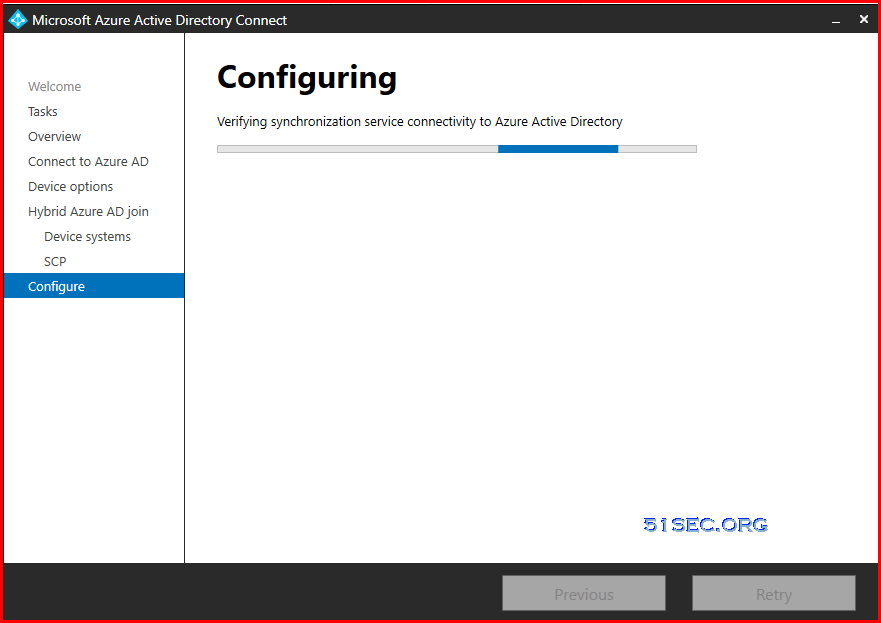
Choose Configuredevice options to start configuring Hybrid joined device configuration. 
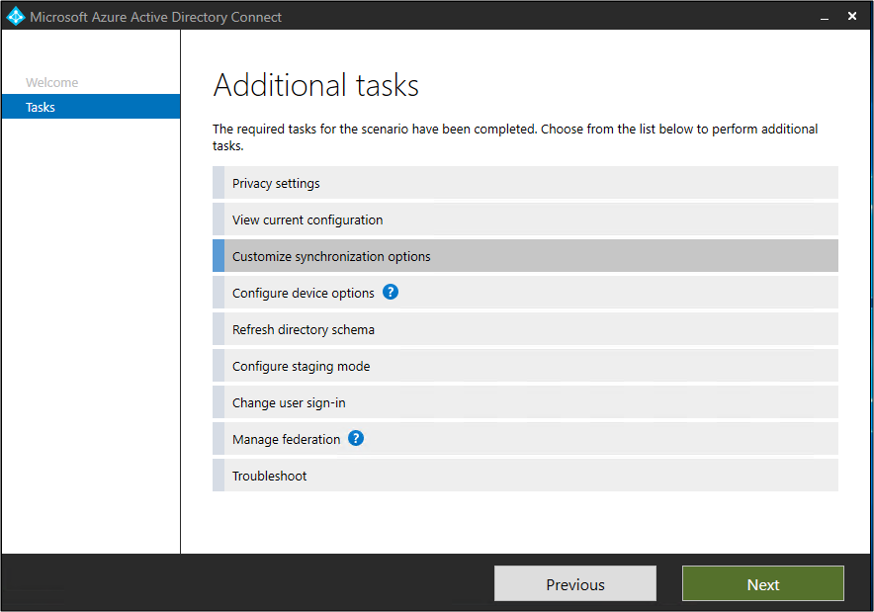
List of additional tasks

You will need a global admin account to log into Azure AD. Also you will need a local ad account which is part of enterprise admins group to log into local AD.
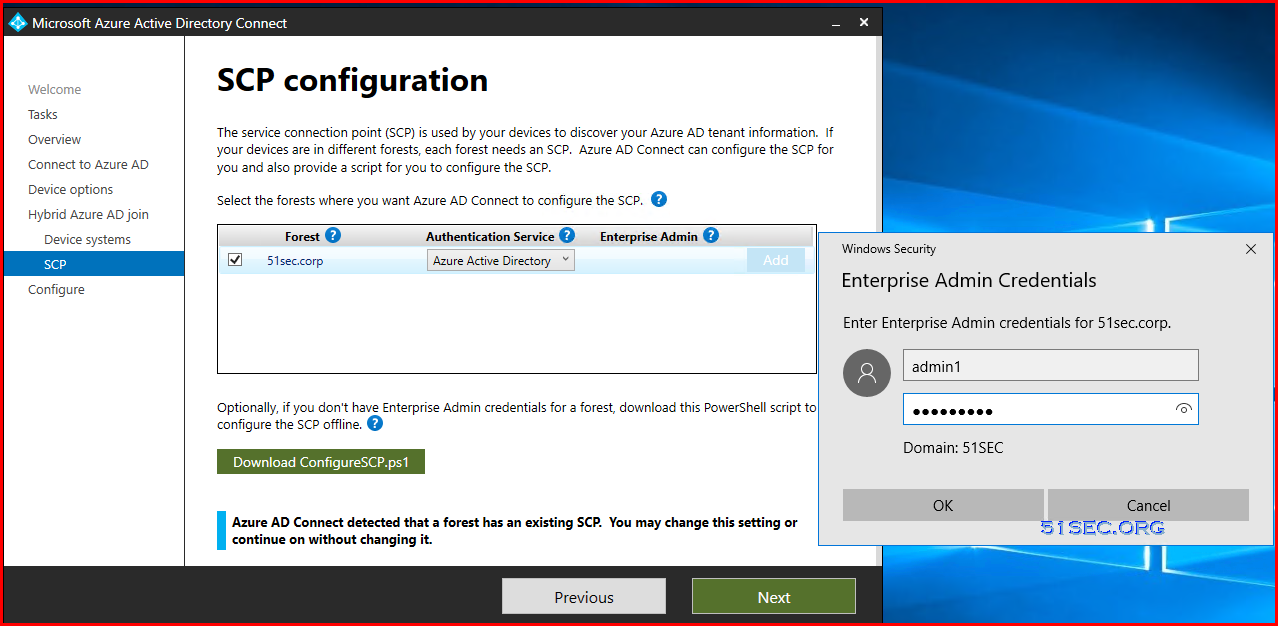
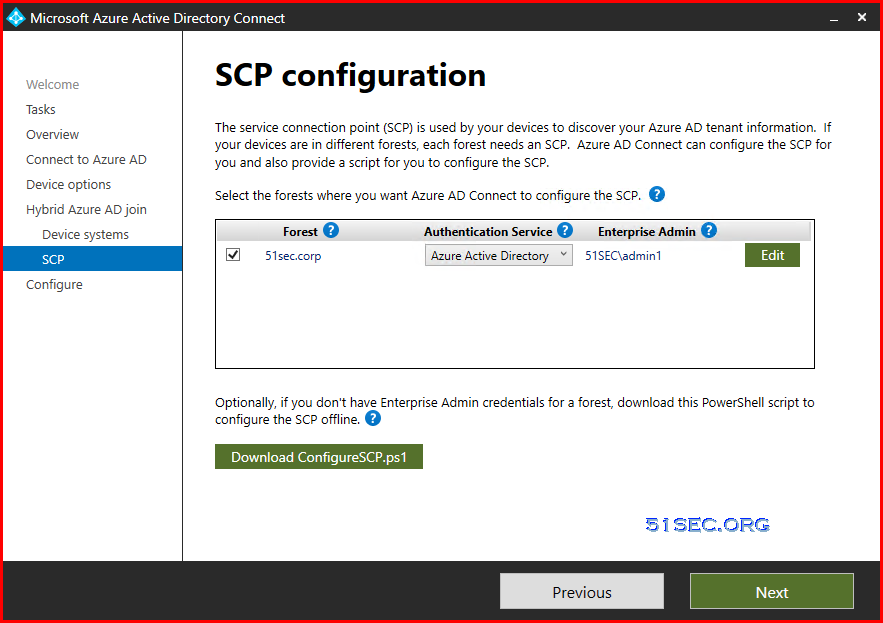

Make sure account (admin1) is joined into enterprise admins group


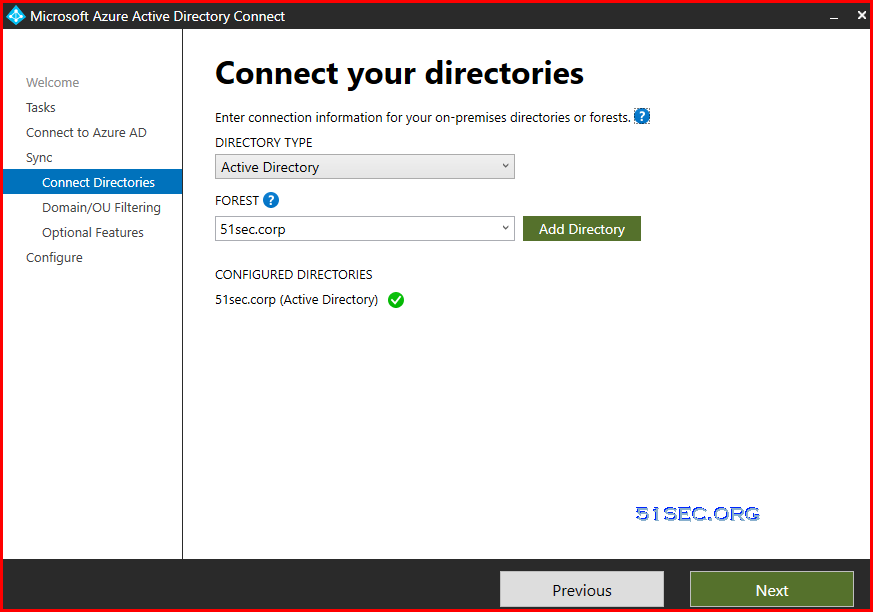
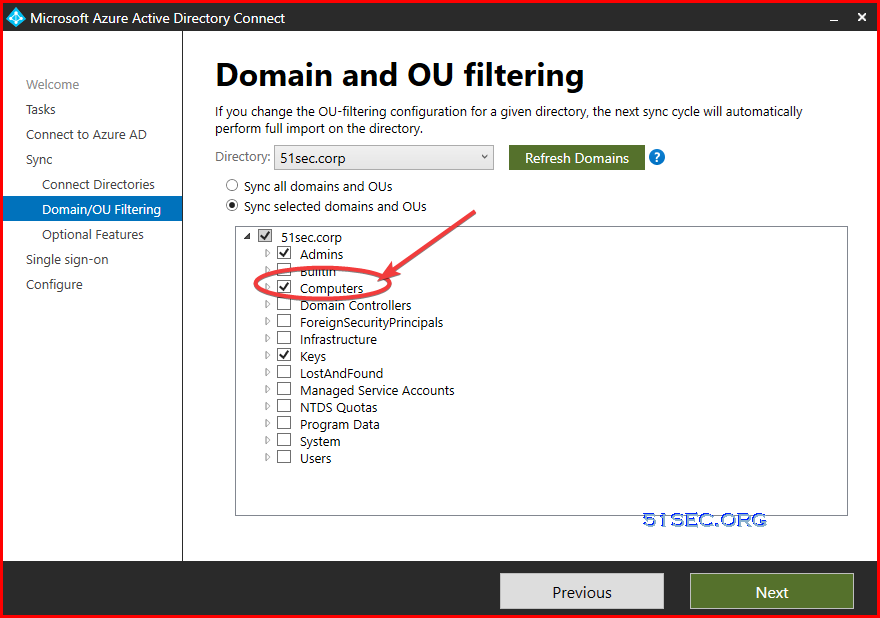
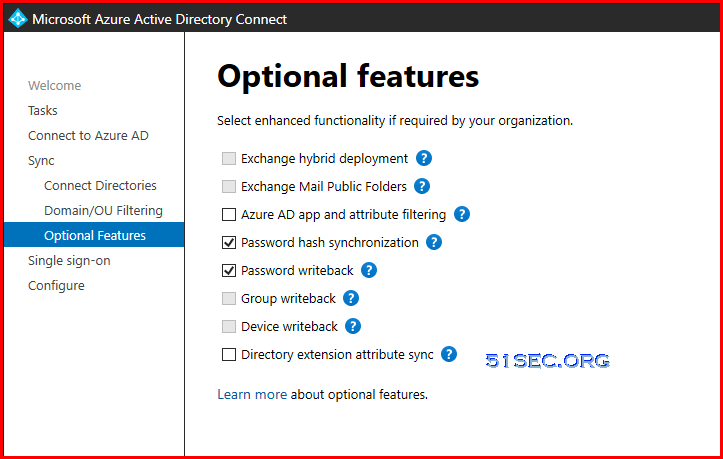
Also make sure you synced computers and users into AAD using Customize Synchronization Options from AD connect.
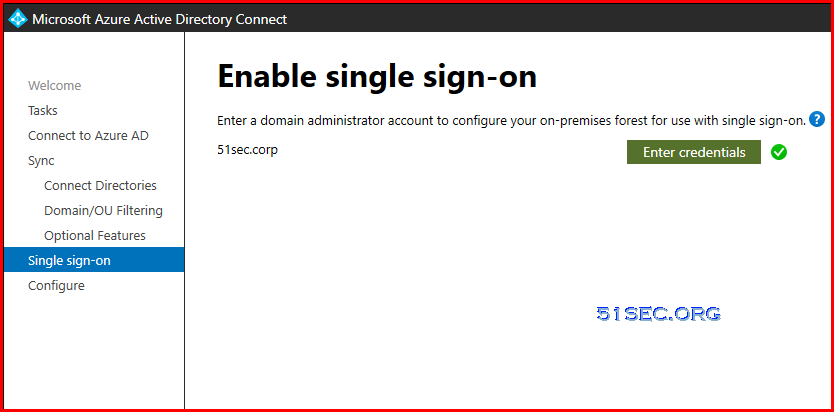
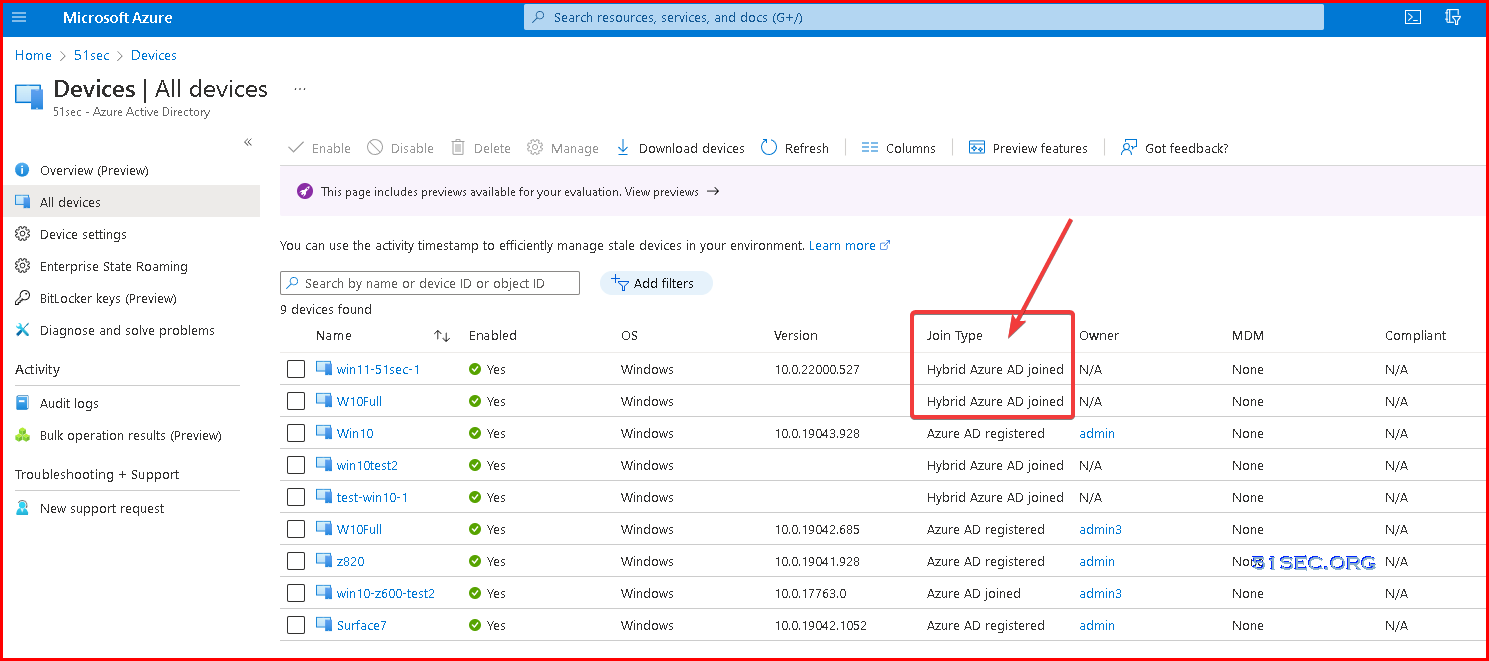
Verification Hybrid Joined Devices.

After a couple of minutes, check your AD joined machine to see if AAD joined enabled. 

  • from command line
  • from AAD devices


Before enabled Hybrid Joined Device:


C:\Users\test1>dsregcmd /status +----------------------------------------------------------------------+
| Device State |
+----------------------------------------------------------------------+ AzureAdJoined : NO
EnterpriseJoined : NO
DomainJoined : YES
DomainName : 51SEC
Device Name : win11-51sec-1.51sec.corp +----------------------------------------------------------------------+
| User State |
+----------------------------------------------------------------------+ NgcSet : NO
WorkplaceJoined : NO
WamDefaultSet : NO +----------------------------------------------------------------------+
| SSO State |
+----------------------------------------------------------------------+ AzureAdPrt : NO
AzureAdPrtAuthority : NO
EnterprisePrt : NO
EnterprisePrtAuthority : NO +----------------------------------------------------------------------+
| Diagnostic Data |
+----------------------------------------------------------------------+ Diagnostics Reference : www.microsoft.com/aadjerrors
User Context : UN-ELEVATED User
Client Time : 2022-03-28 02:27:38.000 UTC
AD Connectivity Test : PASS
AD Configuration Test : FAIL [0x80070005]
DRS Discovery Test : SKIPPED
DRS Connectivity Test : SKIPPED
Token acquisition Test : SKIPPED
Fallback to Sync-Join : ENABLED Previous Registration : 2022-03-28 02:04:01.000 UTC
Registration Type : sync
Error Phase : join
Client ErrorCode : 0x801c03f3
Server ErrorCode : invalid_request
Server ErrorSubCode : error_missing_device
Server Operation : DeviceRenew
Server Message : The device object by the given id (ca565a27-6db8-4a55-9e5e-d96427e8cd2e) is not found.
Https Status : 400
Request Id : 04bb2d88-30f9-44cc-a456-d84ca34dcf16
Executing Account Name : WIN11-51SEC-1\test1 +----------------------------------------------------------------------+
| IE Proxy Config for Current User |
+----------------------------------------------------------------------+ Auto Detect Settings : YES
Auto-Configuration URL :
Proxy Server List :
Proxy Bypass List : +----------------------------------------------------------------------+
| WinHttp Default Proxy Config |
+----------------------------------------------------------------------+ Access Type : DIRECT +----------------------------------------------------------------------+
| Ngc Prerequisite Check |
+----------------------------------------------------------------------+ IsDeviceJoined : NO
IsUserAzureAD : NO
PolicyEnabled : NO
PostLogonEnabled : YES
DeviceEligible : YES
SessionIsNotRemote : YES
CertEnrollment : none
PreReqResult : WillNotProvision For more information, please visit https://www.microsoft.com/aadjerrors
C:\Users\test1>

After enabled Hybrid Joined Device:

C:\Users\test1>dsregcmd /status
+----------------------------------------------------------------------+
| Device State                                                         |
+----------------------------------------------------------------------+
             AzureAdJoined : YES
          EnterpriseJoined : NO
              DomainJoined : YES
                DomainName : 51SEC
               Device Name : win11-51sec-1.51sec.corp
+----------------------------------------------------------------------+
| Device Details                                                       |
+----------------------------------------------------------------------+
                  DeviceId : ca565a27-6db8-4a55-9e5e-d96427e8cd2e
                Thumbprint : 014E8C97B0A2553E6B32F3A03B7C931F290A3652
 DeviceCertificateValidity : [ 2022-03-28 01:57:43.000 UTC -- 2032-03-28 02:27:43.000 UTC ]
            KeyContainerId : 7eacafad-c157-472f-8834-f011bafa97c3
               KeyProvider : Microsoft Platform Crypto Provider
              TpmProtected : YES
          DeviceAuthStatus : SUCCESS
+----------------------------------------------------------------------+
| Tenant Details                                                       |
+----------------------------------------------------------------------+
                TenantName :
                  TenantId : 8ed8617a-5de3-44d8-a8f4-737c89fa9bbc
               AuthCodeUrl : https://login.microsoftonline.com/8ed8617a-5de3-44d8-a8f4-737c89fa9bbc/oauth2/authorize
            AccessTokenUrl : https://login.microsoftonline.com/8ed8617a-5de3-44d8-a8f4-737c89fa9bbc/oauth2/token
                    MdmUrl :
                 MdmTouUrl :
          MdmComplianceUrl :
               SettingsUrl :
            JoinSrvVersion : 2.0
                JoinSrvUrl : https://enterpriseregistration.windows.net/EnrollmentServer/device/
                 JoinSrvId : urn:ms-drs:enterpriseregistration.windows.net
             KeySrvVersion : 1.0
                 KeySrvUrl : https://enterpriseregistration.windows.net/EnrollmentServer/key/
                  KeySrvId : urn:ms-drs:enterpriseregistration.windows.net
        WebAuthNSrvVersion : 1.0
            WebAuthNSrvUrl : https://enterpriseregistration.windows.net/webauthn/8ed8617a-5de3-44d8-a8f4-737c89fa9bbc/
             WebAuthNSrvId : urn:ms-drs:enterpriseregistration.windows.net
    DeviceManagementSrvVer : 1.0
    DeviceManagementSrvUrl : https://enterpriseregistration.windows.net/manage/8ed8617a-5de3-44d8-a8f4-737c89fa9bbc/
     DeviceManagementSrvId : urn:ms-drs:enterpriseregistration.windows.net
+----------------------------------------------------------------------+
| User State                                                           |
+----------------------------------------------------------------------+
                    NgcSet : NO
           WorkplaceJoined : NO
             WamDefaultSet : NO
+----------------------------------------------------------------------+
| SSO State                                                            |
+----------------------------------------------------------------------+
                AzureAdPrt : NO
       AzureAdPrtAuthority :
             EnterprisePrt : NO
    EnterprisePrtAuthority :
+----------------------------------------------------------------------+
| Diagnostic Data                                                      |
+----------------------------------------------------------------------+
        AadRecoveryEnabled : NO
    Executing Account Name : WIN11-51SEC-1\test1
               KeySignTest : PASSED
+----------------------------------------------------------------------+
| IE Proxy Config for Current User                                     |
+----------------------------------------------------------------------+
      Auto Detect Settings : YES
    Auto-Configuration URL :
         Proxy Server List :
         Proxy Bypass List :
+----------------------------------------------------------------------+
| WinHttp Default Proxy Config                                         |
+----------------------------------------------------------------------+
               Access Type : DIRECT
+----------------------------------------------------------------------+
| Ngc Prerequisite Check                                               |
+----------------------------------------------------------------------+
            IsDeviceJoined : YES
             IsUserAzureAD : NO
             PolicyEnabled : NO
          PostLogonEnabled : YES
            DeviceEligible : YES
        SessionIsNotRemote : YES
            CertEnrollment : none
              PreReqResult : WillNotProvision
For more information, please visit https://www.microsoft.com/aadjerrors
C:\Users\test1>
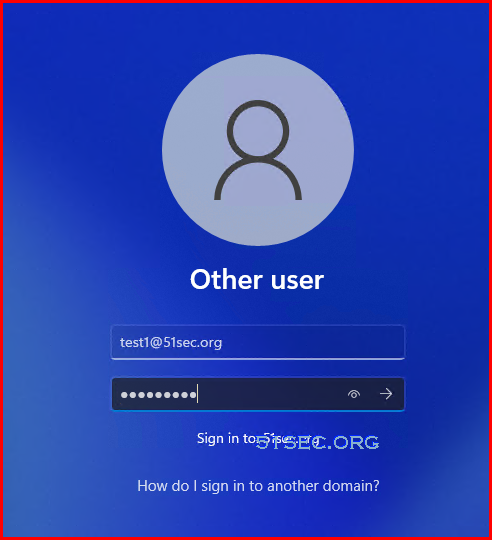
Now , you should be able to log into your computer using your email address.


Windows Client Configuration

Please make sure your Windows client machine joined local AD DS. 
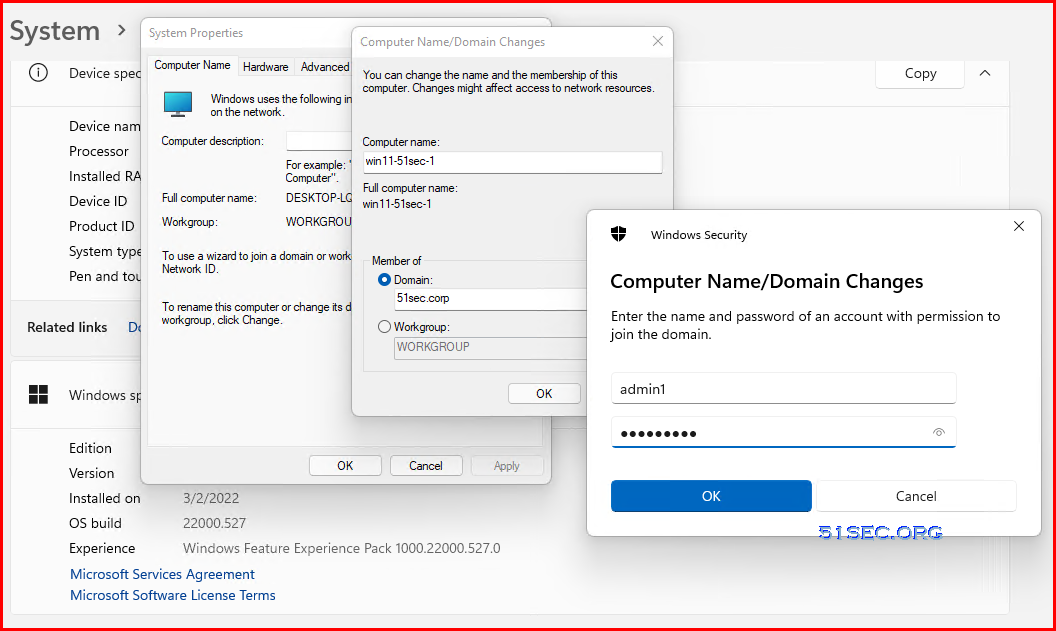

If your Windows client machine is not having direct connection to your local AD DC, you will need a vpn to connect back to your AD DC. 

There is a challenge to get your remote workgroup machine to join into your local onprem AD, even with VPN installed and connected. 

Before you log in to your machine using your AD account, you will have to log in your machine using local admin account and shift right click an application to open it using a different user. That will allow system to create a Domain user profile to allow this domain user to log in without a connection to AD DC.

Following screenshot is an example of CMD application.
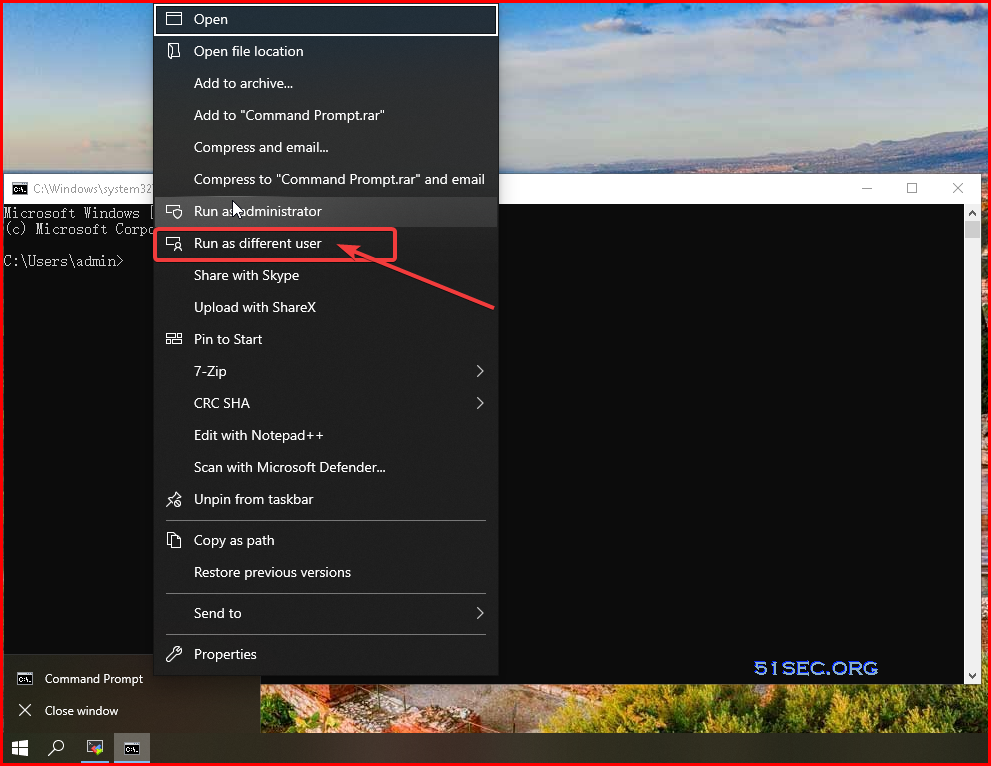


Azure Point to Site  (P2S) VPN Configuration

If your Internet ISP blocked port 445, you will need to create a Azure VPN Gateway to create a tunnel to have your client machine connecting to your File Shares. You might also need to create private end point for your storage account. 


  • Point-to-Site (P2S) VPN gateway connections, which are VPN connections between Azure and an individual client. This solution is primarily useful for devices that are not part of your organization's on-premises network, such as telecommuters who want to be able to mount their Azure file share from home, a coffee shop, or hotel while on the road. To use a P2S VPN connection with Azure Files, a P2S VPN connection will need to be configured for each client that wants to connect. To simplify the deployment of a P2S VPN connection, see Configure a Point-to-Site (P2S) VPN on Windows for use with Azure Files and Configure a Point-to-Site (P2S) VPN on Linux for use with Azure Files.

In addition to the default public endpoint for a storage account, Azure Files provides the option to have one or more private endpoints. A private endpoint is an endpoint that is only accessible within an Azure virtual network. When you create a private endpoint for your storage account, your storage account gets a private IP address from within the address space of your virtual network, much like how an on-premises file server or NAS device receives an IP address within the dedicated address space of your on-premises network.

An individual private endpoint is associated with a specific Azure virtual network subnet. A storage account may have private endpoints in more than one virtual network.


Please refer following post to configure your P2S VPN.

  • Azure Point-to-Site VPN Configuration


Notes


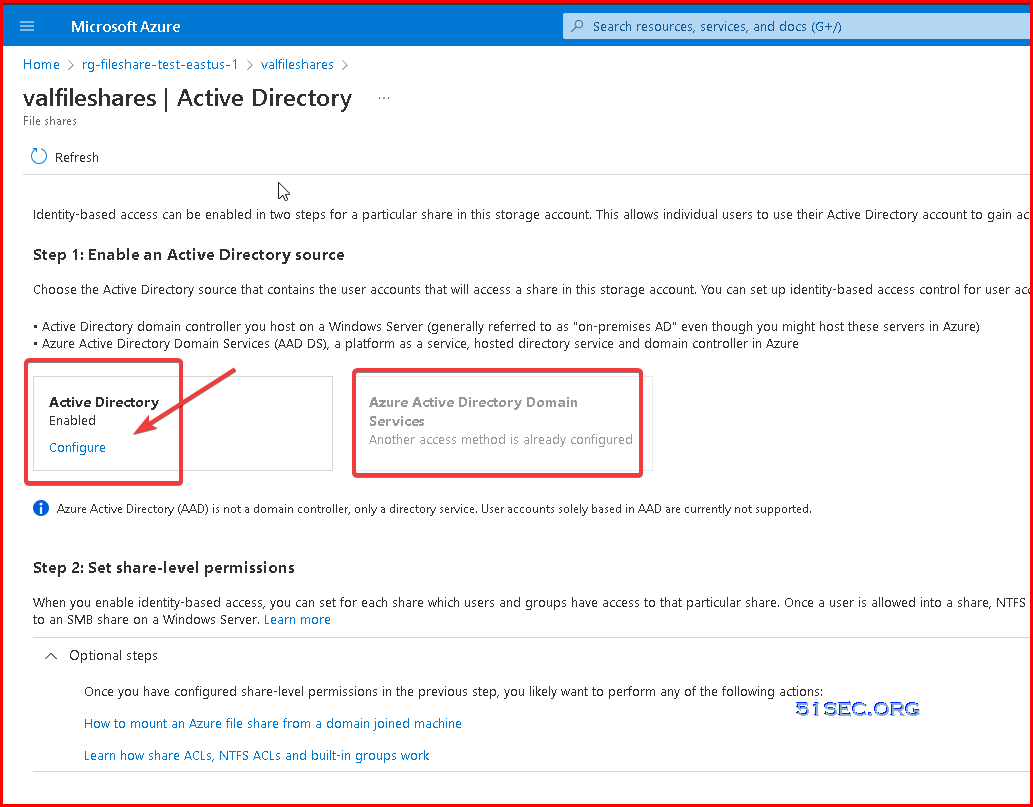
For Azure File Shares, you can only choose your Active Diretory source either from local AD DS or from Azure AD DS. Following screenshot is an example which enabled to intergrate with local AD DS


References

  • Overview - on-premises Active Directory Domain Services authentication over SMB for Azure file shares
  • Azure Point-to-Site VPN Configuration
  • Using Azure AD to Log Into Computer and Assign Share Folder Permission
  • Remote AAD Joined Machine Access Azure Storage File Share Using Cloud Tiering
  • Install Azure AD Connect to Integrate On-Prem ADFS with AAD (Hybrid Identity)
  • Mount Azure Blob Storage into Local Windows File System
  • Deploy Azure File Sync on Cloud VM and Mount Azure File Share to Machine Without Port 445
  • Mount Azure Cloud VM File Share Folder With Tcp Port 445 Blocked By ISP
  • Setup Hybrid Azure Active Directory John and Login For Your Client Machines


via Blogger http://blog.51sec.org/2022/03/azure-file-shares-integrating-with.html
March 31, 2022 at 01:51PM Cloud
0 Comments

Pen Test Practices - Binary Exploitation

3/31/2022

0 Comments

 
Pen Test Practices - Binary Exploitation
Binary Exploitation is a broad topic within Cyber Security that comes down to finding a vulnerability in the program and exploiting it to gain control of a shell or modifying the program’s functions. The portion of the language that a computer can understand is called a “binary.” Computers operate in binary, meaning they store data and perform calculations using only zeros and ones. A single binary digit can only represent True (1) or False (0) in boolean logic. Each language, has its distinct features, though many times there are commonalities between programming languages. It works on the principle of turning a weakness into an advantage which involves, taking advantage of a bug or vulnerability to cause unintended or unanticipated behavior.


Buffer Overflow


There are two different types of buffer-overflow attacks. These are stack-based and heap-based buffer overflow. In both cases, this type of exploit takes advantage of an application that waits for the user’s input. It can cause the program to crash or execute arbitrary code. A buffer overflow happens when a program tries to fill a block of memory (a memory buffer) with more data than is supposed to hold. Attackers exploit buffer overflow issues by overwriting the memory of an application. Buffer overflows are common vulnerabilities in software applications that can exploit to achieve remote code execution (RCE) or perform a Denial-of-Service (DoS) attack. The simplest and most common buffer overflow is one where the buffer is on the Stack. The most significant cause of buffer overflows is the use of programming languages that do not automatically monitor limits of memory buffer or stack to prevent (stack-based) buffer overflow.


GDB Usage

What is GDB?

GDB, the GNU Project debugger, allows you to see what is going on `inside' another program while it executes -- or what another program was doing at the moment it crashed.

GDB can do four main kinds of things (plus other things in support of these) to help you catch bugs in the act:

  • Start your program, specifying anything that might affect its behavior.
  • Make your program stop on specified conditions.
  • Examine what has happened, when your program has stopped.
  • Change things in your program, so you can experiment with correcting the effects of one bug and go on to learn about another.
Those programs might be executing on the same machine as GDB (native), on another machine (remote), or on a simulator. GDB can run on most popular UNIX and Microsoft Windows variants, as well as on Mac OS X.

What Languages does GDB Support?

GDB supports the following languages (in alphabetical order):
  • Ada
  • Assembly
  • C
  • C++
  • D
  • Fortran
  • Go
  • Objective-C
  • OpenCL
  • Modula-2
  • Pascal
  • Rust


$ chmod +x gdbme
$ gdb gdbme
(gdb) layout asm
(gdb) break *(main+99)
(gdb) run
(gdb) jump *(main+104)


Launch gdb. Launch the C debugger (gdb) as shown below.

$ gdb a.out

Set up a break point inside C program

Syntax:

break line_number
Places break point in the C program, where you suspect errors. While executing the program, the debugger will stop at the break point, and gives you the prompt to debug.


Execute the C program in gdb debugger

run [args]

You can start running the program using the run command in the gdb debugger. You can also give command line arguments to the program via run args. The example program we used here does not requires any command line arguments so let us give run, and start the program execution.

run
Starting program: /home/sathiyamoorthy/Debugging/c/a.out

Once you executed the C program, it would execute until the first break point, and give you the prompt for debugging.

Printing the variable values inside gdb debugger

Syntax: print {variable}

Examples:
print i
print j
print num
(gdb) p i
$1 = 1
(gdb) p j
$2 = 3042592
(gdb) p num
$3 = 3
(gdb)


Continue, stepping over and in – gdb commands

There are three kind of gdb operations you can choose when the program stops at a break point. They are continuing until the next break point, stepping in, or stepping over the next program lines.

  • c or continue: Debugger will continue executing until the next break point.
  • n or next: Debugger will execute the next line as single instruction.
  • s or step: Same as next, but does not treats function as a single instruction, instead goes into the function and executes it line by line.

By continuing or stepping through you could have found that the issue is because we have not used the <= in the ‘for loop’ condition checking. So changing that from < to <= will solve the issue.

gdb command shortcuts

Use following shortcuts for most of the frequent gdb operations.

  • l – list
  • p – print
  • c – continue
  • s – step
  • ENTER: pressing enter key would execute the previously executed command again.

Miscellaneous gdb commands

  • l command: Use gdb command l or list to print the source code in the debug mode. Use l line-number to view a specific line number (or) l function to view a specific function.
  • bt: backtrack – Print backtrace of all stack frames, or innermost COUNT frames.
  • help – View help for a particular gdb topic — help TOPICNAME.
  • quit – Exit from the gdb debugger.


Gets()


Why the gets() is dangerous ??

It’s unsafe because it assumes consistent input. NEVER USE IT! You should not use gets since it has no way to stop a buffer overflow. It doesn’t perform bounds checking on the size of its input. An attacker can easily send arbitrarily-sized input to gets() and overflow the destination buffer. If the user types in more data then will most likely end up with corruption or worse.


Using exam or print to get address of function win.

(gdb) x win
0x80491f6 <win>:        0xfb1e0ff3
(gdb) p win
$1 = {<text variable, no debug info>} 0x80491f6 <win>
(gdb)


(gdb) set disassembly-flavor intel
(gdb) disassemble main
Dump of assembler code for function main:
   0x080492c4 <+0>:     endbr32
   0x080492c8 <+4>:     lea    ecx,[esp+0x4]
   0x080492cc <+8>:     and    esp,0xfffffff0
   0x080492cf <+11>:    push   DWORD PTR [ecx-0x4]
   0x080492d2 <+14>:    push   ebp
   0x080492d3 <+15>:    mov    ebp,esp
   0x080492d5 <+17>:    push   ebx
   0x080492d6 <+18>:    push   ecx
   0x080492d7 <+19>:    sub    esp,0x10
   0x080492da <+22>:    call   0x8049130 <__x86.get_pc_thunk.bx>
   0x080492df <+27>:    add    ebx,0x2d21
   0x080492e5 <+33>:    mov    eax,DWORD PTR [ebx-0x4]
   0x080492eb <+39>:    mov    eax,DWORD PTR [eax]
   0x080492ed <+41>:    push   0x0
   0x080492ef <+43>:    push   0x2
   0x080492f1 <+45>:    push   0x0
   0x080492f3 <+47>:    push   eax
   0x080492f4 <+48>:    call   0x80490b0 <setvbuf@plt>
   0x080492f9 <+53>:    add    esp,0x10
   0x080492fc <+56>:    call   0x8049070 <getegid@plt>
   0x08049301 <+61>:    mov    DWORD PTR [ebp-0xc],eax
   0x08049304 <+64>:    sub    esp,0x4
   0x08049307 <+67>:    push   DWORD PTR [ebp-0xc]
   0x0804930a <+70>:    push   DWORD PTR [ebp-0xc]
   0x0804930d <+73>:    push   DWORD PTR [ebp-0xc]
   0x08049310 <+76>:    call   0x80490d0 <setresgid@plt>
   0x08049315 <+81>:    add    esp,0x10
   0x08049318 <+84>:    sub    esp,0xc
   0x0804931b <+87>:    lea    eax,[ebx-0x1f60]
   0x08049321 <+93>:    push   eax
   0x08049322 <+94>:    call   0x8049080 <puts@plt>
   0x08049327 <+99>:    add    esp,0x10
   0x0804932a <+102>:   call   0x8049281 <vuln>
   0x0804932f <+107>:   mov    eax,0x0
   0x08049334 <+112>:   lea    esp,[ebp-0x8]
   0x08049337 <+115>:   pop    ecx
   0x08049338 <+116>:   pop    ebx
   0x08049339 <+117>:   pop    ebp
   0x0804933a <+118>:   lea    esp,[ecx-0x4]
   0x0804933d <+121>:   ret
End of assembler dump.
(gdb)


(gdb) info register
eax            0x41                65
ecx            0xffffffff          -1
edx            0x41                65
ebx            0x61616161          1633771873
esp            0xffb36250          0xffb36250
ebp            0x61616161          0x61616161
esi            0xf7f03000          -135254016
edi            0xf7f03000          -135254016
eip            0x61616161          0x61616161
eflags         0x10282             [ SF IF RF ]
cs             0x23                35
ss             0x2b                43
ds             0x2b                43
es             0x2b                43
fs             0x0                 0
gs             0x63                99
k0             0x0                 0
k1             0x0                 0
k2             0x0                 0
k3             0x0                 0
k4             0x0                 0
k5             0x0                 0
k6             0x0                 0
k7             0x0                 0


aaabbbcccdddeeefffggghhhiiijjjkkklllmmmnnnooopppqqqrrrssstttuuuvvvwwwxxxyyyzzz


root@ubuntu1:~# python
Python 2.7.18 (default, Mar  8 2021, 13:02:45)
[GCC 9.3.0] on linux2
Type "help", "copyright", "credits" or "license" for more information.
>>> chr(0x6c)
'l'


References

  • Into the art of Binary Exploitation 0x000001 [Stack-Based Overflow]


via Blogger http://blog.51sec.org/2022/03/pen-test-practices-binary-exploitation.html
March 31, 2022 at 01:51PM Threat Hunting
0 Comments

Find Out & Remove Your Duplicate Files to Free Up Storage Space

3/26/2022

0 Comments

 
With more and more data stored on your storage devices, such as USB stick, Network Storage, External Hard Drives, there are many duplicate files also stored across your file folders. In this video, I am showing you how to use free version Duplicate Cleaner to find out duplicate files across your storage folders and remove them. It is completely free although there is Pro version for purchasing. Free version is enough for most of use cases. Related Videos: ⚡Free Up Space On Your C Drive and Clean Up Your Windows System - https://youtu.be/bN8FWXHU3Mw ⚡Five Simple and Easy Steps to Improve Windows 11 Performance - https://youtu.be/b7ZnI6sZ4K4 Win11 Videos: ⚡Fix Minimum Requirement Issue: https://youtu.be/cmLt0gD4xrk ⚡Easily Upgrade From Windows 7/10 To Windows 11 Without Minimum System Requirement - https://youtu.be/dejYRyUkTcU ⚡Fix Windows 11 Minimum System Requirements Installation Issue - https://youtu.be/cmLt0gD4xrk ⚡Install Android Apps On Windows 11 Through Amazon Appstore - https://youtu.be/topZizBUlnw ==================================================================== If you found this video has some useful information✍, please give me a thumb up ✅ and subscribe this channel ?to get more updates?: ⚡https://www.youtube.com/c/Netsec?sub_confirmation=1 ⚡Resource Collection and Bookmarks: https://sites.51sec.org/ Learning and Sharing - 海内存知己,天涯若比邻 - ⚡https://51sec.org ?https://itprosec.com

Watch video on YouTube here: https://youtu.be/fJOtxmK8vLI by Johnny Netsec
0 Comments

Microsoft Defender for Endpoint

3/23/2022

0 Comments

 
Microsoft Defender for Endpoint

Microsoft Defender for Endpoint is an enterprise endpoint security platform designed to help enterprise networks prevent, detect, investigate, and respond to advanced threats. Defender for Endpoint provides advanced threat protection that includes antivirus, antimalware, ransomware mitigation, and more, together with centralized management and reporting. Two plans are available:

  • Microsoft Defender for Endpoint Plan 1; and
  • Microsoft Defender for Endpoint Plan 2, formerly known as Microsoft Defender for Endpoint.
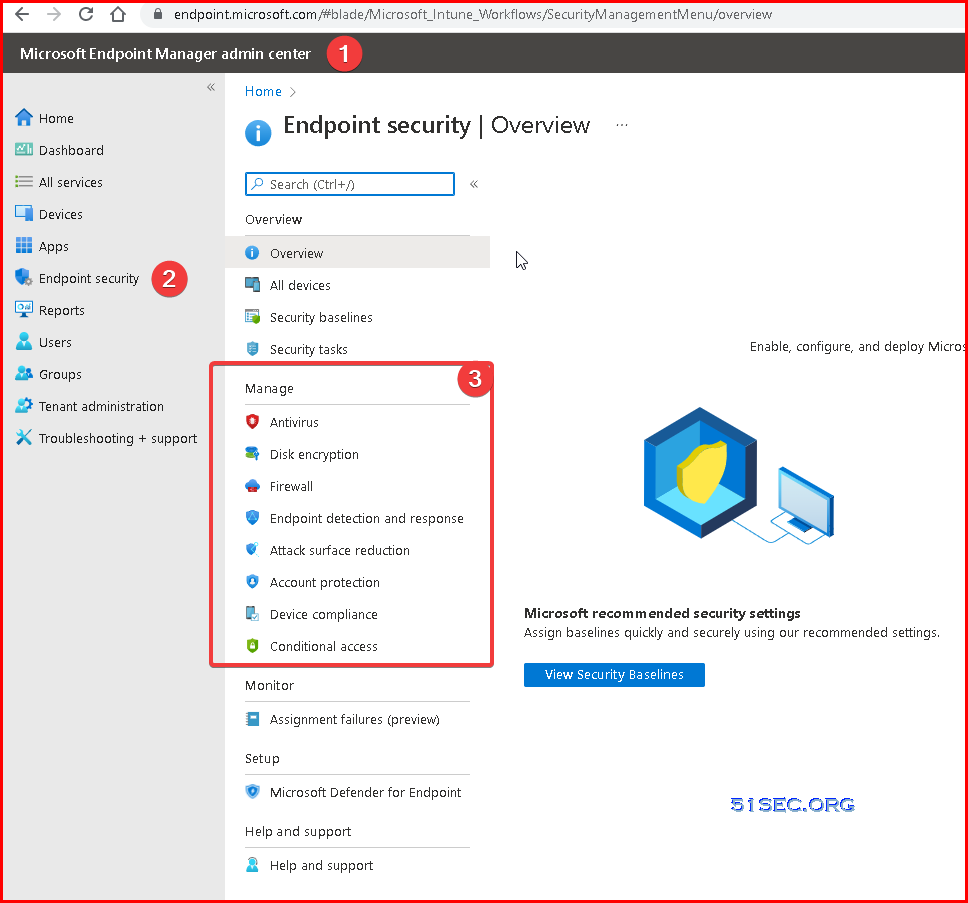
Microsoft Endpoint Manager (Intune portal) 


Microsoft Defender for Endpoint

TABLE 1
Threat & Vulnerability Management
Attack surface reduction
Next-generation protection
Endpoint detection and response
Automated investigation and remediation
Microsoft Threat Experts
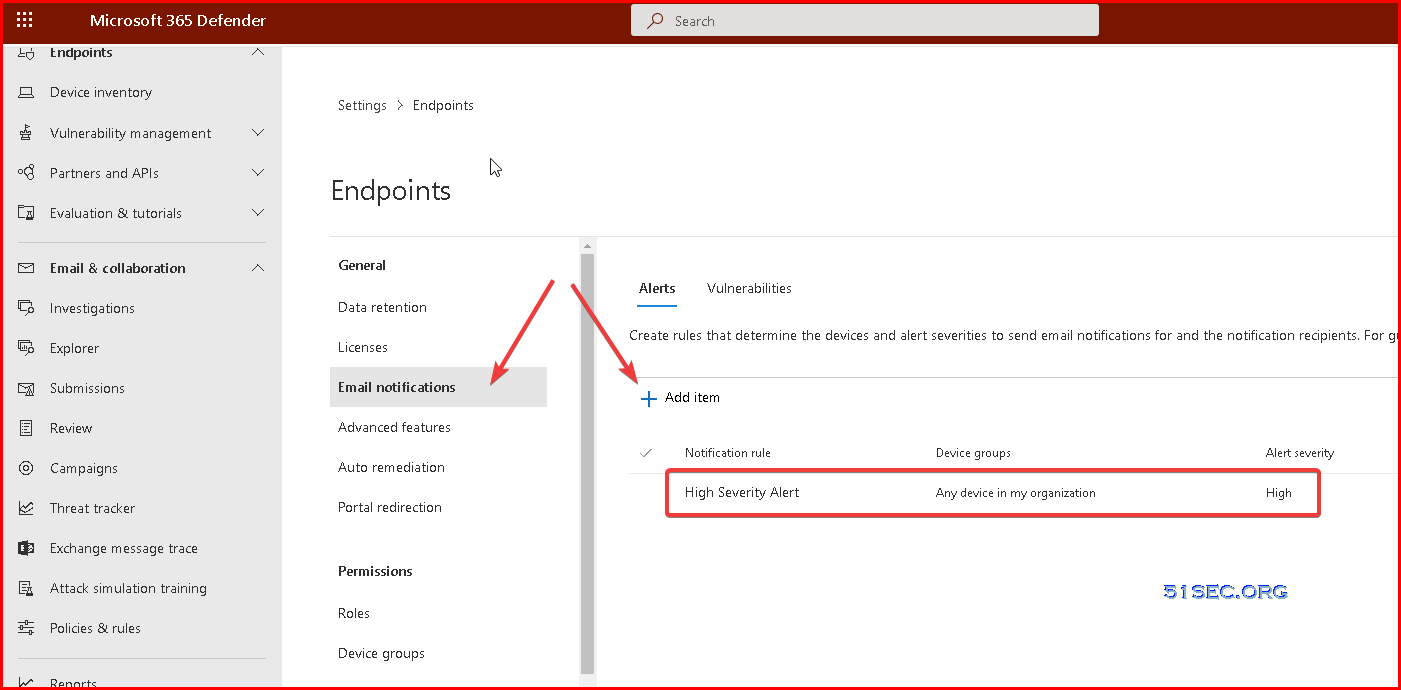
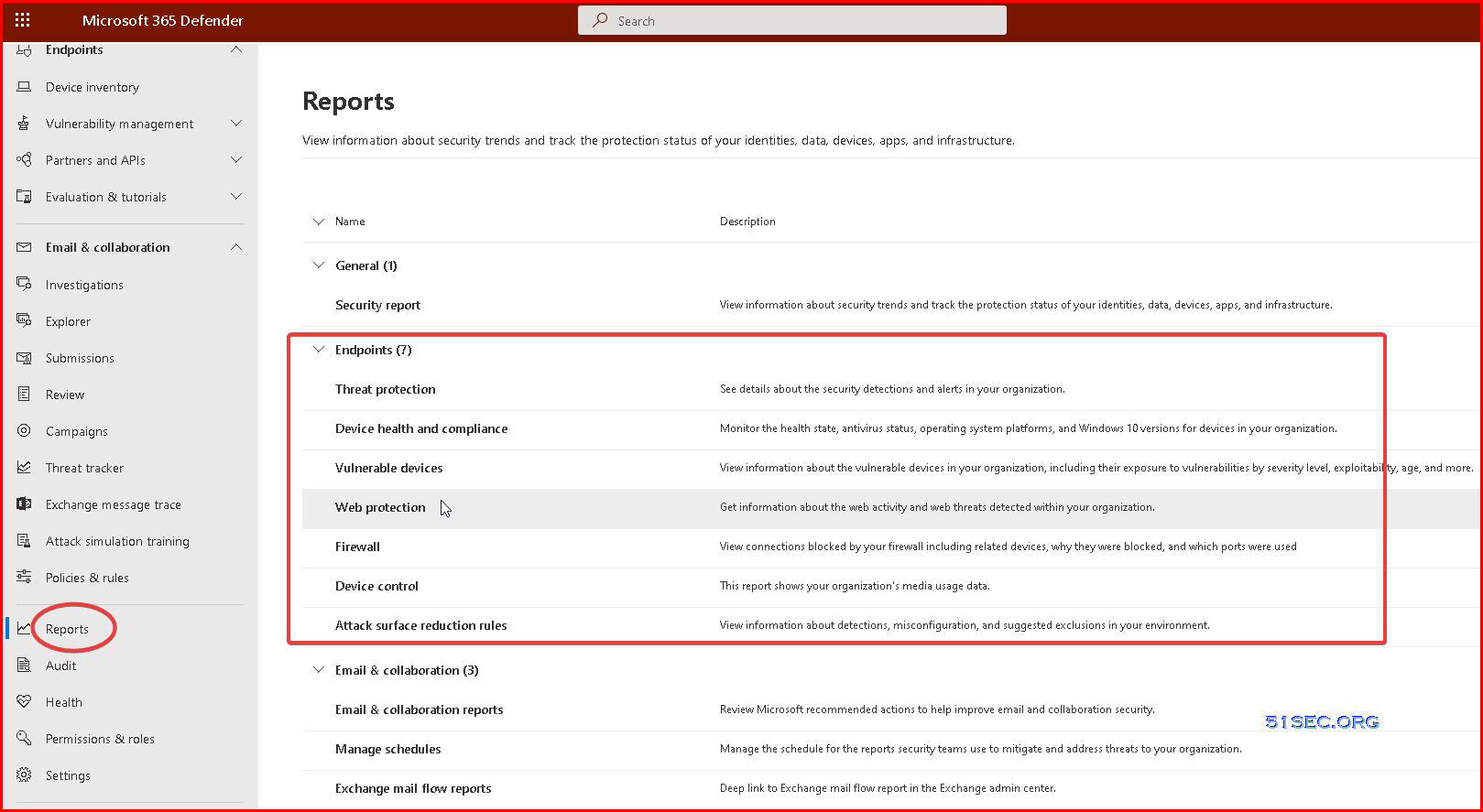
Centralized configuration and administration, APIs
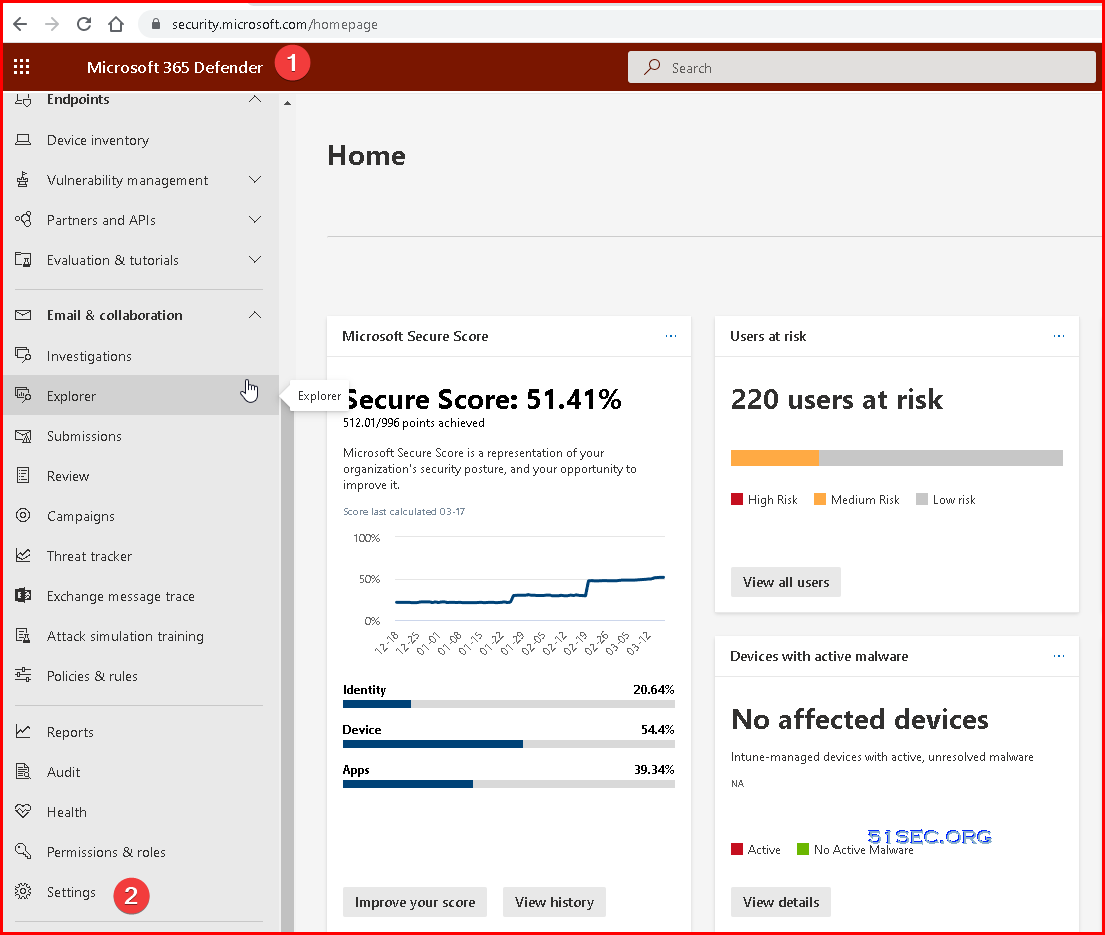
Microsoft 365 Defender

Activate Microsoft Defender

Turn on Microsoft Defender Antivirus

Complete the following steps to turn on Microsoft Defender Antivirus on your device.

  1. Select the Start menu.
  2. In the search bar, type group policy. Then select Edit group policy from the listed results. The Local Group Policy Editor will open.
  3. Select Computer Configuration > Administrative Templates > Windows Components > Microsoft Defender Antivirus.
  4. Scroll to the bottom of the list and select Turn off Microsoft Defender Antivirus.
  5. Select Disabled or Not configured. It might feel counter-intuitive to select these options because the names suggest that you're turning Microsoft Defender Antivirus off. Don't worry, these options actually ensure that it's turned on.
  6. Select Apply > OK.

Turn on real-time and cloud-delivered protection

Complete the following steps to turn on real-time and cloud-delivered protection. Together, these antivirus features protect you against spyware and can deliver fixes for malware issues via the cloud.

  1. Select the Start menu.
  2. In the search bar, type Windows Security. Select the matching result.
  3. Select Virus & threat protection.
  4. Under Virus & threat protection settings, select Manage settings.
  5. Flip each switch under Real-time protection and Cloud-delivered protection to turn them on.

If you don't see these options on your screen, they may be hidden. Complete the following steps to make them visible.

  1. Select the Start menu.
  2. In the search bar, type group policy. Then select Edit group policy from the listed results. The Local Group Policy Editor will open.
  3. Select Computer Configuration > Administrative Templates > Windows Components > Windows Security > Virus and threat protection.
  4. Select Hide the Virus and threat protection area.
  5. Select Disabled > Apply > OK.

Onboarding tool options

The following table lists the available tools based on the endpoint that you need to onboard.

Endpoint Tool options
Windows Local script (up to 10 devices)
Group Policy
Microsoft Endpoint Manager/ Mobile Device Manager
Microsoft Endpoint Configuration Manager
VDI scripts
Integration with Microsoft Defender for Cloud
macOS Local scripts
Microsoft Endpoint Manager
JAMF Pro
Mobile Device Management
Linux Server Local script
Puppet
Ansible
iOS Microsoft Endpoint Manager
Android Microsoft Endpoint Manager

PowerShell Command for Troubleshooting


PS C:\Users\test1> get-MPcomputerstatus
AMEngineVersion                  : 1.1.18900.3
AMProductVersion                 : 4.18.2201.10
AMRunningMode                    : Normal
AMServiceEnabled                 : True
AMServiceVersion                 : 4.18.2201.10
AntispywareEnabled               : True
AntispywareSignatureAge          : 0
AntispywareSignatureLastUpdated  : 03/04/2022 8:59:39 AM
AntispywareSignatureVersion      : 1.359.1366.0
AntivirusEnabled                 : True
AntivirusSignatureAge            : 0
AntivirusSignatureLastUpdated    : 03/04/2022 8:59:38 AM
AntivirusSignatureVersion        : 1.359.1366.0
BehaviorMonitorEnabled           : True
ComputerID                       : 580F14A1-4405-EEA6-2C71-96B3EA0C42C6
ComputerState                    : 0
DeviceControlDefaultEnforcement  : N/A
DeviceControlPoliciesLastUpdated : 03/04/2022 2:04:19 PM
DeviceControlState               : N/A
FullScanAge                      : 0
FullScanEndTime                  : 03/04/2022 1:48:27 PM
FullScanStartTime                : 03/04/2022 1:10:43 PM
IoavProtectionEnabled            : True
IsTamperProtected                : False
IsVirtualMachine                 : False
LastFullScanSource               : 2
LastQuickScanSource              : 2
NISEnabled                       : True
NISEngineVersion                 : 1.1.18900.3
NISSignatureAge                  : 0
NISSignatureLastUpdated          : 03/04/2022 8:59:38 AM
NISSignatureVersion              : 1.359.1366.0
OnAccessProtectionEnabled        : True
QuickScanAge                     : 481
QuickScanEndTime                 : 11/07/2020 9:36:57 PM
QuickScanStartTime               : 11/07/2020 9:35:40 PM
RealTimeProtectionEnabled        : True
RealTimeScanDirection            : 0
TamperProtectionSource           : Service Init
TDTMode                          : cm
TDTStatus                        : Disabled
TDTTelemetry                     : Disabled
PSComputerName                   :
PS C:\Users\test1> get-mppreference
AllowDatagramProcessingOnWinServer            : False
AllowNetworkProtectionDownLevel               : False
AllowNetworkProtectionOnWinServer             : False
AllowSwitchToAsyncInspection                  : False
AttackSurfaceReductionOnlyExclusions          : {N/A: Must be and administrator to view exclusions}
AttackSurfaceReductionRules_Actions           :
AttackSurfaceReductionRules_Ids               :
CheckForSignaturesBeforeRunningScan           : True
CloudBlockLevel                               : 0
CloudExtendedTimeout                          : 50
ComputerID                                    : 580F14A1-4405-EEA6-2C71-96B3EA0C42C6
ControlledFolderAccessAllowedApplications     : {N/A: Must be and administrator to view exclusions}
ControlledFolderAccessProtectedFolders        :
DefinitionUpdatesChannel                      : 0
DisableArchiveScanning                        : False
DisableAutoExclusions                         : False
DisableBehaviorMonitoring                     : False
DisableBlockAtFirstSeen                       : False
DisableCatchupFullScan                        : True
DisableCatchupQuickScan                       : True
DisableCpuThrottleOnIdleScans                 : True
DisableDatagramProcessing                     : False
DisableDnsOverTcpParsing                      : False
DisableDnsParsing                             : False
DisableEmailScanning                          : True
DisableFtpParsing                             : False
DisableGradualRelease                         : False
DisableHttpParsing                            : False
DisableInboundConnectionFiltering             : False
DisableIOAVProtection                         : False
DisableNetworkProtectionPerfTelemetry         : False
DisablePrivacyMode                            : False
DisableRdpParsing                             : False
DisableRealtimeMonitoring                     : False
DisableRemovableDriveScanning                 : False
DisableRestorePoint                           : True
DisableScanningMappedNetworkDrivesForFullScan : True
DisableScanningNetworkFiles                   : False
DisableScriptScanning                         : False
DisableSshParsing                             : False
DisableTlsParsing                             : False
EnableControlledFolderAccess                  : 0
EnableDnsSinkhole                             : True
EnableFileHashComputation                     : False
EnableFullScanOnBatteryPower                  : False
EnableLowCpuPriority                          : False
EnableNetworkProtection                       : 0
EngineUpdatesChannel                          : 0
ExclusionExtension                            : {N/A: Must be and administrator to view exclusions}
ExclusionIpAddress                            : {N/A: Must be and administrator to view exclusions}
ExclusionPath                                 : {N/A: Must be and administrator to view exclusions}
ExclusionProcess                              : {N/A: Must be and administrator to view exclusions}
ForceUseProxyOnly                             : False
HighThreatDefaultAction                       : 0
LowThreatDefaultAction                        : 0
MAPSReporting                                 : 1
MeteredConnectionUpdates                      : False
ModerateThreatDefaultAction                   : 0
PlatformUpdatesChannel                        : 0
ProxyBypass                                   :
ProxyPacUrl                                   :
ProxyServer                                   :
PUAProtection                                 : 0
QuarantinePurgeItemsAfterDelay                : 90
RandomizeScheduleTaskTimes                    : True
RealTimeScanDirection                         : 0
RemediationScheduleDay                        : 0
RemediationScheduleTime                       : 12:30:00
ReportingAdditionalActionTimeOut              : 10080
ReportingCriticalFailureTimeOut               : 10080
ReportingNonCriticalTimeOut                   : 1440
ScanAvgCPULoadFactor                          : 50
ScanOnlyIfIdleEnabled                         : True
ScanParameters                                : 2
ScanPurgeItemsAfterDelay                      : 15
ScanScheduleDay                               : 0
ScanScheduleOffset                            : 750
ScanScheduleQuickScanTime                     : 00:00:00
ScanScheduleTime                              : 12:30:00
SchedulerRandomizationTime                    : 4
ServiceHealthReportInterval                   : 60
SevereThreatDefaultAction                     : 0
SharedSignaturesPath                          :
SignatureAuGracePeriod                        : 0
SignatureBlobFileSharesSources                :
SignatureBlobUpdateInterval                   : 60
SignatureDefinitionUpdateFileSharesSources    :
SignatureDisableUpdateOnStartupWithoutEngine  : False
SignatureFallbackOrder                        : MicrosoftUpdateServer
SignatureFirstAuGracePeriod                   : 120
SignatureScheduleDay                          : 0
SignatureScheduleTime                         : 00:15:00
SignatureUpdateCatchupInterval                : 1
SignatureUpdateInterval                       : 1
SubmitSamplesConsent                          : 1
ThreatIDDefaultAction_Actions                 :
ThreatIDDefaultAction_Ids                     :
ThrottleForScheduledScanOnly                  : True
TrustLabelProtectionStatus                    : 0
UILockdown                                    : False
UnknownThreatDefaultAction                    : 0
PSComputerName                                :


Update-MpSignature -UpdateSource InternalDefinitionUpdateServer


PS C:\Program Files\Windows Defender> .\MpCmdRun.exe -SignatureUpdate
Signature update started . . .
Signature update finished.
PS C:\Program Files\Windows Defender>


PS C:\Program Files\Windows Defender> .\MpCmdRun.exe -removeDefinitions
You need administrator privilege to execute this command.


PS C:\Program Files\Windows Defender> .\MpCmdRun.exe -removeDefinitions
You need administrator privilege to execute this command.


PS C:\Program Files\Windows Defender> .\MpCmdRun.exe -removeDefinitions
You need administrator privilege to execute this command.


PS C:\windows\System32> Get-MpPreference

AllowDatagramProcessingOnWinServer            : False
AllowNetworkProtectionDownLevel               : False
AllowNetworkProtectionOnWinServer             : False
AllowSwitchToAsyncInspection                  : False
AttackSurfaceReductionOnlyExclusions          : {N/A: Must be and administrator to view exclusions}
AttackSurfaceReductionRules_Actions           :
AttackSurfaceReductionRules_Ids               :
CheckForSignaturesBeforeRunningScan           : True
CloudBlockLevel                               : 0
CloudExtendedTimeout                          : 50
ComputerID                                    : 580F14A1-4405-EEA6-2C71-96B3EA0C42C6
ControlledFolderAccessAllowedApplications     : {N/A: Must be and administrator to view exclusions}
ControlledFolderAccessProtectedFolders        :
DefinitionUpdatesChannel                      : 0
DisableArchiveScanning                        : False
DisableAutoExclusions                         : False
DisableBehaviorMonitoring                     : False
DisableBlockAtFirstSeen                       : False
DisableCatchupFullScan                        : True
DisableCatchupQuickScan                       : True
DisableCpuThrottleOnIdleScans                 : True
DisableDatagramProcessing                     : False
DisableDnsOverTcpParsing                      : False
DisableDnsParsing                             : False
DisableEmailScanning                          : True
DisableFtpParsing                             : False
DisableGradualRelease                         : False
DisableHttpParsing                            : False
DisableInboundConnectionFiltering             : False
DisableIOAVProtection                         : False
DisableNetworkProtectionPerfTelemetry         : False
DisablePrivacyMode                            : False
DisableRdpParsing                             : False
DisableRealtimeMonitoring                     : False
DisableRemovableDriveScanning                 : False
DisableRestorePoint                           : True
DisableScanningMappedNetworkDrivesForFullScan : True
DisableScanningNetworkFiles                   : False
DisableScriptScanning                         : False
DisableSshParsing                             : False
DisableTlsParsing                             : False
EnableControlledFolderAccess                  : 0
EnableDnsSinkhole                             : True
EnableFileHashComputation                     : False
EnableFullScanOnBatteryPower                  : False
EnableLowCpuPriority                          : False
EnableNetworkProtection                       : 0
EngineUpdatesChannel                          : 0
ExclusionExtension                            : {N/A: Must be and administrator to view exclusions}
ExclusionIpAddress                            : {N/A: Must be and administrator to view exclusions}
ExclusionPath                                 : {N/A: Must be and administrator to view exclusions}
ExclusionProcess                              : {N/A: Must be and administrator to view exclusions}
ForceUseProxyOnly                             : False
HighThreatDefaultAction                       : 0
LowThreatDefaultAction                        : 0
MAPSReporting                                 : 1
MeteredConnectionUpdates                      : False
ModerateThreatDefaultAction                   : 0
PlatformUpdatesChannel                        : 0
ProxyBypass                                   :
ProxyPacUrl                                   :
ProxyServer                                   : 142.106.63.41:8080
PUAProtection                                 : 0
QuarantinePurgeItemsAfterDelay                : 90
RandomizeScheduleTaskTimes                    : True
RealTimeScanDirection                         : 0
RemediationScheduleDay                        : 0
RemediationScheduleTime                       : 12:30:00
ReportingAdditionalActionTimeOut              : 10080
ReportingCriticalFailureTimeOut               : 10080
ReportingNonCriticalTimeOut                   : 1440
ScanAvgCPULoadFactor                          : 50
ScanOnlyIfIdleEnabled                         : True
ScanParameters                                : 2
ScanPurgeItemsAfterDelay                      : 15
ScanScheduleDay                               : 0
ScanScheduleOffset                            : 750
ScanScheduleQuickScanTime                     : 00:00:00
ScanScheduleTime                              : 12:30:00
SchedulerRandomizationTime                    : 4
ServiceHealthReportInterval                   : 60
SevereThreatDefaultAction                     : 0
SharedSignaturesPath                          :
SignatureAuGracePeriod                        : 0
SignatureBlobFileSharesSources                :
SignatureBlobUpdateInterval                   : 60
SignatureDefinitionUpdateFileSharesSources    :
SignatureDisableUpdateOnStartupWithoutEngine  : False
SignatureFallbackOrder                        : MicrosoftUpdateServer
SignatureFirstAuGracePeriod                   : 120
SignatureScheduleDay                          : 0
SignatureScheduleTime                         : 00:15:00
SignatureUpdateCatchupInterval                : 1
SignatureUpdateInterval                       : 1
SubmitSamplesConsent                          : 1
ThreatIDDefaultAction_Actions                 :
ThreatIDDefaultAction_Ids                     :
ThrottleForScheduledScanOnly                  : True
TrustLabelProtectionStatus                    : 0
UILockdown                                    : False
UnknownThreatDefaultAction                    : 0
PSComputerName                                :


PS C:\windows\System32>


Compare Defender for Endpoint plans

The following table describes what's included in each plan at a high level.

COMPARE DEFENDER FOR ENDPOINT PLANS
Defender for Endpoint Plan 1 Defender for Endpoint Plan 2
Next-generation protection
(includes antimalware and antivirus)

Attack surface reduction

Manual response actions

Centralized management

Security reports

APIs

Defender for Endpoint Plan 1, plus:

Device discovery

Threat and vulnerability management

Threat Analytics

Automated investigation and response

Advanced hunting

Endpoint detection and response

Microsoft Threat Experts

Support for Windows 10, iOS, Android OS, and macOS devices Support for Windows (client and server) and non-Windows platforms
(macOS, iOS, Android, and Linux)
To try Defender for Endpoint Plan 1, visit https://aka.ms/mdep1trial. To try Defender for Endpoint Plan 2, visit https://aka.ms/MDEp2OpenTrial.


Defender for Endpoint Plan 1 diagram


Define Defender Policies in Endpoint Manager (Intune)

Go to Microsoft Endpoint Manager Admin Center - Endpoint Security - Manage

Manage
  • Antivirus
  • Disk encryption
  • Firewall
  • Endpoint detection and response
  • Attack surface reduction
  • Account protection
  • Device compliance
  • Conditional access


Create Notification Rules


Go to Microsoft 365 Defender - Settings - Endpoints


Click Email notifications - Alerts - Add items
Create a notification rule for high severity alert

Also you can create a notification rule for critical/high vulnerability event:


Reports


Take response actions


On a device

  • Response actions on devices
  • Manage tags
  • Start an automated investigation
  • Start a Live Response session
  • Collect investigation package
  • Run antivirus scan
  • Restrict app execution
  • Isolate devices from the network
  • Consult a threat expert
  • Check activity details in Action center


On a file

  • Response actions on files
  • Stop and quarantine files in your network
  • Restore file from quarantine
  • Add indicators to block or allow a file
  • Consult a threat expert
  • Check activity details in Action center
  • Download or collect file
  • Deep analysis


Training

Train your security staff for Microsoft 365 Defender


Become a Microsoft 365 Defender Ninja


Security Operations Fundamentals

Module 1. Technical overview

  • thumbnail image 8 of blog post titled Become a Microsoft 365 Defender Ninja Short overview “What is Microsoft 365 Defender"
  • thumbnail image 9 of blog post titled Become a Microsoft 365 Defender Ninja Unified experiences across endpoint and email
  • thumbnail image 10 of blog post titled Become a Microsoft 365 Defender Ninja New value for ​Defender for Identity
  • thumbnail image 11 of blog post titled Become a Microsoft 365 Defender Ninja New value for Defender for Office 365
  • thumbnail image 12 of blog post titled Become a Microsoft 365 Defender Ninja XDR announcement blog

Module 2. Getting started

  • thumbnail image 13 of blog post titled Become a Microsoft 365 Defender Ninja Quick tutorial to get you started
  • thumbnail image 14 of blog post titled Become a Microsoft 365 Defender Ninja Starting the service
  • thumbnail image 15 of blog post titled Become a Microsoft 365 Defender Ninja Prepare your Azure Active Directory
  • thumbnail image 16 of blog post titled Become a Microsoft 365 Defender Ninja Manage access
  • thumbnail image 17 of blog post titled Become a Microsoft 365 Defender Ninja Provide your feedback

Module 3. Investigation – Incident

  • thumbnail image 18 of blog post titled Become a Microsoft 365 Defender Ninja Work with incidents
  • thumbnail image 19 of blog post titled Become a Microsoft 365 Defender Ninja Get email notifications on new incidents
  • thumbnail image 20 of blog post titled Become a Microsoft 365 Defender Ninja Improved incident queue
  • thumbnail image 21 of blog post titled Become a Microsoft 365 Defender Ninja Classification of incidents & alerts
  • thumbnail image 22 of blog post titled Become a Microsoft 365 Defender Ninja See how consolidated incidents improve SOC efficiency
  • thumbnail image 23 of blog post titled Become a Microsoft 365 Defender Ninja Protect your organization with Microsoft 365 Defender
  • thumbnail image 24 of blog post titled Become a Microsoft 365 Defender Ninja Incidents trend graph view
  • thumbnail image 25 of blog post titled Become a Microsoft 365 Defender Ninja Responding to my first incident, a tutorial and walkthrough for new-to-role analysts

  • thumbnail image 26 of blog post titled Become a Microsoft 365 Defender Ninja Alert page for incident detections  

  • thumbnail image 27 of blog post titled Become a Microsoft 365 Defender Ninja Email Entity page

Module 4. Threat Analytics

  • thumbnail image 28 of blog post titled Become a Microsoft 365 Defender Ninja Threat analytics
  • thumbnail image 29 of blog post titled Become a Microsoft 365 Defender Ninja Overview of Threat Analytics

Module 5. Advanced hunting

  • thumbnail image 30 of blog post titled Become a Microsoft 365 Defender Ninja Quick overview & a short tutorial that will get you started fast
  • thumbnail image 31 of blog post titled Become a Microsoft 365 Defender Ninja Learn the query language
  • thumbnail image 32 of blog post titled Become a Microsoft 365 Defender Ninja Understand the schema

Module 6. Self-healing

  • thumbnail image 33 of blog post titled Become a Microsoft 365 Defender Ninja How automation works
  • thumbnail image 34 of blog post titled Become a Microsoft 365 Defender Ninja Learn about the various AIR capabilities
  • thumbnail image 35 of blog post titled Become a Microsoft 365 Defender Ninja The action center

Module 7. Community (blogs, webinars, GitHub)

  • thumbnail image 36 of blog post titled Become a Microsoft 365 Defender Ninja Microsoft Threat Protection Blog
  • thumbnail image 37 of blog post titled Become a Microsoft 365 Defender Ninja Tech Community

Module 8. Partner

  • thumbnail image 38 of blog post titled Become a Microsoft 365 Defender Ninja Professional security services catalog 


> Ready for the Fundamentals Knowledge Check? 


Security Operations Intermediate

Module 1.  Architecture

  • thumbnail image 39 of blog post titled Become a Microsoft 365 Defender Ninja Microsoft Threat Protection data security and privacy

Module 2. Investigation

  • thumbnail image 40 of blog post titled Become a Microsoft 365 Defender Ninja Correlating and consolidating attacks into incidents
  • thumbnail image 41 of blog post titled Become a Microsoft 365 Defender Ninja Investigate incidents
  • thumbnail image 42 of blog post titled Become a Microsoft 365 Defender Ninja Mapping attack chains from cloud to endpoint
  • thumbnail image 43 of blog post titled Become a Microsoft 365 Defender Ninja Prioritize incidents
  • thumbnail image 44 of blog post titled Become a Microsoft 365 Defender Ninja Manage incidents
  • thumbnail image 45 of blog post titled Become a Microsoft 365 Defender Ninja Investigation improvements for Microsoft Defender for Office 365
  • thumbnail image 46 of blog post titled Become a Microsoft 365 Defender Ninja Report false positives/negatives

Module 3. Advanced hunting

  • thumbnail image 47 of blog post titled Become a Microsoft 365 Defender Ninja Advanced hunting cheat sheet
  • thumbnail image 48 of blog post titled Become a Microsoft 365 Defender Ninja Microsoft Cloud App Security: The Hunt in a multi-stage incident
  • thumbnail image 49 of blog post titled Become a Microsoft 365 Defender Ninja Hunting with Microsoft Cloud App Security data
  • thumbnail image 50 of blog post titled Become a Microsoft 365 Defender Ninja Microsoft Cloud App Security: The Hunt for Insider Risk
  • thumbnail image 51 of blog post titled Become a Microsoft 365 Defender Ninja Limitless Advanced Hunting with Azure Data Explorer (ADX)
  • thumbnail image 52 of blog post titled Become a Microsoft 365 Defender Ninja Take action on advanced hunting query results
  • thumbnail image 53 of blog post titled Become a Microsoft 365 Defender Ninja Advanced Hunting in portal Schema Reference 
  • thumbnail image 54 of blog post titled Become a Microsoft 365 Defender Ninja DeviceFromIP() function in advanced hunting
  • thumbnail image 55 of blog post titled Become a Microsoft 365 Defender Ninja Webinar series, episode 1: KQL fundamentals (MP4, YouTube)
  • thumbnail image 56 of blog post titled Become a Microsoft 365 Defender Ninja Advanced hunting query best practices
  • thumbnail image 57 of blog post titled Become a Microsoft 365 Defender Ninja Hunt across cloud app activities
  • thumbnail image 58 of blog post titled Become a Microsoft 365 Defender Ninja Use additional email data in your hunting queries
  • thumbnail image 59 of blog post titled Become a Microsoft 365 Defender Ninja Use Azure Active Directory audit log data in advanced hunting
  • thumbnail image 60 of blog post titled Become a Microsoft 365 Defender Ninja Hunt for Azure Active Directory sign-in events
  • thumbnail image 61 of blog post titled Become a Microsoft 365 Defender Ninja Advanced hunting queries on GitHub

Module 4. Automated investigation and remediation

  • thumbnail image 62 of blog post titled Become a Microsoft 365 Defender Ninja Remediation actions following automated investigations
  • thumbnail image 63 of blog post titled Become a Microsoft 365 Defender Ninja Approve or reject pending actions

Module 6. Self-healing

  • thumbnail image 64 of blog post titled Become a Microsoft 365 Defender Ninja Learn about the various AIR capabilities
  • thumbnail image 65 of blog post titled Become a Microsoft 365 Defender Ninja Self-healing explained based on an example 
  • thumbnail image 66 of blog post titled Become a Microsoft 365 Defender Ninja Configure automated investigation and response capabilities
  • thumbnail image 67 of blog post titled Become a Microsoft 365 Defender Ninja Approve or reject pending actions
  • thumbnail image 68 of blog post titled Become a Microsoft 365 Defender Ninja Report a false positive/negative to Microsoft for analysis
  • thumbnail image 69 of blog post titled Become a Microsoft 365 Defender Ninja The action center

Module 5. Build your own lab

  • thumbnail image 70 of blog post titled Become a Microsoft 365 Defender Ninja Create a lab environment

Module 7. Reporting

  • thumbnail image 71 of blog post titled Become a Microsoft 365 Defender Ninja Out of the box reports

Module 8. Microsoft Threat Experts

  • thumbnail image 72 of blog post titled Become a Microsoft 365 Defender Ninja Microsoft Threat Experts


> Ready for the Intermediate Knowledge Check? 


Security Operations Expert

Module 1. Incidents

  • thumbnail image 73 of blog post titled Become a Microsoft 365 Defender Ninja Prioritize incidents
  • thumbnail image 74 of blog post titled Become a Microsoft 365 Defender Ninja Manage incidents
  • thumbnail image 75 of blog post titled Become a Microsoft 365 Defender Ninja Report false positives/negatives
  • thumbnail image 76 of blog post titled Become a Microsoft 365 Defender Ninja Deep-dive attack playbooks from the DART team for seasoned analysts
  • thumbnail image 77 of blog post titled Become a Microsoft 365 Defender Ninja Incident response overview

Module 2. Advanced hunting

  •  thumbnail image 78 of blog post titled Become a Microsoft 365 Defender Ninja Webinar series, episode 2: Joins (MP4, YouTube)
  •  thumbnail image 79 of blog post titled Become a Microsoft 365 Defender Ninja Webinar series, episode 3: Summarizing, pivoting, and visualizing Data (MP4, YouTube)
  •  thumbnail image 80 of blog post titled Become a Microsoft 365 Defender Ninja Webinar series, episode 4: Let’s hunt! Applying KQL to incident tracking (MP4, YouTube)
  • ⤴ Plural sight KQL training

Module 3. APIs, custom reports, SIEM & other integrations

  • thumbnail image 81 of blog post titled Become a Microsoft 365 Defender Ninja Microsoft 365 Defender APIs
  • thumbnail image 82 of blog post titled Become a Microsoft 365 Defender Ninja Best practices for leveraging API's - Episode Two
  • thumbnail image 83 of blog post titled Become a Microsoft 365 Defender Ninja Streaming API Announcement blog
  • thumbnail image 84 of blog post titled Become a Microsoft 365 Defender Ninja Overview of the Streaming API
  • thumbnail image 85 of blog post titled Become a Microsoft 365 Defender Ninja Stream Microsoft 365 Defender events
  • thumbnail image 86 of blog post titled Become a Microsoft 365 Defender Ninja Azure Sentinel and Microsoft 365 Defender incident integration
  • thumbnail image 87 of blog post titled Become a Microsoft 365 Defender Ninja Overview Azure Sentinel integration
  • thumbnail image 88 of blog post titled Become a Microsoft 365 Defender Ninja Azure Sentinel integration


> Ready for the Expert Knowledge Check? 


Microsoft Learn learning paths

Use these Microsoft Learn learning paths and their modules to build an understanding of Microsoft 365 Defender and Microsoft Defender for Endpoint, one module and unit at a time.

  • Detect and respond to cyber attacks with Microsoft 365 Defender

  • Secure your organization with Microsoft Defender for Endpoint


References

  • Microsoft Defender for Endpoint Plan 1 and Plan 2
  • Portal for Microsoft 365 Defender
  • Microsoft Defender for Endpoint documentation
  • Defender-specific functions
  • Defender Proxy Settings


via Blogger http://blog.51sec.org/2022/03/microsoft-defender-for-endpoint.html
March 23, 2022 at 01:47PM Security
0 Comments

Free Up Space On Your C Drive and Clean Up Your Windows System

3/19/2022

0 Comments

 
Once you used your Windows system for a while, you C drive which is your system drive might be getting full. In this video, I am showing some techniques to free up space on C drive and clean up your Windows system. 01:20- Manual steps to free up space and clean up system 03:14- Using Windows Built-In tools, especially moving your download folder and documents folder from C drive to other drives. 08:38- Using Third Party Tools such as Ccleaner Free version, Geek Uninstaller. Win11 Related Videos: ⚡Fix Minimum Requirement Issue: https://youtu.be/cmLt0gD4xrk ⚡Easily Upgrade From Windows 7/10 To Windows 11 Without Minimum System Requirement - https://youtu.be/dejYRyUkTcU ⚡Fix Windows 11 Minimum System Requirements Installation Issue - https://youtu.be/cmLt0gD4xrk ⚡Install Android Apps On Windows 11 Through Amazon Appstore - https://youtu.be/topZizBUlnw ⚡Five Simple and Easy Steps to Improve Windows 11 Performance - https://youtu.be/b7ZnI6sZ4K4 ==================================================================== If you found this video has some useful information✍, please give me a thumb up ✅ and subscribe this channel ?to get more updates?: ⚡https://www.youtube.com/c/Netsec?sub_confirmation=1 ⚡Resource Collection and Bookmarks: https://sites.51sec.org/ Learning and Sharing - 海内存知己,天涯若比邻 - ⚡https://51sec.org ?https://itprosec.com

Watch video on YouTube here: https://youtu.be/bN8FWXHU3Mw by Johnny Netsec
0 Comments

Manual Install WSA and Android Apps into Win11

3/16/2022

0 Comments

 
0 Comments

Install Android Apps On Windows 11 Through Amazon Appstore

3/7/2022

0 Comments

 
Microsoft has made installing Android Apps much easier now. Once your machine meet minimum system requirements and just a couple of clicks, you can install Amazon Appstore from Microsoft store. All other needed components will be also installed during installing Amazon Appstore. You might have a problem to sign in Amazon Appstore using Amaon account since it is only available for US area. This video will show you how the installation of Amazon Appstore looks like and what those minimum system requirements looks like. It also shows using a personal vpn to log into Amazon Appstore. ✍Blog Post: https://blog.51sec.org/2022/03/install-android-apps-in-windows-11.html ?Windows 11 Related Videos: ⚡VMWare Workstation: https://youtu.be/FlhzA1gIVjU ⚡Old HP ThinClient T620: https://youtu.be/0iFhMrDvYpY ⚡Fix Minimum Requirement Issue: https://youtu.be/cmLt0gD4xrk ⚡Easily Upgrade From Windows 7/10 To Windows 11 Without Minimum System Requirement - https://youtu.be/dejYRyUkTcU ⚡Fix Windows 11 Minimum System Requirements Installation Issue - https://youtu.be/cmLt0gD4xrk ==================================================================== If you found this video has some useful information✍, please give me a thumb up ✅ and subscribe this channel ?to get more updates?: ⚡https://www.youtube.com/c/Netsec?sub_confirmation=1 ⚡Resource Collection and Bookmarks: https://sites.51sec.org/ Learning and Sharing - 海内存知己,天涯若比邻 - ⚡https://51sec.org ?https://itprosec.com

Watch video on YouTube here: https://youtu.be/topZizBUlnw by Johnny Netsec
0 Comments

Easiest and Simplest Way to Upgrade Win10 to Win11 Bypassing Minimum Requirements

3/4/2022

0 Comments

 
In this video, I am showing you how to use a Github project to upgrade your current Windows machine to Windows 11 although it is not meeting Win11 minimum system requirements. Github project: https://github.com/coofcookie/Windows11Upgrade/releases/tag/1.0.0 OneDrive link: https://od.51sec.org/T51SecEU/Sharing/ISO/Win11/Windows11Upgrade_EN/ ✍Blog post: https://blog.51sec.org/2022/02/easiest-way-to-upgrade-windows-10-to.html I do have other similar videos to show different ways to install/upgrade to Windows 11: ?Check my Win11 installation videos: ⚡VMWare Workstation: https://youtu.be/FlhzA1gIVjU ⚡Old HP ThinClient T620: https://youtu.be/0iFhMrDvYpY ⚡Fix Minimum Requirement Issue: https://youtu.be/cmLt0gD4xrk ⚡Easily Upgrade From Windows 7/10 To Windows 11 Without Minimum System Requirement - https://youtu.be/dejYRyUkTcU ⚡Fix Windows 11 Minimum System Requirements Installation Issue - https://youtu.be/cmLt0gD4xrk ==================================================================== If you found this video has some useful information✍, please give me a thumb up ✅ and subscribe this channel ?to get more updates?: ⚡https://www.youtube.com/c/Netsec?sub_confirmation=1 ⚡Resource Collection and Bookmarks: https://sites.51sec.org/ Learning and Sharing - 海内存知己,天涯若比邻 - ⚡https://51sec.org ?https://itprosec.com

Watch video on YouTube here: https://youtu.be/i-KWJ-MkINs by Johnny Netsec
0 Comments

Install WSA (Windows Subsystem for Android) and Android Apps In Windows 11

3/2/2022

0 Comments

 
Install WSA (Windows Subsystem for Android) and Android Apps In Windows 11
October 2021, Microsoft began testing Android apps on Windows 11 PCs in partnership with Amazon and its app store. However, the feature was only available to beta testers participating in the Windows 11 Insider Program, and was limited to around 50 apps. Starting from Feb 15, 2022, the company is opening access to a broader audience with the arrival of the Amazon Appstore Preview in the Microsoft Store, which will now offer more than 1,000 apps and games.


The experience is built on the Android platform via the new Windows Subsystem for Android, powered by Intel’s Bridge Technology. Both AMD and Intel devices are supported, however, given they meet hardware requirements for running Windows 11.

Now, Windows 11 users in the U.S. will be able to access the Amazon Appstore Preview and download over 1,000 more apps and games in partnership with Amazon, including top apps like Audible, Subway Surfers, Lords Mobile, Khan Academy Kids and others. To get started, users will need to open, then update, their Microsoft Store (click Get updates in Microsoft Store > Library.) You can then search for your favorite apps and games and download them through the Amazon Appstore. The idea is that the apps will run in a way that makes them feel like a part of Windows, as they’ll integrate with Windows input and windowing experiences, like Snap layouts.

Unfortunately, we might still experience the issue Aazon Appstore is not listing in your search result and not able to install directly from Microsoft Store. In this post, I will show you step by step to get WSA installed, and show you how to install any other Android application with bypassing all limitations Microsoft enforced. 


Pre-requisites


Basci requirements

  • Memory: 8GB (16GB recommended).
  • Processor: Intel Core i3 8th Gen, AMD Ryzen 3000, Qualcomm Snapdragon 8c, or better.
  • Storage: Solid-state drive (SSD).
  • Microsoft Store app: Version 22110.1402.6.0 or higher.
  • Windows 11: Build 22000.526 or higher (stable channel).

Verify and Install Virtual Machine Platform:

1 Open the Task Manager on the CPU tab and check the CPU tab for the Virtualization line. If it is missing, you need to enable it in BIOS.


2 Now, press Win + R and type optionalfeatures in the Run dialog


3 Check the Virtual Machine Platform component and click OK to install it. You may need to restart the OS to apply the change.


4  Search Amazon Appstore. But you might not have this in your search result.


If Amazon Appstore shows in your search result, you might be able to directly install it with all other required components. But if you are having same issue I am facing, here are the steps we can get WSA installed and other Android apps installed. 

Download Two Components 


Download 

Next, open you web browser and point to this Store link generator by rg-adguard (https://store.rg-adguard.net/).

  1. Type the following url into its search box: https://www.microsoft.com/store/productId/9P3395VX91NR.
  2. Select the Slow ring and click on the checkmark button to generate the links.


Download the huge file (1.2 GB)

 MicrosoftCorporationII.WindowsSubsystemForAndroid_***_.msixbundle, where *** is its version.


You will also need to download 

  • Microsoft.UI.Xaml.2.6_2.62112.3002.0_x64__8wekyb3d8bbwe.Appx (4.65MB)

Install Components


Here are two files you have downloaded:
  • Microsoft.UI.Xaml.2.6_2.62112.3002.0_x64__8wekyb3d8bbwe.Appx
  • MicrosoftCorporationII.WindowsSubsystemForAndroid_1.8.32837.0_neutral___8wekyb3d8bbwe.Msixbundle


Open Windows Terminal as Administrator with PowerShell to the Downloads folder and type the following command to install Windows Subsystem for Android in Windows 11: Add-AppxPackage -Path "C:\Users\winaero\Downloads\MicrosoftCorporationII.WindowsSubsystemForAndroid_<version>.msixbundle". Correct the package name and its path and hit Enter.


PS C:\users\test1\Downloads> dir
    Directory: C:\users\test1\Downloads

Mode                 LastWriteTime         Length Name
----                 -------------         ------ ----
-a----          3/1/2022   8:36 AM        4879744 Microsoft.UI.Xaml.2.6_2.62112.3002.0_x64__8wekyb3d8bbwe.Appx
-a----          3/1/2022   8:30 AM     1299657701 MicrosoftCorporationII.WindowsSubsystemForAndroid_1.8.32837.0_neutral
                                                  ___8wekyb3d8bbwe.Msixbundle

PS C:\users\test1\Downloads> Add-AppxPackage -Path ".\Microsoft.UI.Xaml.2.6_2.62112.3002.0_x64__8wekyb3d8bbwe.Appx"
PS C:\users\test1\Downloads> Add-AppxPackage -Path ".\MicrosoftCorporationII.WindowsSubsystemForAndroid_1.8.32837.0_neutral___8wekyb3d8bbwe.Msixbundle"
PS C:\users\test1\Downloads>


Windows Subsystem for Android is now installed and available from the Start menu along with the Amazon Store.


Verify Components


Turn on the Developer mode toggle switch.


Download Android Debugging Bridge (ADB) tools

To set up the ADB tools, use these steps:

  1. Open the Android developer website.
  2. Under the "Downloads" section, click the Download SDK Platform-Tools for Windows link.


  3. Check the option to accept the terms.
  4. Click the Downloads section, click the Download Android SDK Platform-Tools for Windows button.


  5. Save the platform-tools zip to the computer.
  6. Open the recently downloaded zip folder.
  7. Click the Extract all button.


    Once you complete the steps, you need to download the Android app file you want to install on Windows 11.


Sideload Android Apps

To install Android apps outside the Amazon Appstore on Windows 11, use these steps:

  1. Open Start.
  2. Search for Windows Subsystem for Android and click the top result to open the platform.
  3. Turn on the Developer mode toggle switch.

    Click the Copy button from the IP address setting.

  4. Quick tip: If the address is unknown, click the Manage developer settings option to spin WSA in the Developer mode setting and click the Refresh button in the IP address setting.

  5. Open Start.
  6. Search for Command Prompt, right-click the top result, and select the Run as administrator option.
  7. Type the following command to navigate to the platform-tools folder and press Enter:

    cd C:\PATH\TO\platform-tools

    In the command, change the path of the location where you extracted the files.

    For example, this command opens the tool's location inside the "Downloads" folder:

    cd C:\Users\yourusername\Downloads\platform-tools_r31.0.3-windows\platform-tools

  8. Type the following command to connect to the WSA instance and press Enter:

    adb connect WSA-IP-ADDRESS

    In the command, replace "WSA-IP-ADDRESS" with the actual IP address of the Windows Subsystem for Android.

    For example, this command connects using the 172.17.114.137 address:

    adb connect 172.17.114.137

  9. Type the following command to install the Android app and press Enter:

    adb install ANDROID-APK-APPNAME

    In the command, replace "ANDROID-APK-APPNAME" with the actual .apk package name.

    For example, this command installs the package called apple-music-app.apk located in the platform-tools folder:

    adb install apple-music-app.apk


After you complete the steps, the app will install, and you can then find it and run it from the Start menu like any other native app on Windows.


Installed Android Apps can be found from Windows Start menu.


References

  • 保姆级教程!教你在Windows 11玩转安卓App
  • How to sideload Android apps using WSA on Windows 11


via Blogger http://blog.51sec.org/2022/03/install-android-apps-in-windows-11.html
March 02, 2022 at 12:09PM Windows
0 Comments

    Categories

    All
    Architecture
    Blog
    Checkpoint
    Cisco
    Cloud
    CyberArk
    F5
    Fortigate
    Guardium
    Juniper
    Linux
    Network
    Others
    Palo Alto
    Qualys
    Raspberry Pi
    Security
    SIEM
    Software
    Vmware
    VPN
    Wireless

    Archives

    March 2024
    February 2024
    January 2024
    December 2023
    November 2023
    October 2023
    September 2023
    August 2023
    July 2023
    June 2023
    May 2023
    April 2023
    March 2023
    February 2023
    January 2023
    December 2022
    November 2022
    October 2022
    September 2022
    August 2022
    July 2022
    June 2022
    May 2022
    April 2022
    March 2022
    February 2022
    January 2022
    December 2021
    November 2021
    October 2021
    September 2021
    August 2021
    July 2021
    June 2021
    May 2021
    April 2021
    March 2021
    February 2021
    January 2021
    December 2020
    November 2020
    October 2020
    September 2020
    August 2020
    July 2020
    October 2019
    September 2019
    June 2019
    July 2018
    May 2018
    December 2017
    August 2017
    April 2017
    March 2017
    January 2017
    December 2016
    November 2016
    October 2016
    September 2016
    August 2016
    July 2016
    June 2016
    May 2016
    April 2016
    March 2016
    February 2016
    January 2016
    December 2015
    November 2015
    October 2015
    September 2015
    August 2015
    July 2015
    June 2015
    May 2015
    April 2015
    March 2015

    Print Page:

    RSS Feed

    Email Subscribe
Powered by Create your own unique website with customizable templates.
  • Blog
  • Sitemap
    • Categories
  • Contact
  • About
  • Resources
  • Tools
  • 51sec.org