
Microsoft Defender for Endpoint is an enterprise endpoint security platform designed to help enterprise networks prevent, detect, investigate, and respond to advanced threats. Defender for Endpoint provides advanced threat protection that includes antivirus, antimalware, ransomware mitigation, and more, together with centralized management and reporting. Two plans are available:
- Microsoft Defender for Endpoint Plan 1; and
- Microsoft Defender for Endpoint Plan 2, formerly known as Microsoft Defender for Endpoint.
Microsoft Defender for Endpoint


Activate Microsoft Defender
Turn on Microsoft Defender Antivirus
Complete the following steps to turn on Microsoft Defender Antivirus on your device.
- Select the Start menu.
- In the search bar, type group policy. Then select Edit group policy from the listed results. The Local Group Policy Editor will open.
- Select Computer Configuration > Administrative Templates > Windows Components > Microsoft Defender Antivirus.
- Scroll to the bottom of the list and select Turn off Microsoft Defender Antivirus.
- Select Disabled or Not configured. It might feel counter-intuitive to select these options because the names suggest that you're turning Microsoft Defender Antivirus off. Don't worry, these options actually ensure that it's turned on.
- Select Apply > OK.
Turn on real-time and cloud-delivered protection
Complete the following steps to turn on real-time and cloud-delivered protection. Together, these antivirus features protect you against spyware and can deliver fixes for malware issues via the cloud.
- Select the Start menu.
- In the search bar, type Windows Security. Select the matching result.
- Select Virus & threat protection.
- Under Virus & threat protection settings, select Manage settings.
- Flip each switch under Real-time protection and Cloud-delivered protection to turn them on.
If you don't see these options on your screen, they may be hidden. Complete the following steps to make them visible.
- Select the Start menu.
- In the search bar, type group policy. Then select Edit group policy from the listed results. The Local Group Policy Editor will open.
- Select Computer Configuration > Administrative Templates > Windows Components > Windows Security > Virus and threat protection.
- Select Hide the Virus and threat protection area.
- Select Disabled > Apply > OK.
Onboarding tool options
The following table lists the available tools based on the endpoint that you need to onboard.
PowerShell Command for Troubleshooting
AMEngineVersion : 1.1.18900.3
AMProductVersion : 4.18.2201.10
AMRunningMode : Normal
AMServiceEnabled : True
AMServiceVersion : 4.18.2201.10
AntispywareEnabled : True
AntispywareSignatureAge : 0
AntispywareSignatureLastUpdated : 03/04/2022 8:59:39 AM
AntispywareSignatureVersion : 1.359.1366.0
AntivirusEnabled : True
AntivirusSignatureAge : 0
AntivirusSignatureLastUpdated : 03/04/2022 8:59:38 AM
AntivirusSignatureVersion : 1.359.1366.0
BehaviorMonitorEnabled : True
ComputerID : 580F14A1-4405-EEA6-2C71-96B3EA0C42C6
ComputerState : 0
DeviceControlDefaultEnforcement : N/A
DeviceControlPoliciesLastUpdated : 03/04/2022 2:04:19 PM
DeviceControlState : N/A
FullScanAge : 0
FullScanEndTime : 03/04/2022 1:48:27 PM
FullScanStartTime : 03/04/2022 1:10:43 PM
IoavProtectionEnabled : True
IsTamperProtected : False
IsVirtualMachine : False
LastFullScanSource : 2
LastQuickScanSource : 2
NISEnabled : True
NISEngineVersion : 1.1.18900.3
NISSignatureAge : 0
NISSignatureLastUpdated : 03/04/2022 8:59:38 AM
NISSignatureVersion : 1.359.1366.0
OnAccessProtectionEnabled : True
QuickScanAge : 481
QuickScanEndTime : 11/07/2020 9:36:57 PM
QuickScanStartTime : 11/07/2020 9:35:40 PM
RealTimeProtectionEnabled : True
RealTimeScanDirection : 0
TamperProtectionSource : Service Init
TDTMode : cm
TDTStatus : Disabled
TDTTelemetry : Disabled
PSComputerName :
PS C:\Users\test1> get-mppreference
AllowDatagramProcessingOnWinServer : False
AllowNetworkProtectionDownLevel : False
AllowNetworkProtectionOnWinServer : False
AllowSwitchToAsyncInspection : False
AttackSurfaceReductionOnlyExclusions : {N/A: Must be and administrator to view exclusions}
AttackSurfaceReductionRules_Actions :
AttackSurfaceReductionRules_Ids :
CheckForSignaturesBeforeRunningScan : True
CloudBlockLevel : 0
CloudExtendedTimeout : 50
ComputerID : 580F14A1-4405-EEA6-2C71-96B3EA0C42C6
ControlledFolderAccessAllowedApplications : {N/A: Must be and administrator to view exclusions}
ControlledFolderAccessProtectedFolders :
DefinitionUpdatesChannel : 0
DisableArchiveScanning : False
DisableAutoExclusions : False
DisableBehaviorMonitoring : False
DisableBlockAtFirstSeen : False
DisableCatchupFullScan : True
DisableCatchupQuickScan : True
DisableCpuThrottleOnIdleScans : True
DisableDatagramProcessing : False
DisableDnsOverTcpParsing : False
DisableDnsParsing : False
DisableEmailScanning : True
DisableFtpParsing : False
DisableGradualRelease : False
DisableHttpParsing : False
DisableInboundConnectionFiltering : False
DisableIOAVProtection : False
DisableNetworkProtectionPerfTelemetry : False
DisablePrivacyMode : False
DisableRdpParsing : False
DisableRealtimeMonitoring : False
DisableRemovableDriveScanning : False
DisableRestorePoint : True
DisableScanningMappedNetworkDrivesForFullScan : True
DisableScanningNetworkFiles : False
DisableScriptScanning : False
DisableSshParsing : False
DisableTlsParsing : False
EnableControlledFolderAccess : 0
EnableDnsSinkhole : True
EnableFileHashComputation : False
EnableFullScanOnBatteryPower : False
EnableLowCpuPriority : False
EnableNetworkProtection : 0
EngineUpdatesChannel : 0
ExclusionExtension : {N/A: Must be and administrator to view exclusions}
ExclusionIpAddress : {N/A: Must be and administrator to view exclusions}
ExclusionPath : {N/A: Must be and administrator to view exclusions}
ExclusionProcess : {N/A: Must be and administrator to view exclusions}
ForceUseProxyOnly : False
HighThreatDefaultAction : 0
LowThreatDefaultAction : 0
MAPSReporting : 1
MeteredConnectionUpdates : False
ModerateThreatDefaultAction : 0
PlatformUpdatesChannel : 0
ProxyBypass :
ProxyPacUrl :
ProxyServer :
PUAProtection : 0
QuarantinePurgeItemsAfterDelay : 90
RandomizeScheduleTaskTimes : True
RealTimeScanDirection : 0
RemediationScheduleDay : 0
RemediationScheduleTime : 12:30:00
ReportingAdditionalActionTimeOut : 10080
ReportingCriticalFailureTimeOut : 10080
ReportingNonCriticalTimeOut : 1440
ScanAvgCPULoadFactor : 50
ScanOnlyIfIdleEnabled : True
ScanParameters : 2
ScanPurgeItemsAfterDelay : 15
ScanScheduleDay : 0
ScanScheduleOffset : 750
ScanScheduleQuickScanTime : 00:00:00
ScanScheduleTime : 12:30:00
SchedulerRandomizationTime : 4
ServiceHealthReportInterval : 60
SevereThreatDefaultAction : 0
SharedSignaturesPath :
SignatureAuGracePeriod : 0
SignatureBlobFileSharesSources :
SignatureBlobUpdateInterval : 60
SignatureDefinitionUpdateFileSharesSources :
SignatureDisableUpdateOnStartupWithoutEngine : False
SignatureFallbackOrder : MicrosoftUpdateServer
SignatureFirstAuGracePeriod : 120
SignatureScheduleDay : 0
SignatureScheduleTime : 00:15:00
SignatureUpdateCatchupInterval : 1
SignatureUpdateInterval : 1
SubmitSamplesConsent : 1
ThreatIDDefaultAction_Actions :
ThreatIDDefaultAction_Ids :
ThrottleForScheduledScanOnly : True
TrustLabelProtectionStatus : 0
UILockdown : False
UnknownThreatDefaultAction : 0
PSComputerName :
Update-MpSignature -UpdateSource InternalDefinitionUpdateServer
PS C:\Program Files\Windows Defender> .\MpCmdRun.exe -SignatureUpdate
Signature update started . . .
Signature update finished.
PS C:\Program Files\Windows Defender>
PS C:\Program Files\Windows Defender> .\MpCmdRun.exe -removeDefinitions
You need administrator privilege to execute this command.
PS C:\Program Files\Windows Defender> .\MpCmdRun.exe -removeDefinitions
You need administrator privilege to execute this command.
PS C:\Program Files\Windows Defender> .\MpCmdRun.exe -removeDefinitions
You need administrator privilege to execute this command.
PS C:\windows\System32> Get-MpPreference
AllowDatagramProcessingOnWinServer : False
AllowNetworkProtectionDownLevel : False
AllowNetworkProtectionOnWinServer : False
AllowSwitchToAsyncInspection : False
AttackSurfaceReductionOnlyExclusions : {N/A: Must be and administrator to view exclusions}
AttackSurfaceReductionRules_Actions :
AttackSurfaceReductionRules_Ids :
CheckForSignaturesBeforeRunningScan : True
CloudBlockLevel : 0
CloudExtendedTimeout : 50
ComputerID : 580F14A1-4405-EEA6-2C71-96B3EA0C42C6
ControlledFolderAccessAllowedApplications : {N/A: Must be and administrator to view exclusions}
ControlledFolderAccessProtectedFolders :
DefinitionUpdatesChannel : 0
DisableArchiveScanning : False
DisableAutoExclusions : False
DisableBehaviorMonitoring : False
DisableBlockAtFirstSeen : False
DisableCatchupFullScan : True
DisableCatchupQuickScan : True
DisableCpuThrottleOnIdleScans : True
DisableDatagramProcessing : False
DisableDnsOverTcpParsing : False
DisableDnsParsing : False
DisableEmailScanning : True
DisableFtpParsing : False
DisableGradualRelease : False
DisableHttpParsing : False
DisableInboundConnectionFiltering : False
DisableIOAVProtection : False
DisableNetworkProtectionPerfTelemetry : False
DisablePrivacyMode : False
DisableRdpParsing : False
DisableRealtimeMonitoring : False
DisableRemovableDriveScanning : False
DisableRestorePoint : True
DisableScanningMappedNetworkDrivesForFullScan : True
DisableScanningNetworkFiles : False
DisableScriptScanning : False
DisableSshParsing : False
DisableTlsParsing : False
EnableControlledFolderAccess : 0
EnableDnsSinkhole : True
EnableFileHashComputation : False
EnableFullScanOnBatteryPower : False
EnableLowCpuPriority : False
EnableNetworkProtection : 0
EngineUpdatesChannel : 0
ExclusionExtension : {N/A: Must be and administrator to view exclusions}
ExclusionIpAddress : {N/A: Must be and administrator to view exclusions}
ExclusionPath : {N/A: Must be and administrator to view exclusions}
ExclusionProcess : {N/A: Must be and administrator to view exclusions}
ForceUseProxyOnly : False
HighThreatDefaultAction : 0
LowThreatDefaultAction : 0
MAPSReporting : 1
MeteredConnectionUpdates : False
ModerateThreatDefaultAction : 0
PlatformUpdatesChannel : 0
ProxyBypass :
ProxyPacUrl :
ProxyServer : 142.106.63.41:8080
PUAProtection : 0
QuarantinePurgeItemsAfterDelay : 90
RandomizeScheduleTaskTimes : True
RealTimeScanDirection : 0
RemediationScheduleDay : 0
RemediationScheduleTime : 12:30:00
ReportingAdditionalActionTimeOut : 10080
ReportingCriticalFailureTimeOut : 10080
ReportingNonCriticalTimeOut : 1440
ScanAvgCPULoadFactor : 50
ScanOnlyIfIdleEnabled : True
ScanParameters : 2
ScanPurgeItemsAfterDelay : 15
ScanScheduleDay : 0
ScanScheduleOffset : 750
ScanScheduleQuickScanTime : 00:00:00
ScanScheduleTime : 12:30:00
SchedulerRandomizationTime : 4
ServiceHealthReportInterval : 60
SevereThreatDefaultAction : 0
SharedSignaturesPath :
SignatureAuGracePeriod : 0
SignatureBlobFileSharesSources :
SignatureBlobUpdateInterval : 60
SignatureDefinitionUpdateFileSharesSources :
SignatureDisableUpdateOnStartupWithoutEngine : False
SignatureFallbackOrder : MicrosoftUpdateServer
SignatureFirstAuGracePeriod : 120
SignatureScheduleDay : 0
SignatureScheduleTime : 00:15:00
SignatureUpdateCatchupInterval : 1
SignatureUpdateInterval : 1
SubmitSamplesConsent : 1
ThreatIDDefaultAction_Actions :
ThreatIDDefaultAction_Ids :
ThrottleForScheduledScanOnly : True
TrustLabelProtectionStatus : 0
UILockdown : False
UnknownThreatDefaultAction : 0
PSComputerName :
PS C:\windows\System32>
Compare Defender for Endpoint plans
The following table describes what's included in each plan at a high level.

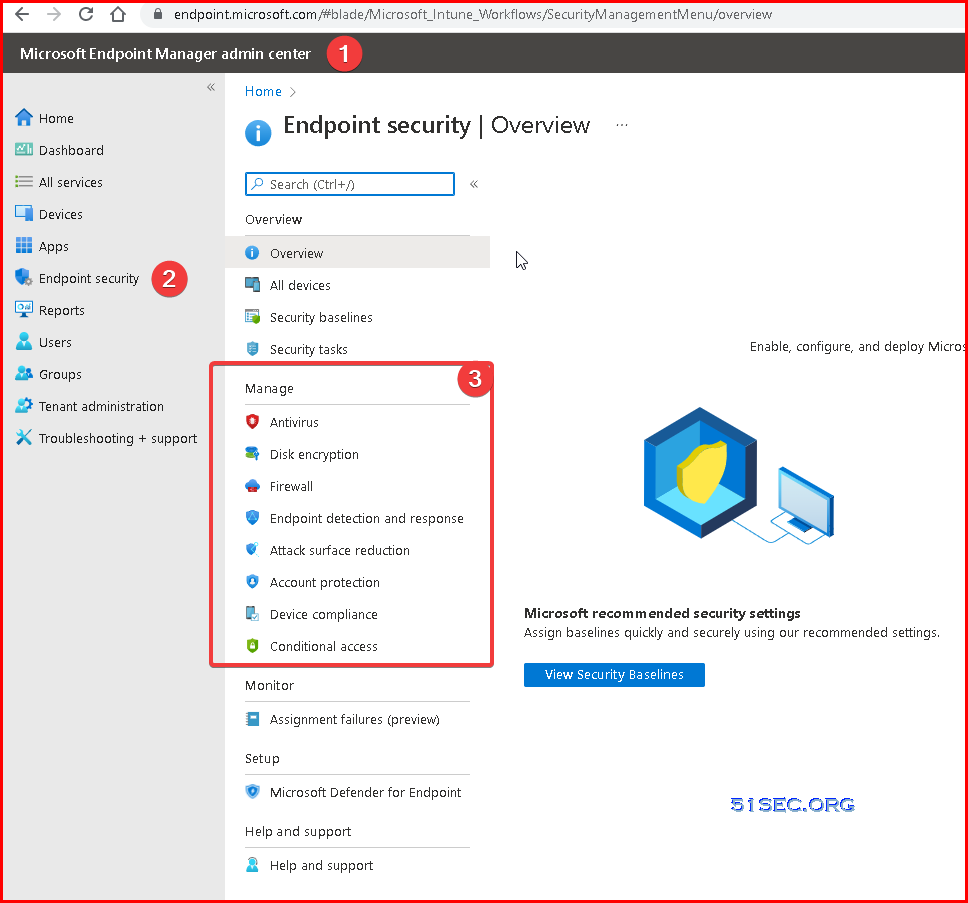
Define Defender Policies in Endpoint Manager (Intune)
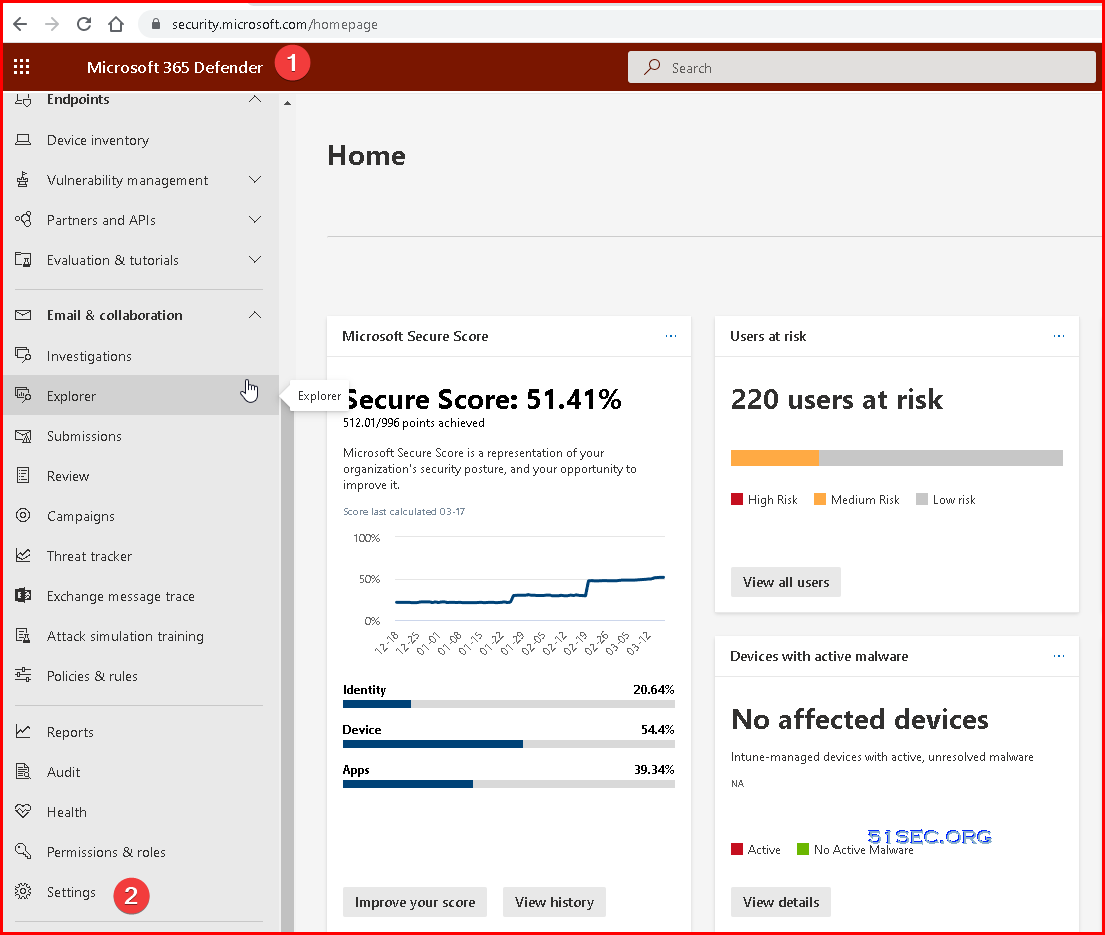
Create Notification Rules
Go to Microsoft 365 Defender - Settings - Endpoints
Click Email notifications - Alerts - Add items
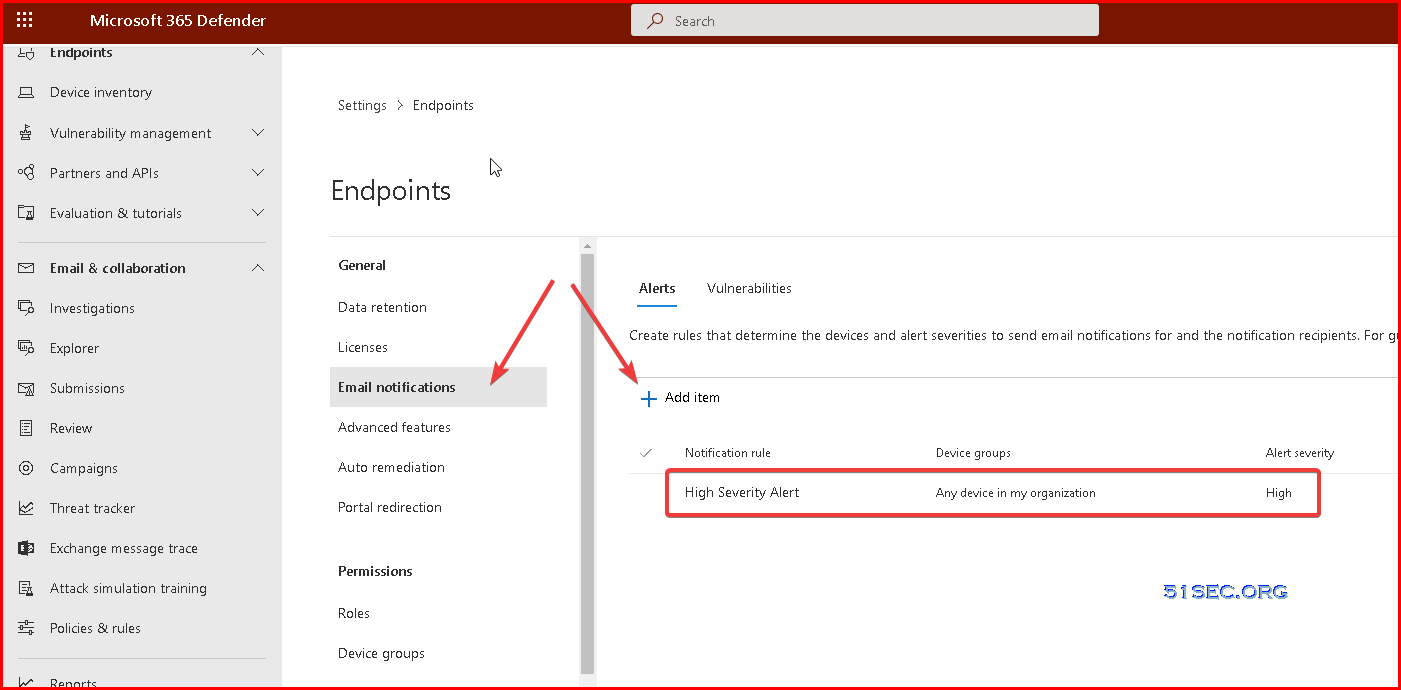
Also you can create a notification rule for critical/high vulnerability event:

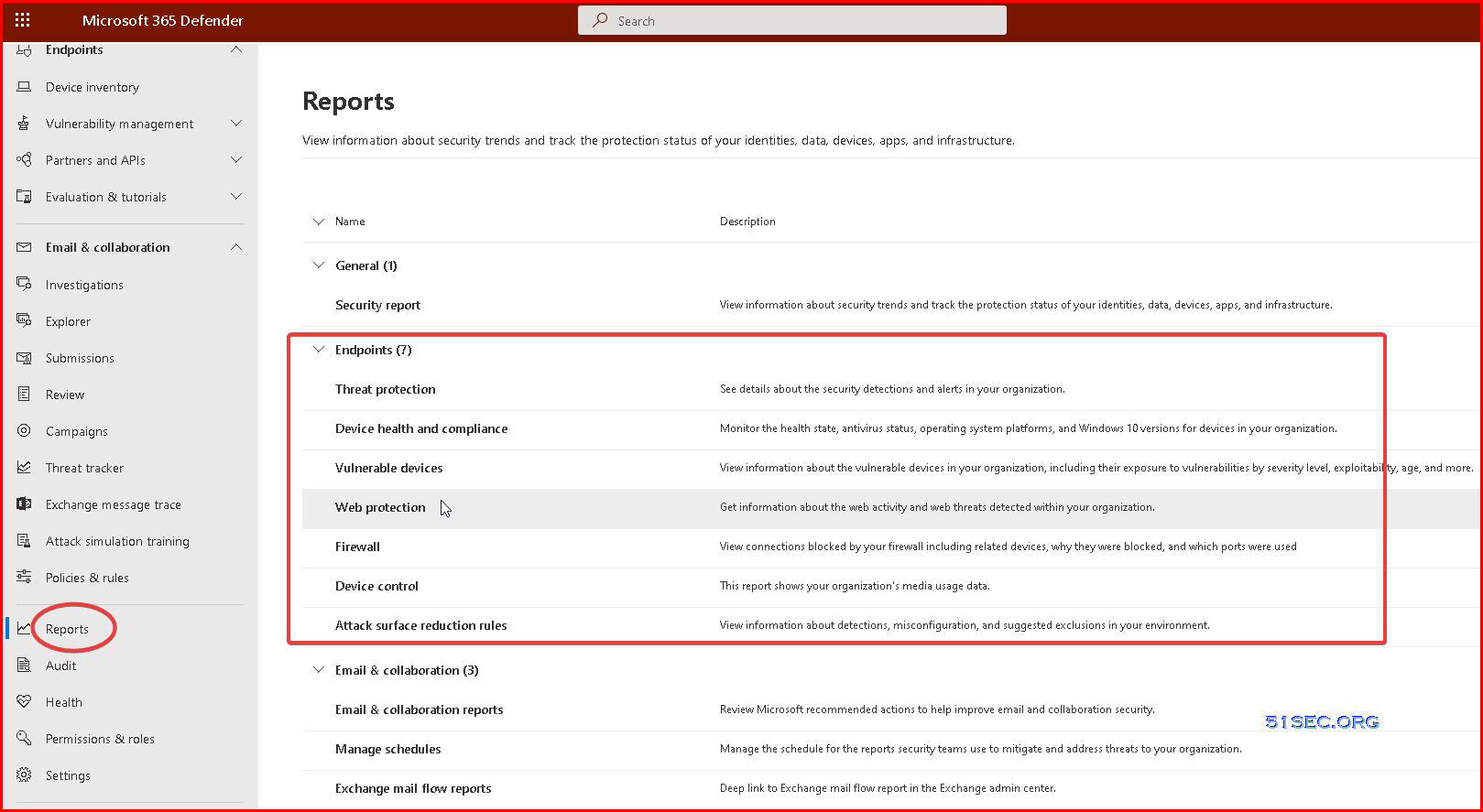
Reports
Take response actions
On a device
- Response actions on devices
- Manage tags
- Start an automated investigation
- Start a Live Response session
- Collect investigation package
- Run antivirus scan
- Restrict app execution
- Isolate devices from the network
- Consult a threat expert
- Check activity details in Action center
On a file
- Response actions on files
- Stop and quarantine files in your network
- Restore file from quarantine
- Add indicators to block or allow a file
- Consult a threat expert
- Check activity details in Action center
- Download or collect file
- Deep analysis
Training
Security Operations Fundamentals
Module 1. Technical overview
- Short overview “What is Microsoft 365 Defender"
-
Unified experiences across endpoint and email
- New value for ​Defender for Identity
- New value for Defender for Office 365
- XDR announcement blog

Module 2. Getting started
- Quick tutorial to get you started
- Starting the service
- Prepare your Azure Active Directory
- Manage access
- Provide your feedback

Module 3. Investigation – Incident
- Work with incidents
- Get email notifications on new incidents
- Improved incident queue
- Classification of incidents & alerts
- See how consolidated incidents improve SOC efficiency
- Protect your organization with Microsoft 365 Defender
- Incidents trend graph view
-
Responding to my first incident, a tutorial and walkthrough for new-to-role analysts
- Email Entity page

Module 4. Threat Analytics
Module 5. Advanced hunting
- Quick overview & a short tutorial that will get you started fast
- Learn the query language
- Understand the schema
Module 6. Self-healing
Module 7. Community (blogs, webinars, GitHub)

Module 8. Partner
> Ready for the Fundamentals Knowledge Check?
Security Operations Intermediate
Module 1. Architecture
Module 2. Investigation
- Correlating and consolidating attacks into incidents
- Investigate incidents
- Mapping attack chains from cloud to endpoint
- Prioritize incidents
- Manage incidents
- Investigation improvements for Microsoft Defender for Office 365
- Report false positives/negatives
Module 3. Advanced hunting
- Advanced hunting cheat sheet
- Microsoft Cloud App Security: The Hunt in a multi-stage incident
- Hunting with Microsoft Cloud App Security data
- Microsoft Cloud App Security: The Hunt for Insider Risk
- Limitless Advanced Hunting with Azure Data Explorer (ADX)
- Take action on advanced hunting query results
- Advanced Hunting in portal Schema Reference
- DeviceFromIP() function in advanced hunting
- Webinar series, episode 1: KQL fundamentals (MP4, YouTube)
- Advanced hunting query best practices
- Hunt across cloud app activities
- Use additional email data in your hunting queries
- Use Azure Active Directory audit log data in advanced hunting
- Hunt for Azure Active Directory sign-in events
- Advanced hunting queries on GitHub


Module 4. Automated investigation and remediation
Module 6. Self-healing
- Learn about the various AIR capabilities
- Self-healing explained based on an example
- Configure automated investigation and response capabilities
- Approve or reject pending actions
- Report a false positive/negative to Microsoft for analysis
- The action center
Module 5. Build your own lab
Module 7. Reporting
Module 8. Microsoft Threat Experts
> Ready for the Intermediate Knowledge Check?
Security Operations Expert
Module 1. Incidents
- Prioritize incidents
- Manage incidents
- Report false positives/negatives
- Deep-dive attack playbooks from the DART team for seasoned analysts
- Incident response overview
Module 2. Advanced hunting
- Webinar series, episode 2: Joins (MP4, YouTube)
- Webinar series, episode 3: Summarizing, pivoting, and visualizing Data (MP4, YouTube)
- Webinar series, episode 4: Let’s hunt! Applying KQL to incident tracking (MP4, YouTube)
- ⤴ Plural sight KQL training
Module 3. APIs, custom reports, SIEM & other integrations
- Microsoft 365 Defender APIs
- Best practices for leveraging API's - Episode Two
- Streaming API Announcement blog
- Overview of the Streaming API
- Stream Microsoft 365 Defender events
- Azure Sentinel and Microsoft 365 Defender incident integration
- Overview Azure Sentinel integration
- Azure Sentinel integration
> Ready for the Expert Knowledge Check?
Microsoft Learn learning paths
Use these Microsoft Learn learning paths and their modules to build an understanding of Microsoft 365 Defender and Microsoft Defender for Endpoint, one module and unit at a time.
-
Detect and respond to cyber attacks with Microsoft 365 Defender
-
Secure your organization with Microsoft Defender for Endpoint
References
via Blogger http://blog.51sec.org/2022/03/microsoft-defender-for-endpoint.html
March 23, 2022 at 01:47PM Security

 RSS Feed
