Info Security Memo
  • Blog
  • Sitemap
    • Categories
  • Contact
  • About
  • Resources
  • Tools
  • 51sec.org

Build Confidence

Focusing on Information Security 

Info Security Notes

Popular Website Dashboards to List Your Web Application

9/29/2021

0 Comments

 
Popular Website Dashboards to List Your Web Application
Recently, I spent quite a few time to look for an application which can provide me a list for organizing my personal web applications created in the cloud and at home. That is one of my reason I created my bookmark navigation website based a github project. It works great and I am using it to organize all of my bookmarks and website collections. If you have same thinking, please check out nav.51sec.org to find out more. But I need something simpler, less hierarchy levels, easy to deploy and easy to add and modify entries. I did find some of interesting one and I would like to show you some popular ones in this post.
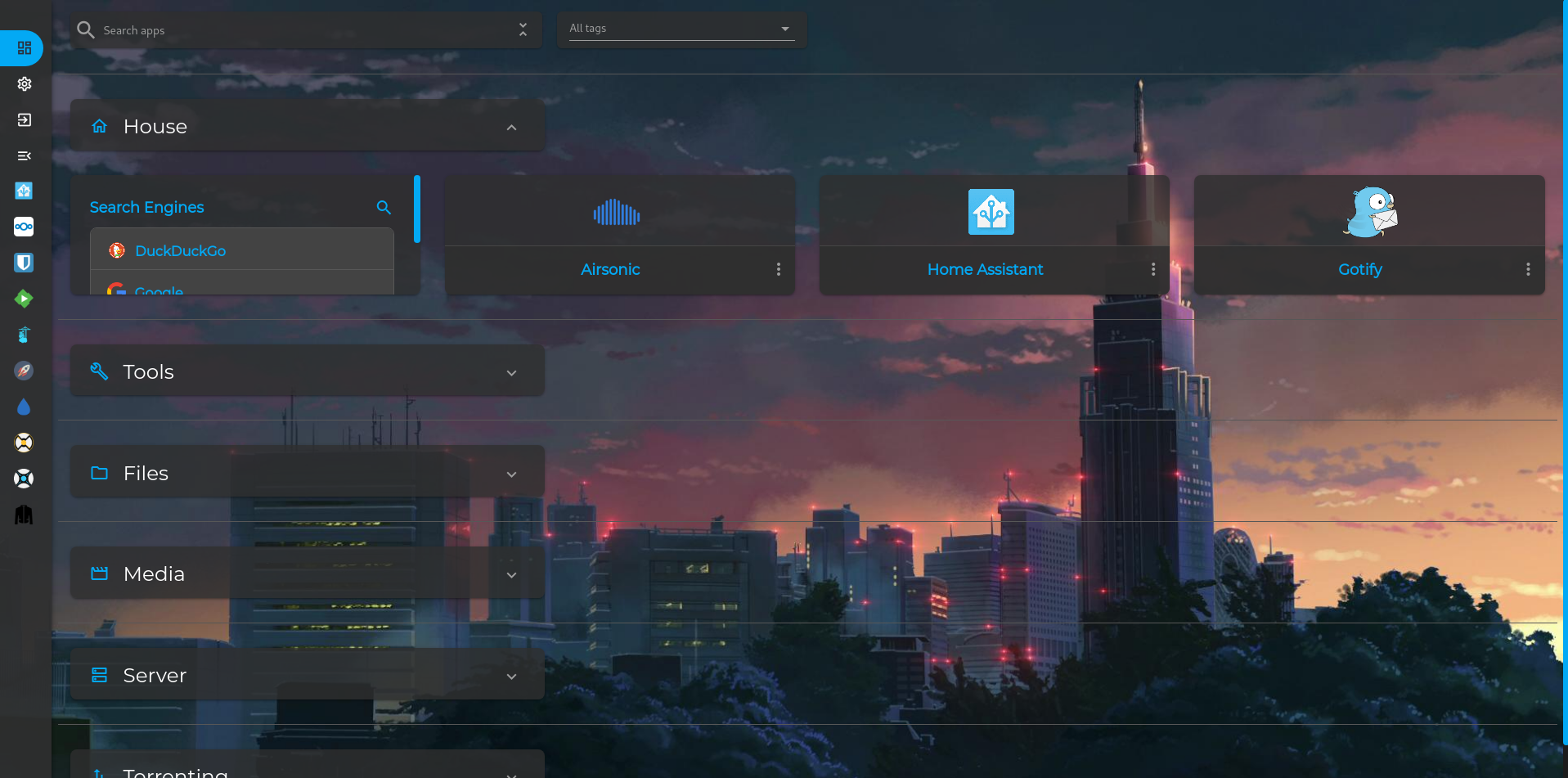
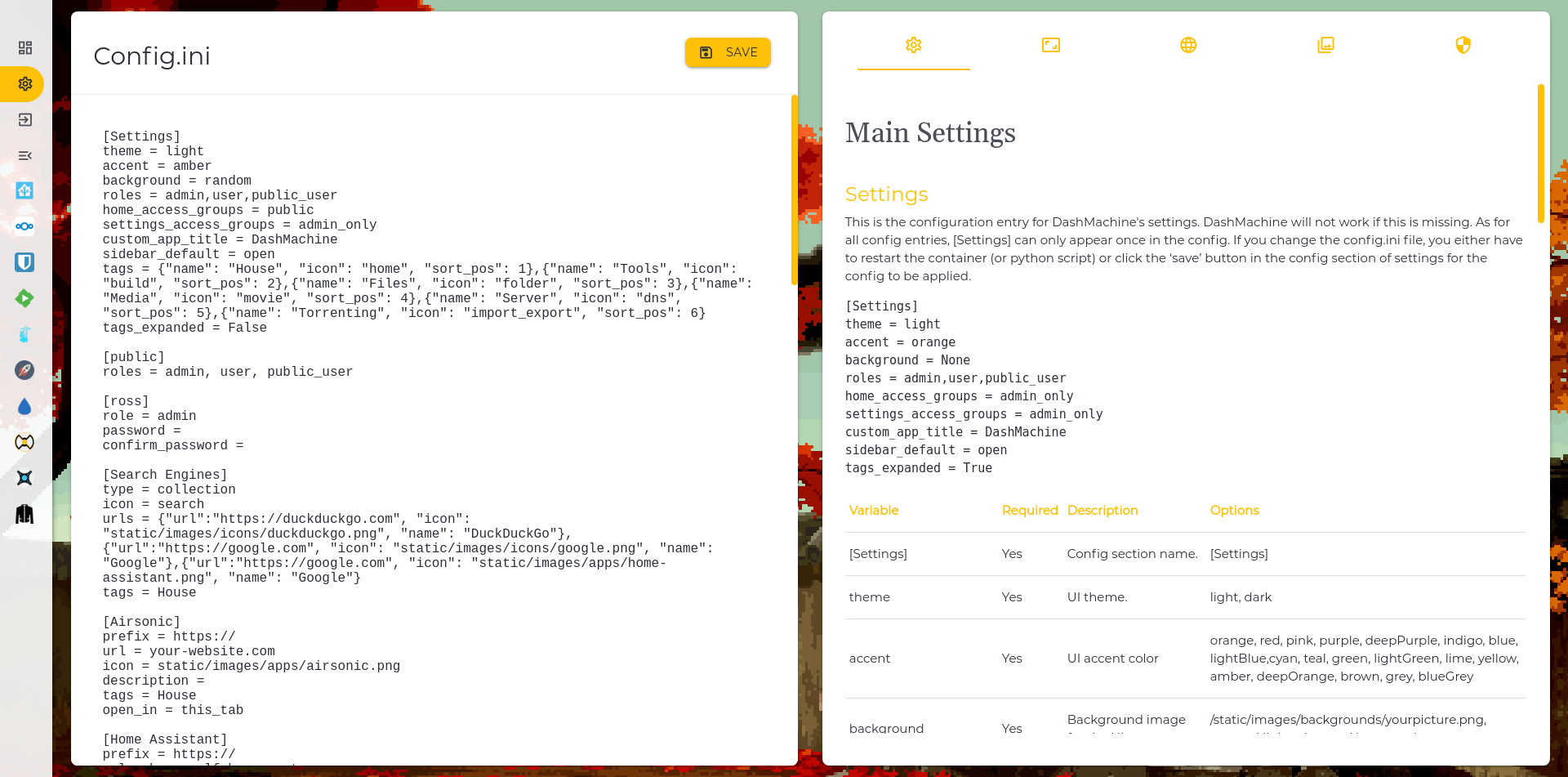
DashMachine

Github Page: https://ift.tt/304PtbN

Docker hub page: https://ift.tt/3CXMrYI


Features:

  • Access control system
  • Sidebar design
  • Powerful plugin to add source data
  • Multiple card types 
  • Single ini file to store configuration

Docker Run: (Not support Arm64 architecture)

docker run -d \
  --name=dashmachine \
  -p 5000:5000 \
  -v /data:/dashmachine/dashmachine/user_data \
  --restart unless-stopped \
  rmountjoy/dashmachine:latest

Default Username / Password : admin/admin

Configuration Page:


Heimdall

Heimdall Application Dashboard is a dashboard for all your web applications. 


Website: https://heimdall.site/
Github page:https://github.com/linuxserver/Heimdall
Docker hub page: https://hub.docker.com/r/linuxserver/heimdall/

Features:
  • Docker image supports arm64 architecture
  • Preadded foundation application icons
  • Enhanced application supports api
  • Easily add your own applications and bookmarks
  • Integrated with search engine such as Google, Bing, DuckDuckGo and more

Heimdall github repo page here.


docker run -d \
  --name=heimdall \
  -e PUID=1000 \
  -e PGID=1000 \
  -e TZ=America/Toronto \
  -p 5080:80 \
  -p 5443:443 \
  -v /data:/config \
  --restart unless-stopped \
  ghcr.io/linuxserver/heimdall


Homer

Github page: https://github.com/bastienwirtz/homer
Demo page: https://homer-demo.netlify.app/

Features: 
  • Simple YAML file to edit
  • Optional notice message
  • Create bookmark groups
  • Search bookmarks


docker run -d \
  --name=homer \
  -p 8888:8080 \
  -v /data:/www/assets \
  --restart=always \
  b4bz/homer:latest


YouTube:


CF-Worker-DIR

Github : https://ift.tt/3CWhNiC

Post: Build a Serverless Bookmark Website Use Cloudflare Worker

Features:

  • Serverless and super fast
  • Optional search bar
  • Auto fetch favicon
  • Group for links
  • Configuration and Data are stored in text based script.


References

  • 5 Personal Dashboards to Organize your Home Network


via Blogger https://ift.tt/2Y97V6g
September 29, 2021 at 09:29AM Cloud
0 Comments

Easy and Simple Ways to Use Github Project Dockers to Create Your Own Web Applications Dashboard

9/29/2021

0 Comments

 
This video shows a couple of nice projects found from Github which is able to use Docker to create your own dashboard to organize your Web Applications and links. Three popular dashboard projects introduced in this video, includes : DashMachine, HeimDall and Homer. All of them can be deployed by a docker image. HeimDall and Homer are supporting Arm64 architecture machines. Github Pages for those Dashboards: ⚡https://ift.tt/304PtbN ⚡https://ift.tt/2EghzVn ⚡https://ift.tt/37htDn0 Related videos: ?Only Needs One Free Github Account to Create Your Bookmark Navigation Website: https://youtu.be/NxRmZgVWP9k ?Create a Free Docker Based Bookmark Navigation Website Under Your Own Free Domain: https://youtu.be/SxtUfoxc0B8 Related resources: ✅ For how to Get Two Free and Permanent VPS from Oracle Cloud Platform : https://youtu.be/E9dHA3NBbN8 ✅ For how to install docker, portainer, check these videos: https://youtu.be/XIIvPNCng18, https://youtu.be/id4_lGAWAsg, https://youtu.be/YKH2RwHqOck ✅ For free domain from pp.ua: https://youtu.be/zrhxb8swVGM or free domain from eu.org: https://youtu.be/V1xnhqqg4Rw Related post: ✍https://ift.tt/2WlqlQe ==================================================================== If you found this video has some useful information✍, please give me a thumb up ✅ and subscribe this channel ?to get more updates?: ⚡https://www.youtube.com/c/Netsec?sub_confirmation=1 ⚡Resource Collection and Bookmarks: https://nav.51sec.org/ Learning and Sharing - 海内存知己,天涯若比邻 - ⚡http://51sec.org ?

Watch video on YouTube here: https://youtu.be/xahWruWoxZM by Johnny Netsec
0 Comments

Self Hosting URL Shortening Service Using Cloudflare Workers

9/24/2021

0 Comments

 
It is quite easy to create your own url shorten service, no need to have own server, vps, or storage. All will be in cloud. In this video, you will see how I created my own url shorten service using Cloudflare workers. Details can be found at Github: go.51sec.org/pZD8s8 You might need your own domain or you can use following tutorials to get your own free domains: ⚡Get Free PP UA Domain and Integrated with CloudFlare - https://youtu.be/zrhxb8swVGM ⚡Get Free Subdomain from EU.ORG & Integrate with Cloudflare - https://youtu.be/V1xnhqqg4Rw ==================================================================== If you found this video has some useful information✍, please give me a thumb up ✅ and subscribe this channel ?to get more updates?: ⚡https://www.youtube.com/c/Netsec?sub_confirmation=1 ⚡Resource Collection and Bookmarks: https://nav.51sec.org/ Learning and Sharing - 海内存知己,天涯若比邻 - ⚡http://51sec.org ?

Watch video on YouTube here: https://youtu.be/5Iyke-Lwt24 by Johnny Netsec
0 Comments

Thycotic Privilege Manager Basic Policies

9/23/2021

0 Comments

 
Thycotic Privilege Manager Basic Policies

Privilege Manager’s toolset is two-fold. First, Local Security discovers all accounts that exist on endpoints and allows Privilege Manager Administrators to control the exact membership of every local group. This will ensure the correct admin and root accounts are permanently set. Additionally, credentials will be controlled by enforcing password rotation on those accounts.

Second, Application Control allows Privilege Manager administrators to manage application activity on endpoint machines. Applications that require admin rights or root access can be automatically elevated, allowed applications are allow listed, and malicious applications are blocked.

Every implementation looks different when configuring Privilege Manager to work best for your organization. This post is to summarize some of examples to set up right policies in Privilege Manager application. 

Related Post:

  • Thycotic Endpoint Privilege Manager Server and Agent Installation 


Best Practices

The following topics are available:

  • Disaster Recovery
  • Active Directory Import
  • Using a Service Account to run the IIS App pool
  • Prevent Read and Write Access to File Types or Locations
  • Securing the IIS Server
  • Updating to higher security algorithms

Notes:

Privilege Manager local accounts should be managed by Thycotic Secret Server.

License expired, the existing policies and new created policies will still wor, but not events.


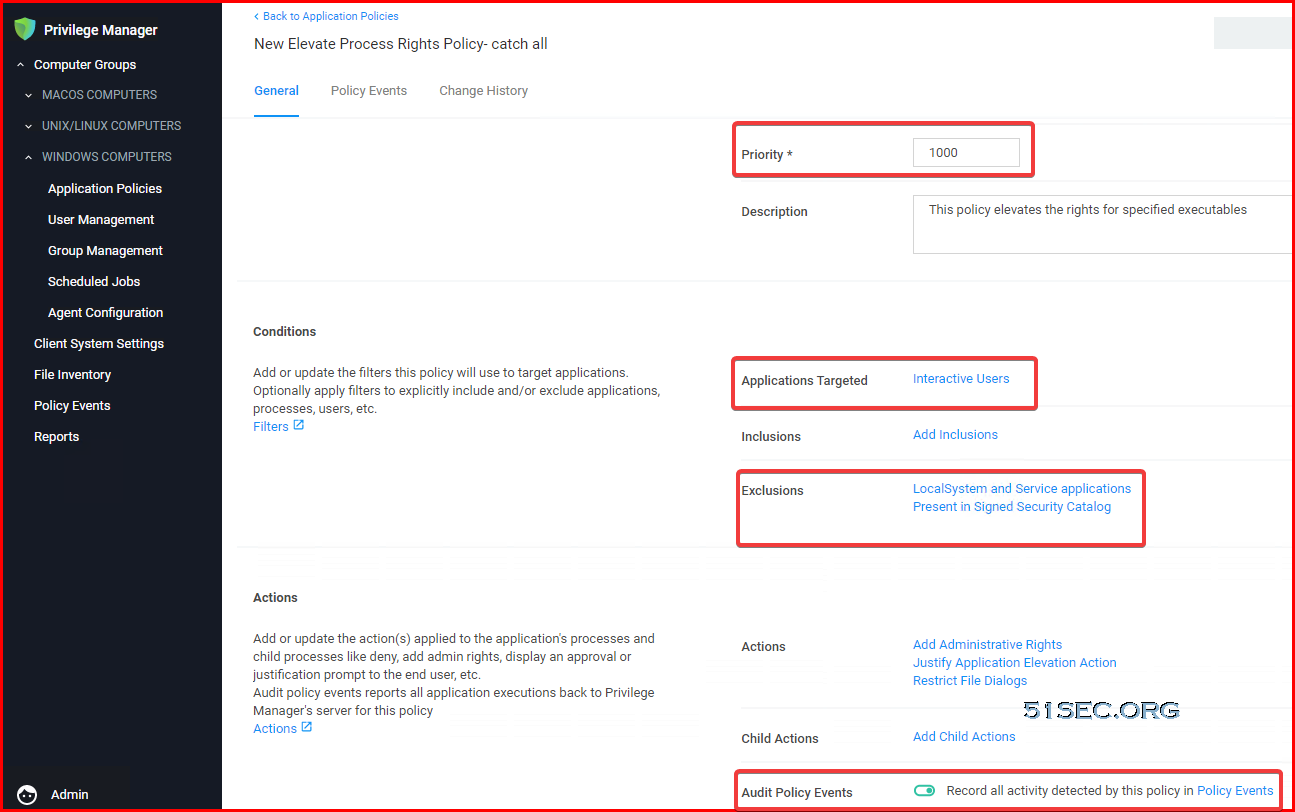
Catch All Policy 

1. Monitoring policy
2. Priority set to 1000
3. Application Targeted : Interactive Users
4. Exclusion:
    LocalSystem and Service applications
    Present in Signed Security Catalog
5. Audit Policy Events : Enabled


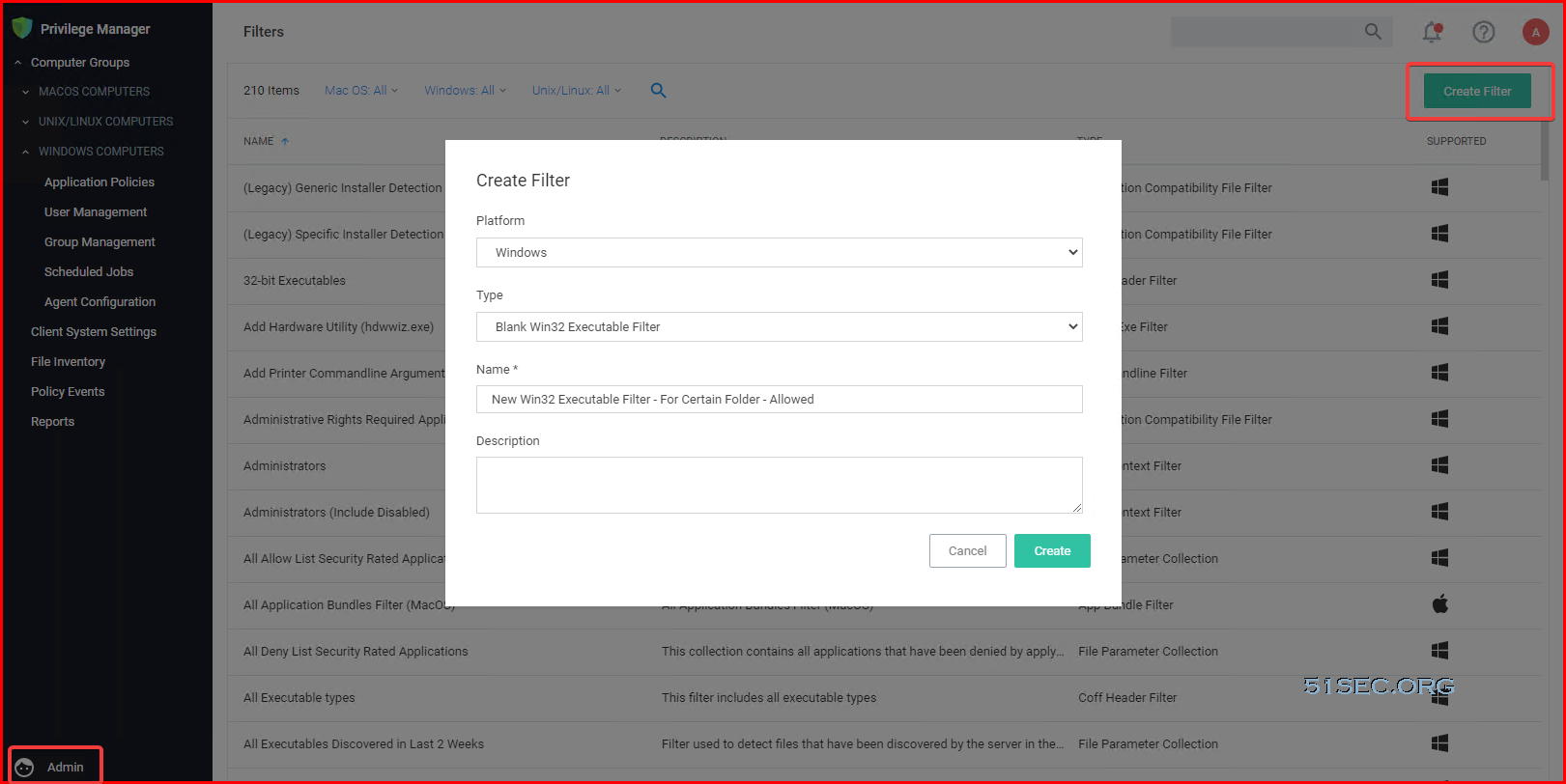
Custom Filter for Allowed Folder / Applications

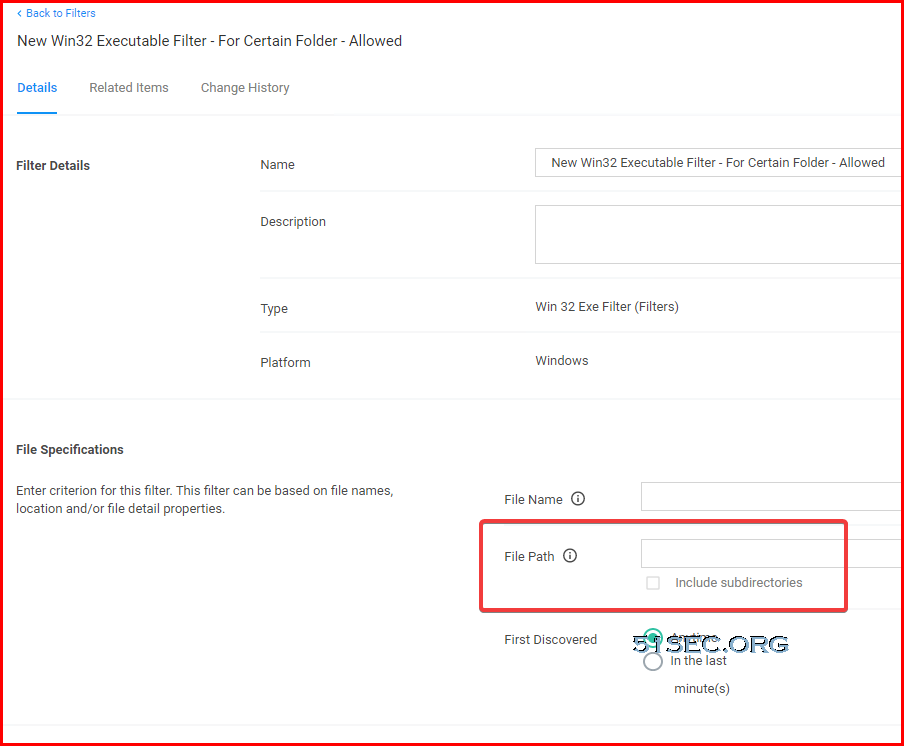
To allow any application in certain folder to run, it requires to create a custom filter:


Enter folder location:

Then create an Allow policy:

  • Setting up priority
  • Change it to active
  • Enable Auditing.


Set up Target Groups for your Policy


References

  • Best Practices


via Blogger https://ift.tt/39w8SHV
September 23, 2021 at 08:10AM Thycotic
0 Comments

Install CloudReady on HP ThinClient T620 to Improve Old Computer's Performance

9/19/2021

0 Comments

 
How can we re-use our old computers? Installing CloudReady is one of methods we can try. Home edition is free to use. In this video, I will show you how to download, make USB disk and boot it to get an old ThinClinet PC become a ChomeOS like computer. Related videos: ⚡Using Ventoy to Make a Bootable USB to Install Windows 11 - https://youtu.be/0iFhMrDvYpY ⚡Install Win10 Enterprise 2019 LTSC - https://youtu.be/InQSctNGcT0 ⚡Run Knoppix Linux From USB Drive - https://youtu.be/S11OAYlMRfk ⚡Run Puppy Linux From USB Drive - https://youtu.be/VxBJ3iqrLZo ⚡Install Win10 / Win7 x64 on HP Thinclient T620 - https://youtu.be/bw_IroEdaCY ⚡Install Windows 7 x86 on HP ThinClient T620 - https://youtu.be/fqC_KeRSRfc ⚡HP ThinClient T620 Hard Drive and Memory Replacement - https://youtu.be/sm1tF-2mxdI T620 Playlist: ✅https://www.youtube.com/playlist?list=PLg7bL1bMpwPVAOPzgt1wMfSQS-8MPinmc ==================================================================== If you found this video has some useful information✍, please give me a thumb up ✅ and subscribe this channel ?to get more updates?: ⚡https://www.youtube.com/c/Netsec?sub_confirmation=1 Resource Collection and Bookmarks: ⚡https://nav.51sec.org/ Learning and Sharing - 海内存知己,天涯若比邻 - ⚡http://51sec.org ?

Watch video on YouTube here: https://youtu.be/c2f9yglkink by Johnny Netsec
0 Comments

Enable IPv6 for Oracle Cloud Infrastructure and Assign it to CentOS Instance

9/16/2021

0 Comments

 
This video shows how to enable IPv6 in your Oracle Cloud Infrastructure. It also shows how to assign an IPv6 address to your existing CentOS instance since it will not automatically fetch the assigned IPv6 address. But Ubuntu instance will get those assigned address automatically. Related ipv6 Videos: ⚡Enable IPv6 for Oracle Cloud Infrastructure and Assign to CentOS Instance - https://youtu.be/yxm3Bn7uHyw ⚡Configure IPv6 for AWS EC2 Instance- https://youtu.be/N4S6UjR6gUY ⚡Access IPv6 Only Website from IPv4 Machine - https://youtu.be/IvJ6_vre3Qg ⚡Configure IPv6 Only VPS to Access IPv4 Internet - https://youtu.be/hVnWhlxliIg Related Posts: ✍,https://ift.tt/3AgnWVK ==================================================================== If you found this video has some useful information✍, please give me a thumb up ✅ and subscribe this channel ?to get more updates?: ⚡https://www.youtube.com/c/Netsec?sub_confirmation=1 ⚡Resource Collection and Bookmarks: https://nav.51sec.org/ Learning and Sharing - 海内存知己,天涯若比邻 - ⚡http://51sec.org ?

Watch video on YouTube here: https://youtu.be/yxm3Bn7uHyw by Johnny Netsec
0 Comments

Kasm Workspaces Introduction and Installation

9/12/2021

0 Comments

 
In this video, I introduced Kasm workspaces solution and showed how to install it into your cloud Linux virtual machine. Kasm workspaces can stream containerized apps and desktops to end-users in browsers. It provides free community version to install on your own hosts. One 4G ram and 2 vCPU Virtual machine with 30GB hard drive is enough for you to run for a quick testing. Related Videos: ⚡Install Virtual Browser n.eko in Cloud Docker (A Github Project - Neko) - https://youtu.be/ISunHDh7WyQ ⚡Install Ubuntu Desktop Docker Using Portainer and Access it From Browser (VNC/noVNC) - https://studio.youtube.com/video/Y43FWu50BEE/edit ⚡Install / Configure VNC Server and XFCE GUI on CentOS7 - https://youtu.be/NLH-v-95tSY ==================================================================== If you found this video has some useful information✍, please give me a thumb up ✅ and subscribe this channel ?to get more updates?: ⚡https://www.youtube.com/c/Netsec?sub_confirmation=1 ⚡Resource Collection and Bookmarks: https://nav.51sec.org/ Learning and Sharing - 海内存知己,天涯若比邻 - ⚡http://51sec.org ?

Watch video on YouTube here: https://youtu.be/WuUh6y7IMec by Johnny Netsec
0 Comments

Using Portainer To Install Acunetix Web Vulnerability Scanner Docker

9/8/2021

0 Comments

 
This video is to show how to use portainer to create a AWVS container using docker hub's image (secfa/docker-awvs). The system requirement for installing AWVS container is minimum. I am using a GCP free tier instance as an example in this video, which has 1G Ram and 2vCPU (Burst). The container is running well in this docker deployment. Previous video: ⚡Install and Configure Automated Web Application Security Testing Tool (Acunetix) in Windows - https://youtu.be/vZ-RUq5YWIs ==================================================================== If you found this video has some useful information✍, please give me a thumb up ✅ and subscribe this channel ?to get more updates?: ⚡https://www.youtube.com/c/Netsec?sub_confirmation=1 ⚡Resource Collection and Bookmarks: https://nav.51sec.org/ Learning and Sharing - 海内存知己,天涯若比邻 - ⚡http://51sec.org ?

Watch video on YouTube here: https://youtu.be/M6i0yHN-3xg by Johnny Netsec
0 Comments

Enable IPv6 on Oracle Cloud Infrastructure

9/7/2021

0 Comments

 
Enable IPv6 on Oracle Cloud Infrastructure

On April 15, 2021, Oracle blog announced "We’re pleased to announce that you can now configure IPv6 in Oracle Cloud Infrastructure (OCI)."

One year ago, Azure has announced "IPv6 for Azure Virtual Network is now generally available"

On March 2017, Google Cloud Platform also started supporting IPv6 in a different way based on this post, although it is still not at VPS level. Here is a guide how to do it. .

" Google Cloud supports IPv6 clients with HTTP(S) Load Balancing, SSL Proxy Load Balancing, and TCP Proxy Load Balancing. The load balancer accepts IPv6 connections from your users, and then proxies those connections to your backends.". 

On Dec 1, 2016, AWS already Announced " Internet Protocol Version 6 (IPv6) support for EC2 instances in Amazon Virtual Private Cloud (VPC)"

In this post, I am going to walk you through all steps needed to enable your IPv6 on Oracle Cloud environment and how to assign IPV6 address to your VPS.


Enable IPv6

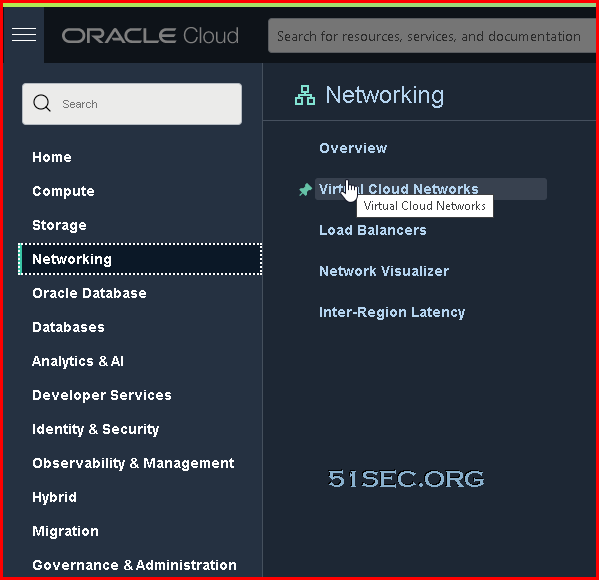
1. Log into your Oracle Cloud account. Choose networking -> Virtual Cloud Networks 


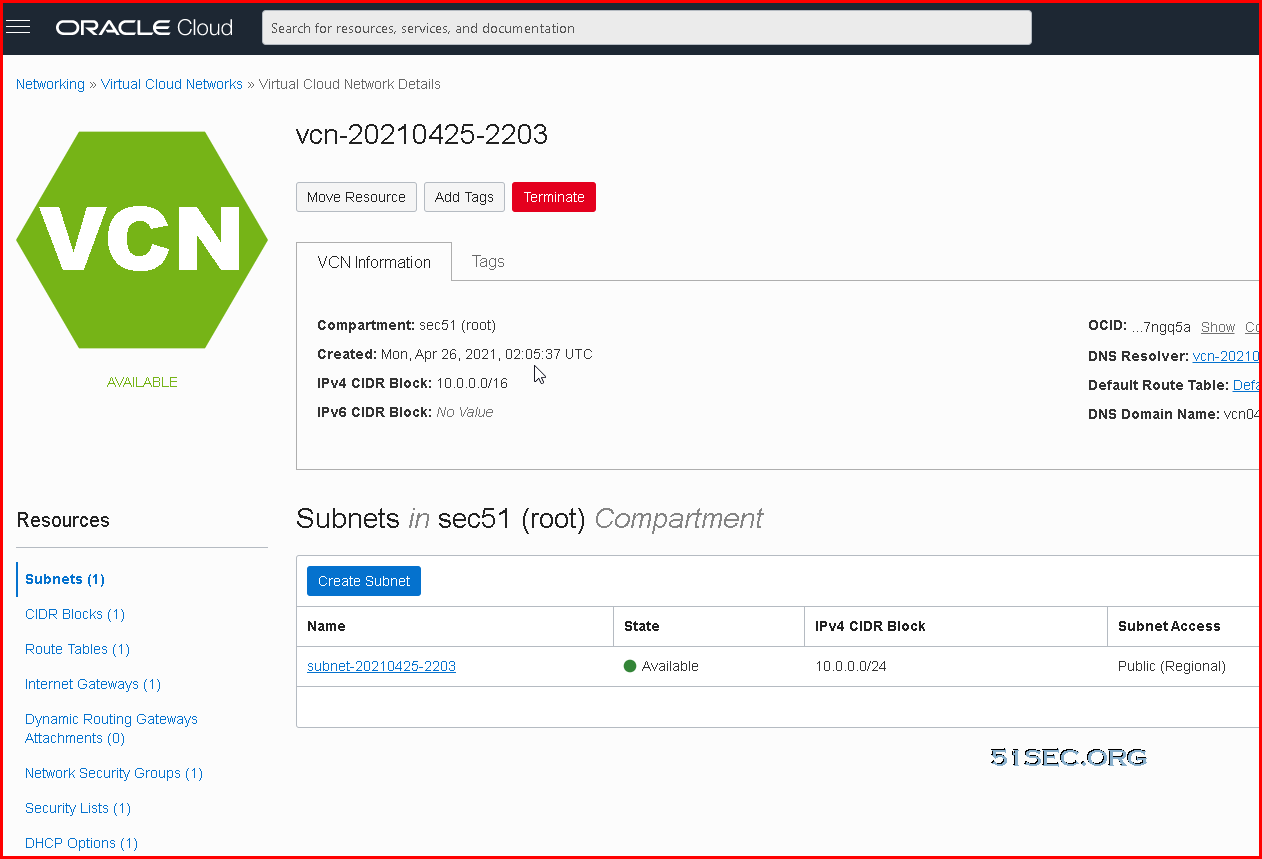
2. Find out your existing VCN (Virtal Cloud Networks), Click it.

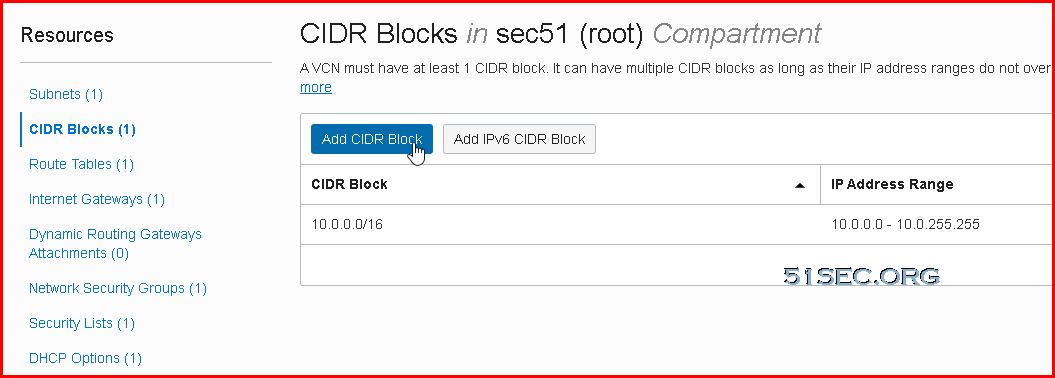
3. You should land on VCN's Subnets page as show below:


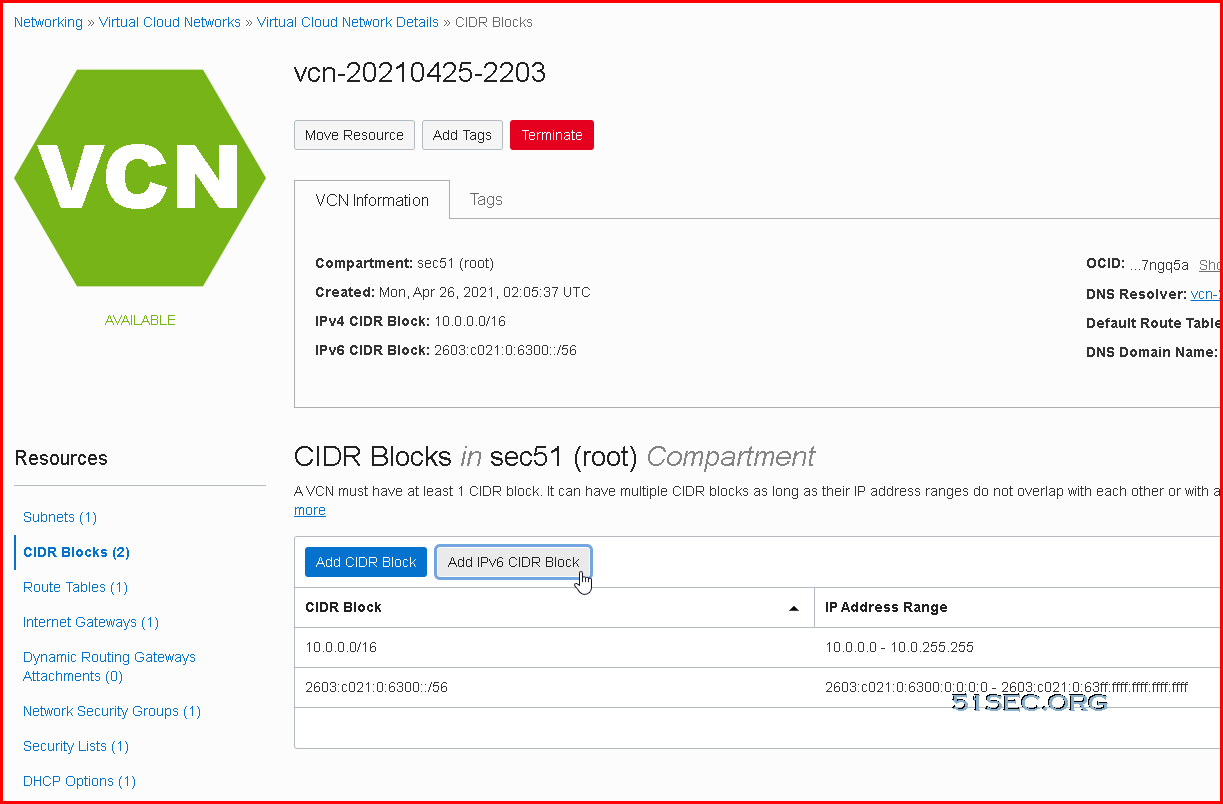
4. Change to CIDR Blocks page , then click Add IPv6 CIDR Block button to add a new IPv6 block in. 


You will get a pop up window to confirm you want to enable ipv6. Click Confirm to continue.

5. After you confirmed to enable ipv6 support, a new ipv6 segment (/56 block) will be assigned to you.


Create IPv6 Subnet

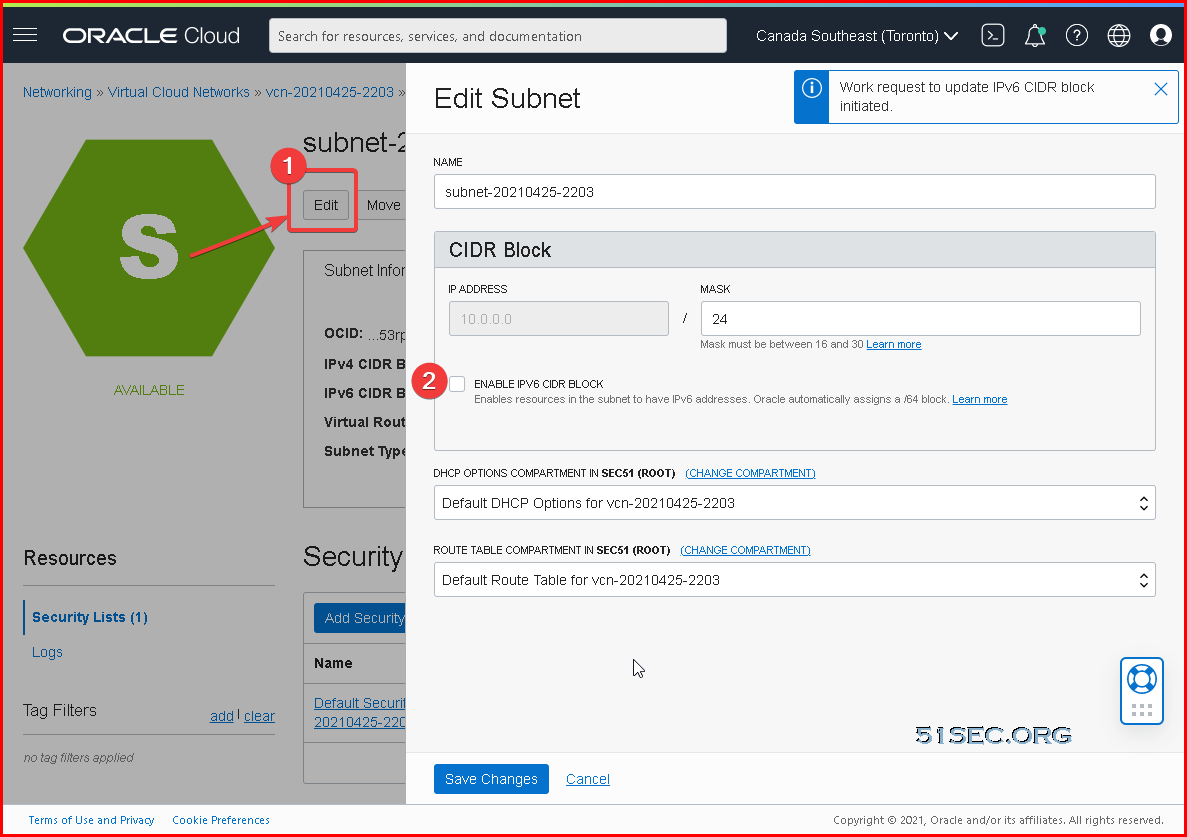
1.Click the existing subnet for Resources panel's Subnets page:

2. Click edit button then check "Enable IPv6 CIDR Block"

3. Enter a new HEX character between 00-FF to assign a /64 subnet from a block /56. 


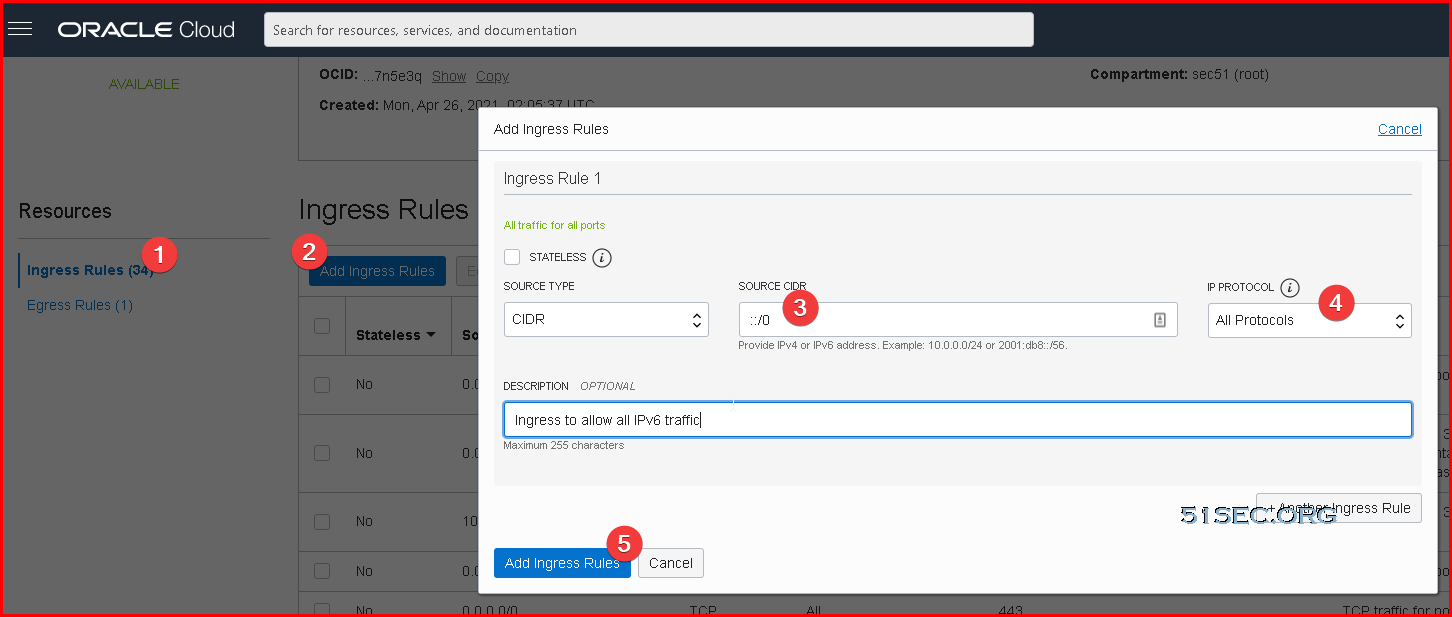
Create Security Rules for Ingress and Egress IPv6 Traffic

Ingress rule for all IPv6 Traffic:


Egress rule for all IPv6 Traffic


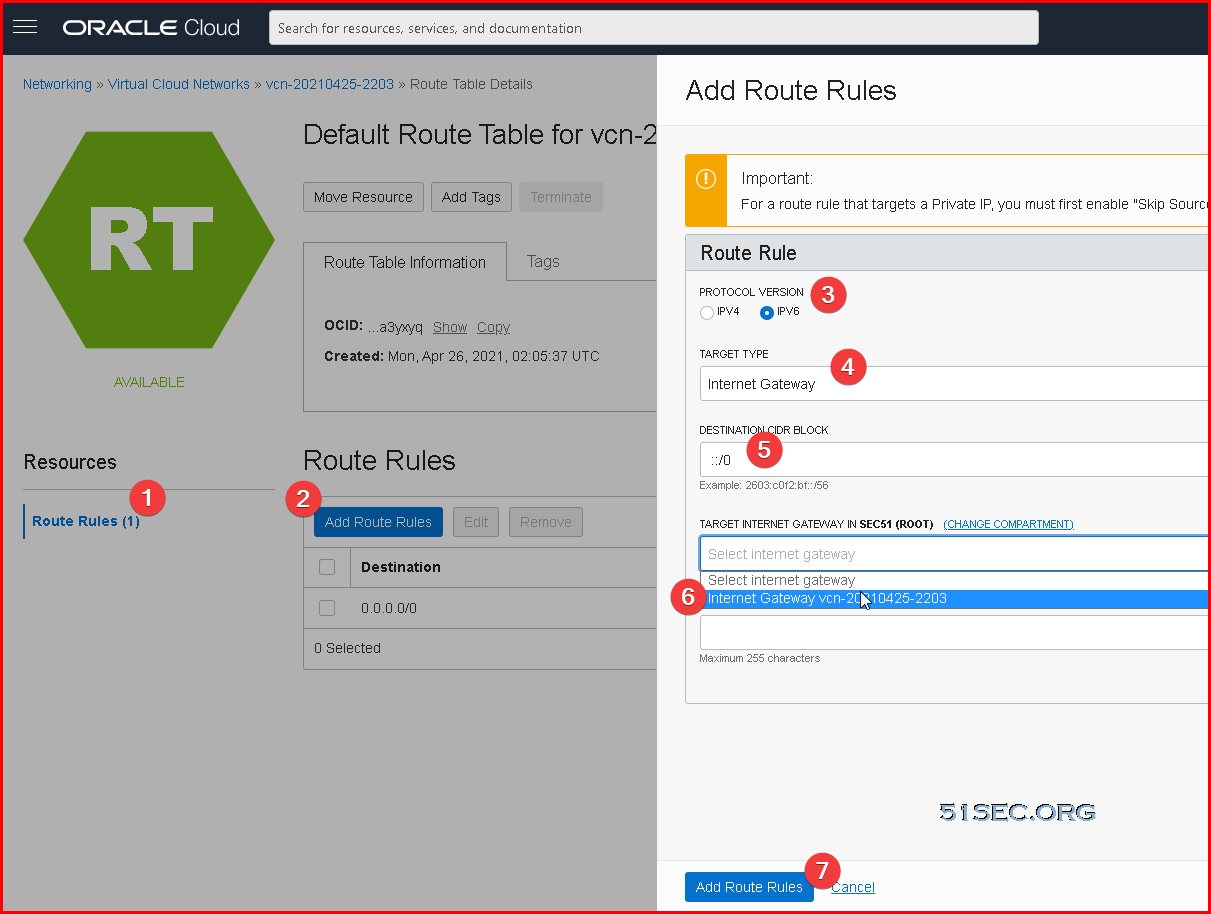
Default IPv6 Route

In your Route Rules, there is already one IPv4 default route in place. 

We will also need to add a default IPv6 route in. The option is same concept as your ipv4 default route.

Since it is for all ipv6 traffic, destination CIDR block is ::/0. 


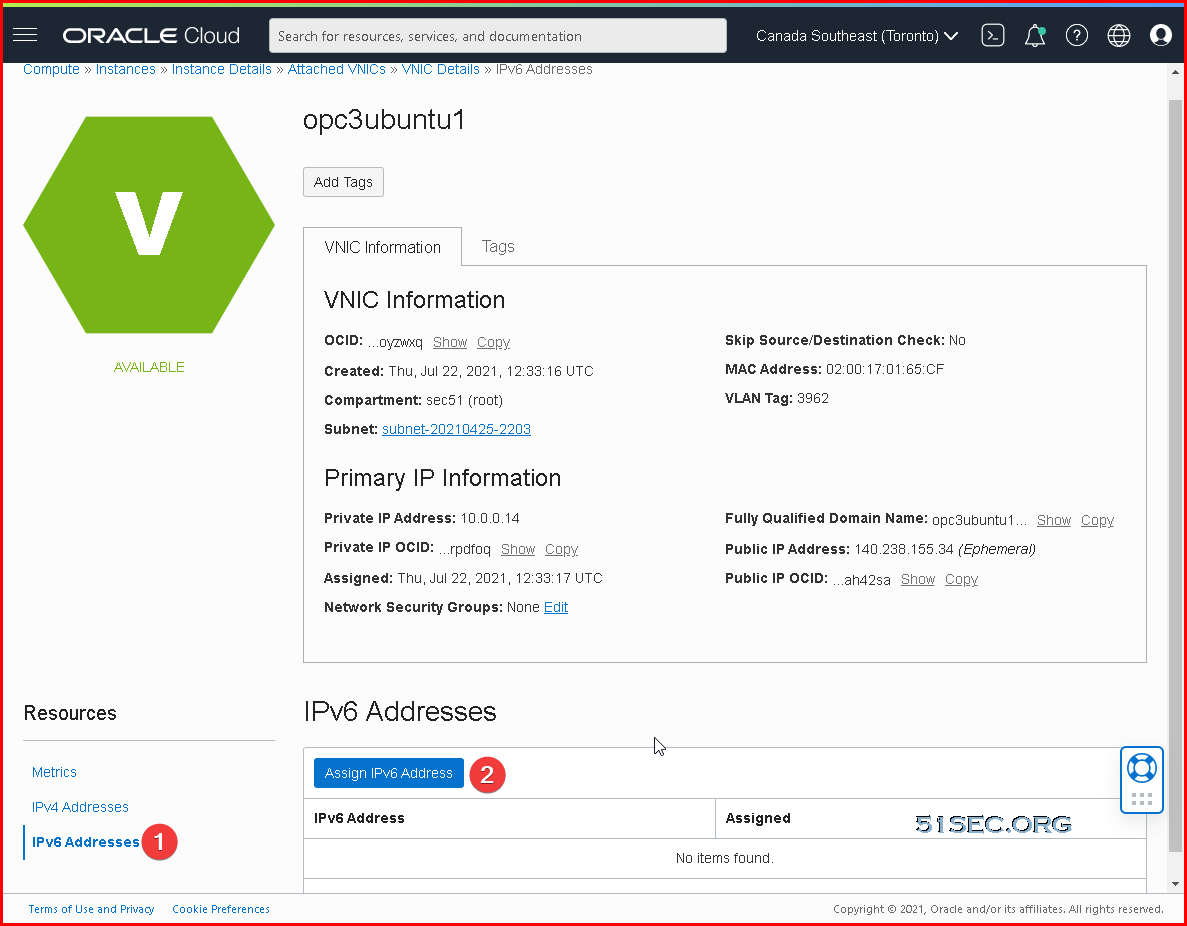
Assign An IPv6 Address to your instance

Go to you instance's configuration page, which you will find Resources panel at the left of page.
Click Attached VNICs, then choose existing VNIC to click. 

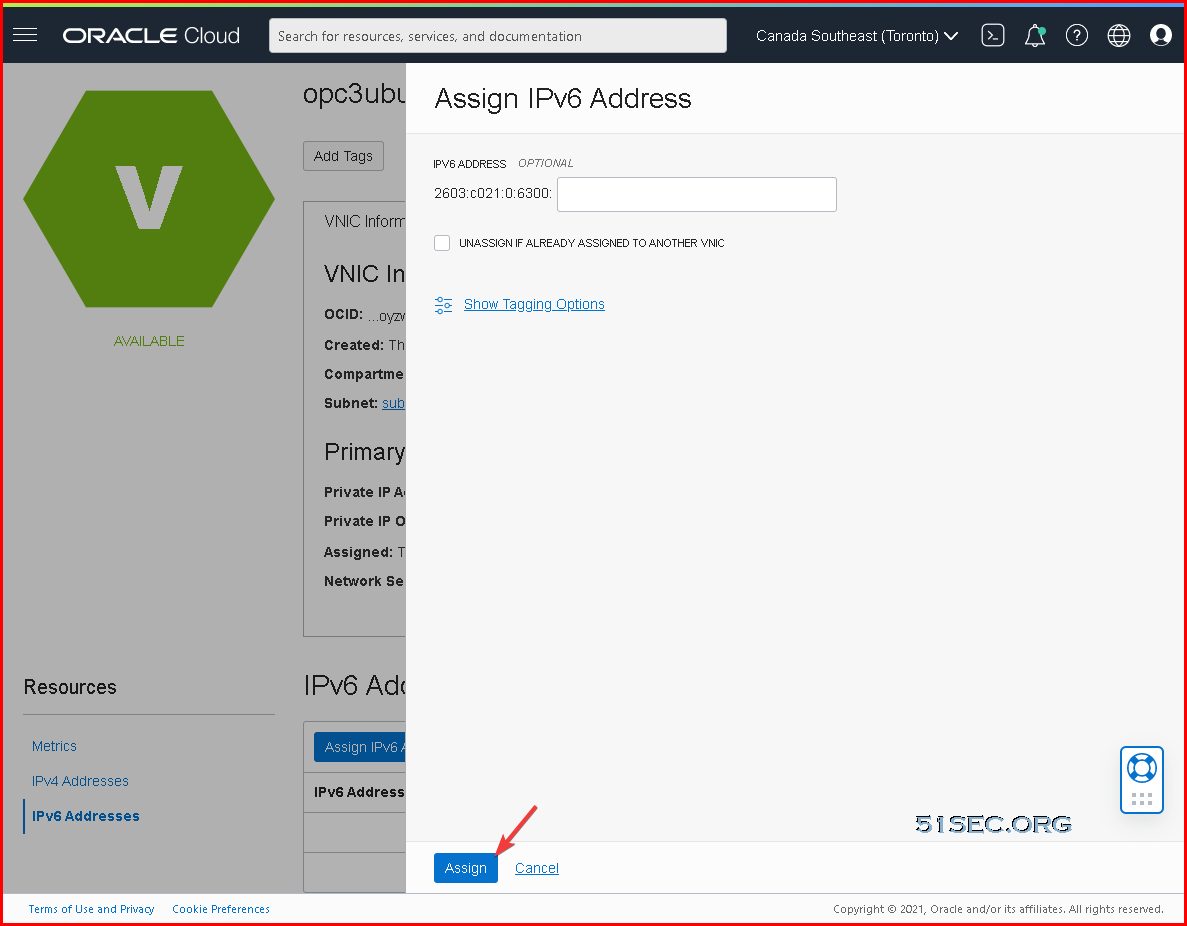
You can assign a new ipv6 or randomly let OCI assign one for you without entering anything, just click Assign button:


After a couple of seconds, one IPv6 address will be assigned to your VNIC. 


Acquire This IPv6 Address From Your VPS

Last step is to fetch this ipv6 address by your VPS's OS.

For CentOS:

Restarting networking will not work. We can using following command:

① Fetch IPv6(Oracle Cloud CentOS default network card name is ens3)

1
dhclient -6 ens3


②Check if fetched IPv6 address

1
ip add


③Test your IPv6 address

1
ping6 google.com


④Add Fetch IPv6 Command into Startup 

After CentOS restarted, IPv6 will not be fetched again. We will let rc.local this automatic boot process to start fetching IP address command.

1
2
chmod +x /etc/rc.d/rc.local
echo "dhclient -6 ens3" >> /etc/rc.d/rc.local


For Ubuntu:

IPv6 address will be automatically fetched by network card ens3:


root@opc3ubuntu1:~# ip a
1: lo: <LOOPBACK,UP,LOWER_UP> mtu 65536 qdisc noqueue state UNKNOWN group default qlen 1000
    link/loopback 00:00:00:00:00:00 brd 00:00:00:00:00:00
    inet 127.0.0.1/8 scope host lo
       valid_lft forever preferred_lft forever
    inet6 ::1/128 scope host
       valid_lft forever preferred_lft forever
2: ens3: <BROADCAST,MULTICAST,UP,LOWER_UP> mtu 9000 qdisc pfifo_fast state UP group default qlen 1000
    link/ether 02:00:17:01:65:cf brd ff:ff:ff:ff:ff:ff
    altname enp0s3
    inet 10.0.0.14/24 brd 10.0.0.255 scope global ens3
       valid_lft forever preferred_lft forever
    inet6 2603:c021:0:6300:728f:b425:2843:b9b2/128 scope global dynamic noprefixroute
       valid_lft 7164sec preferred_lft 6864sec
    inet6 fe80::17ff:fe01:65cf/64 scope link
       valid_lft forever preferred_lft forever


References

  • 甲骨文云(Oracle Cloud)免费服务器开启 IPv6


via Blogger https://ift.tt/3jNVp42
September 07, 2021 at 11:13AM Cloud
0 Comments

Disable Windows 11 Update By Windows Update Blocker

9/5/2021

0 Comments

 
Windows 11 update caused an issue on taskbar on Sep 2 and it was identified by Microsoft it was caused by server-side deployment that went out to insiders. This video shows an easy way to use an application Windows Update Blocker to disable Windows Update related services. Related video: ⚡Completely Disable Windows 10 Update Services - https://youtu.be/NGOvZhMqDf8 ==================================================================== If you found this video has some useful information✍, please give me a thumb up ✅ and subscribe this channel ?to get more updates?: ⚡https://www.youtube.com/c/Netsec?sub_confirmation=1 ⚡Resource Collection and Bookmarks: https://nav.51sec.org/ Learning and Sharing - 海内存知己,天涯若比邻 - ⚡http://51sec.org ?

Watch video on YouTube here: https://youtu.be/9hwGCOMum04 by Johnny Netsec
0 Comments
<<Previous

    Categories

    All
    Architecture
    Blog
    Checkpoint
    Cisco
    Cloud
    CyberArk
    F5
    Fortigate
    Guardium
    Juniper
    Linux
    Network
    Others
    Palo Alto
    Qualys
    Raspberry Pi
    Security
    SIEM
    Software
    Vmware
    VPN
    Wireless

    Archives

    March 2024
    February 2024
    January 2024
    December 2023
    November 2023
    October 2023
    September 2023
    August 2023
    July 2023
    June 2023
    May 2023
    April 2023
    March 2023
    February 2023
    January 2023
    December 2022
    November 2022
    October 2022
    September 2022
    August 2022
    July 2022
    June 2022
    May 2022
    April 2022
    March 2022
    February 2022
    January 2022
    December 2021
    November 2021
    October 2021
    September 2021
    August 2021
    July 2021
    June 2021
    May 2021
    April 2021
    March 2021
    February 2021
    January 2021
    December 2020
    November 2020
    October 2020
    September 2020
    August 2020
    July 2020
    October 2019
    September 2019
    June 2019
    July 2018
    May 2018
    December 2017
    August 2017
    April 2017
    March 2017
    January 2017
    December 2016
    November 2016
    October 2016
    September 2016
    August 2016
    July 2016
    June 2016
    May 2016
    April 2016
    March 2016
    February 2016
    January 2016
    December 2015
    November 2015
    October 2015
    September 2015
    August 2015
    July 2015
    June 2015
    May 2015
    April 2015
    March 2015

    Print Page:

    RSS Feed

    Email Subscribe
Powered by Create your own unique website with customizable templates.
  • Blog
  • Sitemap
    • Categories
  • Contact
  • About
  • Resources
  • Tools
  • 51sec.org