Info Security Memo
  • Blog
  • Sitemap
    • Categories
  • Contact
  • About
  • Resources
  • Tools
  • 51sec.org

Build Confidence

Focusing on Information Security 

Info Security Notes

USB to Serial Cable Driver Issue on Windows 10

12/29/2015

1 Comment

 
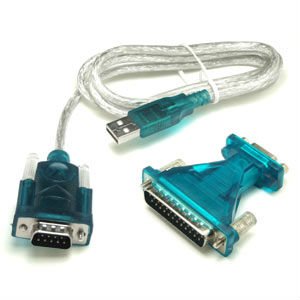
I have been using a Usb-to-Serial cable for many years without problem at windows xp and windows 7 system. Just recently upgraded to windows 10 , the cable does not work properly any more.

The Prolific USB-to-Serial Comm Port shows not working properly in the system Device Manager. There is a yellow exclamation mark next to my Prolific USB in device manager as shown below screenshots:
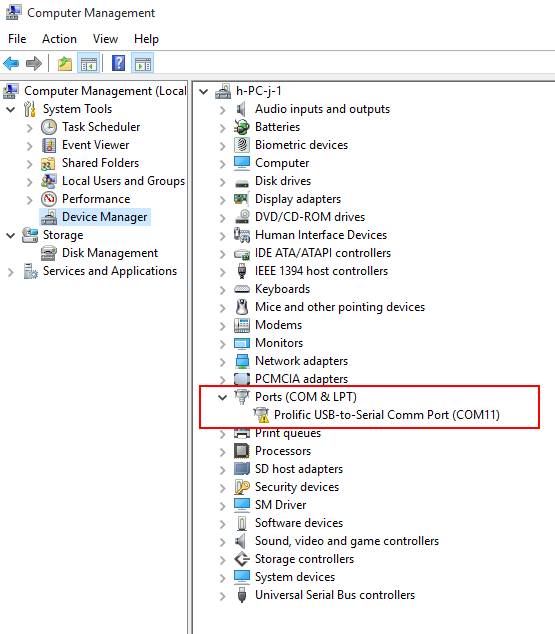
Device Status of the Device's Property shows:

    This device cannot start. (Code 10)
    A device which does not exist was specified.
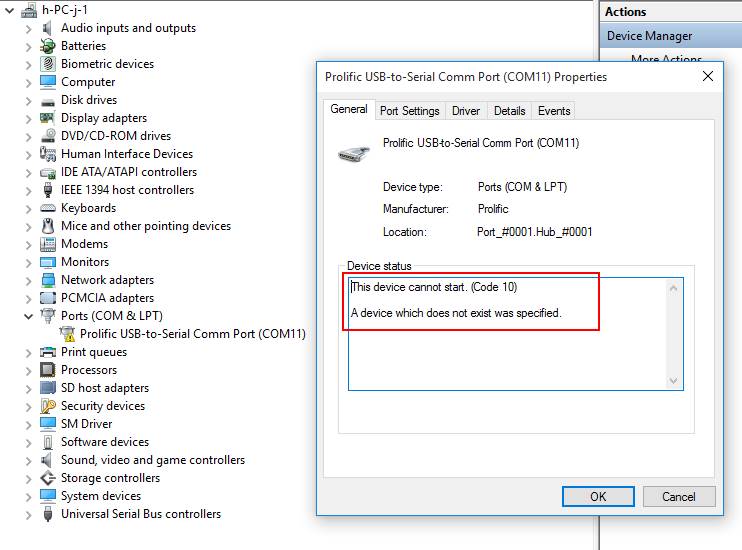


This error is basically saying that Windows, for one reason or another, cannot communicate properly with one of your programs. This communication problem is usually caused by out-of-date, missing or corrupt device drivers. 
To resolve Error Code 10, I have followed following recommended steps found from Internet:
  1. Reboot your computer – this is always a first step to resolving any problems, if it works – great, if not – proceed to the next step!
  2. Select Start > All Programs > Windows Update
  3. Right-click on My Computer
  4. Click Properties > Hardware menu tab  > Device Manager
  5. Double-click the device that is causing the error (there will be a yellow triangle with exclamation mark to the left of it)
  6. Right-click the specific device and select Properties
  7. Click on the Driver menu tab and select Update Driver
  8. Windows may ask for the path of the driver in which case you will need to either insert your Drivers disk (if you have it) or download the Drivers from the manufacturers website
  9. Restart your computer
Unfortunately those steps do not work in my case. By Googling Internet, I found some explanation:
"What has happened is that there have been counterfeit "Prolific" chips coming from China. The counterfeit chips use the same Vendor ID (VID_067B) and Product ID (PID_2303) as the authentic Prolific chips. So, Prolific made changes to their newest drivers to render the adapters using counterfeit chips unusable. Unfortunately, it renders all earlier adapters inoperative and so you have to go out and buy new ones. Planned obsolescence? Getting a working driver installed for the average user is almost impossible."
So by default windows 10 will automatically install Windows WDF WHQL Driver v3.6.78.350 (06/05/2015) drivers for your device. Unfortunately the old chips sometimes do not work well with this new driver because of reason mentioned above. 
I am thinking maybe some old drivers may still works for my device. I started to google and try to download and install some other version drivers such as 3.0.0.10, 3.0.1.0 and  3.3.11.152,   finally found 3.3.11.152 is working fine for my old usb-to-serial device.
1. Download the correct driver

Download from this link:    USB-SERIAL Driver V3.3.11.152
Unzip and run the installer, "PL2303_Prolific_DriverInstaller_v1210.exe".

2. Change Default Driver to version 3.3.11.152


3. Verify from Device Manager


1 Comment

Firefox Warning Message -"This Connection is Untrusted" Caused by Proxy Server Certificate

12/21/2015

1 Comment

 
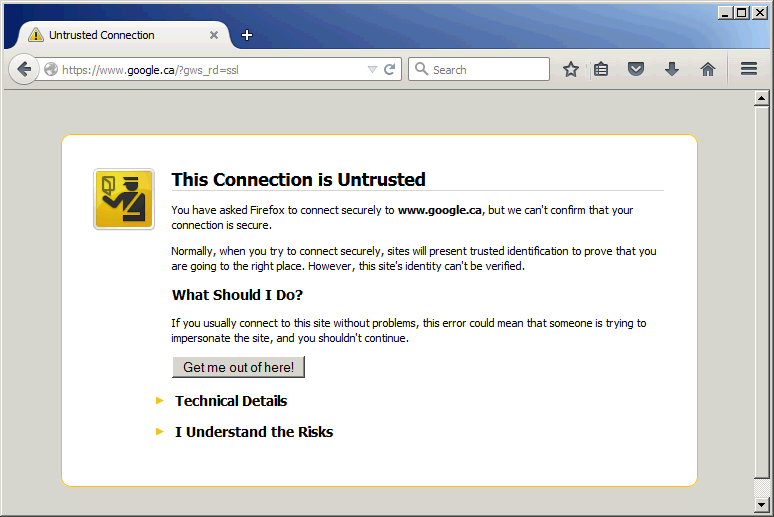
I am getting the "This Connection Is Untrusted" message in Firefox for all security website using https even when I go to the Mozilla support page. Any secure site is viewed as an untrusted connection only in Firefox browser, but IE and Chrome are fine. The certificate is not trusted because the issuer certificate is unknown. Here is a screenshot when I tried to browse Google website from Firefox.


I have tried following: https://support.mozilla.org/en-US/kb/connection-untrusted-error-message#w_the-certificate-is-not-trusted-because-the-issuer-certificate-is-unknown
The file cert8.db in your profile folder may have become corrupted. Delete this file while Firefox is closed.
  1. Open your profile folder:
    • Click the menu button New Fx Menu , click help Help-29 and select The image "Troubleshooting Information" does not exist.. The Troubleshooting Information tab will open.
    • Under the Application Basics section, click on Show Folder. A window with your profile files will open.
    • Note: If you are unable to open or use Firefox, follow the instructions in Finding your profile without opening Firefox.
  2. Click the menu button New Fx Menu and then click Exit Close 29
  3. In Windows Explorer, click on the file named cert8.db (or cert8 if extensions are hidden)
  4. Press Delete.
  5. Restart Firefox.
Unfortunately, this solution does not work for this case.  It becomes so annoying when using Firefox. Interesting thing is this is not happening on my Microsoft IE browser. I have looked at the other relevant articles already, and tried everything to fix this problem. I have completely reinstalled Firefox, I have refreshed it, I have deleted the cert8.db file, I have run it in safe mode, and I have run it with the Skip Cert Error 0.4.4 extension. Nothing works - I cannot even access support.mozilla.org without running into this error. If I let the skip cert error do its thing for a while, sometimes I can access a bare-bones version of the site with a white background and all links in blue underlined text, all aligned left. There's got to be a better way.

Today I decided to look into this error messages and luckly found a solution for it. There is a inter-middle certificate issued from our Proxy server.  That is why I got all those warning messages.

 Although this untrusted certifcate is issued to *.google.com, but it is issued by our internal web-gate server, which is our Proxy server.


The solution will be easy as well since we got the root cause. As soon as you export this web-gate Proxy server Certificate from IE browser, you can import it into Firefox to let Firefox trust it.


Import it into Firefox:


After exported certificate imported into Firefox, this annoying warning message is gone.

1 Comment

Upgrading Cisco ASA 5550 IOS and ASDM 

12/20/2015

0 Comments

 
Here are steps to upgrade IOS from 8.2(1) to 9.1(6) and ASDM to 7.5.2. The steps is good for ASA all versions upgrade as well.

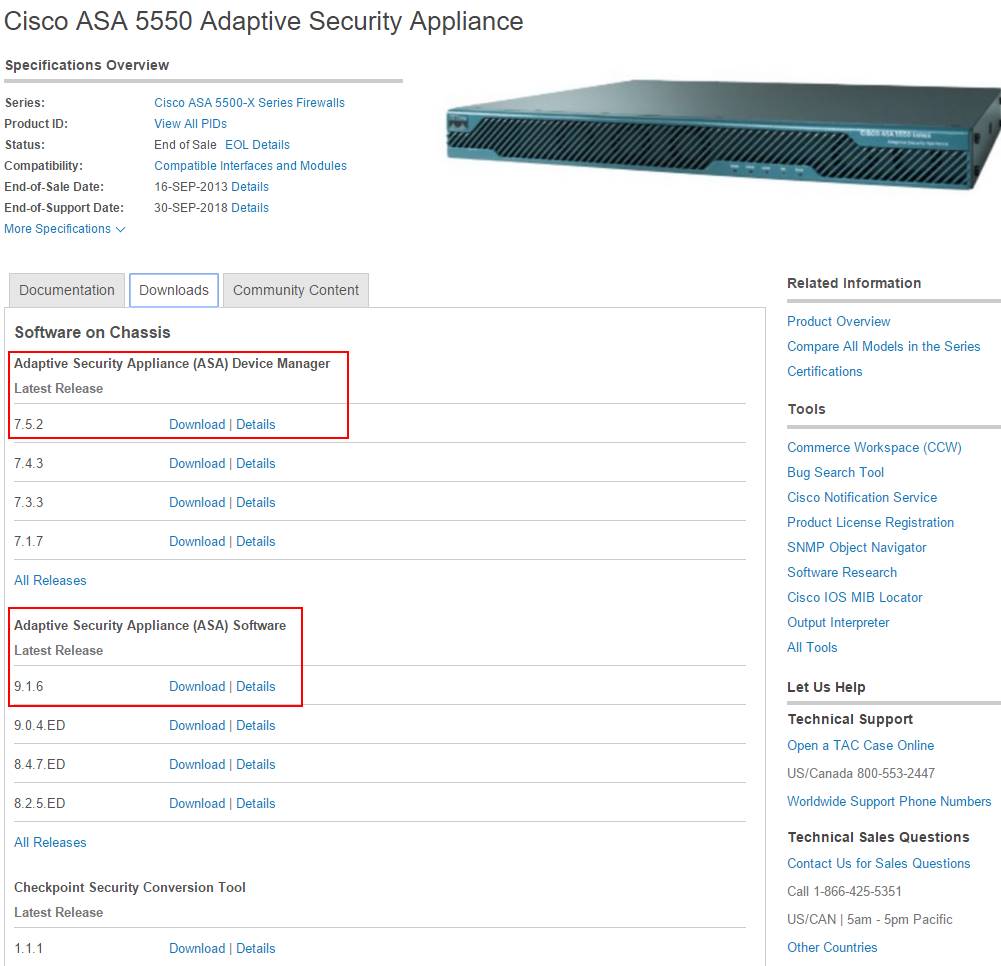
1. Download Software from Cisco Website
You may need to use your ASA's serial number to find out latest support IOS version and ASDM version from Cisco support site. CCO account will be needed as well.

You will have two files for this upgrade:
  • asa916-k8.bin - for ASA IOS, about 26M
  • asdm-752.bin - for ASA's ASDM , about 25M
2. Basic Configuration on ASA

Configure management interface 0/0 with ip address 10.1.13. Also you will need to set up proper nameif and security level to enable this port. After all configured, do not forget to write all configuration to flash card.


ciscoasa(config)# int management 0/0
ciscoasa(config-if)# ip address 10.1.1.1 255.255.255.0
ciscoasa(config-if)# management-only
ciscoasa(config-if)#  nameif management
INFO: Security level for "management" set to 0 by default.
ciscoasa(config-if)#  security-level 100
ciscoasa(config-if)#
ciscoasa(config)# wr
Building configuration...
Cryptochecksum: 2f6ce793 14d757a0 d226a8da db8c3472

2582 bytes copied in 3.580 secs (860 bytes/sec)
[OK]

3. TFTP configuration

Set up your computer with ip address 10.1.1.2, which is same network as your ASA management interface. Start your TFTP application with proper configuration. I am using Tftpd32 by Ph.Jounin to set up my tftp server. Make sure you are selecting right server interface if you are having multiple network interfaces. I have put downloaded IOS 9.1.6 version and ASDM into d;\ios foler.

After connected ASA's management interface with your tftp server, verify the connectivity from ASA to your TFTP server by ping-ing tftp server ip 10.1.1.2. You may need to disable your local firewall on your tftp server machine.


ciscoasa(config)# ping 10.1.1.2
Type escape sequence to abort.
Sending 5, 100-byte ICMP Echos to 10.1.1.2, timeout is 2 seconds:
!!!!!
Success rate is 100 percent (5/5), round-trip min/avg/max = 1/1/1 ms


4. Copy both IOS and ASDM files from TFTP to ASA Flash 

ciscoasa(config)# copy tftp: flash:
Address or name of remote host []? 10.1.1.2
Source filename []? asa916-k8.bin
Destination filename [asa916-k8.bin]?
Accessing tftp://10.1.1.2/asa916-k8.bin...!!!!!!!!!!!!!!!!!!!!!!!!!!!!!!!!!!!!!!!!!!!!!!!!!!!!!!!!!!!!!!!!!!!!!!!!!!!!!!!!!!!!!!!!!!!!!!!!!!!!!!!!!!!!!!!!!!!!!!!!!!!!!!!!!!!!!!!!!!!!!!!!!!!!!!!!!!!
Writing file disk0:/asa916-k8.bin...
!!!!!!!!!!!!!!!!!!!!!!!!!!!!!!!!!!!!!!!!!!!!!!!!!!!!!!!!!!!!!!!!!!!!!!!!!!!!!!!!!!!!!!!!!!!!!!!!!!!!!!!!!!!!!!!!!!!!!!!!!!!!!!!!!!!!!!!!!!!!!!!!!!!!!!!!!!!
27150336 bytes copied in 30.390 secs (905011 bytes/sec)

ciscoasa(config)# copy tftp: flash:
Address or name of remote host [10.1.1.2]?
Source filename [asa916-k8.bin]? asdm-752.bin
Destination filename [asdm-752.bin]?
Accessing tftp://10.1.1.2/asdm-752.bin...!!!!!!!!!!!!!!!!!!!!!!!!!!!!!!!!!!!!!!!!!!!!!!!!!!!!!!!!!!!!!!!!!!!!!!!!!!!!!!!!!!!!!!!!!!!!!!!!!!!!!!!!!!!!!!!!!!!!!!!!!!!!!!!!!!!!!!!!!!!!!!!!!!!!!!!!!!!!!!!!!!!!!!!!!!!!!
Writing file disk0:/asdm-752.bin...
!!!!!!!!!!!!!!!!!!!!!!!!!!!!!!!!!!!!!!!!!!!!!!!!!!!!!!!!!!!!!!!!!!!!!!!!!!!!!!!!!!!!!!!!!!!!!!!!!!!!!!!!!!!!!!!!!!!!!!!!!!!!!!!!!!!!!!!!!!!!!!!!!!!!!!!!!!!!!!!!!!!!!!!!!!!!!
25627616 bytes copied in 28.700 secs (915272 bytes/sec)


5. Boot ASA with new IOS and load new ASDM image


ciscoasa(config)# boot system disk0:/asa916-k8.bin
ciscoasa(config)# asdm image disk0:/asdm-752.bin
ciscoasa(config)# wr
Building configuration...
Cryptochecksum: bab14ac0 c6d4808b 1c61875d 96255622

2646 bytes copied in 3.720 secs (882 bytes/sec)
[OK]
ciscoasa(config)#
ciscoasa(config)# reload
Proceed with reload? [confirm]
ciscoasa(config)#


***
*** --- START GRACEFUL SHUTDOWN ---
Shutting down isakmp
Shutting down webvpn
Shutting down File system


***
*** --- SHUTDOWN NOW ---
Process shutdown finished
Rebooting.....
Restarting system.


Following output is from booting console:


Booting system, please wait...


CISCO SYSTEMS
Embedded BIOS Version 1.0(11)5 08/28/08 15:11:51.82

Low Memory: 631 KB
High Memory: 3968 MB
PCI Device Table.
Bus Dev Func VendID DevID Class              Irq
 00  00  00   8086   2578  Host Bridge      
 00  01  00   8086   2579  PCI-to-PCI Bridge
 00  03  00   8086   257B  PCI-to-PCI Bridge
 00  1C  00   8086   25AE  PCI-to-PCI Bridge
 00  1D  00   8086   25A9  Serial Bus         11
 00  1D  01   8086   25AA  Serial Bus         10
 00  1D  04   8086   25AB  System          
 00  1D  05   8086   25AC  IRQ Controller  
 00  1D  07   8086   25AD  Serial Bus         9
 00  1E  00   8086   244E  PCI-to-PCI Bridge
 00  1F  00   8086   25A1  ISA Bridge      
 00  1F  02   8086   25A3  IDE Controller     11
 00  1F  03   8086   25A4  Serial Bus         5
 00  1F  05   8086   25A6  Audio              5
 02  01  00   8086   1075  Ethernet           11
 03  01  00   177D   0003  Encrypt/Decrypt    9
 03  02  00   8086   1079  Ethernet           9
 03  02  01   8086   1079  Ethernet           9
 03  03  00   8086   1079  Ethernet           9
 03  03  01   8086   1079  Ethernet           9
 04  02  00   8086   1209  Ethernet           11
 04  03  00   8086   1209  Ethernet           5

Evaluating BIOS Options ...
Launch BIOS Extension to setup ROMMON

Cisco Systems ROMMON Version (1.0(11)5) #0: Thu Aug 28 15:23:50 PDT 2008

Platform ASA5550

Use BREAK or ESC to interrupt boot.
Use SPACE to begin boot immediately.
                                             
Launching BootLoader...
Boot configuration file contains 1 entry.


Loading disk0:/asa916-k8.bin... Booting...
Platform ASA5550

Loading...
IO memory blocks requested from bigphys 32bit: 78436
dosfsck 2.11, 12 Mar 2005, FAT32, LFN
Starting check/repair pass.
Starting verification pass.
/dev/hda1: 130 files, 11109/31180 clusters
dosfsck(/dev/hda1) returned 0
Processor memory 3166699520, Reserved memory: 157286400

Total SSMs found: 1
SSM-4GE-INC, SN JAF1335BEME, HW ver 1.0, FW ver 1.0(0)8

Total NICs found: 12
mcwa i82557 Ethernet at irq 11  MAC: 0023.ebc4.364c
mcwa i82557 Ethernet at irq  5  MAC: 0000.0001.0001
i82547GI rev00 Gigabit Ethernet @ irq11 dev 1 index 05 MAC: 0000.0001.0002
i82546GB rev03 Gigabit Ethernet @ irq09 dev 2 index 03 MAC: 0023.ebc4.364b
i82546GB rev03 Gigabit Ethernet @ irq09 dev 2 index 02 MAC: 0023.ebc4.364a
i82546GB rev03 Gigabit Ethernet @ irq09 dev 3 index 01 MAC: 0023.ebc4.3649
i82546GB rev03 Gigabit Ethernet @ irq09 dev 3 index 00 MAC: 0023.ebc4.3648
VCS7380 Gigabit Ethernet @ index 07 MAC: 0026.0b31.564c
VCS7380 Gigabit Ethernet @ index 08 MAC: 0026.0b31.564d
VCS7380 Gigabit Ethernet @ index 09 MAC: 0026.0b31.564e
VCS7380 Gigabit Ethernet @ index 10 MAC: 0026.0b31.564f
VCS7380 Gigabit Ethernet @ index 11 MAC: 0000.0003.0002

INFO: Unable to read cluster interface-mode from flash
       Writing default mode "None" to flash
Verify the activation-key, it might take a while...
Running Permanent Activation Key: 0xd41ee978 0xb495d93b 0x48934db8 0xbd7c2014 0xc502138f

Licensed features for this platform:
Maximum Physical Interfaces       : Unlimited      perpetual
Maximum VLANs                     : 400            perpetual
Inside Hosts                      : Unlimited      perpetual
Failover                          : Active/Active  perpetual
Encryption-DES                    : Enabled        perpetual
Encryption-3DES-AES               : Enabled        perpetual
Security Contexts                 : 2              perpetual
GTP/GPRS                          : Disabled       perpetual
AnyConnect Premium Peers          : 2              perpetual
AnyConnect Essentials             : Disabled       perpetual
Other VPN Peers                   : 5000           perpetual
Total VPN Peers                   : 5000           perpetual
Shared License                    : Disabled       perpetual
AnyConnect for Mobile             : Disabled       perpetual
AnyConnect for Cisco VPN Phone    : Disabled       perpetual
Advanced Endpoint Assessment      : Disabled       perpetual
UC Phone Proxy Sessions           : 2              perpetual
Total UC Proxy Sessions           : 2              perpetual
Botnet Traffic Filter             : Disabled       perpetual
Intercompany Media Engine         : Disabled       perpetual
Cluster                           : Disabled       perpetual

This platform has an ASA 5550 VPN Premium license.

Encryption hardware device : Cisco ASA-55xx on-board accelerator (revision 0x0)
                             Boot microcode        : CN1000-MC-BOOT-2.00
                             SSL/IKE microcode     : CNLite-MC-SSLm-PLUS-2_05
                             IPSec microcode       : CNlite-MC-IPSECm-MAIN-2.09

Cisco Adaptive Security Appliance Software Version 9.1(6)

  ****************************** Warning *******************************
  This product contains cryptographic features and is
  subject to United States and local country laws
  governing, import, export, transfer, and use.
  Delivery of Cisco cryptographic products does not
  imply third-party authority to import, export,
  distribute, or use encryption. Importers, exporters,
  distributors and users are responsible for compliance
  with U.S. and local country laws. By using this
  product you agree to comply with applicable laws and
  regulations. If you are unable to comply with U.S.
  and local laws, return the enclosed items immediately.

  A summary of U.S. laws governing Cisco cryptographic
  products may be found at:
  http://www.cisco.com/wwl/export/crypto/tool/stqrg.html

  If you require further assistance please contact us by
  sending email to [email protected].
  ******************************* Warning *******************************

This product includes software developed by the OpenSSL Project
for use in the OpenSSL Toolkit (http://www.openssl.org/)
Copyright (C) 1995-1998 Eric Young ([email protected])
All rights reserved.
Copyright (c) 1998-2011 The OpenSSL Project.
All rights reserved.

This product includes software developed at the University of
California, Irvine for use in the DAV Explorer project
(http://www.ics.uci.edu/~webdav/)
Copyright (c) 1999-2005 Regents of the University of California.
All rights reserved.

Busybox, version 1.16.1, Copyright (C) 1989, 1991 Free Software Foundation, Inc.
51 Franklin St, Fifth Floor, Boston, MA 02110-1301  USA
Busybox comes with ABSOLUTELY NO WARRANTY.
This is free software, and you are welcome to redistribute it under the General
Public License v.2 (http://www.gnu.org/licenses/gpl-2.0.html)
See User Manual (''Licensing'') for details.

DOSFSTOOLS, version 2.11, Copyright (C) 1989, 1991 Free Software Foundation, Inc.
59 Temple Place, Suite 330, Boston, MA 02111-1307
675 Mass Ave, Cambridge, MA 02139
DOSFSTOOLS comes with ABSOLUTELY NO WARRANTY.
This is free software, and you are welcome to redistribute it under the General
Public License v.2 (http://www.gnu.org/licenses/gpl-2.0.html)
See User Manual (''Licensing'') for details.

grub, version 0.94, Copyright (C) 1989, 1991 Free Software Foundation, Inc.
59 Temple Place, Suite 330, Boston, MA 02111-1307
grub comes with ABSOLUTELY NO WARRANTY.
This is free software, and you are welcome to redistribute it under the General
Public License v.2 (http://www.gnu.org/licenses/gpl-2.0.html)
See User Manual (''Licensing'') for details.

libgcc, version 4.3, Copyright (C) 2007 Free Software Foundation, Inc.
libgcc comes with ABSOLUTELY NO WARRANTY.
This is free software, and you are welcome to redistribute it under the General
Public License v.2 (http://www.gnu.org/licenses/gpl-2.0.html)
See User Manual (''Licensing'') for details.

libstdc++, version 4.3, Copyright (C) 2007 Free Software Foundation, Inc.
libstdc++ comes with ABSOLUTELY NO WARRANTY.
This is free software, and you are welcome to redistribute it under the General
Public License v.2 (http://www.gnu.org/licenses/gpl-2.0.html)
See User Manual (''Licensing'') for details.

Linux kernel, version 2.6.29.6, Copyright (C) 1989, 1991 Free Software
Foundation, Inc.
51 Franklin St, Fifth Floor, Boston, MA 02110-1301  USA
Linux kernel comes with ABSOLUTELY NO WARRANTY.
This is free software, and you are welcome to redistribute it under the General
Public License v.2 (http://www.gnu.org/licenses/gpl-2.0.html)
See User Manual (''Licensing'') for details.

module-init-tools, version 3.10, Copyright (C) 1989, 1991 Free Software
Foundation, Inc.
59 Temple Place, Suite 330, Boston, MA 02111-1307 USA
module-init-tools comes with ABSOLUTELY NO WARRANTY.
This is free software, and you are welcome to redistribute it under the General
Public License v.2 (http://www.gnu.org/licenses/gpl-2.0.html)
See User Manual (''Licensing'') for details.

numactl, version 2.0.3, Copyright (C) 2008 Author: Andi Kleen, SUSE Labs
Version 2.0.0 by Cliff Wickman, Chritopher Lameter and Lee Schermerhorn
numactl comes with ABSOLUTELY NO WARRANTY.
This is free software, and you are welcome to redistribute it under the General
Public License v.2 (http://www.gnu.org/licenses/gpl-2.0.html)
See User Manual (''Licensing'') for details.

pciutils, version 3.1.4, Copyright (C) 1989, 1991 Free Software Foundation, Inc.
51 Franklin St, Fifth Floor, Boston, MA 02110-1301  USA
pciutils comes with ABSOLUTELY NO WARRANTY.
This is free software, and you are welcome to redistribute it under the General
Public License v.2 (http://www.gnu.org/licenses/gpl-2.0.html)
See User Manual (''Licensing'') for details.

readline, version 5.2, Copyright (C) 1989, 1991 Free Software Foundation, Inc.
59 Temple Place, Suite 330, Boston, MA 02111 USA
readline comes with ABSOLUTELY NO WARRANTY.
This is free software, and you are welcome to redistribute it under the General
Public License v.2 (http://www.gnu.org/licenses/gpl-2.0.html)
See User Manual (''Licensing'') for details.

udev, version 146, Copyright (C) 1989, 1991 Free Software Foundation, Inc.
51 Franklin St, Fifth Floor, Boston, MA 02110-1301  USA
udev comes with ABSOLUTELY NO WARRANTY.
This is free software, and you are welcome to redistribute it under the General
Public License v.2 (http://www.gnu.org/licenses/gpl-2.0.html)
See User Manual (''Licensing'') for details.

util-linux, version 2.16.1, Copyright (C) 1989, 1991 Free Software Foundation, Inc.
The following components, built for inclusion in Busybox.
The following components from util-linux come with ABSOLUTELY NO WARRANTY.
fdisk:
  Copyright (C) 1992  A. V. Le Blanc ([email protected])
  Copyright (C) 2001,2002 Vladimir Oleynik <[email protected]> (initial bb port)
dmesg:
  Copyright 2006 Rob Landley <[email protected]>
  Copyright 2006 Bernhard Reutner-Fischer <[email protected]>
mkswap:
  Copyright 2006 Rob Landley <[email protected]>
mount:
  Copyright (C) 1995, 1996 by Bruce Perens <[email protected]>.
  Copyright (C) 1999-2004 by Erik Andersen <[email protected]>
  Copyright (C) 2005-2006 by Rob Landley <[email protected]>
umount:
  Copyright (C) 1999-2004 by Erik Andersen <[email protected]>
  Copyright (C) 2005 by Rob Landley <[email protected]>
This is free software, and you are welcome to redistribute it under the General
Public License v.2 (http://www.gnu.org/licenses/gpl-2.0.html)
See User Manual (''Licensing'') for details.

Cisco Adapative Security Appliance Software, version 9.1,
Copyright (c) 1996-2015 by Cisco Systems, Inc.
Certain components of Cisco ASA Software, Version 9.1 are licensed under the GNU
Lesser Public License (LGPL) Version 2.1.  The software code licensed under LGPL
Version 2.1 is free software that comes with ABSOLUTELY NO WARRANTY.  You can
redistribute and/or modify such LGPL code under the terms of LGPL Version 2.1
(http://www.gnu.org/licenses/lgpl-2.1.html).  See User Manual for licensing
details.

                Restricted Rights Legend

Use, duplication, or disclosure by the Government is
subject to restrictions as set forth in subparagraph
(c) of the Commercial Computer Software - Restricted
Rights clause at FAR sec. 52.227-19 and subparagraph
(c) (1) (ii) of the Rights in Technical Data and Computer
Software clause at DFARS sec. 252.227-7013.

                Cisco Systems, Inc.
                170 West Tasman Drive
                San Jose, California 95134-1706

Reading from flash...
!
REAL IP MIGRATION: WARNING
In this version access-lists used in 'access-group', 'class-map',
'dynamic-filter classify-list', 'aaa match' will be migrated from
using IP address/ports as seen on interface, to their real values.
If an access-list used by these features is shared with per-user ACL
then the original access-list has to be recreated.
INFO: Note that identical IP addresses or overlapping IP ranges on
different interfaces are not detectable by automated Real IP migration.
If your deployment contains such scenarios, please verify your migrated
configuration is appropriate for those overlapping addresses/ranges.
Please also refer to the ASA 8.3 migration guide for a complete
explanation of the automated migration process.

INFO: MIGRATION - Saving the startup configuration to file

INFO: MIGRATION - Startup configuration saved to file 'flash:8_2_1_0_startup_cfg.sav'
*** Output from config line 4, "ASA Version 8.2(1) "
.
Cryptochecksum (unchanged): 46743c59 c0bc15d3 43afde7f 39783981
Real IP migration logs:
        No ACL was changed as part of Real-ip migration

INFO: Power-On Self-Test in process.
...........................................................
INFO: Power-On Self-Test complete.

INFO: MIGRATION - Saving the startup errors to file 'flash:upgrade_startup_errors_201512181715.log'
Type help or '?' for a list of available commands.
ciscoasa> en
Password:
ciscoasa#
ciscoasa#

ciscoasa# conf t
ciscoasa(config)#

***************************** NOTICE *****************************

Help to improve the ASA platform by enabling anonymous reporting,
which allows Cisco to securely receive minimal error and health
information from the device. To learn more about this feature,
please visit: http://www.cisco.com/go/smartcall

Would you like to enable anonymous error reporting to help improve
the product? [Y]es, [N]o, [A]sk later: n

In the future, if you would like to enable this feature,
issue the command "call-home reporting anonymous".

Please remember to save your configuration.

6. Verify ASDM

Configure ASA to allow ASDM client network to access ASA's management port.
ciscoasa(config)# http server enable
ciscoasa(config)# http 10.1.1.0 255.255.255.0 management
ciscoasa(config)# wr
Building configuration...
Cryptochecksum: d719ed8f 2578f2f0 20d50a04 fe506e2b

3754 bytes copied in 3.190 secs (1251 bytes/sec)
[OK]
ciscoasa(config)# 

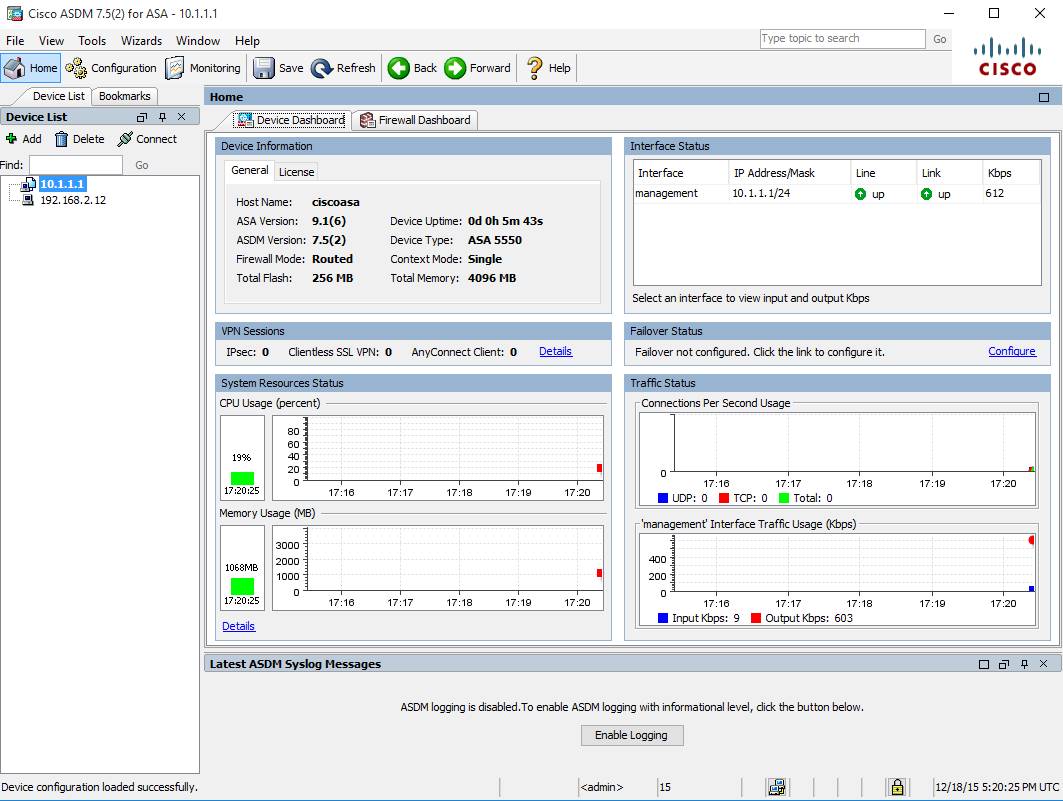
Open your browser with url http://10.1.1.1, you should get following screen to install ASDM launcher.
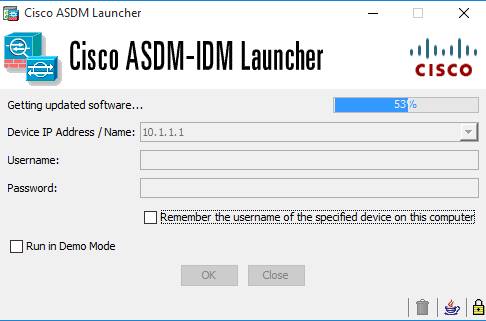
 Here is log in window from ASDM Launcher. If it asks username and password, just leave it empty and press enter.


Reference:

  • PIX/ASA: Upgrade a Software Image using ASDM or CLI Configuration Example
  • How To Upgrade Cisco ASA Software And ASDM


0 Comments

Understanding Juniper SRX TCP Security Check

12/17/2015

0 Comments

 
Juniper SRX is a stateful firewall and allows traffic which matches an existing session. Sessions are created when a TCP SYN packet is received and it is permitted by the security policy. This of course means that the firewall needs to see both directions of a flow (client-server and server-client), otherwise these checks will block legitimate packets.

Following flow chart illustrates packet flow sequences both when SYN flag checking is enabled and when it is disabled.
SYN Flag Checking

By default, security TCP check is enabled on all TCP flow sessions. The Junos operating system (Junos OS) performs the following operations during TCP sessions:

  • Checks for SYN flags in the first packet of a session and rejects any TCP segments with non- SYN flags that attempt to initiate a session.
  • Validates the TCP sequence numbers during stateful inspection.

Reset packet is turned off for non-SYN session TCP packets:
{primary:node0}
root@fw-mgmt-trn1-1> show security zones
node0:
--------------------------------------------------------------------------

Security zone: MGMT1
  Send reset for non-SYN session TCP packets: Off
  Policy configurable: Yes
  Interfaces bound: 1
  Interfaces:
    reth4.201

Security zone: TSMGMT
  Send reset for non-SYN session TCP packets: Off
  Policy configurable: Yes
  Interfaces bound: 1
  Interfaces:
    reth4.198

Security zone: MGMT2
  Send reset for non-SYN session TCP packets: Off
  Policy configurable: Yes
  Interfaces bound: 1
  Interfaces:
    reth3.0
We can enable reset packets when received non-syn tcp session packets.
{primary:node0}[edit]
root@fw-mgmt-1# set security zones security-zone MGMT1 tcp-rst

{primary:node0}[edit]
root@fw-mgmt-1# set security zones security-zone TSMGMT tcp-rst

{primary:node0}[edit]
root@fw-mgmt-1# set security zones security-zone MGMT tcp-rst        

Check the settings again:
root@fw-mgmt-1> show security zones 
node0:
--------------------------------------------------------------------------

Security zone: MGMT1
  Send reset for non-SYN session TCP packets: On
  Policy configurable: Yes  
  Interfaces bound: 1
  Interfaces:
    reth4.201

Security zone: TSMGMT
  Send reset for non-SYN session TCP packets: On
  Policy configurable: Yes  
  Interfaces bound: 1
  Interfaces:
    reth4.198

Security zone: MGMT2
  Send reset for non-SYN session TCP packets: On
  Policy configurable: Yes  
  Interfaces bound: 1
  Interfaces:reth3.0


Junos OS provides a mechanism for disabling security checks on TCP packets to ensure interoperability with hosts and devices with faulty TCP implementations. During no-SYN-check the Junos OS does not look for the TCP SYN packet for session creation. No-sequence check disables TCP sequence checking validation. Also, increases throughput. SYN check and sequence check are enabled by default. The set security flow command disables TCP SYN checks and TCP sequence checks on all TCP sessions thus reduces security. This may be required in scenarios with customers like big transfer files, or with applications that do not correctly work with standards.

Another reason to disable syn-check and sequence-check is the asymmetric flows in your environment. It is best, whenever possible, to ensure that asymmetric flows do not occur; but this is not always possible. So, you can disable these checks globally on the SRX device.

To disable TCP packet security checks:
set security flow tcp-session no-syn-check
set security flow tcp-session no-sequence-check

After you disabled the tcp options, tcp-syn-check, and tcp-sequence-check that are configured at global level, you might want to configure TCP packet security checks at the policy level.

Note: Disabling the global SYN check and enforcing the SYN check after policy search will greatly impact the number of packets that the router can process. This in turn will result in intense CPU operations.

Configure the checking for the TCP SYN bit before creating a session:
[edit]
user@host# set security policies from-zone Zone-A to-zone Zone-B policy pol1 then permit tcp-options syn-check-required

Configure the checking for sequence numbers in TCP segments during stateful inspection:
[edit]
user@host# set security policies from-zone Zone-A to-zone Zone-B policy pol1 then permit tcp-options sequence-check-required

It is also possible to disable TCP SYN or sequence checking on one policy and enable them on all other policies, an apply-group can be used to complete this configuration based on KB24566.


Reference:
  • [J-Series/SRX] Example: Configuring TCP SYN Check options on a per policy basis
  • [ SRX ] : How to selectively disable TCP SYN or Sequence checking
  • Understanding TCP SYN Checking - Juniper Networks
  • Example: Disabling TCP Packet Security Checks for SRX Series Services Gateways


0 Comments

2016 Technology Salary Report (GTA) from Lannick

12/13/2015

0 Comments

 
Established in 1985, Lannick Group has been the GTA’s premier specialized recruitment and staffing firm for more than 30 years and we place more than 700 professionals annually.  2016 Technology Salary Repor is the latest technology report in their industry and role-specific Salary Reports. 

Here are some interesting information from this report:

1. Job Comparison by Position (Greater Toronto Area):

JOB TITLE
2015
2016
LOW
HIGH
Infrastructure Support


Service Desk Analyst I
48,500
48,900“
36,500
53,000
Service Desk Analyst II
59,500
61,500“
44,000
65,500
Systems/Server Analyst
74,500
78,000“
68,500
90,000
Network Administrator
78,500
80,000“
67,000
90,000
Network  Architect/Engineer
98,000
98,000–
80,500
109,500
Database  Administrator
80,500
82,000“
79,500
96,750
Service Desk Manager
79,500
80,000“
72,000
89,500
IT Security Analyst
95,500
97,500“
86,500
116,000
IT Auditor
84,500
84,500–
81,500
105,500
Manager of Technical Services
95,500
95,000”
80,000
108,500
Director of Technical Services
123,500
124,500“
109,000
142,500

Application Services


SEO/Social Media/Digital Analyst
59,500
59,000”
44,500
65,500
.NET Developer
74,500
77,000“
63,000
98,500
SharePoint Developer
97,500
97,500–
79,500
108,500
PHP Developer
77,000
79,500“
60,000
98,000
Full Stack J2EE/Angular JS Developer
83,000
86,000“
67,000
108,500
Front End Web Developer
88,500
91,000“
77,500
103,000
Mobile Developer
94,000
93,000”
75,000
109,000
UI/UX Specialist
82,500
84,500“
76,500
102,500
Business Intelligence Analyst
79,000
80,000“
70,500
96,000
BI/Application Architect
115,500
117,000“
106,000
137,500
Quality Assurance Analyst
83,000
83,500“
75,500
89,500
Business Analyst
76,500
77,500“
70,000
96,500
Database  Analyst/Developer
77,000
77,500“
66,500
96,000
Technical Writer
82,500
81,500”
67,000
91,500
Project Coordinator
64,500
64,500–
51,500
75,500
Project Manager
94,000
94,000–
84,000
113,000
Manager of Application Development
113,000
118,000“
94,500
127,000


2. Top Technology Positions and Skills:


Front End Web Developers
HTML5, CSS3, RWD, JavaScript
(Node, Angular, jQuery, Backbone, React)
.NET Application Developers 
Full Stack, MSSQL, MVC, C#, jQuery, JavaScript,
 Agile, JIRA
J2EE Application Developers 
J2EE, Java, Spring MVC, JavaScript, Bootstrap, Hibernate,
 Agile, JIRA
DevOps Engineers
Chef, Puppet, Jenkins, Ancible, Linux/UNIX, Python, Perl,
Automation, Continuous  Integration/Deployment
QA Analysts
Selenium, Automation, Manual Testing, Python, Java/.NET,
REST API, Protractor, QTP, Junit
Data Scientists
Python, SAS, Splunk, Machine Learning, Big Data, Pig, Hive,
Hadoop, HBase, Cassandra, MongoDB


Reference:


  • Lannick Salary Report
  • 2015 Canada IT Skills & Salary Report

0 Comments

Use Endpoint Sandbox Software to Protect Your Windows Computers

12/8/2015

0 Comments

 
There are so many malicious websites, software and hackers in this cyber world which are aiming to get our information, hijack your computer or browsers. Even after you patched your computer, installed anti-virus/anti-spam/anti-spy/anti-bot/firewall/intrusion protection software on your computer, they will still find a way to come in to ruin your computer by alluring you click a link, open an attachment, or install a valid software.

Is there a way we could keep our computer completely free from those threats? No, the answer of course is no. But we could use some software provides from those security vendors to help us, such as  anti-virus/anti-spam/anti-spy/anti-bot/firewall/intrusion protection software. There is another different technology we could use too to exempt some kinds of those threats away from your computers.

I call it Sandbox Endpoint software. It use Sandbox technology to isolate the threats in certain scope. Once you completed your tasks, just close that scope to delete all trails left by those tasks. Recently i found some of them are pretty helpful and evaluated them in my personal computer:

1. Sandboxie Works at File System Level

This software has been recommended by LifeHacker as #1 Windows Utility:

"Let's admit it: sometimes, even though we know it's wrong, we all open the occasional sketchy program or file. We're not judging, but if you're going to do it, at least use protection. Enter Sandboxie, which lets you run programs independent of the rest of your system. That way they can't infect, access, or otherwise interfere with your Windows installation. It's also great for testing apps you aren't sure of or running multiple instances of an app that won't let you, so it's fun for the whole family."

Latest Sandboxie version is 5.06, which released on 23 October 2015. Now it supports windows 10. This small software installer is only 2.5MB and it is for Windows XP SP 3 through Windows 10 including 32-bit and 64-bit.

Basically Sandboxie runs your programs in an isolated space which prevents them from making permanent changes to other programs and data in your computer.


The red arrows indicate changes flowing from a running program into your computer. The box labeled Hard disk (no sandbox) shows changes by a program running normally. The box labeled Hard disk (with sandbox) shows changes by a program running under Sandboxie. The animation illustrates that Sandboxie is able to intercept the changes and isolate them within a sandbox, depicted as a yellow rectangle. It also illustrates that grouping the changes together makes it easy to delete all of them at once.

Sandboxie is an application sandbox that works at the file system level, but only for those applications that the user chooses to run in the sandbox. Sandboxed applications have all file system and registry writes redirected into the sandbox container folder, isolating them within the sandbox. Sandboxed applications also have to be isolated from interacting with unsandboxed applications in ways that would allow sandbox security to be breached. Isolating sandboxed from unsandboxed processes introduces some complexities.

1. Application software updates can sometimes break sandbox functionality, which means that Sandboxie has to be kept updated to cope with the consequences of software changes in applications that are candidates for sandboxing, e.g. browsers. Unless a lifetime license was previously purchased before the Invincea takeover, keeping Sandboxie up to date will mean purchasing an annual license.

2. Sandboxie compatibility settings may be required for Sandboxie to work smoothly alongside some other security applications and utilities. There may be also a few applications which simply aren't compatible.

3. Sandboxie has to prevent the installation drivers and services within the sandbox, and cannot be used to test software that installs a driver or service.

One of the major plus points of Sandboxie is that it also has a rich set of policy-restriction features that can be applied to applications running in the sandbox. It is much more than just application sandboxing, which means that Sandboxie can be used as a complete security solution for the containment of untrusted applications.


2. Sandbox System Restore Software Works on System Level

2.1 Shadow Defender

Shadow Defender is the best easy-to-use PC/laptop security and privacy protection tool for Windows operating systems. It provides an excellent way to prevent unwanted or malicious changes from being made to your PC/laptop. With Shadow Defender you can run system in a virtual environment, called Shadow Mode. And all the attacks will happen in the virtual environment, not in the real environment. If attacks happened, all you need to do is to reboot your system. After reboot, your system will be restored to the original state, as if nothing happened. And meanwhile you can save any selected files and folders to the real environment.
Features
1. Prevent any unknown and future virus.
2. Protect your privacy effectly.
3. Eliminate the system downtime and PC/laptop maintenance cost.
4. Surf the internet safely.


Shadow Defender is lightweight virtualization that works below the level of the Windows file system to virtualize entire disk partitions. As a minimum this should include the system partition. Changes are virtualized by redirecting all disk sectors writes on a shadowed partition to a hidden temporary cache. Shadow Defender can be thought of as sitting between Windows and the running applications. This has some consequences.

1. Providing applications are making normal Windows file system calls (direct disk writes are prevented), Shadow Defender will handle disk sector redirection without the application being aware of Shadow Defender's existence. This is a simple and robust mechanism. Shadow Defender does not need to be kept up to date to cope with software changes in applications. Furthermore, the license is lifetime, covering all future software updates.

2. No software compatibility settings are required for Shadow Defender to operate smoothly alongside other security applications and utilities. The operation of Shadow Defender is invisible to applications running at the level of the Windows file system.

3. As all system changes are discarded when rebooting to exit Shadow Mode, Shadow Defender restores the system to a previous known state in order to eliminate unwanted change from whatever cause: malware infection, system crashes, etc. It's about more than just protecting the system against infection by malware.

4. Because the entire system partition is virtualized in Shadow Mode, all processes are running within a system-wide sandbox. No process isolation between sandboxed and unsandboxed processes is needed. Software that installs drivers or services can be tested using Shadow Defender, providing that it does not require a reboot to complete the install.

5. Because Shadow Defender virtualizes the entire system partition, care needs to be taken to ensure that changes to data aren't accidentally lost when rebooting. If the data folders are located on the system partition, Shadow Defender can be configure to permanently exclude them from virtualization. Alternatively, data folders can be moved to a separate data partition, if there is one. (As an alternative to folder exclusions, changes to data files can be committed manually but it does mean remembering to do it to avoid data loss.)

Unlike Sandboxie, Shadow Defender does not have any added real-time protection features beyond virtualization. This makes it essential to supplement Shadow Defender with additional real-time protection.

Finally, because they operate differently, they can be used together. Sandboxie can provide the additional real-time protection for sandboxed applications that Shadow Defender lacks, whereas Shadow Defender enables the system to be kept in a constant state that can also be useful for software testing.

2.2 PowerShadow from Ensurbit Software

PowerShadow makes your Windows system impervious to virus attack to spyware tracking,and it automatically sanitizes all web activities and surfing history by giving you the power to generate with one click, a "clone" of your Windows system, identical and fully functional as the original.
You then surf the net or perform any other sensitive activities while in this "cloned" PowerShadow mode. Everything you do while in PowerShadow mode is actually being done, not by your operating system, but by a clone of the operating system. Therefore, when you exit PowerShadow mode, everything (except what you save to a non-system drive) vanishes. Likewise, If a virus attacks, it attacks the clone system. If spyware is installed, it is installed on the clone system only. If you delete a file, you have only deleted a clone file, leaving the original untouched. Absolute security and privacy in one elegant software solution! PowerShadow is a similar product as Shadow Defender coming from Ensurebit Software which says
"PowerShadow automatically sanitizes all Web activities and surfing history by giving you the power to generate with one click, a clone of your Windows system, identical and fully functional as the original. You then surf the Net or perform any other sensitive activities while in this cloned PowerShadow mode. Everything you do while in PowerShadow mode is actually being done, not by your operating system, but by a clone of the operating system. Therefore, when you exit PowerShadow mode, everything (except what you save to a non-system drive) vanishes. Likewise, if a virus attacks, it attacks the clone system. If spyware is installed, it is installed on the clone system only. If you delete a file, you only have deleted a clone file, leaving the original untouched. The program offers absolute security and privacy in one elegant software solution. Version 2.6 includes new interface and online upgrade function. "
This program takes an interesting approach to protecting your privacy and keeping your computer safe from offenders. In short, PowerShadow creates a virtual drive on your computer. When you enter shadow mode, the application saves all system changes and user activities on the virtual drive instead of on your actual PC. Every time you restart, your machine will revert to its original state, wiping away nasties such as spyware and eliminating your surfing and application histories. However, since this process also will wipe away useful changes such as edits in a Word document, you must remember to save things you want to keep on your actual hard drive. In general, the app's interface is elegant and easy to navigate, and it didn't appear to slow our PC when running in the background. PowerShadow will be especially useful for those who share computers, but other folks may find it another useful weapon in the war against Adware.

Current version is 8.5.5 which supports Win10/Win8.1/Win8/Win7/XP and here is download link. Also from there website, it says PowerShadow is free forever.


Single Shadow Mode:
http://bbs.hongxiu.com/pic/2006/6/14/934423684.jpg
Single Shadow Mode

Full Shadow Mode:
http://bbs.hongxiu.com/pic/2006/6/14/935823567.jpg
Full Shadow Mode

2.3 Time Freeze from ToolWiz

Toolwiz Time Freeze is a must have for anyone who doesn’t want to make any unwanted changes to the system. No matter what changes are made, no matter what happens, a simple restart will return things to the way they were. Nothing bad can happen to your PC while Toolwiz Time Freeze is up and running. Modifications made to the settings will be undone, files downloaded from the web will be removed, and other unwanted changes will all be undone when you restart your PC. It puts everything on ice so that no unwanted changes can be performed on your PC. You can enter the freeze mode with a simple click and quit the freeze mode with a simple restart or shut down.

Implement of Virtualization : Create a virtual environment as a copy of the real system where allows an unmodified operating system with all of its installed software to run, keeping your actual system ‘frozen’ and away from unwanted changes and malicious threats. Nothing bad can happen to your PC while Toolwiz Time Freeze is up and running.
Operating System Support : Run multiple operation systems (real&virtual systems) at the same time on the same PC without reboot and easily switch between them to optimize your PC resources and improve efficiency.
Restore & Recovery: No matter what changes are made, no matter what happens, a simple restart will return things to the way they were. Modifications made to the settings can be undone, files downloaded from the web can be removed, and other unwanted changes will all can be undone when you restart your PC.


Installation Steps

Configuration;
Enable ToolWiz Time Freeze and add Exclusion folder


2.4 Deep Freeze from Faronics

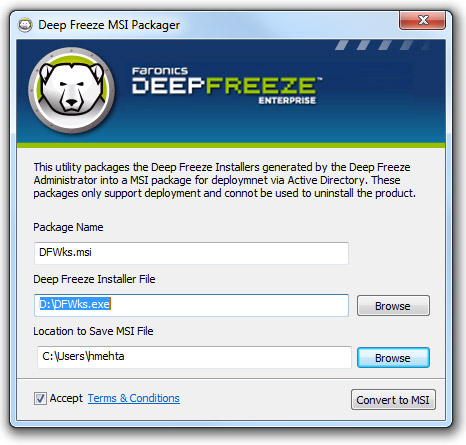
Faronics' Deep Freeze is an application that, as the name implies, "freezes" your system so that any changes that are made are never permanent. If the system becomes unstable for any reason, say a virus or perhaps a driver misconfiguration, simply reboot! Within seconds, Deep Freeze will restore the system to the state it was in when last frozen. Just like magic, everything that had been done since then becomes undone and you are back up and running in no time.

Once installed, Deep Freeze has two states, "thawed" and "frozen." As you might have guessed, when thawed you configure your system precisely the way you want it to be restored. When frozen, the system will then be restored to that state on the next reboot. You can freeze and thaw as needed to update the system with any changes you'd like to keep. The latest version 8.3 supports Windows 10


2.5 Returnil System Safe


The free version of Returnil System Safe is free and necessary antivirus protection for every home PC user. For small businesses, public access PCs and education institutions we offer many more useful features to enhance users' computer security experience. For example, Returnil System Safe Pro offers unique system rollback feature, which allows users to remove viruses by going back in time to the latest clean version of an infected file. Or while working in the virtual environment, you have the option of saving documents and files, so that your data will not be lost when the system is restarted. Our products provide administrators with an easy way to manage and protect their IT infrastructure with our comprehensive remote client management application, Returnil Commander. With Returnil System Safe Pro you will drive down your IT costs while improving productivity of your computers.

It seems it stopped update. The latest version on their website is 2011.


Reference:

  • 影子系统PowerShadow官网
  • http://www.faronics.com/products/deep-freeze/enterprise/
  • http://www.sandboxie.com/
  • http://www.shadowdefender.com/
  • 無限再生!Windows 8.1開機即還原


0 Comments

Fortigate File Syste Check Recommendation After Logged in Web UI

12/4/2015

0 Comments

 
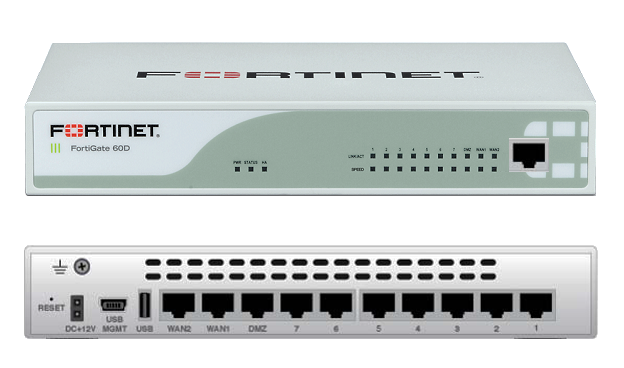
Fortigate firewall 60D has been used in our environment because of performance and cost. It is small, powerful, rich feature also cost effective. Usually 60D is reliable and sitting quietly in the corner of server room.

Today during a regular check, File System Check Recommended message pop-ed up when I logged into Web Interface. It prompted a file system check recommended window as show below:

It seems Power Failure Detected during last power outage. Obviously Firewall itself is still running well. It is not down and nothing scary happened yet. Should I directly go ahead to click "Check file system" button?

There is one thing you will have to remember is this option to check file system will reboot your devices. If your device is in the production, you will have to let it remind you later. If you hit the Check file system button, you will have to wait 5-8 minutes for this job done, which also means your production will be down for 5-8 minutes. I would suggest the button name should change from "Check file system" to "Check file system and Reboot", just for those impatient person not to read all messages on the screen.
Based on FortiOS knowledge article,

"In FortiOS 5.2 patch3, the file system check dialogue was introduced in the GUI and it offers the options to restart the unit and perform a file system check or, if desired, to be reminded later for performing the action in a maintenance window.
File System check is a feature that is checking if the device was not shutdown properly. It will do a disk scan when the system boots up to avoid any potential file system errors.  In fact,  if the unit was shutdown without using the proper command (#execute shutdown), during the booting sequence, the FortiGate will check internal files for this log event and, if it cannot find it, the message will be shown.
This behavior is by design and there is no option to disable this message.
The message should no longer be seen once the following actions have been completed:
- Check of the file system.- Reboot of the device."

I have connected the console to this Fortigate 60D device to see the console outputs during system check. After that, I did a firmware upgrade and here are what I got from console.


FORTIGATE60D login:

The system
Please stand by while rebooting the system.
Restarting system.


FORTIGATE60D-60D (17:26-02.19.2014)
Ver:04000023
Serial number: FGT60D4614011953
CPU(00): 800MHz
Total RAM:  2GB
Initializing boot device...
Initializing MAC... nplite#0
Please wait for OS to boot, or press any key to display configuration menu......

Booting OS...
Reading boot image... 1278219 bytes.
Initializing firewall...

System is starting...
Scanning /dev/sdb1... (100%)


FORTIGATE60D login:

I did firmware upgrade to v5.2.4, build688 from the web UI system information section. It took about five minutes to finish upgrading.


The following console output is recorded during firmware upgrading process:


FORTIGATE60D login:

Firmware upgrade in progress ...
Done.


The system is going down NOW !!

Please stand by while rebooting the system.
Restarting system.


FORTIGATE60D-60D (17:26-02.19.2014)
Ver:04000023
Serial number: FGT60D4614011953
CPU(00): 800MHz
Total RAM:  2GB
Initializing boot device...
Initializing MAC... nplite#0
Please wait for OS to boot, or press any key to display configuration menu......

Booting OS...
Reading boot image... 1278067 bytes.
Initializing firewall...

System is starting...


FORTIGATE60D login: admin
Password: ***********
Welcome !


FORTIGATE60D # execute ping 10.4.1.1
PING 10.4.1.1 (10.4.1.1): 56 data bytes
64 bytes from 10.4.1.1: icmp_seq=1 ttl=255 time=18.9 ms
64 bytes from 10.4.1.1: icmp_seq=2 ttl=255 time=1.5 ms

--- 10.4.1.1 ping statistics ---
3 packets transmitted, 2 packets received, 33% packet loss
round-trip min/avg/max = 1.5/10.2/18.9 ms

FORTIGATE60D #


Reference:

1. Technical Note: File System Check Recommended message
0 Comments

Recover Cisco 4507 Switch from a Continuous Reboot

12/3/2015

0 Comments

 
One of Cisco 4507 switch got a continuous reboot problem. It just got super engine replaced in the slot 3. During power on process, the console screen shows a rebooting cycle in the following output.


 **********************************************************
 *                                                        *
 * Welcome to Rom Monitor for WS-X45-SUP6-E System.       *
 * Copyright (c) 2003-2009 by Cisco Systems, Inc.         *
 * All rights reserved.                                   *
 *                                                        *
 **********************************************************


Flash die # 0: AMD 67108864Bytes
Flash die # 1: AMD 67108864Bytes

Determining FTL format status of volume.
Volume is FTL formatted.

Checking the partition table and boot sector...
Checking FAT, Files and Directories...
Reclaiming unused space...
Updating FAT...
 Rom Monitor Program Version 12.2(44r)SG5
 CPU Rev: 2.0, Board Rev: 6, Board Type: 10, CPLD Jawa Rev: 18
 Chassis: WS-C4507R-E

Front Panel Phy is Bcm5482s
Got Mac Address: 00:25:84:1e:0d:8f

 MAC Address  : 00-25-84-1e-0d-8f
 Ip Address   : Not set.
 Netmask      : Not set.
 Gateway      : Not set.
 TftpServer   : Not set.


 ***** The system will autoboot in 5 seconds *****


 Type control-C to prevent autobooting.
 . . . . .

 ******** The system will autoboot now ********


 config-register = 0x2
 Autobooting using BOOT variable specified file.....

 Current BOOT file is --- bootflash:/cat4500e-entservices-mz.152-1.E3.bin
 boot: can not load "bootflash:/cat4500e-entservices-mz.152-1.E3.bin"


 The switch will automatically reboot now...


It is obviously the reboot is caused by missing or corrupt image file. Also it may relate to an incorrect boot image is specified when setting up the boot variable, which prevents the booting of the system image.

The solution is pretty simple as well. Find out correct IOS file in system and set it as boot IOS.


 **********************************************************
 *                                                        *
 * Welcome to Rom Monitor for WS-X45-SUP6-E System.       *
 * Copyright (c) 2003-2009 by Cisco Systems, Inc.         *
 * All rights reserved.                                   *
 *                                                        *
 **********************************************************


Flash die # 0: AMD 67108864Bytes
Flash die # 1: AMD 67108864Bytes

Determining FTL format status of volume.
Volume is FTL formatted.

Checking the partition table and boot sector...
Checking FAT, Files and Directories...
Reclaiming unused space...
Updating FAT...
 Rom Monitor Program Version 12.2(44r)SG5
 CPU Rev: 2.0, Board Rev: 6, Board Type: 10, CPLD Jawa Rev: 18
 Chassis: WS-C4507R-E

Front Panel Phy is Bcm5482s
Got Mac Address: 00:25:84:1e:0d:8f

 MAC Address  : 00-25-84-1e-0d-8f
 Ip Address   : Not set.
 Netmask      : Not set.
 Gateway      : Not set.
 TftpServer   : Not set.


 ***** The system will autoboot in 5 seconds *****


 Type control-C to prevent autobooting.
 . . . . .
 Autoboot cancelled......... please wait!!!
rommon 1 > [interrupt]

rommon 2 >help
 alias              set and display aliases command
 boot               boot up an external process
 clear              clear configurations, use 'clear help' for more info
 confreg            configuration register utility
 dev                list the device table with physical device information
 dir                list filesystem information
 help               monitor builtin command help
 history            monitor command history
 macstats           print management port MAC statistics counters
 meminfo            main memory information
 ping               ping utility to determine network connectivity
 repeat             repeat a monitor command
 reset              system reset
 set                show/set environment vars, use 'set help' for more info
 sprom              serial eprom operations
 unalias            unset an alias
 unset              unset a monitor variable
 version            display Rom Monitor version information

rommon 4 >dir

 usage: dir { [ bootflash: ] | [ slot0: ] | [ usb0: ] }
rommon 5 >dir bootflash:

  File Size (Bytes)             File Name
  ---------------------------------------
      25443451                 cat4500e-entservicesk9-mz.122-53.SG.bin

   Total space = 131436544 bytes, Available = 98537472 bytes

rommon 6 >boot bootflash:cat4500e-entservicesk9-mz.122-53.SG.bin


Reference:

1. Recover a Cisco IOS Catalyst 4500/4000 Series Switch from a Corrupt or Missing Image or in Rommon Mode
0 Comments

Cisco Switch 2960 Password Recovery Procedures

12/2/2015

1 Comment

 
Worked on a used cisco switch 2960 which has been configured password. Following steps have been recorded how to get into recover mode.

1. Connect Console Cable

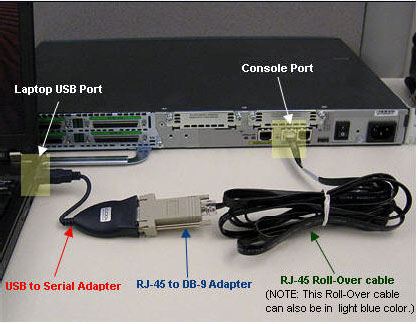
Cisco provides a couple of ports for console access, such as Console port, Mini USB port, AUX port. I has a previous post "Using Cisco Mini USB Console Cable to Configure Cisco Switches and Routers" for Mini USB usage. Usually old fashion way to use console port is still prevailing.

Configure the baud rate and character format of the PC or terminal to match these console port default characteristics:

  • 9600 baud
  • 8 data bits
  • No parity
  • 1 stop bit


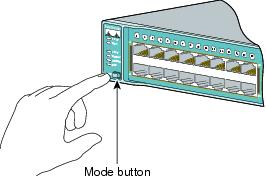
2. Hold down MODE Button while powering on the device

Note: for Cisco routers and certain type of Cisco switch (2955), it will require press Break Button / Ctrl+Break on terminal window to interrupt boot procedure.

Using driver version 1 for media type 1
Base ethernet MAC Address: 00:26:ca:28:4e:80
Xmodem file system is available.
The password-recovery mechanism is enabled.

The system has been interrupted prior to initializing the
flash filesystem.  The following commands will initialize
the flash filesystem, and finish loading the operating
system software:

    flash_init
    boot

switch: 


3. Initialize the flash file system and delete old configuration file

note: you also can use command 'dir flash:' to list files and rename configuration file with rename command 'rename flash:config.text flash:config.text.old'

switch: flash_init
Initializing Flash...
mifs[2]: 0 files, 1 directories
mifs[2]: Total bytes     :    3870720
mifs[2]: Bytes used      :       1024
mifs[2]: Bytes available :    3869696
mifs[2]: mifs fsck took 1 seconds.
mifs[3]: 531 files, 19 directories
mifs[3]: Total bytes     :   27998208
mifs[3]: Bytes used      :    9988096
mifs[3]: Bytes available :   18010112
mifs[3]: mifs fsck took 6 seconds.
...done Initializing Flash.

switch: del flash:config.text
Are you sure you want to delete "flash:config.text" (y/n)?y
File "flash:config.text" deleted

switch: del falsh:vlan.dat
Are you sure you want to delete "falsh:vlan.dat" (y/n)?y
File "falsh:vlan.dat" not deleted -- no such device


4. Reboot the system with default configuration


switch:
switch: boot
Loading "flash:c2960-lanlitek9-mz.122-44.SE6/c2960-lanlitek9-mz.122-44.SE6.bin"... @@@@@ @@@@@@@@@@@@@@@@@@@@@@@@@@@@@@@@@@@@@@@@@@@@@@@@@@@@@@@@@@@@@@@@@@@@@@@@@@@@@@@@@@@@@@@@@@@@@@@@@@@@@@@@@@@@@@@@@@@@@@@@@@@@@@@@@@@@@@@@@@@@@@@@@@@@@@@@@@@@@@
File "flash:c2960-lanlitek9-mz.122-44.SE6/c2960-lanlitek9-mz.122-44.SE6.bin" uncompressed and installed, entry point: 0x3000
executing...

              Restricted Rights Legend

Use, duplication, or disclosure by the Government is
subject to restrictions as set forth in subparagraph
(c) of the Commercial Computer Software - Restricted
Rights clause at FAR sec. 52.227-19 and subparagraph
(c) (1) (ii) of the Rights in Technical Data and Computer
Software clause at DFARS sec. 252.227-7013.

           cisco Systems, Inc.
           170 West Tasman Drive
           San Jose, California 95134-1706


Cisco IOS Software, C2960 Software (C2960-LANLITEK9-M), Version 12.2(44)SE6, RELEASE SOFTWARE (fc1)
Copyright (c) 1986-2009 by Cisco Systems, Inc.
Compiled Mon 09-Mar-09 18:10 by gereddy
Image text-base: 0x00003000, data-base: 0x01000000

Initializing flashfs...
Using driver version 1 for media type 1
mifs[3]: 0 files, 1 directories
mifs[3]: Total bytes     : 3870720
mifs[3]: Bytes used      : 1024
mifs[3]: Bytes available : 3869696
mifs[3]: mifs fsck took 0 seconds.
mifs[3]: Initialization complete.

mifs[4]: 530 files, 19 directories
mifs[4]: Total bytes     : 27998208
mifs[4]: Bytes used      : 9985536
mifs[4]: Bytes available : 18012672
mifs[4]: mifs fsck took 1 seconds.
mifs[4]: Initialization complete.

...done Initializing flashfs.

Checking for Bootloader upgrade.. not needed

POST: CPU MIC register Tests : Begin
POST: CPU MIC register Tests : End, Status Passed

POST: PortASIC Memory Tests : Begin
POST: PortASIC Memory Tests : End, Status Passed

POST: CPU MIC interface Loopback Tests : Begin
POST: CPU MIC interface Loopback Tests : End, Status Passed

POST: PortASIC RingLoopback Tests : Begin
POST: PortASIC RingLoopback Tests : End, Status Passed

POST: PortASIC CAM Subsystem Tests : Begin
POST: PortASIC CAM Subsystem Tests : End, Status Passed

POST: PortASIC Port Loopback Tests : Begin
POST: PortASIC Port Loopback Tests : End, Status Passed

Waiting for Port download...Complete


This product contains cryptographic features and is subject to United
States and local country laws governing import, export, transfer and
use. Delivery of Cisco cryptographic products does not imply
third-party authority to import, export, distribute or use encryption.
Importers, exporters, distributors and users are responsible for
compliance with U.S. and local country laws. By using this product you
agree to comply with applicable laws and regulations. If you are unable
to comply with U.S. and local laws, return this product immediately.

A summary of U.S. laws governing Cisco cryptographic products may be found at:
http://www.cisco.com/wwl/export/crypto/tool/stqrg.html

If you require further assistance please contact us by sending email to
[email protected].

cisco WS-C2960-24-S (PowerPC405) processor (revision C0) with 61440K/4088K bytes of memory.
Processor board ID FOC1330Y46Z
Last reset from power-on
1 Virtual Ethernet interface
24 FastEthernet interfaces
The password-recovery mechanism is enabled.

64K bytes of flash-simulated non-volatile configuration memory.
Base ethernet MAC Address       : 00:26:CA:28:4E:80
Motherboard assembly number     : 73-11471-05
Power supply part number        : 341-0097-02
Motherboard serial number       : FOC133106GX
Power supply serial number      : AZS132908XC
Model revision number           : C0
Motherboard revision number     : A0
Model number                    : WS-C2960-24-S
System serial number            : FOC1330Y46Z
Top Assembly Part Number        : 800-29858-02
Top Assembly Revision Number    : C0
Version ID                      : V03
CLEI Code Number                : COMSJ00ARC
Hardware Board Revision Number  : 0x01


Switch Ports Model              SW Version            SW Image
------ ----- -----              ----------            ----------
*    1 24    WS-C2960-24-S      12.2(44)SE6           C2960-LANLITEK9-M


         --- System Configuration Dialog ---

Would you like to enter the initial configuration dialog? [yes/no]:no


Reference:


1. Cisco Catalyst Fixed Configuration Layer 2 and Layer 3 Switches
2. All Cisco Products Password Recovery Procedures


1 Comment

    Categories

    All
    Architecture
    Blog
    Checkpoint
    Cisco
    Cloud
    CyberArk
    F5
    Fortigate
    Guardium
    Juniper
    Linux
    Network
    Others
    Palo Alto
    Qualys
    Raspberry Pi
    Security
    SIEM
    Software
    Vmware
    VPN
    Wireless

    Archives

    March 2024
    February 2024
    January 2024
    December 2023
    November 2023
    October 2023
    September 2023
    August 2023
    July 2023
    June 2023
    May 2023
    April 2023
    March 2023
    February 2023
    January 2023
    December 2022
    November 2022
    October 2022
    September 2022
    August 2022
    July 2022
    June 2022
    May 2022
    April 2022
    March 2022
    February 2022
    January 2022
    December 2021
    November 2021
    October 2021
    September 2021
    August 2021
    July 2021
    June 2021
    May 2021
    April 2021
    March 2021
    February 2021
    January 2021
    December 2020
    November 2020
    October 2020
    September 2020
    August 2020
    July 2020
    October 2019
    September 2019
    June 2019
    July 2018
    May 2018
    December 2017
    August 2017
    April 2017
    March 2017
    January 2017
    December 2016
    November 2016
    October 2016
    September 2016
    August 2016
    July 2016
    June 2016
    May 2016
    April 2016
    March 2016
    February 2016
    January 2016
    December 2015
    November 2015
    October 2015
    September 2015
    August 2015
    July 2015
    June 2015
    May 2015
    April 2015
    March 2015

    Print Page:

    RSS Feed

    Email Subscribe
Powered by Create your own unique website with customizable templates.
  • Blog
  • Sitemap
    • Categories
  • Contact
  • About
  • Resources
  • Tools
  • 51sec.org