Info Security Memo
  • Blog
  • Sitemap
    • Categories
  • Contact
  • About
  • Resources
  • Tools
  • 51sec.org

Build Confidence

Focusing on Information Security 

Info Security Notes

Cisco ASAv HA Configurations

1/31/2016

0 Comments

 
Configuring high availability requires two identical ASAs connected to each other through a dedicated failover link and, optionally, a Stateful Failover link. The health of the active interfaces and units is monitored to determine if specific failover conditions are met. If those conditions are met, failover occurs.

The ASA supports two failover configurations, Active/Active failover and Active/Standby failover. Each failover configuration has its own method for determining and performing failover.

  • In Active/Standby failover, one unit is the active unit. It passes traffic. The standby unit does not actively pass traffic. When a failover occurs, the active unit fails over to the standby unit, which then becomes active. You can use Active/Standby failover for ASAs in single or multiple context mode.
  • In an Active/Active failover configuration, both ASAs can pass network traffic. Active/Active failover is only available to ASAs in multiple context mode. In Active/Active failover, you divide the security contexts on the ASA into 2 failover groups . A failover group is simply a logical group of one or more security contexts. One group is assigned to be active on the primary ASA, and the other group is assigned to be active on the secondary ASA. When a failover occurs, it occurs at the failover group level.

Both failover configurations support stateful or stateless (regular) failover.

Failover Configuration Feature Support

Feature

Active/Active

Active/Standby

Single Context Mode

No

Yes

Multiple Context Mode

Yes

Yes

Traffic Sharing Network Configurations

Yes

No

Unit Failover

Yes

Yes

Failover of Groups of Contexts

Yes

No

Failover of Individual Contexts

No

No


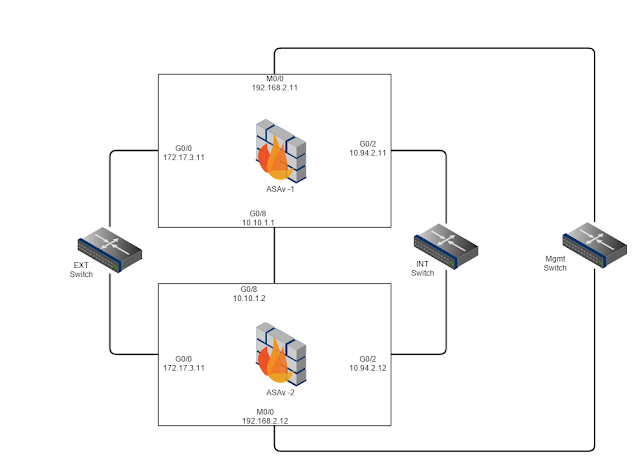
Topology:

Configuration Steps:

1. Basic ASAv Setup for ASDM and SSH Access on Both ASAv Devices

Same configuration will be on both ASAv firewalls, but with different IP address
// For ASDM Access 
interface Management0/0
 management-only
 nameif Mgmt
 security-level 100
 ip address 192.168.2.11 255.255.255.0 

http server enable
http 192.168.2.0 255.255.255.0 management


// For SSH Accss
ciscoasa(config)# crypto key generate rsa modulus 2048
INFO: The name for the keys will be:
Keypair generation process begin. Please wait...
ciscoasa(config)# write memory
Building configuration...
Cryptochecksum: 67435a18 4790aaff 7584afa7 d28c43c0 

2837 bytes copied in 0.680 secs
[OK]

ciscoasa(config)# aaa authentication ssh console LOCAL
WARNING: local database is empty! Use 'username' command to define local users.
ciscoasa(config)# username test password test


ciscoasa(config)# ssh 192.168.2.0 255.255.255.0 Mgmt
ciscoasa(config)# host ASAv-Pri

// Secondary ASAv 
ciscoasa(config)# host ASAv-Sec


2. Primary ASAv Setup
2.1 Failover Interface (G0/8)


enable
config t
failover lan unit primary
interface gigabitEthernet 0/8
no shutdown

failover lan interface LANFAIL gigabitethernet 0/8
failover interface ip LANFAIL 10.10.1.1 255.255.255.0 standby 10.10.1.2
failover key secretkey
failover link LANFAIL
exit

show failover

interface gigabitEthernet 0/8
no shutdown

exit


2.2 External Interface (G0/0)


config t
interface gigabitEthernet 0/0
nameif EXT
ip address 172.17.3.11 255.255.255.0 standby 172.17.3.12
no shutdown
exit


2.3 Internal Interface (G0/3)


interface gigabitEthernet 0/1
nameif INT
security-level 100
ip address 10.94.2.11 255.255.255.0 standby 10.94.2.12
no shutdown
exit


2.4 Verify Primary ASAv Configuration


ASAv-Pri(config)# monitor-interface EXT

ASAv-Pri(config)# monitor-interface INT

ASAv-Pri(config)# failover

ASAv-Pri(config)# show failover
Failover On
Failover unit Primary
Failover LAN Interface: LANFAIL GigabitEthernet0/8 (up)
Reconnect timeout 0:00:00
Unit Poll frequency 1 seconds, holdtime 15 seconds
Interface Poll frequency 5 seconds, holdtime 25 seconds
Interface Policy 1
Monitored Interfaces 2 of 36 maximum
MAC Address Move Notification Interval not set
Version: Ours 9.5(1)200, Mate 9.5(1)200
Last Failover at: 03:27:17 UTC Jan 27 2016
        This host: Primary - Active
                Active time: 48084 (sec)
                slot 0: empty
                  Interface mgmt (192.168.2.11): Normal (Not-Monitored)
                  Interface EXT (172.17.3.11): Normal (Monitored)
                  Interface INT (10.94.2.11): Normal (Monitored)
        Other host: Secondary - Standby Ready
                Active time: 0 (sec)
                  Interface mgmt (192.168.2.12): Normal (Not-Monitored)
                  Interface EXT (172.17.3.12): Normal (Monitored)
                  Interface INT (10.94.2.12): Normal (Monitored)

Stateful Failover Logical Update Statistics
        Link : LANFAIL GigabitEthernet0/8 (up)
        Stateful Obj    xmit       xerr       rcv        rerr
        General         16330      0          6362       0
        sys cmd         6363       0          6362       0
        up time         0          0          0          0
        RPC services    0          0          0          0
        TCP conn        0          0          0          0
        UDP conn        0          0          0          0
        ARP tbl         9963       0          0          0
        Xlate_Timeout   0          0          0          0
        IPv6 ND tbl     0          0          0          0
        VPN IKEv1 SA    0          0          0          0
        VPN IKEv1 P2    0          0          0          0
        VPN IKEv2 SA    0          0          0          0
        VPN IKEv2 P2    0          0          0          0
        VPN CTCP upd    0          0          0          0
        VPN SDI upd     0          0          0          0
        VPN DHCP upd    0          0          0          0
        SIP Session     0          0          0          0
        SIP Tx  0          0          0          0
        SIP Pinhole     0          0          0          0
        Route Session   2          0          0          0
        Router ID       0          0          0          0
        User-Identity   2          0          0          0
        CTS SGTNAME     0          0          0          0
        CTS PAC         0          0          0          0
        TrustSec-SXP    0          0          0          0
        IPv6 Route      0          0          0          0
        STS Table       0          0          0          0

        Logical Update Queue Information
                        Cur     Max     Total
        Recv Q:         0       17      6362
        Xmit Q:         0       30      42313

ASAv-Pri(config)# show failover interface
        interface LANFAIL GigabitEthernet0/8
                System IP Address: 10.10.1.1 255.255.255.0
                My IP Address    : 10.10.1.1
                Other IP Address : 10.10.1.2
ASAv-Pri(config)#


3. Secondary ASAv Configuration

3.1 Failover Interface Configuration (G0/8)


config t

no failover
failover lan unit secondary
interface gigabitEthernet 0/8
no nameif
no shutdown
failover lan interface LANFAIL gigabitEthernet 0/3

failover interface ip LANFAIL 10.10.1.1 255.255.255.0 standby 10.10.1.2
failover key secretkey
failover link LANFAIL
failover
exit

interface gigabitEthernet 0/8
no shutdown

exit


ASAv-Pri# show failover
Failover On
Failover unit Secondary
Failover LAN Interface: LANFAIL GigabitEthernet0/8 (up)
Reconnect timeout 0:00:00
Unit Poll frequency 1 seconds, holdtime 15 seconds
Interface Poll frequency 5 seconds, holdtime 25 seconds
Interface Policy 1
Monitored Interfaces 2 of 36 maximum
MAC Address Move Notification Interval not set
Version: Ours 9.5(1)200, Mate 9.5(1)200
Last Failover at: 16:22:41 UTC Jan 27 2016
        This host: Secondary - Standby Ready
                Active time: 0 (sec)
                slot 0: empty
                  Interface EXT (172.17.3.12): Normal (Monitored)
                  Interface INT (10.94.2.12): Normal (Monitored)
                  Interface mgmt (192.168.2.12): Normal (Not-Monitored)
        Other host: Primary - Active
                Active time: 48625 (sec)
                  Interface EXT (172.17.3.11): Normal (Monitored)
                  Interface INT (10.94.2.11): Normal (Monitored)
                  Interface mgmt (192.168.2.11): Normal (Not-Monitored)

Stateful Failover Logical Update Statistics
        Link : LANFAIL GigabitEthernet0/8 (up)
        Stateful Obj    xmit       xerr       rcv        rerr
        General         287        0          310        0
        sys cmd         287        0          287        0
        up time         0          0          0          0
        RPC services    0          0          0          0
        TCP conn        0          0          0          0
        UDP conn        0          0          0          0
        ARP tbl         0          0          22         0
        Xlate_Timeout   0          0          0          0
        IPv6 ND tbl     0          0          0          0
        VPN IKEv1 SA    0          0          0          0
        VPN IKEv1 P2    0          0          0          0
        VPN IKEv2 SA    0          0          0          0
        VPN IKEv2 P2    0          0          0          0
        VPN CTCP upd    0          0          0          0
        VPN SDI upd     0          0          0          0
        VPN DHCP upd    0          0          0          0
        SIP Session     0          0          0          0
        SIP Tx  0          0          0          0
        SIP Pinhole     0          0          0          0
        Route Session   0          0          0          0
        Router ID       0          0          0          0
        User-Identity   0          0          1          0
        CTS SGTNAME     0          0          0          0
        CTS PAC         0          0          0          0
        TrustSec-SXP    0          0          0          0
        IPv6 Route      0          0          0          0
        STS Table       0          0          0          0

        Logical Update Queue Information
                        Cur     Max     Total
        Recv Q:         0       17      1532
        Xmit Q:         0       1       287
ASAv-Pri#

ASAv-Pri# failover ?

  active          Make this system to be the active unit of the failover pair
  exec            Execute command on the designated unit
  reload-standby  Force standby unit to reboot
  reset           Force a unit or failover group to an unfailed state


4. Verify

After all above configuration, each time you save configuration on Primary, the configuration will copied to Secondary. When you reboot Secondary ASAv, you will see the hosname will be ASAv-Sec first then after Sync, it will automatically change to ASAv-Pri.


I reloaded the Primary ASAv and checked all interfaces on Secondary:

ASAv-Pri# show failover
Failover On
Failover unit Secondary
Failover LAN Interface: LANFAIL GigabitEthernet0/8 (up)
Reconnect timeout 0:00:00
Unit Poll frequency 1 seconds, holdtime 15 seconds
Interface Poll frequency 5 seconds, holdtime 25 seconds
Interface Policy 1
Monitored Interfaces 2 of 36 maximum
MAC Address Move Notification Interval not set
Version: Ours 9.5(1)200, Mate 9.5(1)200
Last Failover at: 17:26:37 UTC Jan 27 2016
        This host: Secondary - Active
                Active time: 161 (sec)
                slot 0: empty
                  Interface EXT (172.17.3.11): Normal (Monitored)
                  Interface INT (10.94.2.11): Normal (Monitored)
                  Interface mgmt (192.168.2.11): Normal (Not-Monitored)
        Other host: Primary - Standby Ready
                Active time: 0 (sec)
                  Interface EXT (172.17.3.12): Normal (Monitored)
                  Interface INT (10.94.2.12): Normal (Monitored)
                  Interface mgmt (192.168.2.12): Normal (Not-Monitored)

Stateful Failover Logical Update Statistics
        Link : LANFAIL GigabitEthernet0/8 (up)
        Stateful Obj    xmit       xerr       rcv        rerr
        General         531        0          563        0
        sys cmd         524        0          523        0
        up time         0          0          0          0
        RPC services    0          0          0          0
        TCP conn        0          0          0          0
        UDP conn        0          0          0          0
        ARP tbl         6          0          39         0
        Xlate_Timeout   0          0          0          0
        IPv6 ND tbl     0          0          0          0
        VPN IKEv1 SA    0          0          0          0
        VPN IKEv1 P2    0          0          0          0
        VPN IKEv2 SA    0          0          0          0
        VPN IKEv2 P2    0          0          0          0
        VPN CTCP upd    0          0          0          0
        VPN SDI upd     0          0          0          0
        VPN DHCP upd    0          0          0          0
        SIP Session     0          0          0          0
        SIP Tx  0          0          0          0
        SIP Pinhole     0          0          0          0
        Route Session   0          0          0          0
        Router ID       0          0          0          0
        User-Identity   1          0          1          0
        CTS SGTNAME     0          0          0          0
        CTS PAC         0          0          0          0
        TrustSec-SXP    0          0          0          0
        IPv6 Route      0          0          0          0
        STS Table       0          0          0          0

        Logical Update Queue Information
                        Cur     Max     Total
        Recv Q:         0       17      2683
        Xmit Q:         0       30      648
ASAv-Pri#
ASAv-Pri# show interface ip brief
Interface                  IP-Address      OK? Method Status                Protocol
GigabitEthernet0/0         172.17.3.11     YES CONFIG up                    up
GigabitEthernet0/1         unassigned      YES unset  up                    up
GigabitEthernet0/2         10.94.2.11      YES CONFIG up                    up
GigabitEthernet0/3         unassigned      YES unset  administratively down up
GigabitEthernet0/4         unassigned      YES unset  administratively down up
GigabitEthernet0/5         unassigned      YES unset  administratively down up
GigabitEthernet0/6         unassigned      YES unset  administratively down up
GigabitEthernet0/7         unassigned      YES unset  administratively down up
GigabitEthernet0/8         10.10.1.2       YES unset  up                    up
Management0/0              192.168.2.11    YES CONFIG up                    up

ASAv-Pri#


ASAv-Pri#   show version

Cisco Adaptive Security Appliance Software Version 9.5(1)200
Device Manager Version 7.5(1)

Compiled on Fri 28-Aug-15 15:56 PDT by builders
System image file is "boot:/asa951-200-smp-k8.bin"
Config file at boot was "startup-config"

ASAv-Pri up 1 hour 5 mins
failover cluster up 15 hours 54 mins

Hardware:   ASAv, 1024 MB RAM, CPU Xeon 5500 series 2294 MHz,
Model Id:   ASAv5
Internal ATA Compact Flash, 256MB
Slot 1: ATA Compact Flash, 8192MB
BIOS Flash Firmware Hub @ 0x0, 0KB


 0: Ext: Management0/0       : address is 000c.291a.f3fd, irq 10
 1: Ext: GigabitEthernet0/0  : address is 000c.291a.f307, irq 5
 2: Ext: GigabitEthernet0/1  : address is 000c.291a.f311, irq 9
 3: Ext: GigabitEthernet0/2  : address is 000c.291a.f31b, irq 11
 4: Ext: GigabitEthernet0/3  : address is 000c.291a.f325, irq 10
 5: Ext: GigabitEthernet0/4  : address is 000c.291a.f32f, irq 5
 6: Ext: GigabitEthernet0/5  : address is 000c.291a.f339, irq 9
 7: Ext: GigabitEthernet0/6  : address is 000c.291a.f343, irq 11
 8: Ext: GigabitEthernet0/7  : address is 000c.291a.f34d, irq 10
 9: Ext: GigabitEthernet0/8  : address is 000c.291a.f357, irq 5

License mode: Smart Licensing
ASAv Platform License State: Unlicensed
No active entitlement: no feature tier and no throughput level configured
*Memory resource allocation is more than the permitted limit.

Licensed features for this platform:
Maximum Physical Interfaces       : 10
Maximum VLANs                     : 25
Inside Hosts                      : Unlimited
Failover                          : Active/Standby
Encryption-DES                    : Enabled
Encryption-3DES-AES               : Enabled
Security Contexts                 : 0
GTP/GPRS                          : Disabled
AnyConnect Premium Peers          : 2
AnyConnect Essentials             : Disabled
Other VPN Peers                   : 50
Total VPN Peers                   : 50
Shared License                    : Disabled
AnyConnect for Mobile             : Disabled
AnyConnect for Cisco VPN Phone    : Disabled
Advanced Endpoint Assessment      : Disabled
Total UC Proxy Sessions           : 2
Botnet Traffic Filter             : Enabled
Cluster                           : Disabled


License mode: Smart Licensing

Failover cluster licensed features for this platform:
Maximum Physical Interfaces       : 10
Maximum VLANs                     : 25
Inside Hosts                      : Unlimited
Failover                          : Active/Standby
Encryption-DES                    : Enabled
Encryption-3DES-AES               : Enabled
Security Contexts                 : 0
GTP/GPRS                          : Disabled
AnyConnect Premium Peers          : 2
AnyConnect Essentials             : Disabled
Other VPN Peers                   : 50
Total VPN Peers                   : 50
Shared License                    : Disabled
AnyConnect for Mobile             : Disabled
AnyConnect for Cisco VPN Phone    : Disabled
Advanced Endpoint Assessment      : Disabled
Total UC Proxy Sessions           : 2
Botnet Traffic Filter             : Enabled
Cluster                           : Disabled

Licensing mode is Smart Licensing

Serial Number: 9ALU3EW6LDF

Image type          : Release
Key version         : A

Configuration last modified by enable_1 at 17:02:38.079 UTC Wed Jan 27 2016
ASAv-Pri#

ASAv-Pri# sh run
: Saved

:
: Serial Number: 9ALU3EW6LDF
: Hardware:   ASAv, 1024 MB RAM, CPU Xeon 5500 series 2294 MHz
:
ASA Version 9.5(1)200
!
hostname ASAv-Pri
enable password 8Ry2YjIyt7RRXU24 encrypted
xlate per-session deny tcp any4 any4
xlate per-session deny tcp any4 any6
xlate per-session deny tcp any6 any4
xlate per-session deny tcp any6 any6
xlate per-session deny udp any4 any4 eq domain
xlate per-session deny udp any4 any6 eq domain
xlate per-session deny udp any6 any4 eq domain
xlate per-session deny udp any6 any6 eq domain
names
!
interface GigabitEthernet0/0
 nameif EXT
 security-level 0
 ip address 172.17.3.11 255.255.255.0 standby 172.17.3.12
!
interface GigabitEthernet0/1
 description test
 no nameif
 no security-level
 no ip address
!
interface GigabitEthernet0/2
 nameif INT
 security-level 100
 ip address 10.94.2.11 255.255.255.0 standby 10.94.2.12
!
interface GigabitEthernet0/3
 shutdown
 no nameif
 no security-level
 no ip address
!
interface GigabitEthernet0/4
 shutdown
 no nameif
 no security-level
 no ip address
!
interface GigabitEthernet0/5
 shutdown
 no nameif
 no security-level
 no ip address
!
interface GigabitEthernet0/6
 shutdown
 no nameif
 no security-level
 no ip address
!
interface GigabitEthernet0/7
 shutdown
 no nameif
 no security-level
 no ip address
!
interface GigabitEthernet0/8
 description LAN/STATE Failover Interface
!
interface Management0/0
 management-only
 nameif mgmt
 security-level 0
 ip address 192.168.2.11 255.255.255.0 standby 192.168.2.12
!
ftp mode passive
pager lines 23
logging enable
logging asdm informational
mtu EXT 1500
mtu INT 1500
mtu mgmt 1500
failover
failover lan unit secondary
failover lan interface LANFAIL GigabitEthernet0/8
failover key *****
failover link LANFAIL GigabitEthernet0/8
failover interface ip LANFAIL 10.10.1.1 255.255.255.0 standby 10.10.1.2
no monitor-interface mgmt
icmp unreachable rate-limit 1 burst-size 1
no asdm history enable
arp timeout 14400
no arp permit-nonconnected
timeout xlate 3:00:00
timeout pat-xlate 0:00:30
timeout conn 1:00:00 half-closed 0:10:00 udp 0:02:00 icmp 0:00:02
timeout sunrpc 0:10:00 h323 0:05:00 h225 1:00:00 mgcp 0:05:00 mgcp-pat 0:05:00
timeout sip 0:30:00 sip_media 0:02:00 sip-invite 0:03:00 sip-disconnect 0:02:00
timeout sip-provisional-media 0:02:00 uauth 0:05:00 absolute
timeout tcp-proxy-reassembly 0:01:00
timeout floating-conn 0:00:00
user-identity default-domain LOCAL
aaa authentication ssh console LOCAL
http server enable
http 192.168.2.0 255.255.255.0 mgmt
no snmp-server location
no snmp-server contact
crypto ipsec security-association pmtu-aging infinite
crypto ca trustpoint _SmartCallHome_ServerCA
 no validation-usage
 crl configure
crypto ca trustpool policy
crypto ca certificate chain _SmartCallHome_ServerCA
 certificate ca 6ecc7aa5a7032009b8cebcf4e952d491
    308205ec 308204d4 a0030201 0202106e cc7aa5a7 032009b8 cebcf4e9 52d49130
    0d06092a 864886f7 0d010105 05003081 ca310b30 09060355 04061302 55533117
    30150603 55040a13 0e566572 69536967 6e2c2049 6e632e31 1f301d06 0355040b
    13165665 72695369 676e2054 72757374 204e6574 776f726b 313a3038 06035504
    0b133128 63292032 30303620 56657269 5369676e 2c20496e 632e202d 20466f72
    20617574 686f7269 7a656420 75736520 6f6e6c79 31453043 06035504 03133c56
    65726953 69676e20 436c6173 73203320 5075626c 69632050 72696d61 72792043
    65727469 66696361 74696f6e 20417574 686f7269 7479202d 20473530 1e170d31
    30303230 38303030 3030305a 170d3230 30323037 32333539 35395a30 81b5310b
    30090603 55040613 02555331 17301506 0355040a 130e5665 72695369 676e2c20
    496e632e 311f301d 06035504 0b131656 65726953 69676e20 54727573 74204e65
    74776f72 6b313b30 39060355 040b1332 5465726d 73206f66 20757365 20617420
    68747470 733a2f2f 7777772e 76657269 7369676e 2e636f6d 2f727061 20286329
    3130312f 302d0603 55040313 26566572 69536967 6e20436c 61737320 33205365
    63757265 20536572 76657220 4341202d 20473330 82012230 0d06092a 864886f7
    0d010101 05000382 010f0030 82010a02 82010100 b187841f c20c45f5 bcab2597
    a7ada23e 9cbaf6c1 39b88bca c2ac56c6 e5bb658e 444f4dce 6fed094a d4af4e10
    9c688b2e 957b899b 13cae234 34c1f35b f3497b62 83488174 d188786c 0253f9bc
    7f432657 5833833b 330a17b0 d04e9124 ad867d64 12dc744a 34a11d0a ea961d0b
    15fca34b 3bce6388 d0f82d0c 948610ca b69a3dca eb379c00 48358629 5078e845
    63cd1941 4ff595ec 7b98d4c4 71b350be 28b38fa0 b9539cf5 ca2c23a9 fd1406e8
    18b49ae8 3c6e81fd e4cd3536 b351d369 ec12ba56 6e6f9b57 c58b14e7 0ec79ced
    4a546ac9 4dc5bf11 b1ae1c67 81cb4455 33997f24 9b3f5345 7f861af3 3cfa6d7f
    81f5b84a d3f58537 1cb5a6d0 09e4187b 384efa0f 02030100 01a38201 df308201
    db303406 082b0601 05050701 01042830 26302406 082b0601 05050730 01861868
    7474703a 2f2f6f63 73702e76 65726973 69676e2e 636f6d30 12060355 1d130101
    ff040830 060101ff 02010030 70060355 1d200469 30673065 060b6086 480186f8
    45010717 03305630 2806082b 06010505 07020116 1c687474 70733a2f 2f777777
    2e766572 69736967 6e2e636f 6d2f6370 73302a06 082b0601 05050702 02301e1a
    1c687474 70733a2f 2f777777 2e766572 69736967 6e2e636f 6d2f7270 61303406
    03551d1f 042d302b 3029a027 a0258623 68747470 3a2f2f63 726c2e76 65726973
    69676e2e 636f6d2f 70636133 2d67352e 63726c30 0e060355 1d0f0101 ff040403
    02010630 6d06082b 06010505 07010c04 61305fa1 5da05b30 59305730 55160969
    6d616765 2f676966 3021301f 30070605 2b0e0302 1a04148f e5d31a86 ac8d8e6b
    c3cf806a d448182c 7b192e30 25162368 7474703a 2f2f6c6f 676f2e76 65726973
    69676e2e 636f6d2f 76736c6f 676f2e67 69663028 0603551d 11042130 1fa41d30
    1b311930 17060355 04031310 56657269 5369676e 4d504b49 2d322d36 301d0603
    551d0e04 1604140d 445c1653 44c1827e 1d20ab25 f40163d8 be79a530 1f060355
    1d230418 30168014 7fd365a7 c2ddecbb f03009f3 4339fa02 af333133 300d0609
    2a864886 f70d0101 05050003 82010100 0c8324ef ddc30cd9 589cfe36 b6eb8a80
    4bd1a3f7 9df3cc53 ef829ea3 a1e697c1 589d756c e01d1b4c fad1c12d 05c0ea6e
    b2227055 d9203340 3307c265 83fa8f43 379bea0e 9a6c70ee f69c803b d937f47a
    6decd018 7d494aca 99c71928 a2bed877 24f78526 866d8705 404167d1 273aeddc
    481d22cd 0b0b8bbc f4b17bfd b499a8e9 762ae11a 2d876e74 d388dd1e 22c6df16
    b62b8214 0a945cf2 50ecafce ff62370d ad65d306 4153ed02 14c8b558 28a1ace0
    5becb37f 954afb03 c8ad26db e6667812 4ad99f42 fbe198e6 42839b8f 8f6724e8
    6119b5dd cdb50b26 058ec36e c4c875b8 46cfe218 065ea9ae a8819a47 16de0c28
    6c2527b9 deb78458 c61f381e a4c4cb66
  quit
telnet timeout 5
ssh stricthostkeycheck
ssh 192.168.2.0 255.255.255.0 mgmt
ssh timeout 5
ssh key-exchange group dh-group1-sha1
console timeout 0
threat-detection basic-threat
threat-detection statistics access-list
no threat-detection statistics tcp-intercept
dynamic-access-policy-record DfltAccessPolicy
username test password P4ttSyrm33SV8TYp encrypted
!
class-map inspection_default
 match default-inspection-traffic
!
!
policy-map type inspect dns preset_dns_map
 parameters
  message-length maximum client auto
  message-length maximum 512
policy-map global_policy
 class inspection_default
  inspect ip-options
  inspect netbios
  inspect rtsp
  inspect sunrpc
  inspect tftp
  inspect xdmcp
  inspect dns preset_dns_map
  inspect ftp
  inspect h323 h225
  inspect h323 ras
  inspect rsh
  inspect esmtp
  inspect sqlnet
  inspect sip
  inspect skinny
policy-map type inspect dns migrated_dns_map_1
 parameters
  message-length maximum client auto
  message-length maximum 512
!
service-policy global_policy global
prompt hostname context
call-home reporting anonymous prompt 2
call-home
 profile License
  destination address http https://tools.cisco.com/its/service/oddce/services/DDCEService
  destination transport-method http
 profile CiscoTAC-1
  no active
  destination address http https://tools.cisco.com/its/service/oddce/services/DDCEService
  destination address email [email protected]
  destination transport-method http
  subscribe-to-alert-group diagnostic
  subscribe-to-alert-group environment
  subscribe-to-alert-group inventory periodic monthly
  subscribe-to-alert-group configuration periodic monthly
  subscribe-to-alert-group telemetry periodic daily
Cryptochecksum:deb136269827f21fc1c142fac079704b
: end

ASAv-Pri#


Video: Cisco ASAv 9.5(1) - High Availability Configuring 


Reference:
  • CLI Book 1: Cisco ASA Series General Operations CLI Configuration Guide, 9.1 - Configuring Failover
  • Cisco ASA 5515-X Configuration Notes


0 Comments

Configuring Checkpoint Gateway Forwarding Logs to External Syslog Server

1/28/2016

4 Comments

 
Check Point Management Server is not only the central policy management place for Check Point products, but also holds all Check Point gateways logs. In real environment, external third party log servers sometimes will need to be used to store and analyse those logs, especially for central SIEM systems.

Before R77.30, you will have to forward those logs from Management server to external syslog servers.

Two previous posts have been recorded in this blog to describe the procedures how to forward Check Point logs from Management Server to external syslog server:

  • Forwarding Checkpoint Management Server Firewall logs to an external syslog server STRM/Qradar SIEM
  • Forward Logs from Checkpoint SmartCenter Management Server and Juniper NSM / IDP to Syslog Server


Starting from R77.30, Check Point allows gateways directly send the logs to external syslog server without going through Management server.

Here is the steps I tried:

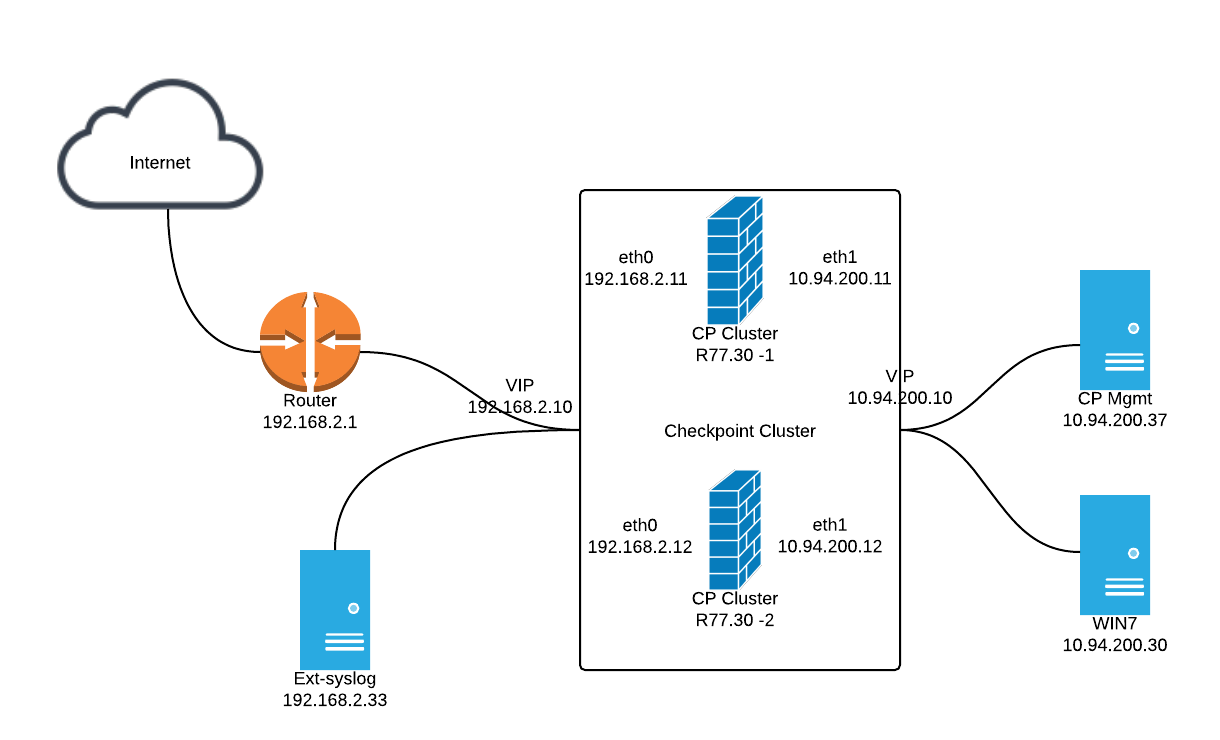
Diagram:


Steps:

1. Download and Install R77.30 Add-on on Security Management Server

1.1 Download file from the R77.30 Add-On Gaia Legacy Cli link.
You will get a 11M file - Check_Point_R77_30_T204_Add-on_Gaia.tgz
Note: If you are using Google Chrome, you will get a file name Check_Point_R77_30_T204_Add-on_Gaia.gz. This issue mentioned on sk76080 (Google Chrome changes downloaded files from .tgz to .gz). rename gz file to tgz should resolve issue.

1.2 SFTP the the file Check_Point_R77_30_T204_Add-on_Gaia.tgz to Mgmt Server CP Mgmt (10.94.200.37)

1.3 Using following command install it on CP Mgmt Server

tar -zxvf Check_Point_R77_30_T204_Add-on_Gaia.tgz
./UnixInstallScript

2. Define a new Syslog Server
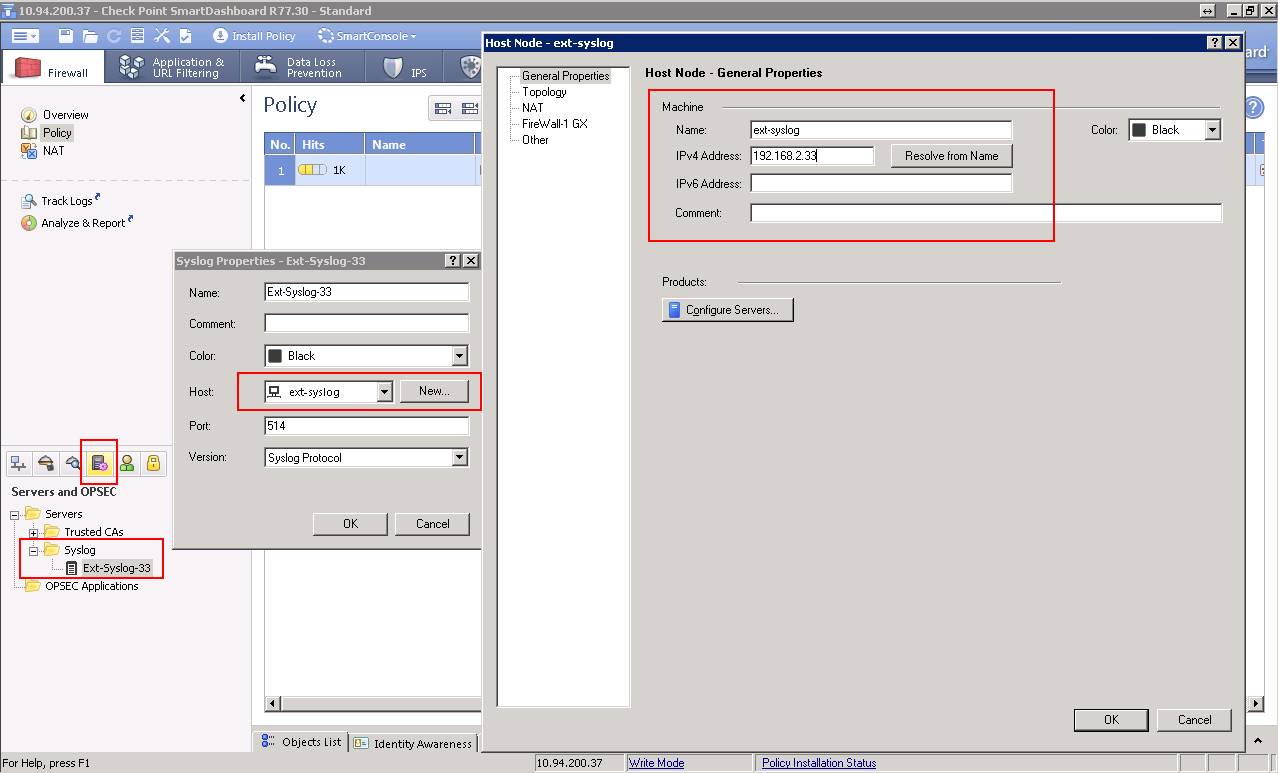
2.1In the Servers and OPSEC Applications object tree, right-click Servers > New > Syslog.
2.2 In the Syslog Properties window, enter or select:
Name: ext-syslog-33
Host: create a new syslog object with name ext-syslog and ip address 192.168.2.33
Port (Default = 514)
Version (BSD Protocol or Syslog Protocol)


3. From Smart Dashboard, Configuring Gateways to Send Logs to Syslog Servers

To send the logs of a gateway to syslog servers:
2.1 In SmartDashboard, go to gateway Properties -> Logs.
2.2 In the Send logs and alerts to these log server table, click the green button to add syslog servers.
2.3 Click OK then Install policy to the gateway.


4. On Security Gateway(s), permanently enable Syslog in Kernel :
Run following command on gateway or all cluster members:

echo fwsyslog_enable=1 >> $FWDIR/modules/fwkern.conf

Reboot the Security Gateway or cluster members.

5. Verify 

5.1 Verify from gateway:
[[email protected]:0]# tcpdump -i eth0 host 192.168.2.33 and udp port 514
tcpdump: verbose output suppressed, use -v or -vv for full protocol decode
listening on eth0, link-type EN10MB (Ethernet), capture size 96 bytes
21:59:12.231469 IP 192.168.2.12.38034 > 192.168.2.33.syslog: SYSLOG authpriv.notice, length: 371
21:59:31.007223 IP 192.168.2.10.10535 > 192.168.2.33.syslog: SYSLOG authpriv.notice, length: 340
21:59:44.120324 IP 192.168.2.12.38034 > 192.168.2.33.syslog: SYSLOG authpriv.notice, length: 334


5.2 Verify from Syslog server


Reference:
  • How to configure Security Gateway on Gaia OS to send FireWall logs to an external Syslog server
  • How to export syslog messages from Security Gateway on Gaia OS to a Log Server and view them in SmartView Tracker
  • How to configure syslog daemon on SecurePlatform OS
  • Configuring Gateways to Send Logs to Syslog Servers


4 Comments

O Errors During TFTP Cisco IOS Image Copying

1/23/2016

0 Comments

 
I were using TFTPD32 to transfer a image to Cisco 3560 switch. It was fine at the beginning then when it was almost done I got lots of O errors.

O usually indicates that a packet was received out of order and the copy process may fail.


Symptoms:


Switch#copy tftp: flash:
Address or name of remote host []? 1.1.1.2
Source filename []? c3560-ipbasek9-mz.150-2.SE9.bin
Destination filename [c3560-ipbasek9-mz.150-2.SE9.bin]?
Accessing tftp://1.1.1.2/c3560-ipbasek9-mz.150-2.SE9.bin...
Loading c3560-ipbasek9-mz.150-2.SE9.bin from 1.1.1.2 (via Vlan1): !!!!!!!!!!!!!!!!!!!
!!!!!!!!!!!!!!!!!!!!!!!!!!!!O!OOOOOO!OOOOOO!OOOOOOOO!OOOOOOOO!OOOOOOOOOO... [timed out]

%Error reading tftp://1.1.1.2/c3560-ipbasek9-mz.150-2.SE9.bin (Timed out)
Switch#


I did many times of this kind of tasks before. I even have a post "Upgrade Cisco 3560X IOS Take 30+ Minutes" regarding the process how to upgrade 3560X-48T-S IOS to latest version. At that time, upgrading took me more than 30 minutes.

Lets review what TFTP used for and what O means for the file transferring.

TFTP uses UDP port 69, and block numbers within packets to order them. There was originally a 512 byte block per packet with a 32MB file limit but this has now increased to a variable block size and a 4GB limit with RFC 2348. TFTP is only used significantly today to transfer network device images & associated configurations across trusted networks, it has no methods of listing directories, packet encryption or passwords.

The characters which show the status of a transfer in IOS are
! – Indicates a successful transfer to 10 packets
O – Indicates out of sequence packets
. – Indicates a timeout
E – Uppercase E indicates an error
e – Lowercase e indicates flash is being erased
V – Indicates checksum verification
Solution:
I was thinking it may relates to my network cable or switch flash itself. During reviewing the folder on 3560 Switch, I found it is caused by not enough space. The IOS file size is more than 16M bytes.


Switch#sh flash:

Directory of flash:/

    2  -rwx        1940   Mar 1 1993 00:02:57 +00:00  private-config.text
    3  -rwx     8811199   Mar 1 1993 02:36:58 +00:00  c3560-ipbasek9-mz.122-46.SE.bin
    4  -rwx          24  Sep 21 2012 16:01:17 +00:00  private-config.text.renamed
    5  -rwx        8459  Sep 21 2012 16:01:17 +00:00  config.text.renamed
    6  -rwx         796   Mar 1 1993 00:02:34 +00:00  vlan.dat.renamed
    7  drwx         192   Mar 1 1993 00:08:16 +00:00  c3560-ipbase-mz.122-35.SE5
  465  -rwx        2072   Mar 1 1993 00:02:57 +00:00  multiple-fs
  467  -rwx        2496   Mar 1 1993 00:02:57 +00:00  config.text

32514048 bytes total (14631936 bytes free)
Switch#
Switch#delete /force /recursive flash:/c3560-ipbase-mz.122-35.SE5
Switch#sh flash:                                                 

Directory of flash:/

    2  -rwx        1940   Mar 1 1993 00:02:57 +00:00  private-config.text
    3  -rwx     8811199   Mar 1 1993 02:36:58 +00:00  c3560-ipbasek9-mz.122-46.SE.bin
    4  -rwx          24  Sep 21 2012 16:01:17 +00:00  private-config.text.renamed
    5  -rwx        8459  Sep 21 2012 16:01:17 +00:00  config.text.renamed
    6  -rwx         796   Mar 1 1993 00:02:34 +00:00  vlan.dat.renamed
  465  -rwx        2072   Mar 1 1993 00:02:57 +00:00  multiple-fs
  467  -rwx        2496   Mar 1 1993 00:02:57 +00:00  config.text

32514048 bytes total (23684096 bytes free)


After removed one folder from flash:/ directory, new IOS transferred again. This time, it is quite smooth.


nSwitch#copy tftp: flash:
Address or name of remote host []? 1.1.1.2
Source filename []? c3560-ipbasek9-mz.150-2.SE9.bin
Destination filename [c3560-ipbasek9-mz.150-2.SE9.bin]? 
Accessing tftp://1.1.1.2/c3560-ipbasek9-mz.150-2.SE9.bin...
Loading c3560-ipbasek9-mz.150-2.SE9.bin from 1.1.1.2 (via Vlan1): !!!!!!!!!!!!!!!!!!!!!!!!!!!!!!!!!!!!!!!!!!!!!!!!!!!!!!!!!!!!!!!!!!!!!!!!!!!!!!!!!!!!!!!!!!!!!!!!!!!!!!!!!!!!!!!!!!!!!!!!!!!!!!!!!!!!!!!!!!!!!!!!!!!!!!!!!!!!!!!!!!!!!!!!!!!!!!!!!!!!!!
[OK - 16663424 bytes]

16663424 bytes copied in 183.676 secs (90722 bytes/sec)

witch#sh flash: 

Directory of flash:/

    2  -rwx        1940   Mar 1 1993 00:02:57 +00:00  private-config.text
    3  -rwx     8811199   Mar 1 1993 02:36:58 +00:00  c3560-ipbasek9-mz.122-46.SE.bin
    4  -rwx          24  Sep 21 2012 16:01:17 +00:00  private-config.text.renamed
    5  -rwx        8459  Sep 21 2012 16:01:17 +00:00  config.text.renamed
    6  -rwx         796   Mar 1 1993 00:02:34 +00:00  vlan.dat.renamed
    7  -rwx    16663424   Mar 1 1993 00:31:46 +00:00  c3560-ipbasek9-mz.150-2.SE9.bin
  465  -rwx        2072   Mar 1 1993 00:02:57 +00:00  multiple-fs
  467  -rwx        2496   Mar 1 1993 00:02:57 +00:00  config.text

32514048 bytes total (7020032 bytes free)


Rebooting 3560 after uploaded new


Switch#reload
Proceed with reload? [confirm]

*Mar  1 00:37:29.136: %SYS-5-RELOAD: Reload requested by console. Reload Reason: Reload command.
Base ethernet MAC Address: 00:26:ca:45:dc:80
Xmodem file system is available.
The password-recovery mechanism is enabled.
Initializing Flash...
flashfs[0]: 8 files, 1 directories
flashfs[0]: 0 orphaned files, 0 orphaned directories
flashfs[0]: Total bytes: 32514048
flashfs[0]: Bytes used: 25494016
flashfs[0]: Bytes available: 7020032
flashfs[0]: flashfs fsck took 10 seconds.
...done Initializing Flash.
Boot Sector Filesystem (bs) installed, fsid: 3
done.
Loading "flash:c3560-ipbasek9-mz.150-2.SE9.bin"...@@@@@@@@@@@@@@@@

@@@@@@@@@@@@@@@@@@@@@@@@@@@@@@@@@@@@@@@
@@@@@@@@@@@@@@@@@@@@@@@@@@@@@@@@@@@@@@@
@@@@@@@@@@@@@@@@@@@@@@@@@@@@@@@@@@@@@@@
@@@@@@@@@@@@@@@@@@@@@@@@@@@@@@@@@@@@@@@
File "flash:c3560-ipbasek9-mz.150-2.SE9.bin" uncompressed and installed, entry point: 0x1000000
executing...

              Restricted Rights Legend

Use, duplication, or disclosure by the Government is
subject to restrictions as set forth in subparagraph
(c) of the Commercial Computer Software - Restricted
Rights clause at FAR sec. 52.227-19 and subparagraph
(c) (1) (ii) of the Rights in Technical Data and Computer
Software clause at DFARS sec. 252.227-7013.

           cisco Systems, Inc.
           170 West Tasman Drive
           San Jose, California 95134-1706


Cisco IOS Software, C3560 Software (C3560-IPBASEK9-M), Version 15.0(2)SE9, RELEASE SOFTWARE (fc1)
Technical Support: http://www.cisco.com/techsupport
Copyright (c) 1986-2015 by Cisco Systems, Inc.
Compiled Tue 01-Dec-15 06:56 by prod_rel_team
HULC:Collect Entropy thread starting on box...
Initializing flashfs...

flashfs[2]: 8 files, 1 directories
flashfs[2]: 0 orphaned files, 0 orphaned directories
flashfs[2]: Total bytes: 32514048
flashfs[2]: Bytes used: 25494016
flashfs[2]: Bytes available: 7020032
flashfs[2]: flashfs fsck took 2 seconds.
flashfs[2]: Initialization complete....done Initializing flashfs.


FIPS: Flash Key Check : Begin
FIPS: Flash Key Check : End, Not Found, FIPS Mode Not Enabled

POST: CPU MIC register Tests : Begin
POST: CPU MIC register Tests : End, Status Passed

POST: PortASIC Memory Tests : Begin
POST: PortASIC Memory Tests : End, Status Passed

POST: CPU MIC interface Loopback Tests : Begin
POST: CPU MIC interface Loopback Tests : End, Status Passed

POST: PortASIC RingLoopback Tests : Begin
POST: PortASIC RingLoopback Tests : End, Status Passed

extracting front_end/front_end_ucode_info (172 bytes)
 Software version is different so extracting
 the whole bundle

front_end/ (directory)
extracting front_end/fe_type_1 (34760 bytes)
extracting front_end/fe_type_2 (78520 bytes)
extracting front_end/front_end_ucode_info (172 bytes)
extracting front_end/fe_type_3 (78520 bytes)
extracting front_end/fe_type_4 (78520 bytes)
extracting ucode_info (76 bytes)

Front-end Microcode IMG MGR: Installed 3 image(s) in cache:

Front-end Microcode IMG MGR: found microcode images for 3 devices.
Image for front-end 0: flash:/front_end_ucode_cache/ucode.1
Image for front-end 7: flash:/front_end_ucode_cache/ucode.1
Image for front-end 14: flash:/front_end_ucode_cache/ucode.1

Front-end Microcode IMG MGR: Preparing to program device microcode...
Front-end Microcode IMG MGR: Preparing to program device[0]...28550 bytes.
Front-end Microcode IMG MGR: Programming device 0...rwRrrrrrrwsssspsssspssssps

psssspsssspsssspsssspsssspsssspsssspsssspsssspsssspsssspsssspsssspsssspssss
psssspsssspsssspsssspsssspsssspsssspsssspsssspsssspwRr!
Front-end Microcode IMG MGR: Microcode programming complete for device 0.
Front-end Microcode IMG MGR: Preparing to program device[7]...28550 bytes.
Front-end Microcode IMG MGR: Programming device 7...rwRrrrrrrwsssspsssspss

psssspsssspsssspsssspsssspsssspsssspsssspsssspsssspsssspsssspsssspssss
psssspsssspsssspsssspsssspsssspsssspsssspsssspsssspsssspwRr!
Front-end Microcode IMG MGR: Microcode programming complete for device 7.
Front-end Microcode IMG MGR: Preparing to program device[14]...28550 bytes.
Front-end Microcode IMG MGR: Programming device 14...rwRrrrrrrwsssspsssspssss

psssspsssspsssspsssspsssspsssspsssspsssspsssspsssspsssspsssspsssspsssspss
sspsssspsssspsssspsssspsssspsssspsssspsssspsssspsssspsssspsssspsssspssssp
sssspsssspsssspsssspsssspsssspsssspsssspsssspsssspsssspsssspsssspsssspssss
psssspsssspsssspsssspsssspsssspsssspsssspsssspsssspsssspsssspsssspsssspsss
psssspwRr!
Front-end Microcode IMG MGR: Microcode programming complete for device 14.
Front-end Microcode IMG MGR: Microcode programming complete.
POST: PortASIC CAM Subsystem Tests : Begin
POST: PortASIC CAM Subsystem Tests : End, Status Passed

POST: PortASIC Port Loopback Tests : Begin
POST: PortASIC Port Loopback Tests : End, Status Passed

Waiting for Port download...Complete


This product contains cryptographic features and is subject to United
States and local country laws governing import, export, transfer and
use. Delivery of Cisco cryptographic products does not imply
third-party authority to import, export, distribute or use encryption.
Importers, exporters, distributors and users are responsible for
compliance with U.S. and local country laws. By using this product you
agree to comply with applicable laws and regulations. If you are unable
to comply with U.S. and local laws, return this product immediately.

A summary of U.S. laws governing Cisco cryptographic products may be found at:
http://www.cisco.com/wwl/export/crypto/tool/stqrg.html

If you require further assistance please contact us by sending email to
[email protected].

cisco WS-C3560G-48TS (PowerPC405) processor (revision D0) with 131072K bytes of memory.
Processor board ID FOC1332D23F
Last reset from power-on
1 Virtual Ethernet interface
52 Gigabit Ethernet interfaces
The password-recovery mechanism is enabled.

512K bytes of flash-simulated non-volatile configuration memory.
Base ethernet MAC Address       : 00:26:CA:45:DB:80
Motherboard assembly number     : 73-10214-04
Power supply part number        : 341-0107-01
Motherboard serial number       : FOC13322DSE
Power supply serial number      : AZS132709CX
Model revision number           : D0
Motherboard revision number     : D0
Model number                    : WS-C3560G-48TS-S
System serial number            : FOC1332W23F
Top Assembly Part Number        : 800-26849-01
Top Assembly Revision Number    : C0
Version ID                      : V03
CLEI Code Number                : CNMWY00DRC
Hardware Board Revision Number  : 0x09


Switch Ports Model              SW Version            SW Image               
------ ----- -----              ----------            ----------             
*    1 52    WS-C3560G-48TS     15.0(2)SE9            C3560-IPBASEK9-M         


Reference:
3560 tftp errors - what does O mean?
0 Comments

Comparison of Cisco Integrated Services Routers: (1800,2800,3800) vs (1900,2900,3900) vs 4000

1/17/2016

0 Comments

 
For Branch switches, please check Comparison of Cisco Switches: (2960 vs 3560), (Cisco 3560 X vs 3650 vs 3750-X vs 3850)

Cisco 2900, 3900, and 4000 (4300 and 4400) Series Integrated Services Routers can communicate directly with Cisco Unified Communications Manager, allowing for the deployment of unified communications solutions that are ideal for small and medium-sized businesses, large enterprises, and service providers that offer managed network services.

In addition to everything integrated from previous generations, the ISR 4000 Series introduces several new concepts to branch routing. Separate CPU complexes for control plane and packet processing is nothing new, but the ISR 4K brings this technology down into the Enterprise branch for the first time in an affordable way that looks and feels as familiar as the traditional ISRs. Virtualization of services is a popular solution and the ISR 4K includes both server virtualization as well as a built-in hypervisor for integrating network-focused virtual machines right on the router itself through Service Containers. Add in license-based performance and you have a platform designed to grow with you through additional services and performance without the need to replace hardware in the field or over-buy more capability than you need up front.

ISR 4000 Series address management with support for both traditional network management platforms and models as well as emerging standards. That means they include support for the same IOS CLI, SNMP, and management protocols that have been around for 20 years as well as newer concepts such as REST, SDN, and programmability through Cisco onePK.

Following Cisco table shows the features comparison for First-Generation ISR, 2nd ISR:

Features
1st Generation
(Cisco 1800, 2800,
3800 Series (EOL))
Generation 2 (ISR G2)
(Cisco 1900, 2900,
3900 Series)
Cisco 4000 Series
Integrated Services Routers
Benefits
Maximum   throughput
Up  to  50  Mbps
Up  to  350  Mbps
 Up  to  2  Gbps
4 to 10 times performance increase for the  same price as the ISR G2
Separate data, control,
and   services   planes
x
x
v
Minimal performance impact as network services are added and throughput increases
Integrated  service  container
x
x
v
No need for additional branch appliances; add network services using pluggable virtual machines
Integrated compute with Cisco
UCS®1      E-Series   servers
x
v
v
Local compute resources for applications, data backup, and analytics
Cisco  IOS®  XE Operating  System
x
x
v
Higher availability for network services with multicore processing
Cisco® Application Visibility
and   Control   (AVC)
x
v
v
Visibility into 1000+ applications for capacity planning and prioritization
Intelligent path
selection   (PfR  v3)
x
v
v
Improve application experience and lower costs with path selection using real-time analytics
WAN optimization
(WAAS3     and   Akamai)
x
v
v
Improve application performance and offload WAN with Layer 4–7 optimization and intelligent caching
Sourcefire® Intrusion
Detection   System   (IDS)
x
v
v
Industry-leading advanced threat defense
Cloud  Web  Security with Advanced  Malware  Protection    (AMP)
x
v
v
Scale secure direct Internet access with  consistent policy enforcement
Multicore hardware VPN acceleration
x
x
v
High-performance encryption for secure WAN
Pay-as-you-grow performance
and     services
x
x
v
Ability to buy what you need today and upgrade anytime  without  complete  equipment upgrades
Cisco  ONE  Software  Suites
x
v
v
Predictable OpEx spend, license portability, and investment protection
Intelligent WAN app with Cisco
APIC  Enterprise  Module
x
v
v
Automated provisioning for faster deployment

Figure1:


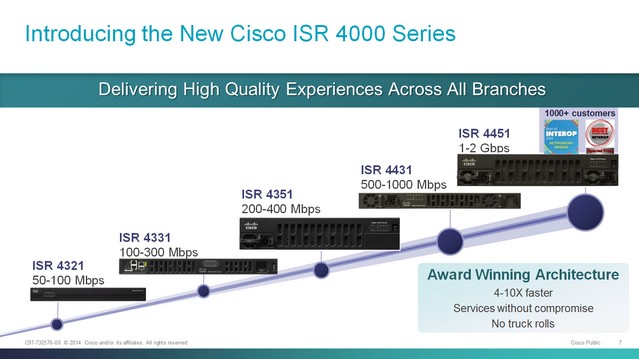
Evolution of Cisco Branch Routers : from 2500 series to ISR 4000 series

More features details for 4000 series:
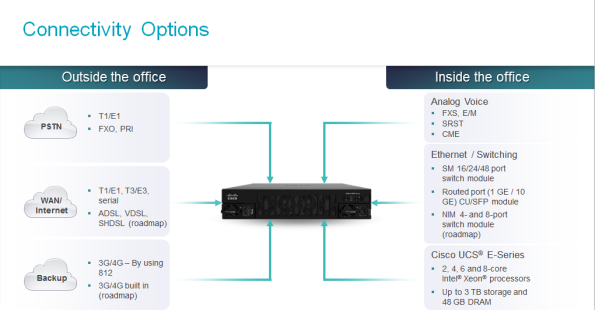
1. Connectivity Options

2. 4-10X faster

3. Re-designed Architecture For Branch Agility

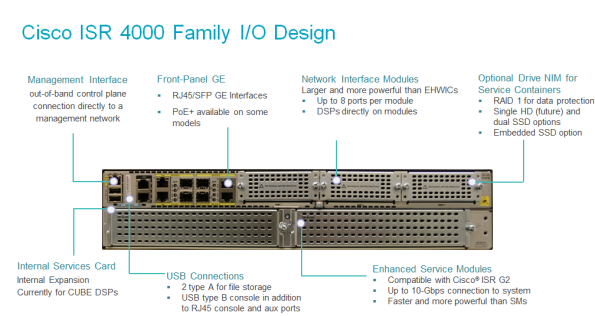
4. I/O Design


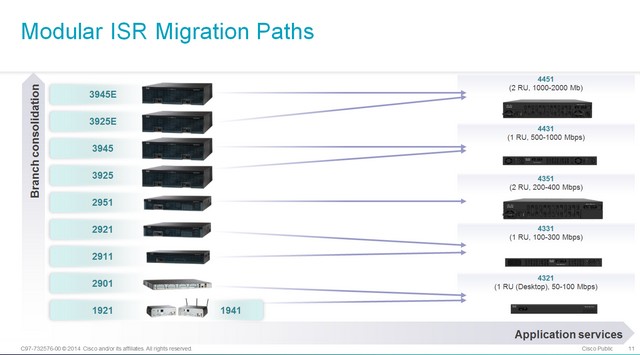
5. Modular ISR Migration Paths from 1900, 2900 and 3900 series

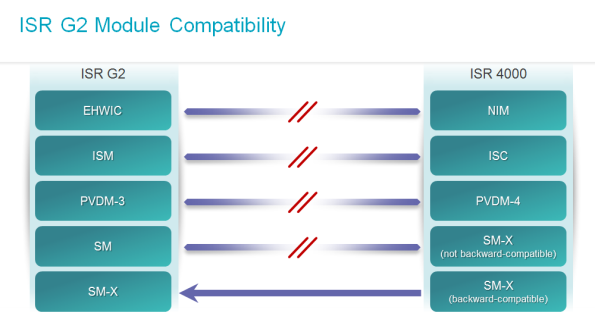
6. Compatibility to ISR G2 (1900, 2900 and 3900) Modules


7. Some Pictures


8. Show Version and Configuration


Router#sh ver
Cisco IOS XE Software, Version 03.16.01a.S - Extended Support Release
Cisco IOS Software, ISR Software (X86_64_LINUX_IOSD-UNIVERSALK9-M), Version 15.5(3)S1a, RELEASE SOFTWARE (fc1)
Technical Support: http://www.cisco.com/techsupport
Copyright (c) 1986-2015 by Cisco Systems, Inc.
Compiled Wed 04-Nov-15 12:50 by mcpre


Cisco IOS-XE software, Copyright (c) 2005-2015 by cisco Systems, Inc.
All rights reserved.  Certain components of Cisco IOS-XE software are
licensed under the GNU General Public License ("GPL") Version 2.0.  The
software code licensed under GPL Version 2.0 is free software that comes
with ABSOLUTELY NO WARRANTY.  You can redistribute and/or modify such
GPL code under the terms of GPL Version 2.0.  For more details, see the
documentation or "License Notice" file accompanying the IOS-XE software,
or the applicable URL provided on the flyer accompanying the IOS-XE
software.


ROM: IOS-XE ROMMON

Router uptime is 2 weeks, 2 days, 1 hour, 9 minutes
Uptime for this control processor is 2 weeks, 2 days, 1 hour, 10 minutes
System returned to ROM by reload at 04:19:32 UTC Fri Dec 4 2015
System image file is "bootflash:/isr4300-universalk9.03.16.01a.S.155-3.S1a-ext.SPA.bi"
Last reload reason: PowerOn


This product contains cryptographic features and is subject to United
States and local country laws governing import, export, transfer and
use. Delivery of Cisco cryptographic products does not imply
third-party authority to import, export, distribute or use encryption.
Importers, exporters, distributors and users are responsible for
compliance with U.S. and local country laws. By using this product you
agree to comply with applicable laws and regulations. If you are unable
to comply with U.S. and local laws, return this product immediately.

A summary of U.S. laws governing Cisco cryptographic products may be found at:
http://www.cisco.com/wwl/export/crypto/tool/stqrg.html

If you require further assistance please contact us by sending email to
[email protected].

Suite License Information for Module:'esg'

--------------------------------------------------------------------------------
Suite                 Suite Current         Type           Suite Next reboot  
--------------------------------------------------------------------------------
FoundationSuiteK9     None                  None           None              
securityk9
appxk9

AdvUCSuiteK9          None                  None           None              
uck9
cme-srst
cube


Technology Package License Information:

-----------------------------------------------------------------
Technology    Technology-package           Technology-package
              Current       Type           Next reboot
------------------------------------------------------------------
appxk9           None             None             None
uck9             None             None             None
securityk9       securityk9       Permanent        securityk9
ipbase           ipbasek9         Permanent        ipbasek9

cisco ISR4331/K9 (1RU) processor with 1659383K/6147K bytes of memory.
Processor board ID FLM1949D0DZ
7 Gigabit Ethernet interfaces
32768K bytes of non-volatile configuration memory.
4194304K bytes of physical memory.
3207167K bytes of flash memory at bootflash:.

Configuration register is 0x2102

Router#show inventory 
NAME: "Chassis", DESCR: "Cisco ISR4331 Chassis"
PID: ISR4331/K9        , VID: V02, SN: FLM1949D0DZ

NAME: "Power Supply Module 0", DESCR: "250W AC Power Supply for Cisco ISR 4330"
PID: PWR-4330-AC       , VID: V01, SN: PST1931D01G

NAME: "Fan Tray", DESCR: "Cisco ISR4330 Fan Assembly"
PID: ACS-4330-FANASSY  , VID:    , SN:            

NAME: "module 0", DESCR: "Cisco ISR4331 Built-In NIM controller"
PID: ISR4331/K9        , VID:    , SN:            

NAME: "NIM subslot 0/1", DESCR: "NIM-ES2-4"
PID: NIM-ES2-4         , VID: V01, SN: FOC1927D5RR

NAME: "NIM subslot 0/0", DESCR: "Front Panel 3 ports Gigabitethernet Module"
PID: ISR4331-3x1GE     , VID: V01, SN: JAB092709DL

NAME: "module 1", DESCR: "Cisco ISR4331 Built-In SM controller"
PID: ISR4331/K9        , VID:    , SN:            

NAME: "module R0", DESCR: "Cisco ISR4331 Route Processor"
PID: ISR4331/K9        , VID: V02, SN: FDO19451DDM
          
NAME: "module F0", DESCR: "Cisco ISR4331 Forwarding Processor"
PID: ISR4331/K9        , VID:    , SN:  


Router#sh run
Building configuration...


Current configuration : 1361 bytes
!
version 15.5
service timestamps debug datetime msec
service timestamps log datetime msec
no platform punt-keepalive disable-kernel-core
!
hostname Router
!
boot-start-marker
boot-end-marker
!
!
vrf definition Mgmt-intf
 !
 address-family ipv4
 exit-address-family
 !
 address-family ipv6
 exit-address-family
!
!
no aaa new-model
!
!
!
!
subscriber templating
!
multilink bundle-name authenticated
!
!
!
!
license udi pid ISR4331/K9 sn FDO19451WHM
!
spanning-tree extend system-id
!
!
redundancy
 mode none
!
!
vlan internal allocation policy ascending
!
!
!
!
interface GigabitEthernet0/0/0
 no ip address
 shutdown
 negotiation auto
!
interface GigabitEthernet0/0/1
 no ip address
 shutdown
 negotiation auto
!
interface GigabitEthernet0/0/2
 no ip address
 shutdown
 negotiation auto
!
interface GigabitEthernet0/1/0
!
interface GigabitEthernet0/1/1
!
interface GigabitEthernet0/1/2
!
interface GigabitEthernet0/1/3
!
interface GigabitEthernet0
 vrf forwarding Mgmt-intf
 no ip address
 shutdown
 negotiation auto
!
interface Vlan1
 no ip address
 shutdown
!
ip forward-protocol nd
no ip http server
no ip http secure-server
ip tftp source-interface GigabitEthernet0
!
!
!
!
!
control-plane
!
!
line con 0
 stopbits 1
line aux 0
 stopbits 1
line vty 0 4
 login
!
!
end


0 Comments

Cisco IKEv1 Site-to-Site IPSec Configuration on IOS Routers (2) - Using Two Different CA Certificates

1/14/2016

0 Comments

 
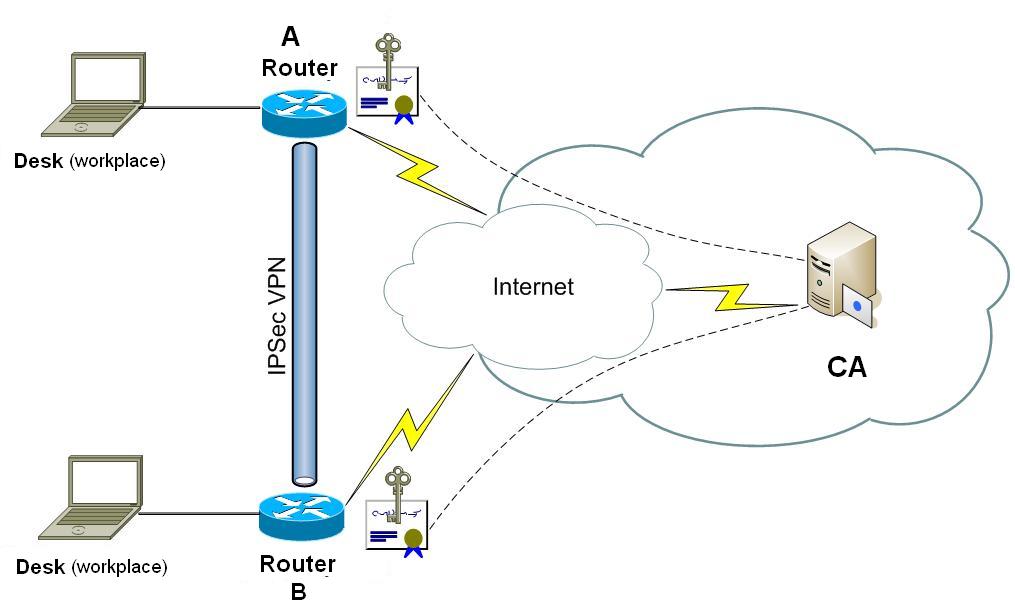
Pre-shared keys and digital certificates are two primary authentication methods in IKE that can be used in the context of IPSec VPN deployments.

Digital certificates provide a means to digitally authenticate devices and individual users. An individual that wishes to send encrypted data obtains a digital certificate from a Certificate Authority (CA). The CA issues an encrypted digital certificate containing the applicant's public key and a variety of other identification information. The CA makes its own public key readily available. The recipient of the encrypted message uses the CA's public key to decode the digital certificate attached to the message, verifies it as issued by the CA, and then obtains the sender's public key and identification information held within the certificate. With this information, the recipient can send an encrypted reply. Public key infrastructure (PKI) is the enabler for managing digital certificates for IPSec VPN deployment. The most widely used format for digital certificates is X.509, which is supported by Cisco IOS.

In this blog, there are already having a couple of posts regarding using Symantec Digital Certificate to set up IPSec or SSL VPN for Check Point Firewalls, Juniper SRX firewalls, and Cisco IOS Routers. Here are some of posts lists:
  • Using Symantec SSL PKI to Authenticate Cisco IOS IPSec VPN - HA Deployment
  • Using PKI Build Route-Based IPSec VPN between Juniper SRX
  • Certification based Cisco IPSec VPN Down caused by 'signature invalid'
  • Troubleshooting Symantec Verisign SSL Certificates Issue on PKI VPN Tunnel between Juniper SRX Firewalls (Cont.)
  • Using Symantec Verisign SSL Certificate for Check Point SSL VPN Mobile Access Portal
  • Using Symantec Verisign PKI to authenticate Checkpoint Site-to-Site IPSec VPN

Using Symantec SSL PKI to Authenticate Cisco IOS IPSec VPN - HA Deployment has presented detail steps how you could use third party Certificate to authenticate your IPSEC IKE.

In this post I will summarize all configuration steps again and add a little more things into a new implementation. We will use a different CA in each peer gateway. The security gateways in all previous posts were using only one same CA - Symantec to authenticate IPSec IKE. We will use a different CA at each side this time.

Most steps are same as before, the only extra step we will need to add is to import your peer's CA certificate into a different Trustpoint.


1. Create RSA key
R1(config)#crypto key generate rsa general-keys label R1.test.com modulus 2048 exportable


2. Create Trustpoint for Your Router


R1(config)#crypto pki trustpoint Verisign2015
R1(ca-trustpoint)#enrollment terminal
R1(ca-trustpoint)#subject-name CN=R1.test.com,OU=IT,O=TT,C=CA,ST=Ontario,L=Markham
R1(ca-trustpoint)#rsakeypair R1.test.com
R1(ca-trustpoint)#fqdn R1.test.com
R1(ca-trustpoint)#revocation-check none
R1(ca-trustpoint)#exit


3. Create CSR


R1(config)#crypto key generate rsa general-keys label R1.test.com modulus 2048 exportable
The name for the keys will be: R1.test.com

% The key modulus size is 2048 bits
% Generating 2048 bit RSA keys, keys will be exportable...
[OK] (elapsed time was 0 seconds)


4. Submit CSR to Verisign and Retreive Signed Certificates


5. Install Intermediate / Root Certificate(s)


R1(config)#crypto pki authenticate Verisign2015

Enter the base 64 encoded CA certificate.
End with a blank line or the word "quit" on a line by itself

-----BEGIN CERTIFICATE-----
MIIE0DCCBDmgAwIBAgIQJQzo4DBhLp8rifcFTXz4/TANgkqhkiG9w0BAQUFADBf
MQswCQYDVQQGEwJVUzEXMBUGA1UEChMOVmVyaVNpZ24sIEluYy4xNzA1BgNVBAsT
LkNsYXNzIDMgUHVibGljIFByaW1hcnkgQ2VydGlmaWNhdGlvbiBBdXRob3JpdHkw
HhcNMDYxMTA4MDAwMDAwWhcNMjExMTA3MjM1OU5WjCByjELMAkGA1UEBhMCVVMx
FzAVBgNVBAoTDlZlcmlTaWduLCBJbmMuMR8wHQYDVQQLExZWZXJpU2lnbiBUcnVz
j+XTGoasjY5rw8+AatRIGCx7GS4wJRYjaHR0cDovL2xvZ28udmVyaXNpZ24uY29t
L3ZzbG9nby5naWYwNAYIKwYBBQUHAQEKDAmMCQGCCsGAQUFBzABhhhodHRwOi8v
b2NzcC52ZXJpc2lnbi5jb20wPgYDVR0lBDcwNQYIKwYBBQUHAwEGCCsGAQUFBwMC
BggrBgEFBQcDAwYJYIZIAYb4QgQBBgpghkgBhvhFAQgBMA0GCSqGSIb3DQEBBQUA
A4GBABMC3fjohgDyWvj4IAxZiGIHzs73Tvm7aGY5eE43U68ZhjTresY8g3JbT5K
lCDDPLq9ZVTGr0SzEK0saz6r1we2uIFjxfleLuUqZ87NMwwq14lWAyMfs77oOghZ
tOxFNfeKW/9mz1Cvxm1XjRl4t7mi0VfqH5pLr7rJjhJ+xr3/
-----END CERTIFICATE-----

Trustpoint 'Verisign2015' is a subordinate CA and holds a non self signed cert
Certificate has the following attributes:
       Fingerprint MD5: F91FFEE6 A36B9988 41D467DD E5F8977A
      Fingerprint SHA1: 32F30882 622B87CF 8856C63D B873DF08 53B4DD27

% Do you accept this certificate? [yes/no]: yes
Trustpoint CA certificate accepted.
% Certificate successfully imported


6. Install Signed SSL Certificate on Cisco Router


R1(config)#crypto pki import Verisign2015 certificate

Enter the base 64 encoded certificate.
End with a blank line or the word "quit" on a line by itself

-----BEGIN CERTIFICATE-----
MIIFgTCCBGmgAwIBAgIQKjCOdOIFbDkbDAxmz+KJjANBgkqhkiG9w0BAQUFADCB
tTELMAkGA1UEBhMCVVMxFzAVBgNVBAoTlZlcmlTaWduLCBJbmMuMR8wHQYDVQQL
ExZWZXJpU2lnbiBUcnVzdCBOZXR3b3JrMTsOQYDVQQLEzJUZXJtcyBvZiB1c2Ug
LmNvbS9TVlJTZWN1cmVHMy5jmwwQwYDVR0gBDwwOjA4BgpghkgBhvhFAQc2MCow
KAYIKwYBBQUHAgEWHGh0dHBzOi8vd3d3LnZlcmlzaWduLmNvbS9jcHMwHQYDVR0l
BBYwFAYIKwYBBQUHAwEGCCsAQUFBwMCMB8GA1UdIwQYMBaAFA1EXBZTRMGCfh0g
qyX0AWPYvnmlMHYGCCsGAQUBwEBBGowaDAkBggrBgEFBQcwAYYYaHR0cDovL29j
c3AudmVyaXNpZ24uY29tMEAGCsGAQUFBzAChjRodHRwOi8vU1ZSU2VjdXJlLUcz
LWFpYS52ZXJpc2lnbi5jb20vU1ZS2VjdXJlRzMuY2VyMA0GCSqGSIb3DQEBBQUA
A4IBAQCpZzArqkr+wlVsmCpgCe5MPMUw/SpQj0gV3zIv5oeMvDfpJN+olwhqJI
hOfPbPdr7dX/ep5JELJUDaAl5AFiON75PYJBtUcrnYuduzqdpY51MV0lUXsa7GP
0kR0ngAfTotDmE76iV5Uno/FiJtVTTM0ZqidPWihJprmtNUjH8BnLO8jA3Kwqw
qvKgAXbJnBOrYb7gGVlPC6r4LPhX7B6dwDaoRDpliSvGBpGAEx6POIW5tD8lvUW
RCZisxlco3oFnxJj6V7hm17dzfnELz49Nisa4vcgfW9eI3Z+2gtM0fT5/oVGDKb
4zRQ+2tLUF72B1WlfFZ4YFl7/m7
-----END CERTIFICATE-----

% Router Certificate successfully imported


7. Import Your Peer Intermediate / Root Certificate in a New TrustPoint


crypto pki trustpoint Customer
 enrollment terminal
 revocation-check none
!

R1(config)#crypto pki authenticate Customer

Enter the base 64 encoded CA certificate.
End with a blank line or the word "quit" on a line by itself

-----BEGIN CERTIFICATE-----
MIIE0DCCBDmgAwIBAgIQJQzo4DBhLp8rifcFTXz4/TANgkqhkiG9w0BAQUFADBf
MQswCQYDVQQGEwJVUzEXMBUGA1UEChMOVmVyaVNpZ24sIEluYy4xNzA1BgNVBAsT
LkNsYXNzIDMgUHVibGljIFByaW1hcnkgQ2VydGlmaWNhdGlvbiBBdXRob3JpdHkw
HhcNMDYxMTA4MDAwMDAwWhcNMjExMTA3MjM1OU5WjCByjELMAkGA1UEBhMCVVMx
FzAVBgNVBAoTDlZlcmlTaWduLCBJbmMuMR8wHQYDVQQLExZWZXJpU2lnbiBUcnVz
j+XTGoasjY5rw8+AatRIGCx7GS4wJRYjaHR0cDovL2xvZ28udmVyaXNpZ24uY29t
L3ZzbG9nby5naWYwNAYIKwYBBQUHAQEKDAmMCQGCCsGAQUFBzABhhhodHRwOi8v
b2NzcC52ZXJpc2lnbi5jb20wPgYDVR0lBDcwNQYIKwYBBQUHAwEGCCsGAQUFBwMC
BggrBgEFBQcDAwYJYIZIAYb4QgQBBgpghkgBhvhFAQgBMA0GCSqGSIb3DQEBBQUA
A4GBABMC3fjohgDyWvj4IAxZiGIHzs73Tvm7aGY5eE43U68ZhjTresY8g3JbT5K
lCDDPLq9ZVTGr0SzEK0saz6r1we2uIFjxfleLuUqZ87NMwwq14lWAyMfs77oOghZ
tOxFNfeKW/9mz1Cvxm1XjRl4t7mi0VfqH5pLr7rJjhJ+xr3/
-----END CERTIFICATE-----

Trustpoint 'Customer' is a subordinate CA and holds a non self signed cert
Certificate has the following attributes:
       Fingerprint MD5: F91FFEE6 A36B9988 41D467DD E5F8977A
      Fingerprint SHA1: 32F30882 622B87CF 8856C63D B873DF08 53B4DD27

% Do you accept this certificate? [yes/no]: yes
Trustpoint CA certificate accepted.
% Certificate successfully imported


8. Verify TrustPoint


R1#show crypto pki trustpoints
Trustpoint Verisign2015:
    Subject Name:
    cn=Symantec Class 3 Secure Server CA - G4
    ou=Symantec Trust Network
    o=Symantec Corporation
    c=US
          Serial Number (hex): 513FB9743870B73440418D30930699FF
    Certificate configured.


Trustpoint Customer:
    Subject Name:
    o=Customer Root Certification Authority
    c=CA
    st=Saskatchewan
    cn=Customer CA 2025
          Serial Number (hex): 0082809023512072AD
    Certificate configured.

9. Verify Certificates and Tunnel


R1#show crypto pki certificates
CA Certificate
  Status: Available
  Certificate Serial Number (hex): 0082809023512072AD
  Certificate Usage: General Purpose
  Issuer:
    o=Customer Root Certification Authority
    c=CA
    st=Saskatchewan
    cn=Customer CA 2025
  Subject:
    o=Customer Root Certification Authority
    c=CA
    st=Saskatchewan
    cn=Customer CA 2025
  Validity Date:
    start date: 10:55:50 EDT Mar 30 2015
    end   date: 10:55:50 EDT Mar 27 2025
  Associated Trustpoints: Customer
  Storage: nvram:CustomerRootCerti#72ADCA.cer

Certificate
  Status: Available
  Certificate Serial Number (hex): 44FC828CB095BC3BA7D553F4F4BF9EBA
  Certificate Usage: General Purpose
  Issuer:
    cn=Symantec Class 3 Secure Server CA - G4
    ou=Symantec Trust Network
    o=Symantec Corporation
    c=US
  Subject:
    Name: R1.gi-de.com
    cn=R1.gi-de.com
    o=Giesecke & Devrient Systems Canada Inc
    l=Markham
    st=Ontario
    c=CA
  CRL Distribution Points:
    http://ss.symcb.com/ss.crl
  Validity Date:
    start date: 19:00:00 EST Dec 30 2015
    end   date: 18:59:59 EST Dec 30 2018
  Associated Trustpoints: Verisign2015
  Storage: nvram:SymantecClas#9EBA.cer

CA Certificate
  Status: Available
  Certificate Serial Number (hex): 513FB9743870B73440418D30930699FF
  Certificate Usage: Signature
  Issuer:
    cn=VeriSign Class 3 Public Primary Certification Authority - G5
    ou=(c) 2006 VeriSign
     Inc. - For authorized use only
    ou=VeriSign Trust Network
    o=VeriSign
     Inc.
    c=US
  Subject:
    cn=Symantec Class 3 Secure Server CA - G4
    ou=Symantec Trust Network
    o=Symantec Corporation
    c=US
  CRL Distribution Points:
    http://s1.symcb.com/pca3-g5.crl
  Validity Date:
    start date: 20:00:00 EDT Oct 30 2013
    end   date: 19:59:59 EDT Oct 30 2023
  Associated Trustpoints: Verisign2015
  Storage: nvram:VeriSignClas#99FFCA.cer


R1#show crypto isakmp sa detail
Codes: C - IKE configuration mode, D - Dead Peer Detection
       K - Keepalives, N - NAT-traversal
       T - cTCP encapsulation, X - IKE Extended Authentication
       psk - Preshared key, rsig - RSA signature
       renc - RSA encryption
IPv4 Crypto ISAKMP SA

C-id  Local           Remote          I-VRF    Status Encr Hash Auth DH Lifetime Cap.

1073  19.26.116.141 20.19.60.26            ACTIVE aes  sha2 rsig 14 20:28:46 D
       Engine-id:Conn-id =  SW:73

IPv6 Crypto ISAKMP SA


Note: Router's Full Configuration


R1#sh run
Building configuration...

Current configuration : 15460 bytes
!
! Last configuration change at 16:00:32 EST Fri Jan 8 2016 by john
! NVRAM config last updated at 16:01:19 EST Fri Jan 8 2016 by john
version 15.1
no service pad
service tcp-keepalives-in
service tcp-keepalives-out
service timestamps debug datetime msec localtime show-timezone
service timestamps log datetime msec localtime show-timezone
service password-encryption
service sequence-numbers
!
hostname R1
!
boot-start-marker
boot-end-marker
!
!
logging buffered 409600
enable secret 5 $1$iNJa$8RiUCW5Tt9nPa5kMW.PT0/
!
!      
ipc zone default
 association 1
  no shutdown
  protocol sctp
   local-port 5000
    local-ip 192.168.20.139
    retransmit-timeout 300 10000
    path-retransmit 10
    assoc-retransmit 10
   remote-port 5000
    remote-ip 192.168.20.140
!
aaa new-model
!
!
aaa authentication login default local group radius group tacacs+
aaa authentication enable default enable group radius group tacacs+
aaa authorization console
aaa authorization exec default local group radius group tacacs+
aaa accounting exec default start-stop group tacacs+
aaa accounting commands 1 default stop-only group tacacs+
aaa accounting commands 5 default stop-only group tacacs+
aaa accounting commands 15 default stop-only group tacacs+
aaa accounting system default start-stop group tacacs+
!
!
!
!
!
aaa session-id common
!
clock timezone EST -5 0
clock summer-time EDT recurring
errdisable recovery cause bpduguard
!
no ipv6 cef
no ip source-route
no ip gratuitous-arps
ip cef
!
!
!
ip dhcp bootp ignore
!
!
no ip bootp server
ip domain name gd.com
ip name-server 8.8.8.8
ip name-server 8.8.4.4
login block-for 120 attempts 3 within 60
login on-failure log
login on-success log
!
multilink bundle-name authenticated
!
crypto pki token default removal timeout 0
!
crypto pki trustpoint Verisign2015
 enrollment terminal
 fqdn R1.gi-de.com
 subject-name CN=R1.test.com,OU=IT,O=G&D,C=CA,ST=Ontario,L=Markham
 revocation-check none
 rsakeypair R1.test.com
!
crypto pki trustpoint Customer
 enrollment terminal
 revocation-check none
!
!
crypto pki certificate chain Verisign2015
 certificate 44FC828CB095BC3BA7D553F4F4BF9EBA
  308204FD 308203E5 A0030201 02021044 FC828CB0 95BC3BA7 D553F4F4 BF9EBA30
  0D06092A 864886F7 0D01010B 0500307E 310B3009 06035504 06130255 53311D30
  1B060355 040A1314 53796D61 6E746563 20436F72 706F7261 74696F6E 311F301D
  06035504 0B131653 796D616E 74656320 54727573 74204E65 74776F72 6B312F30
  2D060355 04031326 53796D61 6E746563 20436C61 73732033 20536563 75726520
  53657276 65722043 41202D20 4734301E 170D3135 31323331 30303030 30305A17
  0D313831 32333032 33353935 395A3081 85310B30 09060355 04061302 43413110
  300E0603 5504080C 074F6E74 6172696F 3110300E 06035504 070C074D 61726B68
  616D312F 302D0603 55040A0C 26476965 7365636B 65202620 44657672 69656E74
  20537973 74656D73 2043616E 61646120 496E6331 21301F06 03550403 0C18522D
  544F5231 2D495053 65632D31 2E67692D 64652E63 6F6D3082 0122300D 06092A86
  4886F70D 01010105 00038201 0F003082 010A0282 010100A7 FC4C44EB B6663518
  6E3B5521 90241DE0 10F831FC B291F54D 2A5A0824 38C6BD63 526A4C01 8994442A
  2C4543FB 58C29C01 7F820CEE 1CC89537 083FDAAD DE15CB65 76F3188F 8977B1E9
  36FDFAC9 0DB9C7E1 A3781D41 DD0B8F78 5ED6BF2A 71862C17 06E5E2C4 C1505FA9
  BB8E3A97 9226C8AD 6BA596A8 A717003A 57E3E3FC 68CADDD3 00715B72 5F729321
  6CF031E0 614AB912 2A75B121 ED4FDC0B 80846343 F6AED8DF 911759A7 8A897F49
  73B712FB 3720910E A9CBC536 6890BE1E EC0EF021 9A5674C6 CA33DDF6 DC663AFA
  FED35E2B AF9B0B4E DC11FB19 2832E02E F339A23F 99172FFF 460D480C 8BA25283
  82FA8EAC 043DC71A 41ED7C32 AECC9B37 EF87BF06 F899F902 03010001 A382016D
  30820169 30230603 551D1104 1C301A82 18522D54 4F52312D 49505365 632D312E
  67692D64 652E636F 6D300906 03551D13 04023000 300E0603 551D0F01 01FF0404
  030205A0 302B0603 551D1F04 24302230 20A01EA0 1C861A68 7474703A 2F2F7373
  2E73796D 63622E63 6F6D2F73 732E6372 6C306106 03551D20 045A3058 30560606
  67810C01 0202304C 30230608 2B060105 05070201 16176874 7470733A 2F2F642E
  73796D63 622E636F 6D2F6370 73302506 082B0601 05050702 0230190C 17687474
  70733A2F 2F642E73 796D6362 2E636F6D 2F727061 301D0603 551D2504 16301406
  082B0601 05050703 0106082B 06010505 07030230 1F060355 1D230418 30168014
  5F60CF61 9055DF84 43148A60 2AB2F57A F44318EF 30570608 2B060105 05070101
  044B3049 301F0608 2B060105 05073001 86136874 74703A2F 2F73732E 73796D63
  642E636F 6D302606 082B0601 05050730 02861A68 7474703A 2F2F7373 2E73796D
  63622E63 6F6D2F73 732E6372 74300D06 092A8648 86F70D01 010B0500 03820101
  00A9EA06 9A561D11 EB72E8C3 0FA4453C FFE376C8 E389BC20 B1A93B72 FA576E4F
  5E598F26 F12E8636 77944F89 105C0802 B4D7D3EC E1E2F550 FC0DB830 B8336C29
  407BC555 E36BB83B 83E29399 55379BCC A2AF808D 2A4CD262 9C1787C5 7CA2029B
  AAF5F6C0 57B0A869 4B822E2A 3355A2A5 F6F8D261 DBE46DB4 3782C9E8 186D739A
  5865E249 FE9CA2CF 4D5F6974 4E959F51 8BB69E49 C4339211 978652F3 2A08858B
  6859D3C5 30E3642C 4E670C9F C554C59A 648FF9E3 C1BAD434 062832B3 23B72814
  60E8962E FA62F32A 38C2D432 57BD06D3 91DABA89 24A1B688 5409DA04 1EA0A93E
  CF4CA550 4A0378DF FF74B724 C48F8A43 FE5B36F3 C95C25A3 C488D881 8E40BE1F
  C0
        quit
 certificate ca 513FB9743870B73440418D30930699FF
  30820538 30820420 A0030201 02021051 3FB97438 70B73440 418D3093 0699FF30
  0D06092A 864886F7 0D01010B 05003081 CA310B30 09060355 04061302 55533117
  30150603 55040A13 0E566572 69536967 6E2C2049 6E632E31 1F301D06 0355040B
  13165665 72695369 676E2054 72757374 204E6574 776F726B 313A3038 06035504
  0B133128 63292032 30303620 56657269 5369676E 2C20496E 632E202D 20466F72
  20617574 686F7269 7A656420 75736520 6F6E6C79 31453043 06035504 03133C56
  65726953 69676E20 436C6173 73203320 5075626C 69632050 72696D61 72792043
  65727469 66696361 74696F6E 20417574 686F7269 7479202D 20473530 1E170D31
  33313033 31303030 3030305A 170D3233 31303330 32333539 35395A30 7E310B30
  09060355 04061302 5553311D 301B0603 55040A13 1453796D 616E7465 6320436F
  72706F72 6174696F 6E311F30 1D060355 040B1316 53796D61 6E746563 20547275
  7374204E 6574776F 726B312F 302D0603 55040313 2653796D 616E7465 6320436C
  61737320 33205365 63757265 20536572 76657220 4341202D 20473430 82012230
  0D06092A 864886F7 0D010101 05000382 010F0030 82010A02 82010100 B2D805CA
  1C742DB5 175639C5 4A520996 E84BD80C F1689F9A 422862C3 A530537E 5511825B
  037A0D2F E17904C9 B4967719 81019459 F9BCF77A 9927822D B783DD5A 277FB203
  7A9C5325 E9481F46 4FC89D29 F8BE7956 F6F7FDD9 3A68DA8B 4B823341 12C3C83C
  CCD6967A 84211A22 04032717 8B1C6861 930F0E51 80331DB4 B5CEEB7E D062ACEE
  B37B0174 EF6935EB CAD53DA9 EE9798CA 8DAA440E 25994A15 96A4CE6D 02541F2A
  6A26E206 3A6348AC B44CD175 9350FF13 2FD6DAE1 C618F59F C9255DF3 003ADE26
  4DB42909 CD0F3D23 6F164A81 16FBF283 10C3B8D6 D855323D F1BD0FBD 8C52954A
  16977A52 2163752F 16F9C466 BEF5B509 D8FF2700 CD447C6F 4B3FB0F7 02030100
  01A38201 63308201 5F301206 03551D13 0101FF04 08300601 01FF0201 00303006
  03551D1F 04293027 3025A023 A021861F 68747470 3A2F2F73 312E7379 6D63622E
  636F6D2F 70636133 2D67352E 63726C30 0E060355 1D0F0101 FF040403 02010630
  2F06082B 06010505 07010104 23302130 1F06082B 06010505 07300186 13687474
  703A2F2F 73322E73 796D6362 2E636F6D 306B0603 551D2004 64306230 60060A60
  86480186 F8450107 36305230 2606082B 06010505 07020116 1A687474 703A2F2F
  7777772E 73796D61 7574682E 636F6D2F 63707330 2806082B 06010505 07020230
  1C1A1A68 7474703A 2F2F7777 772E7379 6D617574 682E636F 6D2F7270 61302906
  03551D11 04223020 A41E301C 311A3018 06035504 03131153 796D616E 74656350
  4B492D31 2D353334 301D0603 551D0E04 1604145F 60CF6190 55DF8443 148A602A
  B2F57AF4 4318EF30 1F060355 1D230418 30168014 7FD365A7 C2DDECBB F03009F3
  4339FA02 AF333133 300D0609 2A864886 F70D0101 0B050003 82010100 5E945649
  DD8E2D65 F5C13651 B603E3DA 9E7319F2 1F59AB58 7E6C2605 2CFA81D7 5C231722
  2C3793F7 86EC85E6 B0A3FD1F E232A845 6FE1D9FB B9AFD270 A0324265 BF84FE16
  2A8F3FC5 A6D6A393 7D43E974 21913528 F463E92E EDF7F55C 7F4B9AB5 20E90ABD
  E045100C 14949A5D A5E34B91 E8249B46 4065F422 72CD99F8 8811F5F3 7FE63382
  E6A8C57E FED008E2 25580871 68E6CDA2 E614DE4E 52242DFD E5791353 E75E2F2D
  4D1B6D40 15522BF7 87897812 416ED94D AA2D78D4 C22C3D08 5F87919E 1F0EB0DE
  30526486 89AA9D66 9C0E760C 80F274D8 2AF8B83A CED7D60F 11BE6BAB 14F5BD41
  A0226389 F1BA0F6F 2963662D 3FAC8C72 C5FBC7E4 D40FF23B 4F8C29C7
        quit
crypto pki certificate chain Customer
 certificate ca 0082809023512072AD
  3082035D 30820245 A0030201 02020900 82809023 512072AD 300D0609 2A864886
  F70D0101 0B050030 65311430 12060355 0403130B 53474920 43412032 30323531
  15301306 03550408 130C5361 736B6174 63686577 616E310B 30090603 55040613
  02434131 29302706 0355040A 13205347 4920526F 6F742043 65727469 66696361
  74696F6E 20417574 686F7269 7479301E 170D3135 30333330 31343535 35305A17
  0D323530 33323731 34353535 305A3065 31143012 06035504 03130B53 47492043
  41203230 32353115 40130603 55040813 0C536173 6B617463 68657761 6E310B30
  09060355 04061302 43413129 30270603 55040A13 20534749 20526F6F 74204365
  72746966 69636174 696F6E20 41757468 6F726974 79308201 22300D06 092A8648
  86F70D01 01010500 0382010F 00308201 0A028201 0100D005 9F2F2CF8 1C09E988
  56577004 EECEE3A2 545AE573 7FE704C8 E1E6F722 CC4B745E 36C860A7 5E0590A1
  7CE42928 3CD72621 7290E6FC 250F2E34 647D3DDE DF8306D8 6C28E3BD 3FD5FA92
  D2B3406C 44DBD66C 2F69E895 861F93C6 A052143E F814245D 0C8DDE69 A2A0FAAC
  F337E69C 843426AB DD19E5C9 F60DB892 503414B9 1E678FE0 93652A7F E4FB8990
  8894D38E 9795C691 F52D331C CA529033 CF90F4E3 98E7177E B69882EF CD2D9532
  32180C7D 12C517A5 8C737C63 FED361C9 CEB8C8AD 59399CCF 3C7B1810 E0EA5CCA
  D774519D 76C0C50A 293322CF 44339523 6F8339F7 18CB539A 19D01136 70D46A13
  21E50BBE C0C8B7DC 8955E88D 48DD7D31 1511986B B5DD0203 010001A3 10300E30
  0C060355 1D130405 30030101 FF300D06 092A8648 86F70D01 010B0500 03820101
  006302EE 40D8BADA 7D69A3C1 A7C03BE0 6BBD1410 B65679CC 7FAFC590 F0500E0A
  1E44A841 B44F11C4 17E8DC94 124476C1 C7D352D3 5967554F 6571F067 D366622F
  C3A6ABAA 2FF2433C D9773D80 F99875BA 593D4F55 40194E12 AE01CC57 51E43C53
  063EE6A0 580E837C B9C65739 E6BBC58F 752CFA34 7CE9BB45 4C494B49 FA90FBEB
  1FE60AC2 7010EE86 644D1414 C402436B 26C58B9D FDA1D3DD 27DECDE7 123CDBB7
  8C640943 3C56945C 9A7E4AA7 DDF70EDE 379BA01B 2E4D0A1D 624B8E8D BEC63755
  529C9025 23632ABA 0365EAC2 A99C0B2F BB71C451 63BCD096 FA9501E3 C8976C2B
  832E80D5 2FF61A7D 72215D6A 12E5F1CE 09722146 2AC182F4 FE00A902 62EE3D31 39
        quit
license udi pid CISCO1921/K9 sn FGL1529E0
!
!
archive
 log config
  logging enable
  logging size 200
  notify syslog contenttype plaintext
  hidekeys
!
no spanning-tree optimize bpdu transmission
spanning-tree uplinkfast
spanning-tree backbonefast
vtp domain gd
vtp mode transparent
username localit privilege 15 secret 5 $1$P3q.$qQBIHNYDUCZH5y0XWTXzbq0
username localit autocommand show running
username localadmin privilege 7 secret 5 $1$OgOX$owjSeZlPaU0A3K8DQJechd.
username cadmin privilege 15 secret 5 $1$PE7E$Yyud3NJ2bl0OPSVkN0PQ//
!
redundancy inter-device
 scheme standby VPNHA
!
!
redundancy
crypto ikev2 proposal aes-sha-256-proposal
 encryption aes-cbc-256
 integrity sha256
 group 14
!
crypto ikev2 policy ike2policy
 proposal aes-sha-256-proposal
!
crypto ikev2 keyring VPN-KEYS
 peer Customer
  address 20.19.60.26
  pre-shared-key local cisco123
  pre-shared-key remote cisco123
 !
!
crypto ikev2 keyring Test-KEYS
 peer Test
  address 19.26.116.137
  pre-shared-key cisco123
 !
!
!
crypto ikev2 profile Customer
 match identity remote address 20.19.60.26 255.255.255.255
 identity local address 19.26.116.141
 authentication local pre-share
 authentication remote pre-share
 keyring VPN-KEYS
!
crypto ikev2 profile Test
 match identity remote address 0.0.0.0
 match identity remote address 19.26.116.137 255.255.255.255
 identity local address 19.26.116.141
 authentication local pre-share
 authentication remote pre-share
 keyring Test-KEYS
!
!
!
ip ssh time-out 10
ip ssh logging events
ip ssh version 2
!
track 1 interface GigabitEthernet0/0 line-protocol
!
track 2 interface GigabitEthernet0/1 line-protocol
!
class-map type port-filter match-any TCP23
 match  port tcp 23
!      
!
policy-map type port-filter FILTERTCP23
 class TCP23
   drop
    log
!
!
!
crypto isakmp policy 1
 encr aes 256
 hash sha256
 group 14
crypto isakmp key cisco123 address 20.19.60.26 no-xauth
crypto isakmp keepalive 10
crypto isakmp aggressive-mode disable
!
!
crypto ipsec transform-set mysec esp-aes 256 esp-sha256-hmac
!
crypto map vpn 10 ipsec-isakmp
 set peer 20.19.60.26
 set transform-set mysec
 set pfs group14
 match address Gand
 reverse-route
!
!
!
!
!
interface Embedded-Service-Engine0/0
 no ip address
 shutdown
!
interface GigabitEthernet0/0
 ip address 19.26.116.139 255.255.255.192
 ip accounting output-packets
 standby 199 ip 19.26.116.141
 standby 199 priority 105
 standby 199 preempt
 standby 199 name VPNHA
 standby 199 track 2 decrement 10
 duplex auto
 speed auto
 crypto map vpn redundancy VPNHA stateful
!
interface GigabitEthernet0/1
 ip address 192.168.20.139 255.255.255.0
 standby 200 ip 192.168.20.141
 standby 200 priority 105
 standby 200 preempt
 standby 200 name CLIENTS
 standby 200 track 1 decrement 10
 duplex auto
 speed auto
!
ip forward-protocol nd
!
no ip http server
no ip http secure-server
!
ip route 0.0.0.0 0.0.0.0 19.26.116.161
!
ip access-list extended Gand
 permit ip host 192.168.20.25 172.21.90.0 0.0.1.255
 permit icmp host 192.168.20.25 172.21.90.0 0.0.1.255
!
logging trap debugging
logging 10.9.20.33
access-list 101 permit ip 10.94.200.0 0.0.0.255 any log
access-list 101 permit ip 19.26.116.0 0.0.0.255 any log
access-list 110 permit ip host 192.168.20.25 host 172.21.91.37
access-list 110 permit ip host 172.21.91.37 host 192.168.20.25
!
!
!
!
!
!
!
!
control-plane
!
!
privilege exec level 7 show configuration
privilege exec level 7 show
banner motd ^C
****************************************************************
* This is a private computing facility.                        *
* Unauthorized use of this device is strictly prohibited.      *
* Violators will be prosecuted to the maximum extent possible. *
*                                                              *
* TACACS+/RADIUS Authentication and Authorization are in place.*
* All actions/commands are monitored and recorded.             *
* By using the network you expressly consent to such           *
* monitoring and recording.                                    *
****************************************************************
^C
!
line con 0
 exec-timeout 5 0
 logging synchronous
 login authentication CONAUTH
 stopbits 1
line aux 0
line 2
 no activation-character
 no exec
 transport preferred none
 transport input all
 transport output pad telnet rlogin lapb-ta mop udptn v120 ssh
 stopbits 1
line vty 0 4
 access-class 101 in
 exec-timeout 5 0
 logging synchronous
 login authentication VTYAUTH
 transport input ssh
line vty 5 15
 access-class 101 in
 exec-timeout 5 0
 absolute-timeout 15
 logging synchronous
 login authentication VTYAUTH
 transport input ssh
!
scheduler allocate 20000 1000
ntp server 0.ca.pool.ntp.org
ntp server 1.ca.pool.ntp.org
ntp server 2.ca.pool.ntp.org
ntp server 3.ca.pool.ntp.org
end


0 Comments

Cisco IKEv1 Site-to-Site IPSec Configuration on IOS Routers (1) - High Availability IPSec

1/9/2016

0 Comments

 
IPsec is a framework of open standards that provides data confidentiality, data integrity, and data authentication among participating peers. It provides these security services at the IP layer; it uses Internetwork Key Exchange (IKE) to handle negotiation of protocols and algorithms based on local policy, and to generate the encryption and authentication keys to be used by IPsec. You can use IPsec to protect one or more data flows between a pair of hosts, between a pair of security gateways, or between a security gateway and a host.

“IKE,” which stands for “Internet Key Exchange,” is a protocol that belongs to the IPsec protocols suite. Its responsibility is in setting up security associations that allow two parties to send data securely. IKE was introduced in 1998 and was later superseded by version 2 roughly 7 years later.

This post summarizes typical Cisco IOS IPSec VPN IKEv1 set up. It includes standalone or High Availability implementation. The next post will includes how to use different CA to authenticate IKE.  It focus on IKEv1 (Internet Key Exchange version 1). Later IKEv2 will be summarized in this blog.

Typical Topology:
R1: G0/0 - 19.26.116.141 (It is VIP in high availability deployment)
R2: G0/0 - 19.26.116.137

R1: G0/1 - Internal Interface for network 192.168.20.x/24
R2: G0/1 - Internal Interface for network 172.21.91.x/24

1. Standalone IOS Router set up IPSec VPN

1.1 Configuration:


 R1#
crypto isakmp policy1
 encr aes 256
 hash sha256
 authentication pre-share
 group 14
crypto isakmp key cisco123 address 19.26.116.141
crypto isakmp keepalive 10
!       
!
crypto ipsec transform-set mysec esp-aes 256 esp-sha256-hmac
!
crypto map vpn 10 ipsec-isakmp
 set peer 19.26.116.141
 set transform-set mysec
 set pfs group14
 match address 110
 reverse-route
!
access-list 110 permit ip host 172.21.91.37 host 192.168.20.25
access-list 110 permit ip host 192.168.20.25 host 172.21.91.37
!
interface GigabitEthernet0/0
 ip address 19.26.116.137 255.255.255.192
 duplex auto
 speed auto
 crypto map vpn

====================================================================

 R2#sh run

 crypto isakmp policy 1
 encr aes 256
 hash sha256
 authentication pre-share
 group 14
crypto isakmp key cisco123 address 19.26.116.137
crypto isakmp keepalive 10
!
!
crypto ipsec transform-set mysec esp-aes 256 esp-sha256-hmac
!
crypto map vpn 10 ipsec-isakmp
 set peer 19.26.116.137
 set transform-set mysec
 set pfs group14
 match address 110
 reverse-route
!
!
interface GigabitEthernet0/0
 ip address 19.26.116.141 255.255.255.192
 duplex auto
 speed auto
 crypto map vpn

access-list 110 permit ip host 192.168.20.25 host 172.21.91.37
access-list 110 permit ip host 172.21.91.37 host 192.168.20.25


1.2 Logs for ISAKMP and IPSEC Packets


R1#show crypto isakmp sa
IPv4 Crypto ISAKMP SA
dst             src             state          conn-id status
19.26.116.141  19.26.116.137 QM_IDLE           1001 ACTIVE

IPv6 Crypto ISAKMP SA

R1#show crypto ipsec sa

interface: GigabitEthernet0/0
    Crypto map tag: vpn, local addr 19.26.116.141

   protected vrf: (none)
   local  ident (addr/mask/prot/port): (192.168.20.25/255.255.255.255/0/0)
   remote ident (addr/mask/prot/port): (172.21.91.37/255.255.255.255/0/0)
   current_peer 19.26.116.137 port 500
     PERMIT, flags={origin_is_acl,}
    #pkts encaps: 0, #pkts encrypt: 0, #pkts digest: 0
    #pkts decaps: 4, #pkts decrypt: 4, #pkts verify: 4
    #pkts compressed: 0, #pkts decompressed: 0
    #pkts not compressed: 0, #pkts compr. failed: 0
    #pkts not decompressed: 0, #pkts decompress failed: 0
    #send errors 0, #recv errors 0

     local crypto endpt.: 19.26.116.141, remote crypto endpt.: 19.26.116.137
     path mtu 1500, ip mtu 1500, ip mtu idb GigabitEthernet0/0
     current outbound spi: 0x74E1A91F(1960945951)
     PFS (Y/N): Y, DH group: group14

     inbound esp sas:
      spi: 0x2C3EB4EE(742307054)
        transform: esp-256-aes esp-sha256-hmac ,
        in use settings ={Tunnel, }
        conn id: 5, flow_id: SW:5, sibling_flags 80000046, crypto map: vpn
        sa timing: remaining key lifetime (k/sec): (4512351/3283)
        IV size: 16 bytes
        replay detection support: Y
        Status: ACTIVE

     inbound ah sas:

     inbound pcp sas:

     outbound esp sas:
      spi: 0x74E1A91F(1960945951)
        transform: esp-256-aes esp-sha256-hmac ,
        in use settings ={Tunnel, }
        conn id: 6, flow_id: SW:6, sibling_flags 80000046, crypto map: vpn
        sa timing: remaining key lifetime (k/sec): (4512352/3283)
        IV size: 16 bytes
        replay detection support: Y
        Status: ACTIVE

     outbound ah sas:

     outbound pcp sas:
         
   protected vrf: (none)
   local  ident (addr/mask/prot/port): (172.21.91.37/255.255.255.255/0/0)
   remote ident (addr/mask/prot/port): (192.168.20.25/255.255.255.255/0/0)
   current_peer 19.26.116.137 port 500
     PERMIT, flags={origin_is_acl,}
    #pkts encaps: 0, #pkts encrypt: 0, #pkts digest: 0
    #pkts decaps: 0, #pkts decrypt: 0, #pkts verify: 0
    #pkts compressed: 0, #pkts decompressed: 0
    #pkts not compressed: 0, #pkts compr. failed: 0
    #pkts not decompressed: 0, #pkts decompress failed: 0
    #send errors 0, #recv errors 0

     local crypto endpt.: 19.26.116.141, remote crypto endpt.: 19.26.116.137
     path mtu 1500, ip mtu 1500, ip mtu idb GigabitEthernet0/0
     current outbound spi: 0x0(0)
     PFS (Y/N): N, DH group: none

     inbound esp sas:

     inbound ah sas:

     inbound pcp sas:

     outbound esp sas:

     outbound ah sas:

     outbound pcp sas:


R1#
040672: Jan  6 14:32:12.454 EST: ISAKMP (0): received packet from 19.26.116.137 dport 500 sport 500 Global (N) NEW SA
040673: Jan  6 14:32:12.454 EST: ISAKMP: Created a peer struct for 19.26.116.137, peer port 500
040674: Jan  6 14:32:12.454 EST: ISAKMP: New peer created peer = 0x28DDE524 peer_handle = 0x80000009
040675: Jan  6 14:32:12.454 EST: ISAKMP: Locking peer struct 0x28DDE524, refcount 1 for crypto_isakmp_process_block
040676: Jan  6 14:32:12.454 EST: ISAKMP: local port 500, remote port 5
R1#00
040677: Jan  6 14:32:12.454 EST: ISAKMP:(0):insert sa successfully sa = 300A8474
040678: Jan  6 14:32:12.454 EST: ISAKMP:(0):Input = IKE_MESG_FROM_PEER, IKE_MM_EXCH
040679: Jan  6 14:32:12.454 EST: ISAKMP:(0):Old State = IKE_READY  New State = IKE_R_MM1

040680: Jan  6 14:32:12.454 EST: ISAKMP:(0): processing SA payload. message ID = 0
040681: Jan  6 14:32:12.454 EST: ISAKMP:(0): processing vendor id payload
040682: Jan  6 14:32:12.454 EST: ISAKMP:(0): vendor ID seems Unity/DPD but major 69 mism
R1#atch
040683: Jan  6 14:32:12.454 EST: ISAKMP (0): vendor ID is NAT-T RFC 3947
040684: Jan  6 14:32:12.454 EST: ISAKMP:(0): processing vendor id payload
040685: Jan  6 14:32:12.454 EST: ISAKMP:(0): vendor ID seems Unity/DPD but major 245 mismatch
040686: Jan  6 14:32:12.454 EST: ISAKMP (0): vendor ID is NAT-T v7
040687: Jan  6 14:32:12.454 EST: ISAKMP:(0): processing vendor id payload
040688: Jan  6 14:32:12.454 EST: ISAKMP:(0): vendor ID seems Unity/DPD but major 157 mismatch
040689: Jan  6 14:32:12
R1#.454 EST: ISAKMP:(0): vendor ID is NAT-T v3
040690: Jan  6 14:32:12.454 EST: ISAKMP:(0): processing vendor id payload
040691: Jan  6 14:32:12.454 EST: ISAKMP:(0): vendor ID seems Unity/DPD but major 123 mismatch
040692: Jan  6 14:32:12.454 EST: ISAKMP:(0): vendor ID is NAT-T v2
040693: Jan  6 14:32:12.454 EST: ISAKMP:(0):found peer pre-shared key matching 19.26.116.137
040694: Jan  6 14:32:12.454 EST: ISAKMP:(0): local preshared key found
040695: Jan  6 14:32:12.454 EST: ISAKMP : Scanning profiles
R1#for xauth ...
040696: Jan  6 14:32:12.454 EST: ISAKMP:(0):Checking ISAKMP transform 1 against priority 1 policy
040697: Jan  6 14:32:12.454 EST: ISAKMP:      encryption AES-CBC
040698: Jan  6 14:32:12.454 EST: ISAKMP:      keylength of 256
040699: Jan  6 14:32:12.454 EST: ISAKMP:      hash SHA256
040700: Jan  6 14:32:12.454 EST: ISAKMP:      default group 14
040701: Jan  6 14:32:12.454 EST: ISAKMP:      auth pre-share
040702: Jan  6 14:32:12.454 EST: ISAKMP:      life type in seconds
040703: Jan  6
R1# 14:32:12.454 EST: ISAKMP:      life duration (VPI) of  0x0 0x1 0x51 0x80
040704: Jan  6 14:32:12.454 EST: ISAKMP:(0):atts are acceptable. Next payload is 0
040705: Jan  6 14:32:12.454 EST: ISAKMP:(0):Acceptable atts:actual life: 0
040706: Jan  6 14:32:12.454 EST: ISAKMP:(0):Acceptable atts:life: 0
040707: Jan  6 14:32:12.454 EST: ISAKMP:(0):Fill atts in sa vpi_length:4
040708: Jan  6 14:32:12.454 EST: ISAKMP:(0):Fill atts in sa life_in_seconds:86400
040709: Jan  6 14:32:12.454 EST: ISAKMP:(0):Retur
R1#ning Actual lifetime: 86400
040710: Jan  6 14:32:12.454 EST: ISAKMP:(0)::Started lifetime timer: 86400.

040711: Jan  6 14:32:12.454 EST: ISAKMP:(0): processing vendor id payload
040712: Jan  6 14:32:12.454 EST: ISAKMP:(0): vendor ID seems Unity/DPD but major 69 mismatch
040713: Jan  6 14:32:12.454 EST: ISAKMP (0): vendor ID is NAT-T RFC 3947
040714: Jan  6 14:32:12.454 EST: ISAKMP:(0): processing vendor id payload
040715: Jan  6 14:32:12.454 EST: ISAKMP:(0): vendor ID seems Unity/DPD but major 245
R1#mismatch
040716: Jan  6 14:32:12.454 EST: ISAKMP (0): vendor ID is NAT-T v7
040717: Jan  6 14:32:12.454 EST: ISAKMP:(0): processing vendor id payload
040718: Jan  6 14:32:12.454 EST: ISAKMP:(0): vendor ID seems Unity/DPD but major 157 mismatch
040719: Jan  6 14:32:12.454 EST: ISAKMP:(0): vendor ID is NAT-T v3
040720: Jan  6 14:32:12.454 EST: ISAKMP:(0): processing vendor id payload
040721: Jan  6 14:32:12.454 EST: ISAKMP:(0): vendor ID seems Unity/DPD but major 123 mismatch
040722: Jan  6 14:32:12.4
R1#54 EST: ISAKMP:(0): vendor ID is NAT-T v2
040723: Jan  6 14:32:12.454 EST: ISAKMP:(0):Input = IKE_MESG_INTERNAL, IKE_PROCESS_MAIN_MODE
040724: Jan  6 14:32:12.454 EST: ISAKMP:(0):Old State = IKE_R_MM1  New State = IKE_R_MM1

040725: Jan  6 14:32:12.454 EST: ISAKMP:(0): constructed NAT-T vendor-rfc3947 ID
040726: Jan  6 14:32:12.454 EST: ISAKMP:(0): sending packet to 19.26.116.137 my_port 500 peer_port 500 (R) MM_SA_SETUP
040727: Jan  6 14:32:12.454 EST: ISAKMP:(0):Sending an IKE IPv4 Packet.
0407
R1#28: Jan  6 14:32:12.454 EST: ISAKMP:(0):Input = IKE_MESG_INTERNAL, IKE_PROCESS_COMPLETE
040729: Jan  6 14:32:12.454 EST: ISAKMP:(0):Old State = IKE_R_MM1  New State = IKE_R_MM2

040730: Jan  6 14:32:12.462 EST: ISAKMP (0): received packet from 19.26.116.137 dport 500 sport 500 Global (R) MM_SA_SETUP
040731: Jan  6 14:32:12.462 EST: ISAKMP:(0):Input = IKE_MESG_FROM_PEER, IKE_MM_EXCH
040732: Jan  6 14:32:12.462 EST: ISAKMP:(0):Old State = IKE_R_MM2  New State = IKE_R_MM3

040733: Jan  6 14:32:12.4
R1#62 EST: ISAKMP:(0): processing KE payload. message ID = 0
040734: Jan  6 14:32:12.646 EST: ISAKMP:(0): processing NONCE payload. message ID = 0
040735: Jan  6 14:32:12.646 EST: ISAKMP:(0):found peer pre-shared key matching 19.26.116.137
040736: Jan  6 14:32:12.646 EST: ISAKMP:(1002): processing vendor id payload
040737: Jan  6 14:32:12.646 EST: ISAKMP:(1002): vendor ID is DPD
040738: Jan  6 14:32:12.646 EST: ISAKMP:(1002): processing vendor id payload
040739: Jan  6 14:32:12.646 EST: ISAKMP:(1002):
R1# speaking to another IOS box!
040740: Jan  6 14:32:12.646 EST: ISAKMP:(1002): processing vendor id payload
040741: Jan  6 14:32:12.646 EST: ISAKMP:(1002): vendor ID seems Unity/DPD but major 31 mismatch
040742: Jan  6 14:32:12.646 EST: ISAKMP:(1002): vendor ID is XAUTH
040743: Jan  6 14:32:12.646 EST: ISAKMP:received payload type 20
040744: Jan  6 14:32:12.646 EST: ISAKMP (1002): His hash no match - this node outside NAT
040745: Jan  6 14:32:12.646 EST: ISAKMP:received payload type 20
040746: Jan  6
R1# 14:32:12.646 EST: ISAKMP (1002): No NAT Found for self or peer
040747: Jan  6 14:32:12.646 EST: ISAKMP:(1002):Input = IKE_MESG_INTERNAL, IKE_PROCESS_MAIN_MODE
040748: Jan  6 14:32:12.646 EST: ISAKMP:(1002):Old State = IKE_R_MM3  New State = IKE_R_MM3

040749: Jan  6 14:32:12.646 EST: ISAKMP:(1002): sending packet to 19.26.116.137 my_port 500 peer_port 500 (R) MM_KEY_EXCH
040750: Jan  6 14:32:12.646 EST: ISAKMP:(1002):Sending an IKE IPv4 Packet.
040751: Jan  6 14:32:12.646 EST: ISAKMP:(1002):Input
R1# = IKE_MESG_INTERNAL, IKE_PROCESS_COMPLETE
040752: Jan  6 14:32:12.646 EST: ISAKMP:(1002):Old State = IKE_R_MM3  New State = IKE_R_MM4

040753: Jan  6 14:32:12.810 EST: ISAKMP (1002): received packet from 19.26.116.137 dport 500 sport 500 Global (R) MM_KEY_EXCH
040754: Jan  6 14:32:12.810 EST: ISAKMP:(1002):Input = IKE_MESG_FROM_PEER, IKE_MM_EXCH
040755: Jan  6 14:32:12.810 EST: ISAKMP:(1002):Old State = IKE_R_MM4  New State = IKE_R_MM5

040756: Jan  6 14:32:12.810 EST: ISAKMP:(1002): processing
R1# ID payload. message ID = 0
040757: Jan  6 14:32:12.810 EST: ISAKMP (1002): ID payload
        next-payload : 8
        type         : 1
        address      : 19.26.116.137
        protocol     : 17
        port         : 500
        length       : 12
040758: Jan  6 14:32:12.810 EST: ISAKMP:(0):: peer matches *none* of the profiles
040759: Jan  6 14:32:12.810 EST: ISAKMP:(1002): processing HASH payload. message ID = 0
040760: Jan  6 14:32:12.810 EST: ISAKMP:received payload type 17
040761: Jan  6 14:32:12.810 EST: ISAKMP:(1002):
R1# processing NOTIFY INITIAL_CONTACT protocol 1
        spi 0, message ID = 0, sa = 0x300A8474
040762: Jan  6 14:32:12.810 EST: ISAKMP:(1002):SA authentication status:
        authenticated
040763: Jan  6 14:32:12.810 EST: ISAKMP:(1002):SA has been authenticated with 19.26.116.137
040764: Jan  6 14:32:12.810 EST: ISAKMP:(1002):SA authentication status:
        authenticated
040765: Jan  6 14:32:12.810 EST: ISAKMP:(1002): Process initial contact,
bring down existing phase 1 and 2 SA's with local 19.26.116.141 remote 1
R1#99.246.116.137 remote port 500
040766: Jan  6 14:32:12.810 EST: ISAKMP: Trying to insert a peer 19.26.116.141/19.26.116.137/500/,  and inserted successfully 28DDE524.
040767: Jan  6 14:32:12.810 EST: ISAKMP:(1002):Input = IKE_MESG_INTERNAL, IKE_PROCESS_MAIN_MODE
040768: Jan  6 14:32:12.810 EST: ISAKMP:(1002):Old State = IKE_R_MM5  New State = IKE_R_MM5

040769: Jan  6 14:32:12.810 EST: IPSEC(key_engine): got a queue event with 1 KMI message(s)
040770: Jan  6 14:32:12.810 EST: ISAKMP:(1002):SA is
R1# doing pre-shared key authentication using id type ID_IPV4_ADDR
040771: Jan  6 14:32:12.810 EST: ISAKMP (1002): ID payload
        next-payload : 8
        type         : 1
        address      : 19.26.116.141
        protocol     : 17
        port         : 500
        length       : 12
040772: Jan  6 14:32:12.810 EST: ISAKMP:(1002):Total payload length: 12
040773: Jan  6 14:32:12.810 EST: ISAKMP:(1002): sending packet to 19.26.116.137 my_port 500 peer_port 500 (R) MM_KEY_EXCH
040774: Jan  6 14:32:12.810 EST: ISAKMP:(1002):Send
R1#ing an IKE IPv4 Packet.
040775: Jan  6 14:32:12.810 EST: ISAKMP:(1002):Input = IKE_MESG_INTERNAL, IKE_PROCESS_COMPLETE
040776: Jan  6 14:32:12.810 EST: ISAKMP:(1002):Old State = IKE_R_MM5  New State = IKE_P1_COMPLETE

040777: Jan  6 14:32:12.810 EST: ISAKMP:(1002):IKE_DPD is enabled, initializing timers
040778: Jan  6 14:32:12.810 EST: ISAKMP:(1002):Input = IKE_MESG_INTERNAL, IKE_PHASE1_COMPLETE
R1#14:32:12.810 EST: ISAKMP:(1002):Old State = IKE_P1_COMPLETE  New State = IKE_P1_COMPLETE

040780: Jan  6 14:32:12.942 EST: ISAKMP (1002): received packet from 19.26.116.137 dport 500 sport 500 Global (R) QM_IDLE     
040781: Jan  6 14:32:12.942 EST: ISAKMP: set new node 1209818338 to QM_IDLE     
040782: Jan  6 14:32:12.942 EST: ISAKMP:(1002): processing HASH payload. message ID = 1209818338
040783: Jan  6 14:32:12.942 EST: ISAKMP:(1002): processing SA payload. message ID = 1209818338
040784: Jan  6 14:32:12.942 EST: ISAKMP:(1002):Checking IPSec proposal 1
040785: Jan  6 14:32:12.9
R1#42 EST: ISAKMP: transform 1, ESP_AES
040786: Jan  6 14:32:12.942 EST: ISAKMP:   attributes in transform:
040787: Jan  6 14:32:12.942 EST: ISAKMP:      encaps is 1 (Tunnel)
040788: Jan  6 14:32:12.942 EST: ISAKMP:      SA life type in seconds
040789: Jan  6 14:32:12.942 EST: ISAKMP:      SA life duration (basic) of 3600
040790: Jan  6 14:32:12.942 EST: ISAKMP:      SA life type in kilobytes
040791: Jan  6 14:32:12.942 EST: ISAKMP:      SA life duration (VPI) of  0x0 0x46 0x50 0x0
040792: Jan  6 14:
R1#32:12.942 EST: ISAKMP:      authenticator is HMAC-SHA256
040793: Jan  6 14:32:12.942 EST: ISAKMP:      key length is 256
040794: Jan  6 14:32:12.942 EST: ISAKMP:      group is 14
040795: Jan  6 14:32:12.942 EST: ISAKMP:(1002):atts are acceptable.
040796: Jan  6 14:32:12.942 EST: IPSEC(validate_proposal_request): proposal part #1
040797: Jan  6 14:32:12.942 EST: IPSEC(validate_proposal_request): proposal part #1,
  (key eng. msg.) INBOUND local= 19.26.116.141:0, remote= 19.26.116.137:0,
    loca
R1#l_proxy= 192.168.20.25/255.255.255.255/0/0 (type=1),
    remote_proxy= 172.21.91.37/255.255.255.255/0/0 (type=1),
    protocol= ESP, transform= NONE  (Tunnel),
    lifedur= 0s and 0kb,
    spi= 0x0(0), conn_id= 0, keysize= 256, flags= 0x0
040798: Jan  6 14:32:12.942 EST: Crypto mapdb : proxy_match
        src addr     : 192.168.20.25
        dst addr     : 172.21.91.37
        protocol     : 0
        src port     : 0
        dst port     : 0
040799: Jan  6 14:32:13.082 EST: ISAKMP:(1002): processing NONCE payload. message ID
R1#= 1209818338
040800: Jan  6 14:32:13.082 EST: ISAKMP:(1002): processing KE payload. message ID = 1209818338
040801: Jan  6 14:32:13.258 EST: ISAKMP:(1002): processing ID payload. message ID = 1209818338
040802: Jan  6 14:32:13.258 EST: ISAKMP:(1002): processing ID payload. message ID = 1209818338
040803: Jan  6 14:32:13.258 EST: ISAKMP:(1002):QM Responder gets spi
040804: Jan  6 14:32:13.258 EST: ISAKMP:(1002):Node 1209818338, Input = IKE_MESG_FROM_PEER, IKE_QM_EXCH
040805: Jan  6 14:32:13.258 EST: I
R1#SAKMP:(1002):Old State = IKE_QM_READY  New State = IKE_QM_SPI_STARVE
040806: Jan  6 14:32:13.258 EST: ISAKMP:(1002): Creating IPSec SAs
040807: Jan  6 14:32:13.258 EST:         inbound SA from 19.26.116.137 to 19.26.116.141 (f/i)  0/ 0
        (proxy 172.21.91.37 to 192.168.20.25)
040808: Jan  6 14:32:13.258 EST:         has spi 0x2C3EB4EE and conn_id 0
040809: Jan  6 14:32:13.258 EST:         lifetime of 3600 seconds
040810: Jan  6 14:32:13.262 EST:         lifetime of 4608000 kilobytes
040811:
R1# Jan  6 14:32:13.262 EST:         outbound SA from 19.26.116.141 to 19.26.116.137 (f/i) 0/0
        (proxy 192.168.20.25 to 172.21.91.37)
040812: Jan  6 14:32:13.262 EST:         has spi  0x74E1A91F and conn_id 0
040813: Jan  6 14:32:13.262 EST:         lifetime of 3600 seconds
040814: Jan  6 14:32:13.262 EST:         lifetime of 4608000 kilobytes
040815: Jan  6 14:32:13.262 EST: ISAKMP:(1002): sending packet to 19.26.116.137 my_port 500 peer_port 500 (R) QM_IDLE     
040816: Jan  6 14:32:13.2
R1#62 EST: ISAKMP:(1002):Sending an IKE IPv4 Packet.
040817: Jan  6 14:32:13.262 EST: ISAKMP:(1002):Node 1209818338, Input = IKE_MESG_INTERNAL, IKE_GOT_SPI
040818: Jan  6 14:32:13.262 EST: ISAKMP:(1002):Old State = IKE_QM_SPI_STARVE  New State = IKE_QM_R_QM2
040819: Jan  6 14:32:13.262 EST: IPSEC(key_engine): got a queue event with 1 KMI message(s)
040820: Jan  6 14:32:13.262 EST: Crypto mapdb : proxy_match
        src addr     : 192.168.20.25
        dst addr     : 172.21.91.37
        protocol     : 0
R1#t     : 0
        dst port     : 0
040821: Jan  6 14:32:13.262 EST: IPSEC(crypto_ipsec_sa_find_ident_head): reconnecting with the same proxies and peer 19.26.116.137
040822: Jan  6 14:32:13.262 EST: IPSEC(rte_mgr): VPN Route Event create SA based on crypto ACL in real time for 19.26.116.137
040823: Jan  6 14:32:13.262 EST:  IPSEC(rte_mgr): Route add Peer 19.26.116.137 , Destination 172.21.91.37, Nexthop 0.0.0.0, RT type 1
040824: Jan  6 14:32:13.262 EST: IPSEC(rte_mgr): VPN Route Refcount 1 GigabitEthernet0/0

R1#040825: Jan  6 14:32:13.262 EST: IPSEC(rte_mgr): VPN Route Added 172.21.91.37 255.255.255.255 via 19.26.116.137 in IP DEFAULT TABLE with tag 0 distance 1
040826: Jan  6 14:32:13.262 EST: IPSEC(policy_db_add_ident): src 192.168.20.25, dest 172.21.91.37, dest_port 0

040827: Jan  6 14:32:13.262 EST: IPSEC(create_sa): sa created,
  (sa) sa_dest= 19.26.116.141, sa_proto= 50,
    sa_spi= 0x2C3EB4EE(742307054),
    sa_trans= esp-aes 256 esp-sha256-hmac , sa_conn_id= 5
    sa_lifetime(k/sec)= (451235
R1#2/3600)
040828: Jan  6 14:32:13.262 EST: IPSEC(create_sa): sa created,
  (sa) sa_dest= 19.26.116.137, sa_proto= 50,
    sa_spi= 0x74E1A91F(1960945951),
    sa_trans= esp-aes 256 esp-sha256-hmac , sa_conn_id= 6
    sa_lifetime(k/sec)= (4512352/3600)
040829: Jan  6 14:32:13.430 EST: ISAKMP (1002): received packet from 19.26.116.137 dport 500 sport 500 Global (R) QM_IDLE     
040830: Jan  6 14:32:13.430 EST: ISAKMP:(1002):deleting node 1209818338 error FALSE reason "QM done (await)"
040831: Jan
R1#  6 14:32:13.430 EST: ISAKMP:(1002):Node 1209818338, Input = IKE_MESG_FROM_PEER, IKE_QM_EXCH
040832: Jan  6 14:32:13.430 EST: ISAKMP:(1002):Old State = IKE_QM_R_QM2  New State = IKE_QM_PHASE2_COMPLETE
040833: Jan  6 14:32:13.430 EST: IPSEC(key_engine): got a queue event with 1 KMI message(s)
040834: Jan  6 14:32:13.430 EST: IPSEC(key_engine_enable_outbound): rec'd enable notify from ISAKMP
040835: Jan  6 14:32:13.430 EST: IPSEC(key_engine_enable_outbound): enable SA with spi 1960945951/50
040836: Jan
R1#  6 14:32:13.430 EST: IPSEC(update_current_outbound_sa): get enable SA peer 19.26.116.137 current outbound sa to SPI 74E1A91F
040837: Jan  6 14:32:13.430 EST: IPSEC(update_current_outbound_sa): updated peer 19.26.116.137 current outbound sa to SPI 74E1A91F
R1#

2. Cisco High Availability Environment - IKEv1 Site to Site IPSec VPN Configuration

Troubleshooting with IPSec Send Error issue.

It was not working when I first configured Crypto Map on HSRP interface with "crypto map vpn" Command just like usually when I do it on standalone VPN set up. When type "show crypto ipsec sa", I got "sends error" number increasing during testing VPN tunnel. What I found is when configuration IPSec on High Availability (HSRP) Interface, at least you will need to configure "crypto map vpn redundancy VPNHA" for stateless failover. It will let your device to commnucate with peer using HSRP Virtual IP 19.26.116.141, not local IP 19.26.116.139.


R2#show crypto ipsec sa

interface: GigabitEthernet0/0
    Crypto map tag: vpn, local addr 19.26.116.137

   protected vrf: (none)
   local  ident (addr/mask/prot/port): (192.168.20.25/255.255.255.255/0/0)
   remote ident (addr/mask/prot/port): (172.21.91.37/255.255.255.255/0/0)
   current_peer 19.26.116.141 port 500
     PERMIT, flags={origin_is_acl,}
    #pkts encaps: 0, #pkts encrypt: 0, #pkts digest: 0
    #pkts decaps: 0, #pkts decrypt: 0, #pkts verify: 0
    #pkts compressed: 0, #pkts decompressed: 0
    #pkts not compressed: 0, #pkts compr. failed: 0
    #pkts not decompressed: 0, #pkts decompress failed: 0
    #send errors 0, #recv errors 0

     local crypto endpt.: 19.26.116.137, remote crypto endpt.: 19.26.116.141
     path mtu 1500, ip mtu 1500, ip mtu idb GigabitEthernet0/0
     current outbound spi: 0x0(0)
     PFS (Y/N): N, DH group: none

     inbound esp sas:

     inbound ah sas:
         
     inbound pcp sas:

     outbound esp sas:

     outbound ah sas:

     outbound pcp sas:

   protected vrf: (none)
   local  ident (addr/mask/prot/port): (172.21.91.37/255.255.255.255/0/0)
   remote ident (addr/mask/prot/port): (192.168.20.25/255.255.255.255/0/0)
   current_peer 19.26.116.141 port 500
     PERMIT, flags={origin_is_acl,}
    #pkts encaps: 0, #pkts encrypt: 0, #pkts digest: 0
    #pkts decaps: 0, #pkts decrypt: 0, #pkts verify: 0
    #pkts compressed: 0, #pkts decompressed: 0
    #pkts not compressed: 0, #pkts compr. failed: 0
    #pkts not decompressed: 0, #pkts decompress failed: 0
    #send errors 82, #recv errors 0

     local crypto endpt.: 19.26.116.137, remote crypto endpt.: 19.26.116.141
     path mtu 1500, ip mtu 1500, ip mtu idb GigabitEthernet0/0
     current outbound spi: 0x0(0)
     PFS (Y/N): N, DH group: none

     inbound esp sas:

     inbound ah sas:

     inbound pcp sas:

     outbound esp sas:

     outbound ah sas:

     outbound pcp sas:

================================================================

 R1#show crypto ipsec sa

interface: GigabitEthernet0/0
    Crypto map tag: vpn, local addr 19.26.116.139  // It is wrong. It should be HSRP virtual IP 19.26.116.141.

   protected vrf: (none)
   local  ident (addr/mask/prot/port): (192.168.20.25/255.255.255.255/0/0)
   remote ident (addr/mask/prot/port): (172.21.91.37/255.255.255.255/0/0)
   current_peer 19.26.116.137 port 500
     PERMIT, flags={origin_is_acl,}
    #pkts encaps: 0, #pkts encrypt: 0, #pkts digest: 0
    #pkts decaps: 0, #pkts decrypt: 0, #pkts verify: 0
    #pkts compressed: 0, #pkts decompressed: 0
    #pkts not compressed: 0, #pkts compr. failed: 0
    #pkts not decompressed: 0, #pkts decompress failed: 0
    #send errors 0, #recv errors 0

     local crypto endpt.: 19.26.116.139, remote crypto endpt.: 19.26.116.137
     path mtu 1500, ip mtu 1500, ip mtu idb GigabitEthernet0/0
     current outbound spi: 0x0(0)
     PFS (Y/N): N, DH group: none

     inbound esp sas:

     inbound ah sas:
        
     inbound pcp sas:

     outbound esp sas:

     outbound ah sas:

     outbound pcp sas:

R1(config-if)#do sh run int g0/0
Building configuration...

Current configuration : 306 bytes
!
!
interface GigabitEthernet0/0
 ip address 19.26.116.139 255.255.255.192
 ip accounting output-packets
 standby 199 ip 19.26.116.141
 standby 199 priority 105
 standby 199 preempt
 standby 199 name VPNHA
 standby 199 track 2 decrement 10
 duplex auto
 speed auto
 crypto map vpn // This configuration is wrong in HSRP interface. This configuration will let VPN Gateway to use local IP 19.26.116.139 to communicate with peer.
end


Since issue cause has been found, the solution will be following two ways, either using stateless failover or stateful failover.  
2.1 Stateless Failover Configuration


R1#sh run
....[Omitted]

crypto isakmp policy 1
 encr aes 256
 hash sha256
 group 14
crypto isakmp key cisco123 address 20.15.6.6 no-xauth
crypto isakmp keepalive 10
crypto isakmp aggressive-mode disable
!
!
crypto ipsec transform-set mysec esp-aes 256 esp-sha256-hmac
!
crypto map vpn 10 ipsec-isakmp
 set peer 20.15.6.6
 set transform-set mysec
 set pfs group14
 match address GandD
 reverse-route
!
!
interface GigabitEthernet0/0
 ip address 19.26.116.139 255.255.255.192
 ip accounting output-packets
 standby 199 ip 19.26.116.141
 standby 199 priority 105
 standby 199 preempt
 standby 199 name VPNHA
 standby 199 track 2 decrement 10
 duplex auto
 speed auto
 crypto map vpn redundancy VPNHA
!

ip access-list extended GandD
 permit ip host 192.168.20.25 172.21.90.0 0.0.1.255
 permit icmp host 192.168.20.25 172.21.90.0 0.0.1.255


======================================================================


//After I changed crypto map configuration from "crypto map vpn " to "crypto map vpn redundancy VPNHA", local addr changed from 19.26.116.139 to 19.26.116.141. IPSec VPN tunnel can be built on this ip address as expected.

R1#sh crypto ipsec sa

interface: GigabitEthernet0/0
    Crypto map tag: vpn, local addr 19.26.116.141

   protected vrf: (none)
   local  ident (addr/mask/prot/port): (192.168.20.25/255.255.255.255/0/0)
   remote ident (addr/mask/prot/port): (172.21.91.37/255.255.255.255/0/0)
   current_peer 19.26.116.137 port 500
     PERMIT, flags={origin_is_acl,}
    #pkts encaps: 1109, #pkts encrypt: 1109, #pkts digest: 1109
    #pkts decaps: 1109, #pkts decrypt: 1109, #pkts verify: 1109
    #pkts compressed: 0, #pkts decompressed: 0
    #pkts not compressed: 0, #pkts compr. failed: 0
    #pkts not decompressed: 0, #pkts decompress failed: 0
    #send errors 0, #recv errors 0

     local crypto endpt.: 19.26.116.141, remote crypto endpt.: 19.26.116.137
     path mtu 1500, ip mtu 1500, ip mtu idb GigabitEthernet0/0
     current outbound spi: 0x2811DA7F(672258687)
     PFS (Y/N): Y, DH group: group14

     inbound esp sas:
      spi: 0x2F3884(3094660)
        transform: esp-256-aes esp-sha256-hmac ,
        in use settings ={Tunnel, }
        conn id: 7, flow_id: SW:7, sibling_flags 80000046, crypto map: vpn
        sa timing: remaining key lifetime (k/sec): (4588296/3485)
        IV size: 16 bytes
        replay detection support: Y
        Status: ACTIVE

     inbound ah sas:

     inbound pcp sas:

     outbound esp sas:
      spi: 0x2811DA7F(672258687)
        transform: esp-256-aes esp-sha256-hmac ,
        in use settings ={Tunnel, }
        conn id: 8, flow_id: SW:8, sibling_flags 80000046, crypto map: vpn
        sa timing: remaining key lifetime (k/sec): (4588296/3485)
        IV size: 16 bytes
        replay detection support: Y
        Status: ACTIVE

     outbound ah sas:

     outbound pcp sas:
R1#


2.2 Stateful Failover Configuation
Stateful Failover for IP Security (IPsec) allows a router to continue processing and forwarding IPsec packets after a planned or unplanned outage occurs. A backup (secondary) router automatically takes over the tasks of the active (primary) router if the active router loses connectivity for any reason. This process is transparent to the user and requires neither adjustment nor reconfiguration of any remote peer.

Stateful Failover for IPsec is designed to work in conjunction with Stateful Switchover (SSO) and Hot Standby Router Protocol (HSRP).

  • HSRP provides network redundancy for IP networks, helping ensure that user traffic immediately and transparently recovers from failures in network edge devices or access circuits. That is, HSRP monitors both the inside and outside interfaces so that if either interface goes down, the whole router is deemed to be down and ownership of IKE and IPsec security associations is passed to the standby router (which transitions to the HSRP active state).
  • SSO allows the active and standby routers to share IKE and IPsec state information so that each router has enough information to become the active router at any time. To configure Stateful Failover for IPsec, a network administrator should enable HSRP, assign a virtual IP address, and enable the SSO protocol.
Enabling Stateful Failover for IKE and IPsec
There is no specific command-line interface (CLI) necessary to enable Stateful Failover for IKE. It is enabled for a particular VIP address when a Stateful Failover crypto map is applied to an interface. Use "crypto map map-name [redundancy standby-group-name [stateful]]" command to enable Stateful Failover for IPsec . All IPsec state information is transferred from the active router to the standby router through the SSO redundancy channel that was specified in the configuration IPC part.


R1#sh run
....[Omitted]

ipc zone default
 association 1
  no shutdown
  protocol sctp
   local-port 5000
    local-ip 192.168.20.139
    retransmit-timeout 300 10000
    path-retransmit 10
    assoc-retransmit 10
   remote-port 5000
    remote-ip 192.168.20.140
!

redundancy inter-device
 scheme standby VPNHA

!
crypto isakmp policy 1
 encr aes 256
 hash sha256
 group 14
crypto isakmp key cisco123 address 20.15.6.6 no-xauth
crypto isakmp keepalive 10
crypto isakmp aggressive-mode disable
!
!
crypto ipsec transform-set mysec esp-aes 256 esp-sha256-hmac
!
crypto map vpn 10 ipsec-isakmp
 set peer 20.15.6.6
 set transform-set mysec
 set pfs group14
 match address GandD
 reverse-route
!
!
interface GigabitEthernet0/0
 ip address 19.26.116.139 255.255.255.192
 ip accounting output-packets
 standby 199 ip 19.26.116.141
 standby 199 priority 105
 standby 199 preempt
 standby 199 name VPNHA
 standby 199 track 2 decrement 10
 duplex auto
 speed auto
 crypto map vpn redundancy VPNHA stateful
!

ip access-list extended GandD
 permit ip host 192.168.20.25 172.21.90.0 0.0.1.255
 permit icmp host 192.168.20.25 172.21.90.0 0.0.1.255


Improve from Stateless Failover from Stateful Failover
Before enable Stateful Failover, ping timed out 39 times:

!!!!!!!!!!!!!!!!!!!!!!!!!!!!!!!!!!!!!!!!!!!!!!!!!!!!!!!!!!!!!!!!!!!!!!
!!!!!!!!!!!!!!!!!!!!!!!!!!!!!!!!!!!!!!!!!!!!!!!!!!!!!!!!!!!!!!!!!!!!!!
!!!!!!!!!!!!!!!!!!!!!!!!!!!!!!!!!!!!!!!!!!!!!!!!!!!!!!!!!!!!!!!!!!!!!!
!!!!!!!!!!!!!!!!!!!!.....................................!!!!!!!!!!!!!
!!!!!!!!!!!!!!!!!!!!!!!!!!!!!!!!!!!!!!!!!!!!!!!!!!!!!!!!!!!!!!!!!!!!!!
!!!!!!!!!!!!!!!!!!!!!!!!!!!!!!!!!!!!!!!!!!!!!!!!!!!!!!!!!!!!!!!!!!!!!!
!!!!!!!!!!!!!!!!!!!!!!!!!!!!!!!!!!!!!!!!!!!!!!!!!!!!!!!!!!!!!!!!!!!!!!


After enabled stateful failover, ping timed out only 13 times.

!!!!!!!!!!!!!!!!!!!!!!!!!!!!!!!!!!!!!!!!!!!!!!!!!!!!!!!!!!!!!!!!!!!!!!
!!!!!!!!!!!!!!!!!!!!!!!!!!!!!!!!!!!!!!!!!!!!!!!!!!!!!!!!!!!!!!!!!!!!!!
!!!!!!!!!!!!!!!!!!!!!!!!!!!!!!!!!!!!!!!!!!!!!!!!!!!!!!!!!!!!!!!!!!!!!!
!!!!!!!!!!!!!!!!!!!!!!!!!!!!............!!!!!!!!!!!!!!!!!!!!!!!!!!!!!!
!!!!!!!!!!!!!!!!!!!!!!!!!!!!!!!!!!!!!!!!!!!!!!!!!!!!!!!!!!!!!!!!!!!!!!
!!!!!!!!!!!!!!!!!!!!!!!!!!!!!!!!!!!!!!!!!!!!!!!!!!!!!!!!!!!!!!!!!!!!!!


Reference:
How to configure Site-to-Site IKEv2 IPSec VPN using Pre-Shared Key Authentication
Cisco High Availability Solution: Stateful Failover for IPsec

0 Comments

Comparison of Cisco Switches: (2960 vs 3560), (Cisco 3560 X vs 3650 vs 3750-X vs 3850)

1/7/2016

1 Comment

 
Cisco 2960 vs 3560 Switch

2960 series switches are L2 only switches. Meaning that you can setup VLANs but you won't be able to route between then. 3500 series switches are L3 switches. Hence you will be able to route between VLANs. Basically between 2960 and 3560 main difference is Layer 3 capabilities on the 3560 range.
Cisco WS-C2960S-24TD-L
Cisco WS-C2960S-24TD-L


2960-S
2960 LAN Base
2960 LAN Lite
3750-X IP Base
3560-X IP Base
3K-X LAN Base
Uplinks
1 GE, 10 GE
GE
GE
1 GE, 10 GE (modular)
PoE
Partial PoE+
FE  PoE
FE PoE
Full PoE+
Full PoE+
Full PoE+
Stacking
FlexStack 20G (modular)
No
No
StackWise+ 64G
No
StackWise+ (3750-X Only)
DRAM/Flash
128/64MB & USB
128/32MB
128/32 MB USB (2960-S)
256/238MB & USB
256/238MB & USB
256/238MB & USB
StackPower
No
No
No
Yes
No
No
Upgradable IOS
No
No
No
Yes
Yes
Yes
Modular Uplinks
No
No
No
Yes
Yes
Yes
Modular PS/Fan
No
No
No
Yes
Yes
Yes
MACSec
No
No
No
Yes
Yes
No
Enhanced LLW
Yes
No
Yes (2960-S)
Yes
Yes
Yes
RPS / XPS
RPS
RPS
No
XPS
XPS
XPS

Cisco 3560X-24T-L
Cisco 3560X-24T-L
One of the major benefits is the ability to stack a maximum of 4 2960S to form one logical switch. The 2960S, particularly models that have a "D" in it's product ID (or PID), supports SFP+ 10Gb interface (up to 2 SFP+ or 2 SFP 1 Gb or a combination of both).

Hardware
Catalyst 2960
Catalyst 3560
Auto-MDIX
Yes
Yes
Digital Optical Monitoring
Yes
Yes
Generic Online Diagnostics (GOLD)
-
Yes
IEEE 802.3af (PoE) support
Yes
Yes
SDM Templates
Yes
Yes
Layer Two
Catalyst 2960
Catalyst 3560
Errdisable Autorecovery
Yes
Yes
Flex Links
Yes
Yes
IEEE 802.1ab (LLDP)
Yes
Yes
IEEE 802.1D STP
Yes
Yes
IEEE 802.1Q Tunneling
-
Yes
IEEE 802.1Q Trunking
Yes
Yes
IEEE 802.1s (MST)
Yes
Yes
IEEE 802.1W (RSTP)
Yes
Yes
IEEE 802.1x
Yes
Yes
IEEE 802.3ad (LACP)
Yes
Yes
Jumbo Frames
Yes
Yes
Layer 2 Protocol Tunneling (L2PT)
-
Yes
Per-port VLAN Policing
-
Yes
Port Security
Yes
Yes
Private VLANs
-
Yes
Storm Control
Yes
Yes
STP BackboneFast
Yes
Yes
STP Loop Guard
Yes
Yes
STP PortFast
Yes
Yes
STP Root Guard
Yes
Yes
STP UplinkFast
Yes
Yes
SPAN
Yes
Yes
RSPAN
Yes
Yes
UDLD
Yes
Yes
VLAN ACLs
-
Yes
VLAN-aware Port Security
Yes
Yes
VTPv2
Yes
Yes
Layer Three
Catalyst 2960
Catalyst 3560
Cisco Express Forwarding
-
Yes
DHCP Server
-
Yes
DHCP Snooping
Yes
Yes
DHCPv6
-
Yes
HSRP
-
Yes
IGMP Snooping
Yes
Yes
IP SLA Monitor
-
Yes
IP Source Guard
-
Yes
IPv4 Routing
-
Yes
IPv6 Routing
-
Yes
MLD Snooping
Yes
Yes
NSF Awareness
-
Yes
Policy Routing
-
Yes
Source-Specific Multicast (SSM)
-
Yes
VRF Lite
-
Yes
WCCPv1
-
Yes
WCCPv2
-
Yes
Management
Catalyst 2960
Catalyst 3560
AutoQoS VOIP
Yes
Yes
Configuration Rollback
Yes
Yes
Configuration Diff
Yes
Yes
Embedded Event Manager
-
Yes
Enhanced Tracking Support
-
Yes
NTP
Yes
Yes
RADIUS Authentication
Yes
Yes
RMON
Yes
Yes
SCP
Yes
Yes
SSHv2
Yes
Yes
SNMPv2c
Yes
Yes
SNMPv3
Yes
Yes
Syslog over IPv6
Yes
Yes
TACACS+ Authentication
Yes
Yes


Cisco 3560 X vs 3650 vs 3750-X vs 3850

Feature Comparison:
Features
Previous Access Switches
Latest Unified Access Switches
Benefits
Cisco Catalyst
Cisco Catalyst
Cisco Catalyst
Cisco Catalyst
3560-X
3750-G (EoS)
3750-X
3850/3650
Bandwidth per stack
No stacking
32 Gbps
64 Gbps
480 Gbps (3850) 160 Gbps (3650)
Support gigabit access growth for wired and wireless/
802.11ac
10 GE1uplinks
2x10GE
4x1 GE
2x10 GE
4x10 GE or
2x10 GE
Integrated wireless LAN controller
N/A
N/A
N/A
x
Enable converged wired-wireless access for operational simplicity and scale
Common wired-wireless features
N/A
N/A
N/A
x
UADP2ASIC for wired-wireless convergence
N/A
N/A
N/A
x
Application visibility across wired-wireless
N/A
N/A
N/A
x
Hierarchical wireless QoS
N/A
N/A
N/A
x
Native Flexible NetFlow
N/A
N/A
N/A
x
Orchestrate role based access to corporate resources by an user, with any device, from any location at any time
Cisco TrustSec/SGT3for wired
x
N/A
x
x
Cisco TrustSec/SGT for wireless
N/A
N/A
N/A
x
Native MACsec encryption
Need service module
N/A
Need service module
Need service module
Common features for wired-wireless
N/A
N/A
N/A
x
Simplicity and business agility
SmartOperations
x
N/A
x
x
SDN4/programmability:
•Cisco onePK ready
•OpenFlow ready
N/A
N/A
N/A
x
Video/collaboration
•Medianet
x
N/A
x
x
Uncompromised user experience: assess, monitor, and troubleshot network proactively


Cisco 3750X-24T-S
Cisco 3750X-24T-S
New Catalyst 3850 Switch


Reference:
  • Comparison of Catalyst 2950, Catalyst 2960, Catalyst 3550, Catalyst 3560 Switches
  • Cisco 2960 vs. Catalyst 3560
  • Cisco 3560X, Cisco 3750X to Cisco Catalyst 3850 & 3650 Switches
  • Benefits of Migrating to Cisco® Catalyst® 3850 and 3650 Switches
  • Cisco Switch Comparison-catalyst 2960 VS 3560 VS 3750 VS 4500 VS 6500
  • BRKARC-1009 - Cisco Catalyst 2960-X Series Switching Architecture (2015 San Diego)
  • BRKCRS-3146 - Troubleshooting Cisco Catalyst 3650 / 3850 Series Switches (2015 San Diego)
  • BRKARC-3438 - Cisco Catalyst 3850 and 3650 Series Switching Architecture (2015 San Diego)
  • BRKARC-3445 - Cisco Catalyst 4500E Switch Architecture (2015 San Diego)
  • BRKARC-3465 - Cisco Catalyst 6800 Switch Architectures (2015 San Diego)
  • BRKARC-3001 - Cisco Integrated Services Router - Architectural Overview and Use Cases (2015 San Diego)
  • BRKDCT-3101 - Nexus 9000 (Standalone) Architecture Brief and Troubleshooting (2015 San Diego)
  • BRKARC-3452 - Cisco Nexus 5600/6000 Switch Architecture (2015 San Diego)


1 Comment

Understadning Cisco Access-Lists on Switches: PACL, VACL, RACL and MACL

1/4/2016

1 Comment

 
This 'ACLs on Switches' diagram shows PACL, VACL and RACL location and traffic direction on switch. It is clear and easy understanding.

The following explanation is from Security Features on Switches by Yusuf Bhaiji.

Access Lists on Switches

The switch supports the following four types of ACLs for traffic filtering:
  • Router ACL
  • Port ACL
  • VLAN ACL
  • MAC ACL

Router ACL

As the name implies, Router ACLs are similar to the IOS ACL discussed in Chapter 2, "Access Control," and can be used to filter network traffic on the switched virtual interfaces (SVI). (SVI interfaces are Layer 3 interfaces on VLANs, on Layer 3 physical interfaces, and on Layer 3 EtherChannel interfaces.) Both standard and extended ACLs are supported. For more details to configure Router ACL, refer to Chapter 2.

Port ACL

Port ACLs are similar to Router ACLs but are supported on physical interfaces and configured on Layer 2 interfaces on a switch. Port ACL supports only inbound traffic filtering. Port ACL can be configured as three type access lists: standard, extended, and MAC-extended.
Processing of the Port ACL is similar to that of the Router ACLs; the switch examines ACLs associated with features configured on a given interface and permits or denies packet forwarding based on packet-matching criteria in the ACL.
When applied to a trunk port, the ACL filters traffic on all VLANs present on the trunk port. When applied to a port with voice VLAN, the ACL filters traffic on both data and voice VLANs.
The main benefit with Port ACL is that it can filter IP traffic (using IP access lists) and non-IP traffic (using MAC access list). Both types of filtering can be achieved—that is, a Layer 2 interface can have both an IP access list and a MAC access list applied to it at the same time.
NOTE
Port ACLs are not supported on EtherChannel interfaces.

VLAN ACL (VACL)

VLAN ACL (also called VLAN map) provides packet filtering for all types of traffic that are bridged within a VLAN or routed into or out of the VLAN. Unlike Router ACL, VACL is not defined by a direction (input or output). All packets entering the VLAN (bridged or routed) are checked against the VACL. It is possible to filter traffic based on the direction of the traffic by combining VACLs and Private VLAN features.
VACLs are processed in hardware, so there is no performance penalty in processing them. Therefore, they are also referred to as wire-speed ACLs. The forwarding rate remains unchanged regardless of the size of the access list because the lookup of VACLs is performed in hardware.

VACL on a Bridged Port

Figure 4-2 illustrates where the VACL is processed when VACL is applied on a bridged port for traffic from Host A in VLAN 5 that is communicating to Host B in VLAN 10 through the switch.

Figure 4-2 VACL on a Bridged Port

VACL on a Routed Port

Figure 4-3 illustrates how IOS ACL and VACL are applied on routed packets and Layer 3 switched packets. Following is the order of processing:
  1. VACL for input VLAN
  2. Input IOS ACL
  3. Output IOS ACL
  4. VACL for output VLAN

Figure 4-3 VACL on a Routed Port

Configuring VACL

Perform the following steps to configure and apply a VACL (VLAN access map) on the switch:
  1. Define the standard or extended access list to be used in VACL.
  2. Define a VLAN access map.
  3. Configure a match clause in a VLAN access map sequence.
  4. Configure an action clause in a VLAN access map sequence.
  5. Apply the VLAN access map to the specified VLANs.
  6. Display VLAN access map information.
Example 4-6 shows how to define and apply a VACL to drop packets matching access list 1 from network 192.168.1.0/24; all other packets matching access list 2 are forwarded. The VACL is applied to VLANs 5 through 10.

Example 4-6. VACL Configuration Example

Switch(config)#access-list 1 permit 192.168.1.0 0.0.0.255
Switch(config)#access-list 2 permit any
Switch(config)#vlan access-map mymap 10
Switch(config-access-map)#match ip address 1
Switch(config-access-map)#action drop
Switch(config-access-map)#exit
Switch(config)#vlan access-map mymap 20
Switch(config-access-map)#match ip address 2
Switch(config-access-map)#action forward
Switch(config-access-map)#exit
Switch(config)# vlan filter mymap vlan-list 5-10
Switch(config-access-map)#end

Switch# show vlan access-map
Vlan access-map "mymap"  10                              
  Match clauses:                                         
    ip address: 1                                        
  Action:                                                
    drop                                                 
Vlan access-map "mymap"  20                              
  Match clauses:                                         
    ip address: 2                                        
  Action:                                                
    Forward                                              

Switch# show vlan filter
VLAN Map mymap is filtering VLANs:                       
  5-10                                                   

MAC ACL

MAC ACL, also known as Ethernet ACL, can filter non-IP traffic on a VLAN and on a physical Layer 2 interface by using MAC addresses in a named MAC extended ACL. The steps to configure a MAC ACL are similar to those of extended named ACLs. MAC ACL supports only inbound traffic filtering.
To define the MAC Extended ACL, use the mac access-list extended command. Several non-IP protocols are supported.
After the MAC ACL is created, it can be applied to a Layer 2 interface using the mac access-group [acl-name] in command to filter non-IP traffic received on the interface.
Example 4-7 shows how to define and apply a MAC ACL to drop all (non-IP) AppleTalk Address Resolution Protocol (AARP) packets, allowing all other types of traffic.

Example 4-7. MAC ACL Configuration Example

Switch(config)# mac access-list extended my-mac-acl
Switch(config-ext-macl)# deny any any aarp
Switch(config-ext-macl)# permit any any
Switch(config-ext-macl)# exit
Switch(config)# interface Fastethernet0/10
Switch(config-if)# mac access-group my-mac-acl in
Switch(config-if)# end

1 Comment

    Categories

    All
    Architecture
    Blog
    Checkpoint
    Cisco
    Cloud
    CyberArk
    F5
    Fortigate
    Guardium
    Juniper
    Linux
    Network
    Others
    Palo Alto
    Qualys
    Raspberry Pi
    Security
    SIEM
    Software
    Vmware
    VPN
    Wireless

    Archives

    March 2024
    February 2024
    January 2024
    December 2023
    November 2023
    October 2023
    September 2023
    August 2023
    July 2023
    June 2023
    May 2023
    April 2023
    March 2023
    February 2023
    January 2023
    December 2022
    November 2022
    October 2022
    September 2022
    August 2022
    July 2022
    June 2022
    May 2022
    April 2022
    March 2022
    February 2022
    January 2022
    December 2021
    November 2021
    October 2021
    September 2021
    August 2021
    July 2021
    June 2021
    May 2021
    April 2021
    March 2021
    February 2021
    January 2021
    December 2020
    November 2020
    October 2020
    September 2020
    August 2020
    July 2020
    October 2019
    September 2019
    June 2019
    July 2018
    May 2018
    December 2017
    August 2017
    April 2017
    March 2017
    January 2017
    December 2016
    November 2016
    October 2016
    September 2016
    August 2016
    July 2016
    June 2016
    May 2016
    April 2016
    March 2016
    February 2016
    January 2016
    December 2015
    November 2015
    October 2015
    September 2015
    August 2015
    July 2015
    June 2015
    May 2015
    April 2015
    March 2015

    Print Page:

    RSS Feed

    Email Subscribe
Powered by Create your own unique website with customizable templates.
  • Blog
  • Sitemap
    • Categories
  • Contact
  • About
  • Resources
  • Tools
  • 51sec.org