
X2Go is an open-source remote desktop software for Linux distributions. It provides a secure, smooth and speedy connection even with slow internet. X2Go uses an NX protocol to transmit information through a secure SSH connection, no other port required. SSH protocol is the popular choice for securing logins from one computer to another. Also, based on real live environment testing, it is fastest remote desktop solution for Linux environment. It also supports audio, printing, file sharing, etc.
For better performance, at least 2G RAM will be needed.
Topology
Update Ubuntu System
In this lab, Ubuntu 18.04 has been used to install X2Go server.
Update and Upgrade Ubuntu to latest
$ sudo apt-get -y update && sudo apt-get -y upgrade
Install Ubuntu Desktop
We can install Desktop environment first or after Install X2Go server:
$ sudo apt-get install -y kubuntu-desktop
Install X2Go Server
We can now install X2Go by running:
$ sudo apt-get install -y x2goserver x2goserver-xsession
Download and Install X2Go Client
Download X2Go client from page : https://ift.tt/2EVAsNvThere are a couple of different packages for different operation system, Mac, Linux, Windows.

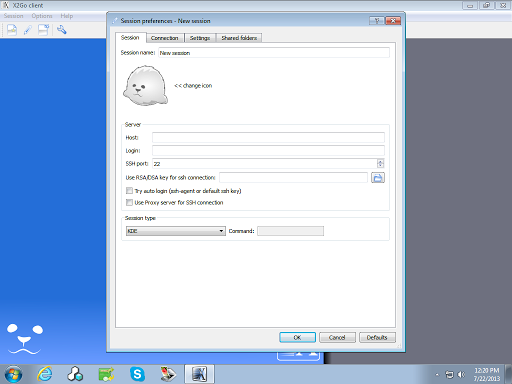
In the Session Name field, you can name your session for ease of access – this doesn’t influence the connection in any way and it’s just for your reference. As you can see on the right, I’ve created multiple sessions to connect to the same server and named them according to what desktop environment I’m using.
In the Host field enter your server’s hostname or IP address.
In the Login field enter the user you used for your SSH connection.
In the SSH Port field enter the port your server uses for SSH, which is 22 by default.
After created session, when you are trying to connect to remote, you got a error message "Cannot execute startkde". That is because default setting for X2Go client is to use KDE desktop. We just need to change it to XFCE desktop, and the issue will go away.

In the Session type dropdown select the option that matches the desktop environment you installed. In this case, choose between XFCE.
YouTube Video
Other linux remote desktop solutions videos: *Fastest Linux Remote Desktop Solution: X2Go - Remote Desktop Log in From Windows 10 to Ubuntu - https://youtu.be/bMLMFXPg5Ao * Install xRDP and Remote RDP into CentOS 7 - https://youtu.be/exSq8eMzW0c * Windows RDP Client through SSH Tunnel to Remote Linux xRDP Server with Putty - https://youtu.be/gjw7gGwAsr8 * Installing GNOME Desktop GUI and xRDP on Ubuntu 18.04 - https://youtu.be/G7uU1234tZ4 * Install / Configure VNC Server and XFCE GUI on CentOS7 - https://youtu.be/NLH-v-95tSY
References
via Blogger https://ift.tt/3eWgbKK
November 13, 2020 at 03:15PM Linux

 RSS Feed
