
 There are a lot of syslog collectors for Windows, but when it comes to stability and features, NXlog has the best chances to fulfill all the requirements.
Windows EventLog allows multi-line messages, so this text is a lot more readable and nicely formatted by spaces, tabs and line-breaks as can be seen in Event Viewer. Because syslog only reads/writes single-line messages, this formatting must be stripped of the EventLog message. In doing so, we lose the meta-data. NXlog is capable of reading these fields, recognize the structure and forward these remotely (or act on them for alerting purposes), thus sparing you time and resources. So, if you use the NXlog framework (client/server) there will be no need to spend time writing patterns to extract usernames, IP addresses and similar meta-data.
| Feature | Note |
|---|---|
| NXlog is a complete framework | It can act as client and/or as server for almost all systems: RedHat/CentOS-, Debian-, Ubuntu-Linux; Windows and Android |
| Supports TCP and UDP Transport Protocol | Default Syslog uses UDP/514 but the fire and forget principle of UDP may not satisfy reliability requirements |
| Transport Encryption trough SSL | Confidentiality requirements may imply an encryption over the line |
| Easy Deployment | low footprint installation, runs as service/daemon |
| Well documented | The manual is very well made and plenty of additional information is available online |
| Open Source | Honestly, do you miss this feature somewhere? ;) |
| Supports syslog format (RFC3164 and RFC5424) | Although still not the best event format out there, syslog always offers compatibility for further processing |
| Supports structured events format (meta-data structure awareness) | NXlog is capable of processing the Windows event log format natively. It reads CSV, JSON, XML, GELF as well as Windows EventLog |
| Clean and easy configuration | You can create a very complex and feature rich configuration. But the basic forwarding configuration is done a few minutes after the installation |
| Built-in scheduling and log rotation | NXlog has a built-in scheduler similar to cron, but with more advanced capabilities to specify timing |
| No Message Loss | NXlog will not drop log messages; it will throttle the input side wherever possible. However, it can be explicitly instructed to drop log messages to avoid possible resource exhaustion |
| Modular Architecture | Dynamically loadable modules (plugins) are available to provide different features and add functionality |
1. Download NXLog Community Edition
On Windows 7 VM, download the NXLog package from the official download : https://nxlog.co/products/nxlog-community-edition/download
2. Install NXLog
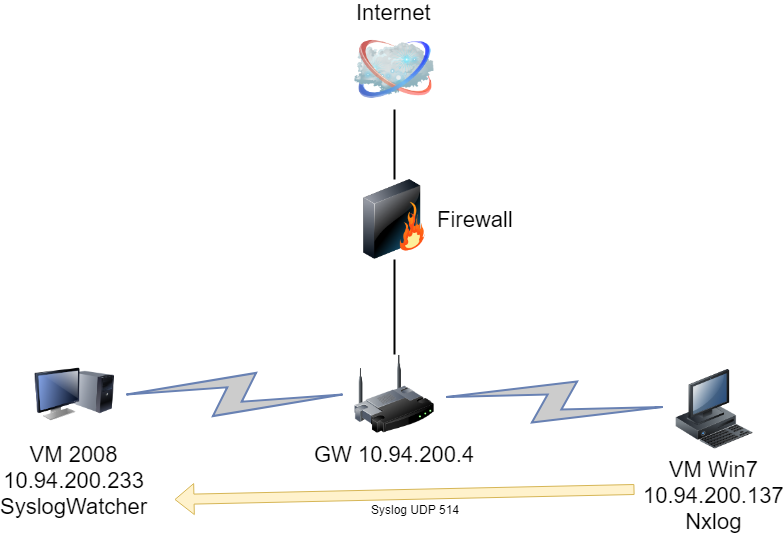
Install NXLog in the regular “next -> next -> finish” fashion. In this lab, I installed on machine 10.94.200.137, a Windows 7 64b VM workstation.
3. Configure NXLog conf file.
Most configuration is default settings. You will need to add three sections in: input, output, and route.

Panic Soft
#NoFreeOnExit TRUE
define ROOT     C:\Program Files (x86)\nxlog
define CERTDIR  %ROOT%\cert
define CONFDIR  %ROOT%\conf
define LOGDIR   %ROOT%\data
define LOGFILE  %LOGDIR%\nxlog.log
LogFile %LOGFILE%
Moduledir %ROOT%\modules
CacheDir  %ROOT%\data
Pidfile   %ROOT%\data\nxlog.pid
SpoolDir  %ROOT%\data
<Extension _syslog>
    Module      xm_syslog
</Extension>
<Extension _charconv>
    Module      xm_charconv
    AutodetectCharsets iso8859-2, utf-8, utf-16, utf-32
</Extension>

<Extension _exec>
    Module      xm_exec
</Extension>

<Extension _fileop>
    Module      xm_fileop
    # Check the size of our log file hourly, rotate if larger than 5MB
    <Schedule>
        Every   1 hour
        Exec    if (file_exists('%LOGFILE%') and \
                   (file_size('%LOGFILE%') >= 5M)) \
                    file_cycle('%LOGFILE%', 8);
    </Schedule>
    # Rotate our log file every week on Sunday at midnight
    <Schedule>
        When    @weekly
        Exec    if file_exists('%LOGFILE%') file_cycle('%LOGFILE%', 8);
    </Schedule>
</Extension>


<Input in>
    Module      im_msvistalog
# For windows 2003 and earlier use the following:
#   Module      im_mseventlog
</Input>

<Output out>
Module om_udp
Host 10.94.200.233
Port 514
</Output>

#################### ROUTE  ###########
<Router r2>
    Path in => out
</Route>
Note: Each time, when you changed the conf file, the NXLog service has to be restarted.

4. Install SyslogWatcher
In this lab, Syslog Watcher installed on a Windows 2008 server as log server.
- Download the latest Syslog Watcher.
- Install in the regular “next -> next -> finish” fashion.
- Open the program from the “start menu”.
- When prompted to select the mode of operation, select: “Manage local Syslog server”.
- If prompted by Windows UAC, approve the administrative rights request.
- Start the service by clicking the huge “Play” button on the top left.
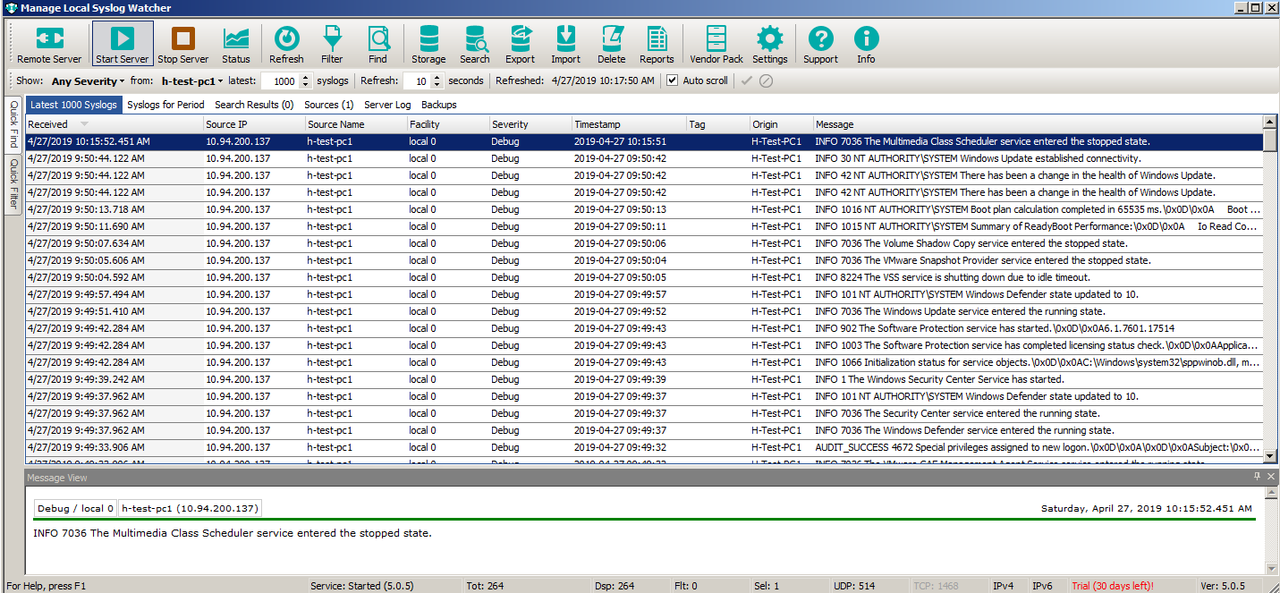
5. Test
Open Command Prompt as Administrator and enter the following command:
EVENTCREATE /ID 1 /L APPLICATION /T INFORMATION /SO TestLOGSOURCE /D "EventTesting"
Microsoft Windows [Version 10.0.17134.706]
(c) 2018 Microsoft Corporation. All rights reserved.

C:\WINDOWS\system32>EVENTCREATE /ID 1 /L APPLICATION /T INFORMATION /SO TestLOGSOURCE /D "EventTesting"

SUCCESS: An event of type 'INFORMATION' was created in the 'APPLICATION' log with 'TestLOGSOURCE' as the source.

C:\WINDOWS\system32>

 RSS Feed
