
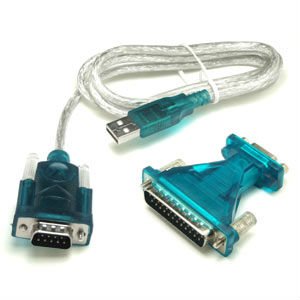
 I have been using a Usb-to-Serial cable for many years without problem at windows xp and windows 7 system. Just recently upgraded to windows 10 , the cable does not work properly any more.
The Prolific USB-to-Serial Comm Port shows not working properly in the system Device Manager. There is a yellow exclamation mark next to my Prolific USB in device manager as shown below screenshots:
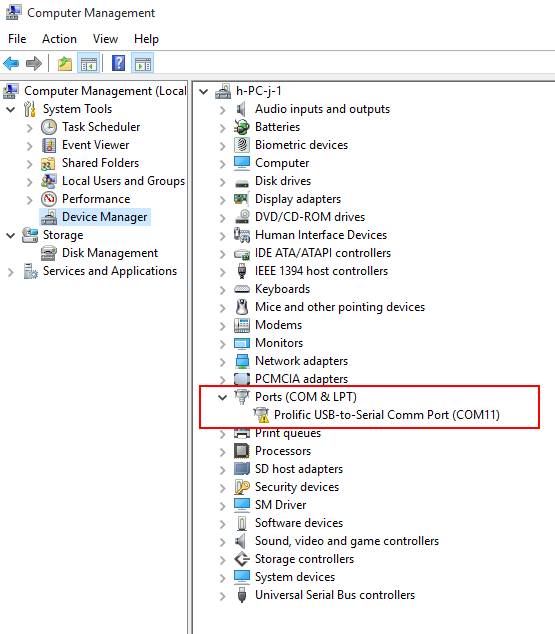
This device cannot start. (Code 10)
A device which does not exist was specified.
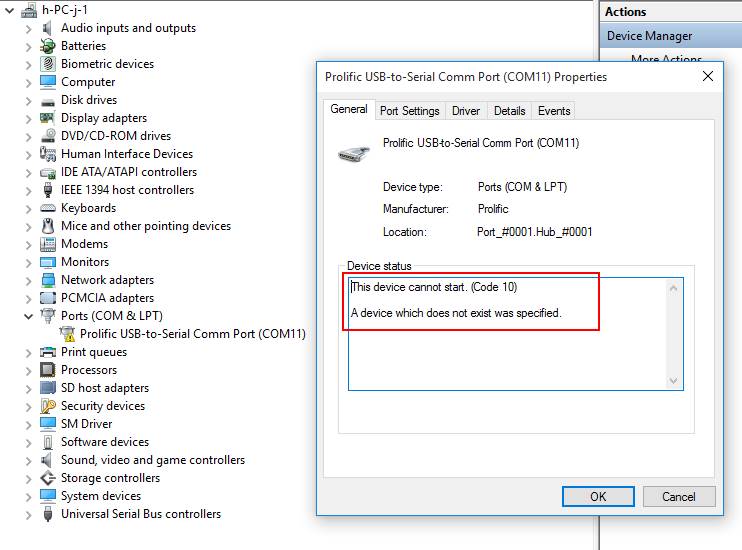
This error is basically saying that Windows, for one reason or another, cannot communicate properly with one of your programs. This communication problem is usually caused by out-of-date, missing or corrupt device drivers.
To resolve Error Code 10, I have followed following recommended steps found from Internet:
- Reboot your computer – this is always a first step to resolving any problems, if it works – great, if not – proceed to the next step!
- Select Start > All Programs > Windows Update
- Right-click on My Computer
- Click Properties > Hardware menu tab > Device Manager
- Double-click the device that is causing the error (there will be a yellow triangle with exclamation mark to the left of it)
- Right-click the specific device and select Properties
- Click on the Driver menu tab and select Update Driver
- Windows may ask for the path of the driver in which case you will need to either insert your Drivers disk (if you have it) or download the Drivers from the manufacturers website
- Restart your computer
Unfortunately those steps do not work in my case. By Googling Internet, I found some explanation:
"What has happened is that there have been counterfeit "Prolific" chips coming from China. The counterfeit chips use the same Vendor ID (VID_067B) and Product ID (PID_2303) as the authentic Prolific chips. So, Prolific made changes to their newest drivers to render the adapters using counterfeit chips unusable. Unfortunately, it renders all earlier adapters inoperative and so you have to go out and buy new ones. Planned obsolescence? Getting a working driver installed for the average user is almost impossible."
So by default windows 10 will automatically install Windows WDF WHQL Driver v3.6.78.350 (06/05/2015) drivers for your device. Unfortunately the old chips sometimes do not work well with this new driver because of reason mentioned above.
I am thinking maybe some old drivers may still works for my device. I started to google and try to download and install some other version drivers such as 3.0.0.10, 3.0.1.0 and 3.3.11.152, finally found 3.3.11.152 is working fine for my old usb-to-serial device.
1. Download the correct driverDownload from this link: USB-SERIAL Driver V3.3.11.152
Unzip and run the installer, "PL2303_Prolific_DriverInstaller_v1210.exe".
2. Change Default Driver to version 3.3.11.152


3. Verify from Device Manager


 RSS Feed
