

|
| All-In-One WP Migration |
Also Wordpress plug-in "All-in-One WP Migration" helped a lot during this process. Whole blog was exported to a 120M package. Unfortunately I still got a problem when access www.51sec.org site later which is running on AWS Linux instance.
Symptoms
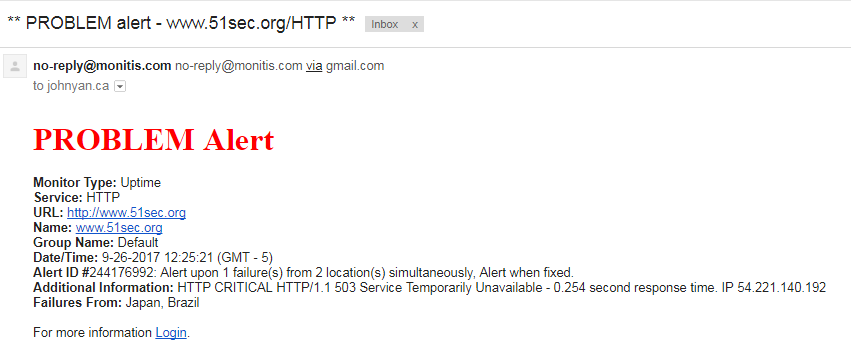
At second day after migration, I got my monitis alert email to say my site is down.
[root@ip-10-10-0-50 httpd]# tail /var/log/httpd/error_log -n 50

mmap() failed: [12] Cannot allocate memory

mmap() failed: [12] Cannot allocate memory

mmap() failed: [12] Cannot allocate memory

mmap() failed: [12] Cannot allocate memory

mmap() failed: [12] Cannot allocate memory

[Thu Sep 28 09:29:37.890816 2017] [mpm_prefork:notice] [pid 2853] AH00169: caught SIGTERM, shutting down
[Thu Sep 28 09:29:38.196735 2017] [suexec:notice] [pid 3692] AH01232: suEXEC mechanism enabled (wrapper: /usr/sbin/suexec)
[Thu Sep 28 09:29:38.217716 2017] [lbmethod_heartbeat:notice] [pid 3693] AH02282: No slotmem from mod_heartmonitor
[Thu Sep 28 09:29:38.312526 2017] [mpm_prefork:notice] [pid 3693] AH00163: Apache/2.4.27 (Amazon) PHP/7.0.21 configured -- resuming normal operations
[Thu Sep 28 09:29:38.312545 2017] [core:notice] [pid 3693] AH00094: Command line: '/usr/sbin/httpd'

mmap() failed: [12] Cannot allocate memory
mmap() failed: [12] Cannot allocate memory
[Thu Sep 28 11:12:03.262604 2017] [:error] [pid 4278] [client 190.94.81.146:4505] PHP Fatal error:  Out of memory (allocated 25165824) (tried to allocate 65536 bytes) in /var/www/html/wp-content/themes/startup-blog/functions.php on line 132, referer: http://www.51sec.org/2016/01/cisco-switch-2960-3560-password-recovery-procedures/
[Thu Sep 28 11:12:03.262669 2017] [:error] [pid 4280] [client 190.94.81.146:4504] PHP Fatal error:  Out of memory (allocated 25165824) (tried to allocate 65536 bytes) in /var/www/html/wp-content/themes/startup-blog/functions.php on line 132, referer: http://www.51sec.org/2016/01/cisco-switch-2960-3560-password-recovery-procedures/
[Thu Sep 28 11:12:04.397148 2017] [:error] [pid 4277] [client 66.249.89.16:36770] PHP Fatal error:  Out of memory (allocated 20971520) (tried to allocate 32768 bytes) in /var/www/html/wp-content/plugins/jetpack/modules/sharedaddy/sharing.php on line 224

mmap() failed: [12] Cannot allocate memory

mmap() failed: [12] Cannot allocate memory
PHP is out of memory. I got many suggestions from Internet. Here are some methods I took.
Solution one
My temporary solution one was to set up a schedule to restart httpd service every two hours using CRON.
[root@ip-10-10-0-50 /]# cat /etc/crontab
SHELL=/bin/bash
PATH=/sbin:/bin:/usr/sbin:/usr/bin
MAILTO=root
HOME=/

# For details see man 4 crontabs

# Example of job definition:
# .---------------- minute (0 - 59)
# |  .------------- hour (0 - 23)
# |  |  .---------- day of month (1 - 31)
# |  |  |  .------- month (1 - 12) OR jan,feb,mar,apr ...
# |  |  |  |  .---- day of week (0 - 6) (Sunday=0 or 7) OR sun,mon,tue,wed,thu,fri,sat
# |  |  |  |  |
# *  *  *  *  * user-name command to be executed
2 */2 * * * root sudo service httpd restart && curl -sm 30 k.wdt.io/[email protected]/reboot_httpd?c=0_*/2_*_*_*
[root@ip-10-10-0-50 /]#
I used https://crontab.guru service to get proper command and wdt.io to get alert email for cron jobs. It did works and helps.
[root@ip-10-10-0-50 /]# tail /var/log/cron
Sep 28 13:00:01 ip-10-10-0-50 CROND[4990]: (root) CMD (sudo service httpd restart && curl -sm 30 k.wdt.io/[email protected]/reboot_httpd?c=0_*_*_*_*)
Sep 28 13:01:01 ip-10-10-0-50 CROND[5071]: (root) CMD (run-parts /etc/cron.hourly)
Sep 28 13:01:01 ip-10-10-0-50 run-parts(/etc/cron.hourly)[5071]: starting 0anacron
Sep 28 13:01:01 ip-10-10-0-50 run-parts(/etc/cron.hourly)[5080]: finished 0anacron
Sep 28 13:50:01 ip-10-10-0-50 crond[2864]: (*system*) RELOAD (/etc/crontab)
Sep 28 14:00:01 ip-10-10-0-50 CROND[5279]: (root) CMD (sudo service httpd restart && curl -sm 30 k.wdt.io/[email protected]/reboot_httpd?c=0_*/2_*_*_*)
Sep 28 14:01:01 ip-10-10-0-50 CROND[5344]: (root) CMD (run-parts /etc/cron.hourly)
Sep 28 14:01:01 ip-10-10-0-50 run-parts(/etc/cron.hourly)[5344]: starting 0anacron
Sep 28 14:01:01 ip-10-10-0-50 run-parts(/etc/cron.hourly)[5353]: finished 0anacron
Sep 28 14:19:01 ip-10-10-0-50 crond[2864]: (*system*) RELOAD (/etc/crontab)
[root@ip-10-10-0-50 /]#
From the httpd/error_log, I can see the service was shut down and resumed at scheduled time.
[root@ip-10-10-0-50 /]# tail /var/log/httpd/error_log -n 20
[root@ip-10-10-0-50 /]# tail /var/log/httpd/error_log -n 20
[Thu Sep 28 12:00:01.375912 2017] [suexec:notice] [pid 4673] AH01232: suEXEC mechanism enabled (wrapper: /usr/sbin/suexec)
[Thu Sep 28 12:00:01.402479 2017] [lbmethod_heartbeat:notice] [pid 4674] AH02282: No slotmem from mod_heartmonitor
[Thu Sep 28 12:00:01.420712 2017] [mpm_prefork:notice] [pid 4674] AH00163: Apache/2.4.27 (Amazon) PHP/7.0.21 configured -- resuming normal operations
[Thu Sep 28 12:00:01.420736 2017] [core:notice] [pid 4674] AH00094: Command line: '/usr/sbin/httpd'
[Thu Sep 28 12:39:01.020101 2017] [:error] [pid 4889] [client 45.43.101.69:59405] PHP Warning:  mysqli_query(): MySQL server has gone away in /var/www/html/wp-includes/wp-db.php on line 1887, referer: http://www.51sec.org/2015/10/advanced-checkpoint-gaia-cli-commands-tips-and-tricks/
[Thu Sep 28 12:39:01.028056 2017] [:error] [pid 4889] [client 45.43.101.69:59405] PHP Warning:  mysqli_query(): Error reading result set's header in /var/www/html/wp-includes/wp-db.php on line 1887, referer: http://www.51sec.org/2015/10/advanced-checkpoint-gaia-cli-commands-tips-and-tricks/
[Thu Sep 28 12:39:01.044760 2017] [:error] [pid 4756] [client 45.43.101.69:58628] PHP Warning:  Error while sending QUERY packet. PID=4756 in /var/www/html/wp-includes/wp-db.php on line 1887, referer: http://www.51sec.org/2015/10/advanced-checkpoint-gaia-cli-commands-tips-and-tricks/
[Thu Sep 28 13:00:02.531359 2017] [mpm_prefork:notice] [pid 4674] AH00169: caught SIGTERM, shutting down
[Thu Sep 28 13:00:03.123712 2017] [suexec:notice] [pid 5019] AH01232: suEXEC mechanism enabled (wrapper: /usr/sbin/suexec)
[Thu Sep 28 13:00:03.145836 2017] [lbmethod_heartbeat:notice] [pid 5020] AH02282: No slotmem from mod_heartmonitor
[Thu Sep 28 13:00:03.198017 2017] [mpm_prefork:notice] [pid 5020] AH00163: Apache/2.4.27 (Amazon) PHP/7.0.21 configured -- resuming normal operations
[Thu Sep 28 13:00:03.198034 2017] [core:notice] [pid 5020] AH00094: Command line: '/usr/sbin/httpd'
[Thu Sep 28 14:00:01.734292 2017] [mpm_prefork:notice] [pid 5020] AH00169: caught SIGTERM, shutting down
[Thu Sep 28 14:00:02.141090 2017] [suexec:notice] [pid 5307] AH01232: suEXEC mechanism enabled (wrapper: /usr/sbin/suexec)
[Thu Sep 28 14:00:02.169154 2017] [lbmethod_heartbeat:notice] [pid 5308] AH02282: No slotmem from mod_heartmonitor
[Thu Sep 28 14:00:02.236204 2017] [mpm_prefork:notice] [pid 5308] AH00163: Apache/2.4.27 (Amazon) PHP/7.0.21 configured -- resuming normal operations
[Thu Sep 28 14:00:02.236230 2017] [core:notice] [pid 5308] AH00094: Command line: '/usr/sbin/httpd'
Solution Two
There are some posts mentioning some kind of attack related to XML-RPC, which can be exploited to send thousands of requests to WordPress in a short amount of time.
To recognize this attack, I did some search from the httpd access log:
[root@ip-10-10-0-50 ec2-user]# grep xmlrpc /var/log/httpd/access_log
180.191.61.7 - - [27/Sep/2017:02:24:09 +0000] "POST /xmlrpc.php HTTP/1.1" 200 403 "-" "Mozilla/5.0 (Windows NT 6.1; WOW64; rv:40.0) Gecko/20100101 Firefox/40.1"
97.73.96.19 - - [27/Sep/2017:02:43:52 +0000] "POST /xmlrpc.php HTTP/1.1" 200 403 "-" "Mozilla/5.0 (Windows NT 6.1; WOW64; rv:40.0) Gecko/20100101 Firefox/40.1"
112.200.195.163 - - [27/Sep/2017:02:46:41 +0000] "POST /xmlrpc.php HTTP/1.1" 200 403 "-" "Mozilla/5.0 (Windows NT 6.1; WOW64; rv:40.0) Gecko/20100101 Firefox/40.1"
115.79.220.211 - - [27/Sep/2017:02:54:56 +0000] "POST /xmlrpc.php HTTP/1.1" 200 403 "-" "Mozilla/5.0 (Windows NT 6.1; WOW64; rv:40.0) Gecko/20100101 Firefox/40.1"
160.238.72.10 - - [27/Sep/2017:03:00:06 +0000] "POST /xmlrpc.php HTTP/1.1" 200 403 "-" "Mozilla/5.0 (Windows NT 6.1; WOW64; rv:40.0) Gecko/20100101 Firefox/40.1"
39.46.183.191 - - [27/Sep/2017:03:06:05 +0000] "POST /xmlrpc.php HTTP/1.1" 200 403 "-" "Mozilla/5.0 (Windows NT 6.1; WOW64; rv:40.0) Gecko/20100101 Firefox/40.1"
2.24.37.37 - - [27/Sep/2017:03:08:31 +0000] "POST /xmlrpc.php HTTP/1.1" 200 403 "-" "Mozilla/5.0 (Windows NT 6.1; WOW64; rv:40.0) Gecko/20100101 Firefox/40.1"
115.178.26.232 - - [27/Sep/2017:03:15:42 +0000] "POST /xmlrpc.php HTTP/1.1" 200 403 "-" "Mozilla/5.0 (Windows NT 6.1; WOW64; rv:40.0) Gecko/20100101 Firefox/40.1"
112.210.202.81 - - [27/Sep/2017:03:16:09 +0000] "POST /xmlrpc.php HTTP/1.1" 200 403 "-" "Mozilla/5.0 (Windows NT 6.1; WOW64; rv:40.0) Gecko/20100101 Firefox/40.1"
98.124.36.154 - - [27/Sep/2017:03:19:52 +0000] "POST /xmlrpc.php HTTP/1.1" 200 403 "-" "Mozilla/5.0 (Windows NT 6.1; WOW64; rv:40.0) Gecko/20100101 Firefox/40.1"
..........
There are thousands of similar logs like that.
Based on the post suggestion, install jetpack plug in helps to reduce this kind of attack.

The Protect function is automatically enabled. You can now see a Jetpack dashboard which also displays the Protect function as being Active. After running a couple of hours, we can see there were 47 malicious attacks blocked by Jetpack plugin.

Solution Three
After did a google online and found there are many posts to suggest change some settings on php.ini file.
Here is what I did :
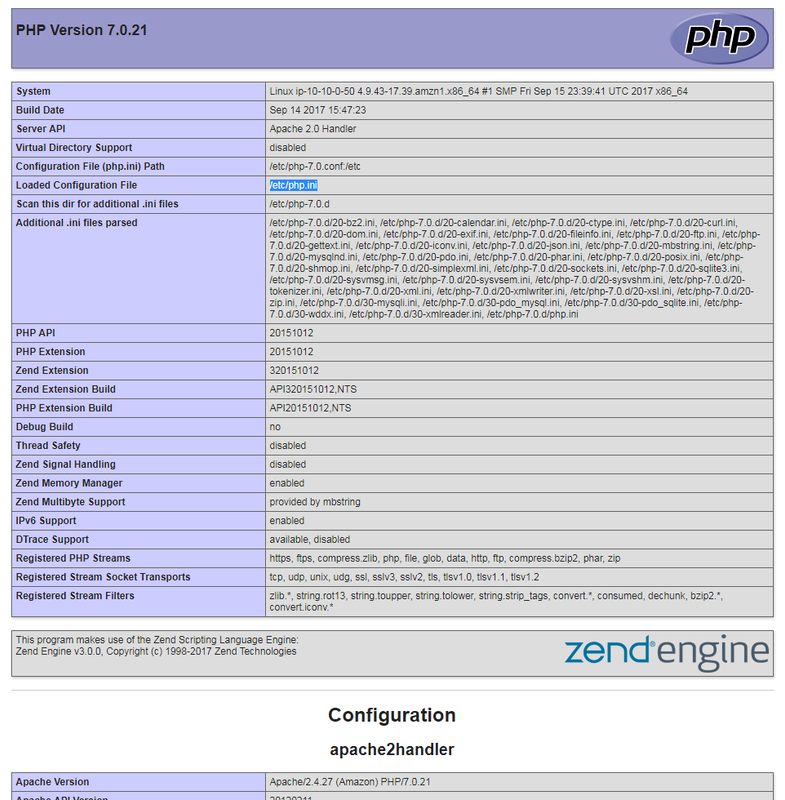
[root@ip-10-10-0-50 html]# echo "<?php phpinfo(); ?>" > /var/www/html/phpinfo.php
by access http://www.51sec.org/phpinfo.php I got the php.ini's location /etc/php.ini
[root@ip-10-10-0-50 etc]# vi php.ini
; Maximum amount of memory a script may consume (128MB is Default)
; http://php.net/memory-limit
memory_limit = 256M
I also tried to increase my PHP memory limit with wp-config.php file. This file is located in /var/www/html/ directory.
[root@ip-10-10-0-50 html]# vi wp-config.php
define('WP_MEMORY_LIMIT', '256M');
Add it to the last line of the file wp-config.php.
References:

 RSS Feed
