
Secret Rotation
STANDARD SECURITY Setting
Is Default True
Prevent Username in Password True
Length between (x) and (x) 12 & 12
Using Characterset Default
Minimum 1 Uppercase (A-Z)
Minimum 1 Lower Case (a-z)
Minimum of 1 Symbol
Require Exclusive Account Usage
HIGH SECURITY Setting
Is Default False
Prevent Username in Password True
Length between (x) and (x) 20 & 20
Using Character set Default
Minimum 1 Uppercase (A-Z)
Minimum 1 Lower Case (a-z)
Minimum of 1 Numeric (0-9)
Minimum of 1 Symbol
Require Exclusive Account Usage
Require Comment & (Change or Incident Ticket)
After you created a new Secrete Template, assign a password requirement to it.
Secret Rotation
Standard Security Rotate every 90 days
High Security Rotate every 30 days
Custom Security Rotate when checking in
Create a secret policy for different situation's combination. Auto Change schedule after expiration can be set in the secret policy.
High security - auto change with heartbeat - 90 days
Launchers
PowerShellFolders
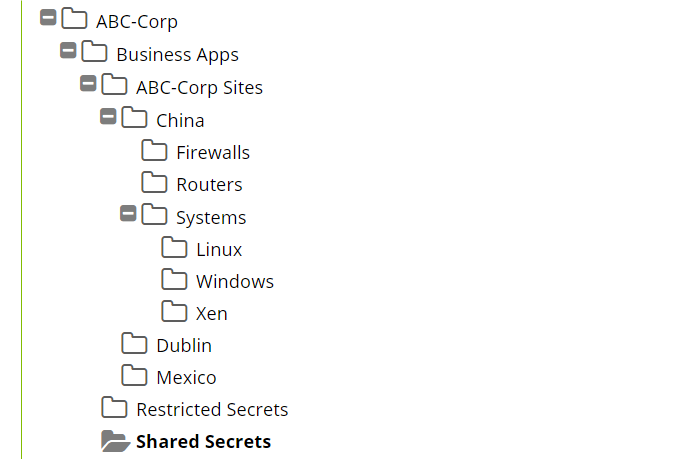
This design (above) is useful when utilizing Distributed Engines with Sites that are different physical locations within your environment and you explicitly want to align a Secret Policy with a specific Site. You have a couple of different locations (Dorval and Wynford), by enforcing or by defaulting the “Site” selection for Secrets to a specific physical location and then aligning that Site specific folder to that Secret Policy, you can ensure that when secrets are created under that specific physical location, you ensure that those secrets will utilize the correct Distributed Engine for that location. For accounts/secrets where it does not make sense to organize them based on any particular “Site” we often suggest creating a “Non-Site Specific” folder that exists on the same sub-folder level as your other sites.
Folder permissions for this type of folder structure will typically have a Secret Server application specific Administrators group as the owner of the top-level folder. Other departments should require “view” only permissions for this top-level folder. For your departmental folders, they may or may not also include the Secret Server application specific Administrators group as owner. Typically, during initial deployment, we see Secret Server Administrators as owners for departmental folders to assist the department with getting everything setup. Alternatively, they may only contain the departmental specific groups with Owner permission. For very large departments, we recommend having multiple groups for each department. One group may be a departmental administrator’s group and another may be a departmental members group. With this kind of group configuration, the departmental administrators group can have “Owner” permissions over the departmental folder and all subfolders. Then the departmental members group can have either “Edit” or “View” permissions for the departmental folder and all subfolders. At the site or device type level of subfolders, this is where you might consider breaking inheritance to allow “Owner” permissions for the departmental member group.
Other Examples:
Secret Server is very flexible and can accommodate many different organization styles. Below are some other folder organizational examples and ideas for a smaller folder structure footprint
1. Department > Device/Account Types
2. Location > Device/Account Types
3. Device/Account Types
Unlimited Administration Mode
via Blogger http://blog.51sec.org/2021/10/thycotic-secret-server-best-practice.html
October 02, 2021 at 08:37PM Thycotic

 RSS Feed
