
This is the second post regarding basic configuration of Raspberry Pi 2.
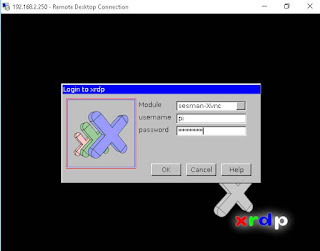
XRDP service will allow you to use remote desktop to access Raspberry Pi GUI through VNC service.


1. Timezone change
By default, Raspberry Pi 2 will use UTC time. Command tzselect will give you continent and country selection to pick.|
pi@raspberrypi ~ $ date
Tue Oct 6 13:48:38 UTC 2015 pi@raspberrypi ~ $ tzselect Please identify a location so that time zone rules can be set correctly. Please select a continent or ocean. 1) Africa 2) Americas 3) Antarctica 4) Arctic Ocean 5) Asia 6) Atlantic Ocean 7) Australia 8) Europe 9) Indian Ocean 10) Pacific Ocean 11) none - I want to specify the time zone using the Posix TZ format pi@raspberrypi ~ $ tzconfig WARNING: the tzconfig command is deprecated, please use: dpkg-reconfigure tzdata pi@raspberrypi ~ $ dpkg-reconfigure tzdata /usr/sbin/dpkg-reconfigure must be run as root pi@raspberrypi ~ $ sudo dpkg-reconfigure tzdata Current default time zone: 'America/Toronto' Local time is now: Tue Oct 6 10:55:18 EDT 2015. Universal Time is now: Tue Oct 6 14:55:18 UTC 2015. pi@raspberrypi ~ $ date Tue Oct 6 10:55:28 EDT 2015 |
2. Access the Raspberry Pi Desktop
XRDP service will allow you to use remote desktop to access Raspberry Pi GUI through VNC service.
|
pi@raspberrypi ~ $ sudo apt-get install xrdp
Reading package lists... Done Building dependency tree Reading state information... Done The following extra packages will be installed: tightvncserver xfonts-base Suggested packages: tightvnc-java The following NEW packages will be installed: tightvncserver xfonts-base xrdp 0 upgraded, 3 newly installed, 0 to remove and 0 not upgraded. Need to get 7,219 kB of archives. After this operation, 11.5 MB of additional disk space will be used. Do you want to continue [Y/n]? y Get:1 http://mirrordirector.raspbian.org/raspbian/ wheezy/main tightvncserver armhf 1.3.9-6.4 [786 kB] Get:2 http://mirrordirector.raspbian.org/raspbian/ wheezy/main xfonts-base all 1:1.0.3 [6,181 kB] Get:3 http://mirrordirector.raspbian.org/raspbian/ wheezy/main xrdp armhf 0.5.0-2 [252 kB] Fetched 7,219 kB in 14s (493 kB/s) Selecting previously unselected package tightvncserver. (Reading database ... 76938 files and directories currently installed.) Unpacking tightvncserver (from .../tightvncserver_1.3.9-6.4_armhf.deb) ... Selecting previously unselected package xfonts-base. Unpacking xfonts-base (from .../xfonts-base_1%3a1.0.3_all.deb) ... Selecting previously unselected package xrdp. Unpacking xrdp (from .../xrdp_0.5.0-2_armhf.deb) ... Processing triggers for man-db ... Processing triggers for fontconfig ... Setting up tightvncserver (1.3.9-6.4) ... update-alternatives: using /usr/bin/tightvncserver to provide /usr/bin/vncserver (vncserver) in auto mode update-alternatives: using /usr/bin/Xtightvnc to provide /usr/bin/Xvnc (Xvnc) in auto mode update-alternatives: using /usr/bin/tightvncpasswd to provide /usr/bin/vncpasswd (vncpasswd) in auto mode Setting up xfonts-base (1:1.0.3) ... Setting up xrdp (0.5.0-2) ... [....] Generating xrdp RSA keys...... Generating 512 bit rsa key... ssl_gen_key_xrdp1 ok saving to /etc/xrdp/rsakeys.ini done (done). [....] Starting Remote Desktop Protocol server : xrdp sesman. pi@raspberrypi ~ $ |


3. List System Information
|
pi@raspberrypi ~ $ uname -a
Linux raspberrypi 3.18.7-v7+ #755 SMP PREEMPT Thu Feb 12 17:20:48 GMT 2015 armv7l GNU/Linux |
4. Add Cron Job
Add a cron job to halt Raspberry Pi at 23:00 everyday.|
pi@raspberrypi ~ $ crontab -e
GNU nano 2.2.6 File: /tmp/crontab.obWc51/crontab # Edit this file to introduce tasks to be run by cron. # # Each task to run has to be defined through a single line # indicating with different fields when the task will be run # and what command to run for the task # # To define the time you can provide concrete values for # minute (m), hour (h), day of month (dom), month (mon), # and day of week (dow) or use '*' in these fields (for 'any').# # Notice that tasks will be started based on the cron's system # daemon's notion of time and timezones. # # Output of the crontab jobs (including errors) is sent through # email to the user the crontab file belongs to (unless redirected). # # For example, you can run a backup of all your user accounts # at 5 a.m every week with: # 0 5 * * 1 tar -zcf /var/backups/home.tgz /home/ # # For more information see the manual pages of crontab(5) and cron(8) # # m h dom mon dow command 0 23 * * * sudo halt [ Wrote 24 lines ] crontab: installing new crontab |

 RSS Feed
