
Pen Test Lab - 3.Active Information Gathering
Unlike passive information gathering, which involves an intermediate system for gathering information, active information gathering involves a direct connection with the target.The client probes for information directly with the target with no intermediate system in between. While this technique may reveal much more information than passive information gathering, there's always a chance of security alarms going off on the target system. Since there's a direct connection with the target system, all the information requests would be logged and can later be traced back to the source. The following diagram depicts active information gathering where the client is directly probing the target system:
The Open Systems Interconnection model (OSI model) is a conceptual model that characterises and standardises the communication functions of a telecommunication or computing system without regard to its underlying internal structure and technology. Its goal is the interoperability of diverse communication systems with standard communication protocols.
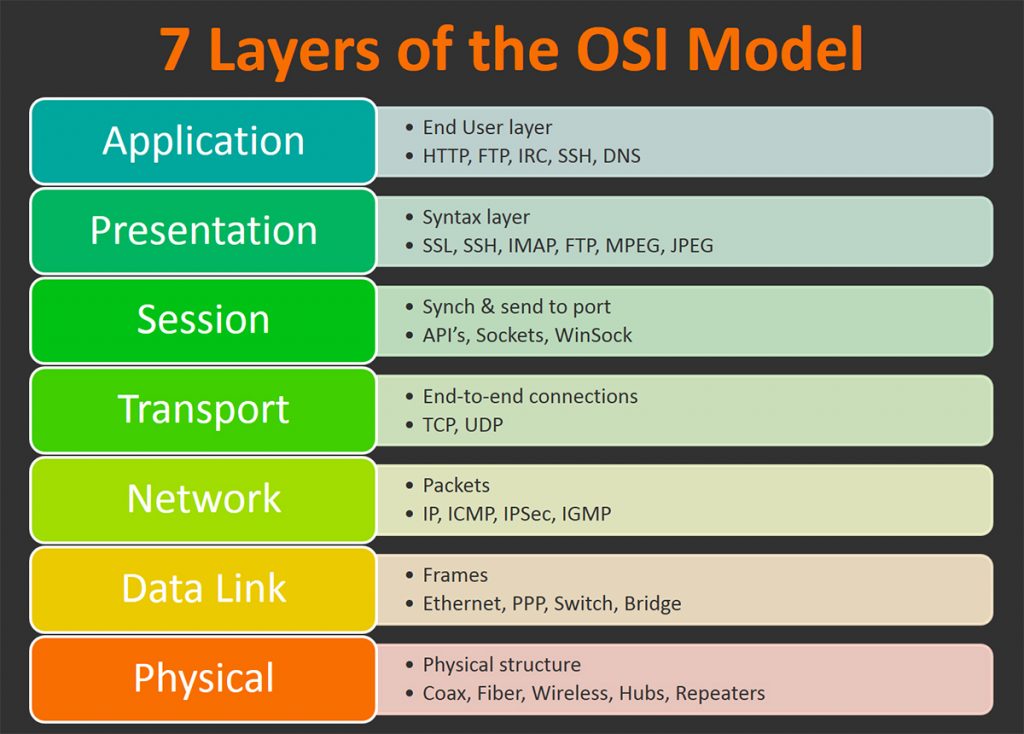
The TCP/IP model is a concise version of the OSI model. It contains four layers, unlike seven layers in the OSI model. The layers are:
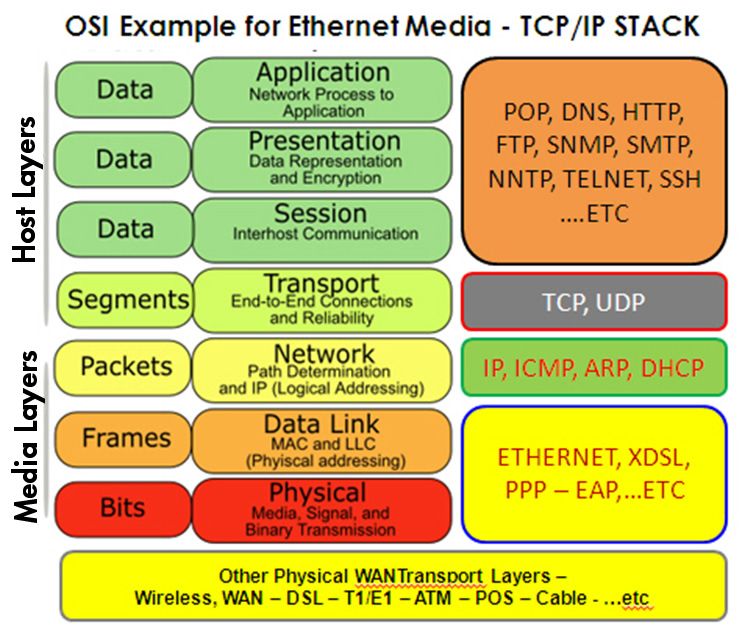
Mapping between OSI Model and TCP/IP Model:

Layer 2 tools can act faster than layer 3 but it can not go to another network. The packets stays in the same network.
Layer 3 tools can be used to discover different networks.
via Blogger https://ift.tt/3yIWPT4
May 23, 2021 at 02:54PM Threat Hunting
Unlike passive information gathering, which involves an intermediate system for gathering information, active information gathering involves a direct connection with the target.The client probes for information directly with the target with no intermediate system in between. While this technique may reveal much more information than passive information gathering, there's always a chance of security alarms going off on the target system. Since there's a direct connection with the target system, all the information requests would be logged and can later be traced back to the source. The following diagram depicts active information gathering where the client is directly probing the target system:
OSI Model / TCP/IP Model
The TCP/IP model is a concise version of the OSI model. It contains four layers, unlike seven layers in the OSI model. The layers are:
- Process/Application Layer
- Host-to-Host/Transport Layer
- Internet Layer
- Network Access/Link Layer
Mapping between OSI Model and TCP/IP Model:
Difference between TCP/IP and OSI Model:
| TCP/IP | OSI |
|---|---|
| TCP refers to Transmission Control Protocol. | OSI refers to Open Systems Interconnection. |
| TCP/IP has 4 layers. | OSI has 7 layers. |
| TCP/IP is more reliable | OSI is less reliable |
| TCP/IP does not have very strict boundaries. | OSI has strict boundaries |
| TCP/IP follow a horizontal approach. | OSI follows a vertical approach. |
| TCP/IP uses both session and presentation layer in the application layer itself. | OSI uses different session and presentation layers. |
| TCP/IP developed protocols then model. | OSI developed model then protocol. |
| Transport layer in TCP/IP does not provide assurance delivery of packets. | In OSI model, transport layer provides assurance delivery of packets. |
| TCP/IP model network layer only provides connection less services. | Connection less and connection oriented both services are provided by network layer in OSI model. |
| Protocols cannot be replaced easily in TCP/IP model. | While in OSI model, Protocols are better covered and is easy to replace with the change in technology. |
Layer 2 Discovery - Arping / netdiscover
┌──(root?kali)-[~]
└─# arping 192.168.2.1 -c 3                                                                                                      1 ⨯
ARPING 192.168.2.1
60 bytes from 00:78:cd:00:fd:f4 (192.168.2.1): index=0 time=4.034 msec
60 bytes from 00:78:cd:00:fd:f4 (192.168.2.1): index=1 time=2.622 msec
60 bytes from 00:78:cd:00:fd:f4 (192.168.2.1): index=2 time=3.788 msec

--- 192.168.2.1 statistics ---
3 packets transmitted, 3 packets received,   0% unanswered (0 extra)
rtt min/avg/max/std-dev = 2.622/3.481/4.034/0.616 ms

┌──(root?kali)-[~]
└─#
Mac Address Look Up: https://ift.tt/3ffrLCJ
┌──(root?kali)-[~]
└─# netdiscover -i eth0 -r 192.168.2.0/24

 Currently scanning: Finished!   |   Screen View: Unique Hosts

 172 Captured ARP Req/Rep packets, from 30 hosts.   Total size: 10320
 _____________________________________________________________________________
   IP            At MAC Address     Count     Len  MAC Vendor / Hostname
 -----------------------------------------------------------------------------
 0.0.0.0         08:ea:40:f8:48:a2     48    2880  SHENZHEN BILIAN ELECTRONIC CO.,LTD
 0.0.0.0         08:ea:40:fc:48:f3     46    2760  SHENZHEN BILIAN ELECTRONIC CO.,LTD
 0.0.0.0         08:ea:40:f8:44:63     36    2160  SHENZHEN BILIAN ELECTRONIC CO.,LTD
 192.168.2.1     00:78:cd:00:fd:f4      1      60  Ignition Design Labs
 192.168.2.2     08:cc:68:40:71:c1      1      60  Cisco Systems, Inc
 192.168.2.4     00:0c:29:1b:b7:e1      1      60  VMware, Inc.
┌──(root?kali)-[~]
└─# netdiscover -p

 Currently scanning: (passive)   |   Screen View: Unique Hosts

 307 Captured ARP Req/Rep packets, from 12 hosts.   Total size: 18420
 _____________________________________________________________________________
   IP            At MAC Address     Count     Len  MAC Vendor / Hostname
 -----------------------------------------------------------------------------
 0.0.0.0         08:ea:40:f8:44:63     94    5640  SHENZHEN BILIAN ELECTRONIC CO.,LTD
 192.168.2.155   24:be:05:e2:40:8f     13     780  Hewlett Packard
 0.0.0.0         08:ea:40:f8:48:a2     82    4920  SHENZHEN BILIAN ELECTRONIC CO.,LTD
 0.0.0.0         08:ea:40:fc:48:f3     82    4920  SHENZHEN BILIAN ELECTRONIC CO.,LTD
 0.0.0.0         00:78:cd:03:d3:00      6     360  Ignition Design Labs
 192.168.2.163   00:78:cd:03:d3:00      2     120  Ignition Design Labs
 192.168.2.157   5c:cf:7f:73:26:55     13     780  Espressif Inc.
 0.0.0.0         00:78:cd:01:05:b8      6     360  Ignition Design Labs
 0.0.0.0         00:78:cd:03:d7:40      4     240  Ignition Design Labs
Layer 3 Discovery - Ping
Ping
Traceroute

Traceroute
hping / fping
- Use traceroute mode (–traceroute), be verbose (-V) in ICMP mode (-1) against the target (www.xxx.com):
-
- root@kali:~# hping3 --traceroute -V -1 www.xxx.com
- -q: brief output. -c: packets numbers. -d:packet site. -S:SYN packets. -p:Port Number. -w:tcp window size. --flood: shoot at discretion, replies will be ignored. --rand-source: hide source ip using a fake random ip.
-
- hping3 -q -c 10 -d 120 -S -w 64 -p 80 --flood --rand-source www.xxx.com
Fping
- fping -g 192.168.2.0/24 -c 1 | grep ms > results.txt
Layer 4 Discovery - Nmap
According to the official Nmap website –
"Nmap is a free and open source utility for network discovery and security auditing. Many systems and network administrators also find it useful for tasks such as network inventory, managing service upgrade schedules, and monitoring host or service uptime. Nmap uses raw IP packets in novel ways to determine what hosts are available on the network, what services (application name and version) those hosts are offering, what operating systems (and OS versions) they are running, what type of packet filters/firewalls are in use, and dozens of other characteristics. It was designed to rapidly scan large networks, but works fine against single hosts. "
Nmap Target Selection
| Scan a single IP | nmap 192.168.2.1 |
| Scan a host | nmap www.test.com |
| Scan a range of IPs | nmap 192.168.2.1-20 |
| Scan a subnet | nmap 192.168.2.0/24 |
| Scan targets from a text file | nmap -iL list-of-ips.txt |
Nmap Port Selection
| Scan a single Port | nmap -p 22 192.168.2.1 |
| Scan a range of ports | nmap -p 1-100 192.168.2.1 |
| Scan 100 most common ports (Fast) | nmap -F 192.168.2.1 |
| Scan all 65535 ports | nmap -p- 192.168.2.1 |
Nmap Port Scan types
| Scan using TCP connect | nmap -sT 192.168.2.1 |
| Scan using TCP SYN scan (default) | nmap -sS 192.168.2.1 |
| Scan UDP ports | nmap -sU -p 123,161,162 192.168.2.1 |
| Scan selected ports - ignore discovery | nmap -Pn -F 192.168.2.1 |
Service and OS Detection
| Detect OS and Services | nmap -A 192.168.2.1 |
| Standard service detection | nmap -sV 192.168.2.1 |
| More aggressive Service Detection | nmap -sV --version-intensity 5 192.168.2.1 |
| Lighter banner grabbing detection | nmap -sV --version-intensity 0 192.168.2.1 |
Nmap Output Formats
| Save default output to file | nmap -oN outputfile.txt 192.168.2.1 |
| Save results as XML | nmap -oX outputfile.xml 192.168.2.1 |
| Save results in a format for grep | nmap -oG outputfile.txt 192.168.2.1 |
| Save in all formats | nmap -oA outputfile 192.168.2.1 |
Digging deeper with NSE Scripts
| Scan using default safe scripts | nmap -sV -sC 192.168.2.1 |
| Get help for a script | nmap --script-help=ssl-heartbleed |
| Scan using a specific NSE script | nmap -sV -p 443 –script=ssl-heartbleed.nse 192.168.2.1 |
| Scan with a set of scripts | nmap -sV --script=smb* 192.168.2.1 |
A scan to search for DDOS reflection UDP services
| Scan for UDP DDOS reflectors | nmap –sU –A –PN –n –pU:19,53,123,161 –script=ntp-monlist,dns-recursion,snmp-sysdescr 192.168.2.0/24 |
HTTP Service Information
| Gather page titles from HTTP services | nmap --script=http-title 192.168.2.0/24 |
| Get HTTP headers of web services | nmap --script=http-headers 192.168.2.0/24 |
| Find web apps from known paths | nmap --script=http-enum 192.168.2.0/24 |
Detect Heartbleed SSL Vulnerability
| Heartbleed Testing | nmap -sV -p 443 --script=ssl-heartbleed 192.168.2.0/24 |
IP Address information
| Find Information about IP address | nmap --script=asn-query,whois,ip-geolocation-maxmind 192.168.2.0/24 |
Scapy
>>> ARP().display()
###[ ARP ]###
  hwtype= 0x1
  ptype= IPv4
  hwlen= None
  plen= None
  op= who-has
  hwsrc= 00:0c:29:fc:11:ce
  psrc= 192.168.2.20
  hwdst= 00:00:00:00:00:00
  pdst= 0.0.0.0
>>> sr1(ARP(pdst="192.168.2.1"))
Begin emission:
Finished sending 1 packets.
*
Received 1 packets, got 1 answers, remaining 0 packets
<ARP  hwtype=0x1 ptype=IPv4 hwlen=6 plen=4 op=is-at hwsrc=00:78:cd:00:fd:f4 psrc=192.168.2.1 hwdst=00:0c:29:fc:11:ce pdst=192.168.2.20 |<Padding  load='\x00\x00\x00\x00\x00\x00\x00\x00\x00\x00\x00\x00\x00\x00\x00\x00\x00\x00' |>>
>>>
>> IP().display()
###[ IP ]###
  version= 4
  ihl= None
  tos= 0x0
  len= None
  id= 1
  flags=
  frag= 0
  ttl= 64
  proto= hopopt
  chksum= None
  src= 127.0.0.1
  dst= 127.0.0.1
  \options\

>>> ICMP().display()
###[ ICMP ]###
  type= echo-request
  code= 0
  chksum= None
  id= 0x0
  seq= 0x0

>>> sr1(IP(dst="192.168.2.1")/ICMP(),timeout=1)
Begin emission:
Finished sending 1 packets.
*
Received 1 packets, got 1 answers, remaining 0 packets
<IP  version=4 ihl=5 tos=0x0 len=28 id=50232 flags= frag=0 ttl=64 proto=icmp chksum=0x3143 src=192.168.2.1 dst=192.168.2.20 |<ICMP  type=echo-reply code=0 chksum=0xffff id=0x0 seq=0x0 |<Padding  load='\x00\x00\x00\x00\x00\x00\x00\x00\x00\x00\x00\x00\x00\x00\x00\x00\x00\x00' |>>>
Half open port scanning
>>> TCP().display()
###[ TCP ]###
  sport= ftp_data
  dport= http
  seq= 0
  ack= 0
  dataofs= None
  reserved= 0
  flags= S
  window= 8192
  chksum= None
  urgptr= 0
  options= []

>>> sr1(IP(dst="192.168.2.1")/TCP(flags="S",dport=80),timeout=1)
Begin emission:
Finished sending 1 packets.
.*
Received 2 packets, got 1 answers, remaining 0 packets
<IP  version=4 ihl=5 tos=0x0 len=44 id=0 flags=DF frag=0 ttl=64 proto=tcp chksum=0xb566 src=192.168.2.1 dst=192.168.2.20 |<TCP  sport=http dport=ftp_data seq=3654116272 ack=1 dataofs=6 reserved=0 flags=SA window=29200 chksum=0x62bd urgptr=0 options=[('MSS', 1460)] |<Padding  load='\x00\x00' |>>>
>>>
via Blogger https://ift.tt/3yIWPT4
May 23, 2021 at 02:54PM Threat Hunting

 RSS Feed
