
As a network guy, you will work with NTP (Network Time Protocol) lots for your network devices.
From Wikipedia, the explanation regarding NTP is:
"The protocol is usually described in terms of a client-server model, but can as easily be used in peer-to-peer relationships where both peers consider the other to be a potential time source.Implementations send and receive timestamps using the User Datagram Protocol (UDP) on port number 123. They can also use broadcasting or multicasting, where clients passively listen to time updates after an initial round-trip calibrating exchange. NTP supplies a warning of any impending leap second adjustment, but no information about local time zones or daylight saving time is transmitted."
A local linux NTP server on the network can be synchronized with a trusted timing source to keep all of your internal NTP clients in sync with an accurate time. For windows ntp server, please check my previous post: Build NTP Windows Server for Network Devices (not Win32Time)
1. Install NTP Server
a. Check your linux release
[root@syslov1p ~]# cat /etc/redhat-release
CentOS release 6.6 (Final)
b. [root@syslov1p ~]# yum install ntp
Loaded plugins: fastestmirror
Setting up Install Process
Loading mirror speeds from cached hostfile
Package ntp-4.2.6p5-2.el6.centos.x86_64 already installed and latest version
Nothing to do
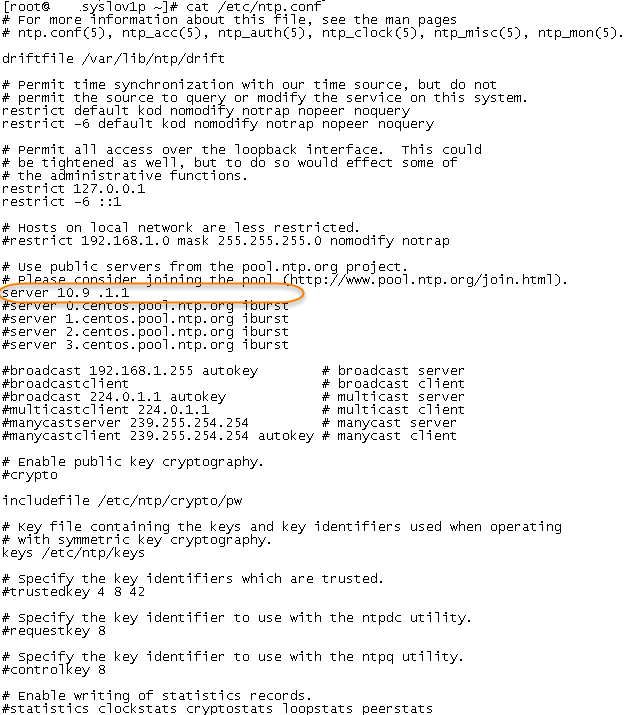
2. Modify /etc/ntp.conf
a. add trusted time server, in my case it is 10.9.1.1. Other configuration could be default.
b. Restart ntpd service
[root@syslov1p ~]# service ntpd restartShutting down ntpd: [ OK ]Starting ntpd: [ OK ][root@syslov1p ~]# service ntpd stopShutting down ntpd: [ OK ][root@syslov1p ~]# service ntpd startStarting ntpd: [ OK ]
c. Also you could restrict only specific clients
restrict 192.168.1.0 mask 255.255.255.0 nomodify notrap
d. add local clock as backup
server 127.127.1.0 # local clockfudge 127.127.1.0 stratum 10
3. Verify NTP Status
a. using command ntpq -p
[root@syslov1p ~]# ntpq -p remote refid st t when poll reach delay offset jitter==============================================================================*10.9.1.1 193.108.184.92 3 u 25 64 377 2.173 4.430 3.906
b. Manually synchronize time
[root@syslov1p ~]# ntpdate -u 10.9.1.116 Mar 20:38:58 ntpdate[2671]: adjust time server 10.9.1.1 offset -0.005387 sec
c. on your linux NTP client, you could start your ntp client Daemon and check the ntp client status
[root@syslov1p ~]# /etc/init.d/ntpd start
Starting ntpd:
[root@syslov1p ~]# ntpdc -c sysinfo
system peer: r-1-hsrp.mgmt.intern
system peer mode: client
leap indicator: 00
stratum: 4
precision: -19
root distance: 0.18851 s
root dispersion: 1.09599 s
reference ID: [10.9.1.1]
reference time: d8b1b105.8e2ff185 Mon, Mar 16 2015 20:44:05.555
system flags: auth monitor ntp kernel stats
jitter: 0.000000 s
stability: 0.000 ppm
broadcastdelay: 0.000000 s
authdelay: 0.000000 s

 RSS Feed
