
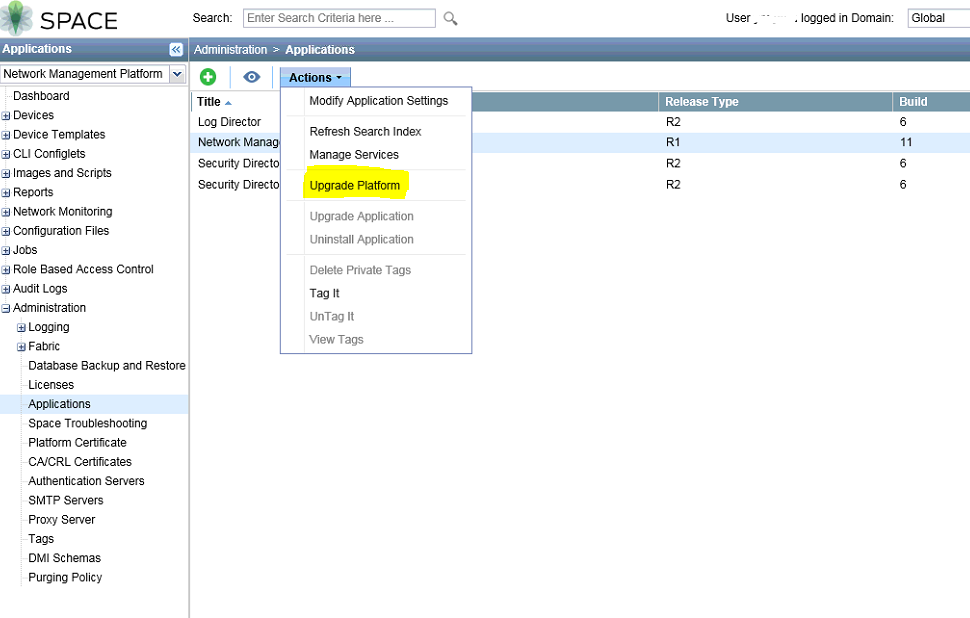
 Usually you can easily upgrade an application from the Junos Space user interface. You must download the image file for the new version of the application, navigate to the Applications page (Network Management Platform > Administration > Applications) and select the application that you want to upgrade. From the right-click menu, choose Upgrade Application to upload the image file into Junos Space via HTTP or SCP.
But upgrade JunOS Space to latest version 16.1 is different and it is not a easy task. There are many steps to follow especially the last step to upgrade to 16.1 from 15.2R2. Here is my recent upgrade procedures.
Steps to upgrade JunOS Space 14.1 to the latest version 16.1:
1. From 14.1, first upgrade to 15.1
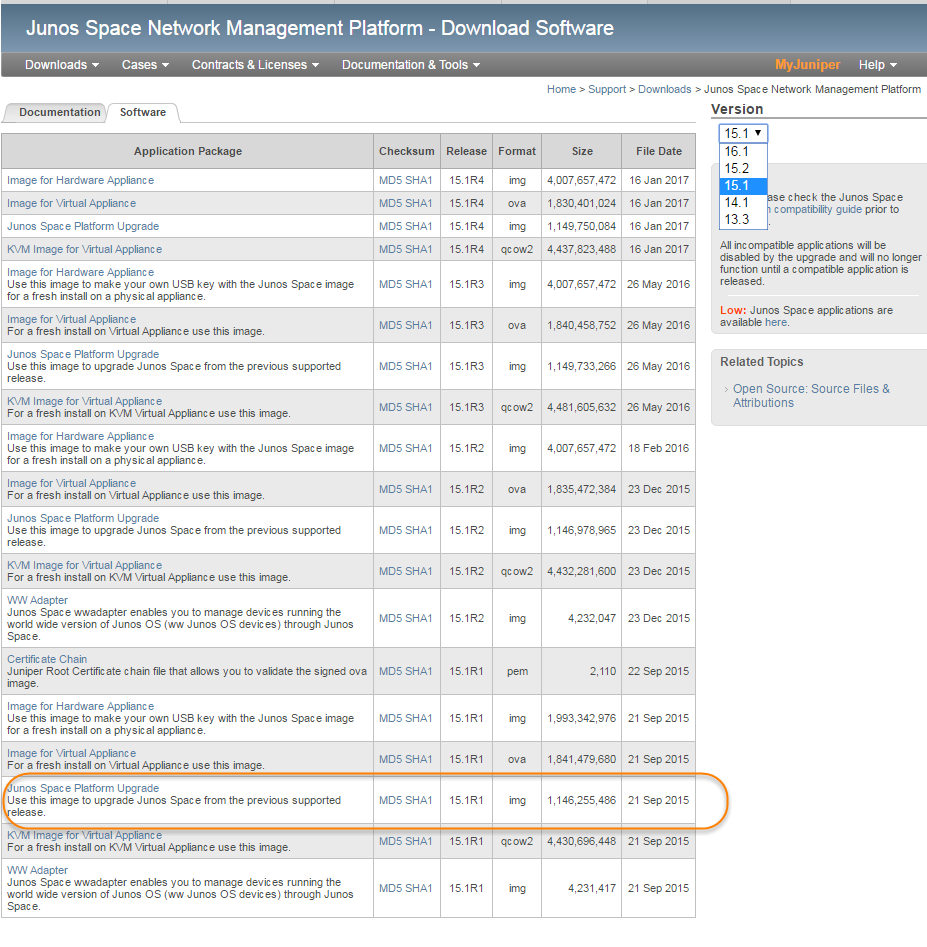
Download 15.1 R1 package from http://www.juniper.net/support/downloads/?p=space#sw
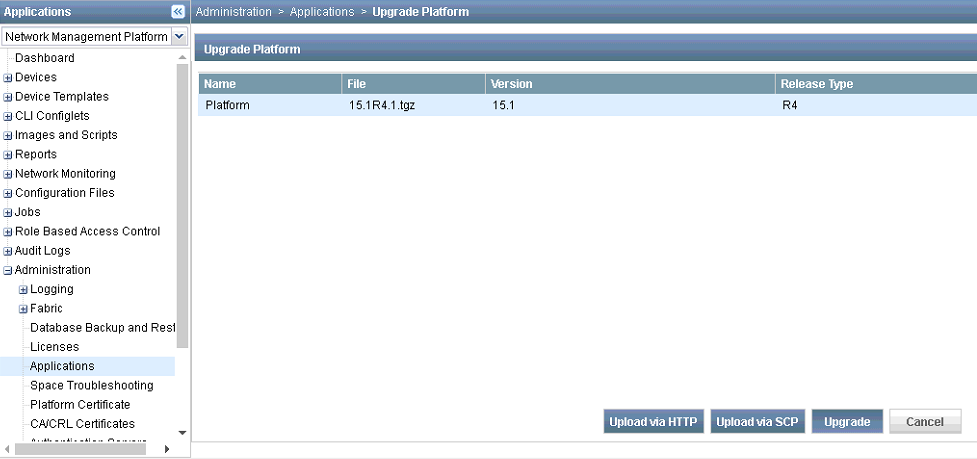
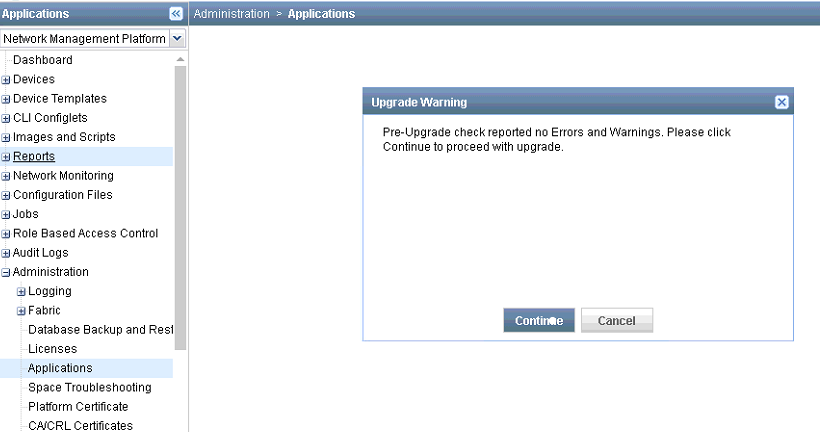
Start Upgrading process from application page:
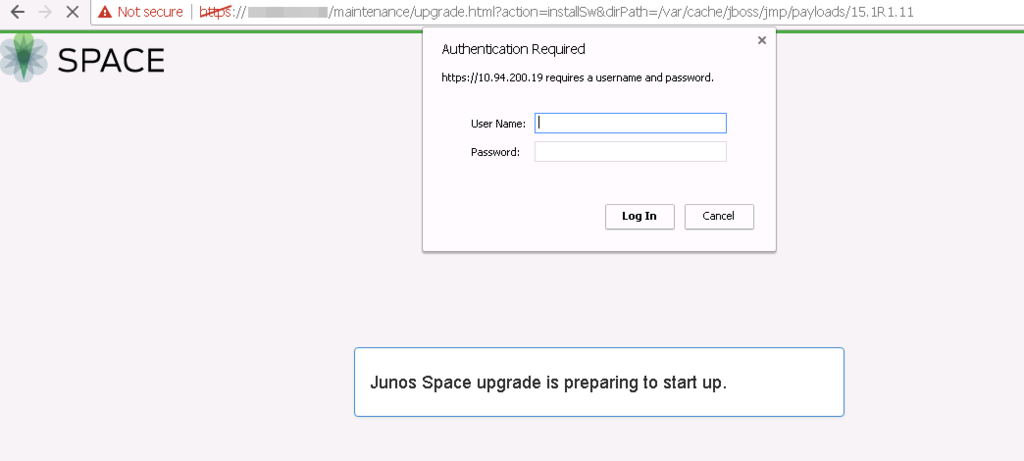
You will be redirect to a new page to enter maintenance user name and password to start upgrade process. Username is maintenance. Password is the one you set up before or you can use this link https://kb.juniper.net/InfoCenter/index?page=content&id=KB16853 to reset it.
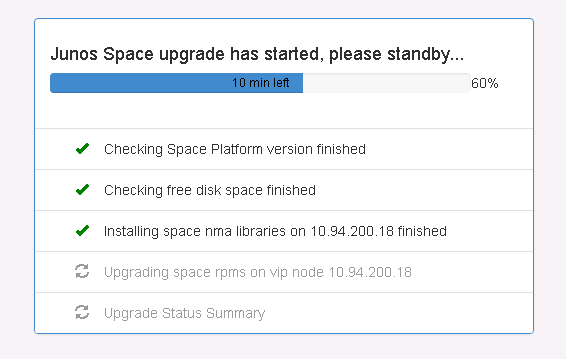
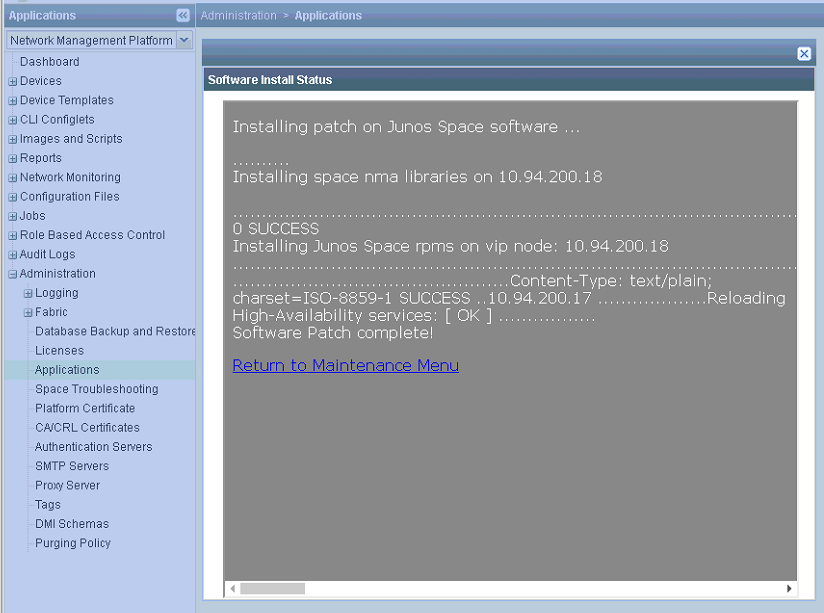
After waited 10 minutes, for somehow, the web gui lost connection. I have to manually restart httpd service to get back into maintenance window.
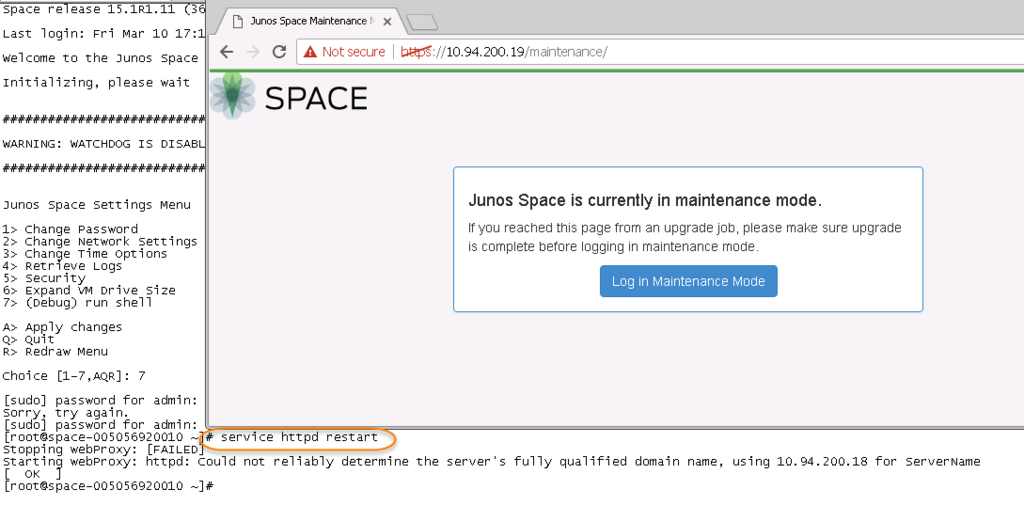
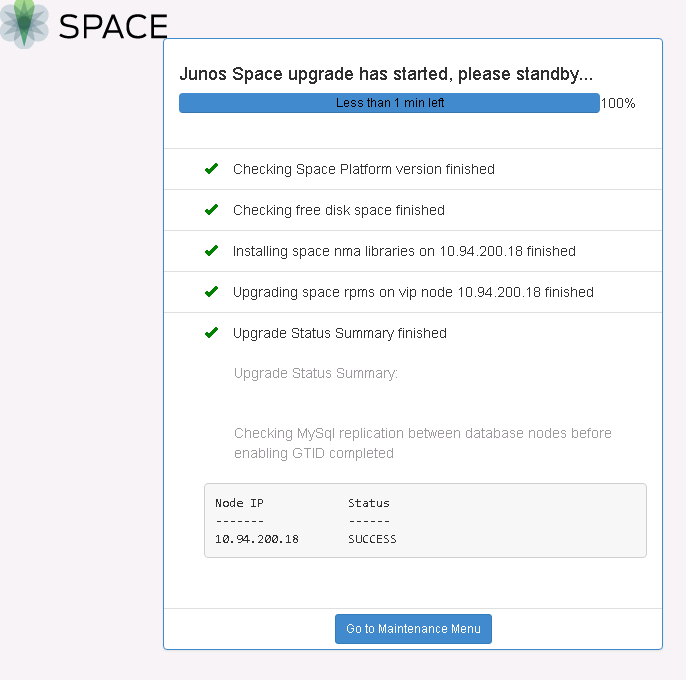
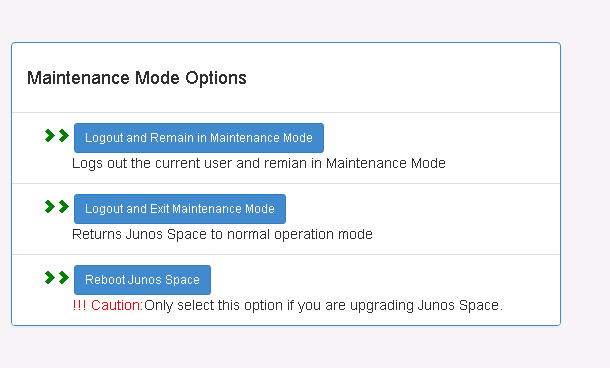
Click the option Reboot JunOS Space:

Space release 15.1R4.1 (379522)

Last login: Sat Mar 11 09:04:58 2017 from 10.94.200.14

Welcome to the Junos Space network settings utility.

Initializing, please wait


Junos Space Settings Menu

1> Change Password
2> Change Network Settings
3> Change Time Options
4> Retrieve Logs
5> Security
6> Expand VM Drive Size
7> (Debug) run shell

A> Apply changes
Q> Quit
R> Redraw Menu

Choice [1-7,AQR]: 7

[sudo] password for admin:
[root@space-005056920010 ~]# service httpd restart
Stopping webProxy: [  OK  ]
Starting webProxy: httpd: Could not reliably determine the server's fully qualified domain name, using 10.94.200.18 for ServerName
[  OK  ]
[root@space-005056920010 ~]# service jmp-watchdog start
jmp-watchdog running
[root@space-005056920010 ~]# service mysql start
SUCCESS! MySQL running (3911)
[root@space-005056920010 ~]# service jboss-dc start
jboss domain controller (pid 13534) is already running
[root@space-005056920010 ~]# service jboss start
PING jmp-CLUSTER (10.94.200.19) 56(84) bytes of data.
64 bytes from jmp-CLUSTER (10.94.200.19): icmp_seq=1 ttl=64 time=0.049 ms
64 bytes from jmp-CLUSTER (10.94.200.19): icmp_seq=2 ttl=64 time=0.043 ms
64 bytes from jmp-CLUSTER (10.94.200.19): icmp_seq=3 ttl=64 time=0.040 ms

--- jmp-CLUSTER ping statistics ---
3 packets transmitted, 3 received, 0% packet loss, time 1999ms
rtt min/avg/max/mdev = 0.040/0.044/0.049/0.003 ms
in master node
domain controller is already running
host.xml.slave is initialized, skip
start jboss
jboss (pid 16674) is running
start deploy ...
[root@space-005056920010 ~]#
2. Upgrade your Network Management Platform (NMP) to the latest release of your current version.
For instance in my case means going from 15.1R1 to 15.1R4.
3. Upgrade your other application
After you have this done you need to upgrade all your Application modules to the latest version compatible for your NMP version (for example upgrade SD to 15.1R2). You didn’t mention having any application, but if you have please don’t skip this step, you can verify this in the NMP under Administration>Applications.
Here is an example to upgrade Security Director from 14.1 to 15.1 R1.
Here is an example to upgrade Security Director from 14.1 to 15.1 R1.

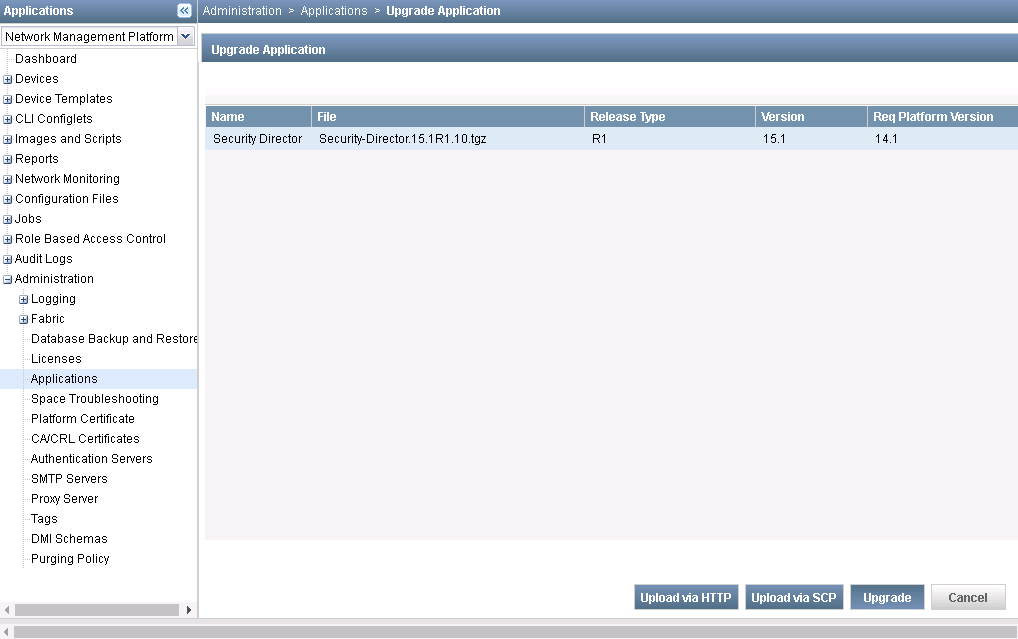

You had better to upgrade Security director to the highest release under that version before you go to next version of NMP. In this post, it has been upgrade to 15.1R2 before NMP upgraded to 15.2R1.
in my case it is 15.2R1
It is same steps as you upgrade from 14.1 to 15.1. It will take quite a while after rebooted to get system back into normal. You may have to those shell commands to start some services in step 1.
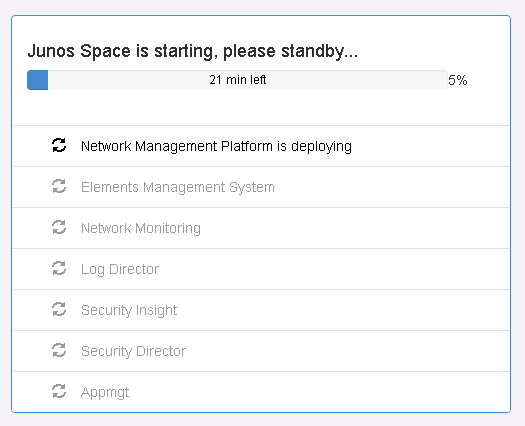
Once 15.1 completed, you will have to upgrade to 15.1R2 version by uploading image file '15.2R2.4.img'. Then you can do your applications such as security director, upgrade from 15.1R2 to 15.2R1 , 15.2R2.

5. Upgrade NMP from 15.2R2 to 16.1.
Upgrade NMP from 15.2R2 to 16.1 is a little different from above steps. In Junos Space Network Management Platform Release 16.1R1, CentOS 6.8 is used as the underlying OS. As a direct upgrade of the OS from CentOS 5.9 to CentOS 6.8 is not supported, a direct upgrade to Junos Space Platform Release 16.1R1 by using the Junos Space Platform UI is also not supported. You must follow a multi-step procedure to upgrade to Junos Space Platform Release 16.1R1.
Here is a link to show all steps.
Here is a link to show all steps.
Please pay special attention to the steps to upgrade to the latest version 16.1, there are different that other previous versions.
Also, if you use a log collector. Versions 15.1, 15.2 and 16.1 of the log collector are not compatible and this will require to erase the old log collector and deploy the newer version instead.
Finally, you can download the required files for the upgrade in this link:
Troubleshooting
Not Enough Disk Space
You may get action failure when you do upgrade because of following error:
"Upgrade Errors: 10.9.2.8: Has no enough disk space. Needs a minimum of 10G available space in "/" partition.
Please click OK to stop the upgrade and fix the Upgrade Errors reported."

[root@space-005056920010 ~]# df -h
Filesystem            Size  Used Avail Use% Mounted on
/dev/mapper/jmpvgnocf-lvroot
                       22G   12G  9.0G  56% /
/dev/mapper/jmpvgnocf-lvtmp
                       23G  458M   22G   3% /tmp
/dev/mapper/jmpvgnocf-lvvar
                       51G  8.7G   39G  19% /var
/dev/mapper/jmpvgnocf-lvlog
                       23G   12G   11G  52% /var/log
/dev/sda1              96M   16M   76M  17% /boot
tmpfs                 3.8G  4.0K  3.8G   1% /dev/shm
[root@space-005056920010 ~]#
[root@space-005056920010 /]# du -h | egrep "^[0-9.]+G"
3.3G    ./var/log/jboss/servers/server1
3.3G    ./var/log/jboss/servers
3.3G    ./var/log/jboss
5.1G    ./var/log
1.2G    ./var/cache/jboss/jmp/15.2R2.4
1.2G    ./var/cache/jboss/jmp/payloads/15.2R2.4
1.2G    ./var/cache/jboss/jmp/payloads
2.4G    ./var/cache/jboss/jmp
5.1G    ./var/cache/jboss
5.2G    ./var/cache
1.1G    ./var/chroot/mysql/var/lib/mysql/build_db
3.0G    ./var/chroot/mysql/var/lib/mysql
3.0G    ./var/chroot/mysql/var/lib
3.0G    ./var/chroot/mysql/var
3.3G    ./var/chroot/mysql
3.3G    ./var/chroot
14G     ./var
du: cannot read directory `./proc/18639': No such file or directory
du: cannot read directory `./proc/18641': No such file or directory
du: cannot read directory `./proc/18642': No such file or directory
du: cannot read directory `./proc/18743': No such file or directory
du: cannot read directory `./proc/18954': No such file or directory
du: cannot read directory `./proc/18956': No such file or directory
du: cannot read directory `./proc/18990': No such file or directory
du: cannot read directory `./proc/18991': No such file or directory
du: cannot read directory `./proc/18992': No such file or directory
du: cannot read directory `./proc/19007': No such file or directory
du: cannot read directory `./proc/19008': No such file or directory
du: cannot read directory `./proc/19009': No such file or directory
du: cannot read directory `./proc/19010': No such file or directory
du: cannot access `./proc/22119/task/8853/fd/795': No such file or directory
1.3G    ./usr/local/jboss/standalone/data/solr/index
2.1G    ./usr/local/jboss/standalone/data/solr
2.1G    ./usr/local/jboss/standalone/data
2.4G    ./usr/local/jboss/standalone
1.1G    ./usr/local/jboss/domain/tmp/servers/server1/vfs
1.9G    ./usr/local/jboss/domain/tmp/servers/server1
1.9G    ./usr/local/jboss/domain/tmp/servers
1.9G    ./usr/local/jboss/domain/tmp
1.2G    ./usr/local/jboss/domain/data/servers/server1/content
1.3G    ./usr/local/jboss/domain/data/servers/server1
1.3G    ./usr/local/jboss/domain/data/servers/server2/content
1.3G    ./usr/local/jboss/domain/data/servers/server2
2.5G    ./usr/local/jboss/domain/data/servers
2.5G    ./usr/local/jboss/domain/data
4.4G    ./usr/local/jboss/domain
1.2G    ./usr/local/jboss/jmp-tmp/net/juniper/jmp/var/schemas/dmi-space/dmi
1.2G    ./usr/local/jboss/jmp-tmp/net/juniper/jmp/var/schemas/dmi-space
1.3G    ./usr/local/jboss/jmp-tmp/net/juniper/jmp/var/schemas
1.3G    ./usr/local/jboss/jmp-tmp/net/juniper/jmp/var
1.3G    ./usr/local/jboss/jmp-tmp/net/juniper/jmp
1.3G    ./usr/local/jboss/jmp-tmp/net/juniper
1.3G    ./usr/local/jboss/jmp-tmp/net
1.3G    ./usr/local/jboss/jmp-tmp
8.3G    ./usr/local/jboss
8.5G    ./usr/local
9.8G    ./usr
24G     .
[root@space-005056920010 /]# find / -type f -size +100000 -exec ls -lha {} \;
-rw-r----- 1 root root 518M Mar 14 05:03 /root/dead.letter
-rw------- 1 root root 64M Mar 14 17:59 /sys/devices/pci0000:00/0000:00:0f.0/resource1
-rw------- 1 root root 103M Nov  6 04:02 /var/log/SystemStatusLog.19
-rw------- 1 root root 103M Jun 12  2016 /var/log/SystemStatusLog.40
-rw------- 1 root root 103M Feb  5 04:02 /var/log/SystemStatusLog.6
-rw------- 1 root root 103M Jul 31  2016 /var/log/SystemStatusLog.33
-rw------- 1 root root 103M May  1  2016 /var/log/SystemStatusLog.46
-rw------- 1 root root 103M May 22  2016 /var/log/SystemStatusLog.43
-rw------- 1 root root 103M Mar 27  2016 /var/log/SystemStatusLog.51
-rw------- 1 root root 101M Oct 26 04:02 /var/log/kern.log.2
-rw------- 1 root root 103M Sep  4  2016 /var/log/SystemStatusLog.28
-rw------- 1 root root 103M Oct 16 04:02 /var/log/SystemStatusLog.22
-rw------- 1 root root 103M Feb 26 04:02 /var/log/SystemStatusLog.3
-rw------- 1 root root 103M Nov 20 04:02 /var/log/SystemStatusLog.17
-rw------- 1 root root 101M Apr 23  2016 /var/log/kern.log.4
-rw------- 1 root root 103M Jul 17  2016 /var/log/SystemStatusLog.35
-rw------- 1 root root 103M Mar 12 04:02 /var/log/SystemStatusLog.1
-rw------- 1 root root 103M Apr 10  2016 /var/log/SystemStatusLog.49
-rw------- 1 root root 103M Feb 19 04:02 /var/log/SystemStatusLog.4
-rw------- 1 root root 103M Aug 21  2016 /var/log/SystemStatusLog.30
-rw------- 1 root root 103M Oct 23 04:02 /var/log/SystemStatusLog.21
-rw------- 1 root root 103M Sep 18 04:02 /var/log/SystemStatusLog.26
-rw------- 1 root root 103M Oct  9 04:02 /var/log/SystemStatusLog.23
-rw------- 1 root root 103M Jan  1 04:02 /var/log/SystemStatusLog.11
-rw------- 1 root root 103M Sep 11  2016 /var/log/SystemStatusLog.27
-rw------- 1 root root 103M Feb 12 04:02 /var/log/SystemStatusLog
.....

 RSS Feed
