Info Security Memo
  • Blog
  • Sitemap
    • Categories
  • Contact
  • About
  • Resources
  • Tools
  • 51sec.org

Build Confidence

Focusing on Information Security 

Info Security Notes

Integrate ShareX with Free Forever S3 Compatble Storage Solution - Tebi.io (25G Storage 250GB Outbound Traffic)

4/23/2023

0 Comments

 
Integrate ShareX with Free Forever S3 Compatble Storage Solution - Tebi.io (25G Storage, 250GB Outbound Traffic)
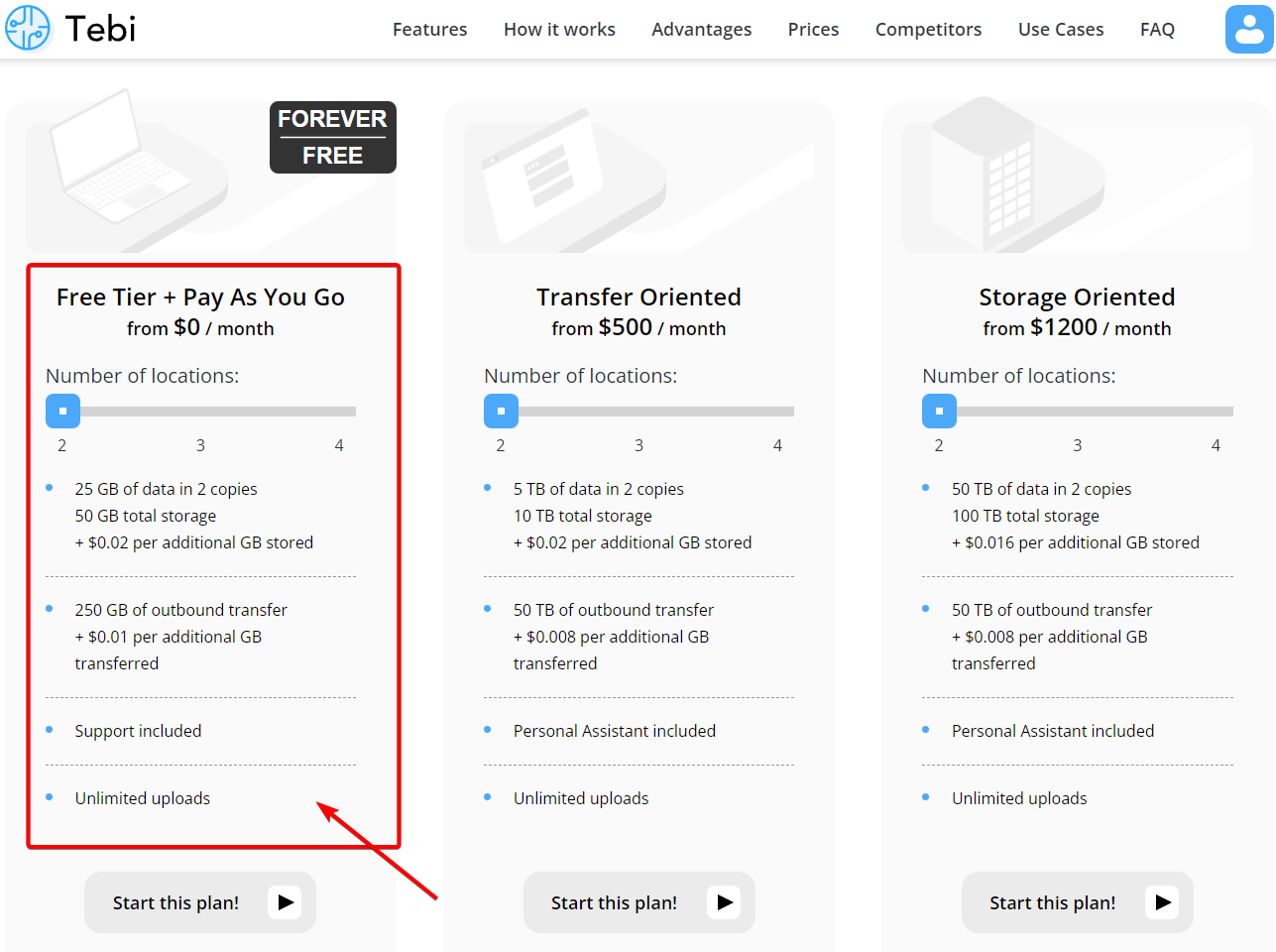
Tebi.io is a s3 compatible geographically distributed object storage solution. It is available with a free trial, or on a forever free plan. It features full S3 API compatibility, live replication, FTP protocol support, and other features supporting data delivery and accelerating cloud operations. Tebi.io is providing most generous free tier plan: 25GB storage with 250GB outbound transfer. 

ShareX is a fantastic tool for Windows that enables screen capture, file sharing, and much more. The most interesting part for ShareX is it can be integrated with many third party services like the Imgur, standard protocols like ftp/SFTP, as well as s3 compatbile services like Amazon AWS S3 and Backblaze B2. 
In this post, I am gonna show you how you can integrate 


Related Posts:
  • Create Your Own Cloud Photo Storage Site in BackBlaze B2 Using Cloudflare and ShareX
  • Integrate Scaleway FREE 75GB Storage with NextCloud and ShareX
  • ShareX Configuration - Free & Powerful Screenshot Tools


Register An Account and Log In

Since registration is very straighforward, there is no necessary to show all screenshots. 
Only thing you will need to do is to enter your credit card to get this free tier + Pay As You Go plan. 


Notes:
You will only have 14 days trial if you did not enter your credit card information.
You can remove your credit card later.
You can enter random numbers as your credit card. 


Create A Bucket & Key with Secret

Add a bucket
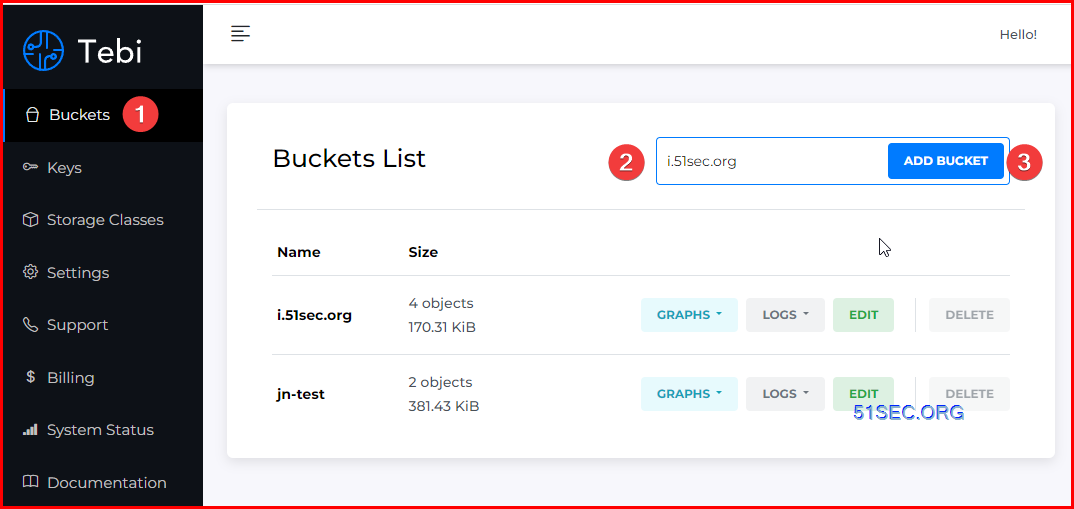
For example, we are creating a new bucket i.51sec.org, which is going to matching our future custom subdomain. If you are not planning using your own custom subdoman, you can use any bucket name as long as no one is using it, and matching S3 bucket name requirements. 


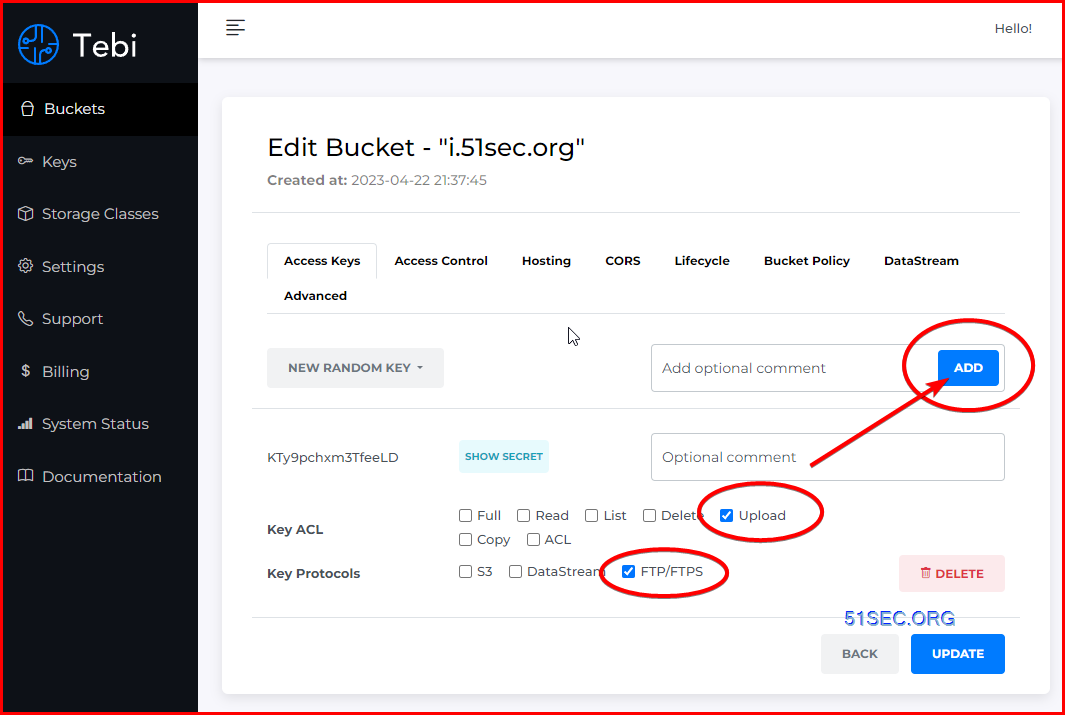
Add a key with least permissions


Configure ShareX
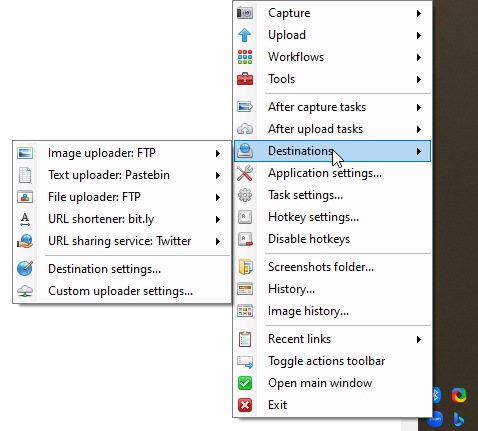
Make sure both image uploader and file uploader are using FTP as a method for uploading to.


You can use s3.tebi.io this domain for your configuration. Later in next section, we will change it to your own domain to use. 

Please refer FTP parameter documentation from : https://docs.tebi.io/intro/connection.html


FTP/FTPS Protocols Connection Parameters:

The File Transfer Protocol (FTP) is a standard communication protocol used for the transfer of computer files from a server to a client on a computer network. Tebi supports both encrypted (FTPS) and not encrypted (FTP) versions.

Host

ftp.tebi.io

Protocol

FTP or FTPS

Login

Bucket Key

Password

Bucket Secret

In this example, we are using FTP protocol. You also can use FTPS for better security: 


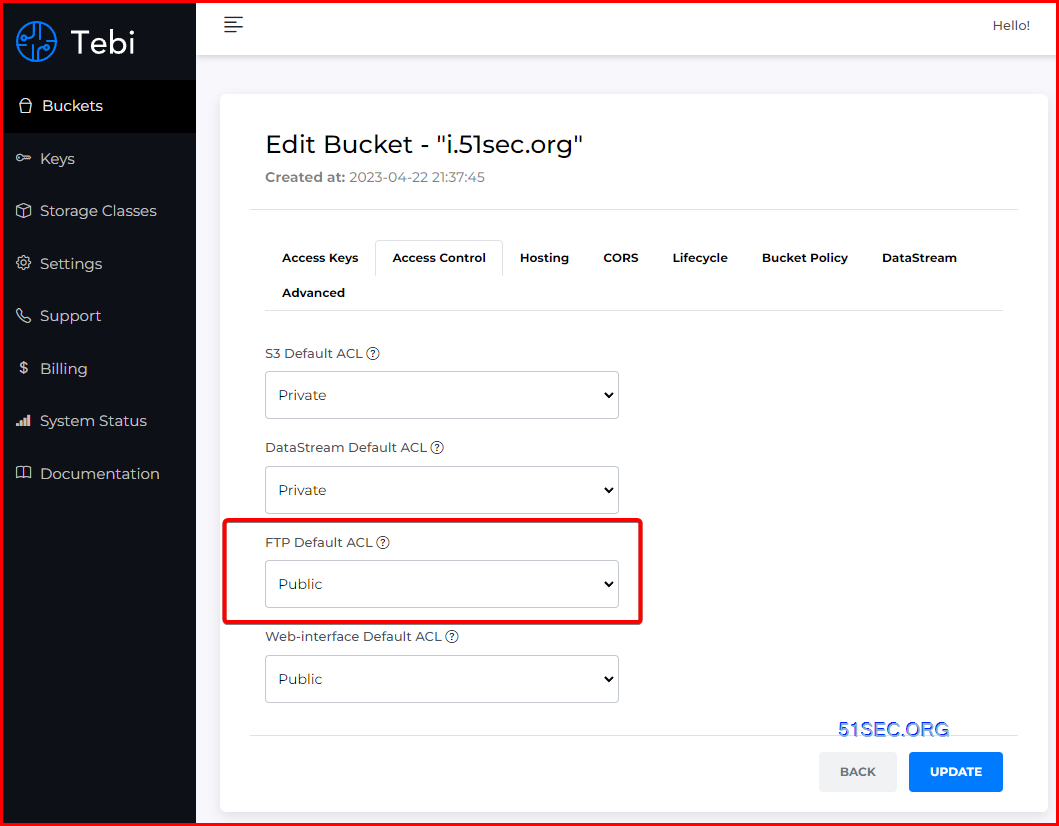
Make sure FTP uploaded file is public accessible. 
Change FTP Default ACL configuration to Public. 


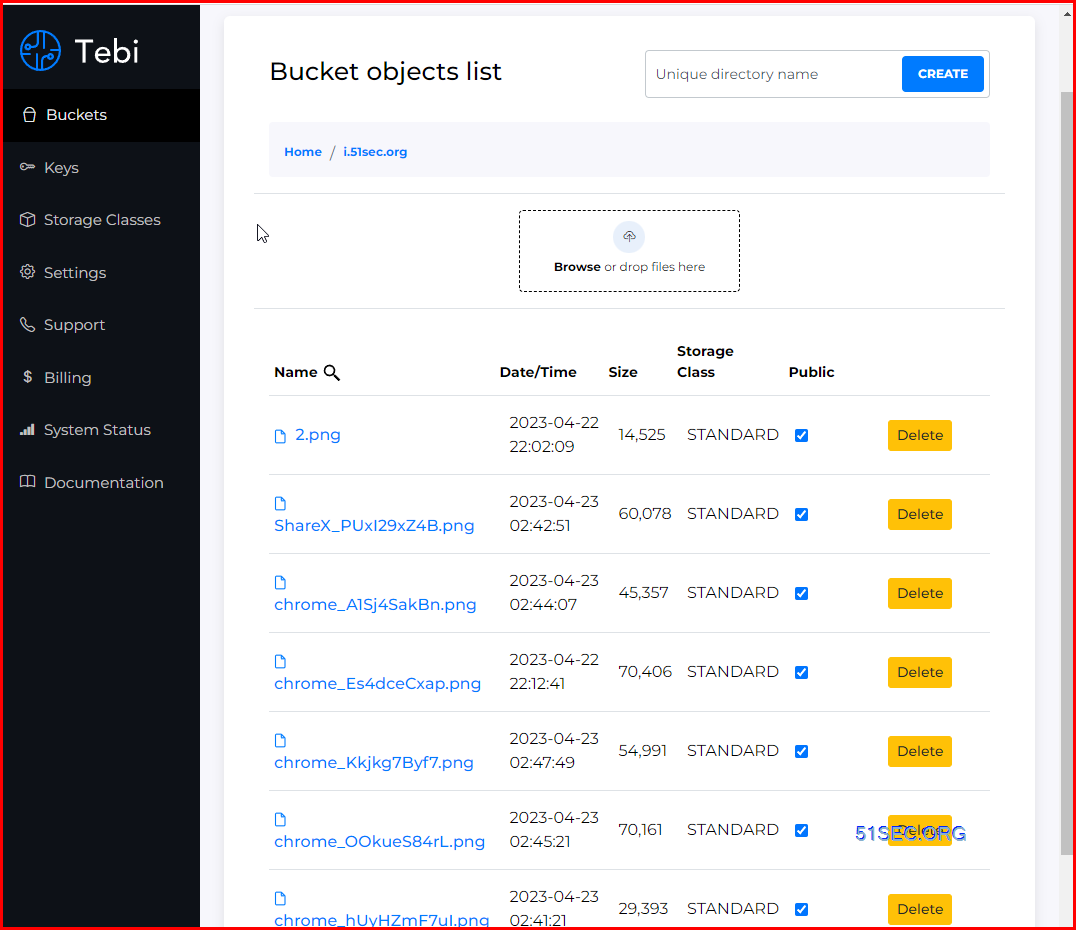
Bucket File List:


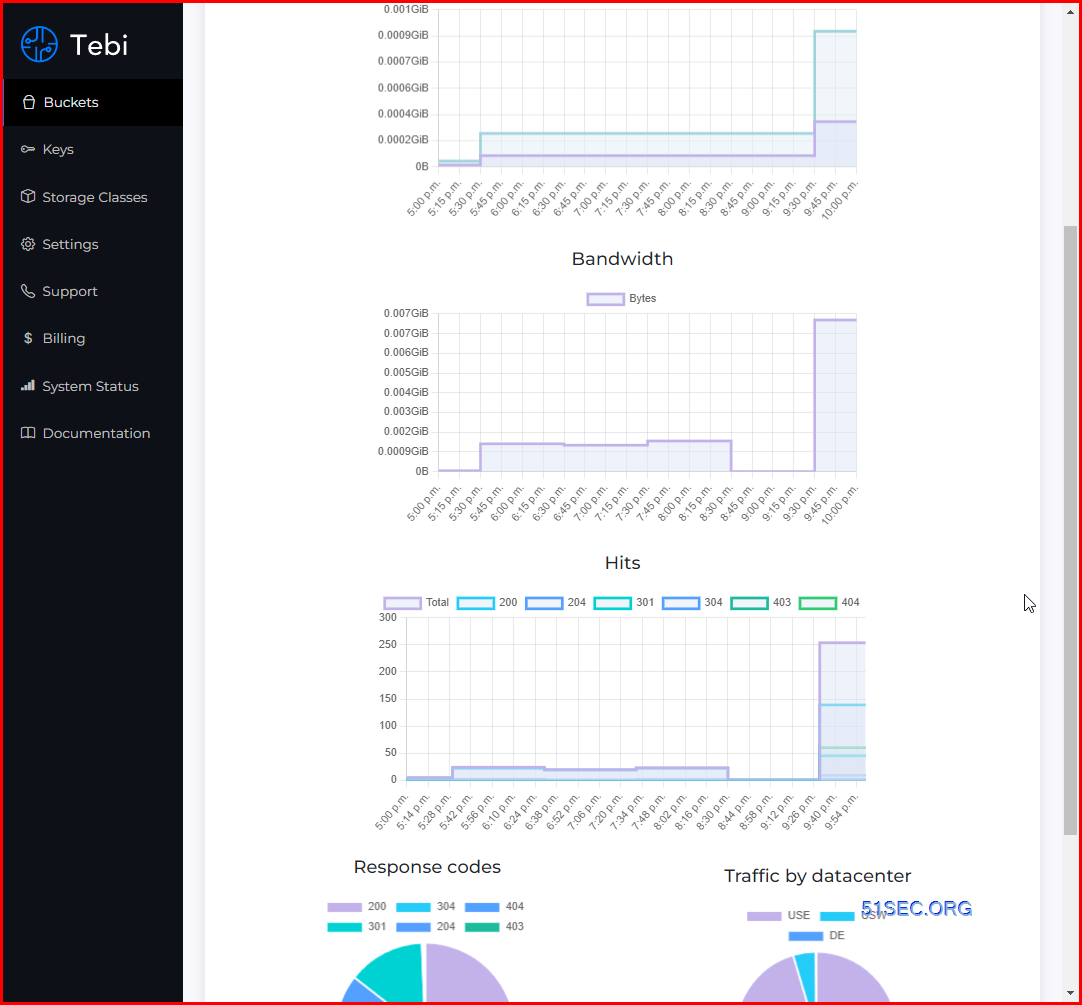
Check Usage:

Support service included:
The tecnical support is pretty fast to respond to the ticket opened, although we are using a free tier service. It usually will be answered in an hour so. 

Enable Hosting and SSL Certificate Support

To enable SSL certificate support, you will need to enable hosting first and configuration custom subdomain. 

The high level steps from Tebi's documentation to associate a hostname with a Tebi bucket using CNAMEs:

  1. Select a hostname that belongs to a domain you control. This example uses the images subdomain of the your-domain.net domain.

  2. Create a bucket that matches the hostname. In this example, the host and bucket names are images.your-domain.net. The bucket name must exactly match the hostname.

  3. Create a CNAME record that defines the hostname as an alias for the Tebi bucket. For example: images.your-domain.net CNAME images.your-domain.net.s3.tebi.io.

1. Enable hosting:


2. Enable HTTPS Certificate

If you have not create DNS CNAME record, the https certificate option will be greyed out. 

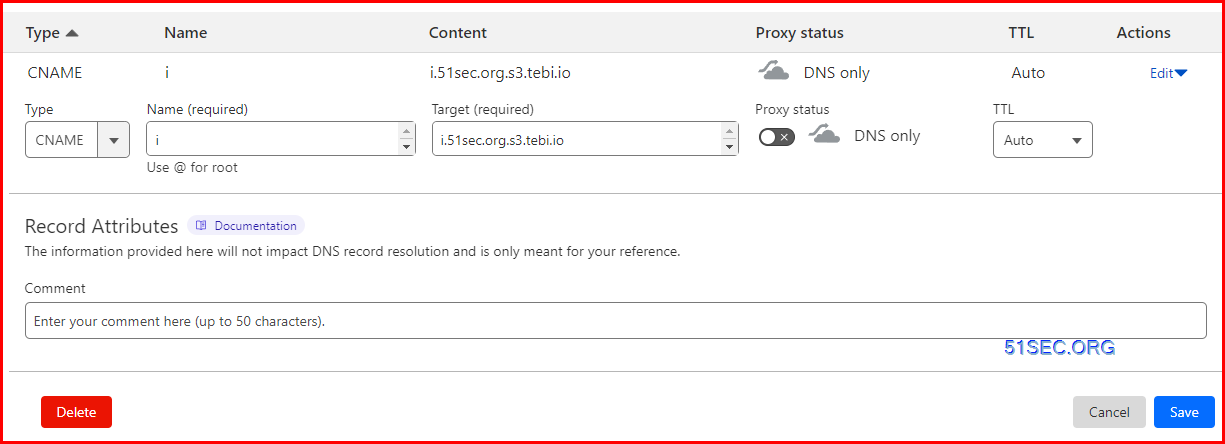
There is a trick at Cloudflare configuration to enable https certificate. When configuration CNAME record in Cloudflare site, you will not enable Proxy for this cname record. 

For 

Here is wrong configuration:


Correct configuration:


3 Enable Force HTTPS

It will automatically rediect http traffic to https.

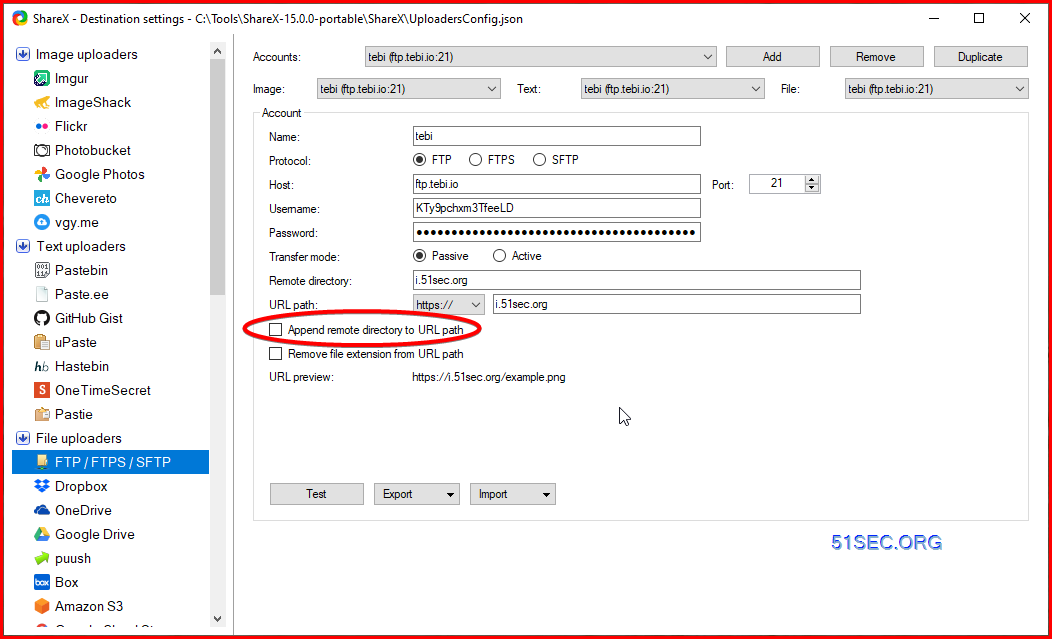
4. Change ShareX configuration to reflect domain change


Videos


References


  • tebi.io免费对象存储,可托管静态网站
  • https://www.youtube.com/watch?v=FzOTQg7UUfg


via Blogger http://blog.51sec.org/2023/04/integrate-sharex-with-free-forever-s3.html
April 22, 2023 at 10:49PM Cloud
0 Comments


Leave a Reply.

    Categories

    All
    Architecture
    Blog
    Checkpoint
    Cisco
    Cloud
    CyberArk
    F5
    Fortigate
    Guardium
    Juniper
    Linux
    Network
    Others
    Palo Alto
    Qualys
    Raspberry Pi
    Security
    SIEM
    Software
    Vmware
    VPN
    Wireless

    Archives

    March 2024
    February 2024
    January 2024
    December 2023
    November 2023
    October 2023
    September 2023
    August 2023
    July 2023
    June 2023
    May 2023
    April 2023
    March 2023
    February 2023
    January 2023
    December 2022
    November 2022
    October 2022
    September 2022
    August 2022
    July 2022
    June 2022
    May 2022
    April 2022
    March 2022
    February 2022
    January 2022
    December 2021
    November 2021
    October 2021
    September 2021
    August 2021
    July 2021
    June 2021
    May 2021
    April 2021
    March 2021
    February 2021
    January 2021
    December 2020
    November 2020
    October 2020
    September 2020
    August 2020
    July 2020
    October 2019
    September 2019
    June 2019
    July 2018
    May 2018
    December 2017
    August 2017
    April 2017
    March 2017
    January 2017
    December 2016
    November 2016
    October 2016
    September 2016
    August 2016
    July 2016
    June 2016
    May 2016
    April 2016
    March 2016
    February 2016
    January 2016
    December 2015
    November 2015
    October 2015
    September 2015
    August 2015
    July 2015
    June 2015
    May 2015
    April 2015
    March 2015

    Print Page:

    RSS Feed

    Email Subscribe
Powered by Create your own unique website with customizable templates.
  • Blog
  • Sitemap
    • Categories
  • Contact
  • About
  • Resources
  • Tools
  • 51sec.org