
It will be helpful for the testing if you have a Linux Desktop environment in the cloud. But I do not want to install a desktop environment to pollute my Linux installation. If I can get a docker environment and let Linux Desktop running inside, that would be a perfect solution.
Recently I found one Github project "docker-ubuntu-vnc-desktop" to show how to get your own Ubuntu Desktop in the docker. I decided to use Portainer to manage this docker as I did for other docker image. Here are all my steps to get it working.
Change System Swap File Size
It is usually same size as your RAM. But if your RAM is less than 1GB, you can make your swap file size double.
wget https://raw.githubusercontent.com/51sec/swap/main/swap.sh && bash swap.sh
Install Docker and Docker Compose
1 Update Package list and Upgrade Packages for Ubuntu 18.04
Update and Upgrade Ubuntu to latest
$ sudo apt-get -y update && sudo apt-get -y upgrade
2 Install Docker on Ubuntu
sudo apt install docker.io -y
sudo -i
systemctl start docker
systemctl enable docker
docker version
Here is an example using version 1.19.0. You might want to check current release (current is 1.28.2) to update the command.
root@ip-172-31-28-5:~# curl -L "https://github.com/docker/compose/releases/download/1.19.0/docker-compose-$(uname -s)-$(uname -m)" -o /usr/local/bin/docker-compose
  % Total    % Received % Xferd  Average Speed   Time    Time     Time  Current
                                 Dload  Upload   Total   Spent    Left  Speed
100   651  100   651    0     0   7076      0 --:--:-- --:--:-- --:--:--  7076
100 8288k  100 8288k    0     0  4671k      0  0:00:01  0:00:01 --:--:-- 7520k
root@ip-172-31-28-5:~# chmod +x /usr/local/bin/docker-compose

root@ip-172-31-28-5:~# docker-compose version
docker-compose version 1.19.0, build 9e633ef
docker-py version: 2.7.0
CPython version: 2.7.13
OpenSSL version: OpenSSL 1.0.1t  3 May 2016
root@ip-172-31-28-5:~#
For CentOS 7 install Docker:
sudo -i
yum -y update
curl -sSL https://get.docker.com/ | sh
systemctl start docker.service
systemctl enable docker.service
Install Portainer
Commands to install latest Portainer Docker.
docker volume create portainer_data
docker run -d -p 9000:9000 --name portainer --restart always -v /var/run/docker.sock:/var/run/docker.sock -v portainer_data:/data portainer/portainer
docker ps
First time, it will ask you to set up admin user's password.
Command to Launch Docker-Ubuntu-VNC-Desktop
Originally from docker-ubuntu-vnc-desktop, the command to run this docker is :
docker run -p 6080:80 -v /dev/shm:/dev/shm dorowu/ubuntu-desktop-lxde-vnc
docker run -p 6080:80 -e HTTP_PASSWORD=mypassword -v /dev/shm:/dev/shm dorowu/ubuntu-desktop-lxde-vnc
Another interesting Docker file we can take a look is from imlala/ubuntu-xfce-vnc-novnc:
version: '3.5'

services:
    ubuntu-xfce-vnc:
        container_name: xfce
        image: imlala/ubuntu-xfce-vnc-novnc:latest
        shm_size: "1gb"
        ports:
            - 5900:5900
            - 6080:6080
        environment:
            - VNC_PASSWD=mypassword
            - GEOMETRY=1280x720
            - DEPTH=24
        volumes:
            - ./Downloads:/root/Downloads
            - ./Documents:/root/Documents
            - ./Pictures:/root/Pictures
            - ./Videos:/root/Videos
            - ./Music:/root/Music
        restart: unless-stopped
Use Portainer to Launch Docker-Ubuntu-VNC-Desktop
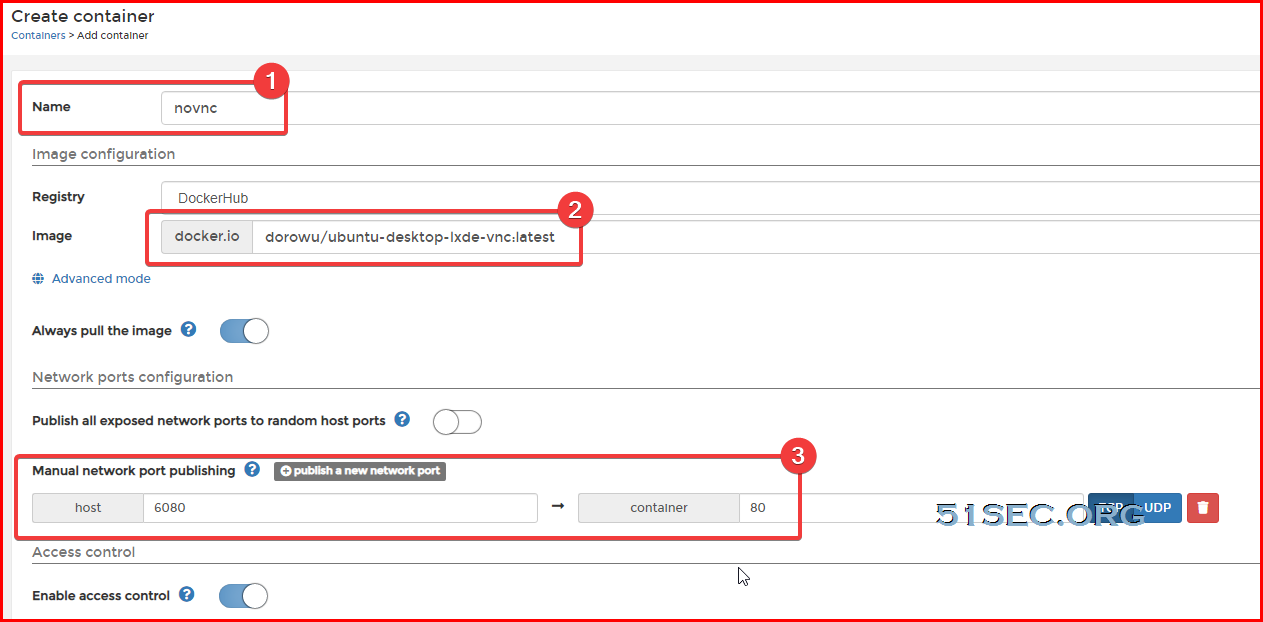

Set restart policy to Unless stopped.
Environment variables:
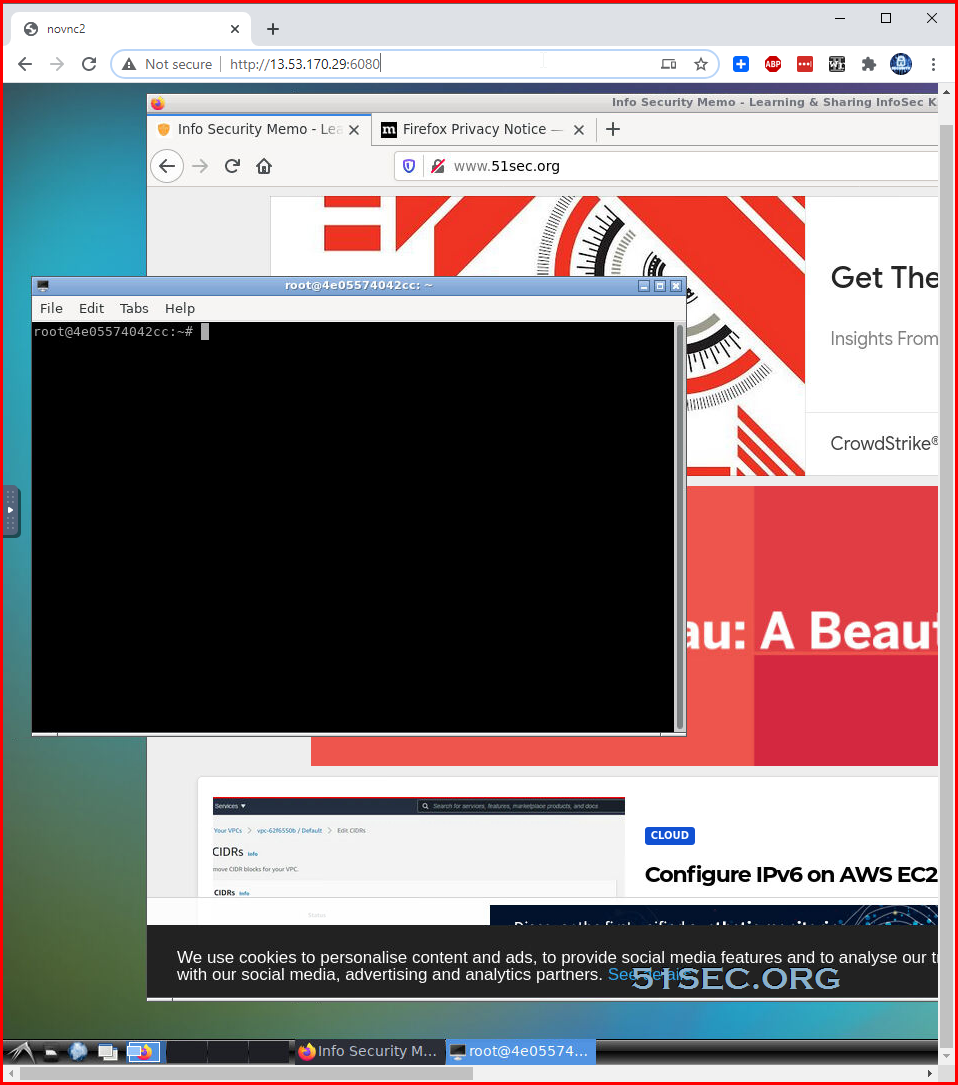
Now, using a browser to browse to http://<Public IP>:6080
References
via Blogger https://ift.tt/36uF1P4
January 30, 2021 at 12:05PM Docker

 RSS Feed
