Info Security Memo
  • Blog
  • Sitemap
    • Categories
  • Contact
  • About
  • Resources
  • Tools
  • 51sec.org

Build Confidence

Focusing on Information Security 

Info Security Notes

Install OpenStack - DevStack into Ubuntu 16.04.05 Virtual Machine

9/2/2019

0 Comments

 
DevStack is an opinionated script to quickly create an OpenStack development environment. It can also be used to demonstrate starting/running OpenStack services and provide examples of using them from a command line. This post is going to present the steps how to install DevStack into a VMware workstation Ubuntu VM.

Youtube Video:


1. Prepare Ubuntu VM

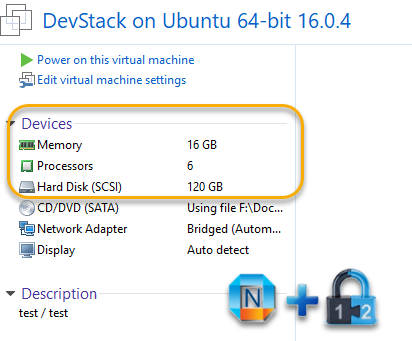
This Ubuntu Virtual machine will need at least 12G memory and 100G hard drive. I have given my OpenStack VM 16G memory and 120G hard drive for testing.


2. Update System and change sources.list file
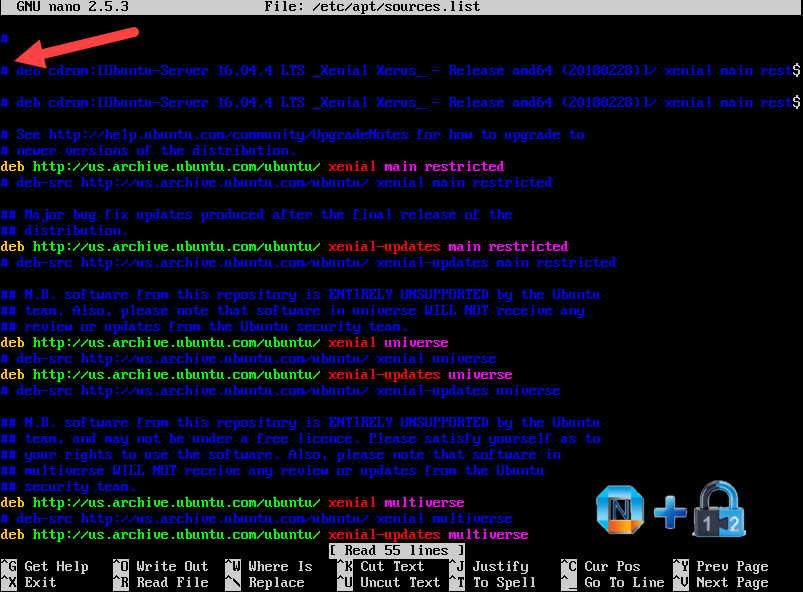
You may want to remove or comment cdrom entry from your default installed Ubuntu sources.list.

I found if I did not do this, my Ubuntu will get some error message to say:

The repository 'cdrom://Ubuntu 16.04 LTS _Xenial Xerus_ - Release amd64 (20160420.1) xenial Release' does not have a Release file.
Data from such a repository can't be authenticated and is therefore potentially dangerous to use.
See apt-secure(8) manpage for repository creation and user configuration details.
The repository 'ppa.launchpad.net/kirillshkrogalev/ffmpeg-next/ubuntu xenial Release' does not have a Release file.
Data from such a repository can't be authenticated and is therefore potentially dangerous to use.
See apt-secure(8) manpage for repository creation and user configuration details.
Failed to fetch cdrom://Ubuntu 16.04 LTS _Xenial Xerus_ - Release amd64 (20160420.1)/dists/xenial/main/binary-amd64/Packages  Please use apt-cdrom to make this CD-ROM recognized by APT. apt-get update cannot be used to add new CD-ROMs
Some index files failed to download. They have been ignored, or old ones used instead.

To resolve this problem from terminal you must remove/comment this CD-ROM repository source directly from /etc/apt/sources.list
 sudo nano /etc/apt/sources.list

and comment or remove lines that include cdrom. eg:
deb cdrom:[Ubuntu-Server 16.04 LTS _Xenial Xerus_ - Release amd64 (20160420.3)]/ xenial main restricted
Now it is time to update / upgrade Ubuntu system:
sudo apt-get update
​sudo apt-get upgrade

3. Install git and clone Devstack to local

sudo apt-get install git
cd /
​sudo git clone https://git.openstack.org/openstack-dev/devstack master

4. Prepare to install Devstack

4.1 copy a sample configuration file to use for installation

cd /master
​sudo cp samples/local.conf local.conf
sudo nano local.conf
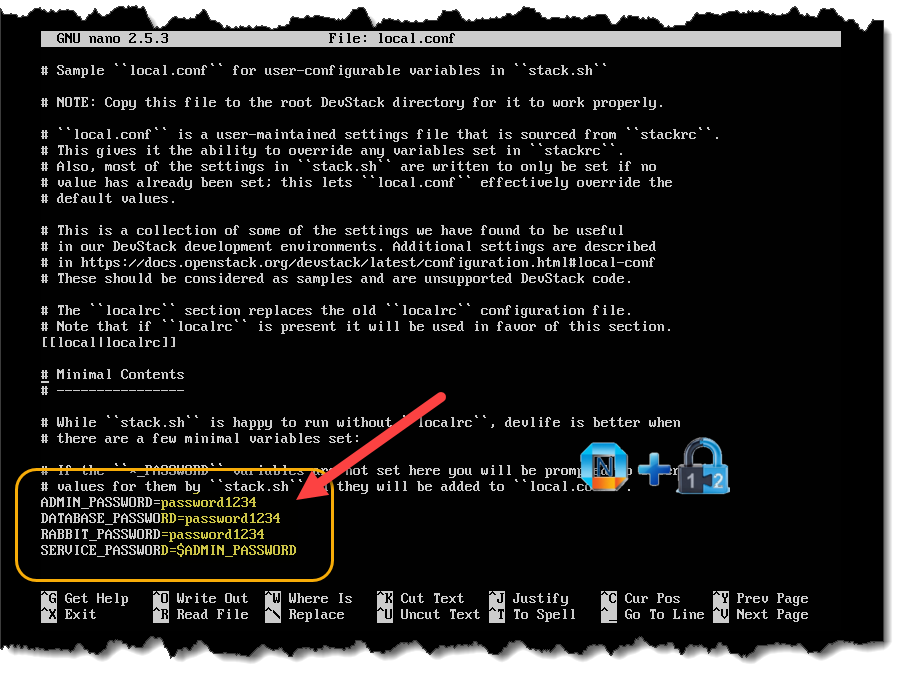
Search for the password variable section and ensure it reflects the following (YOURPASSWORD is the actual password you want to use):
ADMIN_PASSWORD=YOURPASSWORD
​MYSQL_PASSWORD=$ADMIN_PASSWORD
​RABBIT_PASSWORD=$ADMIN_PASSWORD
​SERVICE_PASSWORD=$ADMIN_PASSWORD

4.2 Create a new user 'stack' and change master folder permission to this new user

We can use a pre-installed script to create a new user for devstack. The command to run this script is:
sudo /devstack/tools/create-stack-user.sh
Once the script completes, you'll need to change the permissions of the master folder with the command:
sudo chown -R stack:stack /master
5. Start DevStack installation

This must be run as the stack user. lets change current user to our new created user - stack.
sudo su stack
Final command to start installation:
./stack.sh
Then it is a long time to wait, more than 45 minutes for me. At the end, once you see following output, your DevStack installation is successful.


=========================
DevStack Component Timing
 (times are in seconds)
=========================
run_process           34
test_with_retry        4
apt-get-update         7
pip_install          635
osc                  216
wait_for_service      30
git_timed            1248
dbsync                48
apt-get              408
-------------------------
Unaccounted time     591
=========================
Total runtime        3221


This is your host IP address: 10.94.200.78
This is your host IPv6 address: ::1
Horizon is now available at http://10.94.200.78/dashboard
Keystone is serving at http://10.94.200.78/identity/
The default users are: admin and demo
The password: password1234

WARNING:
Using lib/neutron-legacy is deprecated, and it will be removed in the future


Services are running under systemd unit files.
For more information see:
https://docs.openstack.org/devstack/latest/systemd.html

DevStack Version: stein
Change: 62c832b090021b0c85ade8eb718eabaccc345257 Merge "Update default cirros version" 2019-01-20 15:20:35 +0000
OS Version: Ubuntu 16.04 xenial


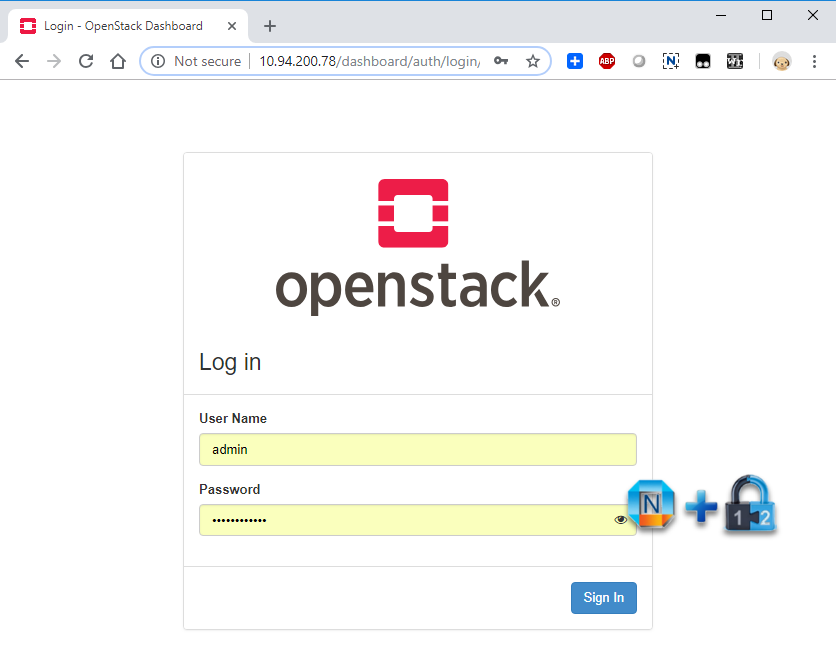
6. Launch Browser to log in DevStack


7. Uninstall DevStack.
If there is any change on local.conf file, you will have to uninstall and clean DevStack installation first.

stack@ubuntu:/master$ ./unstack.sh
stack@ubuntu:/master$ ./clean.sh


Some Command line tools:


test@ubuntu:~$ cd /master
test@ubuntu:/master$ source openrc admin admin
WARNING: setting legacy OS_TENANT_NAME to support cli tools.
test@ubuntu:/master$ nova show tt1
+--------------------------------------+-----------------------------------------------------------------+
| Property                             | Value                                                           |
+--------------------------------------+-----------------------------------------------------------------+
| OS-DCF:diskConfig                    | AUTO                                                            |
| OS-EXT-AZ:availability_zone          | nova                                                            |
| OS-EXT-SRV-ATTR:host                 | ubuntu                                                          |
| OS-EXT-SRV-ATTR:hostname             | tt1                                                             |
| OS-EXT-SRV-ATTR:hypervisor_hostname  | ubuntu                                                          |
| OS-EXT-SRV-ATTR:instance_name        | instance-00000004                                               |
| OS-EXT-SRV-ATTR:kernel_id            |                                                                 |
| OS-EXT-SRV-ATTR:launch_index         | 0                                                               |
| OS-EXT-SRV-ATTR:ramdisk_id           |                                                                 |
| OS-EXT-SRV-ATTR:reservation_id       | r-gmom984x                                                      |
| OS-EXT-SRV-ATTR:root_device_name     | /dev/vda                                                        |
| OS-EXT-SRV-ATTR:user_data            | -                                                               |
| OS-EXT-STS:power_state               | 4                                                               |
| OS-EXT-STS:task_state                | -                                                               |
| OS-EXT-STS:vm_state                  | stopped                                                         |
| OS-SRV-USG:launched_at               | 2019-01-22T01:10:52.000000                                      |
| OS-SRV-USG:terminated_at             | -                                                               |
| accessIPv4                           |                                                                 |
| accessIPv6                           |                                                                 |
| config_drive                         |                                                                 |
| created                              | 2019-01-22T01:10:40Z                                            |
| description                          | tt1                                                             |
| flavor:disk                          | 0                                                               |
| flavor:ephemeral                     | 0                                                               |
| flavor:extra_specs                   | {}                                                              |
| flavor:original_name                 | cirros256                                                       |
| flavor:ram                           | 256                                                             |
| flavor:swap                          | 0                                                               |
| flavor:vcpus                         | 1                                                               |
| hostId                               | d04e0dcc9fc1398a8e5e01ed3376e8fb30f59e85459ca7bd75bb983e        |
| host_status                          | UP                                                              |
| id                                   | 58ddbe80-d943-4d5b-9b2a-e5f6518e5ea1                            |
| image                                | cirros-0.4.0-x86_64-disk (b897ce20-2ad3-4142-9e02-63ec31986bcd) |
| key_name                             | -                                                               |
| locked                               | False                                                           |
| metadata                             | {}                                                              |
| name                                 | tt1                                                             |
| os-extended-volumes:volumes_attached | []                                                              |
| public network                       | 172.24.4.31, 2001:db8::1f7                                      |
| security_groups                      | default                                                         |
| status                               | SHUTOFF                                                         |
| tags                                 | []                                                              |
| tenant_id                            | ad9bc16cfe6f4d57a3f1a722e413f9d5                                |
| trusted_image_certificates           | -                                                               |
| updated                              | 2019-01-22T01:21:45Z                                            |
| user_id                              | 659da36320994abdaac01a509911cd81                                |
+--------------------------------------+-----------------------------------------------------------------+
test@ubuntu:/master$ 
test@ubuntu:/master$ nova service-list
+--------------------------------------+------------------+--------+----------+---------+-------+----------------------------+-----------------+-------------+
| Id                                   | Binary           | Host   | Zone     | Status  | State | Updated_at                 | Disabled Reason | Forced down |
+--------------------------------------+------------------+--------+----------+---------+-------+----------------------------+-----------------+-------------+
| f26f6b58-ee11-4371-92ab-7bcdb4a0460d | nova-scheduler   | ubuntu | internal | enabled | up    | 2019-01-22T01:38:09.000000 | -               | False       |
| ef6130dd-14e0-4c7f-a6ed-52ab18dbf290 | nova-consoleauth | ubuntu | internal | enabled | up    | 2019-01-22T01:38:07.000000 | -               | False       |
| 2f7f1d9b-de00-476a-b396-0beb2f013c33 | nova-conductor   | ubuntu | internal | enabled | up    | 2019-01-22T01:38:10.000000 | -               | False       |
| 1c479ce7-ad67-4d51-bb9f-a2caa7ff473b | nova-compute     | ubuntu | nova     | enabled | up    | 2019-01-22T01:38:15.000000 | -               | False       |
| 99d78d26-aedb-455b-bf71-ca8b868464e5 | nova-conductor   | ubuntu | internal | enabled | up    | 2019-01-22T01:38:09.000000 | -               | False       |
| c8ecc3a9-0b60-41fb-b6d7-36e7210cadb3 | nova-compute     | ubuntu | nova     | enabled | up    | 2019-01-22T01:38:12.000000 | -               | False       |
+--------------------------------------+------------------+--------+----------+---------+-------+----------------------------+-----------------+-------------+
test@ubuntu:/master$ nova hypervisor-stats
+----------------------+-------+
| Property             | Value |
+----------------------+-------+
| count                | 1     |
| current_workload     | 0     |
| disk_available_least | 10    |
| free_disk_gb         | 18    |
| free_ram_mb          | 15261 |
| local_gb             | 18    |
| local_gb_used        | 0     |
| memory_mb            | 16029 |
| memory_mb_used       | 768   |
| running_vms          | 1     |
| vcpus                | 6     |
| vcpus_used           | 1     |
+----------------------+-------+
test@ubuntu:/master$ 
test@ubuntu:/master$ openstack volume show testv
+--------------------------------+--------------------------------------+
| Field                          | Value                                |
+--------------------------------+--------------------------------------+
| attachments                    | []                                   |
| availability_zone              | nova                                 |
| bootable                       | false                                |
| consistencygroup_id            | None                                 |
| created_at                     | 2019-01-22T01:43:46.000000           |
| description                    |                                      |
| encrypted                      | False                                |
| id                             | 267cffee-8da0-42d1-8eb0-a45e4192dc3a |
| migration_status               | None                                 |
| multiattach                    | False                                |
| name                           | testv                                |
| os-vol-host-attr:host          | None                                 |
| os-vol-mig-status-attr:migstat | None                                 |
| os-vol-mig-status-attr:name_id | None                                 |
| os-vol-tenant-attr:tenant_id   | ad9bc16cfe6f4d57a3f1a722e413f9d5     |
| properties                     |                                      |
| replication_status             | None                                 |
| size                           | 2                                    |
| snapshot_id                    | None                                 |
| source_volid                   | None                                 |
| status                         | error                                |
| type                           | Performance                          |
| updated_at                     | 2019-01-22T01:43:46.000000           |
| user_id                        | 659da36320994abdaac01a509911cd81     |
+--------------------------------+--------------------------------------+


References:
  1. How to install OpenStack on a single Ubuntu Server virtual machine
  2. All-In-One Single Machine


0 Comments


Leave a Reply.

    Categories

    All
    Architecture
    Blog
    Checkpoint
    Cisco
    Cloud
    CyberArk
    F5
    Fortigate
    Guardium
    Juniper
    Linux
    Network
    Others
    Palo Alto
    Qualys
    Raspberry Pi
    Security
    SIEM
    Software
    Vmware
    VPN
    Wireless

    Archives

    March 2024
    February 2024
    January 2024
    December 2023
    November 2023
    October 2023
    September 2023
    August 2023
    July 2023
    June 2023
    May 2023
    April 2023
    March 2023
    February 2023
    January 2023
    December 2022
    November 2022
    October 2022
    September 2022
    August 2022
    July 2022
    June 2022
    May 2022
    April 2022
    March 2022
    February 2022
    January 2022
    December 2021
    November 2021
    October 2021
    September 2021
    August 2021
    July 2021
    June 2021
    May 2021
    April 2021
    March 2021
    February 2021
    January 2021
    December 2020
    November 2020
    October 2020
    September 2020
    August 2020
    July 2020
    October 2019
    September 2019
    June 2019
    July 2018
    May 2018
    December 2017
    August 2017
    April 2017
    March 2017
    January 2017
    December 2016
    November 2016
    October 2016
    September 2016
    August 2016
    July 2016
    June 2016
    May 2016
    April 2016
    March 2016
    February 2016
    January 2016
    December 2015
    November 2015
    October 2015
    September 2015
    August 2015
    July 2015
    June 2015
    May 2015
    April 2015
    March 2015

    Print Page:

    RSS Feed

    Email Subscribe
Powered by Create your own unique website with customizable templates.
  • Blog
  • Sitemap
    • Categories
  • Contact
  • About
  • Resources
  • Tools
  • 51sec.org