
Install BT (aaPanel) in Oracle ARM-based Virtual Instance with Oracle Linux 8
Many people will install Debian through DD, but this is risky. Many people are deleted by Oracle because they are detected to be idle by the system. The DD system will cause some detection functions to fail, so this is not recommended. The following is the default installation under Oracle Linux 8.
First update the system software package:
via Blogger https://ift.tt/3BB0eVp
July 24, 2021 at 07:07PM Cloud
Oracle’s newly exited ARM can actually have up to 4 cores, 24G memory, 4G bandwidth, and 200G storage instances. But the CPU is an arm architecture, so in actual use, when installing the pagoda panel, we encountered some problems and could not complete the installation. Actually, it was caused by associated software.
Many people will install Debian through DD, but this is risky. Many people are deleted by Oracle because they are detected to be idle by the system. The DD system will cause some detection functions to fail, so this is not recommended. The following is the default installation under Oracle Linux 8.
Update System
First update the system software package:
|
Update Oracle Linux 8 system to latest:
[root@arm1 ~]# yum upgrade -y && yum update -y Download & Install aaPanel (BT)For aaPanel:
InstallationView detailed tutorial >>
Centos / Oracle Linux:
For BT: (Chinese Version of aaPanel)
Install all dependenciesFor example, to Install LNMP (Nginx2.2.4 ,PHP 8.0, Mysql 5.7)
If you got a message to say: No match for argument: build-essential Error: Unable to find a match: build-essential We can try :
This works equivalent of You might also need following package, Libiconv
Create a link to Libiconv (创建文件链接到Libiconv库)
If install Nginx 1.21 through aaPanel or BT panel, no matter using compiled method or fast method, you will meet Error: The HTTP image filter module requires the GD library, the easy fix is to install gd and gd-devel packages.
Install LNMP
[root@ocp3arm1oracle ~]# bt
===============aaPanel CLI==================
(1) Restart panel                           (8) Change panel port
(2) Stop panel                              (9) Clear panel cache
(3) Start panel                             (10) Clear login limit
(4) Reload panel                            (11) Cancel entrance limit
(5) Change panel password                   (12) Cancel domain binding limit
(6) Change panel username                   (13) Cacel IP access limit
(7) Forcibly change MySQL root password     (14) View panel default info
(22) Display panel error log                (15) Clear system rubbish
(23) Turn off BasicAuth authentication      (16) Repair panel (check for errors and update panel files to the latest version)
(24) Turn off Google Authenticator          (17) Set log cutting on/off compression
(25) Set whether to back up the panel automatically  (18) Set whether to save a historical copy of the file
(26) Keep/Remove local backup when backing up to cloud storage
(0) Cancel
===============================================
Pls enter command number:14
===============================================
EXECUTING
===============================================
==================================================================
aaPanel default info!
==================================================================
aaPanel Internet Address: http://120.28.16.109:8888/2e939bb
aaPanel Internal Address: http://10.0.0.243:8888/2e939bb
username: nkbrpcr
password: a211621
Warning:
If you cannot access the panel,
release the following port (8888|888|80|443|20|21) in the security group
==================================================================
[root@ocp3arm1oracle ~]#
After you logged in Web Gui, it will prompt you for recommended software packages, either LNMP or LAMP. If there is any installation for LNMP not completed, you will need to install dependencies following the previous section's instruction. 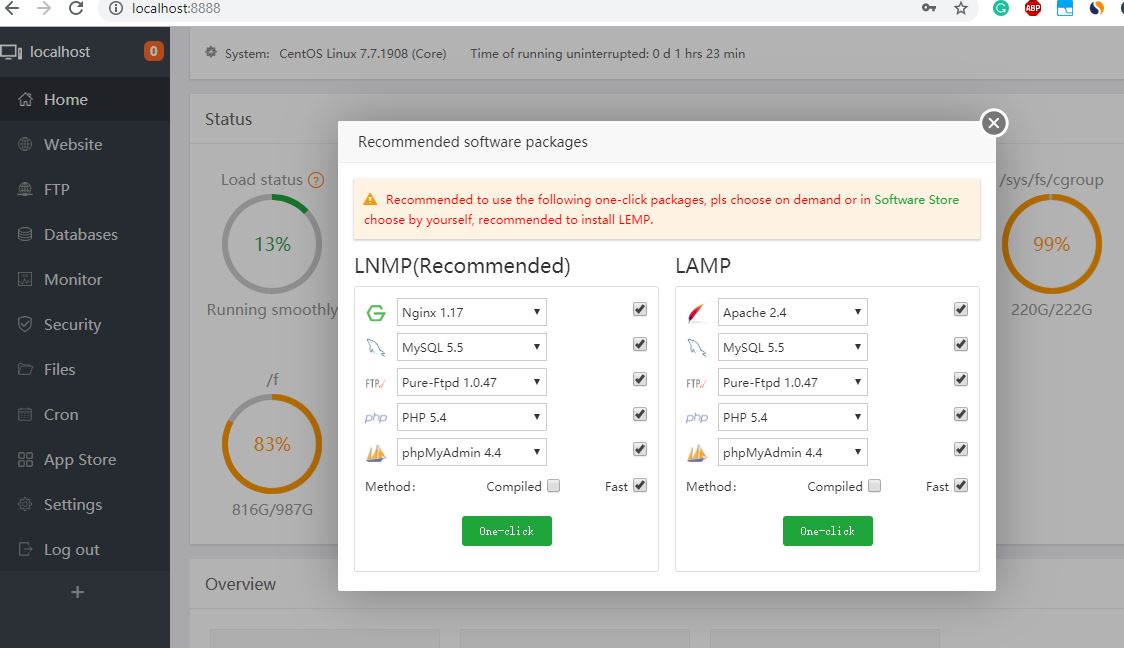
Eventually, you will have folloing packages installed. 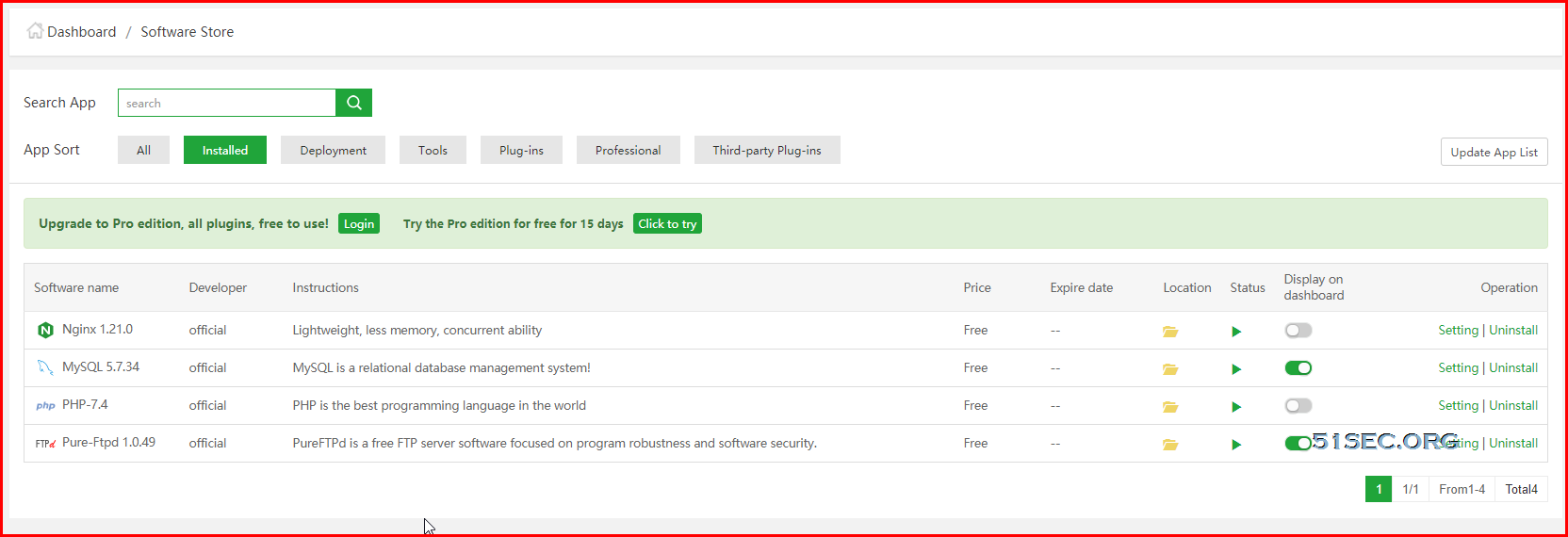
Install LNMP Enable BBRBBR is a new TCP congestion control algorithm that uses estimated congestion rather than loss to determine when to back off.
wget -N --no-check-certificate https://github.com/teddysun/across/raw/master/bbr.sh && chmod +x bbr.sh && bash bbr.sh
Check if BBR has been installed and started:
sysctl net.ipv4.tcp_available_congestion_control
sysctl net.ipv4.tcp_congestion_control
sysctl net.core.default_qdisc
lsmod | grep bbr
ps -ef | grep bbr
References |
via Blogger https://ift.tt/3BB0eVp
July 24, 2021 at 07:07PM Cloud

 RSS Feed
