
Info Security Memo
  • Blog
  • Sitemap
    • Categories
  • Contact
  • About
  • Resources
  • Tools
  • 51sec.org

Build Confidence

Focusing on Information Security 

Info Security Notes

Install Adblock in your OpenWRT Router OS
3/21/2021

0 Comments

 
Install Adblock in your OpenWRT Router OS

 Adblock software in OpenWRT is a script running in your OpenWRT gateway to sort out those DNS queries that ask for the resources recrds of ad servers and return a simple 'NSDOMAIN'. This action will make your browser not able to show those ads on the page you are surfing. 


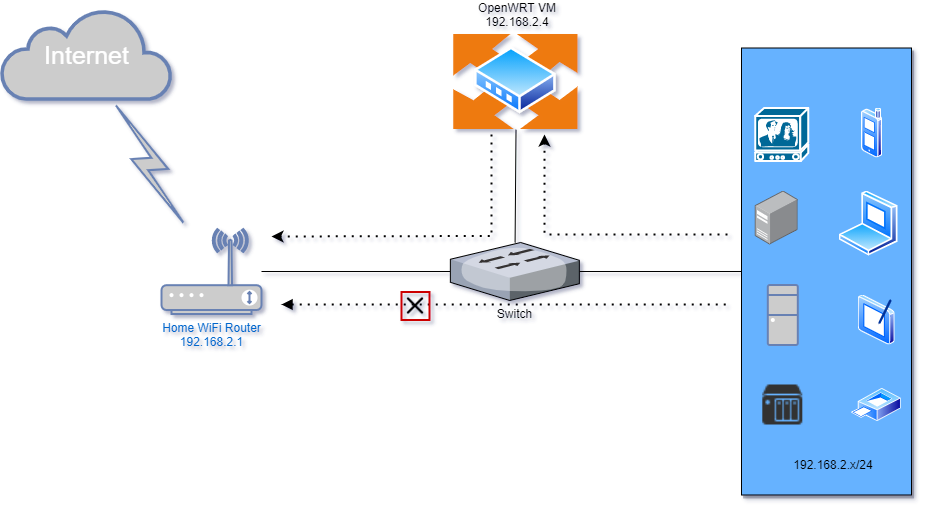
Topology


Prerequisites

  • OpenWrt, tested with the stable release series (19.07.x) and with the latest rolling snapshot releases. On turris devices it has been successfully tested with TurrisOS 5.1.x
  • A download utility with SSL support: 'wget', 'uclient-fetch' with one of the 'libustream-*' ssl libraries, 'aria2c' or 'curl' is required
  • Option: DNS Reporting, TCPDUMP or TCPDUMP-Mini installed
  • Client DNS pointing to OpenWRT


Installation Steps

From OpenWRT Luci Web GUI:

  • Click Update Lists from OpenWRT Web GUI - System - Software
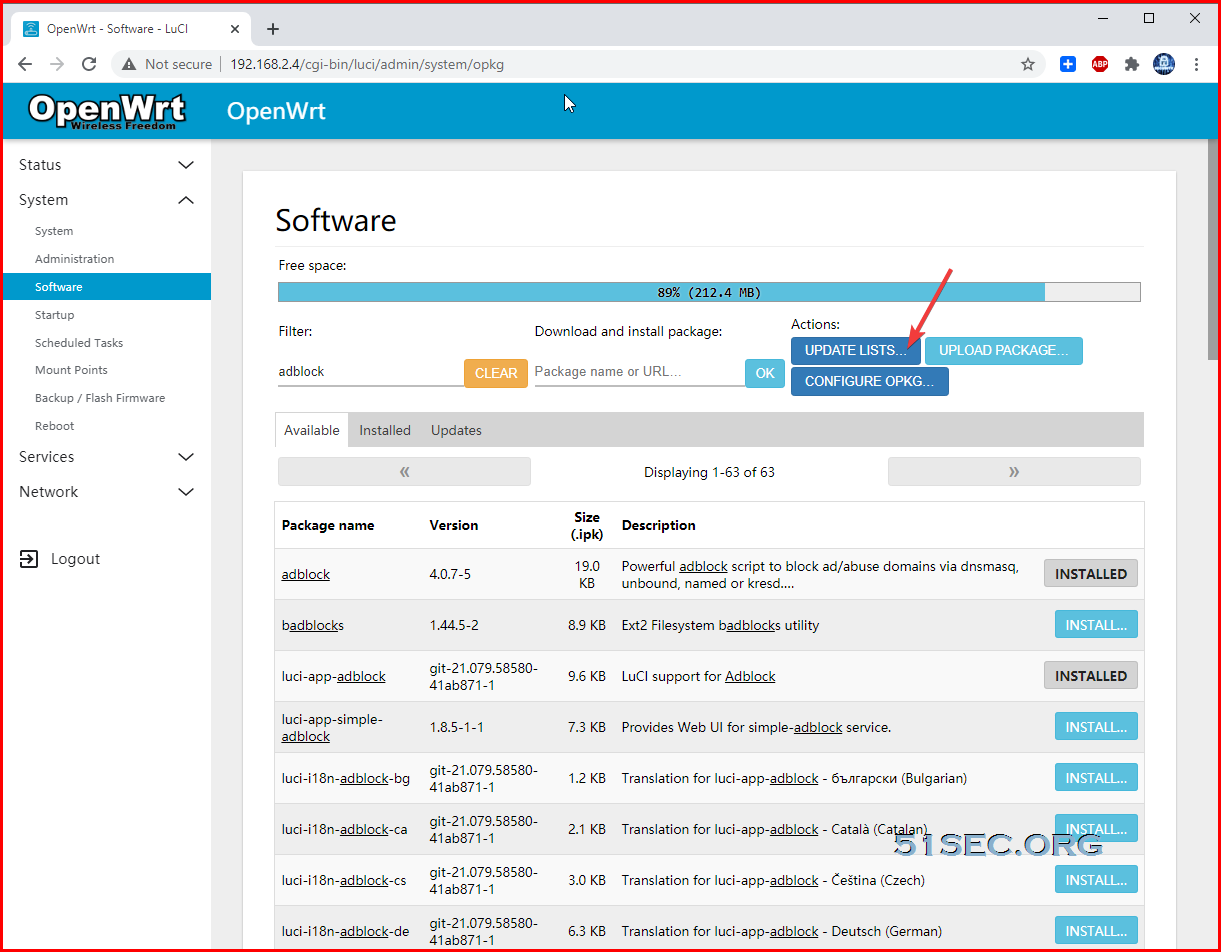
  • Install adblock and luci-app-adblock
  • Install wget / Curl 
  • Reboot OpenWRT
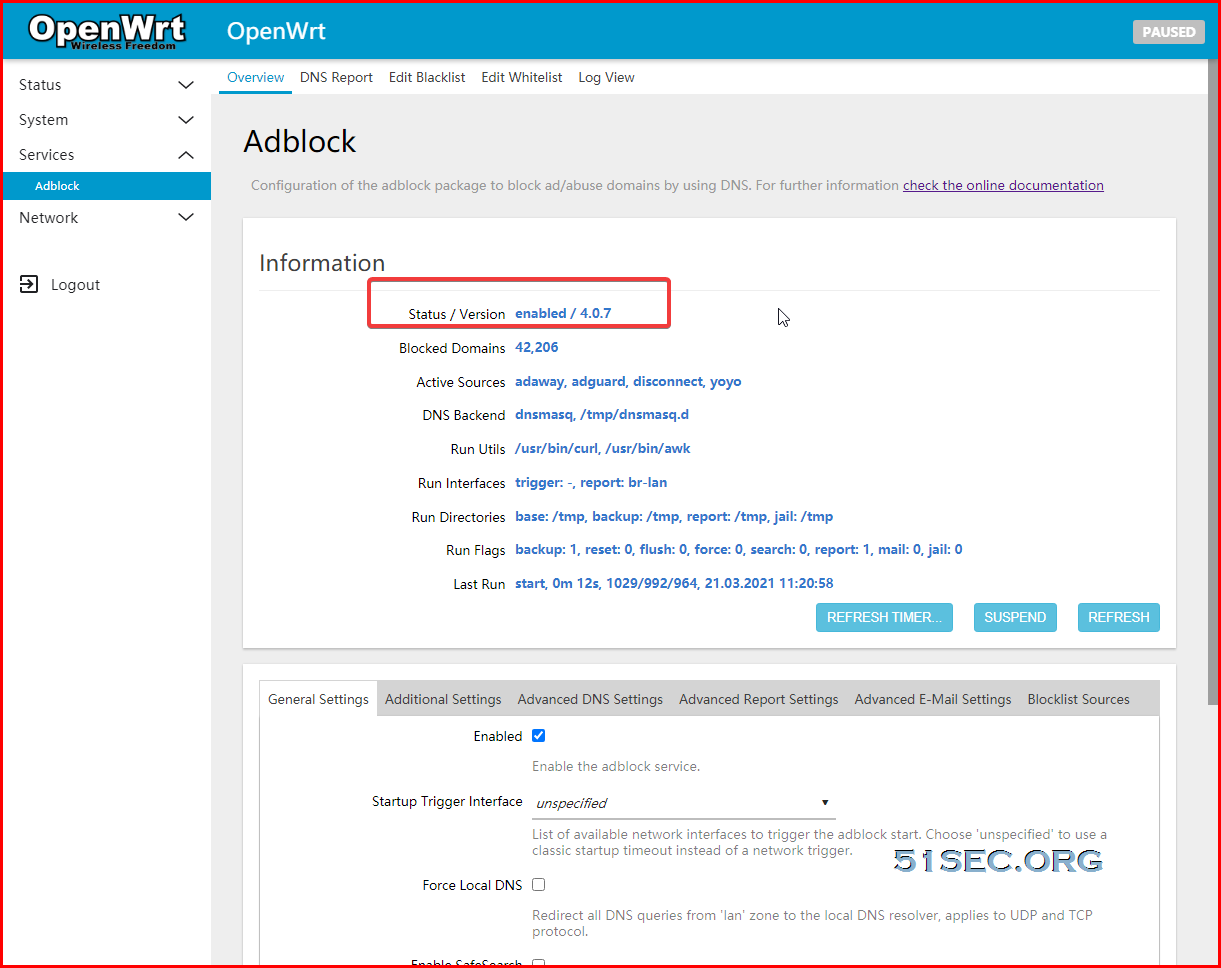
  • Browse to OpenWRT Web GUI - Services - Adblock

From Console or SSH Session:

  • Update your local opkg repository (opkg update)
  • Install 'adblock' (opkg install adblock). The adblock service is enabled by default
  • Install the LuCI companion package 'luci-app-adblock' (opkg install luci-app-adblock)
  • It's strongly recommended to use the LuCI frontend to easily configure all aspects of adblock, the application is located in LuCI under the 'Services' menu
  • Update from a former adblock version is easy. During the update a backup is made of the old configuration '/etc/config/adblock-backup' and replaced by the new config - that's all


References

  • OpenWRT Wiki - Ad blocking
  • DNS based ad/abuse domain blocking


via Blogger https://ift.tt/314u3wE
March 21, 2021 at 02:00PM Security
0 Comments


Leave a Reply.

    Categories

    All
    Architecture
    Blog
    Checkpoint
    Cisco
    Cloud
    CyberArk
    F5
    Fortigate
    Guardium
    Juniper
    Linux
    Network
    Others
    Palo Alto
    Qualys
    Raspberry Pi
    Security
    SIEM
    Software
    Vmware
    VPN
    Wireless

    Archives

    March 2024
    February 2024
    January 2024
    December 2023
    November 2023
    October 2023
    September 2023
    August 2023
    July 2023
    June 2023
    May 2023
    April 2023
    March 2023
    February 2023
    January 2023
    December 2022
    November 2022
    October 2022
    September 2022
    August 2022
    July 2022
    June 2022
    May 2022
    April 2022
    March 2022
    February 2022
    January 2022
    December 2021
    November 2021
    October 2021
    September 2021
    August 2021
    July 2021
    June 2021
    May 2021
    April 2021
    March 2021
    February 2021
    January 2021
    December 2020
    November 2020
    October 2020
    September 2020
    August 2020
    July 2020
    October 2019
    September 2019
    June 2019
    July 2018
    May 2018
    December 2017
    August 2017
    April 2017
    March 2017
    January 2017
    December 2016
    November 2016
    October 2016
    September 2016
    August 2016
    July 2016
    June 2016
    May 2016
    April 2016
    March 2016
    February 2016
    January 2016
    December 2015
    November 2015
    October 2015
    September 2015
    August 2015
    July 2015
    June 2015
    May 2015
    April 2015
    March 2015

    Print Page:

    RSS Feed

    Email Subscribe
Powered by Create your own unique website with customizable templates.
  • Blog
  • Sitemap
    • Categories
  • Contact
  • About
  • Resources
  • Tools
  • 51sec.org
