
IBM Guardium: Configure a Database Vulnerability Assessment
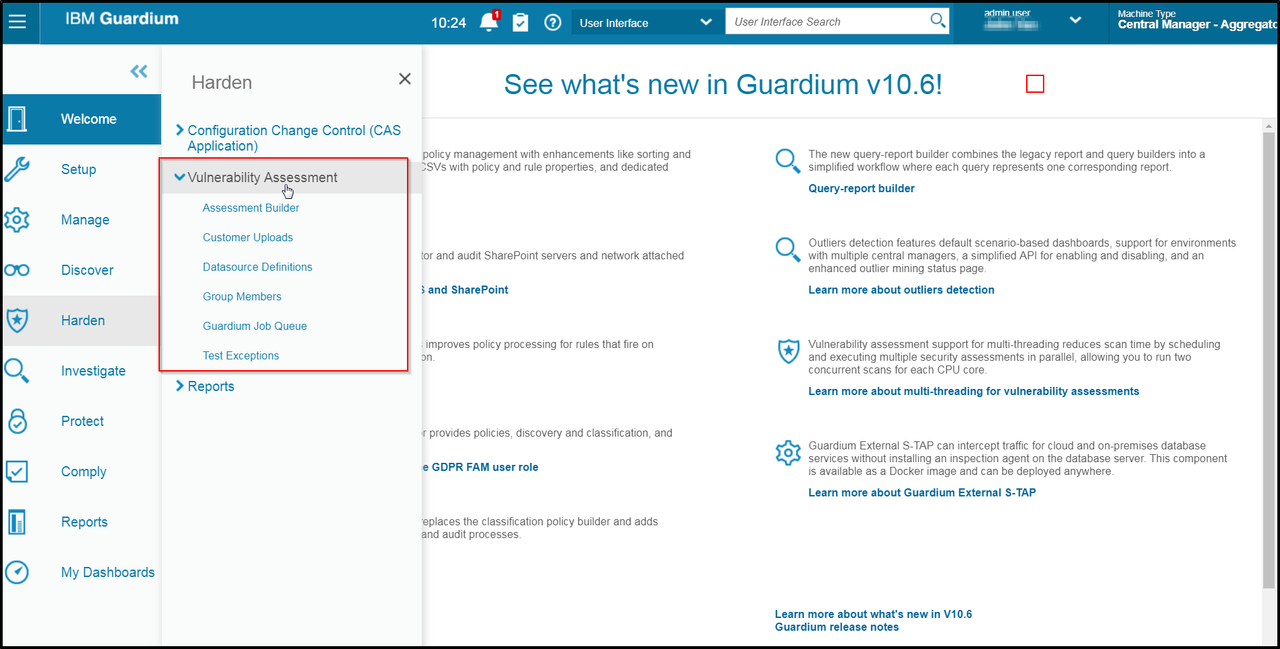 The IBM® InfoSphere® Guardium® Database Vulnerability Assessment (VA) module scans your database infrastructure for vulnerabilities and provides an ongoing evaluation of your security posture, using both real-time and historical data. This capability includes a comprehensive library of preconfigured tests based on industry-best practices such as the Computer Internet Security (CIS) benchmarks and the Database Security Technical Implementation Guide (STIG) created by the Department of Defense (DoD). These tests check for common vulnerabilities, such as missing patches, weak passwords, misconfigured privileges and default accounts, as well as unique vulnerabilities for each DBMS platform.
via Blogger https://ift.tt/3htmEO0
August 23, 2020 at 09:10AM
The IBM® InfoSphere® Guardium® Database Vulnerability Assessment (VA) module scans your database infrastructure for vulnerabilities and provides an ongoing evaluation of your security posture, using both real-time and historical data. This capability includes a comprehensive library of preconfigured tests based on industry-best practices such as the Computer Internet Security (CIS) benchmarks and the Database Security Technical Implementation Guide (STIG) created by the Department of Defense (DoD). These tests check for common vulnerabilities, such as missing patches, weak passwords, misconfigured privileges and default accounts, as well as unique vulnerabilities for each DBMS platform.
This post is to record steps how to configure IBM Guardium to do Vulnerability Assessment.
Log in with user guardcli1
set your guiuser then enable file service.
Open our browser to your IBM Guardium Central Manager's port 8445 web page:
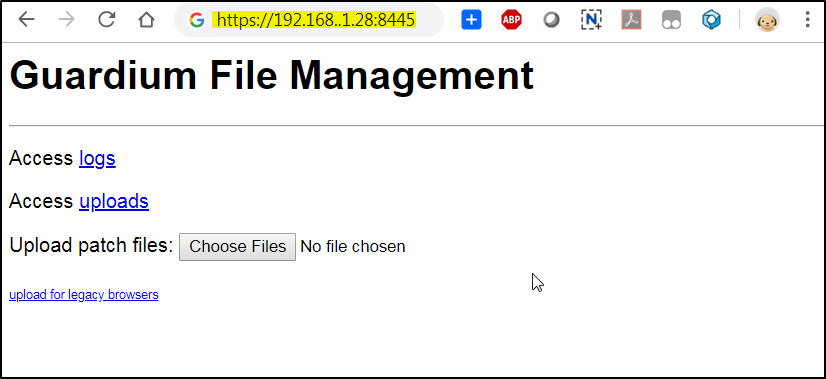
Then click logs\debug-logs\gdmmonitor_scripts, you will get to a page with all gdmmonitor sql script page.
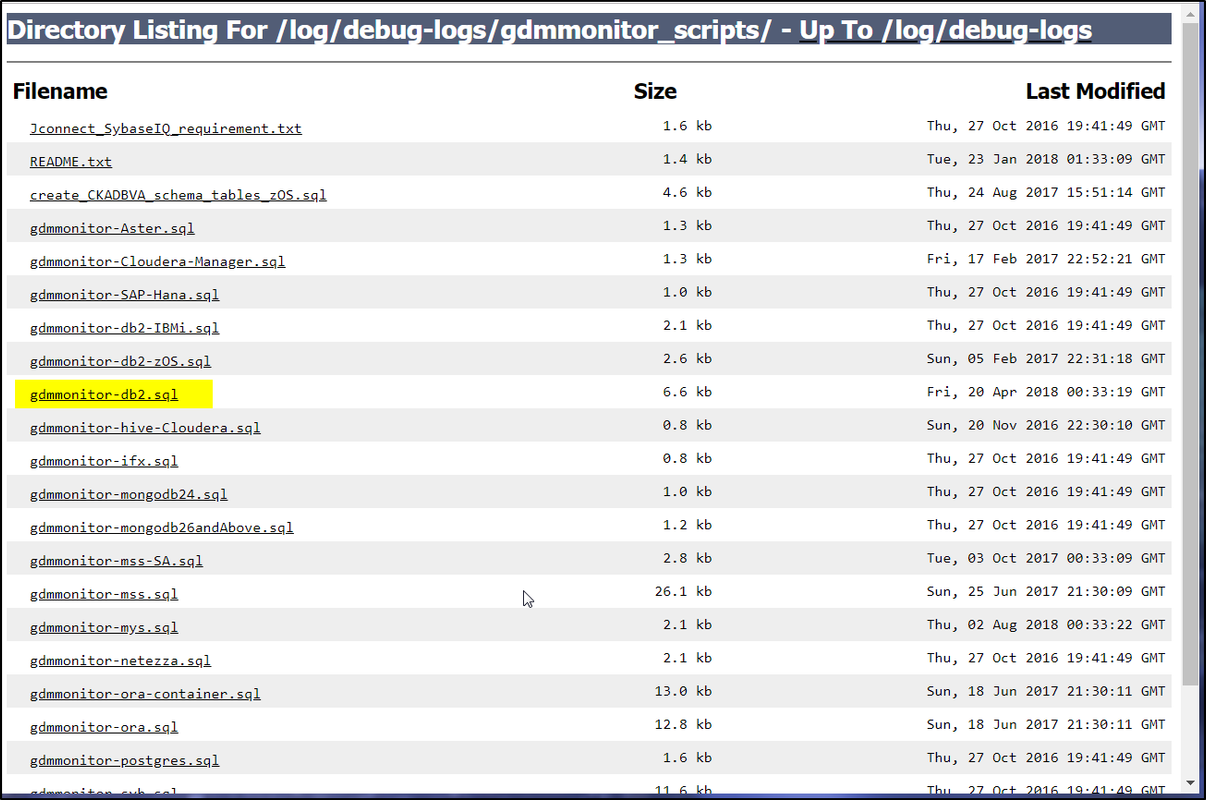
Since we are using DB2 database as a VA example, lets click gdmmonitor-db2.sql file to see what is in it.
We will have to follow the instruction to create a gdmmon group and add a gdm_user into this group on DB2 server.
Once we have right group created, we can run the script on DB2 server.
Reference: Introducing Guardium Vulnerability Assessment
Notes:
1 Create a new VA

2 Choose datasource
Preparation for Vulnerability Assessment
| 1 Download Script to Run in DB Server to Create User and Proper Permissions |
Log into IBM Guardium Central Manager's CLI with your SSH client.
Log in with user guardcli1
set your guiuser then enable file service.
login as: guardcli1
Pre-authentication banner message from server:
|
| IBM Guardium, Command Line Interface (CLI)
|
End of banner message from server
[email protected]'s password:
Access denied
[email protected]'s password:
Last failed login: Wed Jul  3 10:17:36 EDT 2019 from 10.10.136.2 on ssh:notty
There was 1 failed login attempt since the last successful login.
Welcome guardcli1 - this is your first login in this system.
Your password has expired.
Changing password for 'guardcli1'.
Enter current password:
Enter new password:
Re-enter new password:
Bad password: it is based on a dictionary word
Changing password for 'guardcli1'.
Enter current password:
Enter new password:
Re-enter new password:
test-igcm1.51sec.org> set guiuser admin
Enter current password:
err

test-igcm1.51sec.org> set guiuser jyan
Enter current password:
ok

test-igcm1.51sec.org>
test-igcm1.51sec.org>
test-igcm1.51sec.org> fileserver 10.10.136.2 2600

Starting the file server...
The file server is ready at https://test-igcm1.51sec.org:8445
The timeout has been set to 2600 seconds and it may timeout during the uploading.

The upload will only be accessible from the IP you are logged in from: 10.10.136.2

Press ENTER to stop the file server.

Warning: Stop the fileserver because of timeout. The file upload may not complete.
Stopping process
ok
test-igcm1.51sec.org>
Open our browser to your IBM Guardium Central Manager's port 8445 web page:
Then click logs\debug-logs\gdmmonitor_scripts, you will get to a page with all gdmmonitor sql script page.
Since we are using DB2 database as a VA example, lets click gdmmonitor-db2.sql file to see what is in it.
--===================================================================================
-- ------------------------------
-- Description
-- ------------------------------
-- Database Type: DB2 LUW
--
-- This script grants the required privileges for VA on the database.
--
--
--       This script must be executed using a DB2 user with either DBADM or SECADM authority.
--
--       This script does not create a user.  You can grant these privileges to any user(s) you
--       choose to perform your scan.  If you choose to create a new OS user for this function, the Linux syntax
--       can be as simple as:
--
--   groupadd gdmmon
--   useradd -m -d /home/gdm_user -g gdmmon gdm_user
--                      passwd gdm_user
--
-- ------------------------------
-- Before running this script
-- ------------------------------
--
-- Make sure you have created an OS group called "gdmmon".  Make sure your scan user is a member of the "gdmmon" group.
--
-- ------------------------------
-- How to Run
-- ------------------------------
--
-- You can run these grants in any JDBC client, just make sure the statement separator is set to 'go'
-- You can also run this in the DB2 CLI using the terminator as 'go' which is the default.
--
-- To run this script using the DB2 CLI, run the following:
--
-- db2 connect to <database> user <db2inst1> using <password>
-- db2 -tdgo -vf gdmmonitor-db2.sql
--
-- ------------------------------
-- after runnign this script
-- ------------------------------
-- Nothing to do
--
-- ------------------------------
-- User/Password to use
-- ------------------------------
-- User: <gdm_user>
-- Pass: user defined
-- Role: gdmmon

--===================================================================================


GRANT CONNECT ON DATABASE                 TO GROUP gdmmon
go


GRANT SELECT ON TABLE SYSCAT.COLAUTH      TO GROUP gdmmon
go
GRANT SELECT ON TABLE SYSCAT.DBAUTH       TO GROUP gdmmon
go
GRANT SELECT ON TABLE SYSCAT.INDEXAUTH    TO GROUP gdmmon
go
GRANT SELECT ON TABLE SYSCAT.LIBRARYAUTH  TO GROUP gdmmon
go
GRANT SELECT ON TABLE SYSCAT.PACKAGEAUTH  TO GROUP gdmmon
go
GRANT SELECT ON TABLE SYSCAT.PASSTHRUAUTH TO GROUP gdmmon
go
GRANT SELECT ON TABLE SYSCAT.ROUTINEAUTH  TO GROUP gdmmon
go
GRANT SELECT ON TABLE SYSCAT.SCHEMAAUTH   TO GROUP gdmmon
go
GRANT SELECT ON TABLE SYSCAT.SEQUENCEAUTH TO GROUP gdmmon
go
GRANT SELECT ON TABLE SYSCAT.TABAUTH      TO GROUP gdmmon
go
GRANT SELECT ON TABLE SYSCAT.TBSPACEAUTH  TO GROUP gdmmon
go
GRANT SELECT ON TABLE SYSCAT.TABLES       TO GROUP gdmmon
go
GRANT SELECT ON TABLE SYSCAT.INDEXES      TO GROUP gdmmon
go
GRANT SELECT ON TABLE SYSCAT.LIBRARIES    TO GROUP gdmmon
go
GRANT SELECT ON TABLE SYSCAT.MODULES      TO GROUP gdmmon
go
GRANT SELECT ON TABLE SYSCAT.PACKAGES     TO GROUP gdmmon
go
GRANT SELECT ON TABLE SYSCAT.ROUTINES     TO GROUP gdmmon
go
GRANT SELECT ON TABLE SYSCAT.SCHEMATA     TO GROUP gdmmon
go
GRANT SELECT ON TABLE SYSCAT.SEQUENCES    TO GROUP gdmmon
go
GRANT SELECT ON TABLE SYSCAT.TABLESPACES  TO GROUP gdmmon
go
GRANT SELECT ON TABLE SYSIBM.SYSROUTINEAUTH  TO GROUP gdmmon
go
GRANT SELECT ON TABLE SYSCAT.ROLEAUTH     TO GROUP gdmmon
go
GRANT SELECT ON TABLE SYSCAT.ROLES    TO GROUP gdmmon
go
GRANT SELECT ON TABLE SYSCAT.CONTEXTS    TO GROUP gdmmon
go
GRANT SELECT ON TABLE SYSCAT.AUDITPOLICIES TO GROUP gdmmon
go
GRANT SELECT ON TABLE SYSCAT.AUDITUSE    TO GROUP gdmmon
go
GRANT SELECT ON TABLE SYSCAT.TRIGGERS    TO GROUP gdmmon
go
GRANT SELECT ON TABLE SYSCAT.MODULES    TO GROUP gdmmon
go
GRANT SELECT ON TABLE SYSCAT.NICKNAMES    TO GROUP gdmmon
go
GRANT SELECT ON TABLE SYSCAT.TABCONST    TO GROUP gdmmon
go
GRANT SELECT ON TABLE SYSCAT.THRESHOLDS   TO GROUP gdmmon
go
GRANT SELECT ON TABLE SYSIBM.SYSDUMMY1    TO GROUP gdmmon
go

-- JDBC Access
GRANT EXECUTE ON PACKAGE NULLID.SYSSH200  TO GROUP gdmmon
go

-- For DB2 8.1 fixpack 9 and higher this table function is need to determine the database version
-- IF YOU ARE RUNNING OLDER VERSION, YOU MAY SEE ERROR ON THESE GRANT WHICH CAN BE IGNORE
GRANT EXECUTE ON FUNCTION SYSPROC.ENV_GET_INST_INFO TO GROUP gdmmon
go
GRANT EXECUTE ON FUNCTION SYSPROC.ENV_GET_SYS_INFO TO GROUP gdmmon
go
--SYSPROC.ADMIN_GET_ENCRYPTION_INFO is available in DB2 10.5 and higher.
GRANT EXECUTE ON FUNCTION SYSPROC.ADMIN_GET_ENCRYPTION_INFO TO GROUP gdmmon
go
GRANT EXECUTE ON FUNCTION SYSPROC.ENV_GET_REG_VARIABLES TO GROUP gdmmon
go

--This grant For DB2 9.5 and above only.  This is very important, if database is created using RESTRICTIVE option
--then most privilege are revoke to PUBLIC by default. We will need this grant to select certain catalog view or else error.
GRANT USAGE ON WORKLOAD SYSDEFAULTUSERWORKLOAD TO GROUP GDMMON
go
GRANT SELECT ON TABLE SYSIBMADM.PRIVILEGES TO GROUP GDMMON
go

--These are require to check configuration parameters as of DB2 9.1 and higher
GRANT SELECT ON TABLE SYSIBMADM.DBCFG  TO GROUP gdmmon
go
GRANT SELECT ON TABLE SYSIBMADM.DBMCFG TO GROUP gdmmon
go

--These are require for dependcies entitlement queries as of DB2 9.1 and higher
GRANT SELECT ON TABLE SYSCAT.TABDEP      TO GROUP gdmmon
go
GRANT SELECT ON TABLE SYSCAT.TRIGDEP     TO GROUP gdmmon
go
GRANT SELECT ON TABLE SYSCAT.ROUTINEDEP  TO GROUP gdmmon
go
GRANT SELECT ON TABLE SYSCAT.PACKAGEDEP  TO GROUP gdmmon
go


--
-- DB2 Command line privilege need to execute queries when CAS script connected to database.
-- When a DB2 database is created using the RESTRICTIVE keyword.  Most objects are not granted to PUBLIC, hence we need this.
-- Therefore we need these privileges to be able to connect to DB2 command line and issue select queries for VA.
-- The below store procedure find package name in NULLID schema begin with SQLC2 and grant execute to gdmmon group.
-- This stored procedure is tested using DB2 8.2 to latest DB2 release on various platform and has the blessing of DB2 security team.
--

create procedure P_GrantPackage

LANGUAGE SQL

begin

declare executestring varchar(100);
declare v_PkgSchema varchar(50);
declare v_PackageName varchar(50);
declare SQLCODE int default 0;


declare c_grant_package cursor for
 SELECT PKGSCHEMA, PKGNAME
 FROM SYSCAT.PACKAGES
 WHERE PKGNAME LIKE 'SQLC2%';

open c_grant_package;
fetch_loop:
loop
fetch c_grant_package into v_PkgSchema, v_PackageName;
 if (SQLCODE <> 0) then
    leave fetch_loop;
 end if;
 set executestring = 'GRANT EXECUTE ON PACKAGE ' ||v_PkgSchema|| '.' || v_PackageName || ' TO GROUP GDMMON';
        execute immediate executestring;
end loop fetch_loop;
close c_grant_package;

end
go

CALL P_GrantPackage
go

drop procedure P_GrantPackage
go
We will have to follow the instruction to create a gdmmon group and add a gdm_user into this group on DB2 server.
Once we have right group created, we can run the script on DB2 server.
Reference: Introducing Guardium Vulnerability Assessment
Notes:
- For both Vulnerability Assessments and Entitlements Reporting, when looking for scripts to grant privileges for entitlement reporting, use scripts in the gdmmonitor_scripts directory. Do not use the entitlement_monitor_role folder, which is no longer updated.
- When using an expiring product license key, or license with a limited number of datasources, the following message may appear: Cannot add datasource. The maximum number of datasources allowed by license has been reached. The License valid until date and Number of datasources can be seen on the System Configuration panel of the Administrator Console. A Vulnerability or Classification process with N datasources are counted as N scans every time they run.
-
Guardium Vulnerability Assessments requires access to the databases it evaluates. To do this, Guardium provides a set of SQL scripts (one script for each database type) that creates users and roles in the database to be used by Guardium.
- The template scripts are available on the Guardium system once it is built and can be found and downloaded via fileserver at the following path: /log/debug-logs/gdmmonitor_scripts/. More information is available in the README.txt file.
2 Create DataSource
If there is not defined Datasource yet, you will need to create a new one based on your DB information.
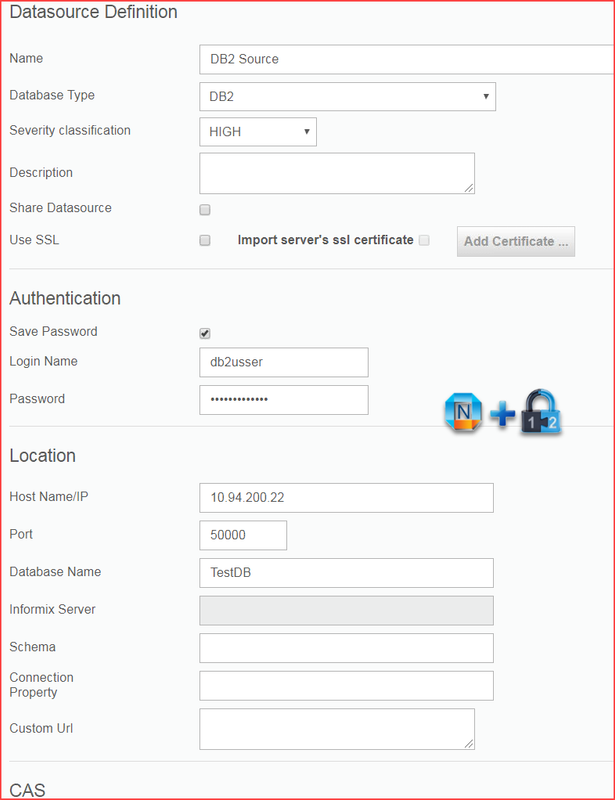
Protect - Security Assessment Builder
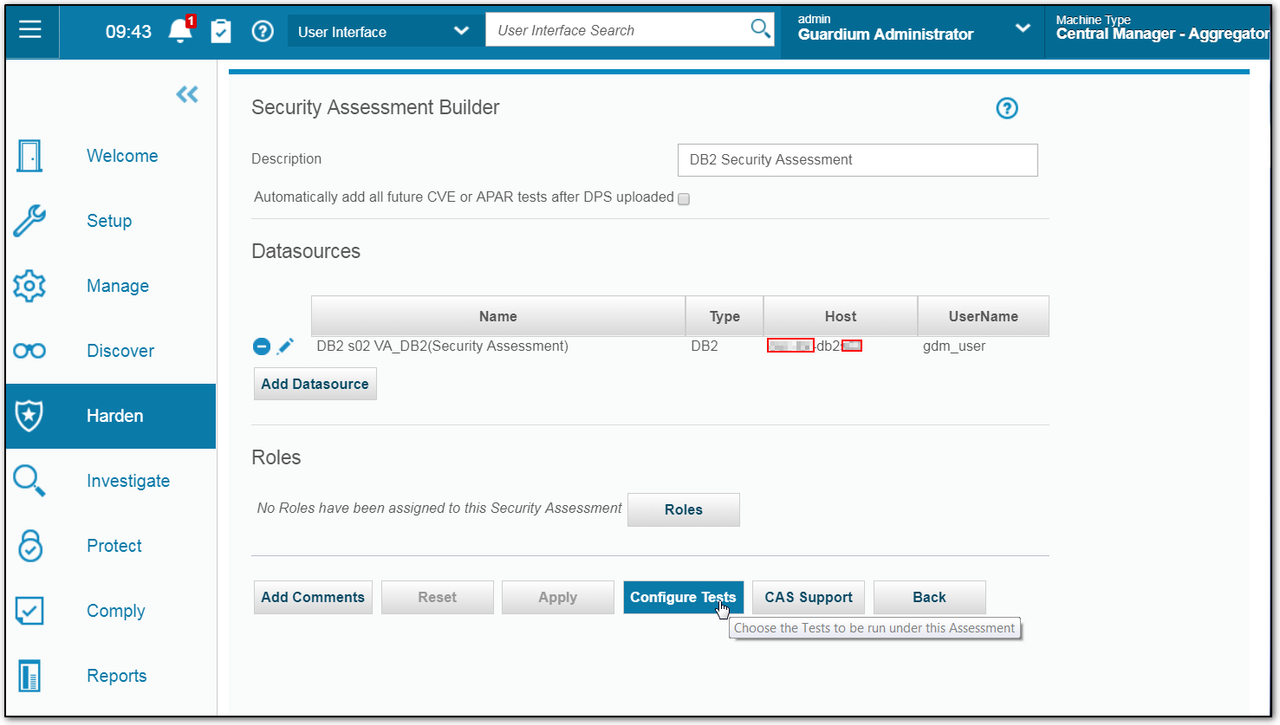
2 Choose datasource
3 Configure Tests
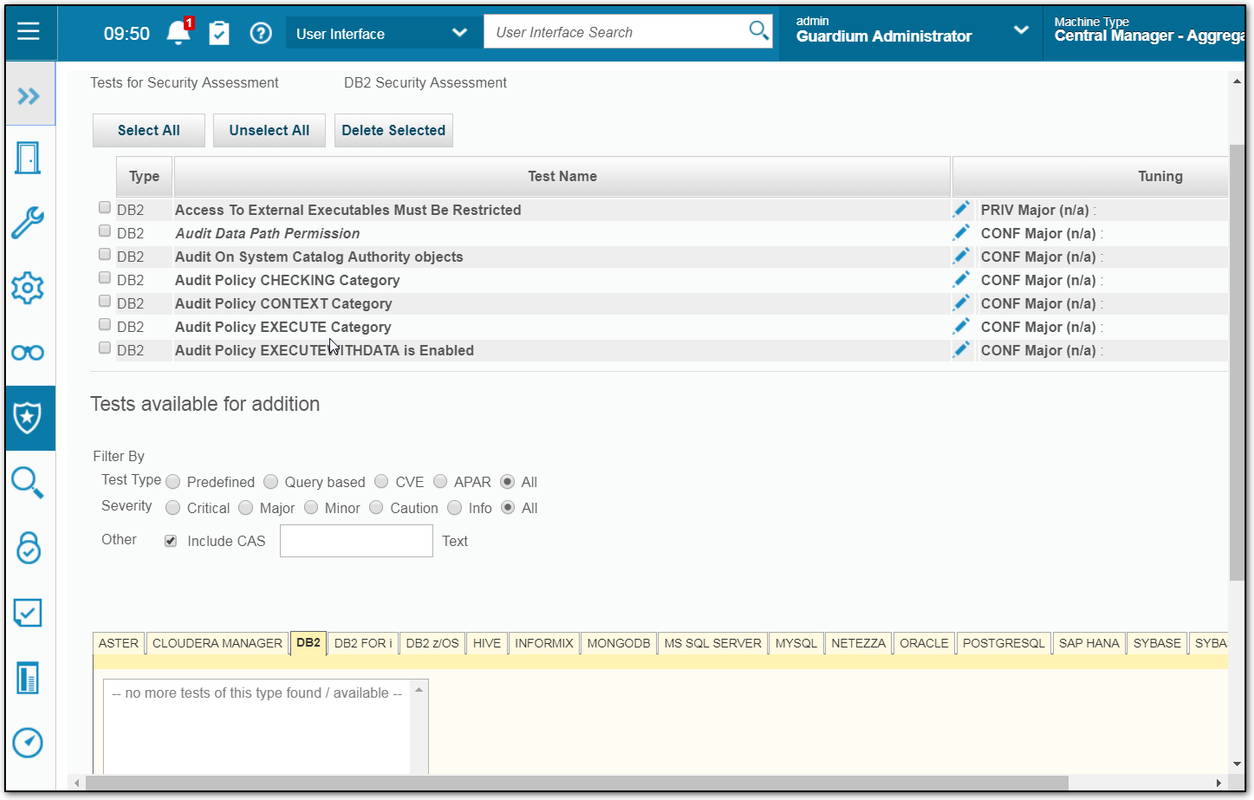
Tests are updated on a quarterly basis by way of the InfoSphere Guardium Knowledgebase service. You can also define custom tests and schedule automated audit tasks incorporating scans, distribution of reports, electronic sign-offs and escalations.
You will need to tell your assessment what kind of tests will be used to assess your DB. You can choose those pre-defined tests based on your DB type.
4 Run it Once
 5 View results
You will need to tell your assessment what kind of tests will be used to assess your DB. You can choose those pre-defined tests based on your DB type.
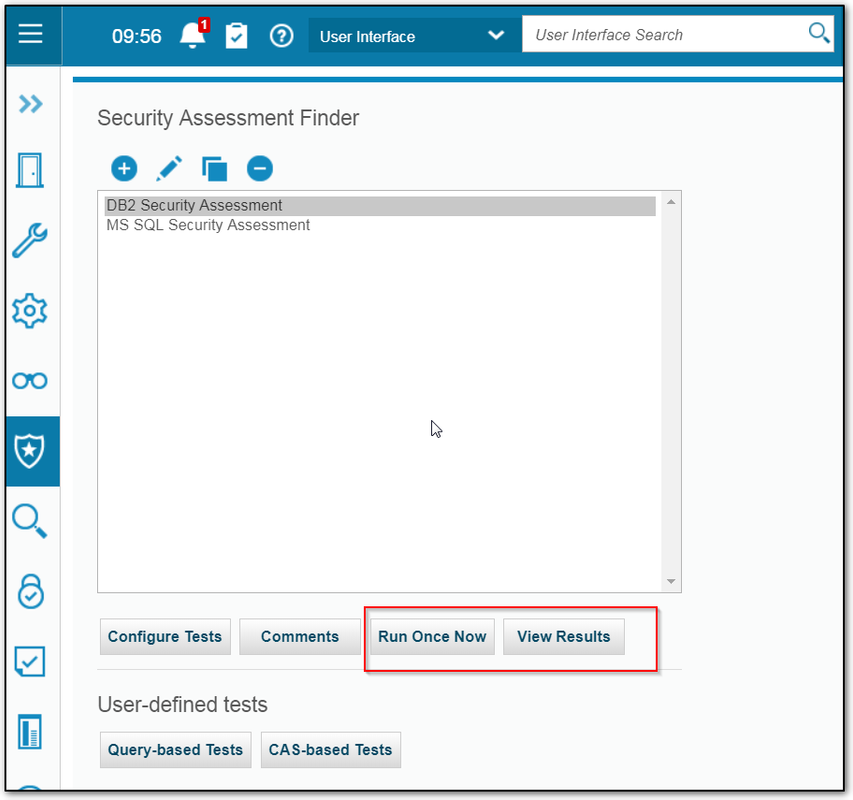
4 Run it Once
6 Check Guardium Job Queue
Schedule Assessment
1 Comply - Audit Process Builders
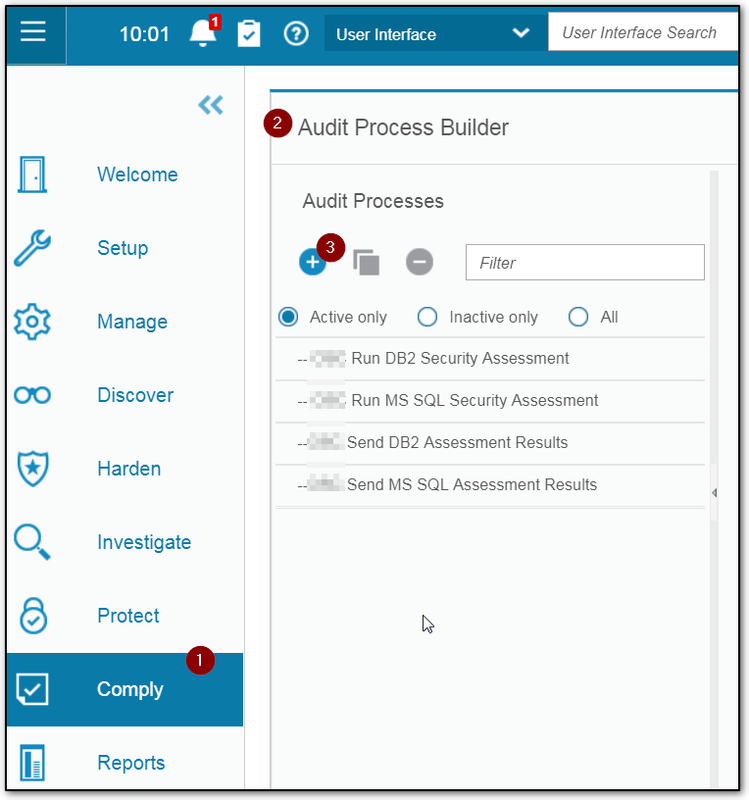

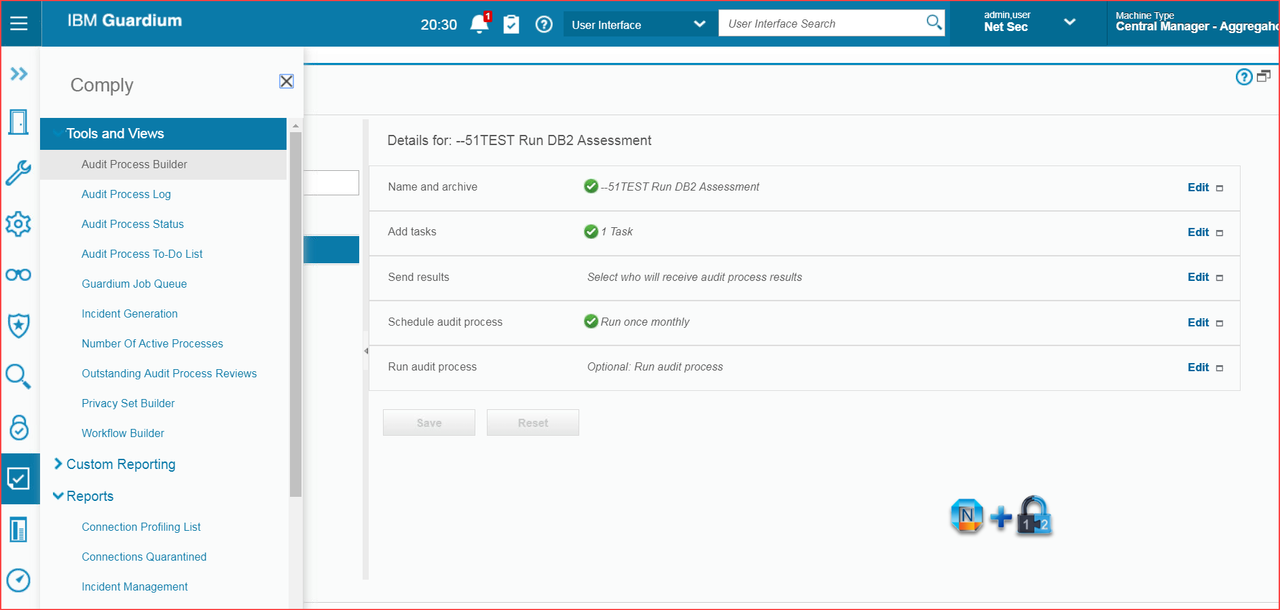
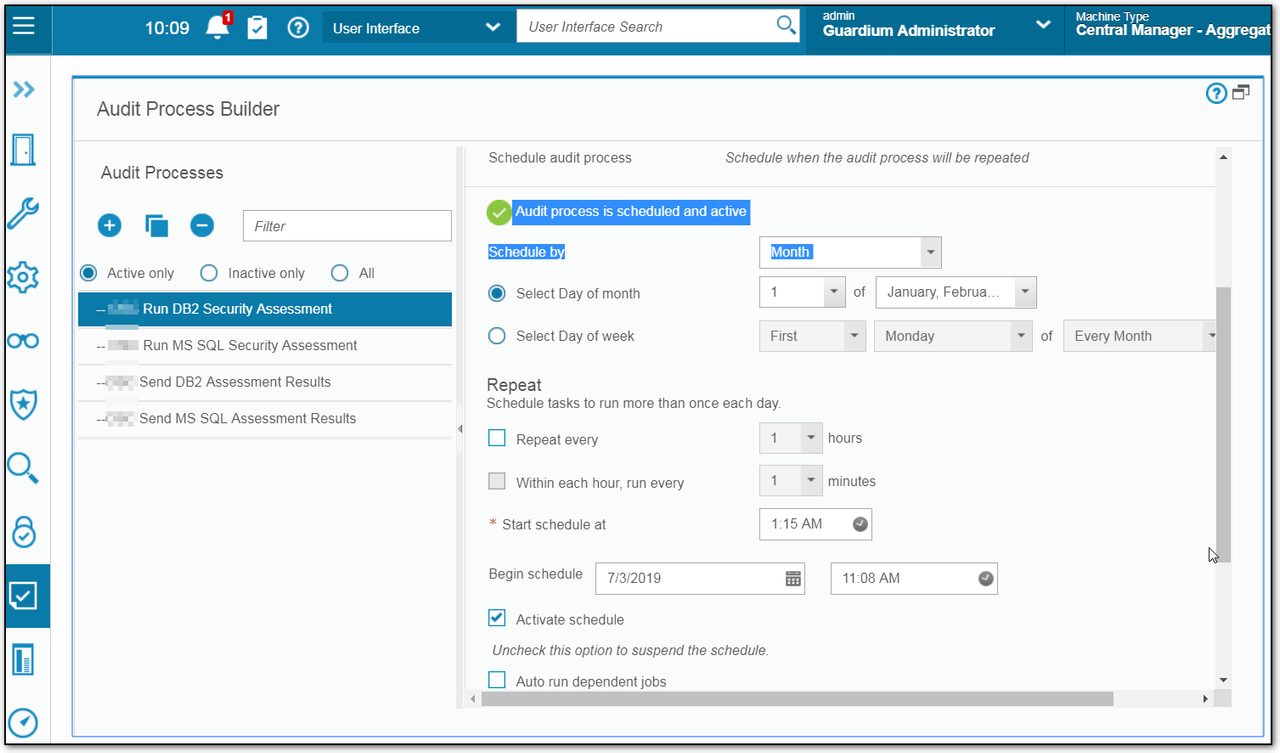
3 Add User to Send Report and Create a schedule
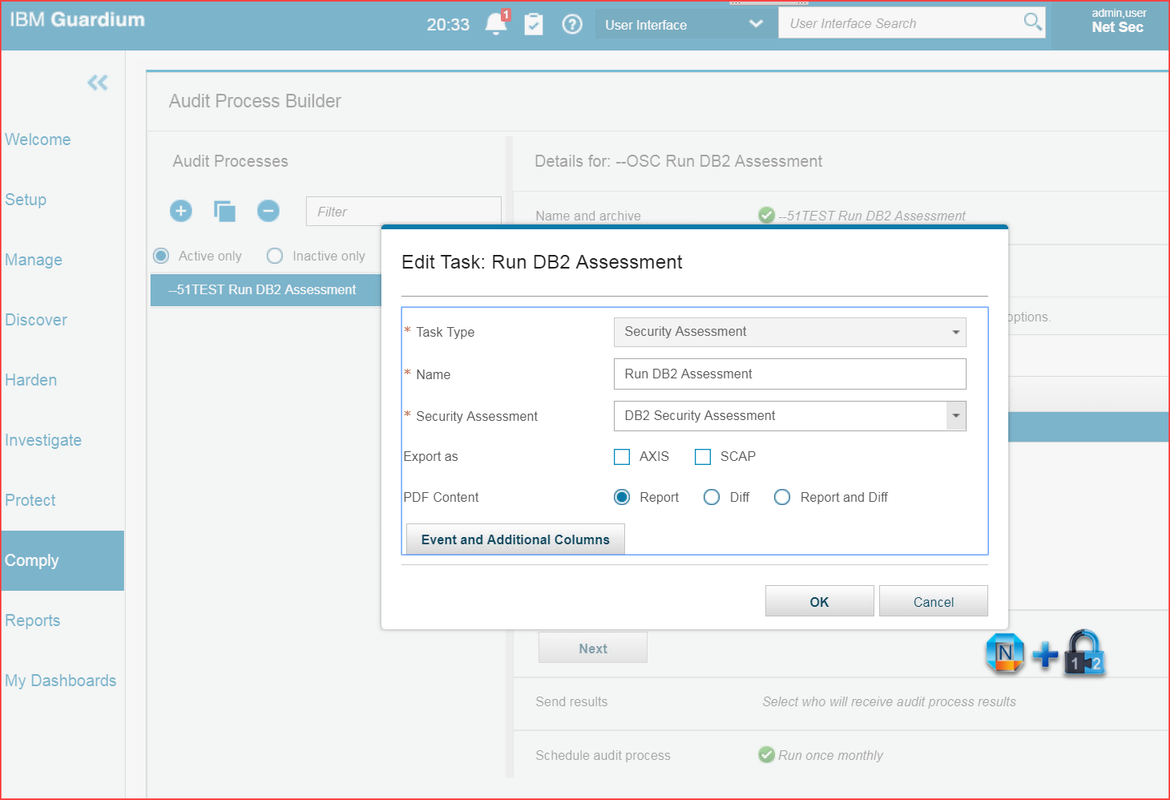
2 Add a Task
You will need to add a task you defined in previous step in the Protect - Security Assessment Builder .
You will also need to add who you want to send results and create a schedule to run this audit process.
YouTube: Vulnerabilty Assessment:
YouTube: Vulnerabilty Assessment:
References
via Blogger https://ift.tt/3htmEO0
August 23, 2020 at 09:10AM

 RSS Feed
