Info Security Memo
  • Blog
  • Sitemap
    • Categories
  • Contact
  • About
  • Resources
  • Tools
  • 51sec.org

Build Confidence

Focusing on Information Security 

Info Security Notes

Free SubDomain from PP.UA and Integration with CloudFlare

2/16/2021

1 Comment

 
Free SubDomain from PP.UA and Integration with CloudFlare

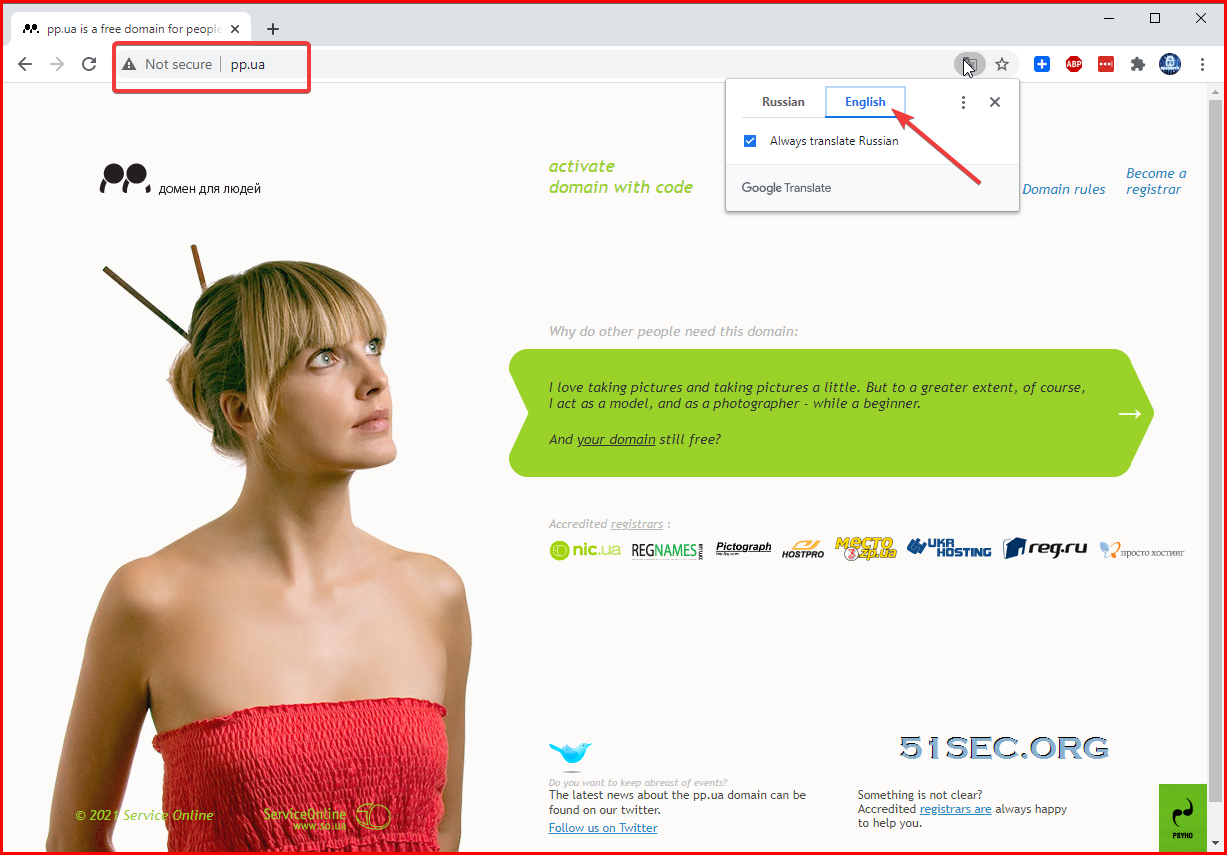
During building my lab for testing, I tried to find a free subdomain to use which also can be integrated with CloudFlare. I found this free pp.ua domain zone is perfect for personal pages and blogs - the abbreviation "PP" means "Private Person". It is Ukraine website in Russian language, but it can be applied globally with Google translation's help .  So far, the subdomain from pp.ua works just like any other domains. 


Restrictions

It does has some restrictions including following main ones:
  • It requires activation, which I found phone number outside of Ukraine might not work. Telegram activation method is still working. 
  • WHOIS information is public. 
  • You can register 3 free domains in one month from the same phone number under your account

Steps to apply a new domain

As shown from the homepage of https://pp.ua, there are quite a few domain registrars. In this post, I picked the first one nic.ua to register my own subdomain as an example. You will need to register an account from nic.ua website first. 
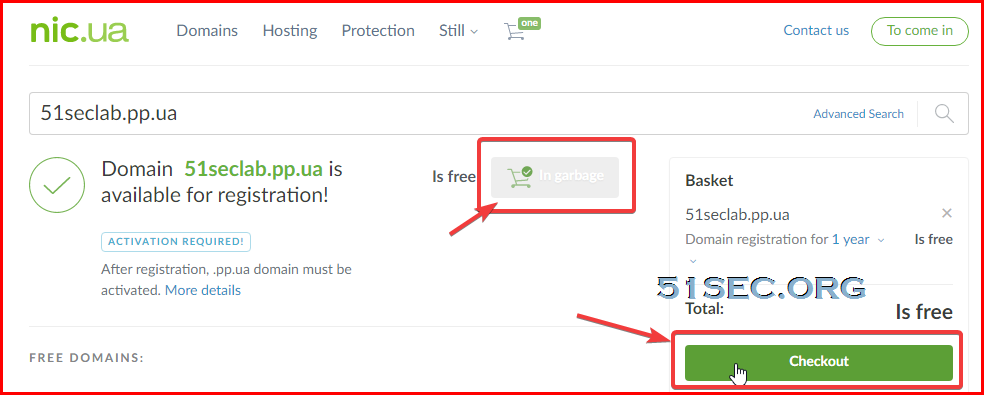
1  Find an accredited registrar
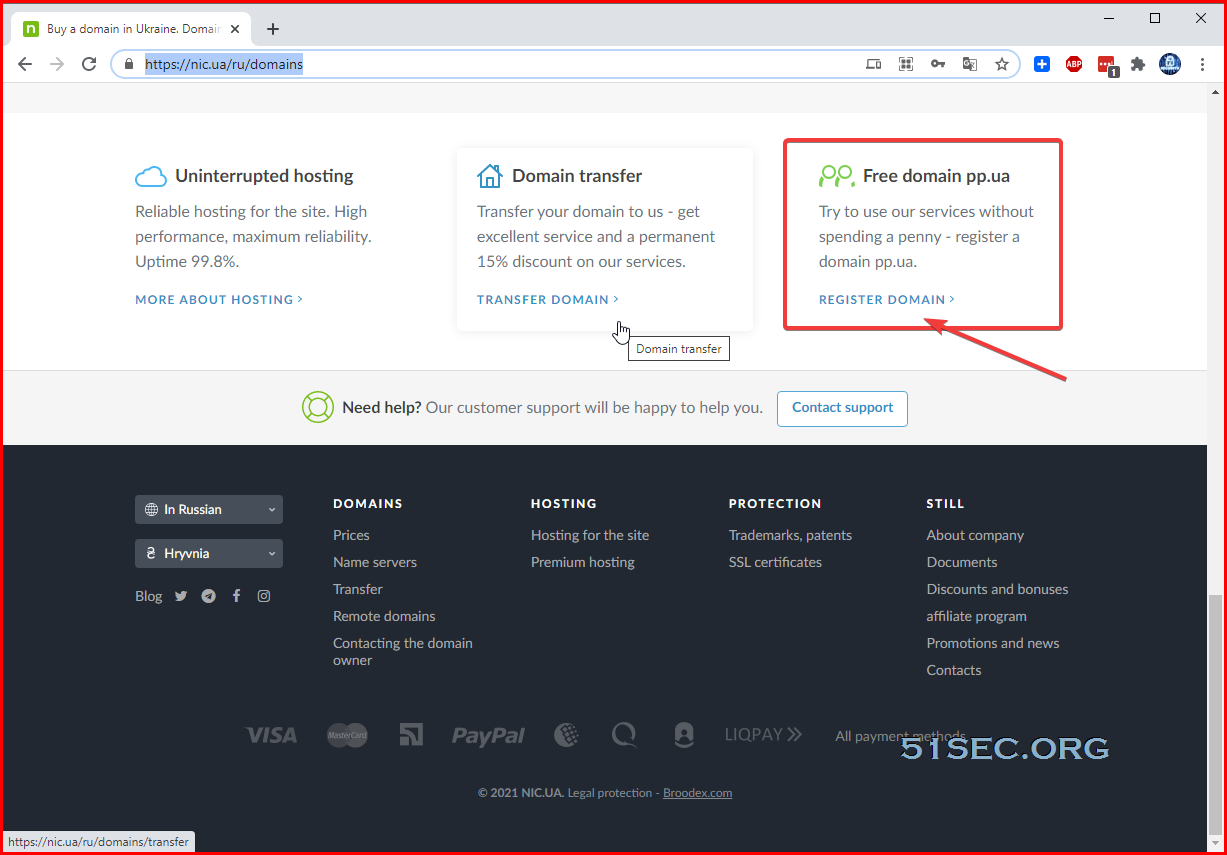
From nic.ua's domain page (https://nic.ua/ru/domains), scroll to the bottom, you will find the free domain pp.ua registration link: https://nic.ua/ru/domains/.pp.ua

Again it is in Russian, you might need Google Translation's help to understand it well.


2  Find an available subdomain by searching

Once found an available one, you can easily add it into cart and check out from the same page. 


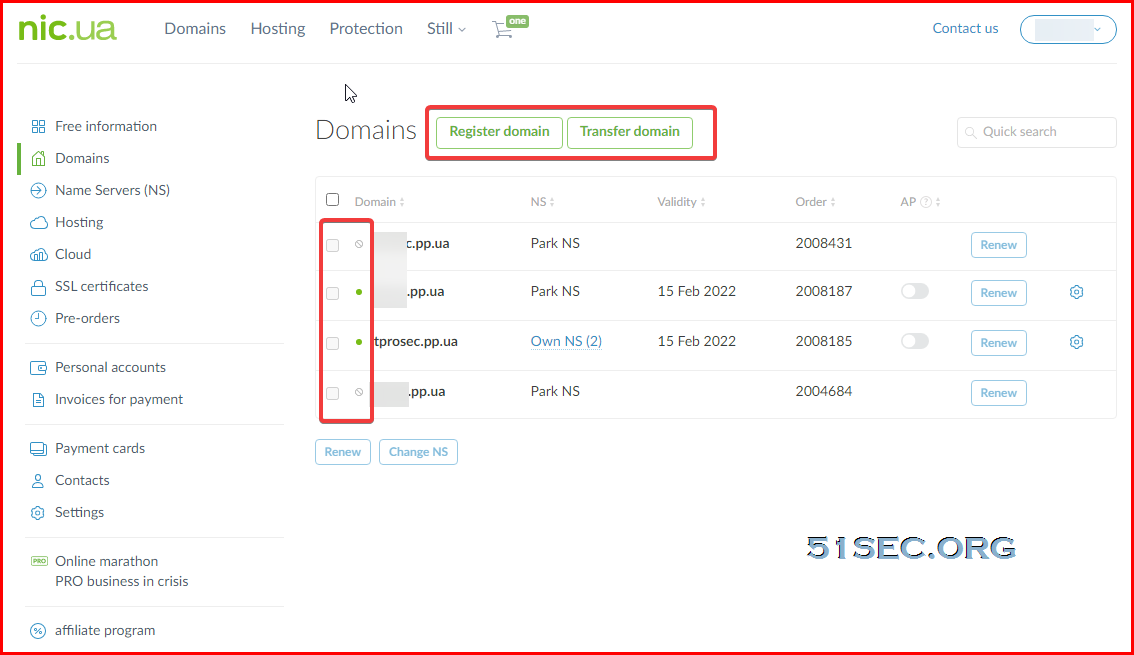
3  Check Domain from your account dashboard
Since it has not been activated, your new domain will not show a green dot in front of it. No more than three domain registered in one month. 


Activation

There are multiple ways to activate your domain. It will require activation code. Unfortunately, for somehow, I did not get sms message for the code. After waited a couple of days, I decided to try Telegram method. 

Follow steps below to activate the domain:

  • In Telegram searching bar find the @ppuabot, press START.
  • Then press "Send phone number”.
  • You will see "Please select function you wish to execute”.
  • Press “Activate domain” and enter your domain name without
    'www' and 'http://'
  • Then you should agree with PP.UA policy and registrant contact data usage
  • PP.UA Bot will generate an activation code.
  • Copy the activation code.
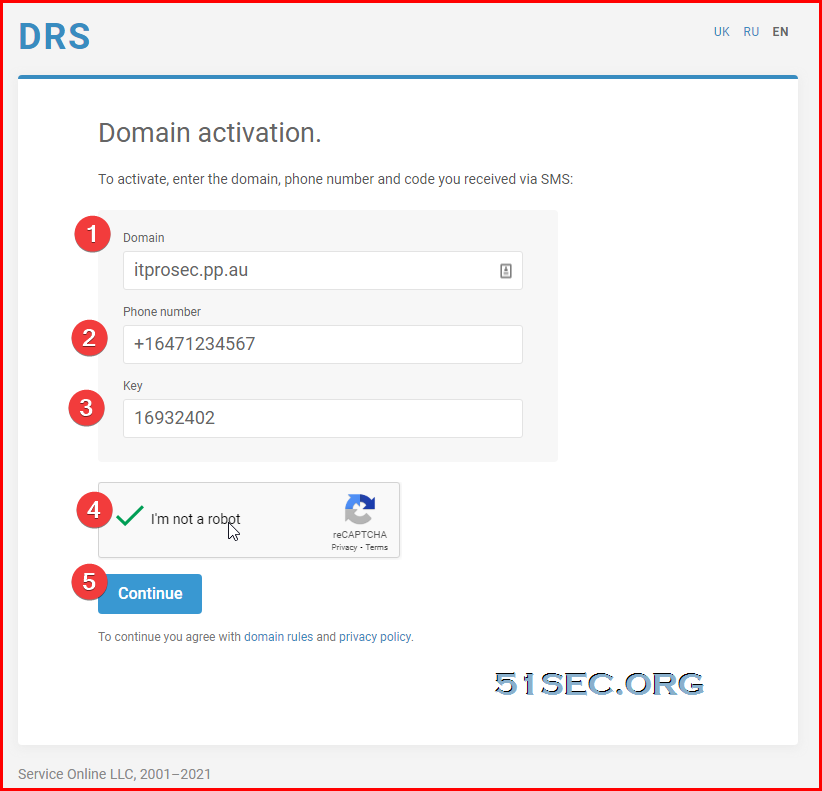
  • Go to activation page


  • Fill 'Domain', 'Phone number' (in international format) and 'Key' field
  • When you continue you agree again with domain rules and privacy policy
  • Click 'Continue' and wait for the result.
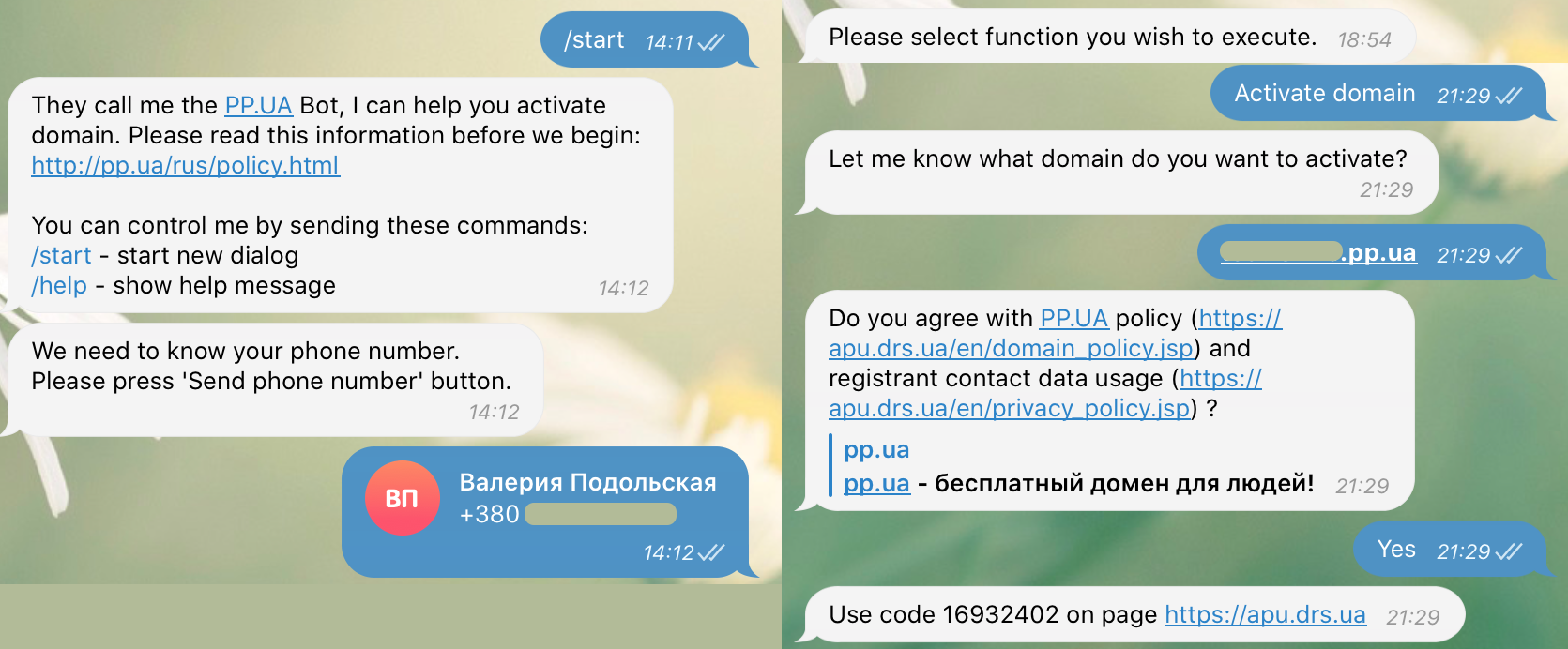
Please note, when you will renew the domain in a year, you have to activate it again the same way. Also, all requests to the registry are eligible for 5 days. If you didn't activate domain in 5 days then you will need to do registration request again and activate your domain.

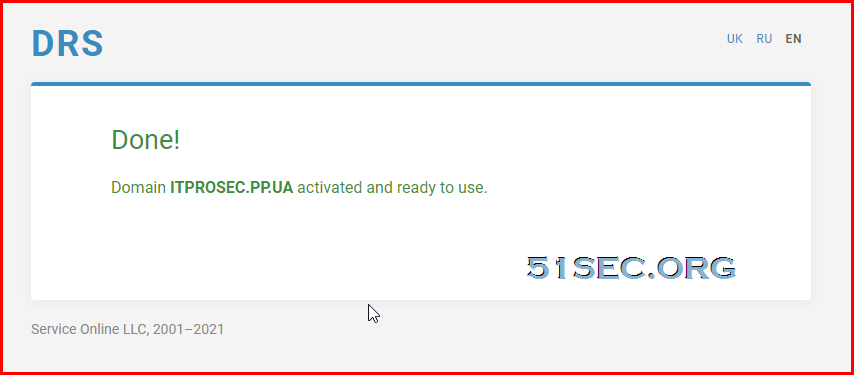
Once you got following Done! page, which confirmed your new domain activated and ready for next step, integration with CloudFlare. 


Integration with CloudFlare

After you activated from Telegram, you can start the process to integrate with CloudFlare. 
  • Log into your CloudFlare account, click button "+Add a Site"
  • Enter your new activated pp.ua domain
  • Choose Free plan
  • You will get a "Complete your nameserver setup" page.
  • Change nameserver settings under your new activated domain from nic.ua 
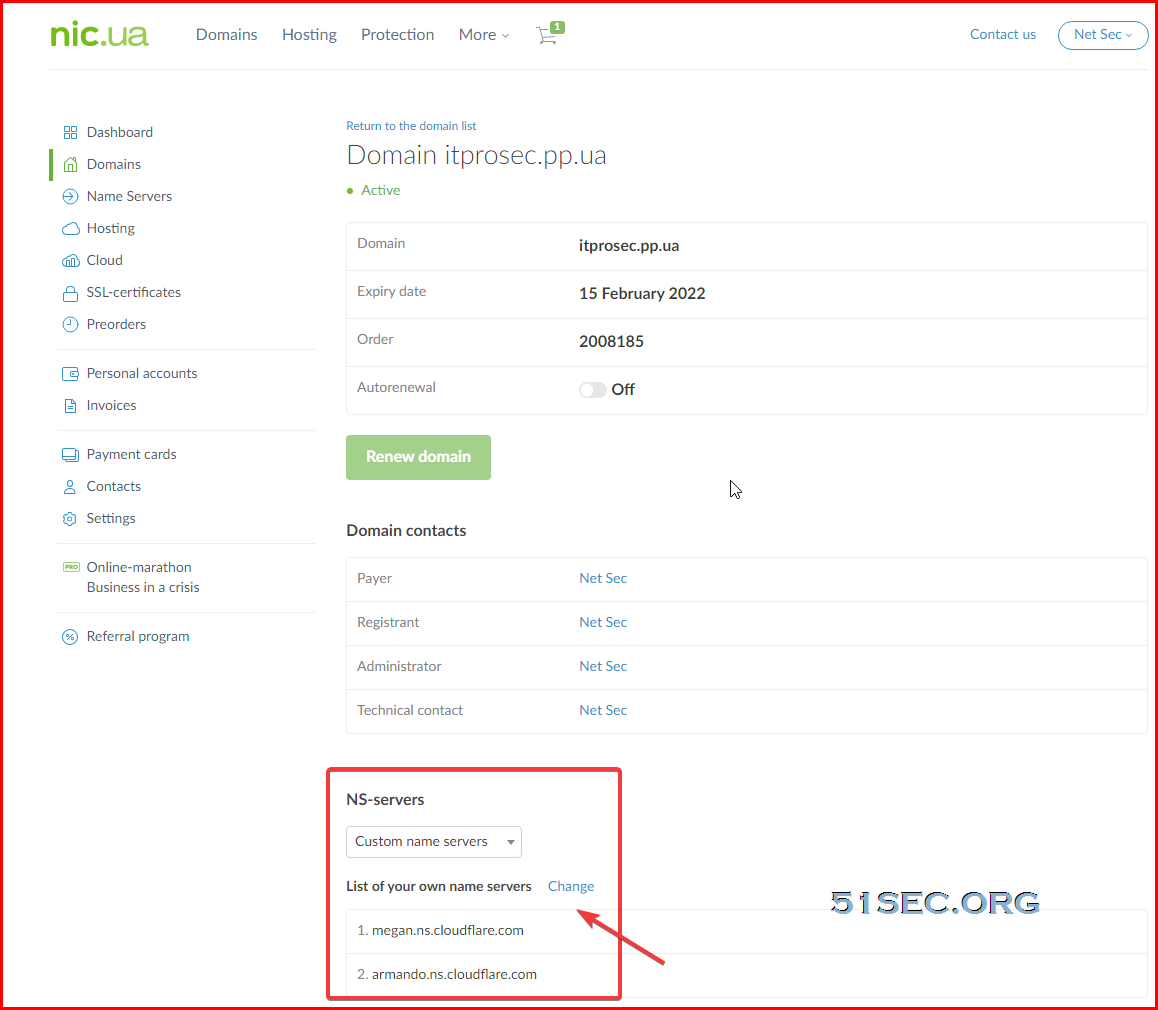
Click 'Change' to modify your name servers. Change NS-Servers entries to those two displayed in CloudFlare page.

  • It will take a couple of hours to get this NS-Server change take into effect. You can request CloudFlare to check this nameserver updates from Overview page in your domain's CloudFlare Dashboard.
  • Eventually if all goes well, in next 2-3 hours, you CloudFlare's domain page will show you this message: "Great news! Cloudflare is now protecting your site"


References

  • PP.UA domains restrictions
  • How to activate PP.UA domain

via Blogger https://ift.tt/3u4wzQw
February 15, 2021 at 09:03PM Cloud
1 Comment
ID Verification link
11/1/2022 06:28:28

Thanks for sharing such a informative blog! Go global instantly, 16,000+ accurate documents out of the box. Access instant global coverage with our 16,000+ documents and 142 languages/typesets.

Reply


Leave a Reply.

    Categories

    All
    Architecture
    Blog
    Checkpoint
    Cisco
    Cloud
    CyberArk
    F5
    Fortigate
    Guardium
    Juniper
    Linux
    Network
    Others
    Palo Alto
    Qualys
    Raspberry Pi
    Security
    SIEM
    Software
    Vmware
    VPN
    Wireless

    Archives

    March 2024
    February 2024
    January 2024
    December 2023
    November 2023
    October 2023
    September 2023
    August 2023
    July 2023
    June 2023
    May 2023
    April 2023
    March 2023
    February 2023
    January 2023
    December 2022
    November 2022
    October 2022
    September 2022
    August 2022
    July 2022
    June 2022
    May 2022
    April 2022
    March 2022
    February 2022
    January 2022
    December 2021
    November 2021
    October 2021
    September 2021
    August 2021
    July 2021
    June 2021
    May 2021
    April 2021
    March 2021
    February 2021
    January 2021
    December 2020
    November 2020
    October 2020
    September 2020
    August 2020
    July 2020
    October 2019
    September 2019
    June 2019
    July 2018
    May 2018
    December 2017
    August 2017
    April 2017
    March 2017
    January 2017
    December 2016
    November 2016
    October 2016
    September 2016
    August 2016
    July 2016
    June 2016
    May 2016
    April 2016
    March 2016
    February 2016
    January 2016
    December 2015
    November 2015
    October 2015
    September 2015
    August 2015
    July 2015
    June 2015
    May 2015
    April 2015
    March 2015

    Print Page:

    RSS Feed

    Email Subscribe
Powered by Create your own unique website with customizable templates.
  • Blog
  • Sitemap
    • Categories
  • Contact
  • About
  • Resources
  • Tools
  • 51sec.org