Info Security Memo
  • Blog
  • Sitemap
    • Categories
  • Contact
  • About
  • Resources
  • Tools
  • 51sec.org

Build Confidence

Focusing on Information Security 

Info Security Notes

Free Hosting - x10hosting : Wordpress in 5 Minutes with Your Own Domain and SSL Auto-Renew

1/9/2023

2 Comments

 
Free Hosting - x10hosting : Wordpress in 5 Minutes with Your Own Domain and SSL Auto-Renew
x10 Free hosting for the masses since 2006!


Domain Integration Diagrams

There are two ways you can integrate your domain with x10hosting. 
I am using EU.ORG (Domain Registrar) and Cloudflare (DNS Managing Providor) as an example. 

Different ways will cause a different way to generate your SSL certificate for your website, either you can generate certificate directly from x10hosting DirectAdmin control panel or from Cloudflare then copy into DirectAdmin control panel. 


Get an Account With Just an Email
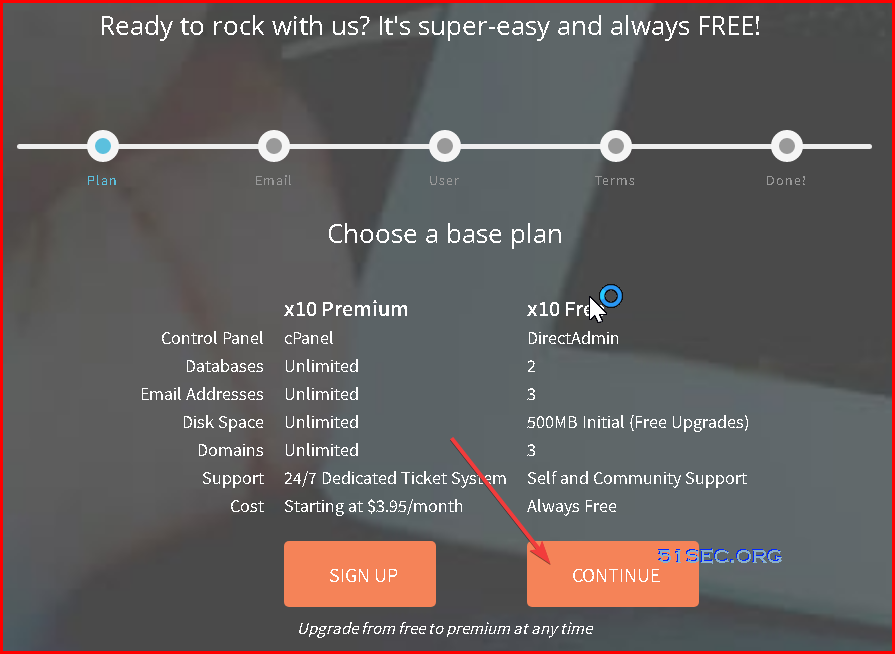
Just an email, and no more information required. Standard process as other popular free hosting providers.


Features for x10 Free Plan

Following feature lists are from x10 website or control panel. Pretty similar feature list as others. Some even have tighter limitation than Byet or Infinity. 

Basic:


x10 Free

Control Panel

DirectAdmin

Databases

2

Email Addresses

3

Disk Space

500MB Initial (Free Upgrades)

Domains

3

Support

Self and Community Support

Cost

Always Free


Extensive :

Control Panel Software:DirectAdminMore Information 
Storage Space:500 MB (can be increased after 7 days)
Inode (File and Folder) Count:50,000 Inodes
Max File Size:10 MB
Bandwidth:Unmetered
MySQL Databases:2
FTP Accounts:3
Domains:2
Subdomains:2
Domain Pointers:1
Email Addresses:3
Features:Softaculous auto installer, PHP version select
Cost:Free!


Steps to Create a Wordpress Site 


1 Create your first service. You will be only able to create one service.

Infinity Free services are limited to 1 per account and this account already has 1 active.
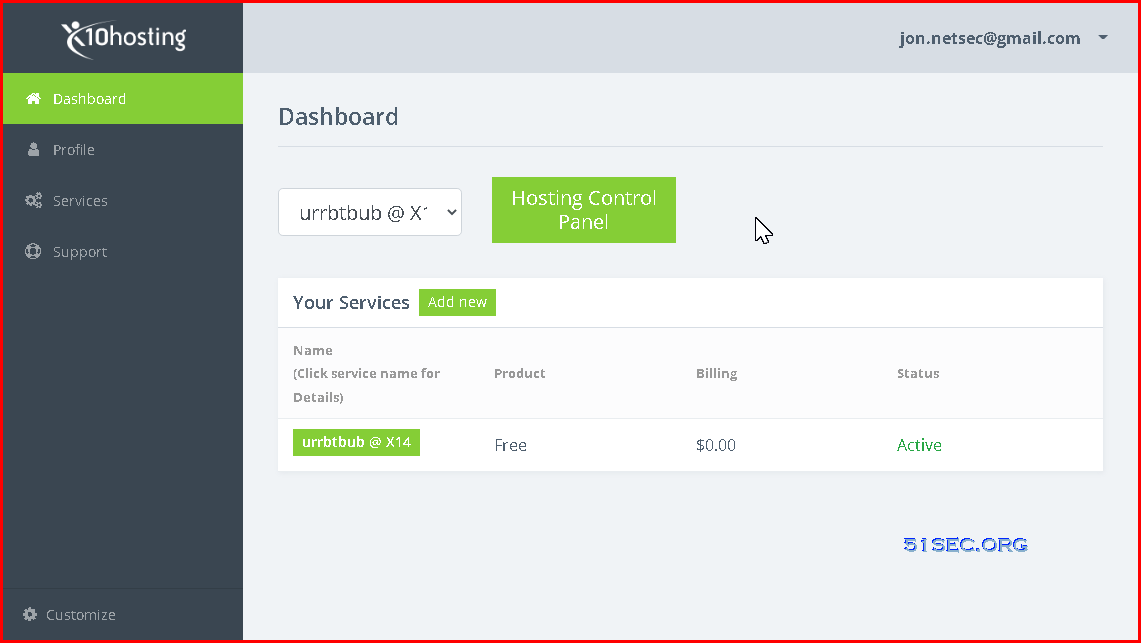

One should be enough for your small project. You always can use another email to get youself another account to play with it if needed. 


2 Hosting Control Panel
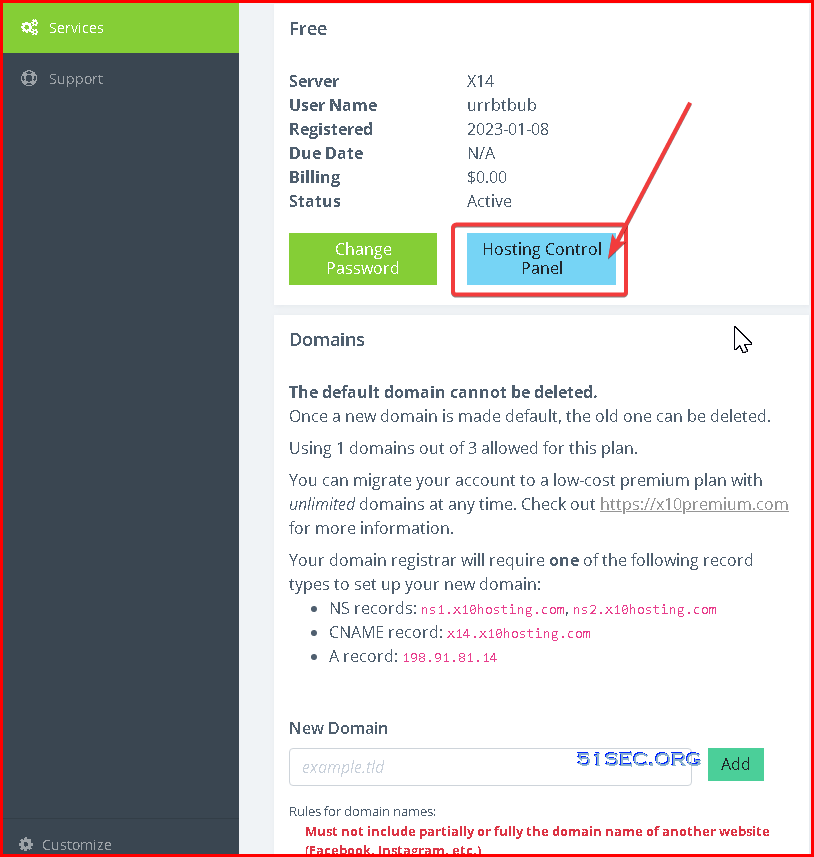

Create a new subdomain or add a new custom domain:

Add an A record from your domain registrar website (in my case, it is Cloudflare) based on the information gives on the above service page
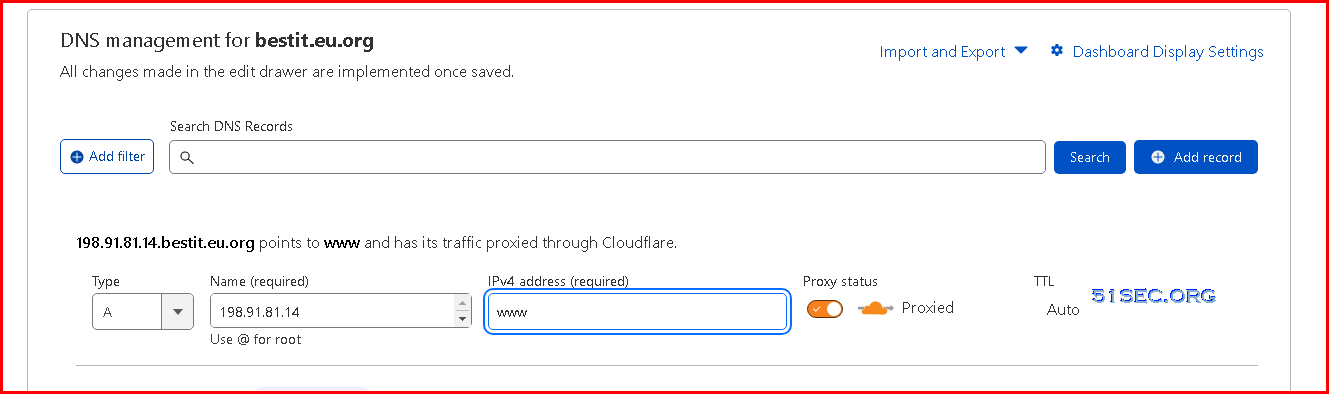
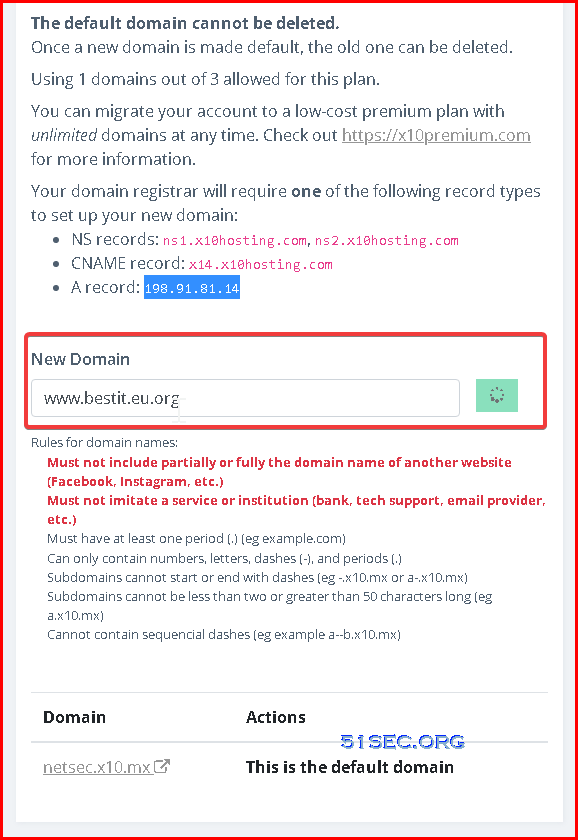
Add new domain into your service. 

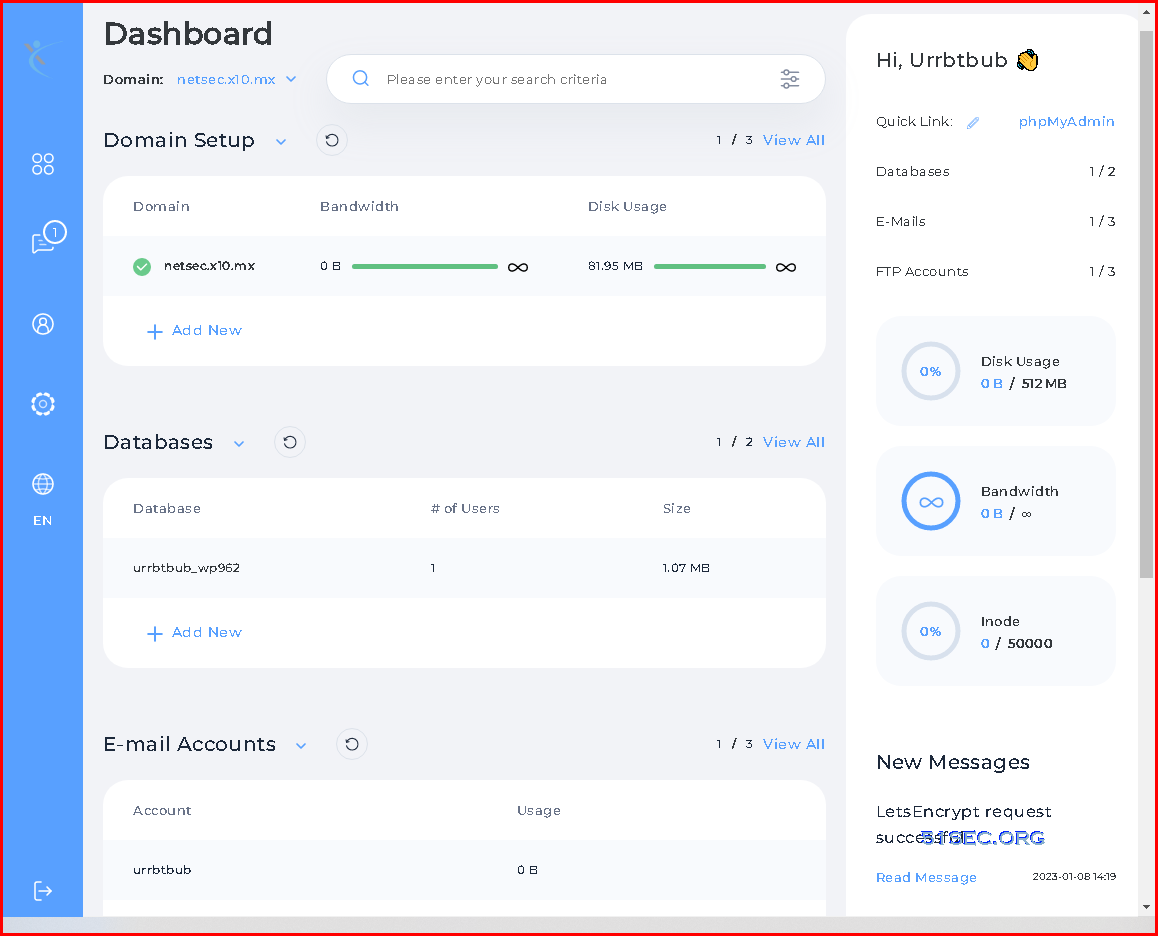
3 Dashboard


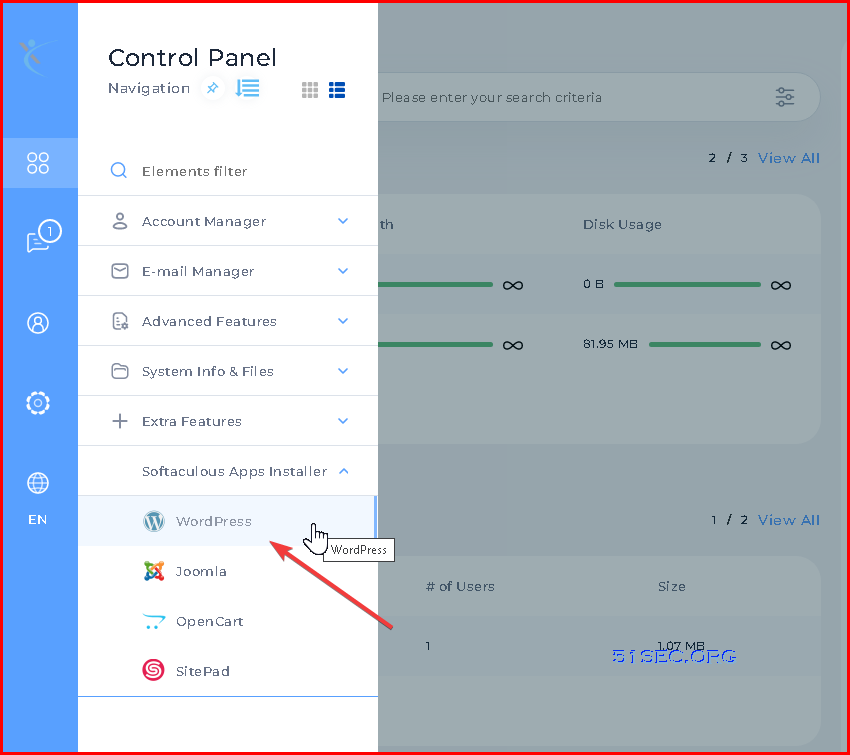
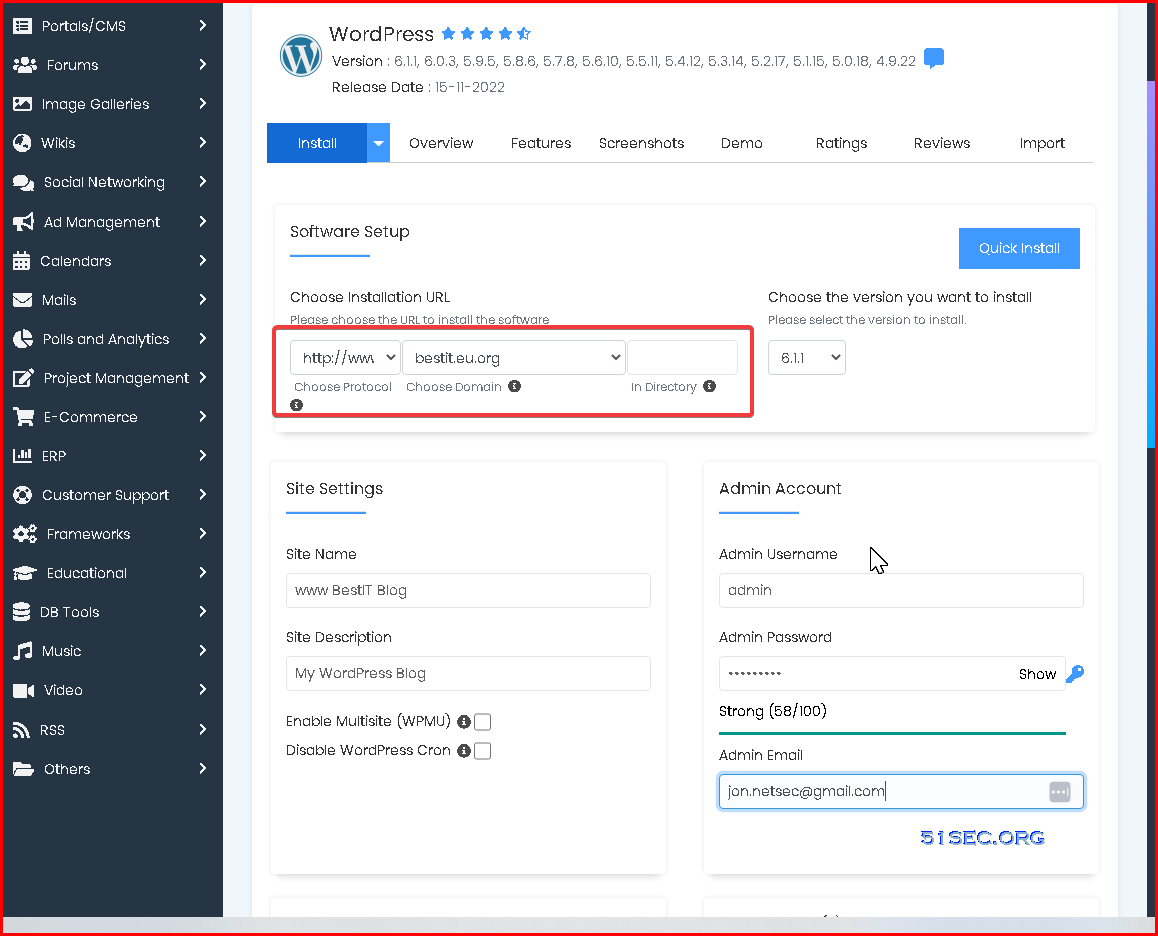
4 Install WordPress


5 Click install, in less than 10 seconds, you should be able to get your Wordpress site up and running.


Enable SSL with integrating with Cloudflare
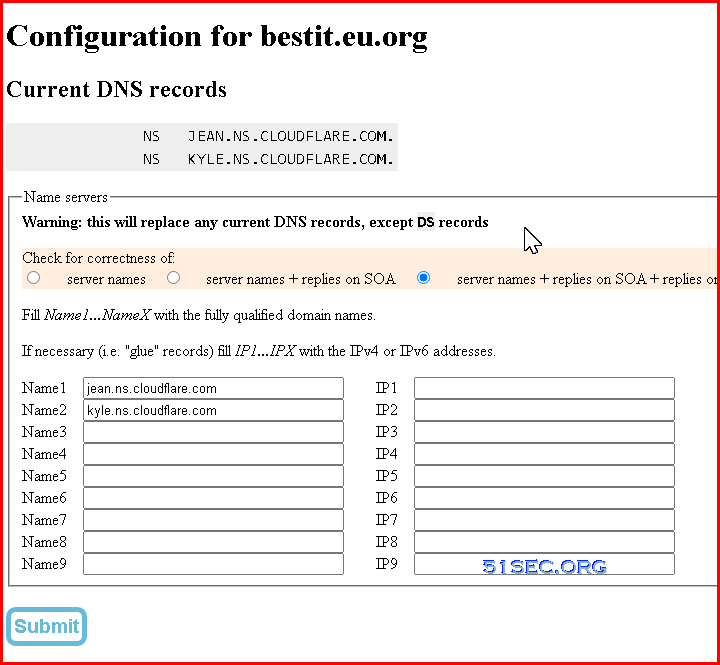
If you are using third party company, such as Cloudflare, to manage your DNS, here are the steps you can take to enable SSL for your website.

In following steps, I am assuming your domain registrar has point your domain to cloudflare's nameservers as show below. 


1 Generate Origin Server Certificate from Cloudflare
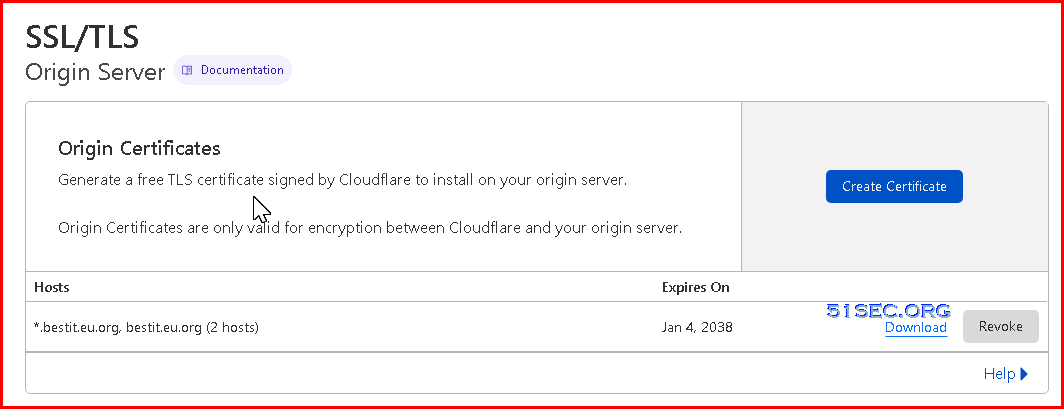

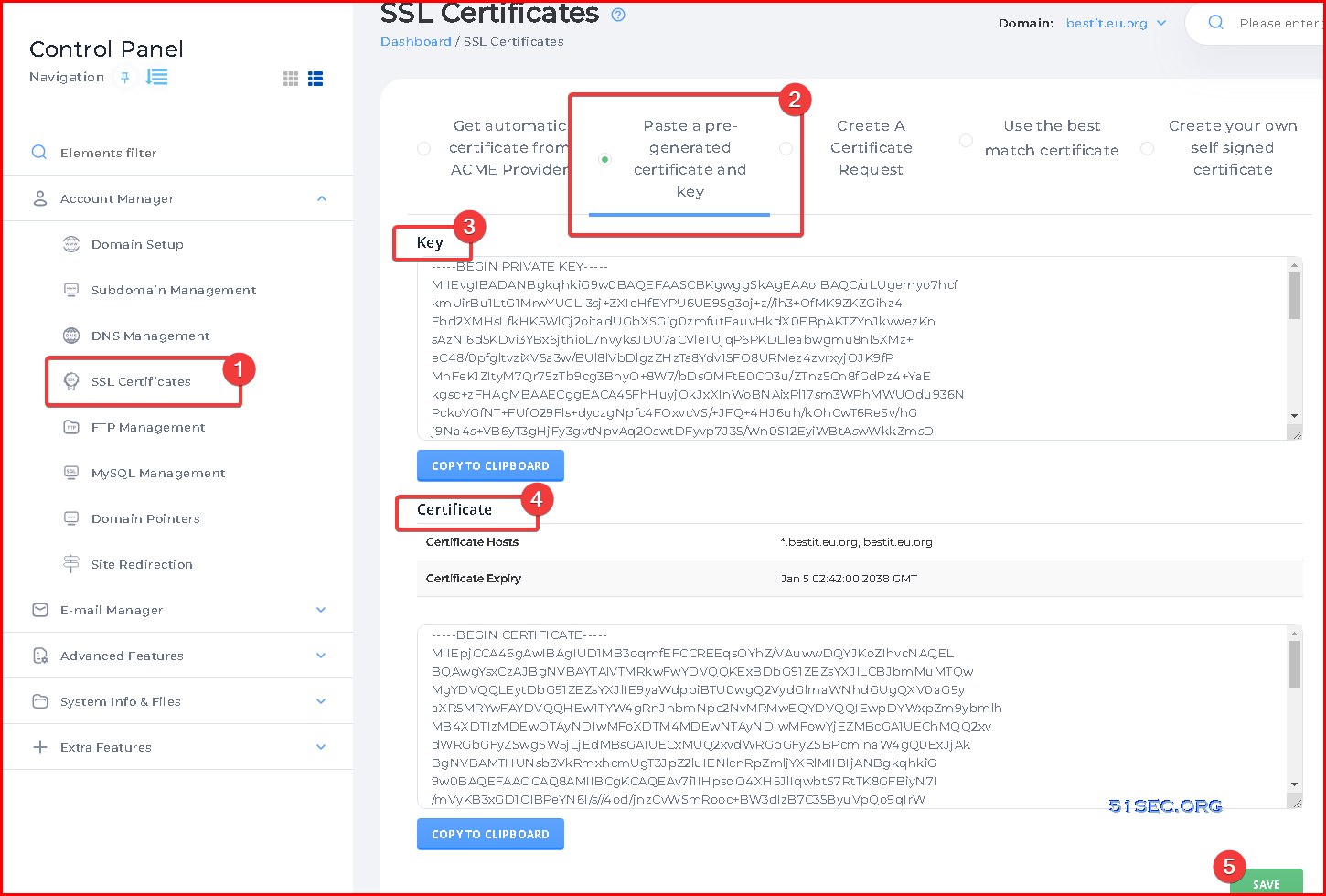
2 Copy / Paste Key and Certificate into x10Hosting's DirectAdmin SSL Page

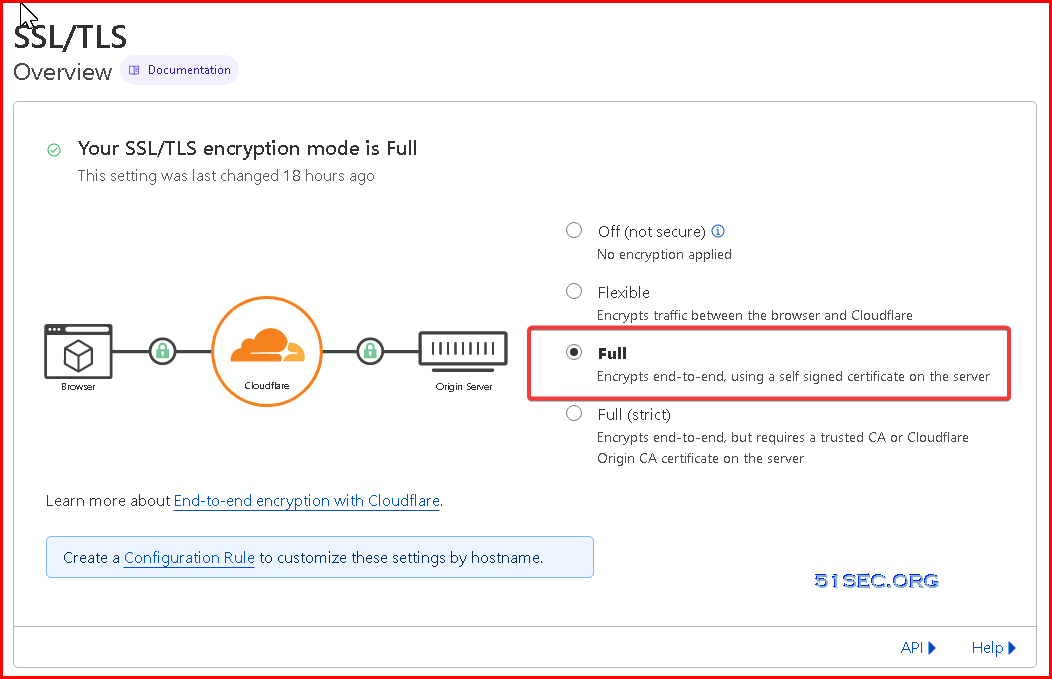
3 Enable Full SSL/TLS encryption mode for our website.


4 Https access will be automatically enabled if you enabled Force SSL with https redirect.


Enable SSL Using DirectAdmin to Manage DNS
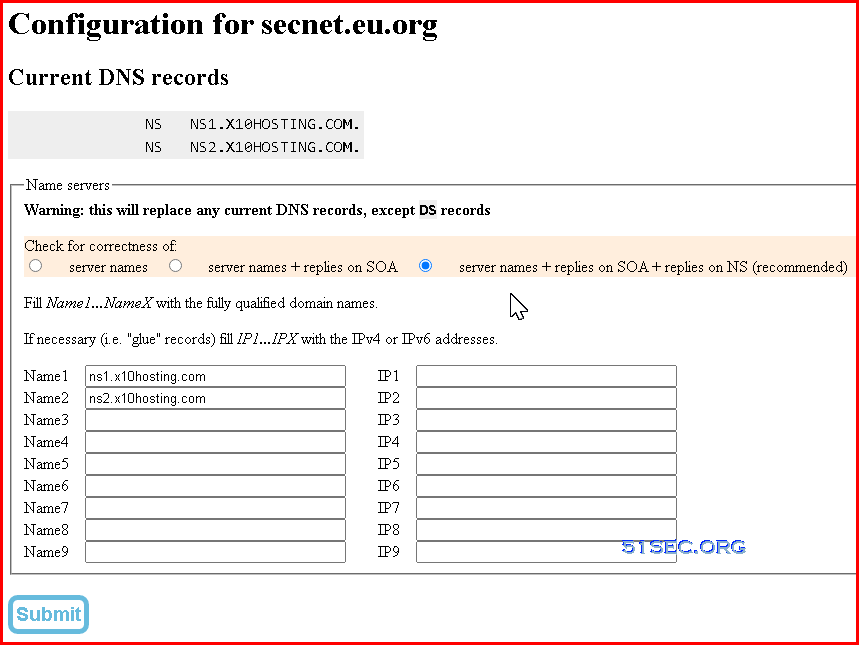
If your domain registrar directly point the domain to x10hosting's nameservers, you can use following steps to activate SSL on your website.

1 Depending on your domain registrar, the configuration page is different.
Here is an example for eu.org, which shows domain secnet.eu.org has pointed to x10hosting's nameservers. 
If you just changed it, it will take a couple of hours to broadcast this change to all DNS root servers. 


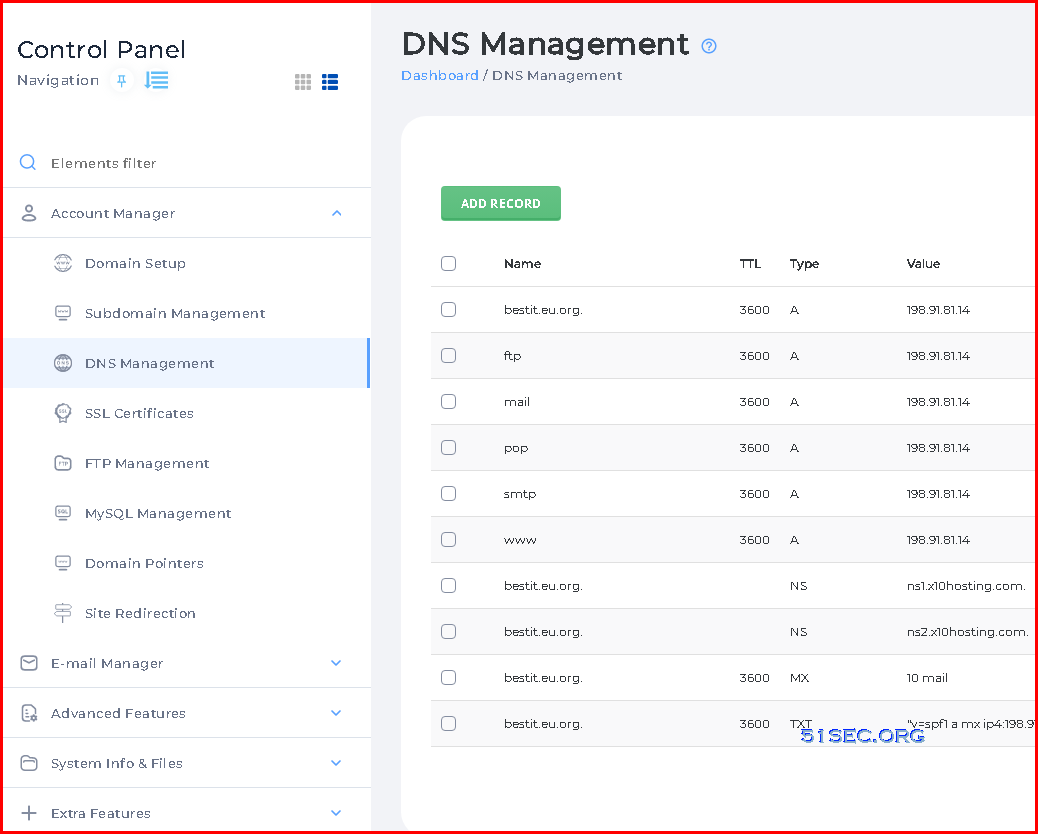
2 Check x10hosting's DirectAdmin's DNS Management page
By default, it will be populated with some typical A records for you already, no matter if it is used to manage your DNS records. 


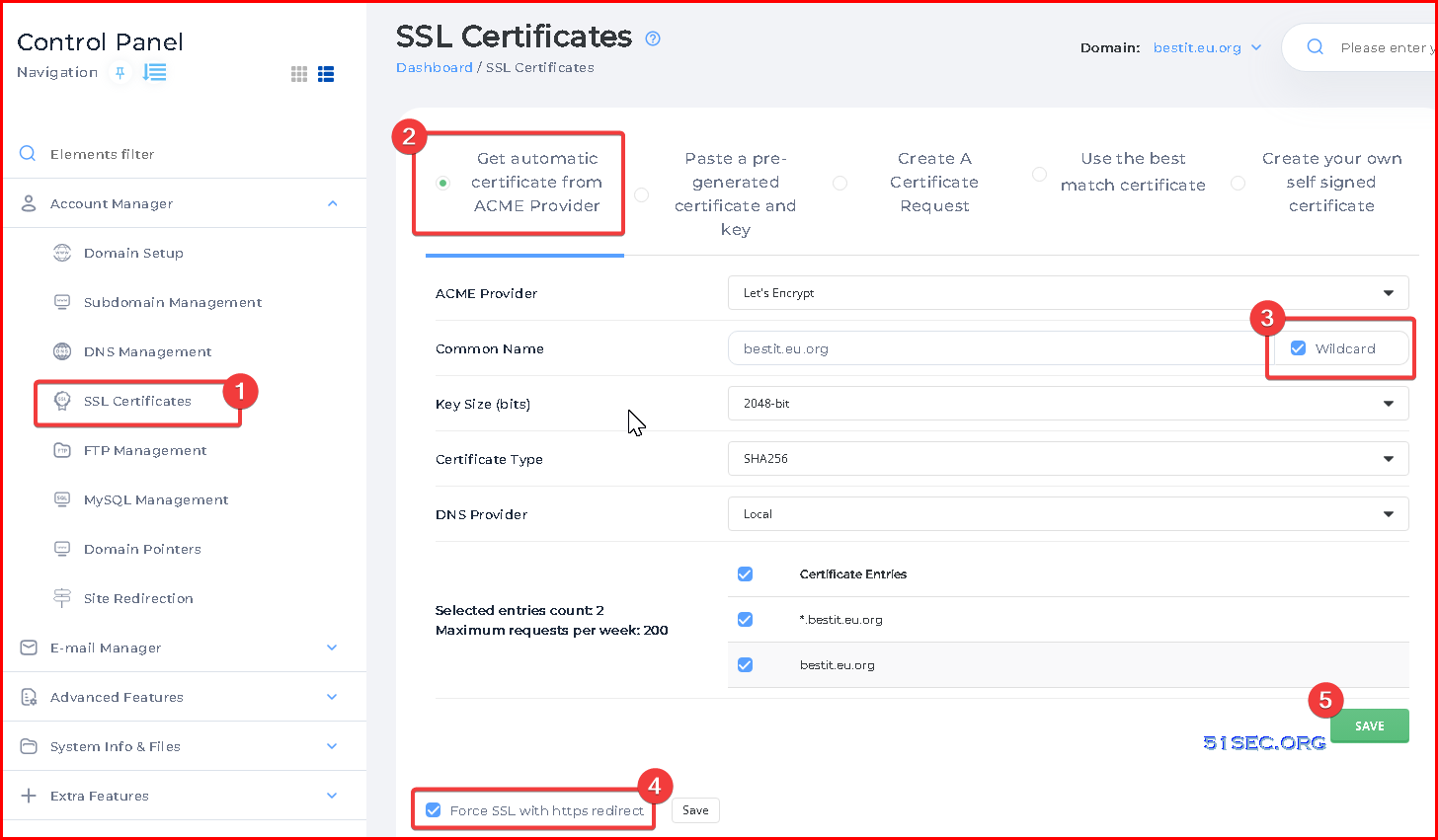
3 Generate your SSL certificate for your Wordpress website


4 Https access testing. 


Videos


References


via Blogger http://blog.51sec.org/2023/01/free-hosting-x10hosting-wordpress-in-5.html
January 09, 2023 at 03:34PM Blog
2 Comments
high value link
2/2/2025 21:31:14

It's worth looking here

Reply
link repeat link
2/2/2025 21:32:27

Link correction

Reply


Leave a Reply.

    Categories

    All
    Architecture
    Blog
    Checkpoint
    Cisco
    Cloud
    CyberArk
    F5
    Fortigate
    Guardium
    Juniper
    Linux
    Network
    Others
    Palo Alto
    Qualys
    Raspberry Pi
    Security
    SIEM
    Software
    Vmware
    VPN
    Wireless

    Archives

    March 2024
    February 2024
    January 2024
    December 2023
    November 2023
    October 2023
    September 2023
    August 2023
    July 2023
    June 2023
    May 2023
    April 2023
    March 2023
    February 2023
    January 2023
    December 2022
    November 2022
    October 2022
    September 2022
    August 2022
    July 2022
    June 2022
    May 2022
    April 2022
    March 2022
    February 2022
    January 2022
    December 2021
    November 2021
    October 2021
    September 2021
    August 2021
    July 2021
    June 2021
    May 2021
    April 2021
    March 2021
    February 2021
    January 2021
    December 2020
    November 2020
    October 2020
    September 2020
    August 2020
    July 2020
    October 2019
    September 2019
    June 2019
    July 2018
    May 2018
    December 2017
    August 2017
    April 2017
    March 2017
    January 2017
    December 2016
    November 2016
    October 2016
    September 2016
    August 2016
    July 2016
    June 2016
    May 2016
    April 2016
    March 2016
    February 2016
    January 2016
    December 2015
    November 2015
    October 2015
    September 2015
    August 2015
    July 2015
    June 2015
    May 2015
    April 2015
    March 2015

    Print Page:

    RSS Feed

    Email Subscribe
Powered by Create your own unique website with customizable templates.
  • Blog
  • Sitemap
    • Categories
  • Contact
  • About
  • Resources
  • Tools
  • 51sec.org