
Fortigate firewall upgrade to different model can become a pain when you are not sure how to migration configuration. Fortinet provides a tool which name is FortiConverter. Here are some features from it website page;
Actually in most case, you will just need to change the configuration as instructed by docs listing at the reference section. In this post, I will use Fortigate 30D upgraded to 60D as an example to demonstrate steps.
Step 1 : Make sure the target device's firmware version as close as to the source's version
It does not need to be same version and build number. Fortigate 30D is using 5.0.0 and target Fortigate 60D is 5.0.2.
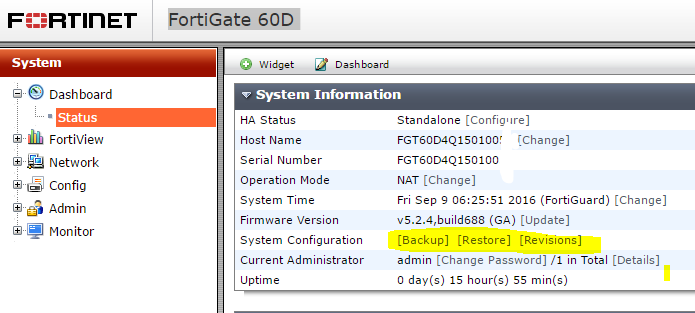
Step 2: Save Target Fortigate 60D configuration to a file
You may want to reset target machine to factory default configuration. But it is not mandatory requirement since you will only need first small section configuration to be copied over.
By clicking Backup from Dashboard Status page, you will be prompted to save configuration to assigned place.
Step 3: Modify Source Fortigate 30D's configuration
3.1 Copy over #config-version part from 60D file to 30D's as show following screenshot
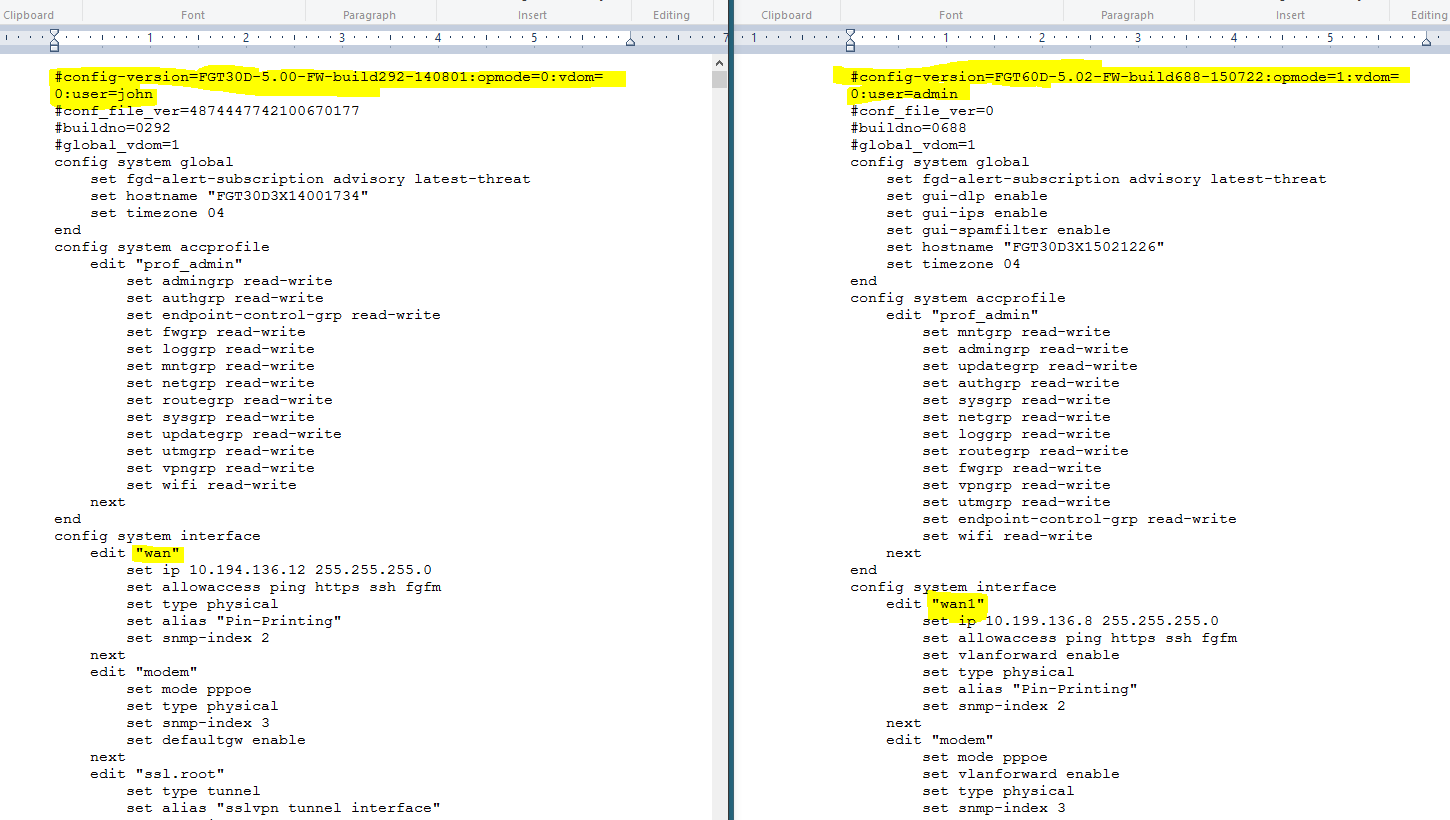
3.2 Replace Interface name
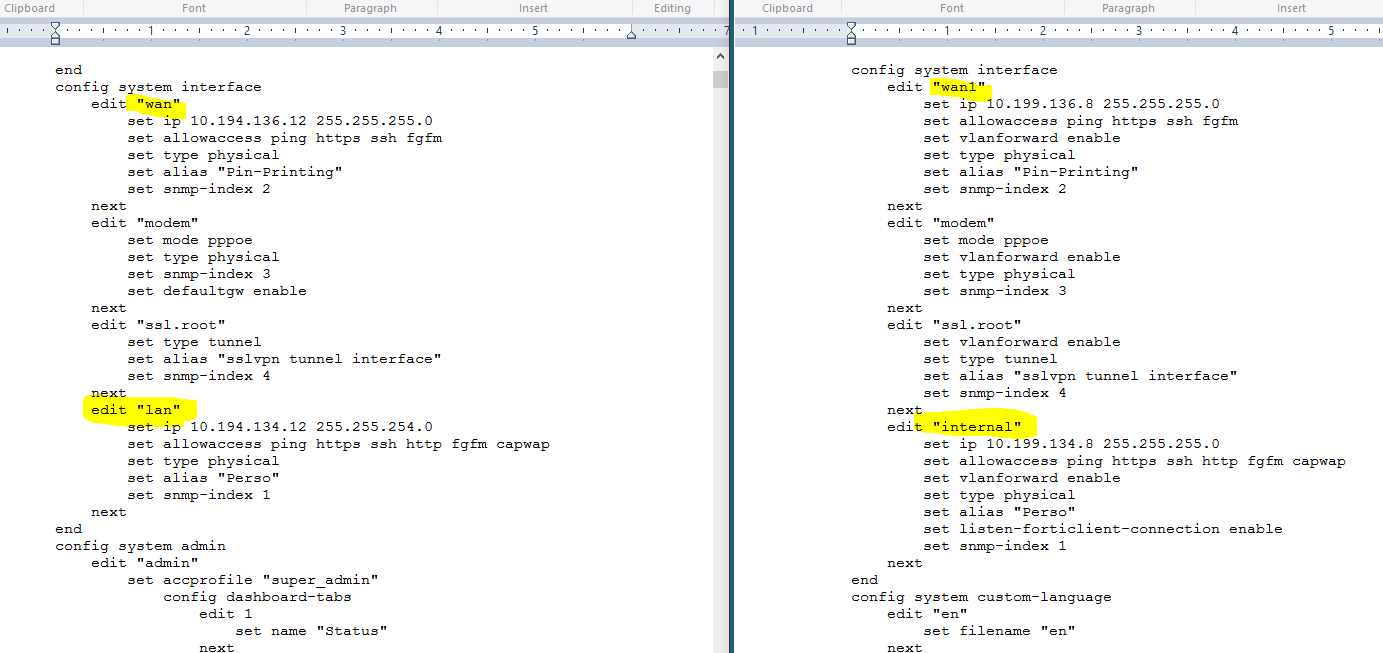
In this case, Fortigate 30D is using 'wan' and 'lan' as interface name, but 60D is using 'wan1' and 'internal'. Use replace function to replace 'wan' with 'wan1' and 'lan' with ‘internal’.
Verify all replacement has been completed correctly by searching those interface names.
4. Restore new configuration file into 60D
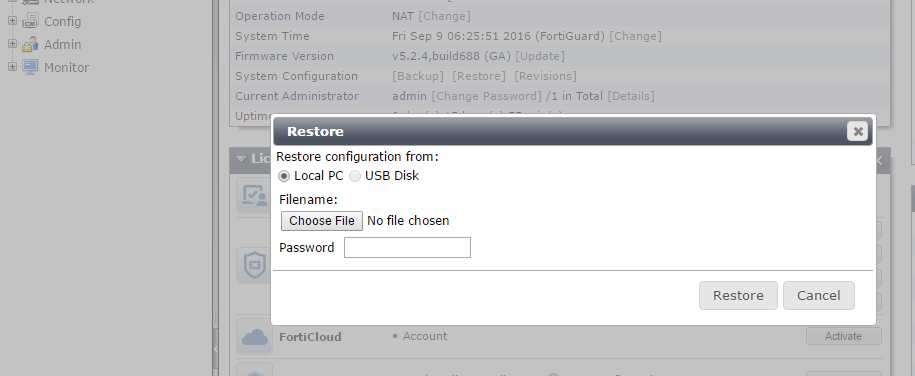
From Dashboard's status page , you will have option to restore configuration from a saved file.
Reboot the device and check all functions as much as you can, such as Interface , routes, policies, virtual ip etc.
Reference:
1. Technical Note - How to upgrade from one FortiGate unit to another and keep the same configuration
2. SysAdmin’s Notebook - Transferring a configuration file from one model to another
-

- Multi-vendor Support - Conversion from Check Point, Cisco, Juniper, Alcatel-Lucent, Palo Alto Networks, and SonicWall. A single tool converts configurations from all supported vendors.
- FortiGate to FortiGate - Can migrate configurations between FortiGate devices to minimize the risk associated with network upgrades. Facilitates migration to new hardware models from legacy FortiGate devices. This feature, including conversion output, is enabled with the trial license.
- Standardized Conversion - Configuration conversion is performed according to conversion rules and policy review and tuning is done after the conversion, prior to generating the output. Human error in the conversion process is minimized.
- Full Support - A valid FortiConverter license entitles users to direct engineering support and private builds to support their complex conversion projects.
Actually in most case, you will just need to change the configuration as instructed by docs listing at the reference section. In this post, I will use Fortigate 30D upgraded to 60D as an example to demonstrate steps.
Step 1 : Make sure the target device's firmware version as close as to the source's version
It does not need to be same version and build number. Fortigate 30D is using 5.0.0 and target Fortigate 60D is 5.0.2.
Step 2: Save Target Fortigate 60D configuration to a file
You may want to reset target machine to factory default configuration. But it is not mandatory requirement since you will only need first small section configuration to be copied over.
By clicking Backup from Dashboard Status page, you will be prompted to save configuration to assigned place.

Step 3: Modify Source Fortigate 30D's configuration
3.1 Copy over #config-version part from 60D file to 30D's as show following screenshot

3.2 Replace Interface name
In this case, Fortigate 30D is using 'wan' and 'lan' as interface name, but 60D is using 'wan1' and 'internal'. Use replace function to replace 'wan' with 'wan1' and 'lan' with ‘internal’.
Verify all replacement has been completed correctly by searching those interface names.


Reboot the device and check all functions as much as you can, such as Interface , routes, policies, virtual ip etc.
Reference:
1. Technical Note - How to upgrade from one FortiGate unit to another and keep the same configuration
2. SysAdmin’s Notebook - Transferring a configuration file from one model to another

 RSS Feed
