
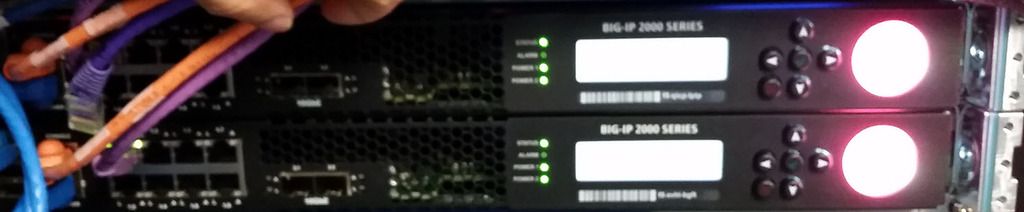
 Two BIG-IP 2200s boxes arrived into the office today for new web service project with multiple rack kits are inside. Two additional power supplies come in with another two small boxes.
The rack rail mounting kit make rack installation much easier , just like mounting a server.
The entry-level BIG-IP 2000 series provides a high-performance ADC platform for organizations wanting to add integrated application delivery to their networks, with options for advanced security.
I have a couple of related posts in this blog:
- F5 Big IP 2000s Appliance Initial Configuration
- F5 BigIP LTM v11.5.3 Virtual Appliance Configuration - Part 1
- F5 BigIP LTM v11.5.3 Virtual Appliance Configuration - Part 2
- F5 BigIP LTM Basic Configuration Steps
- F5 Big-IP 2500 Appliance System Initial Configuration
- Download and Install F5 BIG-IP v11.x / Virtual Edition 11.3.x into Vmware Workstation
Both devices have been mounted into rack side by side.

1. Log into Appliance from Console
Kernel 2.6.32-279.19.1.el6.f5.x86_64 on an x86_64
localhost.localdomain login: root
Password: default
[root@localhost:NO LICENSE:Standalone] config #
2. Check BigIP Hardware Model and Platform
[root@localhost:NO LICENSE:Standalone] config # tmsh
root@(localhost)(cfg-sync Standalone)(NO LICENSE)(/Common)(tmos)# show /sys hardware

Sys::Hardware
Chassis Fan Status
  Index  Status  Low Limit(rpm)  Fan Speed(rpm)
  1      up      1000            12200
  2      up      1000            12000
  3      up      1000            11806
  4      up      1000            12000

Chassis Information
  Maximum MAC Count  2
  Registration Key   -

Chassis Power Supply Status
  Index  Status  Current
  1      up      AC
  2      up      AC

Chassis Temperature Status
  Index  Lo Limit(C)  Temp(degC)  Hi Limit(C)  Location
  1      0            26          43           Main board inlet IC temperature
  2      0            26          59           Main board outlet IC temperatur
  3      0            30          65           Power supply #1 meas. inlet tem
  4      0            33          65           Power supply #2 meas. inlet tem
  5      0            35          59           Main board near power supplies

CPU Status
  Index  Temp(degC)  Fan Speed(rpm)
  1      36          12000

Hardware Version Information
  Name        cpld
  Type        pic
  Model       F5 CPLD
  Parameters  --                   --
              version              0xa

  Name        cpus
  Type        base-board
  Model       Intel(R) Core(TM) i3- CPU @ 2.00GHz
  Parameters  --                   --
              cache size           3072 KB
              cores                4  (cores/cpu:2)
              cpu MHz              2000.000

  Name        lop
  Type        pic
  Model       F5
  Parameters  --                   --
              Boot loader version  1.04
              Firmware version     4.08

  Name        mainboard
  Type        base-board
  Model       F5
  Parameters  --                   --
              Assembly serial      pca0280za138
              Board type           N/A
              Level 400 part       PCA-0280-09 REV B
              PCN level            PCA-0280-09 REV B
              Revision             N/A

  Name        psu1
  Type        psu
  Model       SPAFFIV-03G
  Parameters  --                   --
              Location             1
              Manufacturer         BEL POWER
              Revision             07
              Serial number        C0481

  Name        psu2
  Type        psu
  Model       SPAFFIV-03G
  Parameters  --                   --
              Location             2
              Manufacturer         BEL POWER
              Revision             07
              Serial number        C0456

  Name        qa0
  Type        coproc
  Model       Cave Creek SKU3 C1 Crypto/Compression Coprocessor
  Parameters  --                   --
              version              QA API: 1.1.0-62, FW: 1.1.1


Platform
  Name           BIG-IP 2200
  BIOS Revision  OBJ-0433-xx Build: 2.04.010.0 07/21/2015
  Base MAC       f4:11:63:0c:a6:00

System Information
  Type                       C112
  Chassis Serial             f5-qicp-lflf
  Level 200/400 Part         200-0356-06 REV N
  Switchboard Serial
  Switchboard Part Revision
  Host Board Serial          pca0280za128
  Host Board Part Revision

root@(localhost)(cfg-sync Standalone)(NO LICENSE)(/Common)(tmos)#
3. Configuring a management IP address
- using the LCD panel
You can use the LCD panel to configure the management IP address. The management IP address enables you to access the BIG-IP® Configuration utility to configure other aspects of the product, such as the product license, VLANs, and trunks. The options are located in the System menu.
Note: When using the LCD panel to configure the unit, be sure to use the Commit option to save all settings.
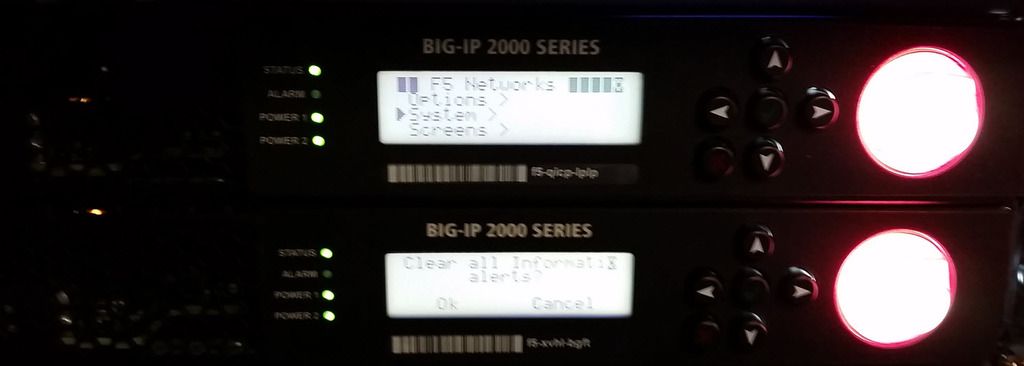
1. Press the X button to activate Menu mode for the LCD.
2. Press the Check button to select System.
3. To configure the management IP address using DHCP:
a) Press the Check button to select DHCP.
b) Press the Check button to select enabled.
4. To configure the management IP address manually:
a) Press the Check button to select Management.
b) Press the Check button to select Address Type, and then press the Check button again to select
either IPv4 or IPv6.
c) Use the arrow keys to select Mgmt IP and press the Check button.
d) Use the arrow keys to configure the management IP address.
e) Use the arrow keys to select Prefix Length and press the Check button.
f) Use the arrow keys to configure the length of the routing prefix for the IPv4 or IPv6 management
IP address.
g) Use the arrow keys to select Mgmt Gateway and press the Check button.
h) Use the arrow keys to configure the default route for the management interface.
5. Use the arrow keys to select Commit and press the Check button.
- Using TMSH Command
By default, Mgmt interface has been configured ip as 192.1681.245/24. We will change it to 10.94.200.31/24 from command line.
[root@localhost:NO LICENSE:Standalone] config # ifconfig
eth0      Link encap:Ethernet  HWaddr F4:15:63:07:6C:01
          inet6 addr: fe80::f615:63ff:fe07:6c01/64 Scope:Link
          UP BROADCAST RUNNING MULTICAST  MTU:1500  Metric:1
          RX packets:3459551 errors:0 dropped:0 overruns:0 frame:0
          TX packets:1807450 errors:0 dropped:0 overruns:0 carrier:0
          collisions:0 txqueuelen:1000
          RX bytes:252627843 (240.9 MiB)  TX bytes:132901778 (126.7 MiB)
          Interrupt:18

http-tunnel Link encap:Ethernet  HWaddr F4:15:63:07:6C:02
          inet6 addr: fe80::f615:63ff:fe07:6c02/64 Scope:Link
          UP POINTOPOINT RUNNING NOARP MULTICAST  MTU:1500  Metric:1
          RX packets:0 errors:0 dropped:0 overruns:0 frame:0
          TX packets:0 errors:0 dropped:0 overruns:0 carrier:0
          collisions:0 txqueuelen:0
          RX bytes:0 (0.0 b)  TX bytes:0 (0.0 b)

lo        Link encap:Local Loopback
          inet addr:127.0.0.1  Mask:255.255.255.0
          inet6 addr: ::1/128 Scope:Host
          UP LOOPBACK RUNNING  MTU:16436  Metric:1
          RX packets:3275888 errors:0 dropped:0 overruns:0 frame:0
          TX packets:3275888 errors:0 dropped:0 overruns:0 carrier:0
          collisions:0 txqueuelen:0
          RX bytes:268792151 (256.3 MiB)  TX bytes:268792151 (256.3 MiB)

mgmt      Link encap:Ethernet  HWaddr F4:15:63:07:6C:01
          inet addr:192.168.1.245  Bcast:192.168.1.255  Mask:255.255.255.0
          inet6 addr: fe80::f615:63ff:fe07:6c01/64 Scope:Link
          UP BROADCAST RUNNING MULTICAST  MTU:1500  Metric:1
          RX packets:3456315 errors:0 dropped:0 overruns:0 frame:0
          TX packets:1806173 errors:0 dropped:0 overruns:0 carrier:0
          collisions:0 txqueuelen:0
          RX bytes:187445901 (178.7 MiB)  TX bytes:125352904 (119.5 MiB)

mgmt.1    Link encap:Ethernet  HWaddr F4:15:63:07:6C:01
          inet addr:127.2.0.2  Bcast:127.2.0.255  Mask:255.255.255.0
          inet6 addr: fe80::f615:63ff:fe07:6c01/64 Scope:Link
          UP BROADCAST RUNNING MULTICAST  MTU:1500  Metric:1
          RX packets:3405261 errors:0 dropped:0 overruns:0 frame:0
          TX packets:1806165 errors:0 dropped:0 overruns:0 carrier:0
          collisions:0 txqueuelen:0
          RX bytes:184354435 (175.8 MiB)  TX bytes:125352472 (119.5 MiB)

mgmt_bp   Link encap:IPIP Tunnel  HWaddr
          inet addr:127.3.0.0  Mask:255.255.255.255
          UP RUNNING NOARP  MTU:1480  Metric:1
          RX packets:0 errors:0 dropped:0 overruns:0 frame:0
          TX packets:0 errors:8 dropped:0 overruns:0 carrier:8
          collisions:0 txqueuelen:0
          RX bytes:0 (0.0 b)  TX bytes:0 (0.0 b)

pf1-1     Link encap:Ethernet  HWaddr F4:15:63:07:6C:02
          inet6 addr: fe80::f615:63ff:fe07:6c02/64 Scope:Link
          UP BROADCAST RUNNING PROMISC MULTICAST  MTU:9198  Metric:1
          RX packets:0 errors:0 dropped:0 overruns:0 frame:0
          TX packets:0 errors:0 dropped:0 overruns:0 carrier:0
          collisions:0 txqueuelen:1000
          RX bytes:0 (0.0 b)  TX bytes:0 (0.0 b)

pf1-2     Link encap:Ethernet  HWaddr F4:15:63:07:6C:03
          UP BROADCAST PROMISC MULTICAST  MTU:9198  Metric:1
          RX packets:0 errors:0 dropped:0 overruns:0 frame:0
          TX packets:0 errors:0 dropped:0 overruns:0 carrier:0
          collisions:0 txqueuelen:1000
          RX bytes:0 (0.0 b)  TX bytes:0 (0.0 b)

pf1-3     Link encap:Ethernet  HWaddr F4:15:63:07:6C:04
          UP BROADCAST PROMISC MULTICAST  MTU:9198  Metric:1
          RX packets:0 errors:0 dropped:0 overruns:0 frame:0
          TX packets:0 errors:0 dropped:0 overruns:0 carrier:0
          collisions:0 txqueuelen:1000
          RX bytes:0 (0.0 b)  TX bytes:0 (0.0 b)

pf1-4     Link encap:Ethernet  HWaddr F4:15:63:07:6C:05
          UP BROADCAST PROMISC MULTICAST  MTU:9198  Metric:1
          RX packets:0 errors:0 dropped:0 overruns:0 frame:0
          TX packets:0 errors:0 dropped:0 overruns:0 carrier:0
          collisions:0 txqueuelen:1000
          RX bytes:0 (0.0 b)  TX bytes:0 (0.0 b)

pf1-5     Link encap:Ethernet  HWaddr F4:15:63:07:6C:06
          UP BROADCAST PROMISC MULTICAST  MTU:9198  Metric:1
          RX packets:0 errors:0 dropped:0 overruns:0 frame:0
          TX packets:0 errors:0 dropped:0 overruns:0 carrier:0
          collisions:0 txqueuelen:1000
          RX bytes:0 (0.0 b)  TX bytes:0 (0.0 b)

pf1-6     Link encap:Ethernet  HWaddr F4:15:63:07:6C:07
          UP BROADCAST PROMISC MULTICAST  MTU:9198  Metric:1
          RX packets:0 errors:0 dropped:0 overruns:0 frame:0
          TX packets:0 errors:0 dropped:0 overruns:0 carrier:0
          collisions:0 txqueuelen:1000
          RX bytes:0 (0.0 b)  TX bytes:0 (0.0 b)

pf1-7     Link encap:Ethernet  HWaddr F4:15:63:07:6C:08
          UP BROADCAST PROMISC MULTICAST  MTU:9198  Metric:1
          RX packets:0 errors:0 dropped:0 overruns:0 frame:0
          TX packets:0 errors:0 dropped:0 overruns:0 carrier:0
          collisions:0 txqueuelen:1000
          RX bytes:0 (0.0 b)  TX bytes:0 (0.0 b)

pf1-8     Link encap:Ethernet  HWaddr F4:15:63:07:6C:09
          UP BROADCAST PROMISC MULTICAST  MTU:9198  Metric:1
          RX packets:0 errors:0 dropped:0 overruns:0 frame:0
          TX packets:0 errors:0 dropped:0 overruns:0 carrier:0
          collisions:0 txqueuelen:1000
          RX bytes:0 (0.0 b)  TX bytes:0 (0.0 b)

pf2-1     Link encap:Ethernet  HWaddr F4:15:63:07:6C:0A
          UP BROADCAST PROMISC MULTICAST  MTU:9198  Metric:1
          RX packets:0 errors:0 dropped:0 overruns:0 frame:0
          TX packets:0 errors:0 dropped:0 overruns:0 carrier:0
          collisions:0 txqueuelen:1000
          RX bytes:0 (0.0 b)  TX bytes:0 (0.0 b)

pf2-2     Link encap:Ethernet  HWaddr F4:15:63:07:6C:0B
          inet6 addr: fe80::f615:63ff:fe07:6c0b/64 Scope:Link
          UP BROADCAST PROMISC MULTICAST  MTU:9198  Metric:1
          RX packets:0 errors:0 dropped:0 overruns:0 frame:0
          TX packets:0 errors:0 dropped:0 overruns:0 carrier:0
          collisions:0 txqueuelen:1000
          RX bytes:0 (0.0 b)  TX bytes:0 (0.0 b)

socks-tunnel Link encap:Ethernet  HWaddr F4:15:63:07:6C:02
          inet6 addr: fe80::f615:63ff:fe07:6c02/64 Scope:Link
          UP POINTOPOINT RUNNING NOARP MULTICAST  MTU:1500  Metric:1
          RX packets:0 errors:0 dropped:0 overruns:0 frame:0
          TX packets:0 errors:0 dropped:0 overruns:0 carrier:0
          collisions:0 txqueuelen:0
          RX bytes:0 (0.0 b)  TX bytes:0 (0.0 b)

tmm0      Link encap:Ethernet  HWaddr 00:98:76:54:32:10
          inet addr:127.1.1.1  Bcast:127.1.1.255  Mask:255.255.255.0
          inet6 addr: fe80::298:76ff:fe54:3210/64 Scope:Link
          UP BROADCAST RUNNING MULTICAST  MTU:9282  Metric:1
          RX packets:177684 errors:0 dropped:0 overruns:0 frame:0
          TX packets:179458 errors:0 dropped:0 overruns:0 carrier:0
          collisions:0 txqueuelen:0
          RX bytes:10929132 (10.4 MiB)  TX bytes:14980686 (14.2 MiB)
[root@localhost:NO LICENSE:Standalone] config # tmsh
root@(localhost)(cfg-sync Standalone)(NO LICENSE)(/Common)(tmos)# list /sys management-ip
sys management-ip 192.168.1.245/24 { }
root@(localhost)(cfg-sync Standalone)(NO LICENSE)(/Common)(tmos)# list /sys management-route
root@(localhost)(cfg-sync Standalone)(NO LICENSE)(/Common)(tmos)# create /sys management-ip 10.94.200.34/255.255.255.128
root@(localhost)(cfg-sync Standalone)(NO LICENSE)(/Common)(tmos)# list /sys management-ip
sys management-ip 10.94.200.31/25 { }
root@(localhost)(cfg-sync Standalone)(NO LICENSE)(/Common)(tmos)# create /sys management-route default gateway 10.94.200.26
root@(localhost)(cfg-sync Standalone)(NO LICENSE)(/Common)(tmos)# save /sys config partitions all
Saving running configuration...
  /config/bigip.conf
  /config/bigip_base.conf
  /config/bigip_user.conf
root@(localhost)(cfg-sync Standalone)(NO LICENSE)(/Common)(tmos)#
You can verify it through accessing https://10.94.200.34. Default username and password is admin / admin.

- Using Web GUI
Since default pre-configured ip is 192.168.1.245/24, you can change your machine to the same network 192.168.1.0/24 and access it through Web GUI. After log in , you can change it to the one you like:

You will have to change host name, root password, admin password as well before you can submit the change.


Other steps can be found from my previous post F5 Big-IP 2500 Appliance System Initial Configuration.
| Specifications | 2000s | 2200s |
|---|---|---|
| Intelligent Traffic Processing: |
L7 requests per second: 212K L4 connections per second: 75K L4 HTTP requests per second: 550K Maximum L4 concurrent connections: 5M Throughput: 5 Gbps L4/L7 |
L7 requests per second: 425K L4 connections per second: 150K L4 HTTP requests per second: 1.1M Maximum L4 concurrent connections: 5M Throughput: 5 Gbps L4/L7 |
| Hardware SSL: | Included: 2,000 TPS (2K keys) Maximum: 2,000 TPS (2K keys) 4 Gbps bulk encryption* |
Included: 4,000 TPS (2K keys) Maximum: 4,000 TPS (2K keys) 4 Gbps bulk encryption* |
| FIPS SSL: | N/A | N/A |
| Hardware DDoS Protection: | N/A | N/A |
| Hardware Compression: | N/A | Included: 4 Gbps Maximum: 4 Gbps |
| Software Compression: | Included: 2.5 Gbps Maximum: 2.5 Gbps |
N/A |
| Software Architecture: | 64-bit TMOS | 64-bit TMOS |
| On-Demand Upgradable: | Yes | N/A |
| Processor: | Intel dual core (total 4 hyperthreaded logical processing cores) |
Intel dual core (total 4 hyperthreaded logical processing cores) |
| Memory: | 8 GB | 8 GB |
| Hard Drive: | 500 GB | 500 GB |
| Gigabit Ethernet CU Ports: | 8 | 8 |
| Gigabit Fiber Ports (SFP): | Optional SFP (SX, LX, or copper) | Optional SFP (SX, LX, or copper) |
| 10 Gigabit Fiber Ports (SFP+): | 2 SR or LR (sold separately); Optional 10G copper direct attach |
2 SR or LR (sold separately); Optional 10G copper direct attach |
| 40 Gigabit Fiber Ports (QSFP+): | N/A | N/A |
| Power Supply: | One 400W included (80+ Platinum efficiency), dual power and DC options |
One 400W included (80+ Platinum efficiency), dual power and DC options |
| Typical Consumption: | 74W (single supply, 110V input)** | 74W (single supply, 110V input)** |
| Input Voltage: | 90–240 VAC +/- 10% auto switching, 50/60hz | 90–240 VAC +/- 10% auto switching, 50/60hz |
| Typical Heat Output: | 252 BTU/hour (single supply, 110V input)** | 252 BTU/hour (single supply, 110V input)** |
| Dimensions: | 1.75” (4.45 cm) H x 17” (43.18 cm) W x 21” (53.34 cm) D 1U industry standard rack-mount chassisn |
1.75” (4.45 cm) H x 17” (43.18 cm) W x 21” (53.34 cm) D 1U industry standard rack-mount chassis |
| Weight: | 20 lbs. (9.1 kg) (one power supply) | 20 lbs. (9.1 kg) (one power supply) |
| Operating Temperature: | 32° to 104° F (0° to 40° C) | 32° to 104° F (0° to 40° C) |
| Operational Relative Humidity: | 5 to 85% at 40° C | 5 to 85% at 40° C |
| Safety Agency Approval: | UL 60950-1 2nd Edition CAN/CSA C22.2 No. 60950-1-07 EN 60950-1:2006, 2nd Edition IEC 60950-1:2006, 2nd Edition Evaluated to all CB Countries |
UL 60950-1 2nd Edition CAN/CSA C22.2 No. 60950-1-07 EN 60950-1:2006, 2nd Edition IEC 60950-1:2006, 2nd Edition Evaluated to all CB Countries |
| Certifications/ Susceptibility Standards: |
EN 300 386 V1.5.1 (2010-10) EN 55022:2006 + A1:2007 EN 61000-3-2:2006 EN 61000-3-3:1995 + A1:2000 + A2:2005 EN 55024: 2010 USA FCC Class A |
EN 300 386 V1.5.1 (2010-10) EN 55022:2006 + A1:2007 EN 61000-3-2:2006 EN 61000-3-3:1995 + A1:2000 + A2:2005 EN 55024: 2010 USA FCC Class A |
Appendix 2:
Compatible BIG-IP Software Version Matrix for BIG-IP 2000s – 2200s
| Platform & BIG-IP Version | 12.0.0 | 11.6.0 | 11.5.3 | 11.5.2 | 11.5.1 | 11.5.0 | 11.4.1 | 11.4.0 | 11.3.0 | 11.2.1 |
|---|---|---|---|---|---|---|---|---|---|---|
| BIG-IP 2000s | X | X | X | X | X | X | X | X | X | X |
| BIG-IP 2200s | X | X | X | X | X | X | X | X | X | X |
Reference:

 RSS Feed
