
EUSERV IPv6-Only VPS Usage

via Blogger http://blog.51sec.org/2021/10/euserv-ipv6-only-vps-usage.html
October 02, 2021 at 08:50PM Network
This post is a continuous post for working on setting up my EUServ's IPv6-Only vps. It summarizes some of typical usages which I usually will do on normal VPS. Of course it can do more than what I put in this post. I will keep updating once I found some interesting usage for this small IPv6-Only VPS.
Related Post
VPS Benchmark
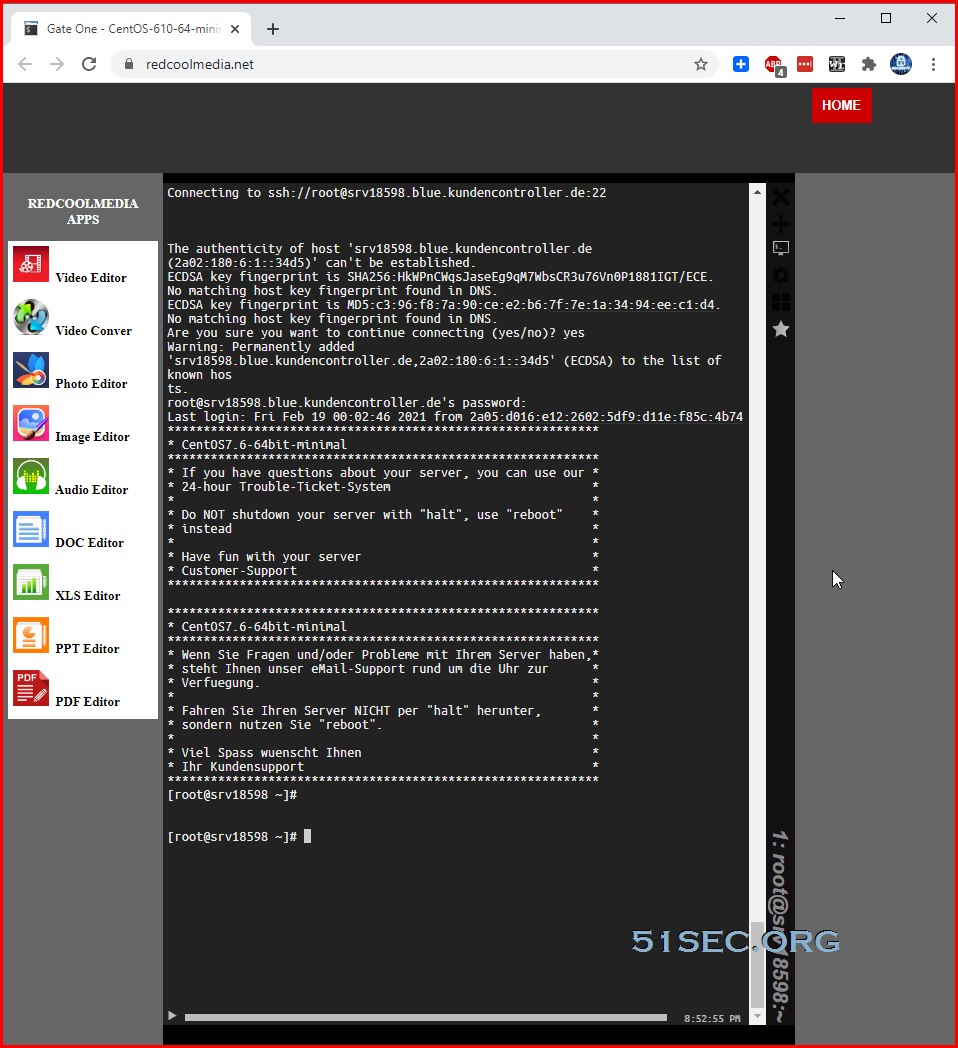
Once your EUserv's VPS is up and running, you can first SSH connect to the VPS which has both IPv4 and IPv6 address, then from there connect to EUServ's VPS IP or DNS name:
root@ip-172-31-23-170:~# ssh srv18598.blue.kundencontroller.de

root@ip-172-31-23-170:~# ssh 2a02:0180:0006:0001:0000:0000:0000:34d5
You also can use online terminal, such as sshgate from (https://www.redcoolmedia.net/sshgate/), to do this kind of connection.
After logged into EUServ's IPV6-Only VPS, you can issue following command to get benchmark script and run it. Please make sure you already configured resolv.conf file to have IPv4 outbound connection ability.
wget -qO- bench.sh | bash
Or
curl -Lso- bench.sh | bash
Results:
[root@srv18598 ~]# wget -qO- bench.sh | bash
----------------------------------------------------------------------
 CPU Model             : Intel(R) Xeon(R) CPU E3-1270 v3 @ 3.50GHz
 CPU Cores             : 1
 CPU Frequency         : 3713.235 MHz
 CPU Cache             : 8192 KB
 Total Disk            : 9.8 GB (1.8 GB Used)
 Total Mem             : 976 MB (40 MB Used)
 Total Swap            : 976 MB (0 MB Used)
 System uptime         : 21 days, 2 hour 31 min
 Load average          : 27.54, 23.66, 13.59
 OS                    : CentOS Linux release 7.9.2009 (Core)
 Arch                  : x86_64 (64 Bit)
 Kernel                : 4.20.8-1.el7.elrepo.x86_64
 TCP CC                : cubic
 Virtualization        : LXC
 Organization          : AS29432 TREX Regional Exchanges Oy
----------------------------------------------------------------------
 I/O Speed(1st run)    : 83.7 MB/s
 I/O Speed(2nd run)    : 74.8 MB/s
 I/O Speed(3rd run)    : 77.0 MB/s
 Average I/O speed     : 78.5 MB/s
----------------------------------------------------------------------
 Node Name        Upload Speed      Download Speed      Latency
 Speedtest.net    119.77 Mbps       15.41 Mbps          31.87 ms
 Beijing    CU    59.62 Mbps        3.20 Mbps           273.41 ms
 Shanghai   CT    17.59 Mbps        1.09 Mbps           256.54 ms
 Shanghai   CU    32.96 Mbps        4.27 Mbps           321.16 ms
 Guangzhou  CT    17.24 Mbps        0.99 Mbps           265.26 ms
 Guangzhou  CU    35.49 Mbps        1.37 Mbps           301.55 ms
 Shenzhen   CU    41.36 Mbps        2.86 Mbps           224.77 ms
 Hongkong   CN    42.09 Mbps        7.53 Mbps           258.92 ms
 Singapore  SG    17.14 Mbps        2.30 Mbps           380.55 ms
 Tokyo      JP    20.44 Mbps        3.94 Mbps           309.06 ms
----------------------------------------------------------------------
Install Nodequery Agent
Create a new server from NodeQuery website. It will give you a command to run on your EUServ's VPS.
[root@srv18598 ~]# wget -N --no-check-certificate https://raw.github.com/nodequery/nq-agent/master/nq-install.sh && bash nq-install.sh BeWc7a4jl8q7GRSgWfl2xrtPeKV9LGJf
--2021-02-19 02:55:46--  https://raw.github.com/nodequery/nq-agent/master/nq-install.sh
Resolving raw.github.com (raw.github.com)... 2001:67c:2b0:db32:0:1:b9c7:6e85, 2001:67c:2b0:db32:0:1:b9c7:6c85, 2001:67c:2b0:db32:0:1:b9c7:6d85, ...
Connecting to raw.github.com (raw.github.com)|2001:67c:2b0:db32:0:1:b9c7:6e85|:443... connected.
HTTP request sent, awaiting response... 301 Moved Permanently
Location: https://raw.githubusercontent.com/nodequery/nq-agent/master/nq-install.sh [following]
--2021-02-19 02:55:53--  https://raw.githubusercontent.com/nodequery/nq-agent/master/nq-install.sh
Resolving raw.githubusercontent.com (raw.githubusercontent.com)... 2001:67c:2b0:db32:0:1:b9c7:6e85, 2001:67c:2b0:db32:0:1:b9c7:6f85, 2001:67c:2b0:db32:0:1:b9c7:6c85, ...
Connecting to raw.githubusercontent.com (raw.githubusercontent.com)|2001:67c:2b0:db32:0:1:b9c7:6e85|:443... connected.
HTTP request sent, awaiting response... 200 OK
Length: 4781 (4.7K) [text/plain]
Saving to: ‘nq-install.sh’

100%[====================================================================================================================================================================>] 4,781       --.-K/s   in 0.1s

Last-modified header missing -- time-stamps turned off.
2021-02-19 02:55:53 (41.8 KB/s) - ‘nq-install.sh’ saved [4781/4781]

|
|   NodeQuery Installer
|   ===================
|
|   Downloading nq-agent.sh to /etc/nodequery
|
|   + 2021-02-19 02:56:00 URL:https://raw.githubusercontent.com/nodequery/nq-agent/master/nq-agent.sh [8537/8537] -> "/etc/nodequery/nq-agent.sh" [1]
|
|   Success: The NodeQuery agent has been installed
|
[root@srv18598 ~]#
Install BT Panel
curl -sSO http://download.bt.cn/install/new_install.sh && bash new_install.sh
[root@srv18598 ~]# curl -sSO http://download.bt.cn/install/new_install.sh && bash new_install.sh

+----------------------------------------------------------------------
| Bt-WebPanel 7.0 FOR CentOS/Ubuntu/Debian
+----------------------------------------------------------------------
| Copyright © 2015-2099 BT-SOFT(http://www.bt.cn) All rights reserved.
+----------------------------------------------------------------------
| The WebPanel URL will be http://SERVER_IP:8888 when installed.
+----------------------------------------------------------------------

Do you want to install Bt-Panel to the /www directory now?(y/n): y
References
via Blogger http://blog.51sec.org/2021/10/euserv-ipv6-only-vps-usage.html
October 02, 2021 at 08:50PM Network

 RSS Feed
