
I have been introduced a couple ways to display OneDrive's content, either using Cloudflare workers or using Heroku. You can find them from my previous posts:
- OneManager - Deploy a free OneDrive List App using Heroku and Cloudflare
- Fast OneDrive Index - A Serverless OneDrive Index Setup
Also I recorded videos to show the whole process:
Deploying OneManager to Heroku is simple and easy but there are two issues which will cause the OneManager will be down.
- New accounts receive 550 free dyno hours and you can verify your identity with a credit card for an additional 450 hours.
- The app will be put into idle mode automatically, after 30 minutes of inactivity. It will take 1-2 minutes to wake it up when it receives access activity.
To resolve those two issues, I developed following three steps to bypass them.
Demo site: https://myod.51sec.eu.org
Deploy Two OneManager into Two Different Heroku Accounts
Lets say, you created two Heroku accounts, and deployed two OneManager apps into them one by one with the process described in my previous post:
You got following two OneManager apps:
- https://ift.tt/3sHs0tB
- https://ift.tt/2RSZJ6B
They are exactly same except the app name and app url is different. Both apps have added same OneDrive disk in it.
The logic behind it to use two OneManager apps which not get us exceeding the 550 hours / month limits if we only activate one app every day and keep another one in idle.
Create a Cloudflare Workers to Rotate Access to Those Two Apps
// odd days
const SingleDay = 'myod1.herokuapp.com'
// plural days
const DoubleDay = 'myod2.herokuapp.com'
// Using CF to do porxy? true/false
const CFproxy = true

// Heroku only has 550 hours/month for free plan by default.
// This CloudFlare Workers code can let use different Heroku app based on odd or even number's day.
// Please change above code for your Heroku's app in either SingleDay or Doubleday parameter.

addEventListener('fetch', event => {
    let nd = new Date();
    if (nd.getDate()%2) {
        host = SingleDay
    } else {
        host = DoubleDay
    }
    if (!CFproxy) {
        let url=new URL(event.request.url);
        if (url.protocol == 'http:') {
            url.protocol = 'https:'
            response = Response.redirect(url.href);
            event.respondWith( response );
        } else {
            url.hostname=host;
            let request=new Request(url,event.request);
            event.respondWith( fetch(request) )
        }
    } else {
        event.respondWith( fetchAndApply(event.request) );
    }
})

async function fetchAndApply(request) {
    let response = null;
    let url = new URL(request.url);
    if (url.protocol == 'http:') {
        url.protocol = 'https:'
        response = Response.redirect(url.href);
        return response;
    }
    url.host = host;

    let method = request.method;
    let body = request.body;
    let request_headers = request.headers;
    let new_request_headers = new Headers(request_headers);

    new_request_headers.set('Host', url.host);
    new_request_headers.set('Referer', request.url);

    let original_response = await fetch(url.href, {
        method: method,
        body: body,
        headers: new_request_headers
    });

    response = new Response(original_response.body, {
        status: original_response.status,
        headers: original_response.headers
    })

    return response;
}
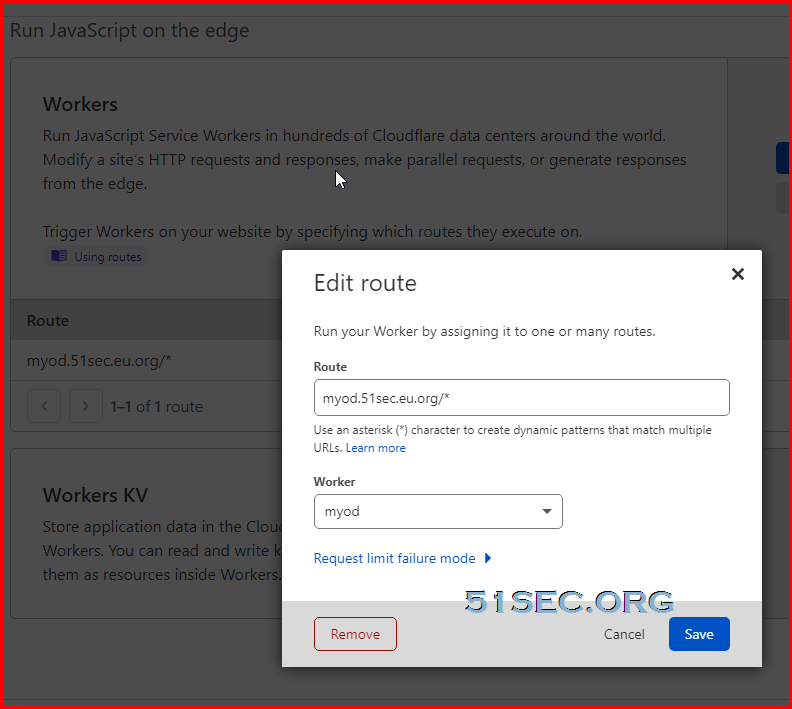
Of course, do not forget to set up a DNS A record (myod.51sec.eu.org) and workers route to it.
Create two CRON Job from www.easycron.com
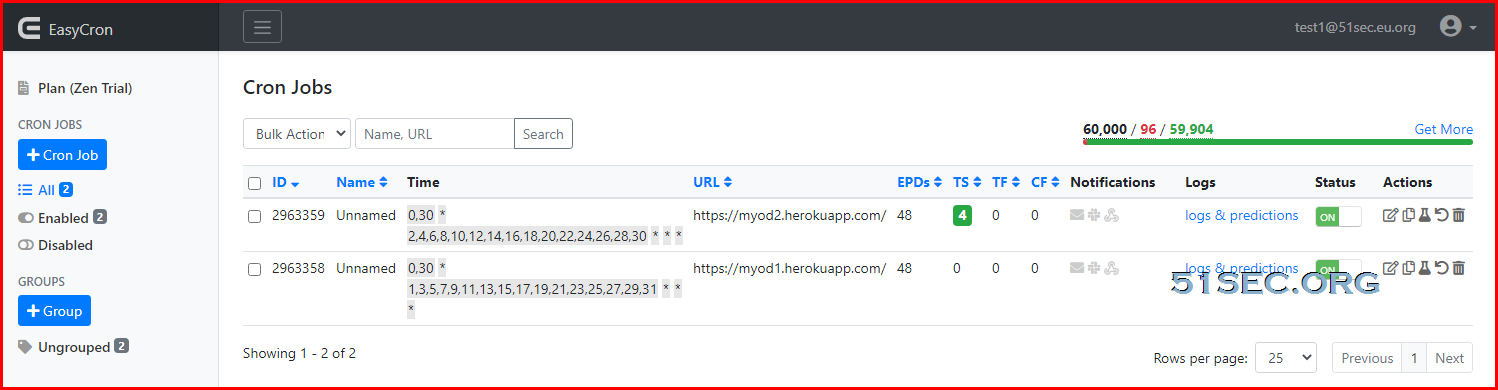
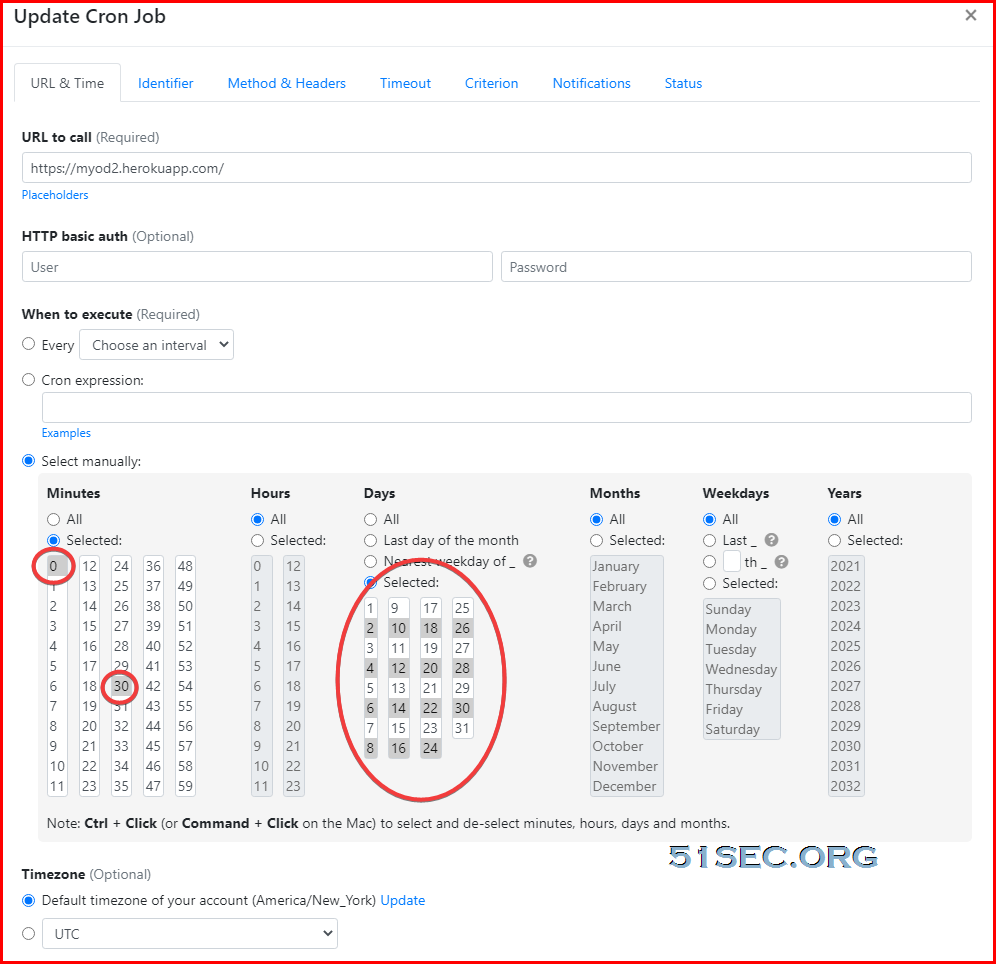
Done, that is all you will need to set up a OneManager at Heroku, which will make your site up all the time to end user when they using your Cloudflare dns to access your site.
References
via Blogger https://ift.tt/3eiq0mg
April 22, 2021 at 08:39PM Cloud

 RSS Feed
