Info Security Memo
  • Blog
  • Sitemap
    • Categories
  • Contact
  • About
  • Resources
  • Tools
  • 51sec.org

Build Confidence

Focusing on Information Security 

Info Security Notes

Deploy Docker Docker-Compose Portainer and NPM (Nginx Proxy Manager)

7/13/2022

0 Comments

 
Deploy Docker, Docker-Compose, Portainer and NPM (Nginx Proxy Manager)
In this tutorial, you will learn to install and configure Docker, Docker-compose, the Portainer container management solution on a Linux server and use it to create and manage Docker containers to run different apps. You will also learn to put these containers behind Nginx using the Nginx proxy manager.The Nginx proxy manager (NPM) is a reverse proxy management system running on Docker. NPM is based on an Nginx server and provides users with a clean, efficient, and beautiful web interface for easier management.


Install Docker & Docker-Compose

  • Docker Install documentation
  • Docker-Compose Install documentation

Ubuntu System:


apt install docker.io -y && apt install docker-compose


CentOS System:

Install Docker on CentOS 8:

curl -sSL https://get.docker.com/ | sh 
systemctl start docker 
systemctl enable docker

Install Docker Compose on CentOS 8:
Important: Check the latest version of docker-compose from https://docs.docker.com/compose/release-notes/ then modify following command with latest version number. (I got 1.29.2 for this installation)


curl -L "https://get.daocloud.io/docker/compose/releases/download/1.29.2/docker-compose-$(uname -s)-$(uname -m)" -o /usr/local/bin/docker-compose
chmod +x /usr/local/bin/docker-compose

ln -s /usr/local/bin/docker-compose /usr/bin/docker-compose


Notes: 
  • Install Docker, Docker-Compose, Portainer & Nginx on CentOS 8 & Ubuntu 20.04

Install Portainer


Commands to install Portainer:

[root@arm1 ~]# docker volume create portainer_data
portainer_data
[root@arm1 ~]# docker run -d -p 9000:9000 --name portainer --restart always -v /var/run/docker.sock:/var/run/docker.sock -v portainer_data:/data portainer/portainer-ce:latest

Access Portainer:
  • Make sure your VPS's 9000 port has been opened. 
Verify Portainer from Internet by visiting http://<VPS's Public IP>:9000

Install NPM


  1. Install Docker and Docker-Compose
  • Docker Install documentation
  • Docker-Compose Install documentation
  1. Create a docker-compose.yml file similar to this:
version: '3'
services:
  app:
    image: 'jc21/nginx-proxy-manager:latest'
    restart: unless-stopped
    ports:
      - '80:80'
      - '81:81'
      - '443:443'
    volumes:
      - ./data:/data
      - ./letsencrypt:/etc/letsencrypt

  1. Bring up your stack by running
docker-compose up -d

  1. Log in to the Admin UI

When your docker container is running, connect to it on port 81 for the admin interface. Sometimes this can take a little bit because of the entropy of keys.

http://127.0.0.1:81

Default Admin User:

Email:    [email protected]
Password: changeme

Immediately after logging in with this default user you will be asked to modify your details and change your password
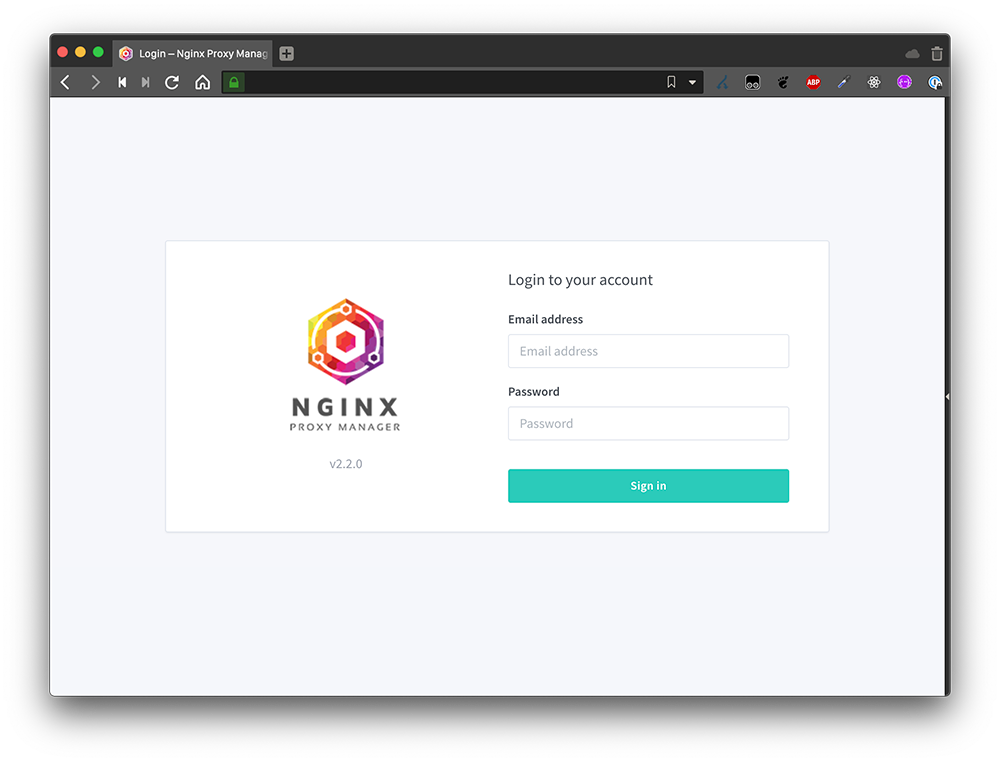
Log in and change password.


Access NPM


1 Open the URL https://<yourserverIP>:81 in your browser, and you will get the following screen. Enter the following default credentials to sign in.

Email address: [email protected] Password: changeme

2 Next, you will be immediately asked to set a name and an email address. Click the Save button, and you will be asked to create a new password. Click the Save button again to get started.
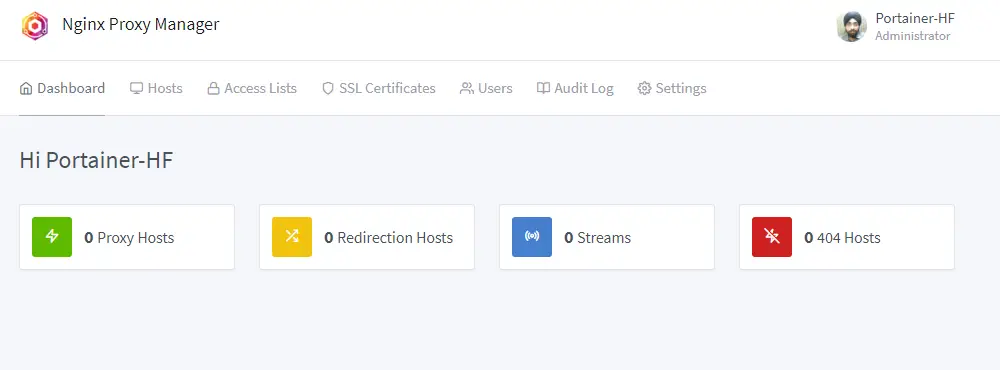
Nginx Proxy Manager Dashboard

3 Visit the Hosts >> Proxy Hosts and click the Add Proxy Host button.
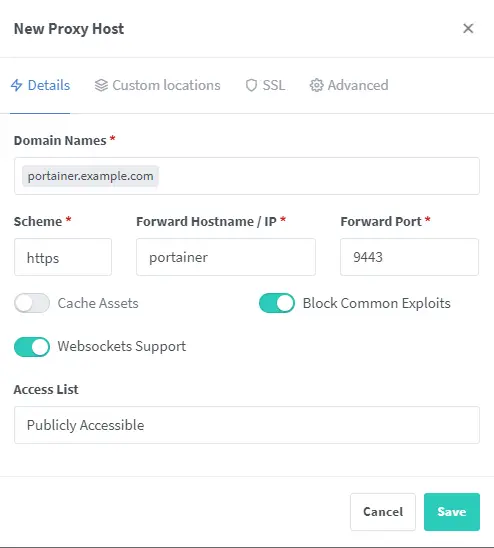
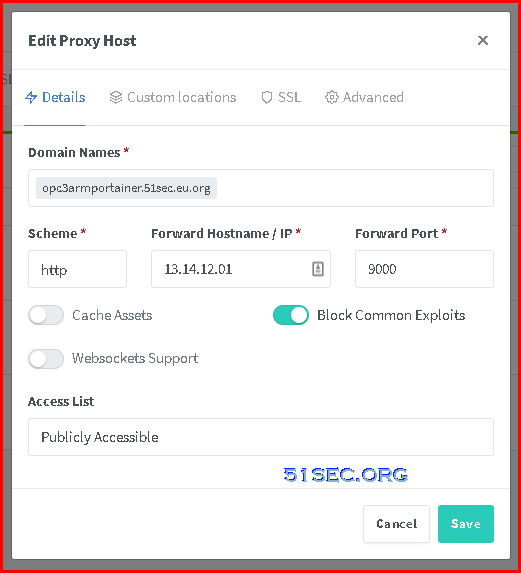
Add Portainer as Proxy Host

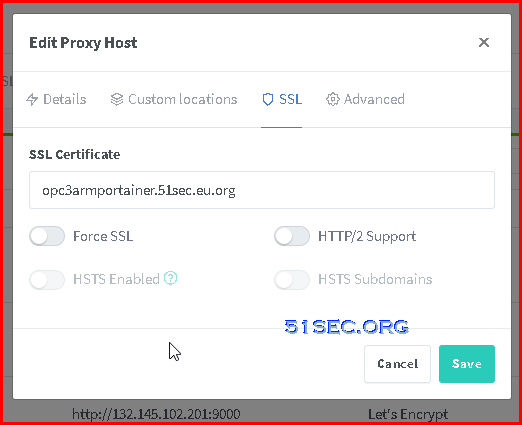
4 Enter the domain name as portainer.example.com. Choose the scheme as https. Enter the name of the container as the Forward Hostname and 9443 as the Forward port. Check the options Block Common Exploits and Websockets Support options.
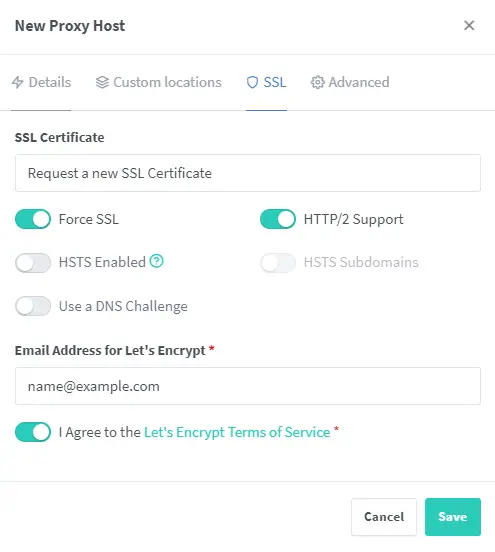
Portainer NPM SSL options


Configure NPM for Portainer


Configure NPM for NPM
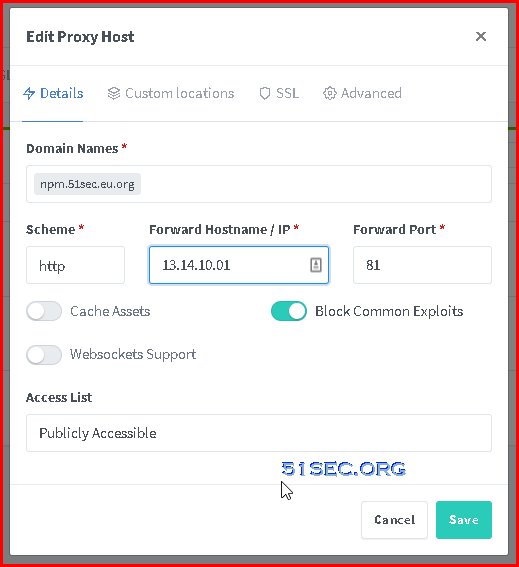


Videos


References

  • NPM Quick Setup
  • How to Install and Use Portainer for Docker management with Nginx Proxy Manager
  • How to setup the Nginx Proxy Manager Docker example
  • Install Docker, Docker-Compose, Portainer & Nginx on CentOS 8 & Ubuntu 20.04


via Blogger http://blog.51sec.org/2022/07/deploy-docker-docker-compose-portainer.html
July 13, 2022 at 02:53PM Docker
0 Comments


Leave a Reply.

    Categories

    All
    Architecture
    Blog
    Checkpoint
    Cisco
    Cloud
    CyberArk
    F5
    Fortigate
    Guardium
    Juniper
    Linux
    Network
    Others
    Palo Alto
    Qualys
    Raspberry Pi
    Security
    SIEM
    Software
    Vmware
    VPN
    Wireless

    Archives

    March 2024
    February 2024
    January 2024
    December 2023
    November 2023
    October 2023
    September 2023
    August 2023
    July 2023
    June 2023
    May 2023
    April 2023
    March 2023
    February 2023
    January 2023
    December 2022
    November 2022
    October 2022
    September 2022
    August 2022
    July 2022
    June 2022
    May 2022
    April 2022
    March 2022
    February 2022
    January 2022
    December 2021
    November 2021
    October 2021
    September 2021
    August 2021
    July 2021
    June 2021
    May 2021
    April 2021
    March 2021
    February 2021
    January 2021
    December 2020
    November 2020
    October 2020
    September 2020
    August 2020
    July 2020
    October 2019
    September 2019
    June 2019
    July 2018
    May 2018
    December 2017
    August 2017
    April 2017
    March 2017
    January 2017
    December 2016
    November 2016
    October 2016
    September 2016
    August 2016
    July 2016
    June 2016
    May 2016
    April 2016
    March 2016
    February 2016
    January 2016
    December 2015
    November 2015
    October 2015
    September 2015
    August 2015
    July 2015
    June 2015
    May 2015
    April 2015
    March 2015

    Print Page:

    RSS Feed

    Email Subscribe
Powered by Create your own unique website with customizable templates.
  • Blog
  • Sitemap
    • Categories
  • Contact
  • About
  • Resources
  • Tools
  • 51sec.org