
CyberArk PAS Configuration Notes (Architecture)
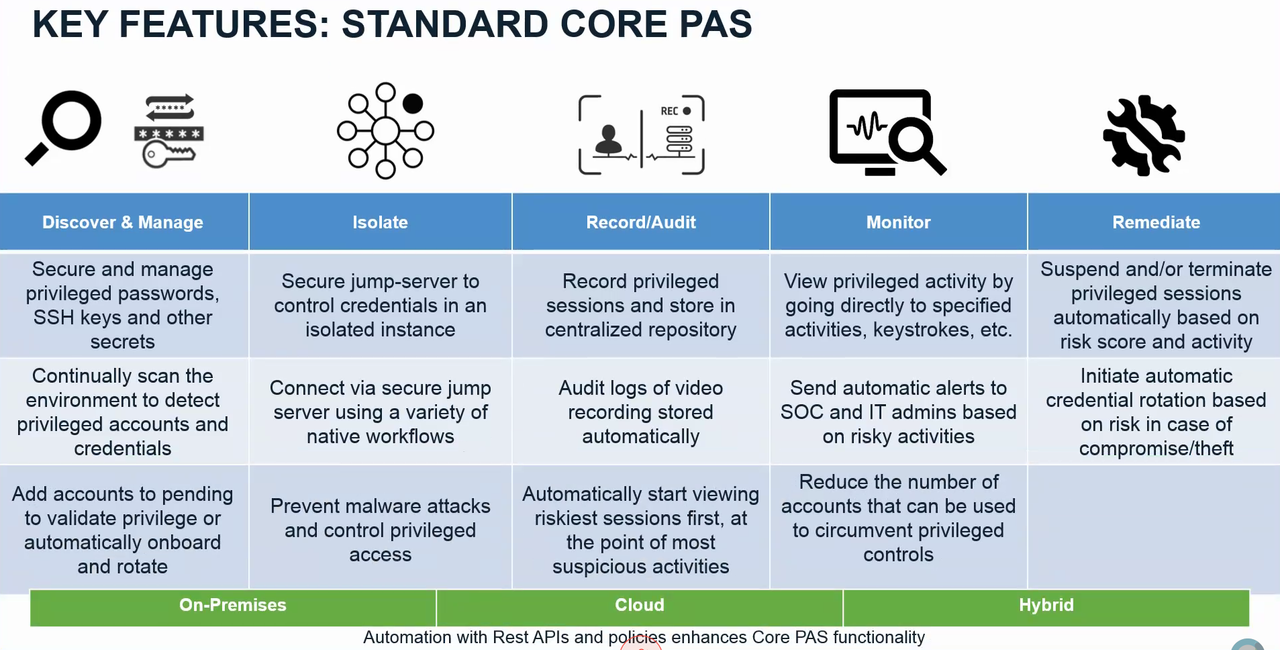
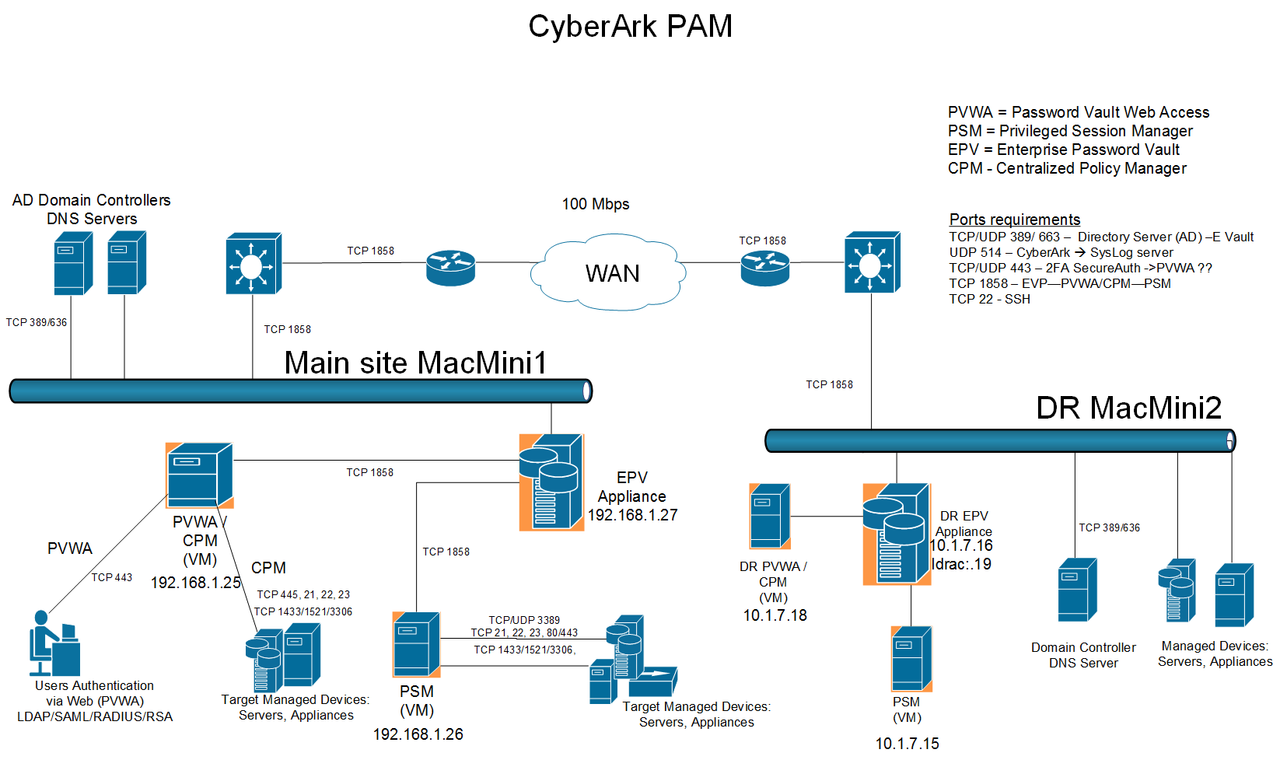
The CyberArk Privileged Account Security solution comprises features that secure, monitor and manages confidential accounts. The major components used widely are following:
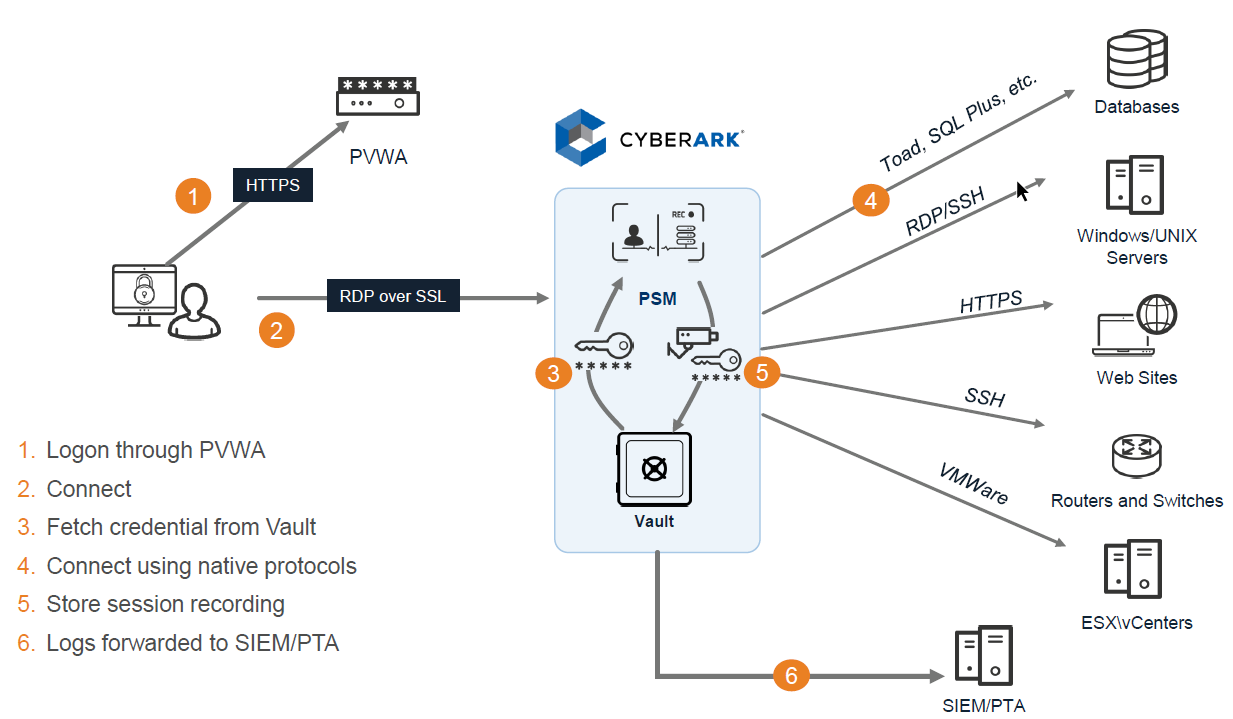
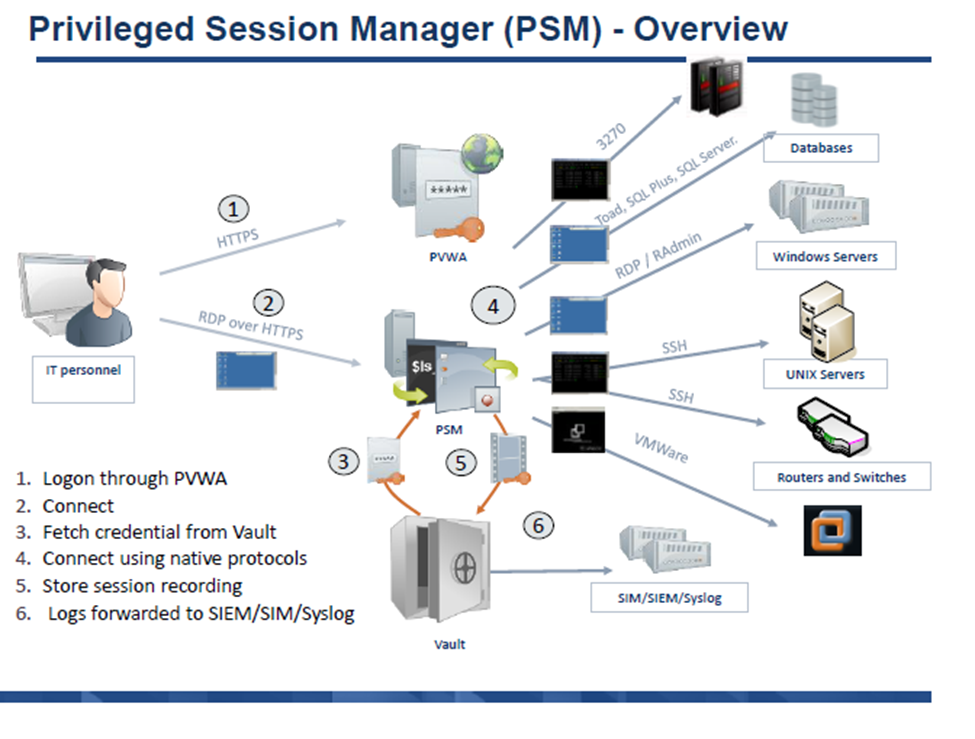 A user clicks "connect" in PVWA, an initial RDP session is established between the user and the PSM server. Since the user shouldn't be able to connect to the PSM server directly, the PSMConnect account is used. Once the session connects, PSM checks the session variables of the connecting user, including CyberArk username. Then the PSMConnect session creates a temporary profile for the user on the PSM server, called a Shadow user (if one doesn't exist), and switches the user's RDP session to that "isolated" shadow session/profile. Now that the user is in their own shadow session, PSM tries to execute the Connection Component specified. For example if it's SSH, it needs to pull the target address, managed account and password from the Vault. It will check if the user is authorized to use that account, pull the information, and launch an ssh session using command line switches for putty. Finally it will start recording, and give control to the RDS session back to the user.
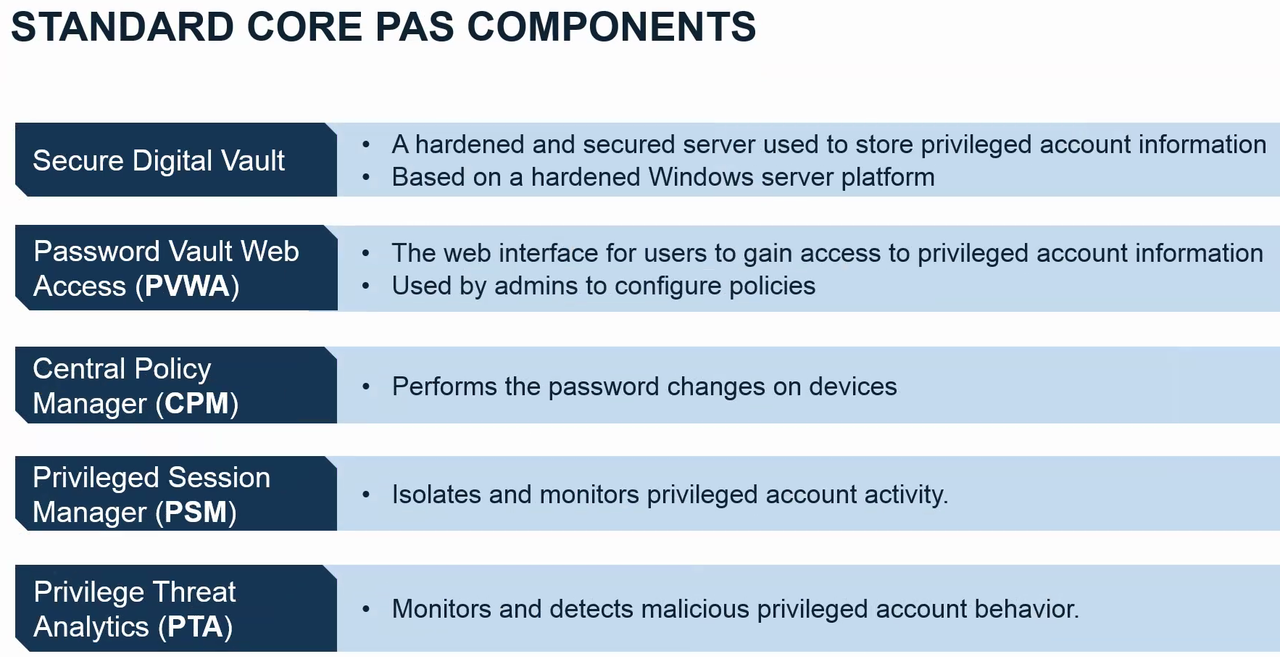
RDP Traffic Flow
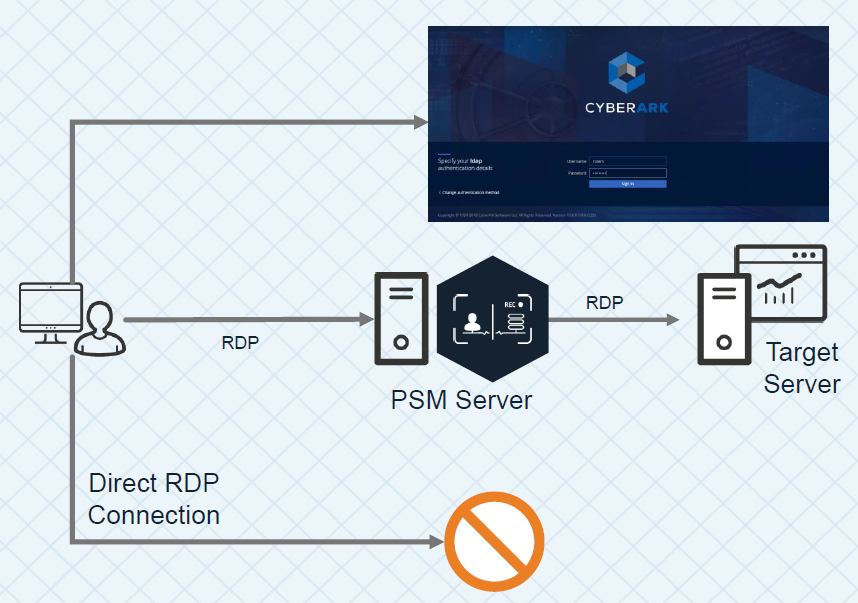
Vault, Components and Clients

via Blogger https://ift.tt/3kvpmVr
February 28, 2021 at 05:44PM CyberArk
The CyberArk Privileged Account Security solution comprises features that secure, monitor and manages confidential accounts. The major components used widely are following:
- Enterprise Password Vault
- Central Policy Manager (CPM)
- Password Vault Web Access (PVWA)
- Privileged Session Manager (PSM)
Architecture
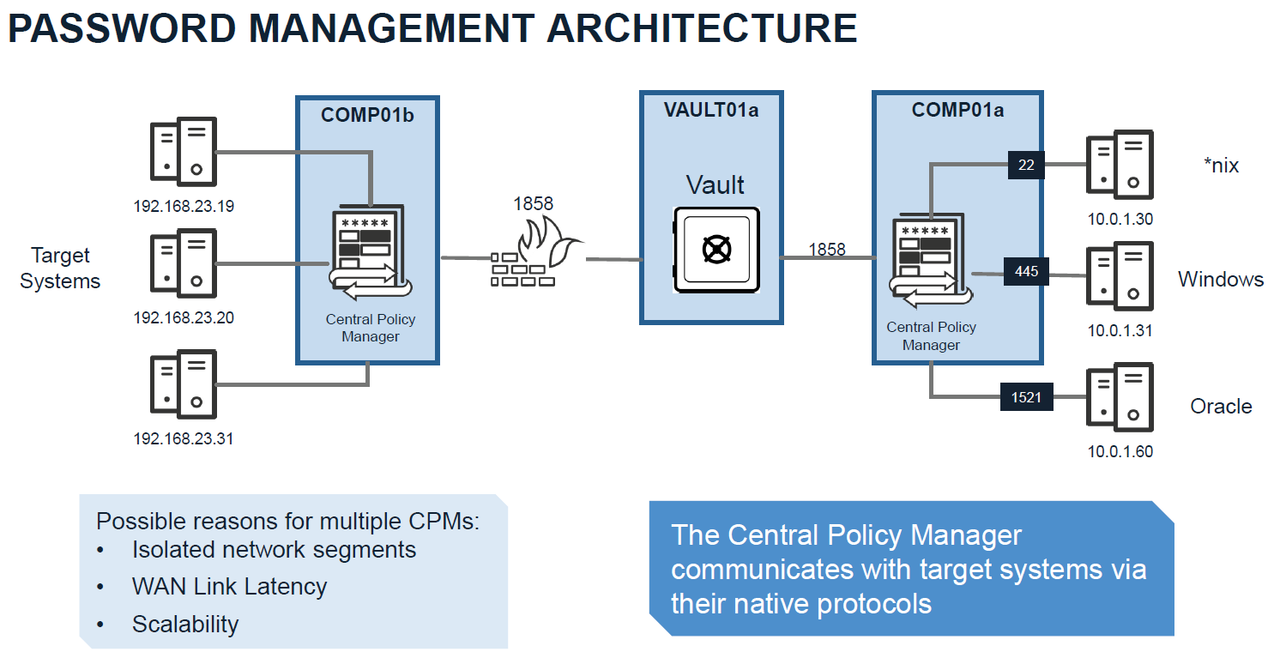
Password Management Architecture
Session Manager Architecture
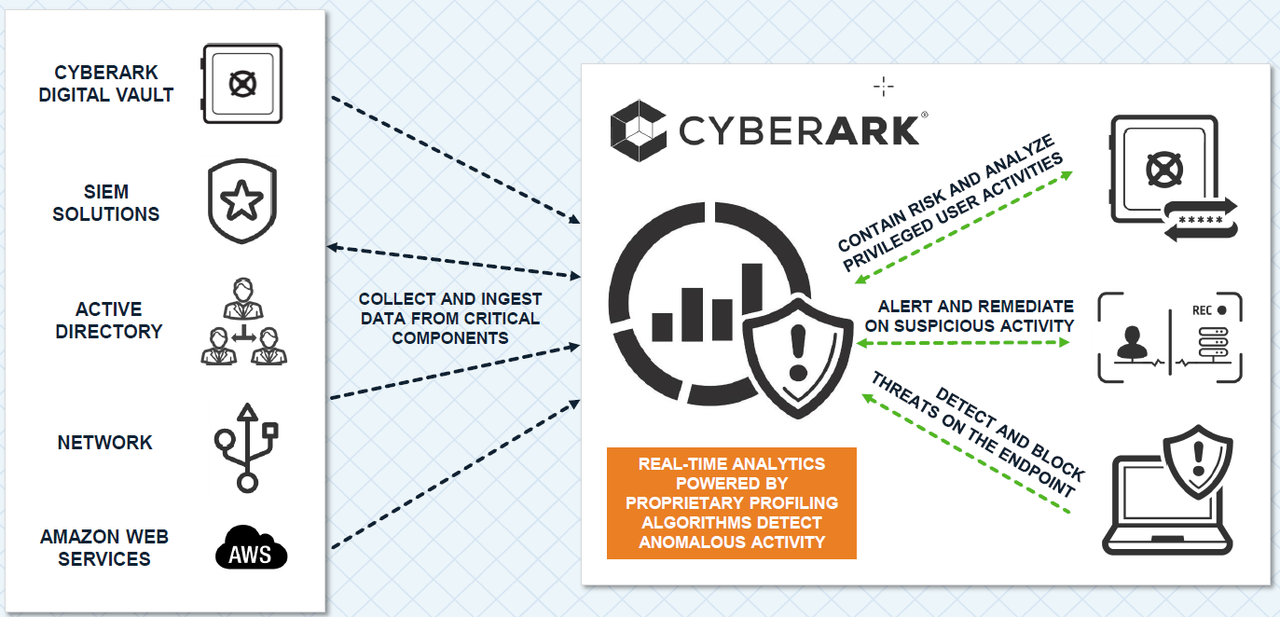
Privileged Threat Analytics Architecture
|
| PAM Solution High Availability Design |
PAS architecture design with PSM.
Connect through the web portal (PVWA):


1. create a CyberArk Bind User - ex. [email protected]. Usually it is domain admin account
2. Define follow LDAP CyberArk groups - Cyberark mapping roles:
CyberArk Vault Admins - Vault Admins
CyberArk Safe Managers - Safe Managers
CyberArk Auditors - Auditors
CyberArk Users - Users
From PVWA Web GUI:
1. Activate PSM
2. Deactivate 'Require users to specify reason for access'
3. Integrate LDAP
On the Vault
1. Manual restart the vault service, will not start Event Notification Engine service.
Connect through PSM for Windows:
PAS Configuration Steps
On the Domain Controller:1. create a CyberArk Bind User - ex. [email protected]. Usually it is domain admin account
2. Define follow LDAP CyberArk groups - Cyberark mapping roles:
CyberArk Vault Admins - Vault Admins
CyberArk Safe Managers - Safe Managers
CyberArk Auditors - Auditors
CyberArk Users - Users
From PVWA Web GUI:
1. Activate PSM
2. Deactivate 'Require users to specify reason for access'
3. Integrate LDAP
On the Vault
1. Manual restart the vault service, will not start Event Notification Engine service.
PSM "connect" explaination
A user clicks "connect" in PVWA, an initial RDP session is established between the user and the PSM server. Since the user shouldn't be able to connect to the PSM server directly, the PSMConnect account is used. Once the session connects, PSM checks the session variables of the connecting user, including CyberArk username. Then the PSMConnect session creates a temporary profile for the user on the PSM server, called a Shadow user (if one doesn't exist), and switches the user's RDP session to that "isolated" shadow session/profile. Now that the user is in their own shadow session, PSM tries to execute the Connection Component specified. For example if it's SSH, it needs to pull the target address, managed account and password from the Vault. It will check if the user is authorized to use that account, pull the information, and launch an ssh session using command line switches for putty. Finally it will start recording, and give control to the RDS session back to the user.CPM "verify" explaination
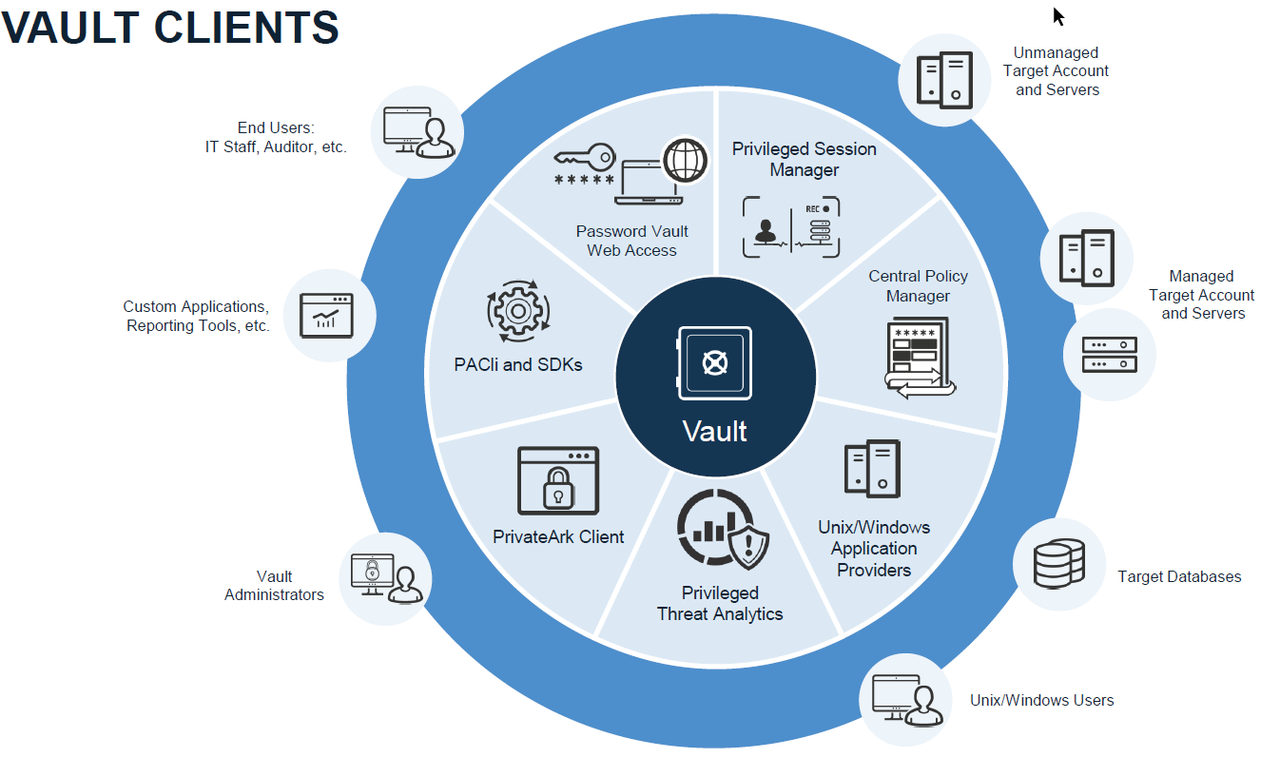
For most platforms, to "verify" the password, CyberArk tries to log into the target with the stored account. If it's able to log in, it calls the password verify. In Unix machines that concept is fairly straightforward - it does an SSH connection, and if it's able to get to the regular prompt, it calls it a success. In Windows, for the regular (non-WMI platform), it tries to issue a "net use \servername\IPC$ /user:<manageduser>" command. If successful, the password is verified. For databases it might try to establish an ODBC connection, etc.Key Features of Core PAS
Standard Core PAS Componets
RDP Traffic Flow
Vault, Components and Clients
References
- Install the Vault Backup Utility
- https://cyberark-customers.force.com/login
- CyberArk Secure File Exchange to download your software
via Blogger https://ift.tt/3kvpmVr
February 28, 2021 at 05:44PM CyberArk

 RSS Feed
