Info Security Memo
  • Blog
  • Sitemap
    • Categories
  • Contact
  • About
  • Resources
  • Tools
  • 51sec.org

Build Confidence

Focusing on Information Security 

Info Security Notes

Create a Own Cloud Photo Storage Site in BackBlaze B2 Using Cloudflare and ShaerX

11/29/2020

0 Comments

 
Create a Own Cloud Photo Storage Site in BackBlaze B2 Using Cloudflare and ShaerX

I am using Imgur to store my Blog photos for a long time, before it was PostImage, PhotoBucket and ImageShack. After tested with BackBlaze B2 service, especially integrated with ShareX and connected to CDN service provider Cloudflare, I decided to give a BackBlaze a try as my photo site to store all my Blog screenshots and photos. 

The free plan at BackBlaze is 10G and Cloudflare can be configured to work with it very well. Also ShareX screen capture software can auto-generate my own domain url for those photos. It sounds quite promising to use it as blog photo bed. There is cap limit for class b and class c transactions. But usually the limit is good for a small website like mine. 

This post is a summary for all steps for installation and configuration. 


Create and Configure Your BackBlaze Account
1  Sign Up an Backblaze.com Account. Free service is enough for this lab.

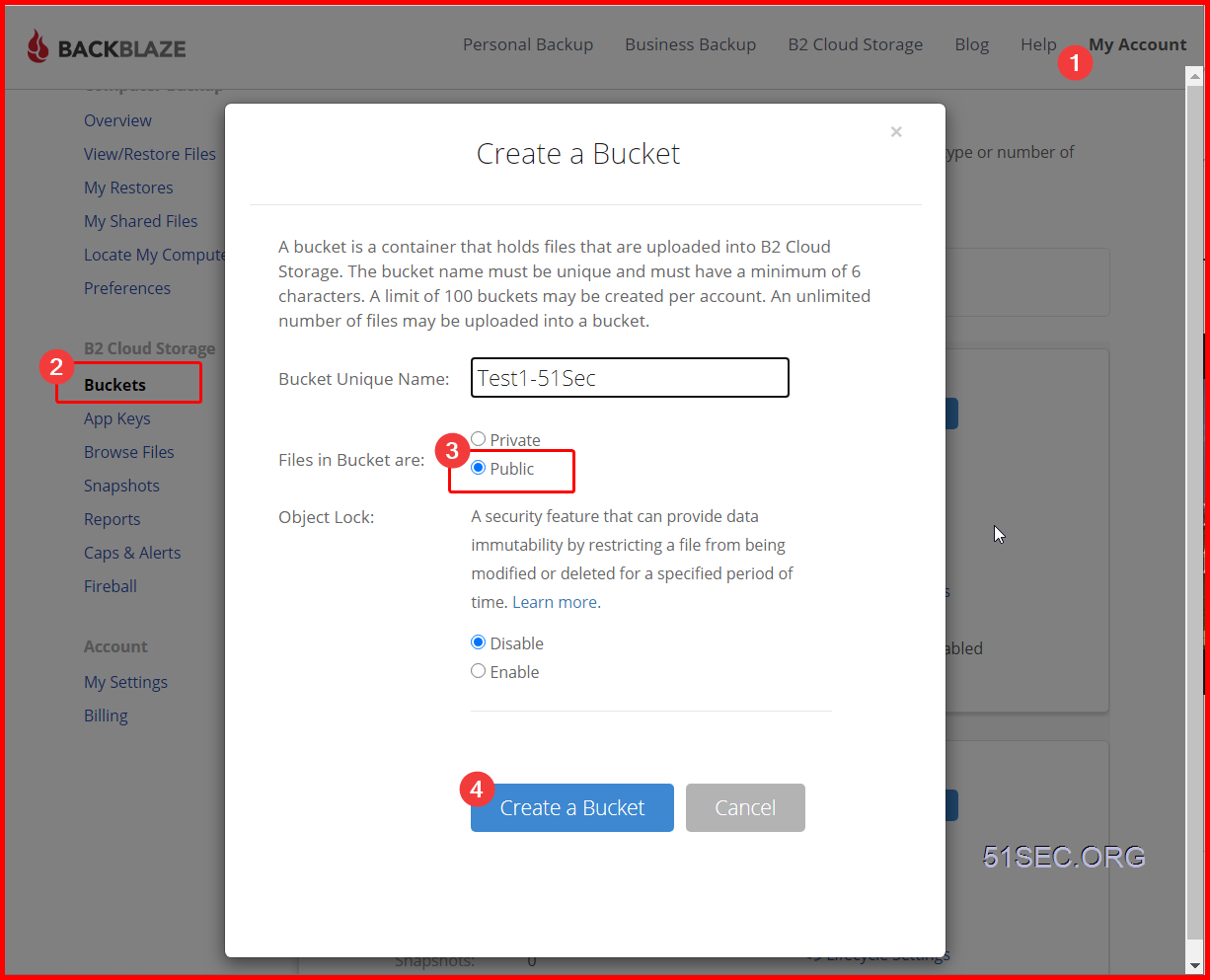
2  Log into Your Account and Create a Public Bucket

Here is an extra important step to set up your bucket. You will have to put one cache command into Bucket info: {"cache-control":"max-age=43200"}

43200 is seconds. This means Cloudflare will not re-fetch the resource from source (BackBlaze) in 43200 seconds


3  Upload a file to get Friendly URL:
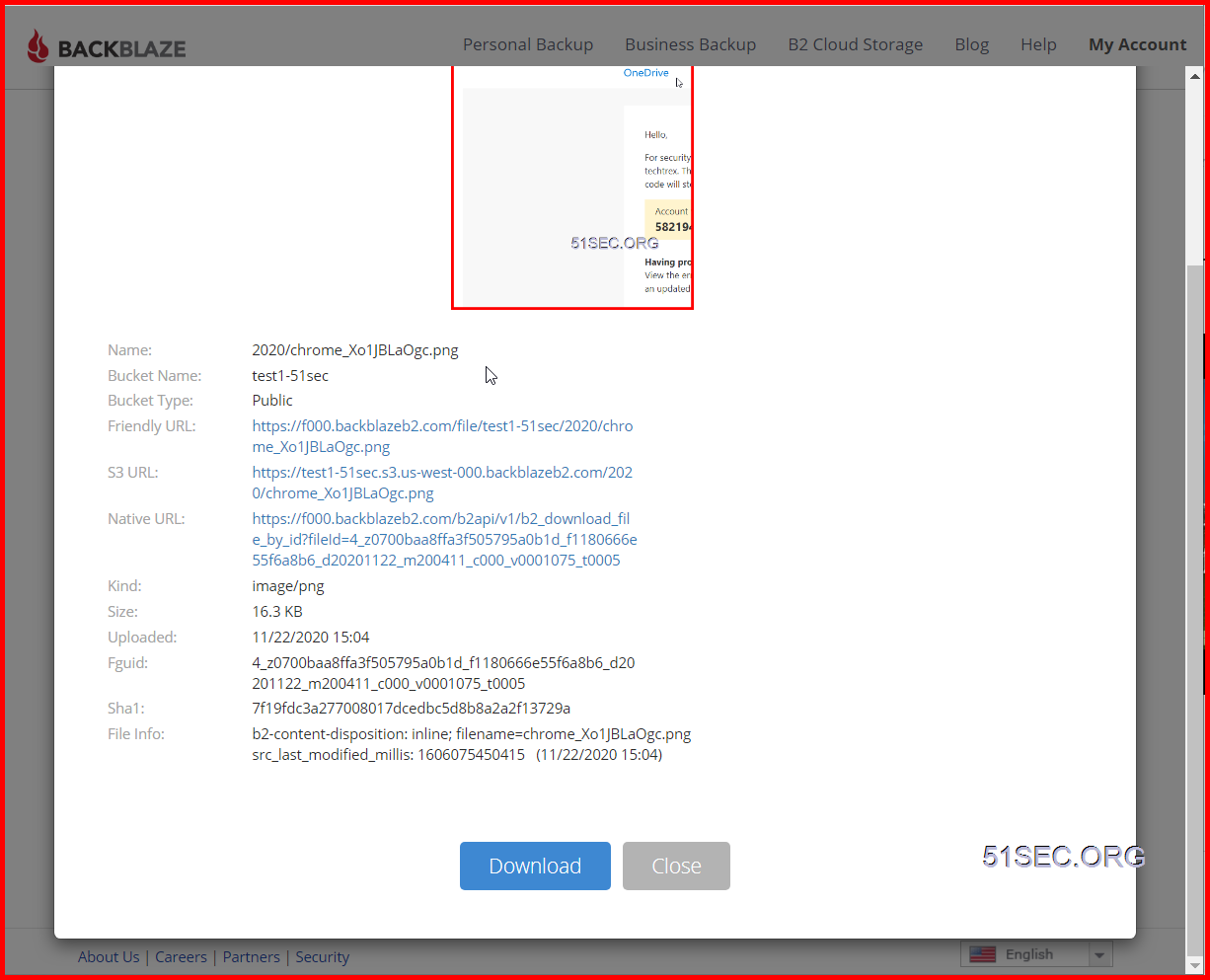

For example: I got following url starting with f000.backblazeb2.com/file. You will need this url to put it into ShareX and Cloudflare

Friendly URL:: https://f000.backblazeb2.com/file/test1-51sec/2020/chrome_Xo1JBLaOgc.png

test1-51sec is bucket name. 2020 is the folder I created in the bucket.


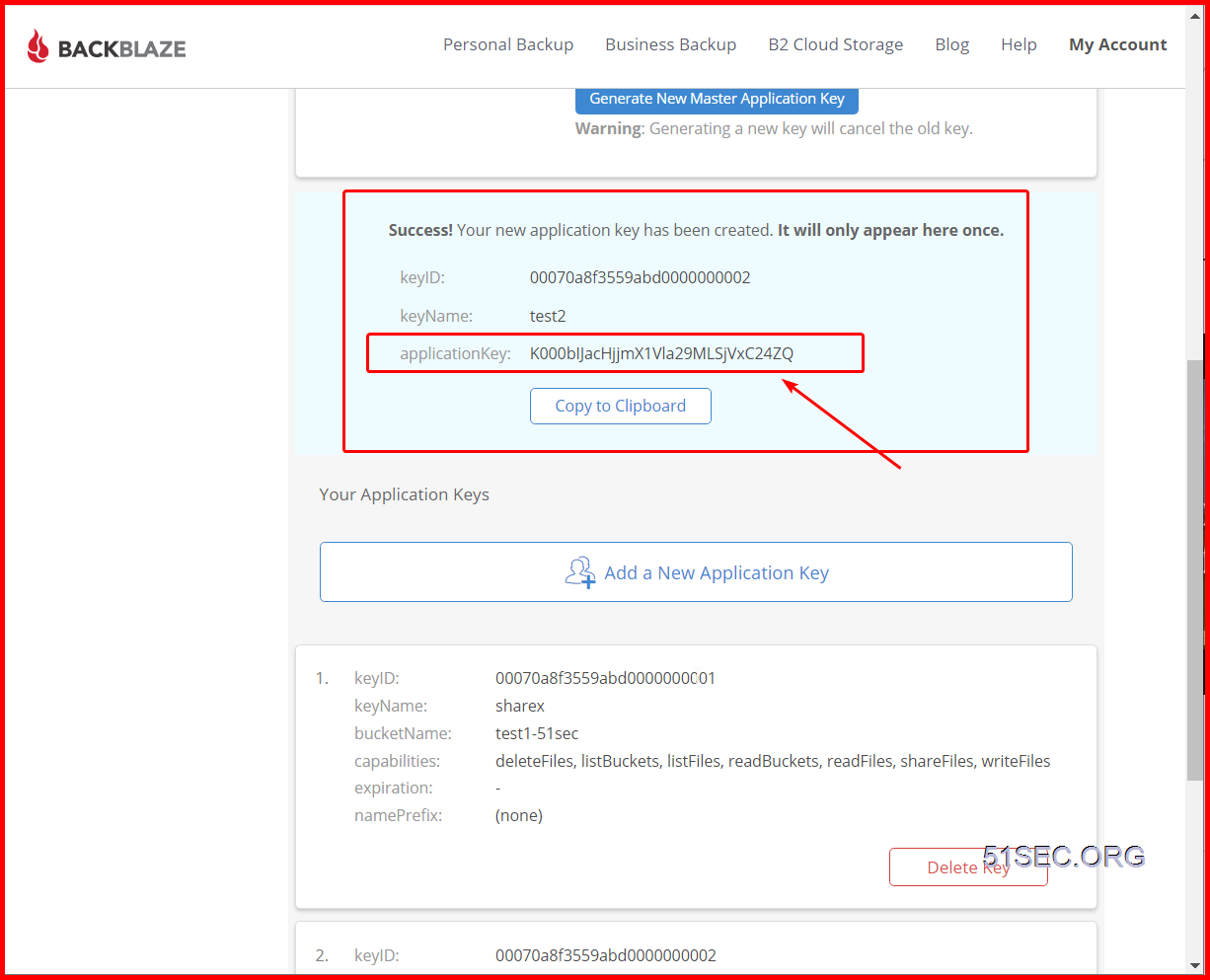
4  Add a New Application Key

The application key will only show once, and you will need it to access your bucket. But you can create multiple keys later. 

Both KeyID and Application Key will be needed to allow ShareX to upload the photos into this bucket.


Configure ShareX 
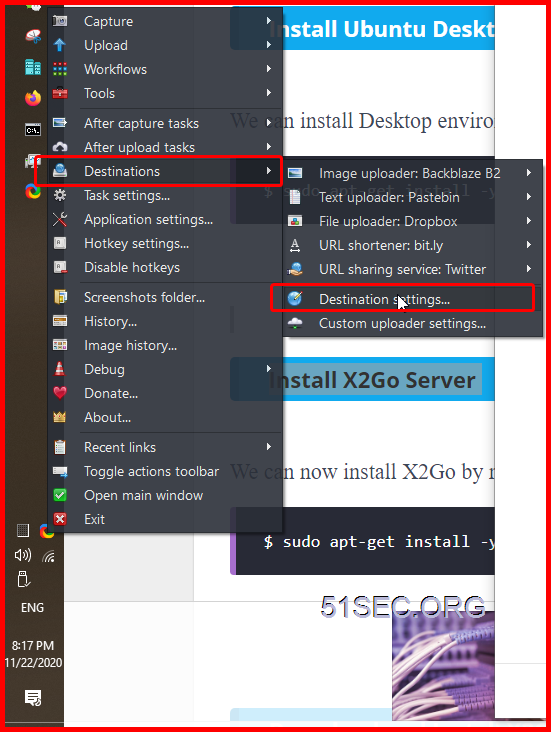
1  Right Click ShareX icon, and select Destinations -> Destination Settings.. menu


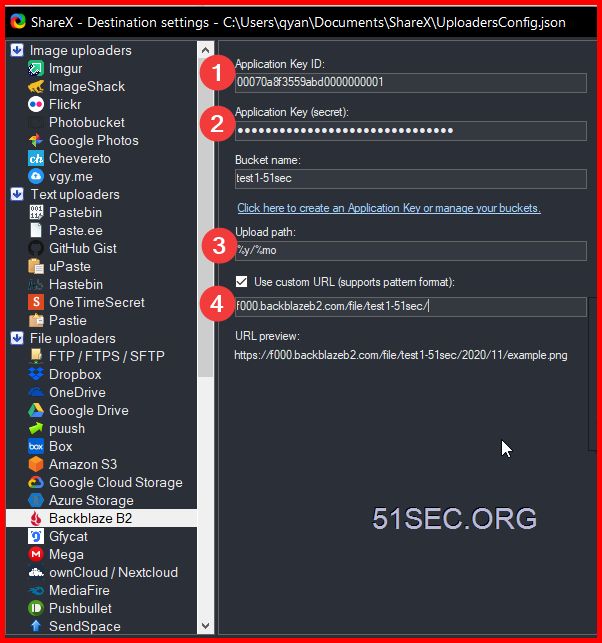
2  Configure Backblaze B2 destination as show in the screenshot.
I put upload path parameter with year and month to organize the photos.
You will have to use custom URL with f000.backblazeb2.com/file/test1-51sec for now. Later, After we configure cloudflare to use our own domain for backblaze site, we can change this custome url. 


Configure Cloudflare

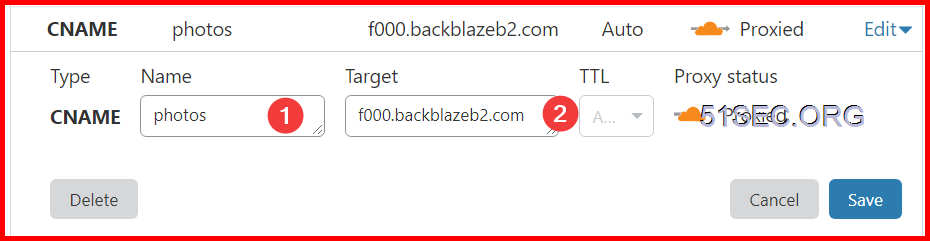
1  Create a new CNAME record for your Backblaze friendly url. 

2  Create a page rule to cache this URL only when it is from 51sec.org. 

3  Change ShareX settings to use photos.51sec.org this sub domain url which cached by Cloudflare.


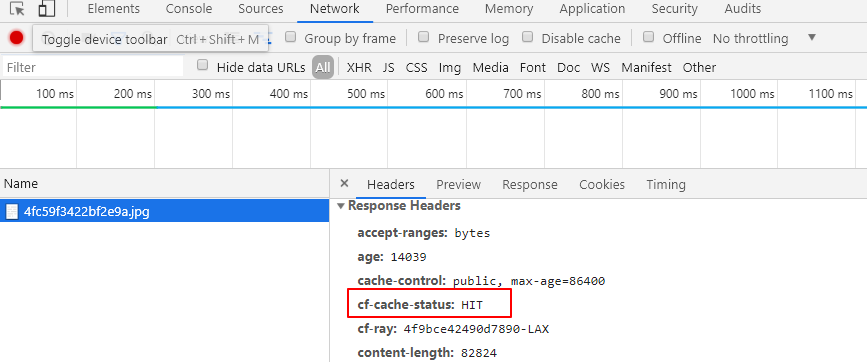
Verify if using CloudFlare Cache


References

  • Using Backblaze B2 with the Cloudflare CDN


via Blogger https://ift.tt/2Jn7IVt
November 29, 2020 at 09:30AM Blog, Cloud
0 Comments


Leave a Reply.

    Categories

    All
    Architecture
    Blog
    Checkpoint
    Cisco
    Cloud
    CyberArk
    F5
    Fortigate
    Guardium
    Juniper
    Linux
    Network
    Others
    Palo Alto
    Qualys
    Raspberry Pi
    Security
    SIEM
    Software
    Vmware
    VPN
    Wireless

    Archives

    March 2024
    February 2024
    January 2024
    December 2023
    November 2023
    October 2023
    September 2023
    August 2023
    July 2023
    June 2023
    May 2023
    April 2023
    March 2023
    February 2023
    January 2023
    December 2022
    November 2022
    October 2022
    September 2022
    August 2022
    July 2022
    June 2022
    May 2022
    April 2022
    March 2022
    February 2022
    January 2022
    December 2021
    November 2021
    October 2021
    September 2021
    August 2021
    July 2021
    June 2021
    May 2021
    April 2021
    March 2021
    February 2021
    January 2021
    December 2020
    November 2020
    October 2020
    September 2020
    August 2020
    July 2020
    October 2019
    September 2019
    June 2019
    July 2018
    May 2018
    December 2017
    August 2017
    April 2017
    March 2017
    January 2017
    December 2016
    November 2016
    October 2016
    September 2016
    August 2016
    July 2016
    June 2016
    May 2016
    April 2016
    March 2016
    February 2016
    January 2016
    December 2015
    November 2015
    October 2015
    September 2015
    August 2015
    July 2015
    June 2015
    May 2015
    April 2015
    March 2015

    Print Page:

    RSS Feed

    Email Subscribe
Powered by Create your own unique website with customizable templates.
  • Blog
  • Sitemap
    • Categories
  • Contact
  • About
  • Resources
  • Tools
  • 51sec.org