
Check Point Management Server is not only the central policy management place for Check Point products, but also holds all Check Point gateways logs. In real environment, external third party log servers sometimes will need to be used to store and analyse those logs, especially for central SIEM systems.
Before R77.30, you will have to forward those logs from Management server to external syslog servers.
Two previous posts have been recorded in this blog to describe the procedures how to forward Check Point logs from Management Server to external syslog server:
Starting from R77.30, Check Point allows gateways directly send the logs to external syslog server without going through Management server.
Here is the steps I tried:
Diagram:

Steps:
1. Download and Install R77.30 Add-on on Security Management Server
1.1 Download file from the R77.30 Add-On Gaia Legacy Cli link.
You will get a 11M file - Check_Point_R77_30_T204_Add-on_Gaia.tgz
Note: If you are using Google Chrome, you will get a file name Check_Point_R77_30_T204_Add-on_Gaia.gz. This issue mentioned on sk76080 (Google Chrome changes downloaded files from .tgz to .gz). rename gz file to tgz should resolve issue.
1.2 SFTP the the file Check_Point_R77_30_T204_Add-on_Gaia.tgz to Mgmt Server CP Mgmt (10.94.200.37)
1.3 Using following command install it on CP Mgmt Server
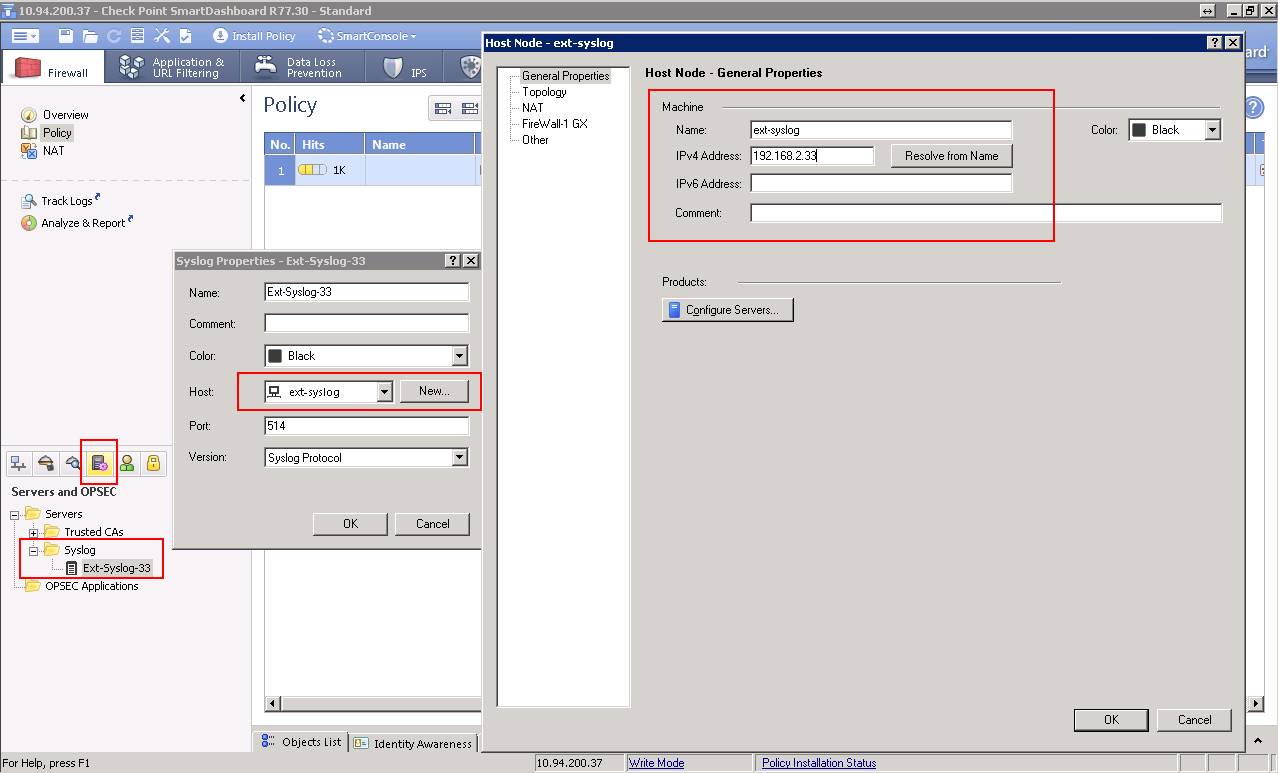
2. Define a new Syslog Server
2.1In the Servers and OPSEC Applications object tree, right-click Servers > New > Syslog.
2.2 In the Syslog Properties window, enter or select:
Name: ext-syslog-33
Host: create a new syslog object with name ext-syslog and ip address 192.168.2.33
Port (Default = 514)
Version (BSD Protocol or Syslog Protocol)

3. From Smart Dashboard, Configuring Gateways to Send Logs to Syslog Servers
To send the logs of a gateway to syslog servers:
2.1 In SmartDashboard, go to gateway Properties -> Logs.
2.2 In the Send logs and alerts to these log server table, click the green button to add syslog servers.
2.3 Click OK then Install policy to the gateway.

4. On Security Gateway(s), permanently enable Syslog in Kernel :
Run following command on gateway or all cluster members:
Reboot the Security Gateway or cluster members.
5. Verify
5.1 Verify from gateway:
5.2 Verify from Syslog server

Reference:
Before R77.30, you will have to forward those logs from Management server to external syslog servers.
Two previous posts have been recorded in this blog to describe the procedures how to forward Check Point logs from Management Server to external syslog server:
- Forwarding Checkpoint Management Server Firewall logs to an external syslog server STRM/Qradar SIEM
- Forward Logs from Checkpoint SmartCenter Management Server and Juniper NSM / IDP to Syslog Server
Starting from R77.30, Check Point allows gateways directly send the logs to external syslog server without going through Management server.
Here is the steps I tried:
Diagram:
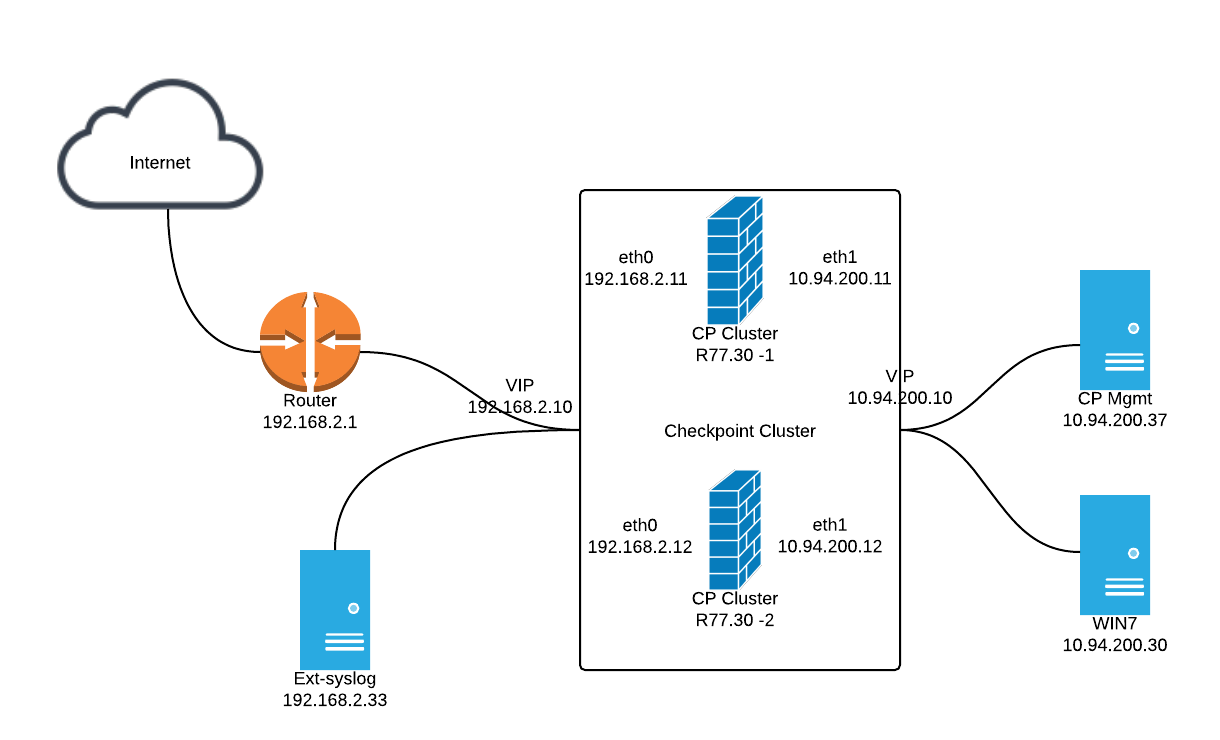
Steps:
1. Download and Install R77.30 Add-on on Security Management Server
1.1 Download file from the R77.30 Add-On Gaia Legacy Cli link.
You will get a 11M file - Check_Point_R77_30_T204_Add-on_Gaia.tgz
Note: If you are using Google Chrome, you will get a file name Check_Point_R77_30_T204_Add-on_Gaia.gz. This issue mentioned on sk76080 (Google Chrome changes downloaded files from .tgz to .gz). rename gz file to tgz should resolve issue.
1.2 SFTP the the file Check_Point_R77_30_T204_Add-on_Gaia.tgz to Mgmt Server CP Mgmt (10.94.200.37)
1.3 Using following command install it on CP Mgmt Server
|
tar -zxvf Check_Point_R77_30_T204_Add-on_Gaia.tgz
./UnixInstallScript |
2. Define a new Syslog Server
2.1In the Servers and OPSEC Applications object tree, right-click Servers > New > Syslog.
2.2 In the Syslog Properties window, enter or select:
Name: ext-syslog-33
Host: create a new syslog object with name ext-syslog and ip address 192.168.2.33
Port (Default = 514)
Version (BSD Protocol or Syslog Protocol)
3. From Smart Dashboard, Configuring Gateways to Send Logs to Syslog Servers
To send the logs of a gateway to syslog servers:
2.1 In SmartDashboard, go to gateway Properties -> Logs.
2.2 In the Send logs and alerts to these log server table, click the green button to add syslog servers.
2.3 Click OK then Install policy to the gateway.

4. On Security Gateway(s), permanently enable Syslog in Kernel :
Run following command on gateway or all cluster members:
|
echo fwsyslog_enable=1 >> $FWDIR/modules/fwkern.conf
|
Reboot the Security Gateway or cluster members.
5. Verify
5.1 Verify from gateway:
|
[[email protected]:0]# tcpdump -i eth0 host 192.168.2.33 and udp port 514
tcpdump: verbose output suppressed, use -v or -vv for full protocol decode listening on eth0, link-type EN10MB (Ethernet), capture size 96 bytes 21:59:12.231469 IP 192.168.2.12.38034 > 192.168.2.33.syslog: SYSLOG authpriv.notice, length: 371 21:59:31.007223 IP 192.168.2.10.10535 > 192.168.2.33.syslog: SYSLOG authpriv.notice, length: 340 21:59:44.120324 IP 192.168.2.12.38034 > 192.168.2.33.syslog: SYSLOG authpriv.notice, length: 334 |
5.2 Verify from Syslog server

Reference:
- How to configure Security Gateway on Gaia OS to send FireWall logs to an external Syslog server
- How to export syslog messages from Security Gateway on Gaia OS to a Log Server and view them in SmartView Tracker
- How to configure syslog daemon on SecurePlatform OS
- Configuring Gateways to Send Logs to Syslog Servers

 RSS Feed
