
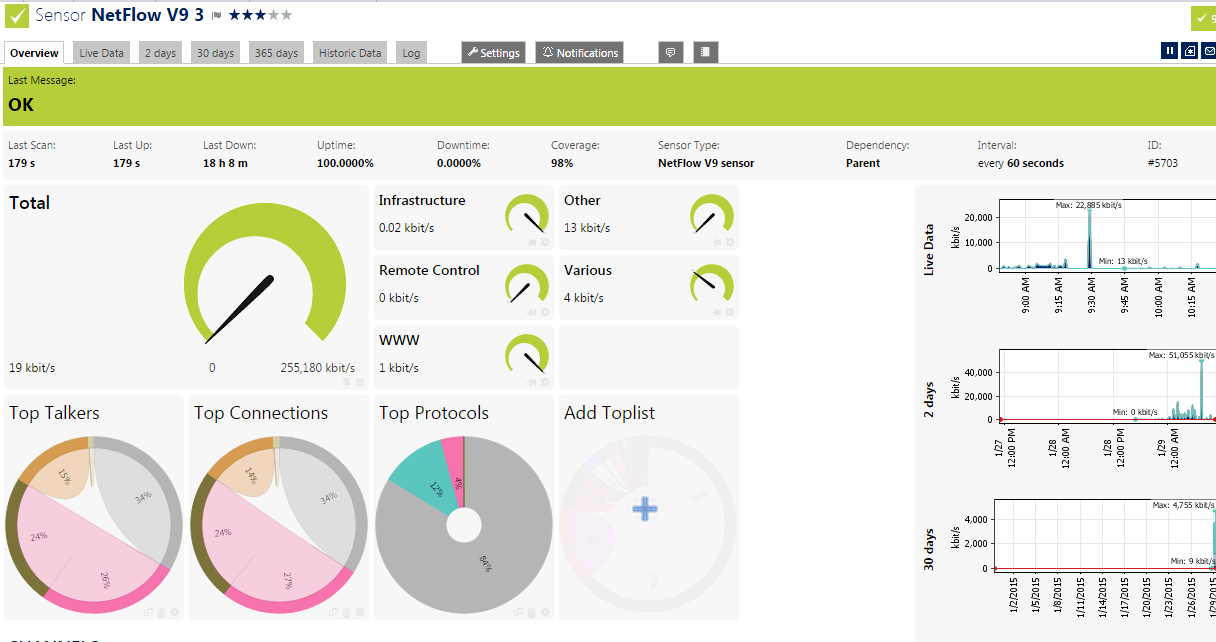
 Netflow is a feature first introduced into Cisco routers and switches and then flow concept has been widely accepted by other network product vendors. Basically the network devices which support xflow feature can collect IP traffic statistics on the interfaces where xFlow is enabled, and export those statistics as xFlow records to remote defined xFlow collector.
PRTG can use this NetFlow feature for detailed bandwidth usage monitoring and it also shows you:
- where your bandwidth is used
- who is using it
- how it is being used
- why it is being used
PRTG support most xFlow (NetFlow, IPFIX, sFlow, jFlow) protocols with their flow sensors.

1. Example Configuration for Cisco Routers and Switches:
1.1 Cisco Routers Example
This configuration is old platform and IOS.
router-2621(config)#interface FastEthernet 0/1
router-2621(config-if)#ip route-cache flow
router-2621(config-if)#exit
router-2621(config)#ip flow-export destination 192.168.1.101 9995
router-2621(config)#ip flow-export source FastEthernet 0/1
router-2621(config)#ip flow-export version 5
router-2621(config)#ip flow-cache timeout active 1
router-2621(config)#ip flow-cache timeout inactive 15
router-2621(config)#snmp-server ifindex persist
router#show ip flow export
router#show ip cache flow
note: Please note that NetFlow data export has to be enabled on all interfaces of a router in order to see accurate IN and OUT traffic.
1.2 Cisco Switches (4510) Example
flow record PRTG-FLOW
match ipv4 tos
match ipv4 protocol
match ipv4 source address
match ipv4 destination address
match transport source-port
match transport destination-port
match interface input
collect interface output
collect counter bytes
collect counter packets
collect timestamp sys-uptime first
collect timestamp sys-uptime last
!
flow exporter PRTG-EXPORTER
description NETFLOW Export to PRTG
destination xxx.xxx.xxx.xxx
source Loopback0
transport udp 2055
export-protocol netflow-v9
!
flow monitor PRTG-MONITOR
description PRTG Netflow Monitor
record PRTG-FLOW
exporter PRTG-EXPORTER
!
interface vlan xxxx
ip flow monitor PRTG-MONITOR input
!ip flow monitor PRTG-MONITOR output
! Cisco switch 4510 does not support Netflow output option
2. Configuration for Cisco ASA firewalls
access-list global_mpc extended permit ip any anynote:In fact Cisco ASA only support version 9. ASA NetFlow was never intended to be used for real time/live traffic analysis. On the Cisco forums web page the official statement is: "[...] NetFlow on the ASA does not provide the ability to see this data in real time. The data can be collected after the flow has been terminated and analyzed but we do not support real time viewing of the NetFlow records. [...] The total bytes transferred can only be seen after the flow is torn down. [...] Lastly, all flows on the ASA are bidirectional. All counters for a flow will increase for traffic flowing from A->B or B->A. [...] NetFlow has a significant performance impact."
!
flow-export destination inside 192.168.1.101 9995
!
class-map global_class
match access-list global_mpc
!
policy-map global_policy
class global_class
flow-export event-type all destination 192.168.1.101
3. Configuration for Check Point Gaia Firewalls
SecurePlatform doesn't support NetFlow but Gaia is fully supporting it.


Check Point CLI Commands Example:
To add a collector:
add netflow collector ip VALUE port VALUE [srcaddr VALUE export-format VALUE]
To delete a collector:
delete netflow collector [for-ip VALUE [for-port VALUE]]
To change settings of a collector:
set netflow collector [for-ip VALUE [for-port VALUE]]
export-format VALUE
srcaddr VALUE
set netflow collector [for-ip VALUE]
port VALUE
set netflow collector
ip VALUE
To see NetFlow configurations:
show netflow all
show netflow collector [for-ip VALUE [for-port VALUE]]
show netflow collector [for-ip VALUE [for-port VALUE]]
export-format
srcaddr
show netflow collector [for-ip VALUE] port
show netflow collector ip
4. Configuration Example for Juniper SRX Firewalls
Jflow Version 9set services flow-monitoring version9 template ipv4-test ipv4-template
set forwarding-options sampling input rate 100
set forwarding-options sampling input run-length 0
set forwarding-options sampling family inet output flow-server 10.9.1.13 port 9996
set forwarding-options sampling family inet output flow-server 10.9.1.13 version9 template ipv4-test
set forwarding-options sampling family inet output inline-jflow source-address 10.9.1.26
set interfaces reth2 unit 0 family inet sampling input
Jflow Version 5
set interfaces reth2 unit 0 family inet sampling input
set interfaces reth2 unit 0 family inet sampling output
set forwarding-options sampling input rate 100
set forwarding-options sampling family inet output flow-server 10.9.1.13 port 9996
set forwarding-options sampling family inet output flow-server 10.9.1.13 version 5
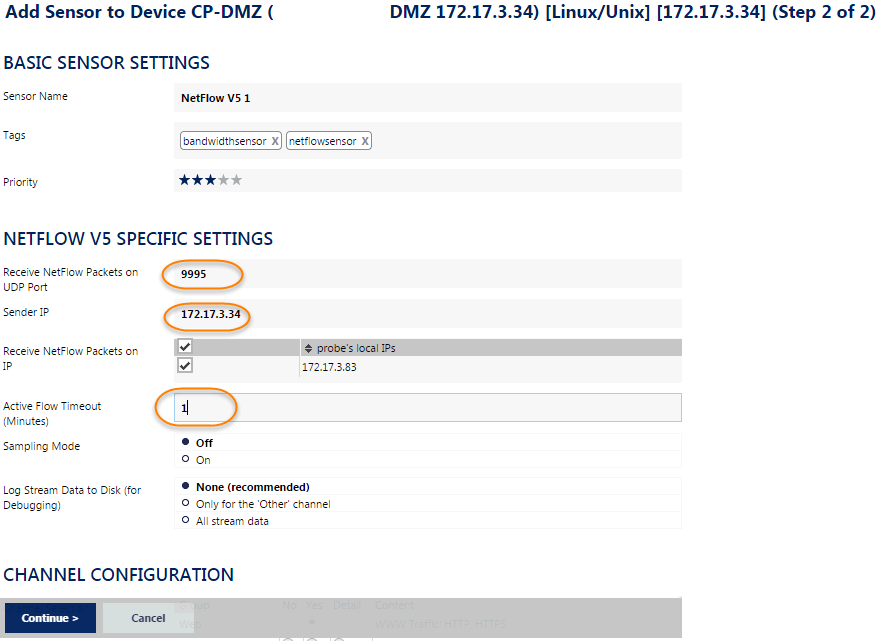
5. PRTG Sensor Configuration

Reference:
1. Configuring Cisco ASA NetFlow via ASDM2. Check Point GAiA NetFlow Configuration
3. Configuring Netflow Export - CLI (netflow)
4. How can I use a trusted SSL certificate with the PRTG web interface?

 RSS Feed
