
Cloudflare Workers and API Usage Collection
Cloudflare Workers provides a serverless execution environment that allows you to create entirely new applications or augment existing ones without configuring or maintaining infrastructure. Your Service Worker will intercept all HTTP requests destined for your domain, and can return any valid HTTP response. Your worker can make outgoing HTTP requests to any server on the public internet.
In this post, I lists some of my usage how Cloudflare Workers helps me to achieve my ideas. Before you can start creating your Cloudflare Workers, at least, you will need to have a free Cloudflare account created. It will work better if your own domain integrated with Cloudflare.
Return HTML example page: https://developers.cloudflare.com/workers/examples
2 Copy example code into Workers app
3 Save and deploy example app
4 Get HTML code using WYSIWYG HTML Editor
I used a Blogger HTML Editor to create a page then toggle it to HTML view to get code. Then copy it back to Workers app code area between <body> and </body>
via Blogger https://ift.tt/2KrFo4P
December 15, 2020 at 10:38PM Cloud
Cloudflare Workers provides a serverless execution environment that allows you to create entirely new applications or augment existing ones without configuring or maintaining infrastructure. Your Service Worker will intercept all HTTP requests destined for your domain, and can return any valid HTTP response. Your worker can make outgoing HTTP requests to any server on the public internet.
In this post, I lists some of my usage how Cloudflare Workers helps me to achieve my ideas. Before you can start creating your Cloudflare Workers, at least, you will need to have a free Cloudflare account created. It will work better if your own domain integrated with Cloudflare.
- Hosting a Serverless Static Web Page
- Using your own domain for your Workers
Other posts:
Hosting a Serverless Static Web Page
1 Check Cloudflare examples
Return HTML example page: https://developers.cloudflare.com/workers/examples
2 Copy example code into Workers app
3 Save and deploy example app
4 Get HTML code using WYSIWYG HTML Editor
I used a Blogger HTML Editor to create a page then toggle it to HTML view to get code. Then copy it back to Workers app code area between <body> and </body>
YouTube video:
Using your own domain for your Workers
1 Create a sub-domain name
As mentioned earlier, domain names, such as
51sec,org must be hosted on or pointing to CloudFlare, and other DNS registrars will result in various weird errors.
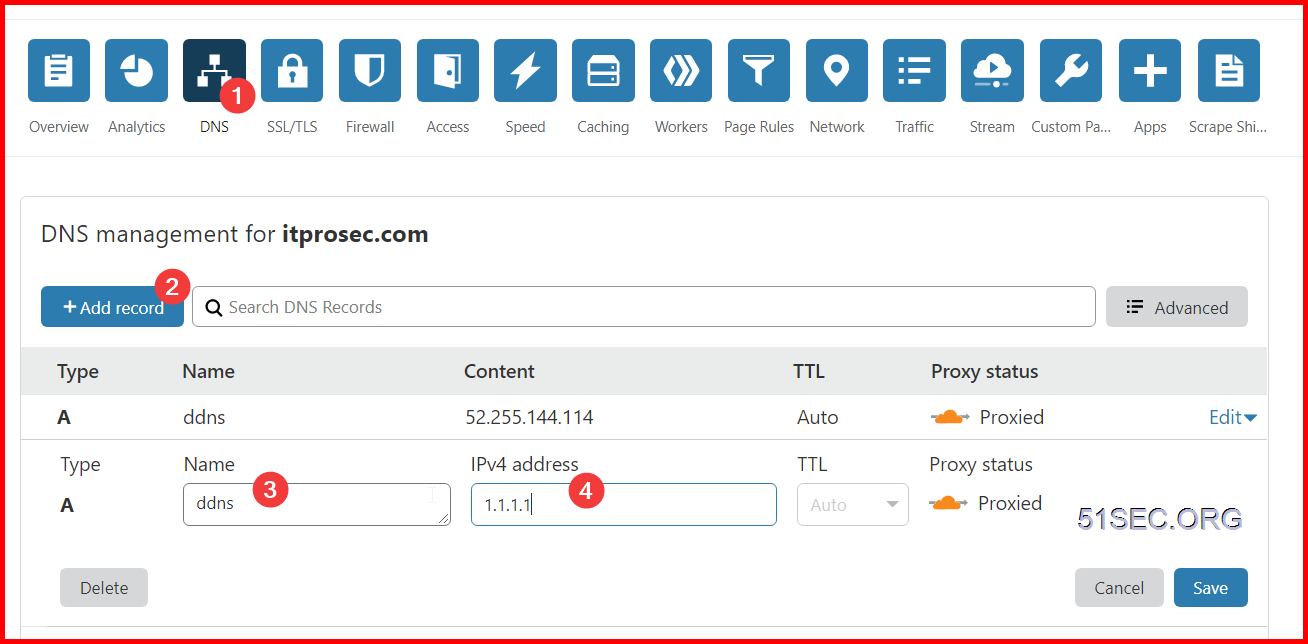
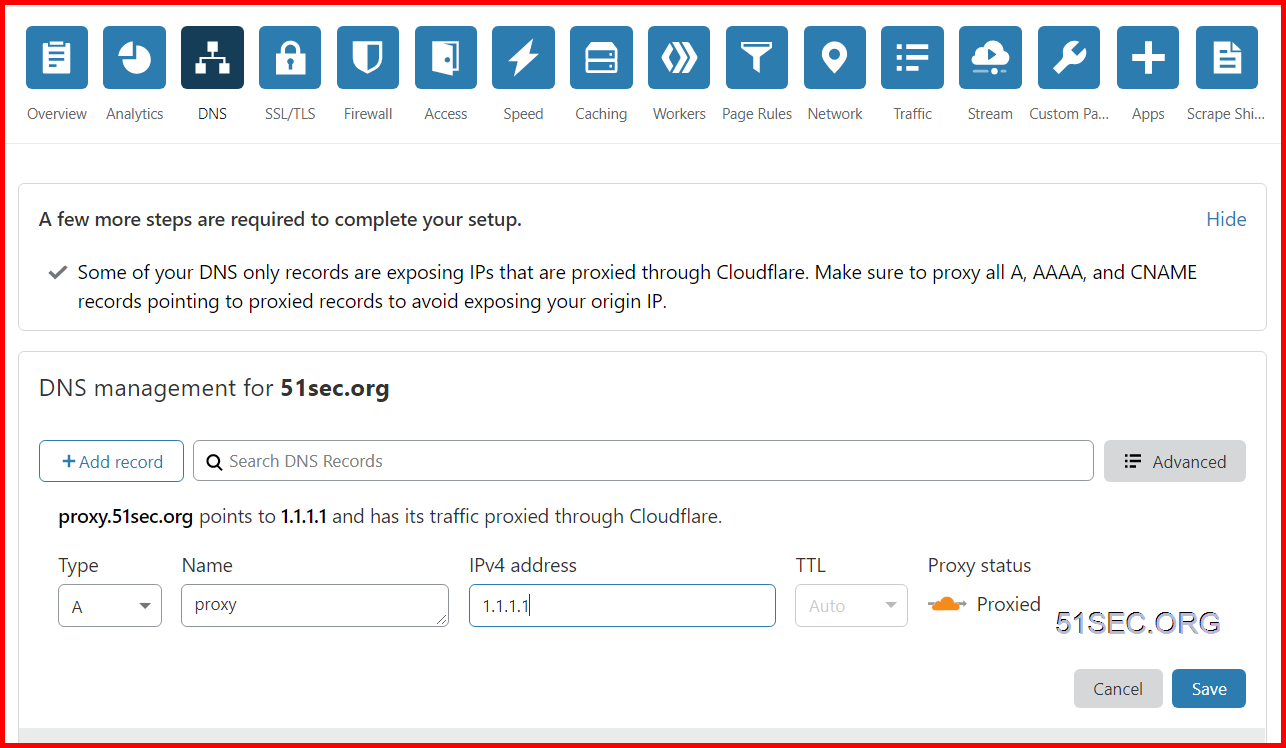
Domain hosting or pointing to CloudFlare is easy, create a dns A record and point to any valid ip address.
After a new DNS record is added, this A record name will be used for our Workers App's sub-domain. When adding this A record, name is the subdomain to be customized (such as proxy.51sec.org). The value of IPv4 address does not matter, but the key is to enable the
Proxied.
2 Associated domain names to Workers
After you create
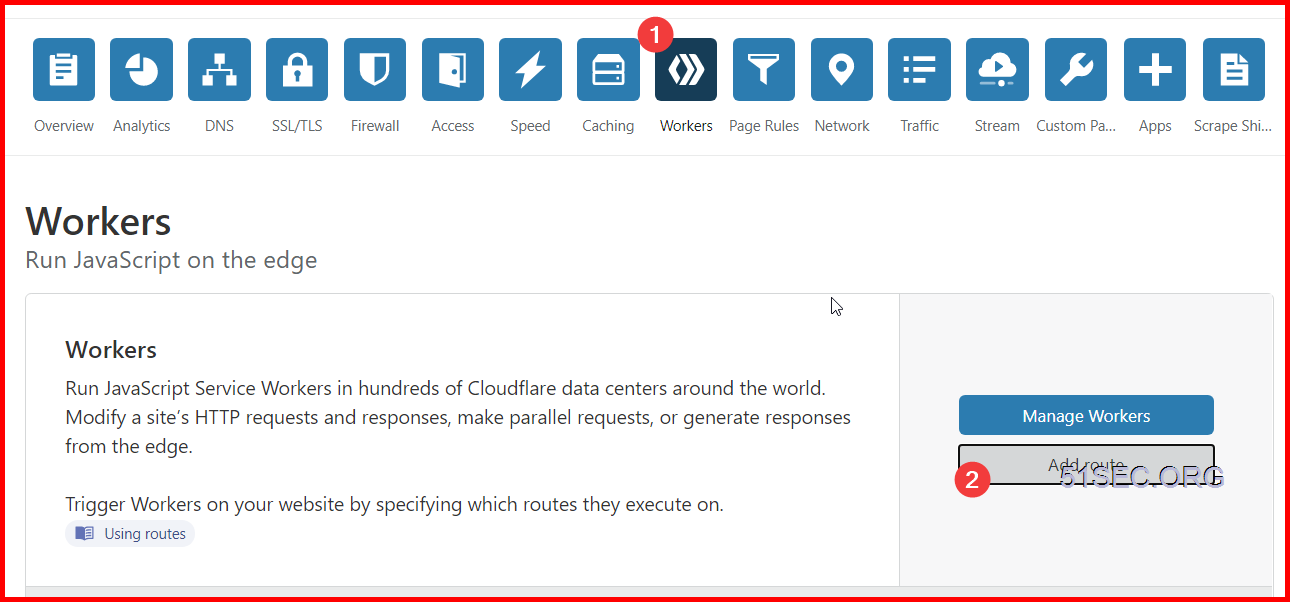
Workers switch to your domain's Workers tab for the domain name (note that the domain name is here, where in Workers you won't find a place to associate it with your domain and then add the association to Add route
3 Create a Workers Route
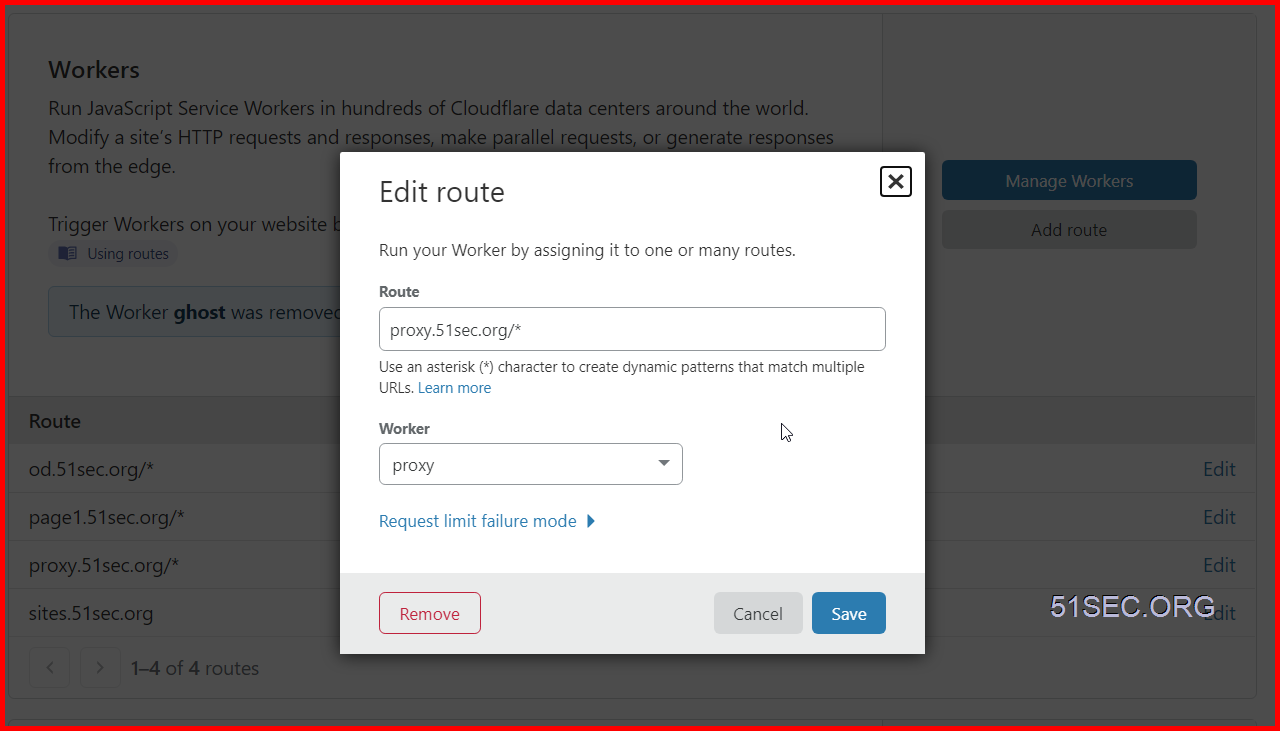
Route fills in the subdomain with /*, (proxy.51sec.org/*) ,Worker selects the worker application we created before, who needs to customize the domain name access, so you need to create a Worker and then associate , to represent access to the Worker service through this custom domain name: proxy.51sec.org/*
When you’re done, you can access the Worker service through a custom domain name, such as https://proxy.51sec.org/
API to Set Up DDNS
CloudFlare DDNS
CloudFlare itself does not have official DDNS support, but it can be implemented using CloudFlare API. GitHub Project Cloudflare-ddns provides a nice script to update your CloudFlare DNS IP using API. I have forked it to my repository to use.
Example : Ubuntu 18.04
Sudo -i
apt-get update -y & apt-get upgrade -y
First clone code from GitHub
git clone https://github.com/51sec/cloudflare-ddns.git
Enter the catalog
cd cloudflare-ddns/
Installation Pip
apt-get install python-pip
Installation dependencies
pip install -r requirements.txt
Rename the config.yaml.template file
mv config.yaml.template config.yaml
Modify config.yaml
nano config.yaml
It's almost like this:
%YAML 1.2
# CloudFlare DDNS updater script config.
---

# CloudFlare API key
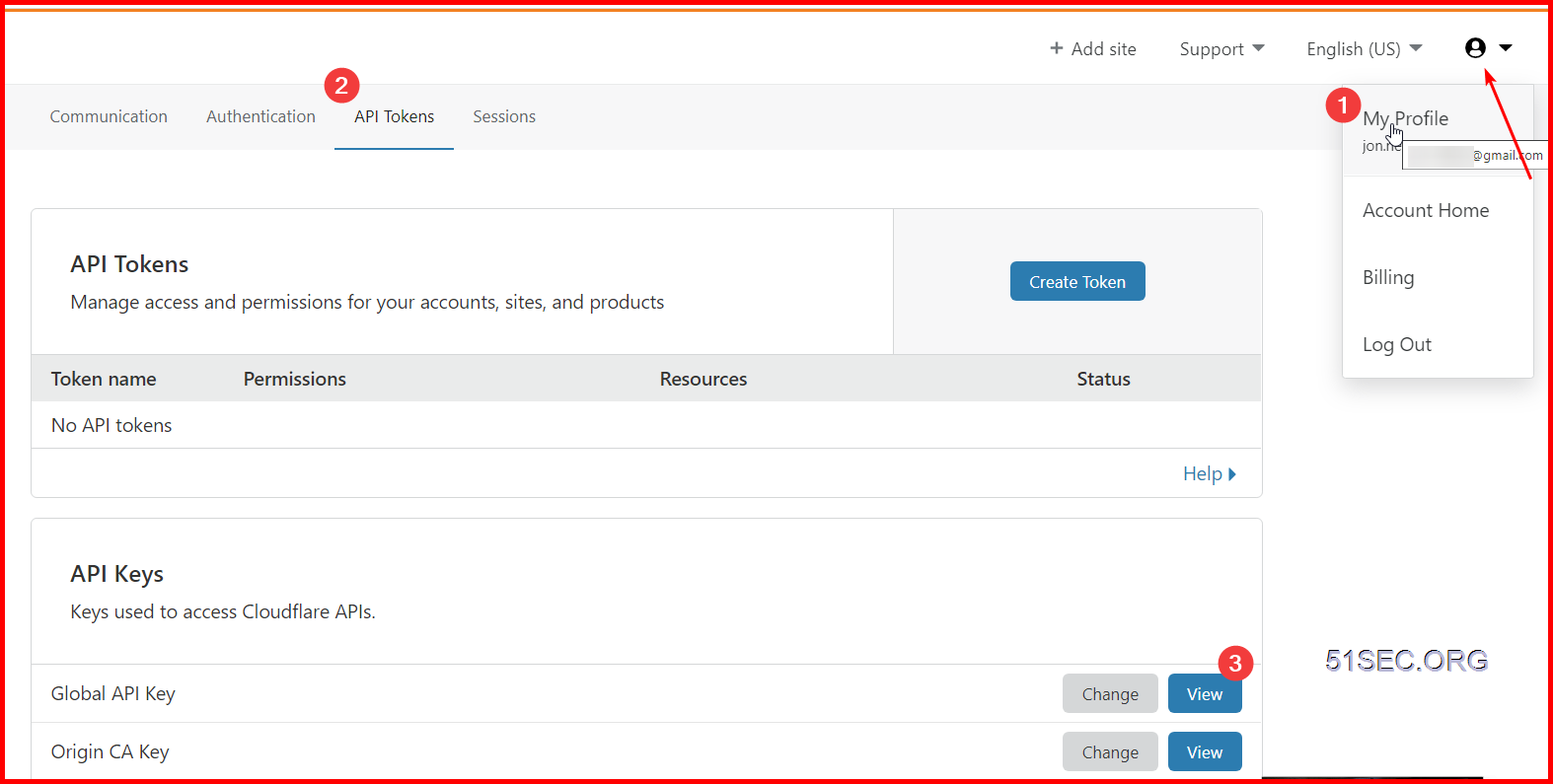
# You can find this under Account > My account after logging into CloudFlare.
cf_key: 'cloudflare API Key'

# Email address for your CloudFlare account.
cf_email: 'CloudFlare log in email'

# Domain you're using CloudFlare to manage.
# If the host name you're updating is "ddns.domain.com", make this "domain.com".
cf_domain: 'root domain'

# The subdomain you're using for your DDNS A record.
# If the host name you're updating is "ddns.domain.com", make this "ddns".
# However, if you're updating the A record for the naked domain (that is, just
# "domain.com" without a subdomain), then set cf_subdomain to an empty value.
cf_subdomain: 'sub domain'

# CloudFlare service mode. This enables/disables CF's traffic acceleration.
# Enabled (orange cloud) is 1. Disabled (grey cloud) is 0.
cf_service_mode: 0

# If set to true, prints a message only when the record changes or when
# there's an error.  If set to 'false', prints a message every time even if
# the record didn't change.
quiet: false

# If set to true then we call the ec2metadata service for the instance
# public ip address rather than an external service.
aws_use_ec2metadata: false

# If set to true dig will be used to fetch the public IP which is better
# but not available on all systems.
use_dig: false
Get API key
Create subdomain
Run script
python cloudflare_ddns.py config.yaml
Add a scheduled task
crontab -e
Fill in the following
# Every 15 minutes, check the current public IP, and update the A record on CloudFlare.
*/15 * * * * /root/cloudflare-ddns/cloudflare_ddns.py /root/cloudflare-ddns/config.yaml >> /var/log/cloudflare_ddns.log
After scheduled job configuration completed, the IP will be updated to Cloudflare every 15 minutes
via Blogger https://ift.tt/2KrFo4P
December 15, 2020 at 10:38PM Cloud

 RSS Feed
