
 There are two options for Cisco Wireless Controller redundancy solutions, either Backup Controllers or High Availability, depending on the firmware version of WLC's, failover time requirement, and budget.
Using Backup Controller method, a single controller at another location can act as a backup for access points when they lose connectivity with the primary controller in the local region. Centralized and regional controllers do not need to be in the same mobility group. You can specify a primary, secondary, and tertiary controller for specific access points in your network. Using the controller GUI or CLI, you can specify the IP addresses of the backup controllers, which allows the access points to fail over to controllers outside of the mobility group. You can set the Primary and Secondary controllers for the AP on the controller via the GUI, the CLI, or even SNMP. With Backup Controllers, in the case of a WLC failure, APs would begin to search for their Secondary Controller and re-establish their CAPWAP tunnel. The obvious downside is the outage that occurs from the client prospective while the AP drops it's tunnel and begins to build it again to the Secondary Controller.
The new High Availability (HA) feature (that is, AP SSO) set within the Cisco Unified Wireless Network software release version 7.3 and 7.4 allows the access point (AP) to establish a CAPWAP tunnel with the Active WLC and share a mirror copy of the AP database with the Standby WLC. The APs do not go into the Discovery state when the Active WLC fails and the Standby WLC takes over the network as the Active WLC. There is only one CAPWAP tunnel maintained at a time between the APs and the WLC that is in an Active state. The overall goal for the addition of AP SSO support to the Cisco Unified Wireless LAN is to reduce major downtime in wireless networks due to failure conditions that may occur due to box failover or network failover. Once you purchase a second WLC and license it specifically to serve as a standby, it shares an IP address and session/Config/AP information with the main controller.
Now with all of that said, which is better? Based on some professional opinions I found from Internet:
"Backup Controllers is the cheaper way if your existing 5508's at different networks have enough available capacity to carry the load of either site, and your business can tolerate a few minutes of downtime in the event of a WLC failure. In that case, simply configure your secondary controllers on each Access Point, and off you go. Note that there is some more management overhead with using Backup Controllers, you will have to configure VLANs/Interfaces for all of your SSID's in each network, make your AP Groups on each controller if you use them, etc. Now, when the WLC goes down at their site, users will experience some downtime as the AP's migrate, but at least they're not down hard.
High Availability becomes a reasonable solution here if you don't have capacity on your existing 5508's and/or your business can't tolerate the failover time in the Backup Controllers method. In other words, if you don't have capacity on your existing controller to use them as a backup for each other, and you're going to have to spend some money anyways, I would recommend looking into the High Availability solution and pricing."
Topology:
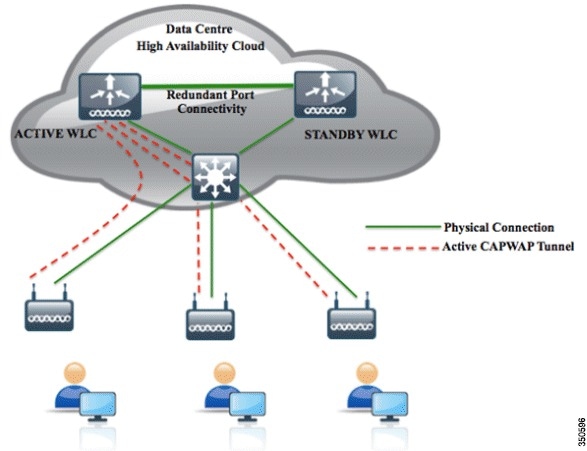
WLC-1 Active : (It is already in Production)
Management: 10.9.1.10/24
Redundancy-MGNT: 10.9.1.22/24
Service-Port: 10.9.20.30 /24
Virtual: 2.2.2.2
Redundancy-MGNT: 10.9.1.22/24
Service-Port: 10.9.20.30 /24
Virtual: 2.2.2.2
WLC-2 Secondary
Management: 10.9.1.21/24 (This is only used temporary to complete configuration)
Redundancy-MGNT: 10.9.1.23 /24
Service-Port: 10.9.20.31 /24
Virtual: 2.2.2.2 (needs to be the same as the Active Unit)
Some Terms:
Redundancy Management Interface
The IP address on this interface should be configured in the same subnet as the management interface. This interface will check the health of the Active WLC via network infrastructure once the Active WLC does not respond to Keepalive messages on the Redundant Port. This provides an additional health check of the network and Active WLC, and confirms if switchover should or should not be executed. Also, the Standby WLC uses this interface in order to source ICMP ping packets to check gateway reachability. This interface is also used in order to send notifications from the Active WLC to the Standby WLC in the event of Box failure or Manual Reset. The Standby WLC will use this interface in order to communicate to Syslog, the NTP server, and the TFTP server for any configuration upload.
Redundancy Port
This interface has a very important role in the new HA architecture. Bulk configuration during boot up and incremental configuration are synced from the Active WLC to the Standby WLC using the Redundant Port. WLCs in a HA setup will use this port to perform HA role negotiation. The Redundancy Port is also used in order to check peer reachability sending UDP keep-alive messages every 100 msec (default timer) from the Standby WLC to the Active WLC. Also, in the event of a box failure, the Active WLC will send notification to the Standby WLC via the Redundant Port. If the NTP server is not configured, a manual time sync is performed from the Active WLC to the Standby WLC on the Redundant Port. This port in case of standalone controller and redundancy VLAN in case of WISM-2 will be assigned an auto generated IP Address where last 2 octets are picked from the last 2 octets of Redundancy Management Interface (the first 2 octets are always 169.254).
Configuration HA Steps:
Active WLC-1: (It is already in production)

Secondary WLC-2: ( new Added)

2. Controller Redundancy Global Configuration
Active WLC-1: (It is already in production)

Secondary WLC-2: ( new Added)

3. Connect Redundancy Port Cable
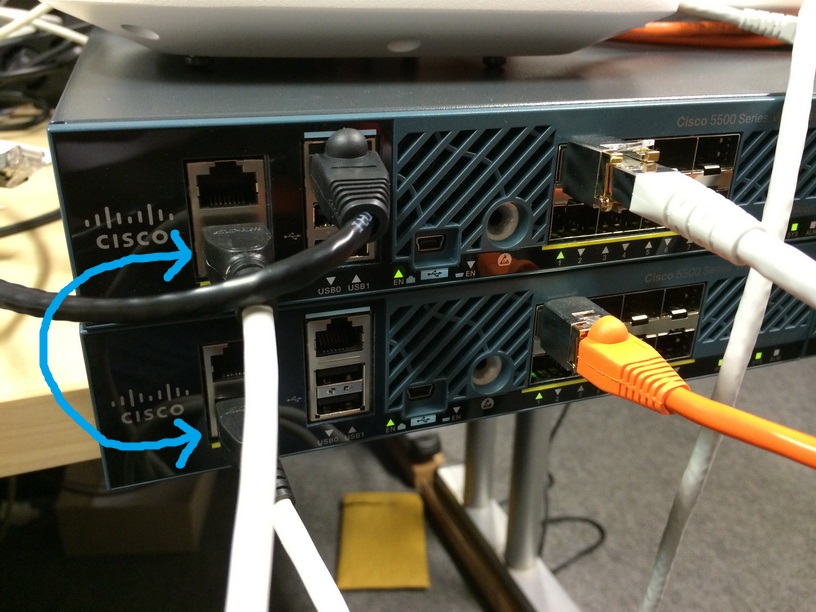
4. Change SSO configuration on both WLCs.
TBC
Reference:
WLAN Controller Failover for Lightweight Access Points Configuration Example
High Availability (SSO) Deployment Guide
WLC geographical redundancy

 RSS Feed
