
All basic configuration has been created from following related posts. This post will focus on some other configuration or troubleshooting happened in real environment.
Relate Posts:
Relate Posts:
- Cisco Wireless Controller 5508 Configuration Step by Step - Part 1 (CLI and GUI) -
- Cisco Wireless Controller 5508 Configuration Step by Step - Part 2 (User/Machine Auth) -
- Cisco Wireless Controller 5508 Configuration Step by Step - Part 3 (Certs Auth and Other Settings)
1. Create Different SSID for Different AP
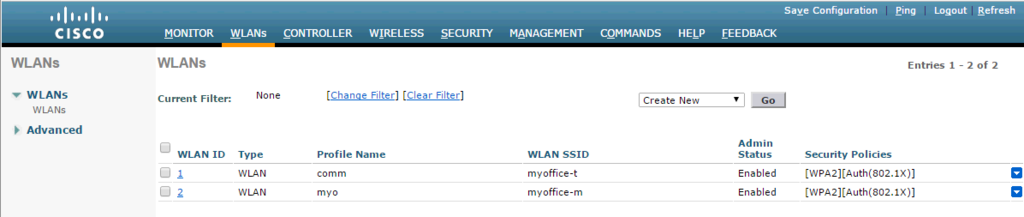
1.1 Create a new WLAN with new SSID
in this example, we are having two SSID : myoffice-t and myoffice-m
in this example, we are having two SSID : myoffice-t and myoffice-m

1.2 create a new AP Group


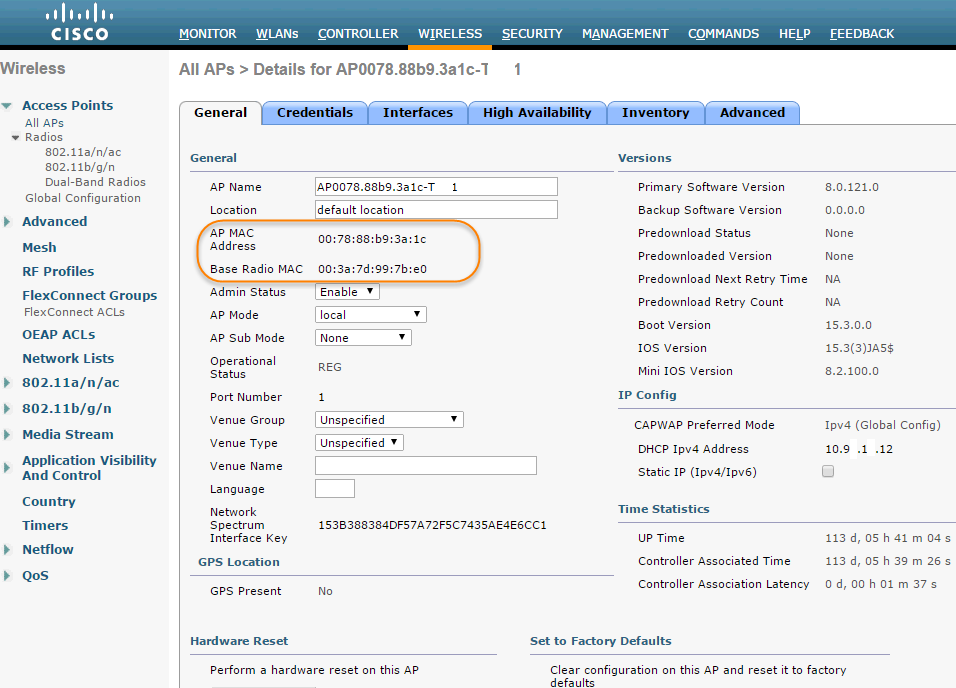
show advanced 802.11a summary would give you the Radio MAC addresses of all APs which has a 802.11a radio.
show advanced 802.11b summary would give you the Radio MAC addresses of all APs which has a 802.11b radio.
Show ap summary would give Ethernet MAC for all APs.
(Cisco Controller)
User: admin
Password:**********
(Cisco Controller) >
(Cisco Controller) >show ap summary

Number of APs.................................... 5

Global AP User Name.............................. admin
Global AP Dot1x User Name........................ Not Configured

AP Name             Slots  AP Model              Ethernet MAC       Location          Country  IP Address       Clients
------------------  -----  --------------------  -----------------  ----------------  -------  ---------------  -------
AP0078.88b9.3a1c-T1  2     AIR-CAP1702I-A-K9     00:78:88:b9:3a:1c  default location  US       10.94.19.12      2
AP00c1.64b5.8e34-T2  2     AIR-CAP1702I-A-K9     00:c1:64:b5:8e:34  default location  US       10.94.19.14      5
AP0042.68db.5858-V2  2     AIR-CAP1702I-A-K9     00:42:68:db:58:58  default location  US       10.94.32.25      1
AP0078.88b9.9fd0-V1  2     AIR-CAP1702I-A-K9     00:78:88:b9:9f:d0  default location  US       10.94.32.26      1
AP0078.8892.1974-M1  2     AIR-CAP1702I-A-K9     00:78:88:92:19:74  default location  US       10.99.2.40       0


(Cisco Controller) >show ap wlan 802.11a AP0078.8892.1974-M1

Site Name........................................ default-group
Site Description................................. <none>

WLAN ID          Interface          BSSID
-------         -----------        --------------------------
1               commercial           e0:0e:da:08:8b:1f

(Cisco Controller) >show ap wlan 802.11b AP0078.8892.1974-M1

Site Name........................................ default-group
Site Description................................. <none>

WLAN ID          Interface          BSSID
-------         -----------        --------------------------
1               commercial           e0:0e:da:08:8b:10
3. Troubleshooting AP Joining into WLC issue
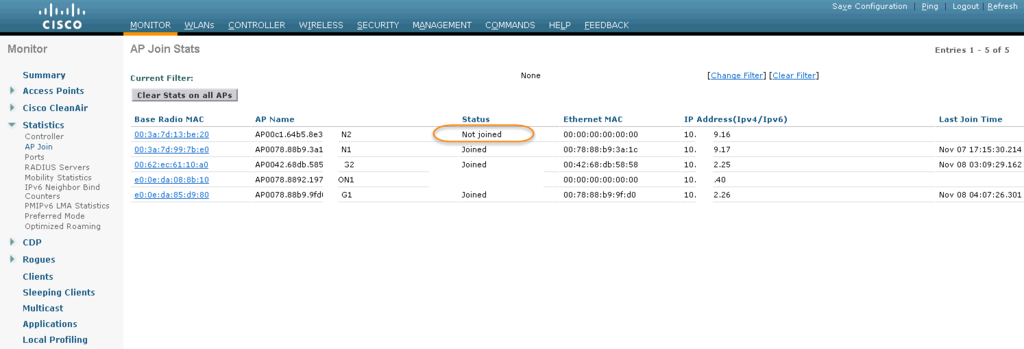
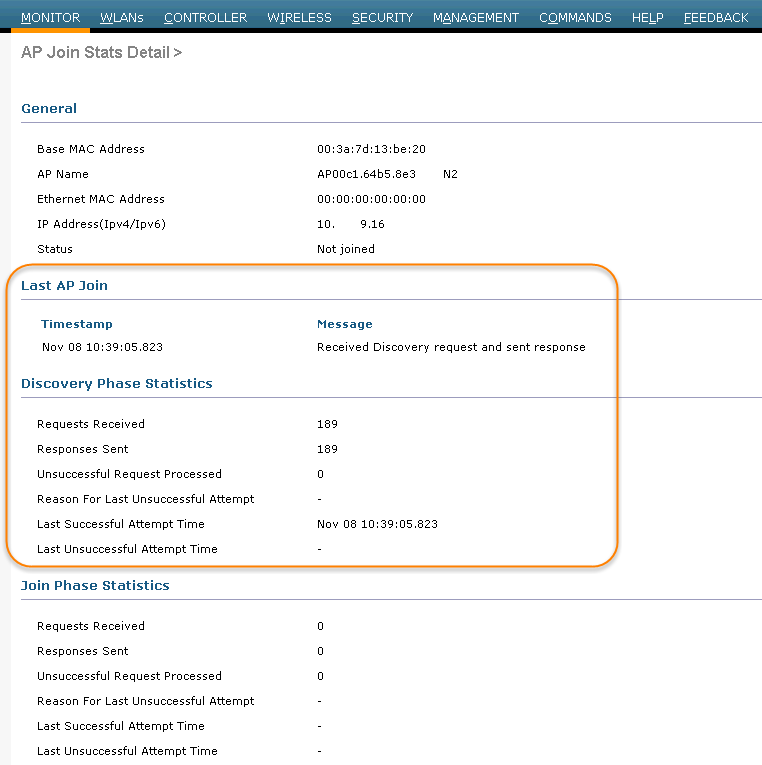
After SSH-ed into LAP and executed some debug commands , we found this LAP is sending request to two WLCs 10.1.4.11 and 10.9.19.10. But 10.1.4.11 has been set as master controller. And we want this specific AP to join into non master controller 10.9.19.10.
CAPWAP, which is based on LWAPP, is a standard, interoperable protocol that enables a controller to manage a collection of wireless access points.
In a CAPWAP environment, a lightweight access point discovers a controller by using CAPWAP discovery mechanisms and then sends the controller a CAPWAP join request. The controller sends the access point a CAPWAP join response allowing the access point to join the controller. When the access point joins the controller, the controller manages its configuration, firmware, control transactions, and data transactions.
CAPWAP is using UDP ports 5246 and 5247 (similar to the LWAPP UDP ports 12222 and 12223). Both ports are not blocked by an intermediate device that could prevent an access point from joining the controller.
The access points use a random UDP source port to reach these destination ports on the controller. After 60 seconds of trying to join a controller with CAPWAP, the access point falls back to using LWAPP. If it cannot find a controller using LWAPP within 60 seconds, it tries again to join a controller using CAPWAP. The access point repeats this cycle of switching from CAPWAP to LWAPP and back again every 60 seconds until it joins a controller.
AP0078.8892.1974-M1#debug capwap client ?
  avc             CAPWAP Client AVC
  cli             CAPWAP Client Cli Messages
  config          CAPWAP Client Config Messages
  detail          CAPWAP Client Detail Messages
  error           CAPWAP Client Error Messages
  event           CAPWAP Client Event Messages
  fwd             CAPWAP Client dot11 forwarding
  hexdump         CAPWAP Client Hexdump Messages
  info            CAPWAP Client Info Messages
  lsc             CAPWAP Client LSC Events
  mgmt            CAPWAP Client dot11 mgmt
  packet          CAPWAP Client Packets
  payload         CAPWAP Client Payload Messages
  predownload     CAPWAP Client Predownload Messages
  probe           CAPWAP Client dot11 probe
  qos             CAPWAP Client QoS
  reassembly      CAPWAP Client Fragment Reassembly
  tcp-mss-adjust  CAPWAP client MSS adjust
  tcp-mss-print   CAPWAP Client MSS print

AP0078.8892.1974-M1#debug capwap client even
CAPWAP Client EVENT display debugging is on
AP0078.8892.1974-M1#debug capwap client err
CAPWAP Client ERROR display debugging is on

AP0078.8892.1974-M1#terminal monitor

AP0078.8892.1974-M1#
*Nov  8 16:23:07.343: %CAPWAP-3-EVENTLOG: Calling wtpGetAcToJoin from timer expiry.
*Nov  8 16:23:07.343: %CAPWAP-3-EVENTLOG: !mwarname
*Nov  8 16:23:07.343: %CAPWAP-3-EVENTLOG: !mwarname
*Nov  8 16:23:07.343: %CAPWAP-3-EVENTLOG: !mwarname
*Nov  8 16:23:07.343: %CAPWAP-3-EVENTLOG: Selected MWAR 'wlc-muc1pm3' (index 1).
*Nov  8 16:23:07.343: %CAPWAP-3-EVENTLOG: Ap mgr count=1
*Nov  8 16:23:07.343: %CAPWAP-3-EVENTLOG: Controller: wlc-muc1pm3. ApMgr count is 1 ipTransportTried 0 prefer-mode 1

*Nov  8 16:23:07.343: %CAPWAP-3-EVENTLOG: Adding Ipv4 AP manager 10.1.4.11 to least load
*Nov  8 16:23:07.343: %CAPWAP-3-EVENTLOG: IPv4 Pref mode. Choosing AP Mgr with index 0, IP = 10.1.4.11, load = 99..
*Nov  8 16:23:07.343: %CAPWAP-3-EVENTLOG: capwapSetTransportAddr returning: index=1, apMgrCount = 0

*Nov  8 16:23:07.343: AP has SHA2 MIC certificate - Using SHA2 MIC certificate for DTLS.

*Nov  8 16:23:07.343: %CAPWAP-3-EVENTLOG: Synchronizing time with AC time.
*Nov  8 16:23:08.000: %CAPWAP-3-EVENTLOG: Setting time to 16:23:08 UTC Nov 8 2016

*Nov  8 16:23:08.000: %CAPWAP-5-DTLSREQSEND: DTLS connection request sent peer_ip: 10.1.4.11 peer_port: 5246
*Nov  8 16:23:08.000: %CAPWAP-3-EVENTLOG: CAPWAP State: DTLS Setup.
*Nov  8 16:23:08.000: %CAPWAP-3-EVENTLOG: Setting default MTU: MTU discovery can start with 576
*Nov  8 16:23:08.815: %CAPWAP-5-DTLSREQSUCC: DTLS connection created sucessfully peer_ip: 10.1.4.11 peer_port: 5246
*Nov  8 16:23:08.815: %CAPWAP-3-EVENTLOG: Dtls Session Established with the AC 10.1.4.11,port= 5246
*Nov  8 16:23:08.815: %CAPWAP-3-EVENTLOG: CAPWAP State: Join.
*Nov  8 16:23:08.815: %CAPWAP-3-EVENTLOG: Join request: version=134251776
*Nov  8 16:23:08.815: %CAPWAP-3-EVENTLOG: Join request: hasMaximum Message Payload
*Nov  8 16:23:08.815: %CAPWAP-3-EVENTLOG: Sending Join Request Path MTU payload, Length 1376

*Nov  8 16:23:08.819: %CAPWAP-5-SENDJOIN: sending Join Request to 10.1.4.11
*Nov  8 16:23:13.815: %CAPWAP-3-EVENTLOG: Join request: version=134251776
*Nov  8 16:23:13.815: %CAPWAP-3-EVENTLOG: Join request: hasMaximum Message Payload
*Nov  8 16:23:13.815: %CAPWAP-5-SENDJOIN: sending Join Request to 10.1.4.11
*Nov  8 16:23:13.919: %CAPWAP-3-EVENTLOG: Join Response from 10.1.4.11
*Nov  8 16:23:13.919: %CAPWAP-3-EVENTLOG: New Mwar DTLS capability 1 Old Mwar DTLS capability 1
*Nov  8 16:23:13.995: %CAPWAP-3-EVENTLOG: New Mwar DTLS capability 1 is same from the prev Mwar
*Nov  8 16:23:13.995: %CAPWAP-3-EVENTLOG: Starting Post Join timer
*Nov  8 16:23:13.995: %CAPWAP-3-EVENTLOG: CAPWAP State: Image Data.
*Nov  8 16:23:14.003: %CAPWAP-3-EVENTLOG: CAPWAP State: Configure.
*Nov  8 16:23:14.043: %CAPWAP-3-EVENTLOG: AP Dissociated due to LinkFailure, while sending message type 5
*Nov  8 16:23:14.119: %CAPWAP-3-EVENTLOG: ap sw version 15.3(3)JA8$
*Nov  8 16:23:14.119: %CAPWAP-3-EVENTLOG: lwapp_encode_ap_reset_button_payload: reset button state on
*Nov  8 16:23:14.199: %CAPWAP-3-EVENTLOG: Sending packet to AC

*Nov  8 16:23:14.199: %CAPWAP-3-EVENTLOG: Configuration Status sent to 10.1.4.11
*Nov  8 16:23:14.199: %CAPWAP-3-EVENTLOG: Current image is good. Connecting to the controller.
*Nov  8 16:23:17.199: %CAPWAP-3-EVENTLOG: Retransmission Count= 0 Max Re-Transmission Value=5

*Nov  8 16:23:17.199: %CAPWAP-3-EVENTLOG: Sending packet to AC

AP0078.8892.1974-M1#no debug all
All possible debugging has been turned off
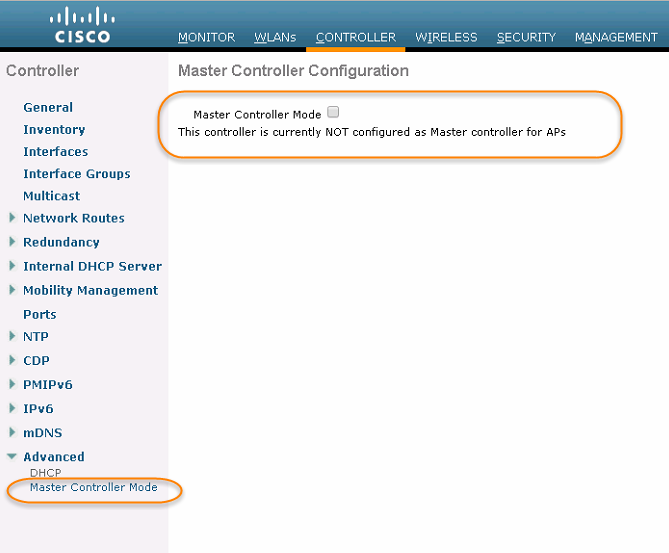
When there is a master controller enabled, all newly added access points with no primary, secondary, or tertiary controllers assigned associate with the master controller on the same subnet. This allows the operator to verify the access point configuration and assign primary, secondary, and tertiary controllers to the access point using the All APs > Details page.
The master controller is normally used only when adding new access points to the Cisco Wireless LAN solution. When no more access points are being added to the network, Cisco WLAN solution recommends that you disable the master controller.
To make sure this AP to join into 10.9.19.10 this WLC, we put one command into AP configuration. This time, debug shows it is only sent request to 10.9.19.10.
AP0078.8892.1974-M1#capwap ap controller ip add 10.9.19.10

AP0078.8892.1974-M1#debug capwap console cli
This command is meant only for debugging/troubleshooting
Any configuration change may result in different
behavior from centralized configuration.

CAPWAP console CLI allow/disallow debugging is on
AP0078.8892.1974-M1#test capwap restart
restart capwap

AP0078.8892.1974-M1#debug capwap client event
CAPWAP Client EVENT display debugging is on
AP0078.8892.1974-M1#debug capwap client err
CAPWAP Client ERROR display debugging is on
AP0078.8892.1974-M1#term mon

AP0078.8892.1974-M1#
*Nov  8 16:43:32.907: %CAPWAP-3-EVENTLOG: CAPWAP State: DTLS Teardown.
*Nov  8 16:43:37.907: %CAPWAP-3-EVENTLOG: DTLS session cleanup completed. Restarting capwap state machine.
*Nov  8 16:43:37.907: %CAPWAP-3-EVENTLOG: Previous CAPWAP state was DTLS Setup,numOfCapwapDiscoveryResp = 3.
*Nov  8 16:43:37.907: %CAPWAP-3-EVENTLOG: Attempting to join next controller
*Nov  8 16:43:37.907: %CAPWAP-3-EVENTLOG: Go Join the next controller

*Nov  8 16:43:37.907: %CAPWAP-3-EVENTLOG: Calling wtpGetAcToJoin from timer expiry.
*Nov  8 16:43:37.907: %CAPWAP-3-EVENTLOG: !mwarname
*Nov  8 16:43:37.907: %CAPWAP-3-EVENTLOG: !mwarname
*Nov  8 16:43:37.907: %CAPWAP-3-EVENTLOG: !mwarname
*Nov  8 16:43:37.907: %CAPWAP-3-EVENTLOG: Selected MWAR 'wlc-muc1pm3' (index 2).
*Nov  8 16:43:37.907: %CAPWAP-3-EVENTLOG: Ap mgr count=0
*Nov  8 16:43:37.907: %CAPWAP-3-EVENTLOG: Go Join the next controller

*Nov  8 16:43:37.907: %CAPWAP-3-EVENTLOG: Remove discovery response at index 2

*Nov  8 16:43:37.907: %CAPWAP-3-EVENTLOG: Calling wtpGetAcToJoin from timer expiry.
*Nov  8 16:43:37.907: %CAPWAP-3-EVENTLOG: !mwarname
*Nov  8 16:43:37.907: %CAPWAP-3-EVENTLOG: !mwarname
*Nov  8 16:43:37.907: %CAPWAP-3-EVENTLOG: !mwarname
*Nov  8 16:43:37.907: %CAPWAP-3-EVENTLOG: Selected MWAR 'WLC-TRN1-1' (index 0).
*Nov  8 16:43:37.907: %CAPWAP-3-EVENTLOG: Ap mgr count=1
*Nov  8 16:43:37.907: %CAPWAP-3-EVENTLOG: Controller: WLC-TRN1-1. ApMgr count is 1 ipTransportTried 0 prefer-mode 1

*Nov  8 16:43:37.907: %CAPWAP-3-EVENTLOG: Adding Ipv4 AP manager 10.9.19.10 to least load
*Nov  8 16:43:37.907: %CAPWAP-3-EVENTLOG: IPv4 Pref mode. Choosing AP Mgr with index 0, IP = 10.9.19.10, load = 4..
*Nov  8 16:43:37.907: %CAPWAP-3-EVENTLOG: capwapSetTransportAddr returning: index=0, apMgrCount = 0

*Nov  8 16:43:37.907: AP has SHA2 MIC certificate - Using SHA2 MIC certificate for DTLS.

*Nov  8 16:43:37.907: %CAPWAP-3-EVENTLOG: Synchronizing time with AC time.
*Nov  8 16:43:38.000: %CAPWAP-3-EVENTLOG: Setting time to 16:43:38 UTC Nov 8 2016

*Nov  8 16:43:38.000: %CAPWAP-5-DTLSREQSEND: DTLS connection request sent peer_ip: 10.9.19.10 peer_port: 5246
*Nov  8 16:43:38.000: %CAPWAP-3-EVENTLOG: CAPWAP State: DTLS Setup.
*Nov  8 16:43:38.000: %CAPWAP-3-EVENTLOG: Setting default MTU: MTU discovery can start with 576
*Nov  8 16:43:38.535: %CAPWAP-5-DTLSREQSUCC: DTLS connection created sucessfully peer_ip: 10.9.19.10 peer_port: 5246
*Nov  8 16:43:38.535: %CAPWAP-3-EVENTLOG: Dtls Session Established with the AC 10.9.19.10,port= 5246
*Nov  8 16:43:38.535: %CAPWAP-3-EVENTLOG: CAPWAP State: Join.
*Nov  8 16:43:38.535: %CAPWAP-3-EVENTLOG: Join request: version=134253568
*Nov  8 16:43:38.535: %CAPWAP-3-EVENTLOG: Join request: hasMaximum Message Payload
*Nov  8 16:43:38.535: %CAPWAP-3-EVENTLOG: Sending Join Request Path MTU payload, Length 1376

*Nov  8 16:43:38.535: %CAPWAP-5-SENDJOIN: sending Join Request to 10.9.19.10
*Nov  8 16:43:43.535: %CAPWAP-3-EVENTLOG: Join request: version=134253568
*Nov  8 16:43:43.535: %CAPWAP-3-EVENTLOG: Join request: hasMaximum Message Payload
*Nov  8 16:43:43.535: %CAPWAP-5-SENDJOIN: sending Join Request to 10.9.19.10
*Nov  8 16:43:43.551: %CAPWAP-3-EVENTLOG: Join Response from 10.9.19.10
*Nov  8 16:43:43.551: %CAPWAP-3-EVENTLOG: New Mwar DTLS capability 1 Old Mwar DTLS capability 1
*Nov  8 16:43:43.627: %CAPWAP-3-EVENTLOG: New Mwar DTLS capability 1 is same from the prev Mwar
*Nov  8 16:43:43.627: %CAPWAP-3-EVENTLOG: Starting Post Join timer
*Nov  8 16:43:43.627: %CAPWAP-3-EVENTLOG: CAPWAP State: Image Data.perform archive download capwap:/ap3g2 tar file
*Nov  8 16:43:43.639: %CAPWAP-6-AP_IMG_DWNLD: Required image not found on AP. Downloading image from Controller.
*Nov  8 16:43:43.639: %CAPWAP-3-EVENTLOG: Sending packet to AC

*Nov  8 16:43:43.639: %CAPWAP-3-EVENTLOG: Stopping Post Join Timer and Starting HeartBeat Timer
*Nov  8 16:43:43.639: %CAPWAP-3-EVENTLOG: Image Data Request sent to 10.9.19.10
*Nov  8 16:43:43.659: %CAPWAP-3-EVENTLOG: Resetting reTransmissionCnt to 0
*Nov  8 16:43:43.659: %CAPWAP-3-EVENTLOG: Queue Empty.
*Nov  8 16:43:43.659: %CAPWAP-3-EVENTLOG: Image Data Response from 10.9.19.10
*Nov  8 16:43:43.659: %CAPWAP-3-EVENTLOG: Starting image download.............
*Nov  8 16:44:13.643: %CAPWAP-3-EVENTLOG: Echo Interval Expired.
*Nov  8 16:44:13.643: %CAPWAP-3-EVENTLOG: Sending packet to AC

*Nov  8 16:44:13.643: %CAPWAP-3-EVENTLOG: Echo Request sent to 10.9.19.10
*Nov  8 16:44:13.675: %CAPWAP-3-EVENTLOG: Resetting reTransmissionCnt to 0
*Nov  8 16:44:13.675: %CAPWAP-3-EVENTLOG: Queue Empty.
*Nov  8 16:44:13.675: %CAPWAP-3-EVENTLOG: Echo Response from 10.9.19.10
*Nov  8 16:44:43.643: %CAPWAP-3-EVENTLOG: Echo Interval Expired.
*Nov  8 16:44:43.643: %CAPWAP-3-EVENTLOG: Sending packet to AC
4. Manually Configure AP IP Configuration
4.1. To see all static config on the AP:

AP0022.9090.e859#sh capwap ip config

LWAPP Static IP Configuration

4.2. Static config

AP0022.9090.e859#capwap ap ip address 192.168.1.2 255.255.255.0

AP0022.9090.e859#capwap ap ip default-gateway 192.168.1.1

Telling the AP the controller to join-

AP0022.9090.e859#capwap ap controller ip address 192.168.1.10

AP0022.9090.e859#sh capwap ip config

LWAPP Static IP Configuration
IP Address         192.168.1.2
IP netmask         255.255.255.0
Default Gateway    192.168.1.1
Primary Controller 192.168.1.10

To view the AP private-config:

AP0022.9090.e859#show capwap client config

configMagicMark         0xF1E2D3C4
chkSumV2                4204
chkSumV1                33089
swVer                   7.2.110.0
adminState              ADMIN_ENABLED(1)
name                    AP0022.9090.e859
location                default location
group name
mwarName
mwarIPAddress           192.168.1.10
mwarName
mwarIPAddress           0.0.0.0
mwarName
mwarIPAddress           0.0.0.0
ssh status              Disabled
Telnet status           Disabled
numOfSlots              2
spamRebootOnAssert      1
spamStatTimer           180
randSeed                0x5B3B
transport               SPAM_TRANSPORT_L3(2)
transportCfg            SPAM_TRANSPORT_DEFAULT(0)
initialisation          SPAM_PRODUCTION_DISCOVERY(1)
ApMode                  Local
ApSubMode               Not Configured
AP Rogue Detection Mode Enabled
OfficeExtend AP         [0] Disabled
OfficeExtend AP JoinMode[0] Standard
Discovery Timer         10 secs
Heart Beat Timer        30 secs
Led State Enabled       1
Primed Interval         0
AP ILP Pre-Standard Switch Support Disabled
AP Power Injector Disabled
Infrastructure MFP validation Disabled
Configured Switch 1 Addr 192.168.75.48
Configured Switch 2 Addr 192.168.75.52
non-occupancy channels:
Ethernet (Duplex/Speed) auto/auto

4.3. To clear the config

AP0022.9090.e859#clear capwap ap ip address

AP0022.9090.e859#clear capwap ap ip default-gateway

AP0022.9090.e859#clear capwap ap hostname

AP0022.9090.e859#clear capwap ap controller ip address

To clear the AP private config-

AP0022.9090.e859#clear capwap private-config

AP0022.9090.e859#show capwap client config

4.4. Normally, if the AP cannot find a controller to join, it will automatically reboot.

To prevent it from rebooting,-

AP0022.9090.e859#debug capwap cli no-reload

4.5. Prior to configuring the AP:

Before the Access Point will allow configuration changes, it is first necessary to enter the following debug command:

AP0022.9090.e859#debug capwap console cli

This command is meant only for debugging/troubleshooting

Any configuration change may result in different behavior from centralized configuration.

CAPWAP console CLI allow/disallow debugging is on

4.6.To upgrade the rcv image on the AP

AP0022.9090.e859#debug capwap console cli

archive download-sw /overwrite /force-reload tftp://<TFTP SERVER>/<file name>

e.g- archive download-sw /overwrite /force-reload tftp://192.168.5.12/ap3g1-rcvk9w8-tar.124-23c.JA3.tar

default password: Cisco

The AP should boot up with the lightweight code; "sh version" on the AP will have a "k9w8" in it instead of a "k9w7" which stands for autonomous.

4.7. Debug commands to monitor the discovery process:

AP0022.9090.e859#debug ip udp

To view the AP detail (controller ip, operational state, software version):

AP0022.9090.e859#show capwap client rcb

AdminState                  :  ADMIN_ENABLED
SwVer                       :  7.2.110.0
NumFilledSlots              :  2
Name                        :  AP0022.9090.e859
Location                    :  default location
MwarName                    :  5508-5
MwarApMgrIp                 :  192.168.75.48
MwarHwVer                   :  0.0.0.0
ApMode                      :  Local
ApSubMode                   :  Not Configured
OperationState              :  UP
CAPWAP Path MTU             :  1485
LinkAuditing                :  disabled
AP Rogue Detection Mode     :  Enabled
AP Tcp Mss Adjust           :  Disabled
Band Direct                 :  Enabled
Predownload Status          :  None
Auto Immune Status          :  Disabled
RA Guard Status             :  Enabled
Efficient Upgrade State     :  Disabled
Efficient Upgrade Role      :  None
TFTP Server                 :  Disabled
802.11bg(0) Radio
  GPR Period                : 10
  Beacon Period             : 100
  DTIM Period               : 0
  World Mode                : 1
  VoceraFix                 : 0
  Fragmentation Threshold   : 2346
  Current Tx Power Level    : 7
  Current Channel           : 6
802.11a(1) Radio
  GPR Period                : 10
  Beacon Period             : 100
  DTIM Period               : 0
  World Mode                : 1
  VoceraFix                 : 0
  Fragmentation Threshold   : 2346
  Current Tx Power Level    : 0
  Current Channel           : 165

 RSS Feed
