
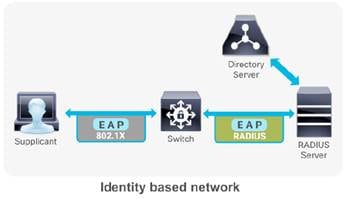
 RADIUS server has been used on a Cisco® Catalyst switch, router or IOS based wireless controllers in the context of enterprise network access security.
1. 802.1x and EAP
While IEEE 802.1X enables authenticated access to IEEE 802 media, including Ethernet and 802.11 wireless LANs, the RADIUS infrastructure facilitates centralized Authentication, Authorization, and Accounting (AAA) management for users and devices that connect and use network service(s).
In an identity based network an endpoint (supplicant) initiates its network access session with a 802.1X authentication. The IEEE 802.1X access control protocol is fundamentally a layer 2 transport protocol that carries the Extensible Authentication Protocol (EAP) payload in it. EAP is an authentication framework that defines the transport and usage of identity credentials. EAP encapsulates the usernames, passwords, certificates, tokens, OTPs, etc. that a client sends for the purpose of authentication. The first hop Network Access Server (NAS) (switch/router/wireless controller), hands off the EAP payload to the authentication server via the RADIUS messaging. The RADIUS server either performs lookups with its internal user database or queries an external identiity store, and responds to the client accordingly with the appropriate authorization permissions. The avaiability and servicability of a RADIUS server is fundamental for an enterprise grade secure access solution to operate.
To make wireless networks really secure you should use a RADIUS server to authenticate your users instead of using a pre-shared key. The RADIUS server will handle the authentication requests and uses EAP (Extensible Authentication Protocol) to communicate with users. There are many EAP types:
- EAP (Extensible Authentication Protocol) uses an arbitrary authentication method, such as certificates, smart cards, or credentials.
- EAP-TLS (EAP-Transport Layer Security) is an EAP type that is used in certificate-based security environments, and it provides the strongest authentication and key determination method.
- EAP-MS-CHAP v2 (EAP-Microsoft Challenge Handshake Authentication Protocol version 2) is a mutual authentication method that supports password-based user or computer authentication.
- PEAP (Protected EAP) is an authentication method that uses TLS to enhance the security of other EAP authentication protocols.
and the most popular ones are:
- PEAP (Protected EAP)
- EAP-TLS
PEAP is normally used to authenticate users by using a username and password. The RADIUS server will show a certificate to the users so that they can verify that they are talking to the correct RADIUS server. EAP-TLS is the most secure form of wireless authentication because it replaces the client username/password with a client certificate.
RADIUS is a distributed client/server system that secures networks against unauthorized access. It’s an open standard protocol that can be customized with vendor specific attributes. In the Cisco implementation, RADIUS clients run on Cisco switches/routers/wireless controllers and send authentication requests to a central RADIUS server that contains all user authentication and network service access information. Cisco supports RADIUS under its AAA security paradigm. RADIUS can be used with other AAA security protocols, such as TACACS+, Kerberos, and local username lookup. RADIUS is supported on all Cisco platforms, but some RADIUS-supported features run only on specified platforms.
2. Configure Local EAP Authentication
Local EAP is an authentication method that allows users and wireless clients to be authenticated locally to WLC. This is useful for a remote branch where it does not have a external RADIUS on-site or do not want to rely on the WAN to connect back to main office RADIUS or even that RADIUS server is gone down. Local EAP supports LEAP, EAP-FAST, EAP-TLS, PEAPv0/MSCHAPv2 and PEAPv1/GTC authentication between the WLC & wireless clients.
If any RADIUS servers are configured on the controller, the controller tries to authenticate the wireless client using the RADIUS servers first. Local EAP is attempted only if no RADIUS servers found (timed out or no RADIUS configured).
2.1 Create local Net Users

2.2 Create a Local EAP Profie - 'localEAP-test'


2.3 Configure a WLAN in the controllers and specify Local EAP as authentication mechanism.


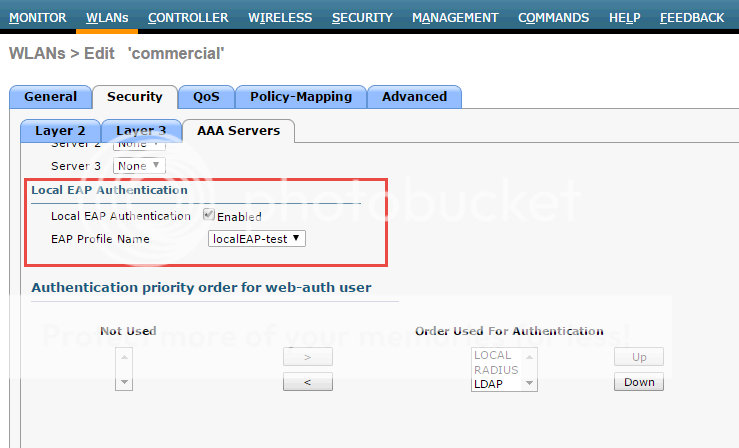
3. Configure Authentication with AD
3.1 Register NPS server in AD
To enable Network Policy Server (NPS) to read user account information in Active Directory Domain Services (AD DS) during the authentication and authorization processes, you must register the server running NPS in AD.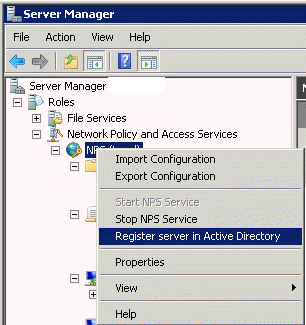
3.2 Create a new Network Policy

3.3 Add a new condition

3.4 Select Windows Groups Condition

3.5 Choose a pre-defined domain user group

3.6 Choose Authentication methods

3.7 Choose some RADIUS attributes

Rather than using user group in step 3.4, you also can choose machine groups. It will require some change at client end. You will have to change it from user or computer authentication to only computer authentication. The issue was caused by the Authentication Mode in the Security Settings for the Wireless Network Connection that we had setup in Group Policy (Computer Configuration > Windows Settings > Security Settings > Wireless Network (802.11) Policies > "Your Network Policy"). Originally the Authentication Mode was set to "User or Computer authentication", when this was changed to "Computer authentication" the Computer Account condition in the Network Policy in NPS was processed correctly and clients could connect. I can only assume that this is a bug as on further testing I found that when the Authentication Mode was set to "User or Computer authentication" NPS would process a User Account condition in the Network Policy correctly, but still refused to process the Computer Account condition properly.
Reference:
1. Configuring Local EAP on WLC
2. Tutorial: 802.1X Authentication via WiFi – Active Directory + Network Policy Server + Cisco WLAN + Group Policy
3. PEAP and EAP-TLS on Server 2008 and Cisco WLC
4. WiFi Certificate Based Authentication
5. Restrict Non Domain devices (BYOD) from authen
6. Implementation of IEEE 802.1X in wirednetworks
7. How to set up a WPA2-EAP Wireless Network Using Network Policy Server (NPS), AD and Group Policies

 RSS Feed
