
Worked on a used cisco switch 2960 which has been configured password. Following steps have been recorded how to get into recover mode.
Configure the baud rate and character format of the PC or terminal to match these console port default characteristics:

 Note: for Cisco routers and certain type of Cisco switch (2955), it will require press Break Button / Ctrl+Break on terminal window to interrupt boot procedure.
1. Cisco Catalyst Fixed Configuration Layer 2 and Layer 3 Switches
2. All Cisco Products Password Recovery Procedures
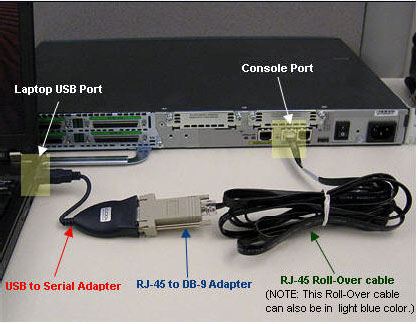
1. Connect Console Cable
Cisco provides a couple of ports for console access, such as Console port, Mini USB port, AUX port. I has a previous post "Using Cisco Mini USB Console Cable to Configure Cisco Switches and Routers" for Mini USB usage. Usually old fashion way to use console port is still prevailing.Configure the baud rate and character format of the PC or terminal to match these console port default characteristics:
- 9600 baud
- 8 data bits
- No parity
- 1 stop bit

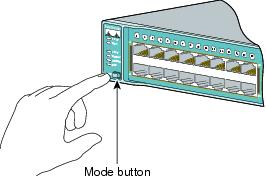
2. Hold down MODE Button while powering on the device
|
Using driver version 1 for media type 1
Base ethernet MAC Address: 00:26:ca:28:4e:80 Xmodem file system is available. The password-recovery mechanism is enabled. The system has been interrupted prior to initializing the flash filesystem. The following commands will initialize the flash filesystem, and finish loading the operating system software: flash_init boot switch: |
3. Initialize the flash file system and delete old configuration file
note: you also can use command 'dir flash:' to list files and rename configuration file with rename command 'rename flash:config.text flash:config.text.old'
switch: flash_init
Initializing Flash...
mifs[2]: 0 files, 1 directories
mifs[2]: Total bytes : 3870720
mifs[2]: Bytes used : 1024
mifs[2]: Bytes available : 3869696
mifs[2]: mifs fsck took 1 seconds.
mifs[3]: 531 files, 19 directories
mifs[3]: Total bytes : 27998208
mifs[3]: Bytes used : 9988096
mifs[3]: Bytes available : 18010112
mifs[3]: mifs fsck took 6 seconds.
...done Initializing Flash.
switch: del flash:config.text
Are you sure you want to delete "flash:config.text" (y/n)?y
File "flash:config.text" deleted
switch: del falsh:vlan.dat
Are you sure you want to delete "falsh:vlan.dat" (y/n)?y
File "falsh:vlan.dat" not deleted -- no such device
4. Reboot the system with default configuration
|
switch:
|
switch: boot
Loading "flash:c2960-lanlitek9-mz.122-44.SE6/c2960-lanlitek9-mz.122-44.SE6.bin"... @@@@@ @@@@@@@@@@@@@@@@@@@@@@@@@@@@@@@@@@@@@@@@@@@@@@@@@@@@@@@@@@@@@@@@@@@@@@@@@@@@@@@@@@@@@@@@@@@@@@@@@@@@@@@@@@@@@@@@@@@@@@@@@@@@@@@@@@@@@@@@@@@@@@@@@@@@@@@@@@@@@@
File "flash:c2960-lanlitek9-mz.122-44.SE6/c2960-lanlitek9-mz.122-44.SE6.bin" uncompressed and installed, entry point: 0x3000
executing...
Restricted Rights Legend
Use, duplication, or disclosure by the Government is
subject to restrictions as set forth in subparagraph
(c) of the Commercial Computer Software - Restricted
Rights clause at FAR sec. 52.227-19 and subparagraph
(c) (1) (ii) of the Rights in Technical Data and Computer
Software clause at DFARS sec. 252.227-7013.
cisco Systems, Inc.
170 West Tasman Drive
San Jose, California 95134-1706
Cisco IOS Software, C2960 Software (C2960-LANLITEK9-M), Version 12.2(44)SE6, RELEASE SOFTWARE (fc1)
Copyright (c) 1986-2009 by Cisco Systems, Inc.
Compiled Mon 09-Mar-09 18:10 by gereddy
Image text-base: 0x00003000, data-base: 0x01000000
Initializing flashfs...
Using driver version 1 for media type 1
mifs[3]: 0 files, 1 directories
mifs[3]: Total bytes : 3870720
mifs[3]: Bytes used : 1024
mifs[3]: Bytes available : 3869696
mifs[3]: mifs fsck took 0 seconds.
mifs[3]: Initialization complete.
mifs[4]: 530 files, 19 directories
mifs[4]: Total bytes : 27998208
mifs[4]: Bytes used : 9985536
mifs[4]: Bytes available : 18012672
mifs[4]: mifs fsck took 1 seconds.
mifs[4]: Initialization complete.
...done Initializing flashfs.
Checking for Bootloader upgrade.. not needed
POST: CPU MIC register Tests : Begin
POST: CPU MIC register Tests : End, Status Passed
POST: PortASIC Memory Tests : Begin
POST: PortASIC Memory Tests : End, Status Passed
POST: CPU MIC interface Loopback Tests : Begin
POST: CPU MIC interface Loopback Tests : End, Status Passed
POST: PortASIC RingLoopback Tests : Begin
POST: PortASIC RingLoopback Tests : End, Status Passed
POST: PortASIC CAM Subsystem Tests : Begin
POST: PortASIC CAM Subsystem Tests : End, Status Passed
POST: PortASIC Port Loopback Tests : Begin
POST: PortASIC Port Loopback Tests : End, Status Passed
Waiting for Port download...Complete
This product contains cryptographic features and is subject to United
States and local country laws governing import, export, transfer and
use. Delivery of Cisco cryptographic products does not imply
third-party authority to import, export, distribute or use encryption.
Importers, exporters, distributors and users are responsible for
compliance with U.S. and local country laws. By using this product you
agree to comply with applicable laws and regulations. If you are unable
to comply with U.S. and local laws, return this product immediately.
A summary of U.S. laws governing Cisco cryptographic products may be found at:
http://www.cisco.com/wwl/export/crypto/tool/stqrg.html
If you require further assistance please contact us by sending email to
cisco WS-C2960-24-S (PowerPC405) processor (revision C0) with 61440K/4088K bytes of memory.
Processor board ID FOC1330Y46Z
Last reset from power-on
1 Virtual Ethernet interface
24 FastEthernet interfaces
The password-recovery mechanism is enabled.
64K bytes of flash-simulated non-volatile configuration memory.
Base ethernet MAC Address : 00:26:CA:28:4E:80
Motherboard assembly number : 73-11471-05
Power supply part number : 341-0097-02
Motherboard serial number : FOC133106GX
Power supply serial number : AZS132908XC
Model revision number : C0
Motherboard revision number : A0
Model number : WS-C2960-24-S
System serial number : FOC1330Y46Z
Top Assembly Part Number : 800-29858-02
Top Assembly Revision Number : C0
Version ID : V03
CLEI Code Number : COMSJ00ARC
Hardware Board Revision Number : 0x01
Switch Ports Model SW Version SW Image
------ ----- ----- ---------- ----------
* 1 24 WS-C2960-24-S 12.2(44)SE6 C2960-LANLITEK9-M
--- System Configuration Dialog ---
Would you like to enter the initial configuration dialog? [yes/no]:no
Reference:
1. Cisco Catalyst Fixed Configuration Layer 2 and Layer 3 Switches
2. All Cisco Products Password Recovery Procedures

 RSS Feed
