
Change SWAP Size to Improve Low Memory Cloud VM Performance
I am having a couple of low memory vm in the cloud to run some basic testing lab. It always gets me a notification for the performance , especially on memory since they are only have 587M memory.
This process is good for both Ubuntu and CentOS.
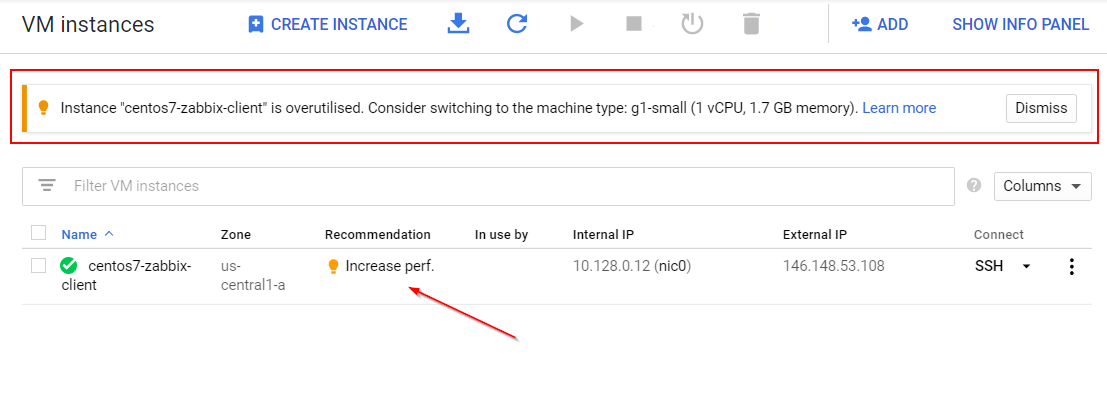
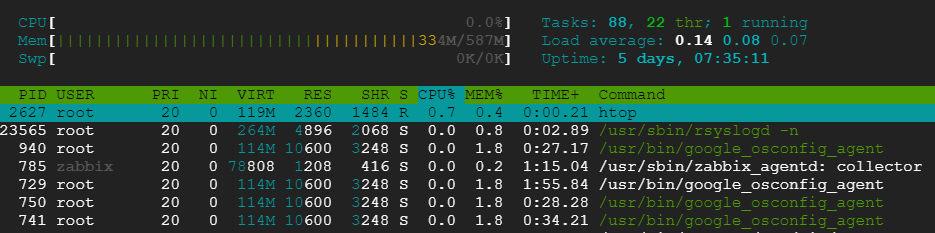
In my case, my VM is only having 587M memory with 0K swap file size.
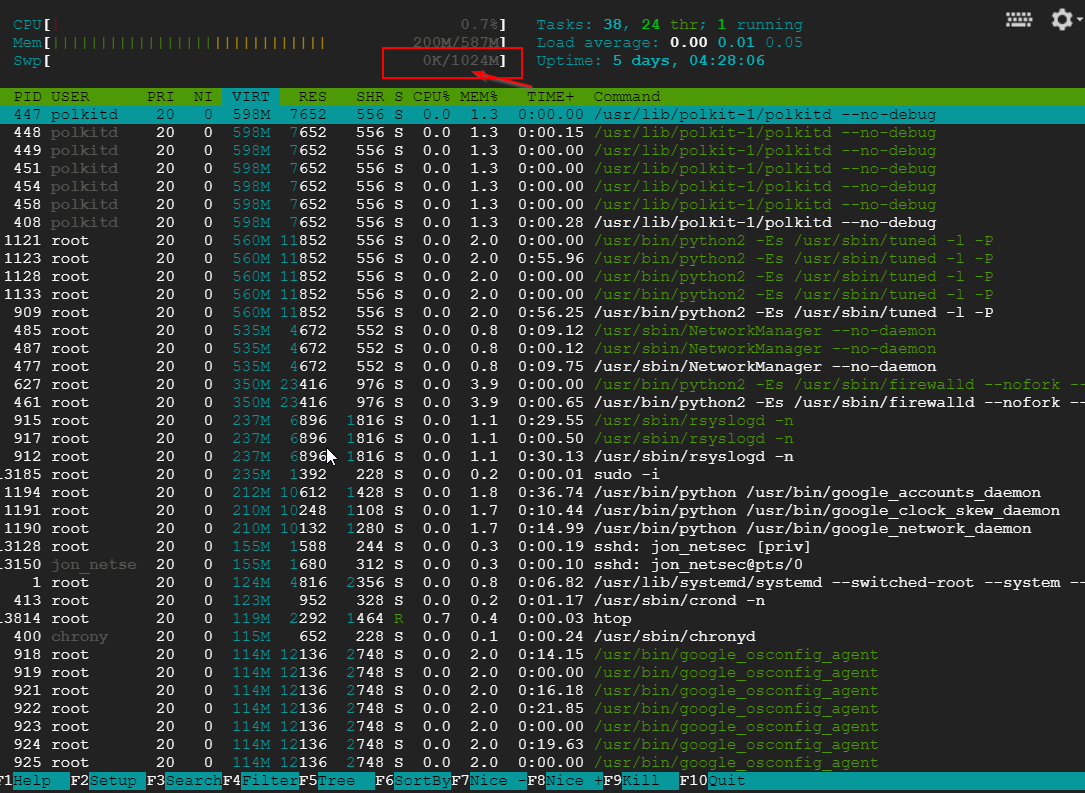
Based on recommendation, I am adding a 1GB swap file for it.
Add a new line into /etc/fstab file:
/swapfile swap swap defaults 0 0

Notes: How do I allocate memory to work as swap space in an Amazon EC2 instance by using a swap file?
Note: No need to reboot system
Verification by using commands:
To Sum up all commands again:
I could not tell much difference from before and after swap increase change. It might be will tell difference when there are some heavy application using memory.
In the following example, we’ll extend the swap space available in the /swapfile from 0 GB to 1 GB.
Turn off all swap processes
fallocate -l 1G /swapfile
Resize the swap
if = input file
of = output file
bs = block size
count = multiplier of blocks
Make the file usable as swap
To make the change permanent open the
If you want to set the swap priority to 100, the command will changed to :
via Blogger https://ift.tt/3qEtGUa
January 23, 2021 at 11:08PM Linux
I am having a couple of low memory vm in the cloud to run some basic testing lab. It always gets me a notification for the performance , especially on memory since they are only have 587M memory.
This process is good for both Ubuntu and CentOS.
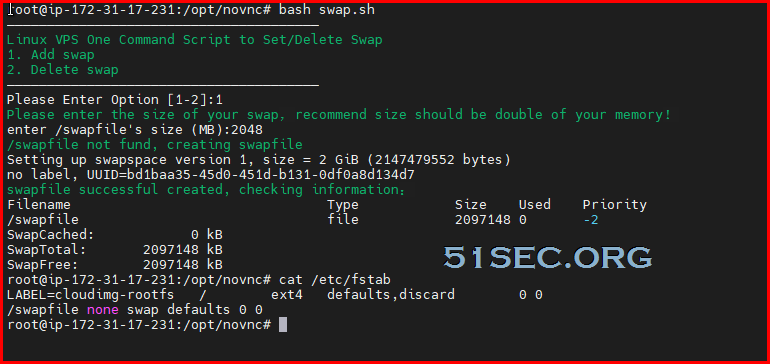
One Command to add/delete SWAP size.
Command (not support OpenVZ) from root user:
When choose add swap, please enter number for size. Default metric is MB。
In screenshot, the priority is showing 0. Script in github has set to 100.
Github: https://github.com/51sec/swap
Original script is from : https://ift.tt/2M1OV3B
Performance Issue on Low Memory Cloud VM
Change SWAP File Size
Linux provides for two types of swap space. By default, most Linux installations create a swap partition, but it is also possible to use a specially configured file as a swap file. A swap partition is just what its name implies—a standard disk partition that is designated as swap space by the mkswap command. If you don’t have enough memory, swap will be used quite often and noticeably more during any memory requirement spikes. If you don’t have enough memory and no swap space, this will often cause failure to allocate memory for requests needing more memory pages. As a last resort, the Kernel will deploy OOM killer to nuke high-memory processes (usually MySQL, java, etc), which shows in my previous post - Linux Virtual Machine PHP Invoked OOM-killer (Out of Memory) Issue.
Here comes recommended SWAP spaces:
|
Amount of system RAM
|
Recommended swap space
|
Recommended swap with hibernation
|
|---|---|---|
|
less than 2 GB
|
2 times the amount of RAM
|
3 times the amount of RAM
|
|
2 GB - 8 GB
|
Equal to the amount of RAM
|
2 times the amount of RAM
|
|
8 GB - 64 GB
|
0.5 times the amount of RAM
|
1.5 times the amount of RAM
|
|
more than 64 GB
|
workload dependent
|
hibernation not recommended
|
In my case, my VM is only having 587M memory with 0K swap file size.
Based on recommendation, I am adding a 1GB swap file for it.
[root@centos7-zabbix-client ~]# sudo fallocate -l 1G /swapfile
[root@centos7-zabbix-client ~]# sudo dd if=/dev/zero of=/swapfile bs=1024 count=1048576
1048576+0 records in
1048576+0 records out
1073741824 bytes (1.1 GB) copied, 27.5052 s, 39.0 MB/s
[root@centos7-zabbix-client ~]# sudo chmod 600 /swapfile
[root@centos7-zabbix-client ~]# sudo mkswap /swapfile
Setting up swapspace version 1, size = 1048572 KiB
no label, UUID=d126e13f-162d-4a1d-998c-f8e4152e4f8b
[root@centos7-zabbix-client ~]# sudo swapon /swapfile
[root@centos7-zabbix-client ~]# vi /etc/fstab
Command Explanation:- create a file which will be used as swap space: sudo dd if=/dev/zero of=/swapfile bs=1024 count=1048576
- Ensure that only the root user can read and write the swap file by setting the correct permissions:sudo chmod 600 /swapfile
- set up a Linux swap area on the file:sudo mkswap /swapfile
- Run the following command to activate the swap: sudo swapon /swapfile
- Make the change permanent by opening the /etc/fstab file: sudo vi /etc/fstab
Add a new line into /etc/fstab file:
/swapfile swap swap defaults 0 0
Notes: How do I allocate memory to work as swap space in an Amazon EC2 instance by using a swap file?
Note: No need to reboot system
Verification by using commands:
- top
- htop
- free -h
To Sum up all commands again:
- sudo fallocate -l 1G /swapfile ##it won't work if fallocate is not installed. using dd if=/dev/zero of=/swapfile bs=1024 count=1048576 command instead
- sudo chmod 600 /swapfile
- sudo mkswap /swapfile
- sudo swapon /swapfile
- echo '/swapfile none swap sw 0 0' | sudo tee -a /etc/fstab
Performance Testing
With the methods posted in my post : VPS Bench Comparison for AWS,Azure,Google Cloud and Oracle Cloud (Free Tier & Regular Tier)I could not tell much difference from before and after swap increase change. It might be will tell difference when there are some heavy application using memory.
|
Before SWAP Increase
|
After SWAP Increase
|
|
nench.sh v2019.07.20 -- https://git.io/nench.sh
benchmark timestamp: 2020-03-18 21:17:43 UTC
-------------------------------------------------
Processor: Intel(R) Xeon(R) CPU @ 2.30GHz
CPU cores: 1
Frequency: 2300.000 MHz
RAM: 587M
Swap: -
Kernel: Linux 3.10.0-1062.12.1.el7.x86_64 x86_64
Disks:
sda 10G HDD
CPU: SHA256-hashing 500 MB
1.719 seconds
CPU: bzip2-compressing 500 MB
CPU: AES-encrypting 500 MB
1.052 seconds
ioping: seek rate
min/avg/max/mdev = 452.8 us / 5.33 ms / 51.9 ms / 8.48 ms
ioping: sequential read speed
generated 2.46 k requests in 5.00 s, 614 MiB, 490 iops, 122.7 MiB/s
dd: sequential write speed
1st run: 35.86 MiB/s
2nd run: 36.05 MiB/s
3rd run: 36.05 MiB/s
average: 35.99 MiB/s
IPv4 speedtests
your IPv4: 35.226.94.xxxx
Cachefly CDN: 110.45 MiB/s
Leaseweb (NL): 17.40 MiB/s
Softlayer DAL (US): 60.76 MiB/s
Online.net (FR): 17.77 MiB/s
OVH BHS (CA): 44.79 MiB/s
No IPv6 connectivity detected
-------------------------------------------------
|
nench.sh v2019.07.20 -- https://git.io/nench.sh
benchmark timestamp: 2020-03-18 21:36:09 UTC
-------------------------------------------------
Processor: Intel(R) Xeon(R) CPU @ 2.30GHz
CPU cores: 1
Frequency: 2300.000 MHz
RAM: 587M
Swap: 1.0G
Kernel: Linux 3.10.0-1062.12.1.el7.x86_64 x86_64
Disks:
sda 10G HDD
CPU: SHA256-hashing 500 MB
1.731 seconds
CPU: bzip2-compressing 500 MB
CPU: AES-encrypting 500 MB
1.059 seconds
ioping: seek rate
min/avg/max/mdev = 338.6 us / 4.13 ms / 68.9 ms / 6.66 ms
ioping: sequential read speed
generated 2.46 k requests in 5.00 s, 615.5 MiB, 492 iops, 123.1 MiB/s
dd: sequential write speed
1st run: 35.86 MiB/s
2nd run: 36.05 MiB/s
3rd run: 36.05 MiB/s
average: 35.99 MiB/s
IPv4 speedtests
your IPv4: 35.226.94.xxxx
Cachefly CDN: 101.90 MiB/s
Leaseweb (NL): 17.43 MiB/s
Softlayer DAL (US): 60.28 MiB/s
Online.net (FR): 17.80 MiB/s
OVH BHS (CA): 32.00 MiB/s
No IPv6 connectivity detected
-------------------------------------------------
|
In the following example, we’ll extend the swap space available in the /swapfile from 0 GB to 1 GB.
Turn off all swap processes
- sudo swapoff -a
fallocate -l 1G /swapfile
Resize the swap
- sudo dd if=/dev/zero of=/swapfile bs=128M count=8
if = input file
of = output file
bs = block size
count = multiplier of blocks
Make the file usable as swap
- sudo mkswap /swapfile
- sudo swapon /swapfile
- grep SwapTotal /proc/meminfo
To make the change permanent open the
/etc/fstab file:
sudo nano /etc/fstab
and paste the following line:
/etc/fstab
/swapfile swap swap defaults 0 0
If you want to set the swap priority to 100, the command will changed to :
/swapfile swap swap defaults 0 100
via Blogger https://ift.tt/3qEtGUa
January 23, 2021 at 11:08PM Linux

 RSS Feed
