
Build a Reverse Proxy Using Cloudflare Workers
 CloudFlare has always been known to webmasters for its domain name hosting service and CDN service. Recently I just found a free CloudFlare Workers service, which is a service that can run a specific JavaScript when accessing a web page and found a good use case to use JSPROXY building a Workers-Proxy (a reverse proxy).
Here is my testing Site URL build before:
What you need is a free CloudFlare account. Github account will be optional for customization. Nothing else.
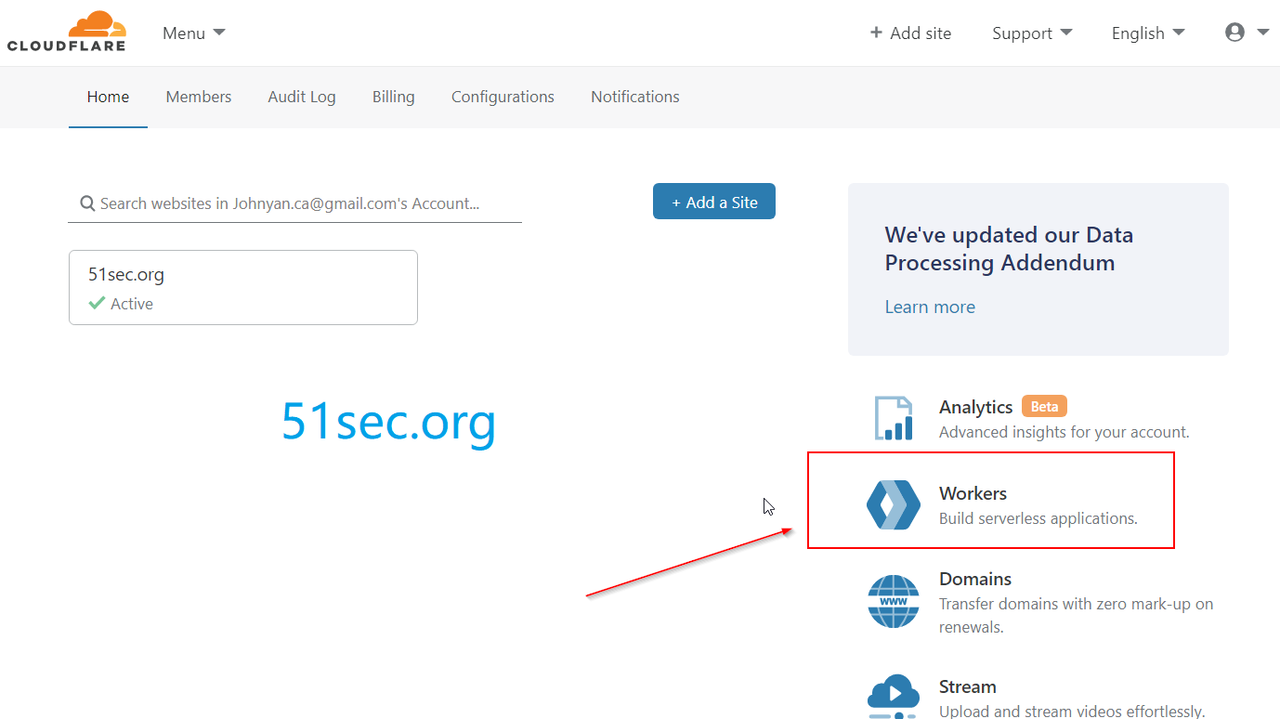
Enter the Cloudflare worker interface after you logged into Cloudflare, see the following figure:
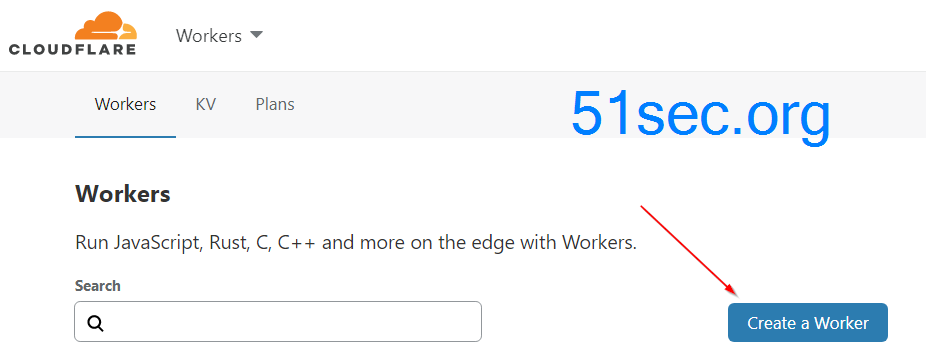
After entered Workers, click Create a Worker to create your first JS workers application:
Then fill in your JS code on the left side of the workers interface. At this time, you need the universal reverse code from github site: https://github.com/EtherDream/jsproxy/raw/master/cf-worker/index.js
which is coming from following website: https://github.com/EtherDream/jsproxy The exactly page for Cloudflare is https://github.com/EtherDream/jsproxy/tree/master/cf-worker, or you can copy from following code section:
via Blogger http://blog.51sec.org/2020/03/build-reverse-proxy-using-cloudflare.html
October 18, 2021 at 10:06AM Cloud
CloudFlare has always been known to webmasters for its domain name hosting service and CDN service. Recently I just found a free CloudFlare Workers service, which is a service that can run a specific JavaScript when accessing a web page and found a good use case to use JSPROXY building a Workers-Proxy (a reverse proxy).Here is my testing Site URL build before:
Pre-requisites
What you need is a free CloudFlare account. Github account will be optional for customization. Nothing else.
Creating a Reverse Proxy Worker
Enter the Cloudflare worker interface after you logged into Cloudflare, see the following figure:
After entered Workers, click Create a Worker to create your first JS workers application:
Then fill in your JS code on the left side of the workers interface. At this time, you need the universal reverse code from github site: https://github.com/EtherDream/jsproxy/raw/master/cf-worker/index.js
which is coming from following website: https://github.com/EtherDream/jsproxy The exactly page for Cloudflare is https://github.com/EtherDream/jsproxy/tree/master/cf-worker, or you can copy from following code section:
'use strict'

/**
 * static files (404.html, sw.js, conf.js)
 */
const ASSET_URL = 'https://etherdream.github.io/jsproxy'

const JS_VER = 10
const MAX_RETRY = 1

/** @type {RequestInit} */
const PREFLIGHT_INIT = {
  status: 204,
  headers: new Headers({
    'access-control-allow-origin': '*',
    'access-control-allow-methods': 'GET,POST,PUT,PATCH,TRACE,DELETE,HEAD,OPTIONS',
    'access-control-max-age': '1728000',
  }),
}

/**
 * @param {any} body
 * @param {number} status
 * @param {Object<string, string>} headers
 */
function makeRes(body, status = 200, headers = {}) {
  headers['--ver'] = JS_VER
  headers['access-control-allow-origin'] = '*'
  return new Response(body, {status, headers})
}


/**
 * @param {string} urlStr
 */
function newUrl(urlStr) {
  try {
    return new URL(urlStr)
  } catch (err) {
    return null
  }
}


addEventListener('fetch', e => {
  const ret = fetchHandler(e)
    .catch(err => makeRes('cfworker error:\n' + err.stack, 502))
  e.respondWith(ret)
})


/**
 * @param {FetchEvent} e
 */
async function fetchHandler(e) {
  const req = e.request
  const urlStr = req.url
  const urlObj = new URL(urlStr)
  const path = urlObj.href.substr(urlObj.origin.length)

  if (urlObj.protocol === 'http:') {
    urlObj.protocol = 'https:'
    return makeRes('', 301, {
      'strict-transport-security': 'max-age=99999999; includeSubDomains; preload',
      'location': urlObj.href,
    })
  }

  if (path.startsWith('/http/')) {
    return httpHandler(req, path.substr(6))
  }

  switch (path) {
  case '/http':
    return makeRes('请更新 cfworker 到最新版本!')
  case '/ws':
    return makeRes('not support', 400)
  case '/works':
    return makeRes('it works')
  default:
    // static files
    return fetch(ASSET_URL + path)
  }
}


/**
 * @param {Request} req
 * @param {string} pathname
 */
function httpHandler(req, pathname) {
  const reqHdrRaw = req.headers
  if (reqHdrRaw.has('x-jsproxy')) {
    return Response.error()
  }

  // preflight
  if (req.method === 'OPTIONS' &&
      reqHdrRaw.has('access-control-request-headers')
  ) {
    return new Response(null, PREFLIGHT_INIT)
  }

  let acehOld = false
  let rawSvr = ''
  let rawLen = ''
  let rawEtag = ''

  const reqHdrNew = new Headers(reqHdrRaw)
  reqHdrNew.set('x-jsproxy', '1')

  // 此处逻辑和 http-dec-req-hdr.lua 大致相同
  // https://github.com/EtherDream/jsproxy/blob/master/lua/http-dec-req-hdr.lua
  const refer = reqHdrNew.get('referer')
  const query = refer.substr(refer.indexOf('?') + 1)
  if (!query) {
    return makeRes('missing params', 403)
  }
  const param = new URLSearchParams(query)

  for (const [k, v] of Object.entries(param)) {
    if (k.substr(0, 2) === '--') {
      // 系统信息
      switch (k.substr(2)) {
      case 'aceh':
        acehOld = true
        break
      case 'raw-info':
        [rawSvr, rawLen, rawEtag] = v.split('|')
        break
      }
    } else {
      // 还原 HTTP 请求头
      if (v) {
        reqHdrNew.set(k, v)
      } else {
        reqHdrNew.delete(k)
      }
    }
  }
  if (!param.has('referer')) {
    reqHdrNew.delete('referer')
  }

  // cfworker 会把路径中的 `//` 合并成 `/`
  const urlStr = pathname.replace(/^(https?):\/+/, '$1://')
  const urlObj = newUrl(urlStr)
  if (!urlObj) {
    return makeRes('invalid proxy url: ' + urlStr, 403)
  }

  /** @type {RequestInit} */
  const reqInit = {
    method: req.method,
    headers: reqHdrNew,
    redirect: 'manual',
  }
  if (req.method === 'POST') {
    reqInit.body = req.body
  }
  return proxy(urlObj, reqInit, acehOld, rawLen, 0)
}


/**
 *
 * @param {URL} urlObj
 * @param {RequestInit} reqInit
 * @param {number} retryTimes
 */
async function proxy(urlObj, reqInit, acehOld, rawLen, retryTimes) {
  const res = await fetch(urlObj.href, reqInit)
  const resHdrOld = res.headers
  const resHdrNew = new Headers(resHdrOld)

  let expose = '*'

  for (const [k, v] of resHdrOld.entries()) {
    if (k === 'access-control-allow-origin' ||
        k === 'access-control-expose-headers' ||
        k === 'location' ||
        k === 'set-cookie'
    ) {
      const x = '--' + k
      resHdrNew.set(x, v)
      if (acehOld) {
        expose = expose + ',' + x
      }
      resHdrNew.delete(k)
    }
    else if (acehOld &&
      k !== 'cache-control' &&
      k !== 'content-language' &&
      k !== 'content-type' &&
      k !== 'expires' &&
      k !== 'last-modified' &&
      k !== 'pragma'
    ) {
      expose = expose + ',' + k
    }
  }

  if (acehOld) {
    expose = expose + ',--s'
    resHdrNew.set('--t', '1')
  }

  // verify
  if (rawLen) {
    const newLen = resHdrOld.get('content-length') || ''
    const badLen = (rawLen !== newLen)

    if (badLen) {
      if (retryTimes < MAX_RETRY) {
        urlObj = await parseYtVideoRedir(urlObj, newLen, res)
        if (urlObj) {
          return proxy(urlObj, reqInit, acehOld, rawLen, retryTimes + 1)
        }
      }
      return makeRes(res.body, 400, {
        '--error': `bad len: ${newLen}, except: ${rawLen}`,
        'access-control-expose-headers': '--error',
      })
    }

    if (retryTimes > 1) {
      resHdrNew.set('--retry', retryTimes)
    }
  }

  let status = res.status

  resHdrNew.set('access-control-expose-headers', expose)
  resHdrNew.set('access-control-allow-origin', '*')
  resHdrNew.set('--s', status)
  resHdrNew.set('--ver', JS_VER)

  resHdrNew.delete('content-security-policy')
  resHdrNew.delete('content-security-policy-report-only')
  resHdrNew.delete('clear-site-data')

  if (status === 301 ||
      status === 302 ||
      status === 303 ||
      status === 307 ||
      status === 308
  ) {
    status = status + 10
  }

  return new Response(res.body, {
    status,
    headers: resHdrNew,
  })
}


/**
 * @param {URL} urlObj
 */
function isYtUrl(urlObj) {
  return (
    urlObj.host.endsWith('.googlevideo.com') &&
    urlObj.pathname.startsWith('/videoplayback')
  )
}

/**
 * @param {URL} urlObj
 * @param {number} newLen
 * @param {Response} res
 */
async function parseYtVideoRedir(urlObj, newLen, res) {
  if (newLen > 2000) {
    return null
  }
  if (!isYtUrl(urlObj)) {
    return null
  }
  try {
    const data = await res.text()
    urlObj = new URL(data)
  } catch (err) {
    return null
  }
  if (!isYtUrl(urlObj)) {
    return null
  }
  return urlObj
}
Again, The code is from this address: https://github.com/EtherDream/jsproxy/raw/master/cf-worker/index.js
The main interface of creating a worker is :
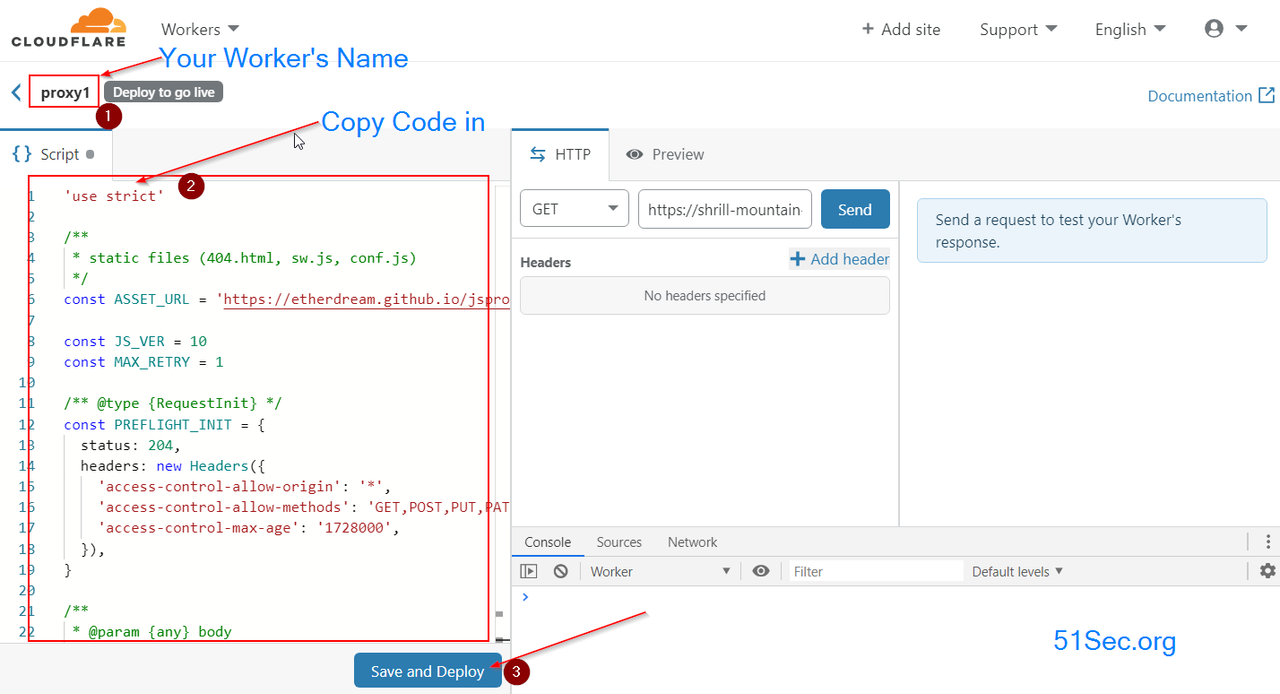
Explanation for this screenshot interface:
① Project name: Format is [Project]. [Subdomain] .workers.dev , where subdomain is the name you entered for workers and project is the project name. In my case, it is proxy.51itpro.workers.dev.
② Edit area: this is where you put down the code
③ Save and deploy: Deploy the project
After all above steps done, you will get a full functional proxy website for your own usage. Cloudflare workers can have 100K requests for your whole accounts. If it is not enough, you might need to create multiple Cloudflare accounts to use , which can be done using following customization method to edit config.js file.
Explanation for this screenshot interface:
① Project name: Format is [Project]. [Subdomain] .workers.dev , where subdomain is the name you entered for workers and project is the project name. In my case, it is proxy.51itpro.workers.dev.
② Edit area: this is where you put down the code
③ Save and deploy: Deploy the project
After all above steps done, you will get a full functional proxy website for your own usage. Cloudflare workers can have 100K requests for your whole accounts. If it is not enough, you might need to create multiple Cloudflare accounts to use , which can be done using following customization method to edit config.js file.
Customization
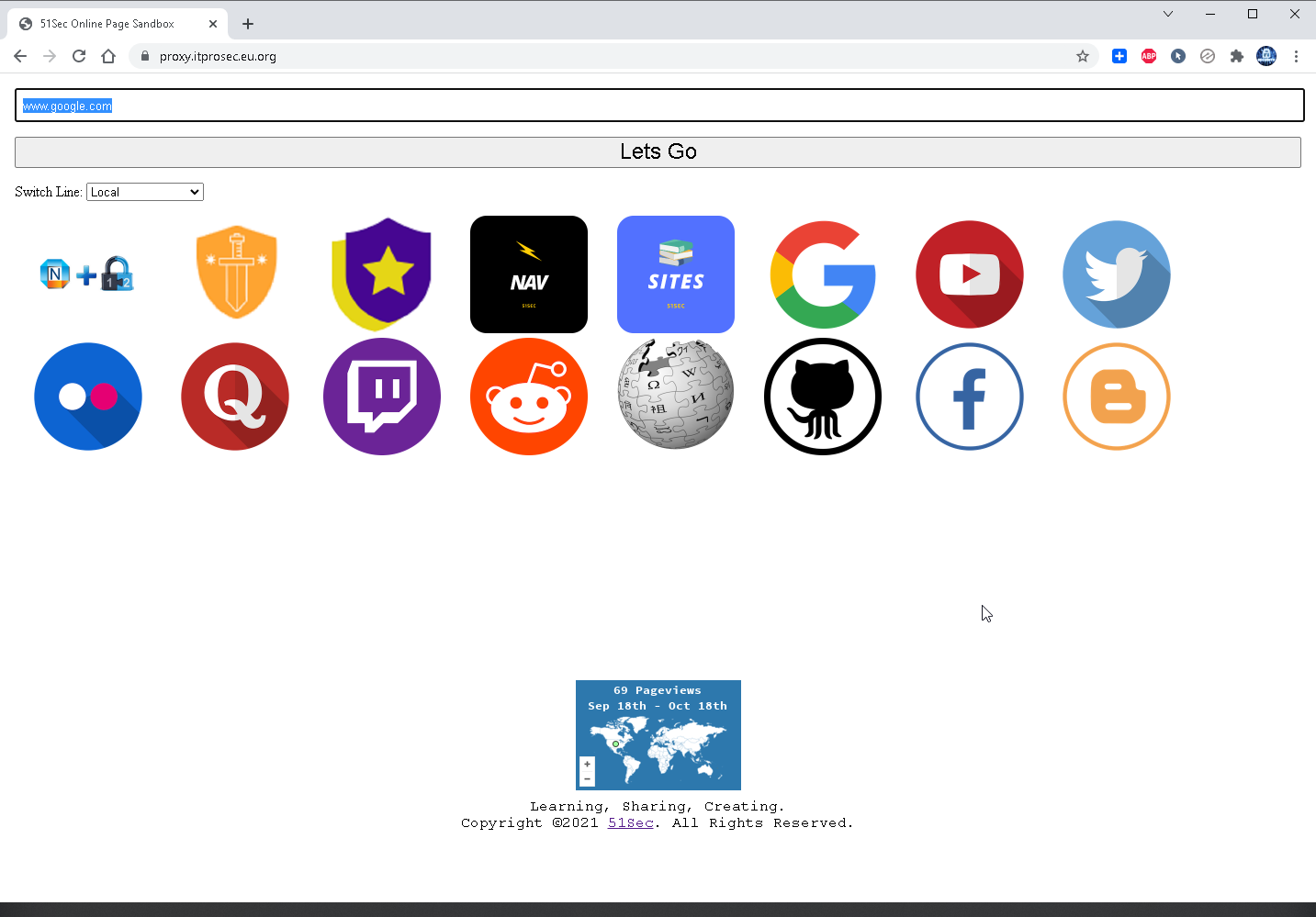
You also can do some basic customization as I did for my proxy page: https://proxy.itprosec.eu.org/
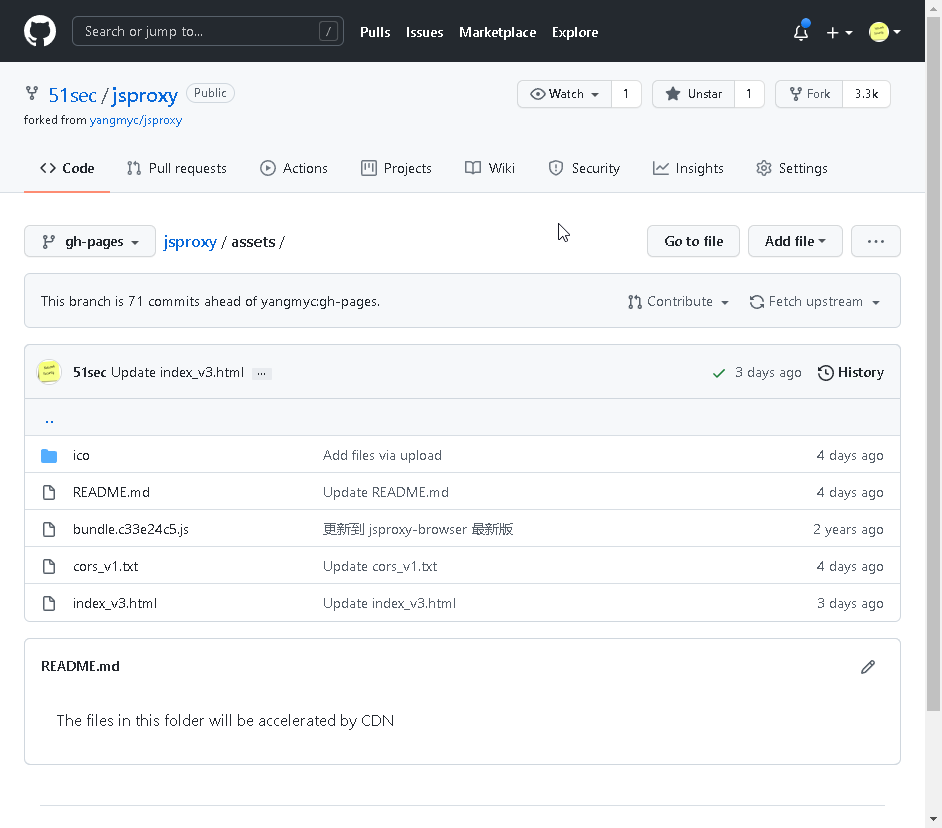
- Fork the project from https://github.com/51sec/jsproxy to your own Github repository, which requires a Github account.
- Change Cloudflare workers script's url to your own Github url, for mine, it looks https://51sec.github.io/jsproxy:
- const ASSET_URL = 'https://etherdream.github.io/jsproxy' .
- Change the file content in index_v3.html
-
-
You might need to manually add some icons into assets folder's ico folder as I did for some of my own sites.
-
- If you have some other jsproxy url sites available, you can add them into conf.js file under gh-pages branch.
Videos
- YouTube:
References
- Build a Serverless Bookmark Website Use Cloudflare Worker
- Fast OneDrive Index - A Serverless OneDrive Index Setup
- Using Cloudflare Workers to Deploy A Free Google Drive Directory Indexer in 5 Minutes
- Set Up CloudFlare Workers to Use Your Own Domain
- Build a Reverse Proxy Using Cloudflare Workers
- Cloudflare Workers Usage Collection
- https://etherdream.github.io/jsproxy
via Blogger http://blog.51sec.org/2020/03/build-reverse-proxy-using-cloudflare.html
October 18, 2021 at 10:06AM Cloud

 RSS Feed
