Info Security Memo
  • Blog
  • Sitemap
    • Categories
  • Contact
  • About
  • Resources
  • Tools
  • 51sec.org

Build Confidence

Focusing on Information Security 

Info Security Notes

Alist Advanced Usages
1/8/2023

0 Comments

 
Alist Advanced Usages

This post summarized some advanced usages of AList. 


Add different network drive

Google Drive:

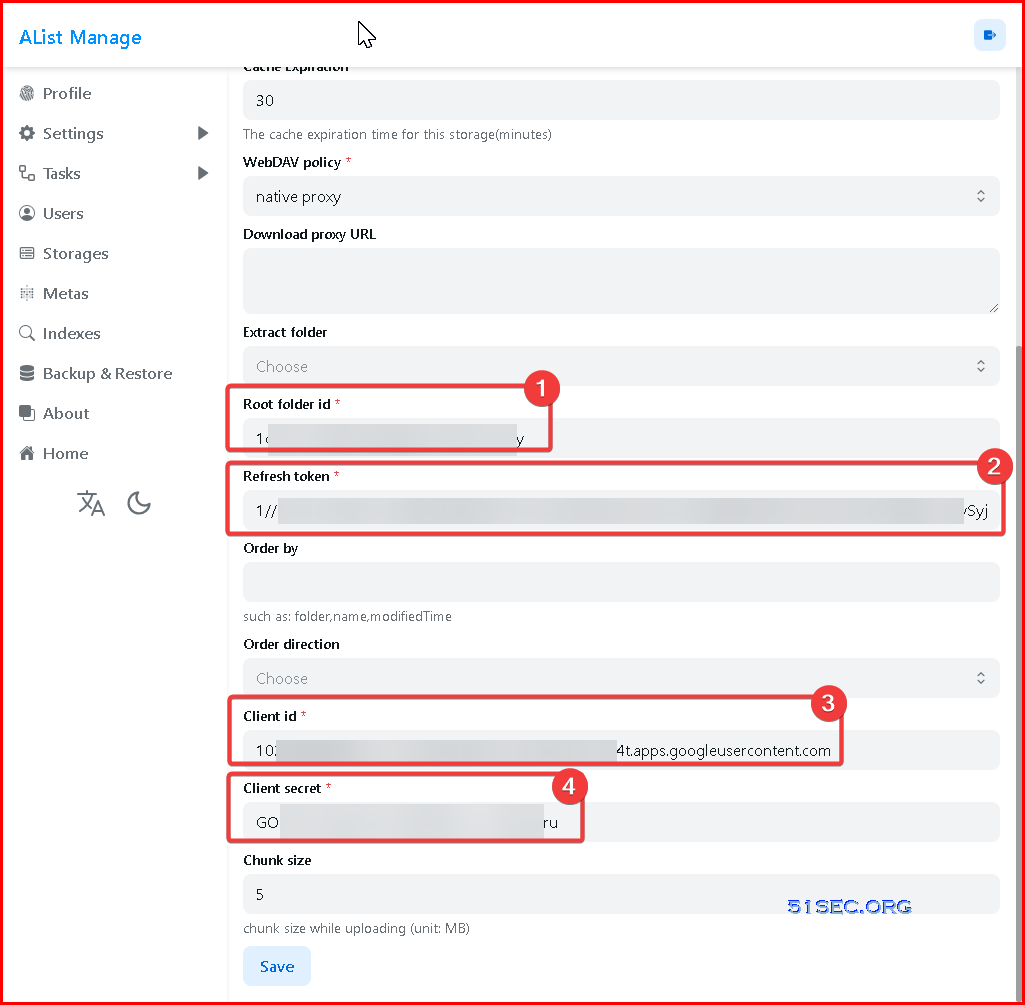
If you have your own Client ID, Client Secret, and refresh token, you can directly paste them in here. As to how to get your own Google Drive's following information, I will put them into another post to talk about it. 

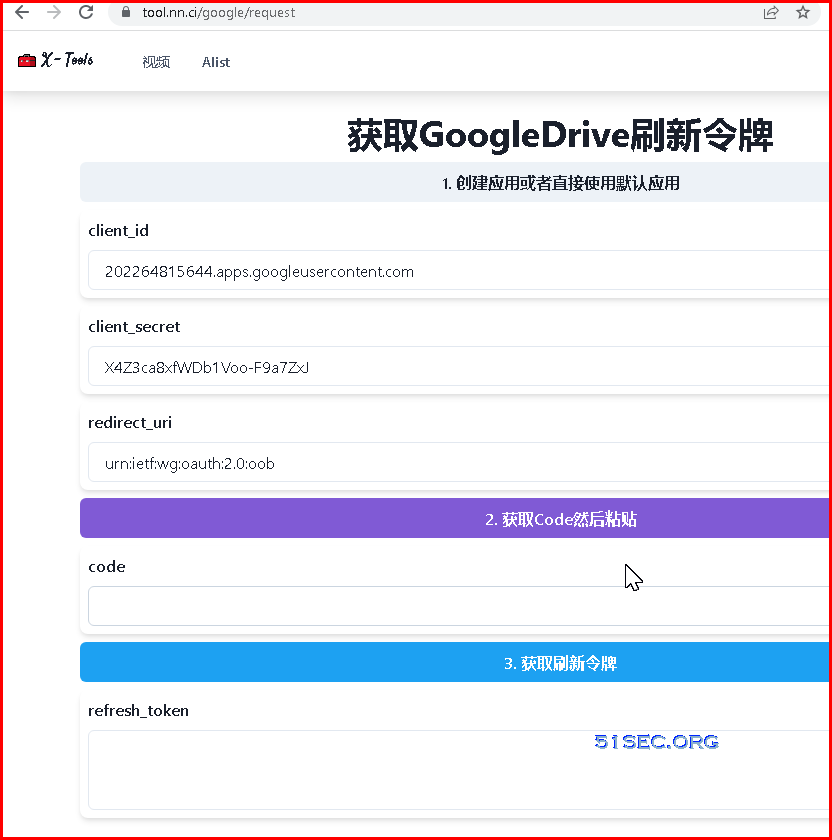
AList author has an instruction page to show you how to  use a default client id / client secret to generate your refresh_token for your Google drive folder, using https://tool.nn.ci/google/request: 
Unfortunately, google doesnot support this way anymore. You will get an access blocked error page.
To resolve this ,you might want to use a local installed Rclone to get refresh token. Please see my other posts for more information:
  • https://blog.51sec.org/2021/11/mount-azure-blob-storage-into-local.html
  • https://blog.51sec.org/2020/03/goindex-using-cloudflare-workers-to.html#point6

After you collected all those information, you can enter them into this AList page to add your Google Drive folder to show all the files / folders. 


OneDrive:

Not like Google drive, the url for fetching refresh token works.

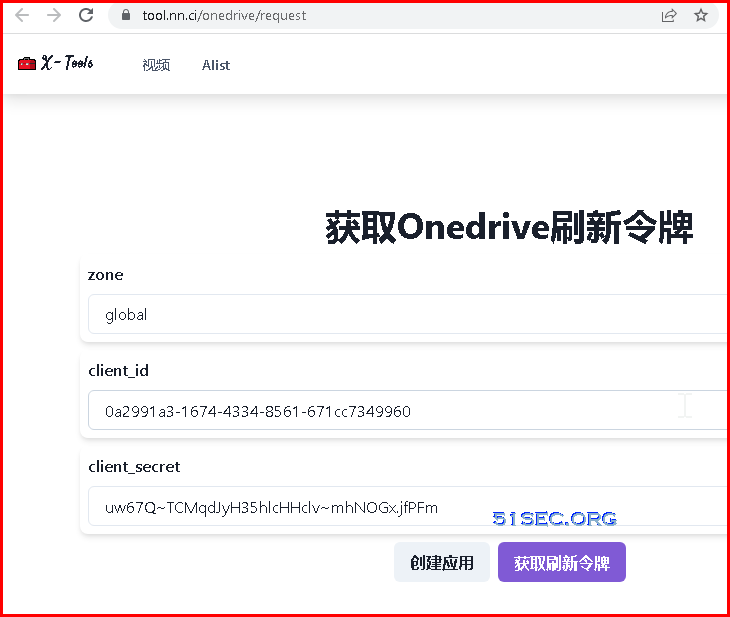
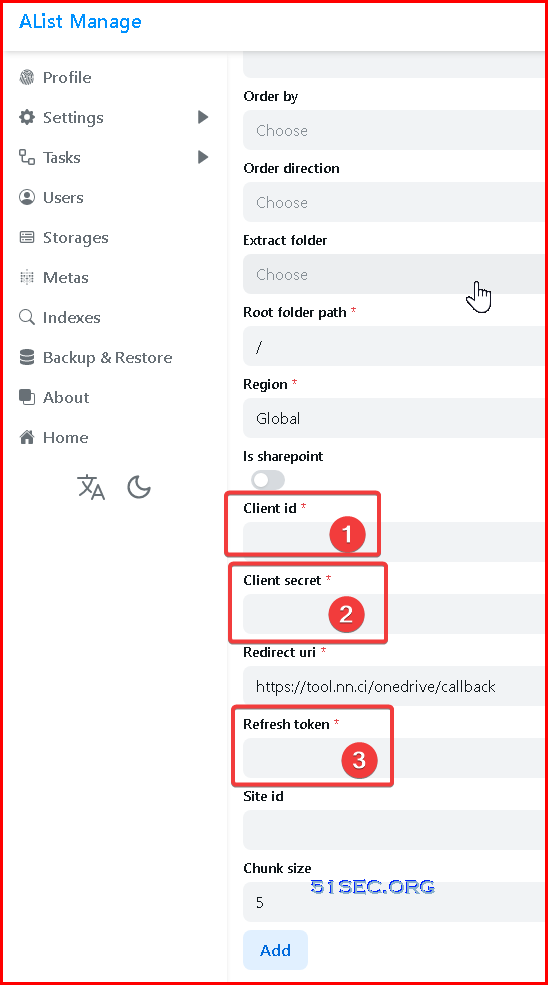
To make it simple, we can use  https://tool.nn.ci/onedrive/request to generate all information. 

Click purple button to fetch refresh token. It will ask you log into your Microsoft Onedrive account.
Baidu NetDisk:

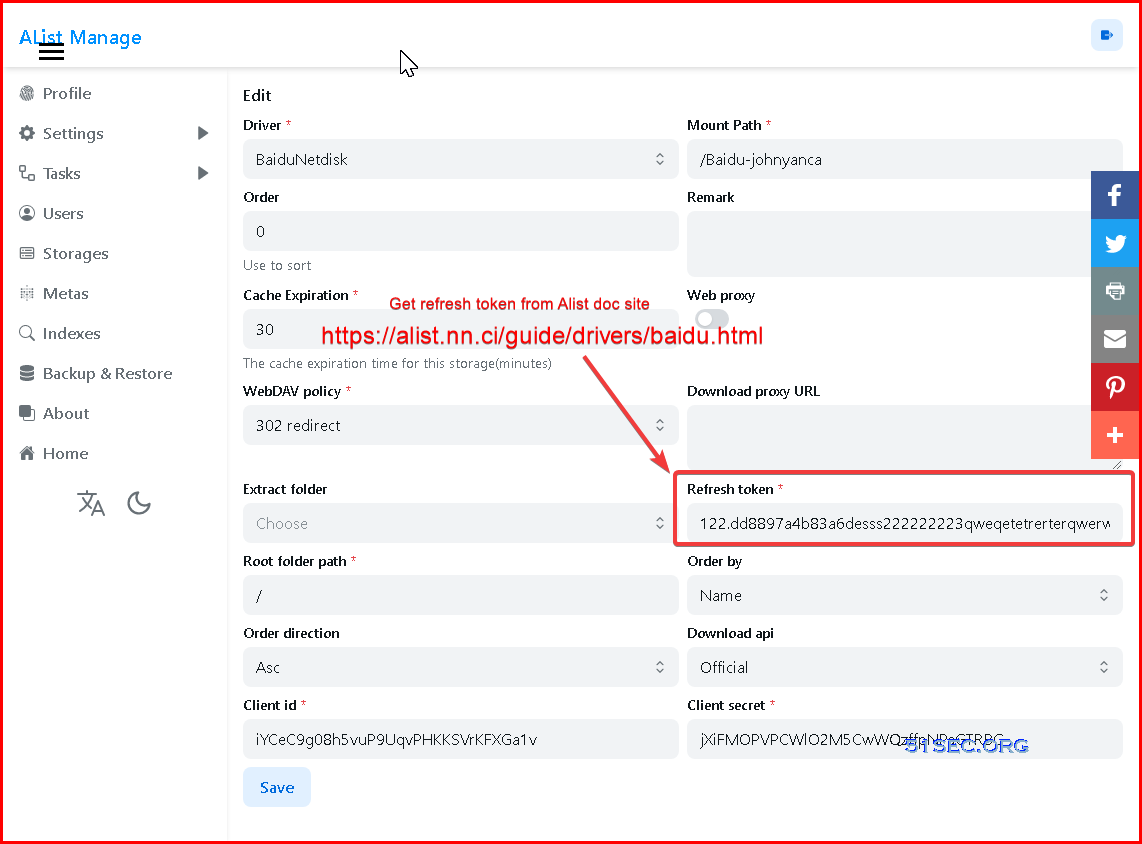
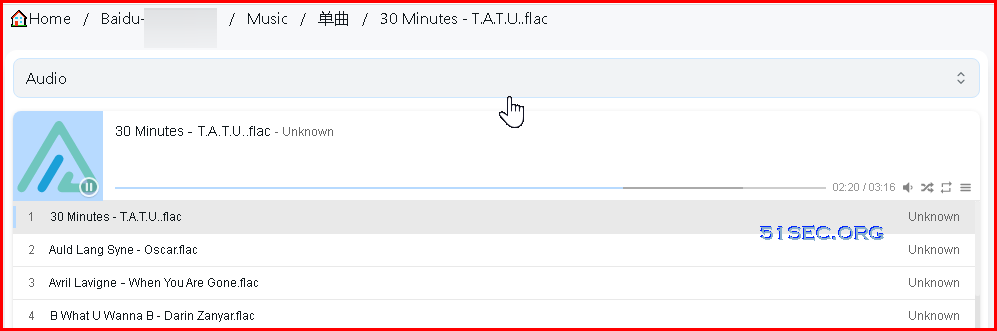
For Baidu NetDisk, only thing you will need is Refresh Token. The problem is download function doesn't work properly. But multimedia preview function is working well.


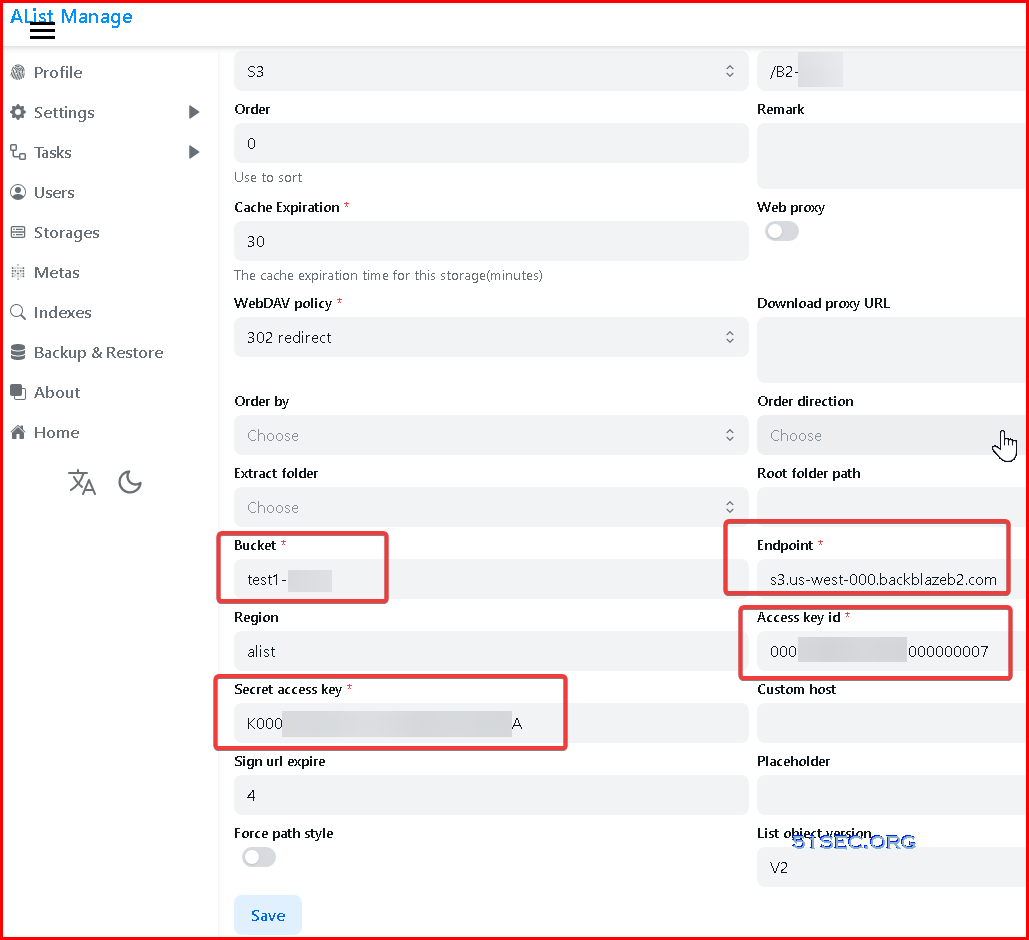
S3 - BackBlaze 

I am only able to view root folder's content, and not able to go to sub folder. It just keeps showing root folder's conent. 


WebDav


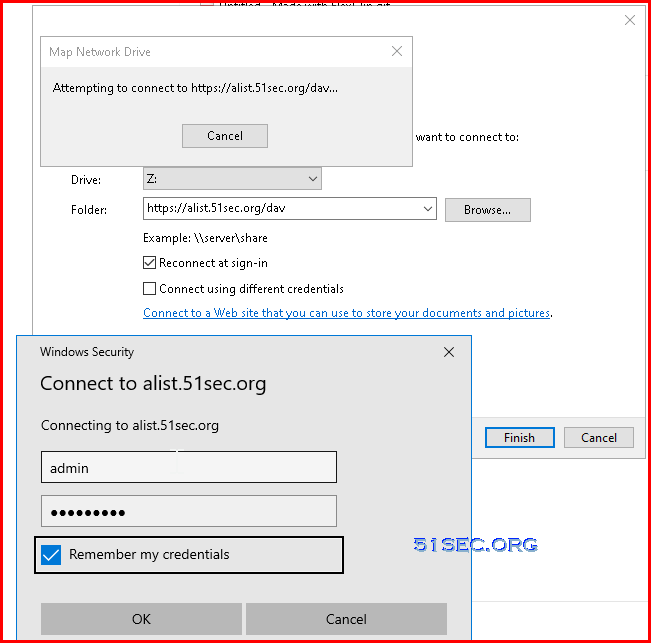
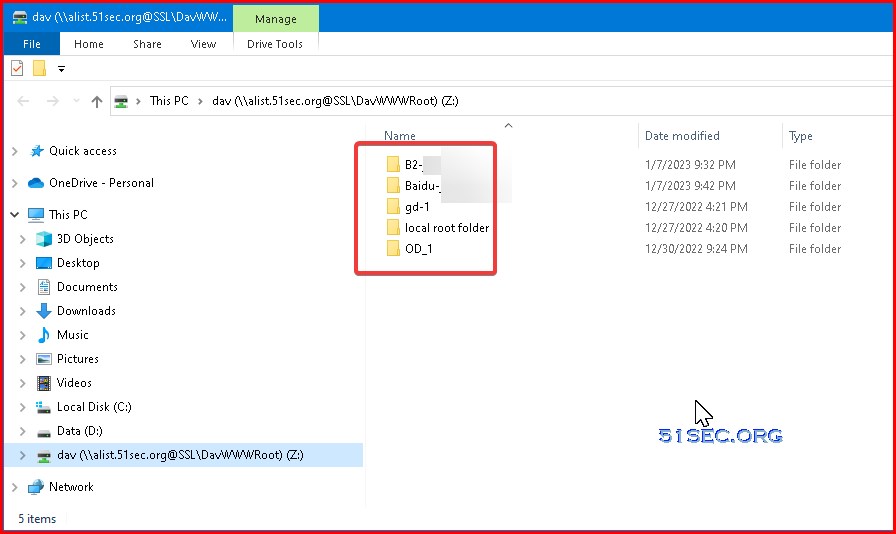
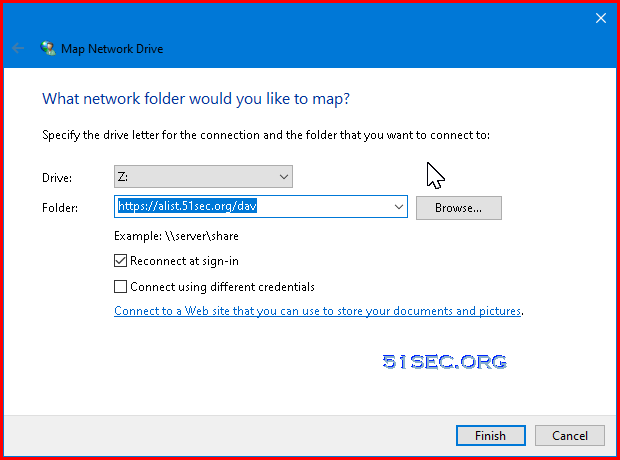
How to mount Alist into local windows?

Folder format: http(s)://alist.51sec.org/dav

Doc URL: https://alist-doc.nn.ci/en/docs/webdav/


Enter a username and password. 


AList Style

Note: https://blog.csdn.net/u012514495/article/details/125772285

黑猫:


  1. <!--看板娘 - 黑猫-->
  2. <script src="https://eqcn.ajz.miesnfu.com/wp-content/plugins/wp-3d-pony/live2dw/lib/L2Dwidget.min.js"></script>
  3. <script>
  4. L2Dwidget.init({
  5. "model": {
  6. jsonPath: "https://unpkg.com/live2d-widget-model-hijiki/assets/hijiki.model.json", <!--这里改模型,前面后面都要改-->
  7. "scale": 1
  8. },
  9. "display": {
  10. "position": "left", <!--设置看板娘的上下左右位置-->
  11. "width": 100,
  12. "height": 200,
  13. "hOffset": 0,
  14. "vOffset": 0
  15. },
  16. "mobile": {
  17. "show": true,
  18. "scale": 0.5
  19. },
  20. "react": {
  21. "opacityDefault": 0.7, <!--设置透明度-->
  22. "opacityOnHover": 0.2
  23. }
  24. });
  25. window.onload = function() {
  26. $("#live2dcanvas").attr("style", "position: fixed; opacity: 0.7; left: 70px; bottom: 0px; z-index: 1; pointer-events: none;")
  27. }
  28. </script>
  29. </div>

白猫:


  1. <!--白小猫咪-->
  2. <script src=" https://eqcn.ajz.miesnfu.com/wp-content/plugins/wp-3d-pony/live2dw/lib/L2Dwidget.min.js"></script>
  3. <script src="https://eqcn.ajz.miesnfu.com/wp-content/plugins/wp-3d-pony/live2dw/lib/L2Dwidget.0.min.js"></script>
  4. <script>
  5. L2Dwidget.init({
  6. "model": {
  7. jsonPath: " https://unpkg.com/[email protected]/assets/tororo.model.json" ,
  8. "scale": 1
  9. },
  10. "display": {
  11. "position": "right",
  12. "width": 100,
  13. "height": 200,
  14. "hOffset": -20,
  15. "vOffset": -20
  16. },
  17. "mobile": {
  18. "show": true,
  19. "scale": 0.5
  20. },
  21. "react": {
  22. "opacityDefault": 1,
  23. "opacityOnHover": 1
  24. }
  25. });
  26. </script>

鼠标点击出随机颜色的爱心:


  1. <!--鼠标点击出随机颜色的爱心-->
  2. <!DOCTYPE html>
  3. <html lang="en">
  4. <head>
  5. <meta charset="UTF-8">
  6. <meta name="viewport" content="width=device-width, initial-scale=1.0">
  7. <title>Document</title>
  8. </head>
  9. <body>
  10. <!-- 网页鼠标点击特效(爱心) -->
  11. <script type="text/javascript">
  12. ! function (e, t, a) {
  13. function r() {
  14. for (var e = 0; e < s.length; e++) s[e].alpha <= 0 ? (t.body.removeChild(s[e].el), s.splice(e, 1)) : (s[
  15. e].y--, s[e].scale += .004, s[e].alpha -= .013, s[e].el.style.cssText = "left:" + s[e].x +
  16. "px;top:" + s[e].y + "px;opacity:" + s[e].alpha + ";transform:scale(" + s[e].scale + "," + s[e]
  17. .scale + ") rotate(45deg);background:" + s[e].color + ";z-index:99999");
  18. requestAnimationFrame(r)
  19. }
  20. function n() {
  21. var t = "function" == typeof e.onclick && e.onclick;
  22. e.onclick = function (e) {
  23. t && t(), o(e)
  24. }
  25. }
  26. function o(e) {
  27. var a = t.createElement("div");
  28. a.className = "heart", s.push({
  29. el: a,
  30. x: e.clientX - 5,
  31. y: e.clientY - 5,
  32. scale: 1,
  33. alpha: 1,
  34. color: c()
  35. }), t.body.appendChild(a)
  36. }
  37. function i(e) {
  38. var a = t.createElement("style");
  39. a.type = "text/css";
  40. try {
  41. a.appendChild(t.createTextNode(e))
  42. } catch (t) {
  43. a.styleSheet.cssText = e
  44. }
  45. t.getElementsByTagName("head")[0].appendChild(a)
  46. }
  47. function c() {
  48. return "rgb(" + ~~(255 * Math.random()) + "," + ~~(255 * Math.random()) + "," + ~~(255 * Math
  49. .random()) + ")"
  50. }
  51. var s = [];
  52. e.requestAnimationFrame = e.requestAnimationFrame || e.webkitRequestAnimationFrame || e
  53. .mozRequestAnimationFrame || e.oRequestAnimationFrame || e.msRequestAnimationFrame || function (e) {
  54. setTimeout(e, 1e3 / 60)
  55. }, i(
  56. ".heart{width: 10px;height: 10px;position: fixed;background: #f00;transform: rotate(45deg);-webkit-transform: rotate(45deg);-moz-transform: rotate(45deg);}.heart:after,.heart:before{content: '';width: inherit;height: inherit;background: inherit;border-radius: 50%;-webkit-border-radius: 50%;-moz-border-radius: 50%;position: fixed;}.heart:after{top: -5px;}.heart:before{left: -5px;}"
  57. ), n(), r()
  58. }(window, document);
  59. </script>

隐藏右上角复制直链、下载切换布局等:


  1. <!--隐藏右上角-->
  2. <style>
  3. .css-neion{
  4. display:none;
  5. }
  6. </style>

全白无框:


  1. <!--全白无框-->
  2. <style>
  3. .chakra-ui-light{
  4. background-color: #FFFFFF;
  5. }
  6. .main-box {
  7. border-radius: 15px !important;
  8. box-shadow: unset !important;
  9. }
  10. .chakra-ui-light .main-box {
  11. background-color: rgba(255,255,255,0.9) !important;
  12. }
  13. .chakra-ui-light .readme-box {
  14. background-color: rgba(255,255,255,0.9) !important;
  15. }
  16. .readme-box {
  17. border-radius: 15px !important;
  18. box-shadow: unset !important;
  19. }
  20. </style>

备案信息:


  1. <!--备案信息-->
  2. </style>
  3. <link href="https://lf6-cdn-tos.bytecdntp.com/cdn/expire-1-M/font-awesome/6.0.0/css/all.min.css" rel=" stylesheet ">
  4. <div id="customize" style="display:none;
  5. text-align:center;
  6. ">
  7. <br />
  8. <div style="font-size:13px;
  9. ">
  10. <span class="nav-item">
  11. <a class="nav-link" href="http://lizong.top/" target="_blank">
  12. <i class="fa-solid fa-copyright" style="color:#9932CC" aria-hidden="true"></i>
  13. 2022 LIZONG.TOP |
  14. </a>
  15. </span>
  16. <span class="nav-item">
  17. <a class="nav-link" href="https://beian.miit.gov.cn/" target="_blank">
  18. <i class="fa fa-balance-scale" style="color:#9932CC;
  19. " aria-hidden="true"></i>
  20. 鄂ICP备xxxxxx号-x |
  21. </a>
  22. </span>
  23. <span class="nav-item">
  24. <a class="nav-link" href="https://github.com/Xhofe/alist" target="_blank">
  25. <i class="fa fa-heart" style="color:#9932CC;
  26. " aria-hidden="true"></i>
  27. 由Alist驱动
  28. </a>
  29. </span>
  30. </div>
  31. <br />
  32. </div>
  33. <script>
  34. let interval = setInterval(() => {
  35. if (document.querySelector(".footer")) {
  36. document.querySelector("#customize").style.display = "";
  37. clearInterval(interval);
  38. }
  39. },200);
  40. </script>
  41. </font>

底部网站运行时间:


  1. <!--开站时间开始-->
  2. <center>
  3. <br />
  4. </span>
  5. <span class="nav-item">
  6. <a class="nav-link" href="https://blog.51sec.org/2022/12/5-minutes-docker-series-deploy-free.html" target="_blank">
  7. <span id="timeDate">载入天数...</span><span id="times">载入时分秒...</span> <script language="javascript">
  8. var now = new Date();
  9. function createtime(){
  10. var grt= new Date("04/17/2022 00:00:00");/*---这里是网站的启用时间--*/
  11. now.setTime(now.getTime()+250);
  12. days = (now - grt ) / 1000 / 60 / 60 / 24;
  13. dnum = Math.floor(days);
  14. hours = (now - grt ) / 1000 / 60 / 60 - (24 * dnum);
  15. hnum = Math.floor(hours);
  16. if(String(hnum).length ==1 ){hnum = "0" + hnum;}
  17. minutes = (now - grt ) / 1000 /60 - (24 * 60 * dnum) - (60 * hnum);
  18. mnum = Math.floor(minutes);
  19. if(String(mnum).length ==1 ){mnum = "0" + mnum;}
  20. seconds = (now - grt ) / 1000 - (24 * 60 * 60 * dnum) - (60 * 60 * hnum) - (60 * mnum);
  21. snum = Math.round(seconds);
  22. if(String(snum).length ==1 ){snum = "0" + snum;}
  23. document.getElementById("timeDate").innerHTML = "⏱️本站已稳定运行"+dnum+"天";
  24. document.getElementById("times").innerHTML = hnum + "小时" + mnum + "分" + snum + "秒";
  25. }
  26. setInterval("createtime()",250);
  27. </script>

自定义背景:替换url即可


  1. <!--自定义背景-->
  2. <style>
  3. .chakra-ui-light{
  4. background-image: url("https://www.dmoe.cc/random.php") !important;
  5. background-repeat:no-repeat;background-size:cover;background-attachment:fixed;background-position-x:center;
  6. }
  7. .main-box {
  8. border-radius: 15px !important;
  9. }
  10. .chakra-ui-light .main-box {
  11. background-color: #ffffff70 !important;
  12. }
  13. .chakra-ui-light .readme-box {
  14. background-color: white !important;
  15. }
  16. .readme-box {
  17. border-radius: 15px !important;
  18. }
  19. </style>

不建议删除底部文字 请尊重开发者的劳动成果,谢谢

去掉底部的管理文字:


  1. <!---去掉底部管理--->
  2. <style>
  3. .footer span,.footer a:nth-of-type(2){
  4. display:none;
  5. }
  6. </style>

去掉底部的 Powered by Alist:


  1. <!--去掉底部Powered by Alist--->
  2. <style>
  3. .footer span,.footer a:nth-of-type(1){
  4. display:none;
  5. }
  6. </style>

去掉底部Powered by Alist和管理文字:


  1. <!---去掉底部文字--->
  2. <style
  3. type="text/css"> .footer {
  4. display: none !important; }
  5. </style>

Videos

 Using Portainer to Deploy & Deploy into Windows


References


via Blogger http://blog.51sec.org/2023/01/alist-advanced-usages.html
January 07, 2023 at 10:13PM Software
0 Comments


Leave a Reply.

    Categories

    All
    Architecture
    Blog
    Checkpoint
    Cisco
    Cloud
    CyberArk
    F5
    Fortigate
    Guardium
    Juniper
    Linux
    Network
    Others
    Palo Alto
    Qualys
    Raspberry Pi
    Security
    SIEM
    Software
    Vmware
    VPN
    Wireless

    Archives

    March 2024
    February 2024
    January 2024
    December 2023
    November 2023
    October 2023
    September 2023
    August 2023
    July 2023
    June 2023
    May 2023
    April 2023
    March 2023
    February 2023
    January 2023
    December 2022
    November 2022
    October 2022
    September 2022
    August 2022
    July 2022
    June 2022
    May 2022
    April 2022
    March 2022
    February 2022
    January 2022
    December 2021
    November 2021
    October 2021
    September 2021
    August 2021
    July 2021
    June 2021
    May 2021
    April 2021
    March 2021
    February 2021
    January 2021
    December 2020
    November 2020
    October 2020
    September 2020
    August 2020
    July 2020
    October 2019
    September 2019
    June 2019
    July 2018
    May 2018
    December 2017
    August 2017
    April 2017
    March 2017
    January 2017
    December 2016
    November 2016
    October 2016
    September 2016
    August 2016
    July 2016
    June 2016
    May 2016
    April 2016
    March 2016
    February 2016
    January 2016
    December 2015
    November 2015
    October 2015
    September 2015
    August 2015
    July 2015
    June 2015
    May 2015
    April 2015
    March 2015

    Print Page:

    RSS Feed

    Email Subscribe
Powered by Create your own unique website with customizable templates.
  • Blog
  • Sitemap
    • Categories
  • Contact
  • About
  • Resources
  • Tools
  • 51sec.org