
There are lots of confusion when talking about following three topics relating to Microsoft AD:
- Active Directory (AD)
- Azure Active Directory (AAD)
- Azure Active Directory Domain Services (AADDS)
In this post, those terms and related technologies will be summarized in a easy way to understand.
Differences among those three
|
| from Microsoft |
AD
- Active Directory is a database that organises your company’s users and computers. It provides authentication and authorization to applications, file services, printers, and other resources on the network. It uses protocols such as Kerberos and NTLM for authentication and LDAP to query and modify items in the Active Directory databases.
- Secure Object store, including Users, Computers and Groups
- Object organization – Organisational Units (OU), Domains and Forests
- Common Authentication and Authorization provider
- LDAP, NTLM, Kerberos (secure authentication between domain joined devices)
- Group Policy – for fine grained control and management of PCs and Servers on the domain
AAD
- No domain controller, just a identity management solution ,
- sub dns name onmicrosoft.com by default, but it can be customized
- modern authentication mechanisms: OAuth2, SAML, WS-FED
- Cloud auth, PTA, federation - seamlessly connecting to any Microsoft Online Services, thousands of SaaS applications
- Not able to do
-
- not offer Group Policy, LDAP, NT LAN Manager (NTLM) and Kerberos authentication
- You can’t join a server to it
- You can’t join a PC to it in the same way – there is Azure AD Join for Windows 10 only (see later)
- It is a flat directory structure – no OU’s or Forests
AADDS
- Microsoft Managed, support OUs and GPOs
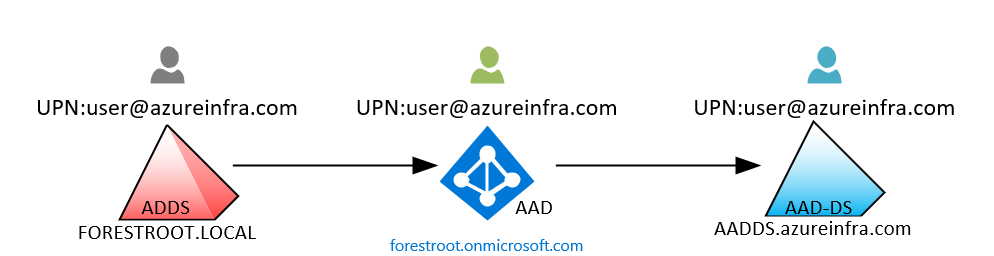
- not connecting to AD, different site/forest
- You are not enterprise admin, not Schema Admin, not Domain Admin
- Common Use Cases
-
- Traditional Authentication as a Service (Kerberos, NTLM)
- Cloud solutions that need domain join (Microsoft Virtual Desktop, AD Auth for file shares)

Another Option - DC in Azure Cloud
Domain Controllers in Cloud
- install domain controller to a virtual machine in Azure
-
- for organizations that use both on-premises and cloud-based resources which are connected through VPN or an Azure ExpressRoute.
- full control

Pros
As I mentioned, it's familiar and comfortable. It ensures that if an app worked on-prem it will still work once migrated to azure, the Application Partitions, the extended schema, the group policies will all be there. Writebacks will occur natively without any duplicate work.
you are not limited to a single virtual network. you can deploy as many sites as required anywhere in the world where Azure regions are found.
Cons
It's not a managed Directory Service, therefore you must take care of it. Each additional domain Controller is another machine you must maintain and patch.
You must define where you deploy each DC to ensure availability. You must manage the backup and DR capabilities
Virtual Machines are typically more expensive than managed services (depending on how many Dcs you deploy and the size of the VMs)
Your environment is significantly more complex due to the VPN/ExpressRoutes added VMs and custom DNS service.
Azure AD Connect
AD or AAD
Use both AD and AAD (sync-ed):
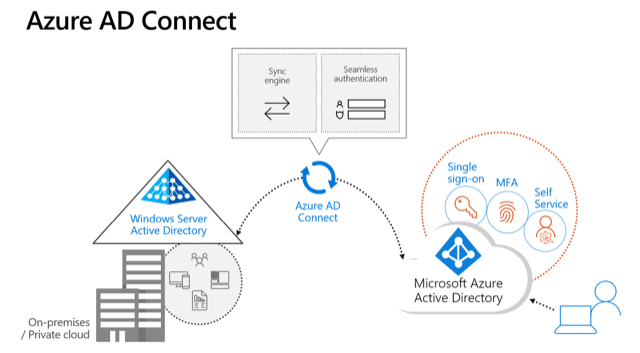
If you have a traditional on-premise set up with AD and also want to use Azure AD to manage access to cloud applications (e.g. Office 365 or any of thousands of SaaS apps) then you can happily use both. You can synchronise AD with Azure AD so that the users only have one set of credentials which they use for both their network logon, and access to O365. You use Azure AD Connect to do this, it is a small free piece of Microsoft software that you install on a server to perform the synchronisation.
Use both AD and AAD (Unsync-ed):
If you are using Office 365 then your users will have a username and password for that (managed by Azure AD), as well as a username and password for their network logon (managed by AD). These two sets of credentials are un-related. This is fine, and just means that if you have a password change policy that users will have to do this twice (and they could of course choose the same password for both).
Use Only AAD:
If you are a new business or one that is looking to transition away from having any traditional on-premise infrastructure and using purely cloud based applications, then you can operate purely using Azure AD. In this case, although you will have all your applications in the cloud, you will of course still have physical devices – PCs and smart phones – that your team will use to access and work with these cloud applications.
More comparing can access this post at https://www.apps4rent.com/blog/active-directory-domain-services-vs-azure-active-directory/
- Single-sign-on (SSO) to applications secured by Azure AD.
- Enterprise policy-compliant roaming of user settings across devices.
- Access to the Windows Store for Business using corporate credentials.
- Windows Hello for Business.
- Restricted access to apps and resources from devices compliant with corporate policy.
Securely Manage AAD Join Devices
In the case of PCs (this applies to Windows 10 only) you can Azure AD Join them and login to machines using Azure AD user accounts. You can apply conditional access policies that require machines to be Azure AD joined before accessing company resources or applications. However Azure AD Join provides limited functionality compared to AD Join (as there is no Group Policy) and in order to gain fine grained control over the PCs you would then use a Mobile Device Management solution, such as Microsoft Intune, in addition to this.
Other devices (Windows 10, iOS, Android, and MacOS) can be Azure AD Registered (which means you sign into the device itself without requiring an Azure AD account, but can then access apps etc using the Azure AD account) and controlled using Microsoft Intune.
If you can’t get all your applications as SaaS apps and have some that still need to run on your own servers, then you can migrate these to Virtual Machines (VMs) in Azure. If those VMs need to be domain joined, then you can either deploy a Domain Controller on another VM in Azure, or you can use Azure Active Directory Domain Services (Azure AD DS) which is a PaaS service (you don’t have to manage it) for domain joining Azure VMs. Azure AD DS automatically synchronises with Azure AD so all your users get the application access you want.
AD vs AADDS
Here are some of the main differences between AD (Not AAD) and AADDS:
|
Feature |
AADDS |
AD |
|
Managed service |
✓ |
✕ |
|
Secure deployments |
✓ |
You secure the deployment |
|
DNS server |
✓ (managed service) |
✓ |
|
Domain or Enterprise administrator privileges |
✕ |
✓ |
|
Domain join |
✓ |
✓ |
|
Domain authentication using NTLM and Kerberos |
✓ |
✓ |
|
Kerberos constrained delegation |
Resource-based |
Resource-based & account-based |
|
Custom OU structure |
✓ |
✓ |
|
Group Policy |
✓ |
✓ |
|
Schema extensions |
✕ |
✓ |
|
AD domain/forest trusts |
✕ |
✓ |
|
Secure LDAP (LDAPS) |
✓ |
✓ |
|
LDAP read |
✓ |
✓ |
|
LDAP write |
✓ (within the managed domain) |
✓ |
|
Geo-distributed deployments |
✕ |
✓ |
AADDS
Pros
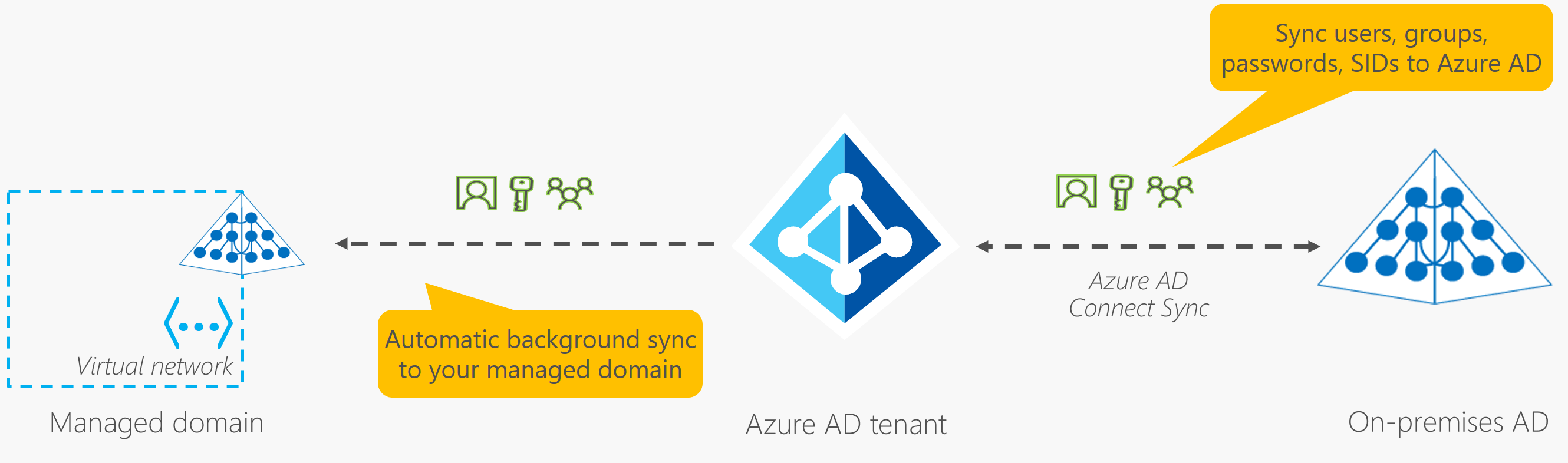
The deployment of AADDS is relatively simple once you have your on-prem AD connected to AAD using Ad Connect. It takes away the need for you to deploy your Domain Controllers in Azure and to ensure that your DCs are in different fault and update domains, and it takes care of the DC patching for you.
AADDS provides an experience that is fully compatible with a subset of features of Active Directory (see above). Depending on your apps, they may keep running in the cloud without any modifications.
As I mentioned since it's a managed Directory service, it is highly available the DCs and the AADDS will be automatically backed up.
You will not need to set up a site-to-site VPN or use ExpressRoute to facilitate the replication of self-managed regular AD domain controllers.
Cons
AADDS does support Group Policies. However, there is no GPO replication from on-prem; you must recreate the policies you need in the managed directory service. If you change one on-prem, you must perform the same change in the managed Directory.
AD domain/forest trusts are not supported at this point. (it's on the roadmap).
There are no capabilities for Geo-distributed deployments. Your managed AADDS is limited to the virtual network on which you deployed it. You can go around that problem by setting up VPNs and peered virtual networks, but it adds considerably more complexity to your environments.
As you can see in the diagram above, the replication from your Azure AD tenant to AADDS is a one-way replication. There are no facilities for LDAP writebacks outside of the managed domain in that virtual network, which means that the changes are NOT written back to the on-prem AD through the AD Connect sync process.
Microsoft’s solution to this problem is Azure AD Domain Services (AAD DS). AAD DS is an Azure product that provides an Active Directory domain (managed by Microsoft) on two domain controllers. The domain controllers support LDAP, domain joining and authentication via Kerberos and NTLM. This version of Azure Active Directory also supports the use of organizational units and group policies.
On an Azure AD-joined or registered device, user authentication happens using modern OAuth / OpenID Connect based protocols. These protocols are designed to work over the internet, so are great for mobile scenarios where users access corporate resources from anywhere.
With Azure AD DS-joined devices, applications can use the Kerberos and NTLM protocols for authentication, so can support legacy applications migrated to run on Azure VMs as part of a lift-and-shift strategy
| Aspect | Azure AD-joined | Azure AD DS-joined |
| Device controlled by | Azure AD | Azure AD DS managed domain |
| Representation in the directory | Device objects in the Azure AD directory | Computer objects in the Azure AD DS managed domain |
| Authentication | OAuth / OpenID Connect based protocols | Kerberos and NTLM protocols |
| Management | Mobile Device Management (MDM) software like Intune | Group Policy |
| Networking | Works over the internet | Must be connected to, or peered with, the virtual network where the managed domain is deployed |
| Great for… | End-user mobile or desktop devices | Server VMs deployed in Azure |
via Blogger http://blog.51sec.org/2022/02/active-directory-ad-vs-azure-ad-aad-vs.html
February 14, 2022 at 04:25PM Cloud

 RSS Feed
