
Here are all codes I found from Internet to display a dropdown menu on my 91sec.blogspot.com website.
This will place the code in Template > Edit HTML.
|
/* ----- START DROPDOWN CSS ----- */ #navigationbar { width: 100%; /* change the width of the navigation bar */ height: 40px; /* change the height of the navigation bar */ } #navigationcss { margin: 0 auto; padding: 0; } #navigationcss ul { float: none; list-style: none; margin: 0; padding: 0; overflow: visible; } #navigationcss li a, #navigationcss li a:link, #navigationcss li a:visited { color: #ffffff; /* change color of the main links */ display: block; margin: 0; padding: 10px 30px; /* change the first number for the top/bottom spacing, and the second number for left/right spacing */ } #navigationcss li a:hover, #navigationcss li a:active { color: #69b4ff ; /* change the color of the links when hovered over */ margin: 0; padding: 10px 30px; /* make sure these are the same as the section above! */ } #navigationcss li li a, #navigationcss li li a:link, #navigationcss li li a:visited { background: #ffffff; /* change the background color of the drop down box */ width: 150px; color: #000000; /* change the color of the drop down links */ float: none; margin: 0; padding: 7px 10px; /* similar to above, change for the spacing around the links */ } #navigationcss li li a:hover, #navigationcss li li a:active { background: #69b4ff ; /* change the background color of drop down items on hover */ color: #ffffff; /* change the color of drop down links on hover */ padding: 7px 10px; /* keep these the same as the above section */ } #navigationcss li { float: none; display: inline-block; list-style: none; margin: 0; padding: 0; } #navigationcss li ul { z-index: 9999; position: absolute; left: -999em; height: auto; width: 150px; margin: 0; padding: 0; } #navigationcss li:hover ul, #navigationcss li li:hover ul, #navigationcss li li li:hover ul, #navigationcss li.sfhover ul, #navigationcss li li.sfhover ul, #navigationcss li li li.sfhover ul { left: auto; } /* ----- END DROPDOWN CSS ----- */ .tabs-outer, .tabs .widget ul {overflow: visible;} ]]></b:skin> |
Note: Code ".tabs-outer, .tabs .widget ul {overflow: visible;}" is used to resolve the issue sometimes drop down menu invisible on some blogger template.
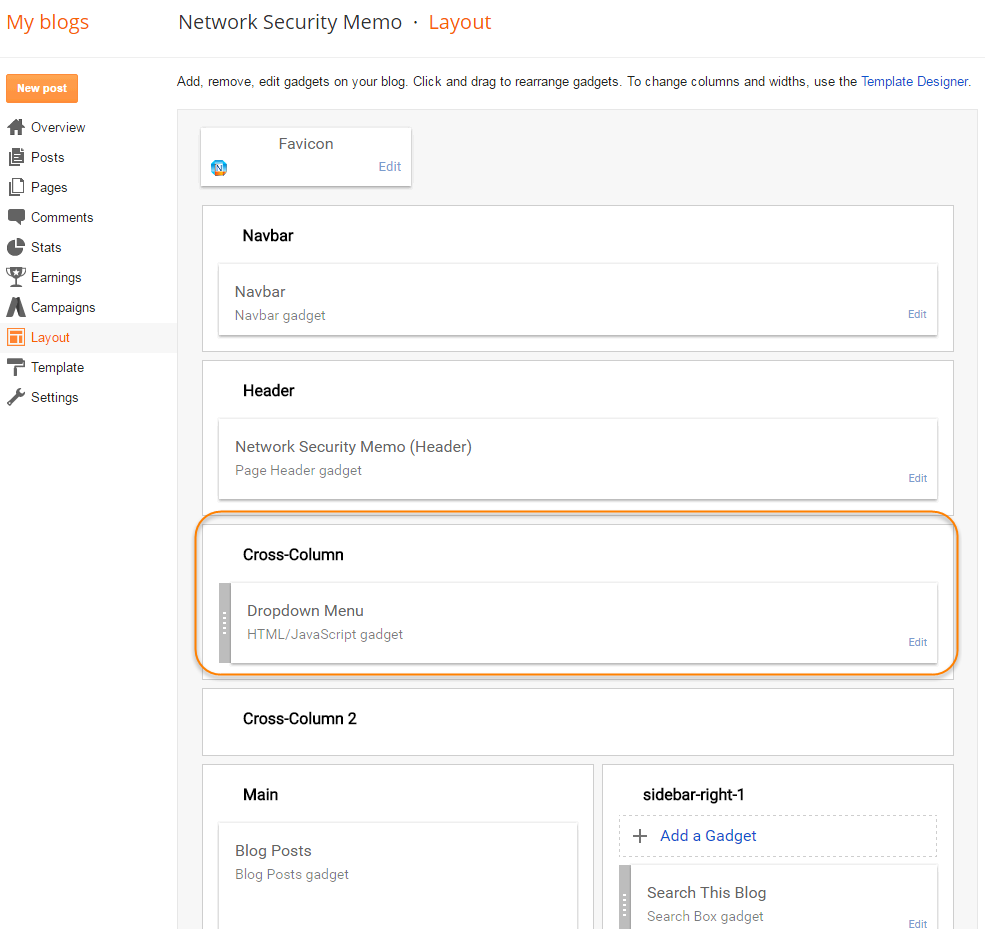
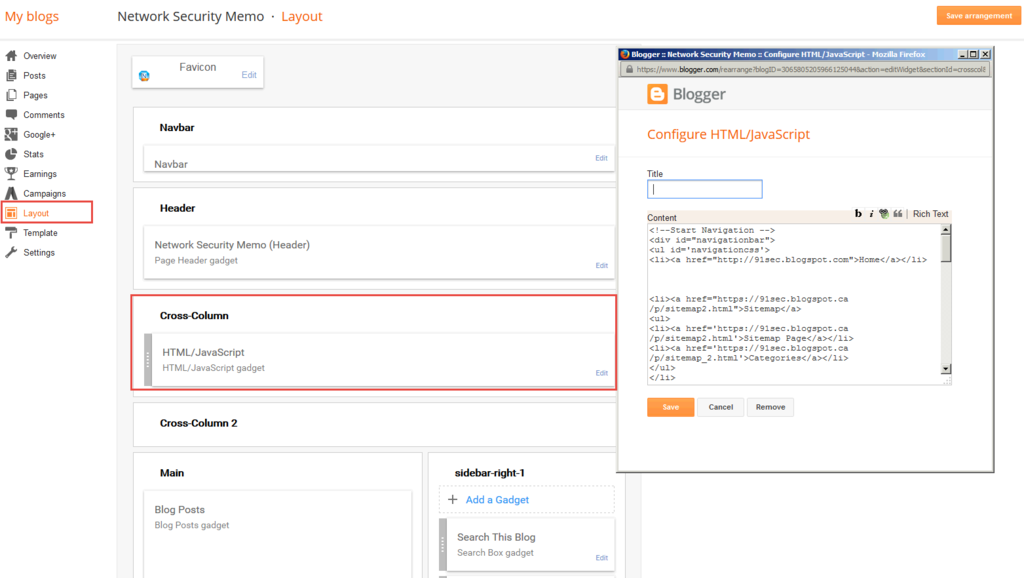
2. Go to Layout > Add a new HTML/Javascript Gadget and add the following code to it.
Different blogger template may have different layout to place this Gadget.
|
<!--Start Navigation --> <div id="navigationbar"> <ul id='navigationcss'> <li><a href="http://91sec.blogspot.com">Home</a></li> <li><a href="https://91sec.blogspot.ca/p/sitemap2.html">Sitemap</a> <ul> <li><a href='https://91sec.blogspot.ca/p/sitemap2.html'>Sitemap Page</a></li> <li><a href='https://91sec.blogspot.ca/p/sitemap_2.html'>Categories</a></li> </ul> </li> <li><a href="">Resources</a> <ul> <li><a href='https://91sec.blogspot.ca/p/othe.html'>Online Resources</a></li> <li><a href='https://91sec.blogspot.ca/p/new-things-to-learn.html'>Learning</a></li> </ul> </li> <li><a href="">Tools</a> <ul> <li><a href='http://91sec.blogspot.com/p/tools.html'>Network Tools</a></li> <li><a href='http://91sec.blogspot.com/2015/07/my-top-network-security-tools.html'>Security Tools</a></li> <li><a href='http://91sec.blogspot.com/2013/08/some-of-my-network-troubleshooting-tools.html'>Internet Tools</a></li> <li><a href='http://91sec.blogspot.com/2016/03/collection-of-website-and-tools-for.html'>Blogger Tools</a></li> </ul> </li> <li><a href="">About</a> <ul> <li><a href='https://91sec.blogspot.ca/p/about-me.html'>About Me</a></li> <li><a href='https://91sec.blogspot.ca/p/consulting-services.html'>Consulting</a></li> <li><a href='https://91sec.blogspot.ca/p/services.html'>Services</a></li> </ul> </li> <li><a href="http://www.51sec.org">51sec.org</a></li> </ul> </div> <!--End Navigation --> |

 RSS Feed
